Title: Turbo Cube Questions
Post by: mikef on August 29, 2007, 10:07:44 PM
Post by: mikef on August 29, 2007, 10:07:44 PM
I recently acquired a 68040/33 Cube with Dimension board, advertised as a Turbo Cube with soundbox. No soundbox received and seller's initial explanation was that this is a dual monitor system. The keyboard will work if plugged into the B&W monitor but I want to use the system with a color monitor and soundbox only rather than with the B&W monitor. Seller now says that he will have to take a sound board out of a B&W monitor and put it into an ADB soundbox. As someone who is new to NeXT I'm having trouble interpreting what's going on here. The system info window does show 68040/33 and the dual monitor system does seem to work with color on the color monitor (B&W plugged into the CPU board and the color monitor plugged into the Dimension board) but I'm lost as to why a soundbox has to be modded to allow use of the color monitor only. Help?
Title: Turbo Cube Questions
Post by: Nitro on August 30, 2007, 01:19:52 AM
Post by: Nitro on August 30, 2007, 01:19:52 AM
It sounds like your system is non-ADB and the seller doesn't have a non-ADB soundbox to give you. So he's going to take a sound board out of a non-ADB monitor and convert an ADB soundbox to a non-ADB soundbox.
On a Dimension equipped Cube the NeXT keyboard and mouse can connect to the Cube in two different ways. The keyboard/mouse can connect to a B/W monitor in a two monitor system, or the keyboard/mouse can connect to a soundbox in a color monitor only system. Here's an old picture of my Turbo Dimension Cube. It's a color only setup with a non-ADB keyboard/mouse/soundbox.
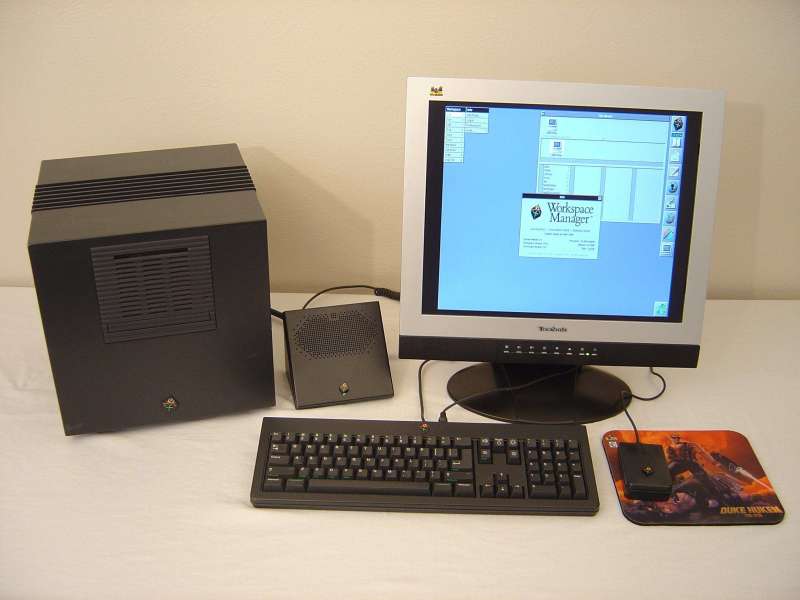
I'm guessing that your keyboard and mouse look like these (non-ADB). So the seller is simply trying to give you a soundbox that will work with a non-ADB system. Swapping the ADB soundboard inside for a non-ADB board should work fine. BTW, congratulations on getting a nice system. :)
On a Dimension equipped Cube the NeXT keyboard and mouse can connect to the Cube in two different ways. The keyboard/mouse can connect to a B/W monitor in a two monitor system, or the keyboard/mouse can connect to a soundbox in a color monitor only system. Here's an old picture of my Turbo Dimension Cube. It's a color only setup with a non-ADB keyboard/mouse/soundbox.
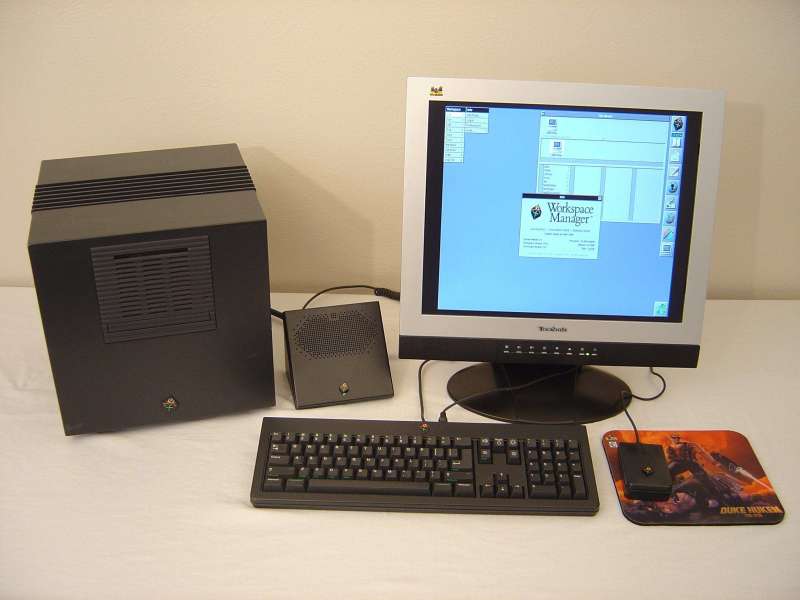
I'm guessing that your keyboard and mouse look like these (non-ADB). So the seller is simply trying to give you a soundbox that will work with a non-ADB system. Swapping the ADB soundboard inside for a non-ADB board should work fine. BTW, congratulations on getting a nice system. :)
Title: Turbo Cube Questions
Post by: nextchef on August 30, 2007, 09:43:09 AM
Post by: nextchef on August 30, 2007, 09:43:09 AM
Nice Duke Nukem 3D mousepad .. loved that game .. :D
Chef
Chef
Title: Turbo Cube Questions
Post by: mikef on August 30, 2007, 12:11:10 PM
Post by: mikef on August 30, 2007, 12:11:10 PM
Thanks, Nitro
Title: Turbo Cube Questions
Post by: blackcube on August 31, 2007, 08:51:56 AM
Post by: blackcube on August 31, 2007, 08:51:56 AM
If it is a Turbo Cube, then it is ADB compatible but he may have sold you a non-ADB mouse and keyboard.
I actually prefer to run my Turbo Dimension Cube dual headed.
I actually prefer to run my Turbo Dimension Cube dual headed.
Title: Turbo Cube Questions
Post by: Nitro on August 31, 2007, 11:27:03 AM
Post by: Nitro on August 31, 2007, 11:27:03 AM
Quote from: "mikef"Thanks, Nitro
No problem. If you run your Cube dual headed make sure that your color monitor is configured to be the primary display or the Dimension board can run very slow.
Quote from: "nextchef"Nice Duke Nukem 3D mousepad .. loved that game .. :D
Man, Duke was a cool game. I especially liked the sound effects. I used to play online with Kali back in the day.
Title: Turbo Cube Questions
Post by: mikef on August 31, 2007, 12:17:07 PM
Post by: mikef on August 31, 2007, 12:17:07 PM
Thanks again folks. I've been perusing the Boards and this site really is a fine resource. Thanks to the Hosts and all who contribute. I hope at some point I can make some useful contributions. I just need to read the manuals and play around with it. Still waiting on CD-Rom and external hard drive with applications.
Title: power supply determines if a mono monitor needs to be used
Post by: nextime on August 31, 2007, 12:28:50 PM
Post by: nextime on August 31, 2007, 12:28:50 PM
If the power supply is model 152 an external load on the power supply is required, ie. mono monitor. It is possible to modity the 152 power supply so an external monitor is not required.
If the power supply is model 983, I believe this is the correct number, a mono monitor is not required and a sound box can be used.
If the power supply is model 983, I believe this is the correct number, a mono monitor is not required and a sound box can be used.
Title: Turbo Cube Questions
Post by: mikef on August 31, 2007, 12:50:43 PM
Post by: mikef on August 31, 2007, 12:50:43 PM
Thanks, nextime. I'll check that out
Title: Turbo Cube Questions
Post by: nextchef on August 31, 2007, 03:58:54 PM
Post by: nextchef on August 31, 2007, 03:58:54 PM
Quote from: "Nitro"Man, Duke was a cool game. I especially liked the sound effects. I used to play online with Kali back in the day.
Duke's one liners were great, wasted quite a bit of time playing this game back in the day. Never played on Kali, but I did play on the old DWANGO dial up system based out of Houston. That was mostly Doom/Doom2 before I found some local guys to play Duke with and then eventually QuakeWorld (Matador mod .. gotta love the grappling hook :D ). That is where I picked up my "Chef" handle, as I used to love to finish off opponents in Doom with a circlestrafe using the chainsaw .. carve em up like a roast.
Sorry for the off topic thread high-jack, but Duke ... fun times :D :D :D
Chef
Title: Turbo Cube Questions
Post by: mikef on August 31, 2007, 07:13:34 PM
Post by: mikef on August 31, 2007, 07:13:34 PM
Re nextime's post, is there any way to tell which power supply I have without cracking the Cube? If there are identifying numbers on the back panel I'm not recognizing them.
Title: Turbo Cube Questions
Post by: Nitro on August 31, 2007, 08:05:28 PM
Post by: Nitro on August 31, 2007, 08:05:28 PM
Quote from: "mikef"Re nextime's post, is there any way to tell which power supply I have without cracking the Cube? If there are identifying numbers on the back panel I'm not recognizing them.
IIRC, NeXT switched over to the new Cube power supply at around serial number 16340. However, someone could have replaced the power supply in your Cube, or my serial number figure could be off due to my bad memory. :) Blackhole Inc has Cube power supplies offered on Ebay for $50.00 if you need a replacement.
Title: Turbo Cube Questions
Post by: mikef on August 31, 2007, 11:35:11 PM
Post by: mikef on August 31, 2007, 11:35:11 PM
Re the power supply, my Cube is in the 18,000' but as noted the provenance of the power supply is unclear.
Dumb question: I went into preferences to choose NeXRdimension 2,0 as the primary monitor instead of megapixel and got a message that I needed to restart the windowpreferences and can't for the life of me figure out what that means.
Dumb question: I went into preferences to choose NeXRdimension 2,0 as the primary monitor instead of megapixel and got a message that I needed to restart the windowpreferences and can't for the life of me figure out what that means.
Title: Turbo Cube Questions
Post by: mikef on September 02, 2007, 08:37:47 PM
Post by: mikef on September 02, 2007, 08:37:47 PM
Have now done extensive research on the previous question and none of the recommended fixes work, e.g., restarting using "exit" in the login screen. Any other ideas? Thanks.
Title: Turbo Cube Questions
Post by: Nitro on September 03, 2007, 04:34:50 PM
Post by: Nitro on September 03, 2007, 04:34:50 PM
Apple has a technical article that explains how to set the Dimension as the primary display. It doesn't mention restarting the Window Preferences though.
http://docs.info.apple.com/article.html?orig=til&artnum=72645
If you drag the login window icon over to the color monitor does it still ask you to restart the window preferences?
http://docs.info.apple.com/article.html?orig=til&artnum=72645
If you drag the login window icon over to the color monitor does it still ask you to restart the window preferences?
Title: Turbo Cube Questions
Post by: mikef on September 03, 2007, 11:29:10 PM
Post by: mikef on September 03, 2007, 11:29:10 PM
Unfortunately, Openstep won't let me drag the login pane onto the color monitor.