Title: Ok, finally got 1.2 mac os x server
Post by: Nadav35 on May 31, 2008, 04:14:43 AM
Post by: Nadav35 on May 31, 2008, 04:14:43 AM
Ok, guys.. I finally got my hands on this. I am having trouble getting past the screen "ROOT DEVICE?" I have two drives in my Power Mac G4 500 Agp graphics based system. I formatted the drive to wholy make use of mac os x server 1.2. The directions stated for me to format the whole drive in OS 9(mac os x server 1.2 boot cd) as Mac OS Extended, or HFS+. Everything then keeps on going fine, until the system reboots and takes me to the main os x server screen. There, it stops with a:
ROOT DEVICE? and along with it or several options:
sd%d, hd%d, fd%d, en%d, tr%d?
Help!! how am I supposed to run this thing if I can't figure out how to get past ROOT DEVICE screen!?
:(
ROOT DEVICE? and along with it or several options:
sd%d, hd%d, fd%d, en%d, tr%d?
Help!! how am I supposed to run this thing if I can't figure out how to get past ROOT DEVICE screen!?
:(
Title: Re: Ok, finally got 1.2 mac os x server
Post by: neozeed on May 31, 2008, 08:18:58 AM
Post by: neozeed on May 31, 2008, 08:18:58 AM
Quote from: "Nadav35"Ok, guys.. I finally got my hands on this. I am having trouble getting past the screen "ROOT DEVICE?" I have two drives in my Power Mac G4 500 Agp graphics based system. I formatted the drive to wholy make use of mac os x server 1.2. The directions stated for me to format the whole drive in OS 9(mac os x server 1.2 boot cd) as Mac OS Extended, or HFS+. Everything then keeps on going fine, until the system reboots and takes me to the main os x server screen. There, it stops with a:
ROOT DEVICE? and along with it or several options:
sd%d, hd%d, fd%d, en%d, tr%d?
Help!! how am I supposed to run this thing if I can't figure out how to get past ROOT DEVICE screen!?
:(
It really should pick up the CD on reboot.... I'm guessing you still have the CD in the drive @ this point??
while I still have my media, sadly I don't own a powermac that can run OS X 1.0 (I bought it the day it came out... lol talk about sucker!)
as it's booting check the dmesg to make sure it's picking up your CDROM... I get the feeling that it isn't, or your disk is ejected...
Also check the disk, it's multisession with half being HFS and the other being UFS...
Title: Re: Ok, finally got 1.2 mac os x server
Post by: Nadav35 on June 04, 2008, 04:49:14 PM
Post by: Nadav35 on June 04, 2008, 04:49:14 PM
Hi neozeed,
Ok, below I am pasting the actual installation of how I did this up until the point it gives me a ROOT DEVICE error?
Maybe you can provide me some steps on how to try to get this resolved. Don't worry, I am still going to get your package :)
Just that I want to try and get past that ROOT DEVICE error. Please if you can provide me step by step on how to prepare my system to run rhapsody 5.6(1.2). Lets see, if I tell you what I did maybe you can tell me where I went wrong.
Step one: I inserted the server 1.2 cd and turned on my machine.
step two: I held down the C key to boot the server cd - it came up as OS 9 booting up.
Step three: I have two physical hard drives: one macosx and the other macos9(I DID NOT BOOT UP FROM THE HARD DRIVE!)
step four: I went to prepare the disk as instructed, by formatting macosx(empty as of now) to a MAC OS EXTENDED partition. I didn't see HFS+, so I am assuming MAC OS Extended was correct)
step five: I then selected the icon on the boot cd: Install Mac OS X Server
step six: I chose the easy install and it then did something.. might have copied some boot parameters to the macosx partition..
step seven: it then came up with a block telling me to reboot my system...
END OF INITIAL SETUP...
MAC OS X SERVER:
Removed the cd from my computer's cd rom drive.
Then it booted off the hard drive "macosx"
got to the splash screen for MAC OS X server with a spinning beach ball saying: installing mac os x server
FINALLY, IT POPPED UP WITH A "ROOT DEVICE?" prompt along with several options: I forget the order of them, but here are the ones I can remember:
sd%d? hd%d? en%d? tr$d?
As to you noticing I had the cd in the DVD-ROM drive(this was from a PC I built, but it does work since it can boot), I don't believe I had the CD in the dvd-rom drive at the point of reboot. It just booted off the hard drive. Is there anyone who can tell me what I am doing wrong, and why this ROOT DEVICE error is coming up?
Ok, below I am pasting the actual installation of how I did this up until the point it gives me a ROOT DEVICE error?
Maybe you can provide me some steps on how to try to get this resolved. Don't worry, I am still going to get your package :)
Just that I want to try and get past that ROOT DEVICE error. Please if you can provide me step by step on how to prepare my system to run rhapsody 5.6(1.2). Lets see, if I tell you what I did maybe you can tell me where I went wrong.
Step one: I inserted the server 1.2 cd and turned on my machine.
step two: I held down the C key to boot the server cd - it came up as OS 9 booting up.
Step three: I have two physical hard drives: one macosx and the other macos9(I DID NOT BOOT UP FROM THE HARD DRIVE!)
step four: I went to prepare the disk as instructed, by formatting macosx(empty as of now) to a MAC OS EXTENDED partition. I didn't see HFS+, so I am assuming MAC OS Extended was correct)
step five: I then selected the icon on the boot cd: Install Mac OS X Server
step six: I chose the easy install and it then did something.. might have copied some boot parameters to the macosx partition..
step seven: it then came up with a block telling me to reboot my system...
END OF INITIAL SETUP...
MAC OS X SERVER:
Removed the cd from my computer's cd rom drive.
Then it booted off the hard drive "macosx"
got to the splash screen for MAC OS X server with a spinning beach ball saying: installing mac os x server
FINALLY, IT POPPED UP WITH A "ROOT DEVICE?" prompt along with several options: I forget the order of them, but here are the ones I can remember:
sd%d? hd%d? en%d? tr$d?
As to you noticing I had the cd in the DVD-ROM drive(this was from a PC I built, but it does work since it can boot), I don't believe I had the CD in the dvd-rom drive at the point of reboot. It just booted off the hard drive. Is there anyone who can tell me what I am doing wrong, and why this ROOT DEVICE error is coming up?
Title: Ok, finally got 1.2 mac os x server
Post by: neozeed on June 04, 2008, 08:51:50 PM
Post by: neozeed on June 04, 2008, 08:51:50 PM
yeah the CD needs to be in there!
from what I can gather and recall about OSX 1.x is this on the install:
first you boot from the CD (holding down the c), use mac os 8 to partition, and format a partition (under 6 gig on old macs), then it'll install the boot loader, and the kernel into the partition. Then it'll have you reboot, it'll load the kernel from the hard disk, but take it's root from the CD.
Then from the CD it'll install all the rest.
the CD should have two sessions (or partitions or whatever) one is HFS, and the other is UFS... you can't see the UFS from the first boot on the CD... And I did want to make a backup of my 1.0 CD but I couldn't figure out how to do it.. sigh.
from what I can gather and recall about OSX 1.x is this on the install:
first you boot from the CD (holding down the c), use mac os 8 to partition, and format a partition (under 6 gig on old macs), then it'll install the boot loader, and the kernel into the partition. Then it'll have you reboot, it'll load the kernel from the hard disk, but take it's root from the CD.
Then from the CD it'll install all the rest.
the CD should have two sessions (or partitions or whatever) one is HFS, and the other is UFS... you can't see the UFS from the first boot on the CD... And I did want to make a backup of my 1.0 CD but I couldn't figure out how to do it.. sigh.
Title: Ok, finally got 1.2 mac os x server
Post by: it68000 on June 05, 2008, 03:29:35 AM
Post by: it68000 on June 05, 2008, 03:29:35 AM
Quote... And I did want to make a backup of my 1.0 CD but I couldn't figure out how to do it.. sigh.
Have you tried with CD copying program that work in RAW mode?
I used ISOEditor under Windows.
Not tried yet with Rhapsody CDs but it makes ISO images of CD unreadable by Windows (like NS ones).
It was free but now it has disappeared from the NET.
I will try to backup my Rhapsody CDs.
Title: Ok, finally got 1.2 mac os x server
Post by: RacerX on June 05, 2008, 03:35:40 AM
Post by: RacerX on June 05, 2008, 03:35:40 AM
Well, lets run down the usual install issues...
- Rhapsody has to be installed on the master drive (not slave) drive of an ATA bus,
- Rhapsody has to be installed within 1 GB of the top of the master drive,
- If installed on a partition, it can't be further away from the top of the master drive than 1 GB and has to be either the first or second partition.
Title: Ok, finally got 1.2 mac os x server
Post by: neozeed on June 05, 2008, 07:58:54 AM
Post by: neozeed on June 05, 2008, 07:58:54 AM
Quote from: "it68000"Quote... And I did want to make a backup of my 1.0 CD but I couldn't figure out how to do it.. sigh.
Have you tried with CD copying program that work in RAW mode?
I used ISOEditor under Windows.
Not tried yet with Rhapsody CDs but it makes ISO images of CD unreadable by Windows (like NS ones).
It was free but now it has disappeared from the NET.
I will try to backup my Rhapsody CDs.
I used DD which is what I used to backup my NS CD's which worked pretty well... I'm just concerened as that I paid over $500 for OS X 1.0 server, and I'd really hate for the disk to break on me..
Title: Ok, finally got 1.2 mac os x server
Post by: it68000 on June 05, 2008, 01:13:56 PM
Post by: it68000 on June 05, 2008, 01:13:56 PM
Hi,
I have just tried to backup an original Rhapsody CD
I can say that ISOeditor worked for me to make a good copy of the MacOSX server original CD.
The copy and the original were tested with DiskUtility on a mac with Panther and they are exactly the same. four partition are present: two MAC OS stardard partitions, one small Apple_Rhapsody_Loader and one big Apple_Rhapsody_UFS.
I have just tried to backup an original Rhapsody CD
I can say that ISOeditor worked for me to make a good copy of the MacOSX server original CD.
The copy and the original were tested with DiskUtility on a mac with Panther and they are exactly the same. four partition are present: two MAC OS stardard partitions, one small Apple_Rhapsody_Loader and one big Apple_Rhapsody_UFS.
Title: Ok, finally got 1.2 mac os x server
Post by: neozeed on June 05, 2008, 04:27:54 PM
Post by: neozeed on June 05, 2008, 04:27:54 PM
Quote from: "it68000"Hi,
I have just tried to backup an original Rhapsody CD
I can say that ISOeditor worked for me to make a good copy of the MacOSX server original CD.
The copy and the original were tested with DiskUtility on a mac with Panther and they are exactly the same. four partition are present: two MAC OS stardard partitions, one small Apple_Rhapsody_Loader and one big Apple_Rhapsody_UFS.
Sounds good to me, then I 'll have to find this "isoeditor"... I'd hate to have that damed disk break or something!
I doubt apple would help with a replacement because of it's age.. Hell they didnt even offer a discount or anything for us 1.0 users for the 10.0 stuff.. I guess I should be happy about the "upgrade" disk for 1.2, even though you can't install it on any G4's it's just an update. :|
Title: Ok, finally got 1.2 mac os x server
Post by: it68000 on June 06, 2008, 07:59:17 AM
Post by: it68000 on June 06, 2008, 07:59:17 AM
QuoteSounds good to me, then I 'll have to find this "isoeditor"... I'd hate to have that damed disk break or something!
In case, drop me a line.
Title: Bottom line...
Post by: Nadav35 on June 10, 2008, 11:18:13 PM
Post by: Nadav35 on June 10, 2008, 11:18:13 PM
Its not working!! I am really getting VERY VERY ANGRY about this.. I hate ROOT DEVICE?? Why isn't it installing? I only have one drive and its set to master.. the video card is a PCI 32MB video card. The G4 is a sawtooth 500 with bootrom 4.2.8f1. I need SERIOUS HELP here on installing this. I mean, someone to walk me through step by step.. I tried installing it as a single partition mac os extended - still ROOT DEVICE comes up. The DVD-ROM drive I got was from a PC I have, however i doubt thats whats causing the problem. I then formatted the disk into two partitions.. one being mac os extended, and the other being mac os x server UFS or UFS. STILL ROOT DEVICE comes up?!!? I am really getting into the destructive mood here, as I have little patience for this. I am not stupid! I know how to install OS'es, but never have I had so much FRUSTRATION from this. I have almost pulled all my hair out of my head because of this!!!
I am about to leave my cell number for someone to call me and walk me through this.. in fact, I am doing that right now.. 443.929.8845 - if you can help me, I will pay you through paypal $50.00 to help me get this thing at least to shut the **** with this ROOT DEVICE crap!
I AM DESPERATE!
I am about to leave my cell number for someone to call me and walk me through this.. in fact, I am doing that right now.. 443.929.8845 - if you can help me, I will pay you through paypal $50.00 to help me get this thing at least to shut the **** with this ROOT DEVICE crap!
I AM DESPERATE!
Quote from: "RacerX"Well, lets run down the usual install issues...Are all those conditions satisfied?
- Rhapsody has to be installed on the master drive (not slave) drive of an ATA bus,
- Rhapsody has to be installed within 1 GB of the top of the master drive,
- If installed on a partition, it can't be further away from the top of the master drive than 1 GB and has to be either the first or second partition.
Title: VERY ANGRY HOW TO SHUT UP ROOT DEVICE ON SERVER 1.2V3?
Post by: Nadav35 on June 10, 2008, 11:18:51 PM
Post by: Nadav35 on June 10, 2008, 11:18:51 PM
Its not working!! I am really getting VERY VERY ANGRY about this.. I hate ROOT DEVICE?? Why isn't it installing? I only have one drive and its set to master.. the video card is a PCI 32MB video card. The G4 is a sawtooth 500 with bootrom 4.2.8f1. I need SERIOUS HELP here on installing this. I mean, someone to walk me through step by step.. I tried installing it as a single partition mac os extended - still ROOT DEVICE comes up. The DVD-ROM drive I got was from a PC I have, however i doubt thats whats causing the problem. I then formatted the disk into two partitions.. one being mac os extended, and the other being mac os x server UFS or UFS. STILL ROOT DEVICE comes up?!!? I am really getting into the destructive mood here, as I have little patience for this. I am not stupid! I know how to install OS'es, but never have I had so much FRUSTRATION from this. I have almost pulled all my hair out of my head because of this!!!
I am about to leave my cell number for someone to call me and walk me through this.. in fact, I am doing that right now.. 443.929.8845 - if you can help me, I will pay you through paypal $50.00 to help me get this thing at least to shut the **** with this ROOT DEVICE crap!
I am about to leave my cell number for someone to call me and walk me through this.. in fact, I am doing that right now.. 443.929.8845 - if you can help me, I will pay you through paypal $50.00 to help me get this thing at least to shut the **** with this ROOT DEVICE crap!
Quote from: "it68000"QuoteSounds good to me, then I 'll have to find this "isoeditor"... I'd hate to have that damed disk break or something!
In case, drop me a line.
Title: Re: Ok, finally got 1.2 mac os x server - contact requested
Post by: Nadav35 on June 10, 2008, 11:20:12 PM
Post by: Nadav35 on June 10, 2008, 11:20:12 PM
Its not working!! I am really getting VERY VERY ANGRY about this.. I hate ROOT DEVICE?? Why isn't it installing? I only have one drive and its set to master.. the video card is a PCI 32MB video card. The G4 is a sawtooth 500 with bootrom 4.2.8f1. I need SERIOUS HELP here on installing this. I mean, someone to walk me through step by step.. I tried installing it as a single partition mac os extended - still ROOT DEVICE comes up. The DVD-ROM drive I got was from a PC I have, however i doubt thats whats causing the problem. I then formatted the disk into two partitions.. one being mac os extended, and the other being mac os x server UFS or UFS. STILL ROOT DEVICE comes up?!!? I am really getting into the destructive mood here, as I have little patience for this. I am not stupid! I know how to install OS'es, but never have I had so much FRUSTRATION from this. I have almost pulled all my hair out of my head because of this!!!
I am about to leave my cell number for someone to call me and walk me through this.. in fact, I am doing that right now.. 443.929.8845 - if you can help me, I will pay you through paypal $50.00 to help me get this thing at least to shut the **** with this ROOT DEVICE crap!
I am about to leave my cell number for someone to call me and walk me through this.. in fact, I am doing that right now.. 443.929.8845 - if you can help me, I will pay you through paypal $50.00 to help me get this thing at least to shut the **** with this ROOT DEVICE crap!
Quote from: "neozeed"Quote from: "Nadav35"Ok, guys.. I finally got my hands on this. I am having trouble getting past the screen "ROOT DEVICE?" I have two drives in my Power Mac G4 500 Agp graphics based system. I formatted the drive to wholy make use of mac os x server 1.2. The directions stated for me to format the whole drive in OS 9(mac os x server 1.2 boot cd) as Mac OS Extended, or HFS+. Everything then keeps on going fine, until the system reboots and takes me to the main os x server screen. There, it stops with a:
ROOT DEVICE? and along with it or several options:
sd%d, hd%d, fd%d, en%d, tr%d?
Help!! how am I supposed to run this thing if I can't figure out how to get past ROOT DEVICE screen!?
:(
It really should pick up the CD on reboot.... I'm guessing you still have the CD in the drive @ this point??
while I still have my media, sadly I don't own a powermac that can run OS X 1.0 (I bought it the day it came out... lol talk about sucker!)
as it's booting check the dmesg to make sure it's picking up your CDROM... I get the feeling that it isn't, or your disk is ejected...
Also check the disk, it's multisession with half being HFS and the other being UFS...
Title: You seem very knowledgable about this
Post by: Nadav35 on June 10, 2008, 11:20:53 PM
Post by: Nadav35 on June 10, 2008, 11:20:53 PM
I didn't spend 60 dollars for a program that gives me a blasted ROOT DEVICE all the time??
Its not working!! I am really getting VERY VERY ANGRY about this.. I hate ROOT DEVICE?? Why isn't it installing? I only have one drive and its set to master.. the video card is a PCI 32MB video card. The G4 is a sawtooth 500 with bootrom 4.2.8f1. I need SERIOUS HELP here on installing this. I mean, someone to walk me through step by step.. I tried installing it as a single partition mac os extended - still ROOT DEVICE comes up. The DVD-ROM drive I got was from a PC I have, however i doubt thats whats causing the problem. I then formatted the disk into two partitions.. one being mac os extended, and the other being mac os x server UFS or UFS. STILL ROOT DEVICE comes up?!!? I am really getting into the destructive mood here, as I have little patience for this. I am not stupid! I know how to install OS'es, but never have I had so much FRUSTRATION from this. I have almost pulled all my hair out of my head because of this!!!
I am about to leave my cell number for someone to call me and walk me through this.. in fact, I am doing that right now.. 443.929.8845 - if you can help me, I will pay you through paypal $50.00 to help me get this thing at least to shut the **** with this ROOT DEVICE crap!
Its not working!! I am really getting VERY VERY ANGRY about this.. I hate ROOT DEVICE?? Why isn't it installing? I only have one drive and its set to master.. the video card is a PCI 32MB video card. The G4 is a sawtooth 500 with bootrom 4.2.8f1. I need SERIOUS HELP here on installing this. I mean, someone to walk me through step by step.. I tried installing it as a single partition mac os extended - still ROOT DEVICE comes up. The DVD-ROM drive I got was from a PC I have, however i doubt thats whats causing the problem. I then formatted the disk into two partitions.. one being mac os extended, and the other being mac os x server UFS or UFS. STILL ROOT DEVICE comes up?!!? I am really getting into the destructive mood here, as I have little patience for this. I am not stupid! I know how to install OS'es, but never have I had so much FRUSTRATION from this. I have almost pulled all my hair out of my head because of this!!!
I am about to leave my cell number for someone to call me and walk me through this.. in fact, I am doing that right now.. 443.929.8845 - if you can help me, I will pay you through paypal $50.00 to help me get this thing at least to shut the **** with this ROOT DEVICE crap!
Quote from: "RacerX"Well, lets run down the usual install issues...Are all those conditions satisfied?
- Rhapsody has to be installed on the master drive (not slave) drive of an ATA bus,
- Rhapsody has to be installed within 1 GB of the top of the master drive,
- If installed on a partition, it can't be further away from the top of the master drive than 1 GB and has to be either the first or second partition.
Title: Ok, finally got 1.2 mac os x server
Post by: RacerX on June 11, 2008, 03:10:47 AM
Post by: RacerX on June 11, 2008, 03:10:47 AM
I'll give you a call later today, but I can already tell you that I see two trouble spots right off the bat. Apple modified Mac OS X Server 1.2 to work only with the DVD/CD drives and video cards that they were shipping with these systems.
No substitutions, original equipment only.
Trying to make hardware substitutions with anything other than older known working hardware on just about the last supported system is a recipe for disaster. Any hardware not pulled from either an identical Apple system or older in this case is like playing russian roulette with all the chambers loaded.
While Mac OS 8/9/X has a high degree of tolerance for not quite right hardware, Rhapsody has none what so ever. Either you are using the correct hardware or your not using Rhapsody. There is really no fudge room here.
To give you an idea just how picky Mac OS X Server 1.2 is, it won't install on the PowerBook G3 Lombard using the DVD-ROM drives Apple shipped with those systems. Upon restarting the hardware after starting the install it can't read the Rhapsody formatted partition of the installation media from those drives (which sounds like the problem you are having).
So I'd be happy to call you, but I would suggest finding a CD-ROM or DVD-ROM drive out of either a G3 (Beige or B&W) or G4 and putting in either the PCI or AGP version of the ATI Rage 128 video card that shipped with the G4s or B&W G3s before we get started.
And just to be sure, I just installed Mac OS X Server 1.2 (and NOT 1.2v3) on a PowerMac G4 Sawtooth (original DVD-ROM, original video) with no issues at all. It took (without installing the MacOS.app) less than 10 minutes to complete.
No substitutions, original equipment only.
Trying to make hardware substitutions with anything other than older known working hardware on just about the last supported system is a recipe for disaster. Any hardware not pulled from either an identical Apple system or older in this case is like playing russian roulette with all the chambers loaded.
While Mac OS 8/9/X has a high degree of tolerance for not quite right hardware, Rhapsody has none what so ever. Either you are using the correct hardware or your not using Rhapsody. There is really no fudge room here.
To give you an idea just how picky Mac OS X Server 1.2 is, it won't install on the PowerBook G3 Lombard using the DVD-ROM drives Apple shipped with those systems. Upon restarting the hardware after starting the install it can't read the Rhapsody formatted partition of the installation media from those drives (which sounds like the problem you are having).
So I'd be happy to call you, but I would suggest finding a CD-ROM or DVD-ROM drive out of either a G3 (Beige or B&W) or G4 and putting in either the PCI or AGP version of the ATI Rage 128 video card that shipped with the G4s or B&W G3s before we get started.
And just to be sure, I just installed Mac OS X Server 1.2 (and NOT 1.2v3) on a PowerMac G4 Sawtooth (original DVD-ROM, original video) with no issues at all. It took (without installing the MacOS.app) less than 10 minutes to complete.
Title: Re: Ok, finally got 1.2 mac os x server - contact requested
Post by: neozeed on June 11, 2008, 09:20:47 AM
Post by: neozeed on June 11, 2008, 09:20:47 AM
Quote from: "Nadav35"Its not working!! I am really getting VERY VERY ANGRY about this.. I hate ROOT DEVICE?? Why isn't it installing? I only have one drive and its set to master.. the video card is a PCI 32MB video card. The G4 is a sawtooth 500 with bootrom 4.2.8f1. I need SERIOUS HELP here on installing this. I mean, someone to walk me through step by step.. I tried installing it as a single partition mac os extended - still ROOT DEVICE comes up. The DVD-ROM drive I got was from a PC I have, however i doubt thats whats causing the problem. I then formatted the disk into two partitions.. one being mac os extended, and the other being mac os x server UFS or UFS. STILL ROOT DEVICE comes up?!!? I am really getting into the destructive mood here, as I have little patience for this. I am not stupid! I know how to install OS'es, but never have I had so much FRUSTRATION from this. I have almost pulled all my hair out of my head because of this!!!
I am about to leave my cell number for someone to call me and walk me through this.. in fact, I am doing that right now.. 443.929.8845 - if you can help me, I will pay you through paypal $50.00 to help me get this thing at least to shut the **** with this ROOT DEVICE crap!Quote from: "neozeed"Quote from: "Nadav35"Ok, guys.. I finally got my hands on this. I am having trouble getting past the screen "ROOT DEVICE?" I have two drives in my Power Mac G4 500 Agp graphics based system. I formatted the drive to wholy make use of mac os x server 1.2. The directions stated for me to format the whole drive in OS 9(mac os x server 1.2 boot cd) as Mac OS Extended, or HFS+. Everything then keeps on going fine, until the system reboots and takes me to the main os x server screen. There, it stops with a:
ROOT DEVICE? and along with it or several options:
sd%d, hd%d, fd%d, en%d, tr%d?
Help!! how am I supposed to run this thing if I can't figure out how to get past ROOT DEVICE screen!?
:(
It really should pick up the CD on reboot.... I'm guessing you still have the CD in the drive @ this point??
while I still have my media, sadly I don't own a powermac that can run OS X 1.0 (I bought it the day it came out... lol talk about sucker!)
as it's booting check the dmesg to make sure it's picking up your CDROM... I get the feeling that it isn't, or your disk is ejected...
Also check the disk, it's multisession with half being HFS and the other being UFS...
Can you post a picture of the full screen where it asks about the root device?!
Title: Re: Ok, finally got 1.2 mac os x server - contact requested
Post by: RacerX on June 11, 2008, 01:57:03 PM
Post by: RacerX on June 11, 2008, 01:57:03 PM
Quote from: "neozeed"Can you post a picture of the full screen where it asks about the root device?!If I was to take a guess, I would bet that this is what he is seeing...
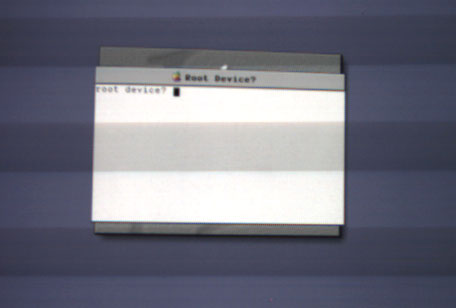
I achieved this state by starting the installation and then removing the CD before the system completed it's first reboot. I would assume this is showing up because an unsupported DVD-ROM drive is being used and that the installation media is no longer visible to the system once the installation is started.
Of course the other reason for this type of prompt would be a corrupt UFS partition on the installation media, but I've only ever seen that occur with bad copies.
Title: Re: Ok, finally got 1.2 mac os x server - contact requested
Post by: neozeed on June 11, 2008, 02:18:53 PM
Post by: neozeed on June 11, 2008, 02:18:53 PM
Quote from: "RacerX"Quote from: "neozeed"Can you post a picture of the full screen where it asks about the root device?!If I was to take a guess, I would bet that this is what he is seeing...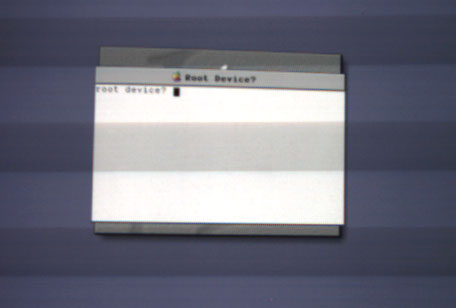
I achieved this state by starting the installation and then removing the CD before the system completed it's first reboot. I would assume this is showing up because an unsupported DVD-ROM drive is being used and that the installation media is no longer visible to the system once the installation is started.
Of course the other reason for this type of prompt would be a corrupt UFS partition on the installation media, but I've only ever seen that occur with bad copies.
I know I've been playing with NS way too much as of late, I forget how involved it is to boot with a '-v'.... It's annoying as hell to not be able to use my copy I have... I thought I kept a mac that was capable of running OS X 1.0 but no luck there... I have the update disks but of course you can't boot from those.
Title: left message
Post by: Nadav35 on June 12, 2008, 02:33:42 AM
Post by: Nadav35 on June 12, 2008, 02:33:42 AM
Hi,
I left you a message yesterday evening to return my call say after 9pm. I didn't hear from you, so I will try back tommorrow at that same time. Well, 1st I will establish contact with you so we can set up the time. The computer has the following hardware:
It originally was a Power Mac G4 400 - all I did was remove the 400 and replace it with a 500mhz processor. The video card is a ATI 32MB PCI video card. There was an rage 128 16MB card, but for some reason it doesn't really work well. No other cards are installed. The DVD rom drive is NOT really an apple branded one, I took one out of my PC and it seems to boot fine into OS 9 and or using the mac os x server cd - it too boots OS 9 correctly.
Now, what I can do is take out the DVD-RAM drive(this DID come with a sawtooth based mac, or power mac G4). Currently, I have it hooked up as a firewire drive to my MDD(I know, MDD won't work :), so I can take the drive out of the external firewire case and replace the PC DVD-ROM drive with the DVD-RAM drive, but I don't think either of these will make a difference. As for hard drive? Its an IBM Deskstar 10GB hard drive.
As I said, no other cards, other than the ATI Radeon 32MB PCI card is installed. I also had a standard ethernet card installed, but also removed that as well. Again, I formatted this 10GB drive as mac os extended. Then went to select the installer and it installed on my drive. Made me reboot the system. Loads mac os x server - spinning beach ball and "installing mac os x server" is displayed. Shortly after about 1 minute, it gives me the "ROOT DEVICE? error, along with the following: sd%d? hd%d? fd%d? en%d? and tr%d?
Again, we will go over this sometime today.
If it makes any sense to say, I do have a replacement sawtooth machine on order from ebay. Its a 400mhz sawtooth - the guy claims that the system boots up to a blank white screen and nothing else. There is no drive at all in the system, though when I asked him to put a drive in it, he told me the same problem was occuring. I plan on gutting this G4 400 and use the parts from it to put into my sawtooth 500. I do believe he said it came with the ATI Rage pro 16MB card which is AGP, and the DVD-ROM drive. It also comes with 256MB memory.
I left you a message yesterday evening to return my call say after 9pm. I didn't hear from you, so I will try back tommorrow at that same time. Well, 1st I will establish contact with you so we can set up the time. The computer has the following hardware:
It originally was a Power Mac G4 400 - all I did was remove the 400 and replace it with a 500mhz processor. The video card is a ATI 32MB PCI video card. There was an rage 128 16MB card, but for some reason it doesn't really work well. No other cards are installed. The DVD rom drive is NOT really an apple branded one, I took one out of my PC and it seems to boot fine into OS 9 and or using the mac os x server cd - it too boots OS 9 correctly.
Now, what I can do is take out the DVD-RAM drive(this DID come with a sawtooth based mac, or power mac G4). Currently, I have it hooked up as a firewire drive to my MDD(I know, MDD won't work :), so I can take the drive out of the external firewire case and replace the PC DVD-ROM drive with the DVD-RAM drive, but I don't think either of these will make a difference. As for hard drive? Its an IBM Deskstar 10GB hard drive.
As I said, no other cards, other than the ATI Radeon 32MB PCI card is installed. I also had a standard ethernet card installed, but also removed that as well. Again, I formatted this 10GB drive as mac os extended. Then went to select the installer and it installed on my drive. Made me reboot the system. Loads mac os x server - spinning beach ball and "installing mac os x server" is displayed. Shortly after about 1 minute, it gives me the "ROOT DEVICE? error, along with the following: sd%d? hd%d? fd%d? en%d? and tr%d?
Again, we will go over this sometime today.
If it makes any sense to say, I do have a replacement sawtooth machine on order from ebay. Its a 400mhz sawtooth - the guy claims that the system boots up to a blank white screen and nothing else. There is no drive at all in the system, though when I asked him to put a drive in it, he told me the same problem was occuring. I plan on gutting this G4 400 and use the parts from it to put into my sawtooth 500. I do believe he said it came with the ATI Rage pro 16MB card which is AGP, and the DVD-ROM drive. It also comes with 256MB memory.
Quote from: "RacerX"I'll give you a call later today, but I can already tell you that I see two trouble spots right off the bat. Apple modified Mac OS X Server 1.2 to work only with the DVD/CD drives and video cards that they were shipping with these systems.
No substitutions, original equipment only.
Trying to make hardware substitutions with anything other than older known working hardware on just about the last supported system is a recipe for disaster. Any hardware not pulled from either an identical Apple system or older in this case is like playing russian roulette with all the chambers loaded.
While Mac OS 8/9/X has a high degree of tolerance for not quite right hardware, Rhapsody has none what so ever. Either you are using the correct hardware or your not using Rhapsody. There is really no fudge room here.
To give you an idea just how picky Mac OS X Server 1.2 is, it won't install on the PowerBook G3 Lombard using the DVD-ROM drives Apple shipped with those systems. Upon restarting the hardware after starting the install it can't read the Rhapsody formatted partition of the installation media from those drives (which sounds like the problem you are having).
So I'd be happy to call you, but I would suggest finding a CD-ROM or DVD-ROM drive out of either a G3 (Beige or B&W) or G4 and putting in either the PCI or AGP version of the ATI Rage 128 video card that shipped with the G4s or B&W G3s before we get started.
And just to be sure, I just installed Mac OS X Server 1.2 (and NOT 1.2v3) on a PowerMac G4 Sawtooth (original DVD-ROM, original video) with no issues at all. It took (without installing the MacOS.app) less than 10 minutes to complete.
Title: Re: left message
Post by: RacerX on June 12, 2008, 05:13:54 AM
Post by: RacerX on June 12, 2008, 05:13:54 AM
Sorry about that, I got stuck working on a clients system until after midnight. I'll be around this evening.
Again, Rhapsody has no tolerance for unsupported hardware. Just because Mac OS 9 can deal with something doesn't imply (in any way, shape or form) that Rhapsody can deal with it. These are two totally different and completely unrelated operating systems, so don't make any assumption that what works with one will work with the other.
Ask yourself the following question... Did Apple ship any systems with a Radeon based video card before 2001? Did Radeon based video cards exist when Apple released Mac OS X Server 1.2? Assuming that a graphics processor that didn't exist when Mac OS X Server 1.2 was being developed would be supported is asking for problems. Maybe it'll work (in default mode) and maybe not? But if it doesn't work, no surprises.
I'm sure you read the system requirements (http://www.rhapsodyos.org/misc/docs_and_faqs/Sys_Req_1_2.html) for Mac OS X Server 1.2, but you might want to read over them one more time (with DVD-RAM (http://www.google.com/search?q=site%3Awww.rhapsodyos.org+DVD-RAM) in mind).
I'm pointing all this stuff out so that when things that aren't supported don't work, it isn't because any of this stuff was hidden in any way from you. You said you were getting very very angry about this stuff not working, but if you are attempting to substitute items that are known to be questionable, then I don't want a failure to install to come as a surprise.
I don't see you getting this and you really need to (or you're going to end up getting very very angry again).
So please review some of these items...
Mac OS X Server 1.0 to 1.2v3: Limitations
Mac OS X Server versions 1.0 to 1.2v3 include the following limitations:
Again, Rhapsody has no tolerance for unsupported hardware. Just because Mac OS 9 can deal with something doesn't imply (in any way, shape or form) that Rhapsody can deal with it. These are two totally different and completely unrelated operating systems, so don't make any assumption that what works with one will work with the other.
Ask yourself the following question... Did Apple ship any systems with a Radeon based video card before 2001? Did Radeon based video cards exist when Apple released Mac OS X Server 1.2? Assuming that a graphics processor that didn't exist when Mac OS X Server 1.2 was being developed would be supported is asking for problems. Maybe it'll work (in default mode) and maybe not? But if it doesn't work, no surprises.
I'm sure you read the system requirements (http://www.rhapsodyos.org/misc/docs_and_faqs/Sys_Req_1_2.html) for Mac OS X Server 1.2, but you might want to read over them one more time (with DVD-RAM (http://www.google.com/search?q=site%3Awww.rhapsodyos.org+DVD-RAM) in mind).
I'm pointing all this stuff out so that when things that aren't supported don't work, it isn't because any of this stuff was hidden in any way from you. You said you were getting very very angry about this stuff not working, but if you are attempting to substitute items that are known to be questionable, then I don't want a failure to install to come as a surprise.
Quote from: "Nadav35"The DVD rom drive is NOT really an apple branded one, I took one out of my PC and it seems to boot fine into OS 9 and or using the mac os x server cd - it too boots OS 9 correctly.I'm going to repeat this because I don't believe you read it the first time...
I don't see you getting this and you really need to (or you're going to end up getting very very angry again).
So please review some of these items...
Mac OS X Server 1.0 to 1.2v3: Limitations
Mac OS X Server versions 1.0 to 1.2v3 include the following limitations:
- The DVD drive may be used only with CD-ROM discs (no DVD-RAM).
- If starting up from a SCSI disk, Mac OS X Server can start up only from a disk connected to the first SCSI card.
- FireWire does not work.
- Software RAID does not work.
- Mac OS X Server can detect USB devices on only one of your computer's USB ports at a time. To use a USB mouse, connect it to your keyboard. When using a display that has an ADC (Apple Display Connector), connect your keyboard to USB port 1 on the computer. The USB ports on the display will not work. You cannot plug and unplug the keyboard or mouse while the computer is turned on.
- Mac OS X Server works only with built-in video and Apple-supplied video cards.
Title: Ok, finally got 1.2 mac os x server
Post by: neozeed on June 12, 2008, 09:26:04 AM
Post by: neozeed on June 12, 2008, 09:26:04 AM
re-reading the limits of 1.x reminds me of how "wow-ed" I was with the first public beta of 10.0.0 ...
Esp the USB support!
Esp the USB support!
Title: Working CD-ROM drive
Post by: iDork on March 04, 2010, 05:58:42 PM
Post by: iDork on March 04, 2010, 05:58:42 PM
I tried to install Mac OS X Server 1.2 on my Yikes! G4 Tower (PCI graphics) today and I ran into the same problem. Fortunately, I found and old MITSUMI CRMC-FX120T drive that worked.
And that's why you never throw away old computer parts, no matter what your wife says (as a certain handicapped AD character would say).
And that's why you never throw away old computer parts, no matter what your wife says (as a certain handicapped AD character would say).
Title: Ok, finally got 1.2 mac os x server
Post by: itomato on August 01, 2010, 08:02:35 PM
Post by: itomato on August 01, 2010, 08:02:35 PM
Quote from: "RacerX"
No substitutions, original equipment only.
Trying to make hardware substitutions with anything other than older known working hardware on just about the last supported system is a recipe for disaster. Any hardware not pulled from either an identical Apple system or older in this case is like playing russian roulette with all the chambers loaded.
I have installed OS X 1.2 from a G4 Server restoration disc onto a 9500 - so I believe it's possible, unless the restore media is that different.
Title: Re: You seem very knowledgable about this
Post by: RacerX on August 04, 2010, 03:59:06 AM
Post by: RacerX on August 04, 2010, 03:59:06 AM
If your 9500 is essentially stock, then I'm not surprised.
If you were using a third party ATA card and installed/restored from a DVD-R drive, that would prove interesting.
A 9500, SCSI all the way, bootable (Apple) SCSI CD-ROM drive, should work perfectly with 1.2... even from a restoration CD. That is a known working system using supported hardware that 1.2 knows how to work with.
:roll:
But more importantly, this isn't a good thread to bring to the top of this forum because of this...
I solved his problem, and he didn't pay.
This thread was better off left dead. :(
If you were using a third party ATA card and installed/restored from a DVD-R drive, that would prove interesting.
A 9500, SCSI all the way, bootable (Apple) SCSI CD-ROM drive, should work perfectly with 1.2... even from a restoration CD. That is a known working system using supported hardware that 1.2 knows how to work with.
:roll:
But more importantly, this isn't a good thread to bring to the top of this forum because of this...
Quote from: "Nadav35"I am about to leave my cell number for someone to call me and walk me through this.. in fact, I am doing that right now.. 443.929.8845 - if you can help me, I will pay you through paypal $50.00 to help me get this thing at least to shut the **** with this ROOT DEVICE crap!
I solved his problem, and he didn't pay.
This thread was better off left dead. :(