Title: WordPerfect errors while installing
Post by: drshmooz2001 on October 11, 2008, 12:44:59 PM
Post by: drshmooz2001 on October 11, 2008, 12:44:59 PM
Need to set up and load, getting errors while installing into me/apps . :idea:
Title: WordPerfect errors while installing
Post by: helf on October 11, 2008, 01:57:03 PM
Post by: helf on October 11, 2008, 01:57:03 PM
... what do the errors say?
Title: What is says "Errors while installing"
Post by: drshmooz2001 on October 11, 2008, 03:08:02 PM
Post by: drshmooz2001 on October 11, 2008, 03:08:02 PM
It just says 'Errors while installing.' and then it stops in progress. What is the zip file for? and see what you can do for me, I am trying to write a book and it's costing me a lot. software is being installed into /me/Apps if that helps. Please this means a lot to me!
Title: WordPerfect errors while installing
Post by: helf on October 11, 2008, 03:14:01 PM
Post by: helf on October 11, 2008, 03:14:01 PM
oh, forgot I zipped it. just open a shell, navigate to where the archive is, type in gzip -d WordPerfect.app.compressed.zip ... then you should be able to double click on the .compressed file in the GUi and unarchive it. Then you will be left with "WordPerfect.app" in the directory. Just double click on it to run it like you would any program. No installation or anything needed.
Tried installing your copy from the Root user account?
Tried installing your copy from the Root user account?
Title: Navigate to I have file on cd in cd-rom where making progres
Post by: drshmooz2001 on October 11, 2008, 04:31:33 PM
Post by: drshmooz2001 on October 11, 2008, 04:31:33 PM
Where making progress I just need to uzip then what...ok first things first file is on cd in cd-rom what do I write to unzip disc says under it WORDPERFECT
it is zipped though because I can't decompress how do I go about list file and writing it in terminal, sorry if this is work for me, I looking for the result.
it is zipped though because I can't decompress how do I go about list file and writing it in terminal, sorry if this is work for me, I looking for the result.
Title: Was able to decompress wht about my copy
Post by: drshmooz2001 on October 12, 2008, 01:38:44 AM
Post by: drshmooz2001 on October 12, 2008, 01:38:44 AM
I would still like to know how to install my copy? do you have opener.app
Title: What's the difference?
Post by: drshmooz2001 on October 13, 2008, 10:08:32 PM
Post by: drshmooz2001 on October 13, 2008, 10:08:32 PM
What's the difference between the compressed WordPerfect.app and software on four floppy diskettes. Where can I get fonts?
Title: Re: What's the difference?
Post by: RacerX on October 14, 2008, 03:31:18 AM
Post by: RacerX on October 14, 2008, 03:31:18 AM
Quote from: "drshmooz2001"Where can I get fonts?I put up a few fonts here (http://www.shawcomputing.net/resources/next/software/ns-os-rhap_fonts/NS-OS-Rhap_Fonts_1.html)
Title: WordPerfect errors while installing
Post by: helf on October 14, 2008, 10:53:29 AM
Post by: helf on October 14, 2008, 10:53:29 AM
racerx, is there any way to use TTF fonts from windows with nextstep?
Title: how do i install fonts
Post by: drshmooz2001 on October 14, 2008, 08:14:27 PM
Post by: drshmooz2001 on October 14, 2008, 08:14:27 PM
i'm using wordperfect how do i install fonts?
Title: WordPerfect errors while installing
Post by: RacerX on October 14, 2008, 08:59:26 PM
Post by: RacerX on October 14, 2008, 08:59:26 PM
Quote from: "helf"racerx, is there any way to use TTF fonts from windows with nextstep?Andrew Stone made a utility called TrueBlue that used to convert Mac and Windows fonts into the NeXT/Rhapsody Postscript font format (for use when distilling PDFs in Mac OS X using PStill)... but I don't recall it working in the later versions (at least none of the converted fonts worked for me).
Quote from: "drshmooz2001"i'm using wordperfect how do i install fonts?Fonts are a resource, so you have to put them into the fonts folder (in ~/Library/Fonts/). As I recall (as it has been a while since I added fonts), you log out and back in after placing them there and they should be active after that. If not, you could use the command line method used in Rhapsody (that I outline here (http://www.rhapsodyos.org/system/fonts/fonts_1.html)).
Title: Please Help
Post by: drshmooz2001 on October 17, 2008, 11:44:02 AM
Post by: drshmooz2001 on October 17, 2008, 11:44:02 AM
I am new to unix and need the exact commnad line to enter to install fonts. :idea:
Title: Re: Please Help
Post by: RacerX on October 17, 2008, 01:13:28 PM
Post by: RacerX on October 17, 2008, 01:13:28 PM
Quote from: "drshmooz2001"I am new to unix and need the exact commnad line to enter to install fonts. :idea:This is actually a non-command line process. I just added a font to my ThinkPad and this is what I did...
Step 1. Downloaded a font from my Fonts page.
Step 2. Unarchived the font using Opener.app (though OpenUp.app would also work)
Step 3. The font should appear in it's own window in the Workspace Manager, so just open another window and navigate to the Fonts folder. Drag and drop the new font into the folder.
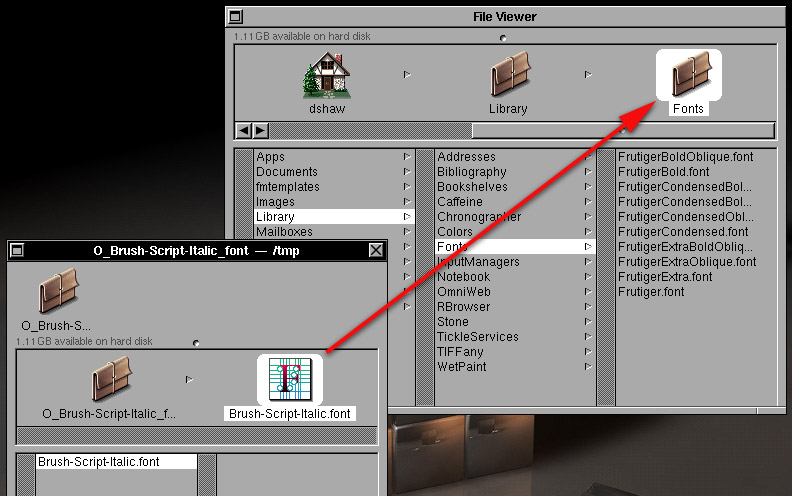
Step 4. (may be optional) Log out and log back in.
Step 5. Start up an app that uses fonts and open the fonts panel. You should get a message that says something like adding new fonts.
Please note that I haven't had a chance to check all the fonts on my fonts page for compatibility with NEXTSTEP and OPENSTEP, so some might not work (which means that the system will use the default font instead of the one install).
The only time a command line was needed was with Rhapsody as Apple broke the system's ability to check for new fonts in the move from OPENSTEP. Command line tools are not needed here (unless you need to use them for unarchiving the fonts).
Title: Doesn't seem to want to drop in fonts folder file
Post by: drshmooz2001 on October 17, 2008, 02:50:06 PM
Post by: drshmooz2001 on October 17, 2008, 02:50:06 PM
Doesn't drag and drop into file?
Title: WordPerfect errors while installing
Post by: RacerX on October 17, 2008, 03:11:49 PM
Post by: RacerX on October 17, 2008, 03:11:49 PM
So when you hold the unarchived font's icon over the Fonts folder in your account's Library folder it doesn't display something like this?
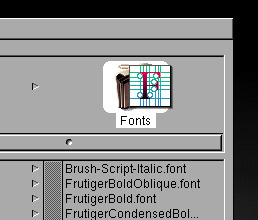
There shouldn't be any issues with putting any type of file (font or otherwise) into that folder as it is in your account.
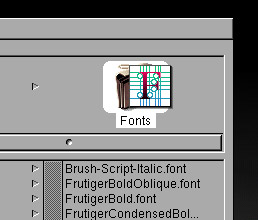
There shouldn't be any issues with putting any type of file (font or otherwise) into that folder as it is in your account.
Title: I am able to drag and drop,
Post by: drshmooz2001 on October 17, 2008, 03:12:18 PM
Post by: drshmooz2001 on October 17, 2008, 03:12:18 PM
Fonts don't show up though.
Title: WordPerfect errors while installing
Post by: helf on October 17, 2008, 03:20:17 PM
Post by: helf on October 17, 2008, 03:20:17 PM
Did you log out and log back in as he mentioned?
Title: WordPerfect errors while installing
Post by: RacerX on October 17, 2008, 03:42:11 PM
Post by: RacerX on October 17, 2008, 03:42:11 PM
A couple questions... I know this might sound redundant, but we should cover all the bases.[list=1]
- Do you have a folder called Fonts in your account's Library folder? (if not, you can create a new folder there and name it Fonts... using that exact spelling and capitalization)
- When unarchived, do the fonts have the correct icon (like the ones in my screenshots) for a font?[/list:o]It might be helpful to see what you are seeing, would you be able to post screenshots of the Workspace Manager while browsing these folders? I might be able to catch something that looks off that way.
Title: I have the new fonts in the fonts folder
Post by: drshmooz2001 on October 17, 2008, 03:44:15 PM
Post by: drshmooz2001 on October 17, 2008, 03:44:15 PM
I am not sure what you are referring to about accounts library folder.
Title: Please work with me on this I am writing a book
Post by: drshmooz2001 on October 17, 2008, 03:46:40 PM
Post by: drshmooz2001 on October 17, 2008, 03:46:40 PM
Thanks
Title: Doesn't seem to show in font selector
Post by: drshmooz2001 on October 17, 2008, 04:32:35 PM
Post by: drshmooz2001 on October 17, 2008, 04:32:35 PM
fonts are in font panel though.
Title: WordPerfect errors while installing
Post by: RacerX on October 17, 2008, 05:20:31 PM
Post by: RacerX on October 17, 2008, 05:20:31 PM
So you've gotten them in the Fonts folder?
I'm sure I've pointed these two references out before but I really can't stress how much important basic information about NEXTSTEP 3.3 and OPENSTEP 4.x are covered in them (even though they are Sun Microsystems documents).
Because all applications in NEXTSTEP/OPENSTEP deal with text about the same, chapter 9: Typing and Editing (http://docs.sun.com/app/docs/doc/802-2102/6i63d60f7?a=view) of Using the OpenStep Desktop will come in handy when getting used to WordPerfect.
I'm sure I've pointed these two references out before but I really can't stress how much important basic information about NEXTSTEP 3.3 and OPENSTEP 4.x are covered in them (even though they are Sun Microsystems documents).
- Quick Start to Using the OpenStep Desktop online version (http://docs.sun.com/app/docs/doc/802-2101) PDF version (http://docs.sun.com/app/docs/doc/802-2101?a=load)
- Using the OpenStep Desktop online version (http://docs.sun.com/app/docs/doc/802-2102) PDF version (http://docs.sun.com/app/docs/doc/802-2102?a=load)
Because all applications in NEXTSTEP/OPENSTEP deal with text about the same, chapter 9: Typing and Editing (http://docs.sun.com/app/docs/doc/802-2102/6i63d60f7?a=view) of Using the OpenStep Desktop will come in handy when getting used to WordPerfect.
Title: It does exactly as you said it does
Post by: drshmooz2001 on October 17, 2008, 05:27:27 PM
Post by: drshmooz2001 on October 17, 2008, 05:27:27 PM
It does exactly as you said it does thing is fonts dont show up in wordperfect
Title: WordPerfect errors while installing
Post by: RacerX on October 17, 2008, 05:43:54 PM
Post by: RacerX on October 17, 2008, 05:43:54 PM
Fonts are a system wide resource, so fonts in WordPerfect aren't any different than in Edit, TextEdit, OpenWrite, Create, FrameMaker, etc.
You should be able to type out some text, highlight it, open the fonts panel, select a font, and hit the "set" button to have the font show up for that text.
...Okay, I just installed WordPerfect, and this is what I got.
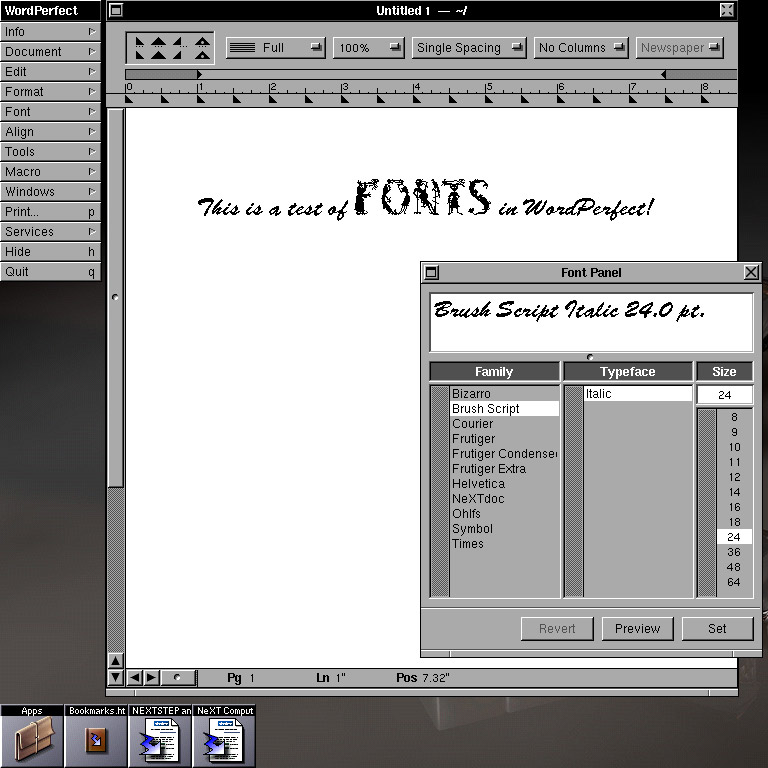
Does any of this look like what you are seeing on your system?
You should be able to type out some text, highlight it, open the fonts panel, select a font, and hit the "set" button to have the font show up for that text.
...Okay, I just installed WordPerfect, and this is what I got.
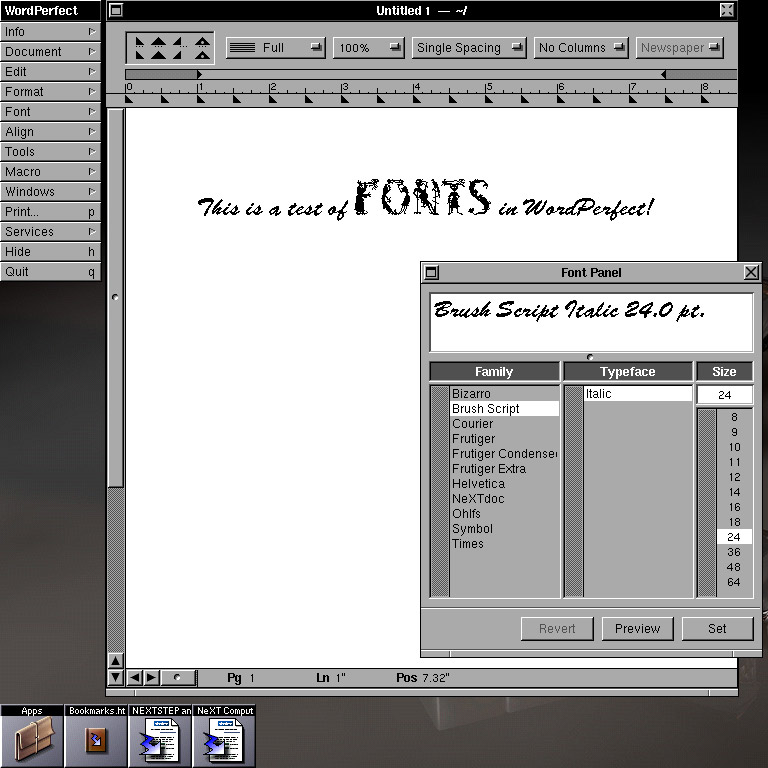
Does any of this look like what you are seeing on your system?