Title: How to setup NS3.3's to share the host's IP (NAT) in VMWare?
Post by: bonbazar on November 30, 2008, 01:10:57 PM
Post by: bonbazar on November 30, 2008, 01:10:57 PM
I know that it can be tricky to setup NextStep network and I have read a couple of posts here but with lots of confused information as soon as it is related to network installation. By any chance does someone has succeed to setup NextStep 3.3's network to share the host's network connection (NAT) using VMware? (I run VMware fusion on Mac OS X)
Thanks for posting the Modus Operandi. It will be greatly appreciated!!
Thanks for posting the Modus Operandi. It will be greatly appreciated!!
Title: How to setup NS3.3's to share the host's IP (NAT) in VMWare?
Post by: slynce on March 30, 2009, 02:42:46 PM
Post by: slynce on March 30, 2009, 02:42:46 PM
I just solved the connection problem (after a week struggle with VMware settings) and now am surfing the Internet happily with my OmniWeb 2 web browser, so this post was writtent and sent out of a VMware NextStep 3.3 machine.
I'd like to describe the changes I did to the settings in the NextStep HostManager configuration and some other little issues I experienced, so that everyone who has just installed NextStep 3.3 in VMware to be able to configure their Internet connection and browse the Internet
What I did to connect my NextStep virtual machine via NAT connection is the following:
1. Following the advice from "TjLs...pdf" manual on how to connect the NextStep 3.3 machine to the Internet I created a file "resolv.conf " in /etc (directory). Creating it is easy - you just use edit.app, when "Untitled.rtf" window of the new text document appears you hit "Alt-Shift-R" key configuration to remove .rtf extension and after writing the info in it you save it "/etc/resolv.conf"
The information has to be written in it is JUST:
nameserver 192.168.X.2
(where the IP address is the one VMware gives to your NAT and it is permanent and X is the speciffic number VMware assignes to you when you first install VMware software on your host computer and it differs)
After writing this one line in the document Save it writing "/etc/resolv.conf" as a path and name for the file
2. In Host Manager I filled the following configuration :
Internet address - 192.168.X.210 (I read in the VMware help - "DHCP conventions for assigning IP address" that the IP range between 192.168.X.128 - 192.168.X.253 is DHCP assigned, which means the ones VMware gives to the guest OS - NextStep 3.3 in our case. tha last number "210" I picked in blind - it turned out a lucky guess)
Broadcats Address - 192.168.X.255
Netmask - 255.255.255.0
Router - 192.168.X.2 (It turned out - after a week of trying, that the router IP in VMware configuration is the one Vmware workstation gives to your NAT as a Gateway IP and it doesn't change, it's permanent)
The name you chose as your Hostname doesn't matter. In my case I believe that it MUST be something inspirational, so I chose "bernerslee"
As you are done with the Host Manager, don't hurry to reboot!
Go to NetInfo Manager.app and do the following:
1. Delete from /machines "localhost" directory with it's information
2. If you had created a directory with "your_new_host" information, following "TjLs...padf" manual advice - delete it too!!! It IS essential because in some way it messes with the VMware NAT configuration (Ican't expalin why, but I realised that this manual wasn't written to help you to set NAT connection in a VMware OS but to configure a connection between a real NextStep machine and your router, so part of it is not needed in our case)
So that's it! After rebooting the NextStep OS you've got the Internet!
The first thing I noticed, though was that when trying to reach my mail accounts my OmniWeb 2 failed to do so and wrote that was not able to resolve https'
Anyone know anything about it? ( I hope it's just this browsers issue and changing the browser will do the trick.)
Any hints here welcome!
I'd like to describe the changes I did to the settings in the NextStep HostManager configuration and some other little issues I experienced, so that everyone who has just installed NextStep 3.3 in VMware to be able to configure their Internet connection and browse the Internet
What I did to connect my NextStep virtual machine via NAT connection is the following:
1. Following the advice from "TjLs...pdf" manual on how to connect the NextStep 3.3 machine to the Internet I created a file "resolv.conf " in /etc (directory). Creating it is easy - you just use edit.app, when "Untitled.rtf" window of the new text document appears you hit "Alt-Shift-R" key configuration to remove .rtf extension and after writing the info in it you save it "/etc/resolv.conf"
The information has to be written in it is JUST:
nameserver 192.168.X.2
(where the IP address is the one VMware gives to your NAT and it is permanent and X is the speciffic number VMware assignes to you when you first install VMware software on your host computer and it differs)
After writing this one line in the document Save it writing "/etc/resolv.conf" as a path and name for the file
2. In Host Manager I filled the following configuration :
Internet address - 192.168.X.210 (I read in the VMware help - "DHCP conventions for assigning IP address" that the IP range between 192.168.X.128 - 192.168.X.253 is DHCP assigned, which means the ones VMware gives to the guest OS - NextStep 3.3 in our case. tha last number "210" I picked in blind - it turned out a lucky guess)
Broadcats Address - 192.168.X.255
Netmask - 255.255.255.0
Router - 192.168.X.2 (It turned out - after a week of trying, that the router IP in VMware configuration is the one Vmware workstation gives to your NAT as a Gateway IP and it doesn't change, it's permanent)
The name you chose as your Hostname doesn't matter. In my case I believe that it MUST be something inspirational, so I chose "bernerslee"
As you are done with the Host Manager, don't hurry to reboot!
Go to NetInfo Manager.app and do the following:
1. Delete from /machines "localhost" directory with it's information
2. If you had created a directory with "your_new_host" information, following "TjLs...padf" manual advice - delete it too!!! It IS essential because in some way it messes with the VMware NAT configuration (Ican't expalin why, but I realised that this manual wasn't written to help you to set NAT connection in a VMware OS but to configure a connection between a real NextStep machine and your router, so part of it is not needed in our case)
So that's it! After rebooting the NextStep OS you've got the Internet!
The first thing I noticed, though was that when trying to reach my mail accounts my OmniWeb 2 failed to do so and wrote that was not able to resolve https'
Anyone know anything about it? ( I hope it's just this browsers issue and changing the browser will do the trick.)
Any hints here welcome!
Title: How to setup NS3.3's to share the host's IP (NAT) in VMWare?
Post by: andreas_g on April 02, 2009, 04:05:22 AM
Post by: andreas_g on April 02, 2009, 04:05:22 AM
thanks for the instructions!
but as a total beginner in network configuration i still have some problems.
which exact steps from the TjLs-Manual-pdf have to be performed and which not?
where can i find out what internet-, broadcast-, router-, nameserver- and other required adresses i have (which ones are assigned from VMware to the NAT-interface)?
my mac connects to the internet using dhcp. the computer is connected to a router that assignes an IP to it. the router is connected to a cable modem.
will the described procedure work for me?
thanks for your help!
for your problem with https: i think there is a plugin for omniweb 2 that enables https-access. you can find it here: http://www.nextcomputers.org/NeXTfiles/Software/NEXTSTEP/Apps/Internet/WWW/Web%20Browsers/Omniweb/Bundles/
i never tested as i have no internet connection for my nextstep-system yet, but sounds like this is what you're looking for.
but as a total beginner in network configuration i still have some problems.
which exact steps from the TjLs-Manual-pdf have to be performed and which not?
where can i find out what internet-, broadcast-, router-, nameserver- and other required adresses i have (which ones are assigned from VMware to the NAT-interface)?
my mac connects to the internet using dhcp. the computer is connected to a router that assignes an IP to it. the router is connected to a cable modem.
will the described procedure work for me?
thanks for your help!
for your problem with https: i think there is a plugin for omniweb 2 that enables https-access. you can find it here: http://www.nextcomputers.org/NeXTfiles/Software/NEXTSTEP/Apps/Internet/WWW/Web%20Browsers/Omniweb/Bundles/
i never tested as i have no internet connection for my nextstep-system yet, but sounds like this is what you're looking for.
Title: How to setup NS3.3's to share the host's IP (NAT) in VMWare?
Post by: slynce on April 03, 2009, 01:24:40 AM
Post by: slynce on April 03, 2009, 01:24:40 AM
Hello andreas_g,
On your questions:
1. Which instructions shall you fallow and which you shall omit? - I, personally, followed all and after that as described above deleted localhost and my_host directories from NetInfo Manager.app . I'm not quite certain if the network can work with them as well (it's just that in my case the Network started working in a stage at which I had deleted them ;)
2. Which configuration settings from your personal connection shall you use? - In my case, my NextStep is in VMware (it's a virtual machine and it shares host computer's net using NAT of the VMware). In any case you shall fill in Host Manager.app four numbers:
2.1 Internet address - the IP your Network assigns to a new computer you connect to the router (whether it is a virtual guest or a real one) and it shall be unique for NextStep and the Network (in my case VMware assigns the IP in special pre-configured range)
2.2 Broadcast address (I was happy with the VMware to have defined broadcast IP and to find it in the above described help file -"DHCP conventions for assigning IP address"). Here I can't say how it is outside a virtual machine.
2.3. Netmask - it is usually 255.255.255.0 (AFAIK, but have in mind I'm not such a big expert)
2.4. Router - it's the IP address of your router or Gateway with which your new NextStep machine will try to communicate, so I guess if you are outside VMware it shall be the one your computer uses (if you are under VMware - it assignes the address mentioned in my post above automatically). On your exact question about your connection I can't say - because as I read your post you are a Mac user and I don't know much about Mac's because I'm a Windows one ;)
So this is the configuration you need to set in all cases (and you have to create resolv.conf as described above)
Hope it will be useful and you will soon be browsing around the Internet.
Thanks for the links you provided. I found the same solution the other day and now my Omniweb resolves https. At this stage I'm looking for some bundle or patch to be able to resolve java for Omniweb 2.7 beta3. It is OK with OpenStep 4 and Omniweb 3, but turns out to be a problem for NextStep 3.3 and Omniweb 2.7 beta 3 (which is the latest release for NextStep 3.3).
Greatly appreciated if anyone comes out with any info about it ( the java issue solution ;)
Cheers! ;)
On your questions:
1. Which instructions shall you fallow and which you shall omit? - I, personally, followed all and after that as described above deleted localhost and my_host directories from NetInfo Manager.app . I'm not quite certain if the network can work with them as well (it's just that in my case the Network started working in a stage at which I had deleted them ;)
2. Which configuration settings from your personal connection shall you use? - In my case, my NextStep is in VMware (it's a virtual machine and it shares host computer's net using NAT of the VMware). In any case you shall fill in Host Manager.app four numbers:
2.1 Internet address - the IP your Network assigns to a new computer you connect to the router (whether it is a virtual guest or a real one) and it shall be unique for NextStep and the Network (in my case VMware assigns the IP in special pre-configured range)
2.2 Broadcast address (I was happy with the VMware to have defined broadcast IP and to find it in the above described help file -"DHCP conventions for assigning IP address"). Here I can't say how it is outside a virtual machine.
2.3. Netmask - it is usually 255.255.255.0 (AFAIK, but have in mind I'm not such a big expert)
2.4. Router - it's the IP address of your router or Gateway with which your new NextStep machine will try to communicate, so I guess if you are outside VMware it shall be the one your computer uses (if you are under VMware - it assignes the address mentioned in my post above automatically). On your exact question about your connection I can't say - because as I read your post you are a Mac user and I don't know much about Mac's because I'm a Windows one ;)
So this is the configuration you need to set in all cases (and you have to create resolv.conf as described above)
Hope it will be useful and you will soon be browsing around the Internet.
Thanks for the links you provided. I found the same solution the other day and now my Omniweb resolves https. At this stage I'm looking for some bundle or patch to be able to resolve java for Omniweb 2.7 beta3. It is OK with OpenStep 4 and Omniweb 3, but turns out to be a problem for NextStep 3.3 and Omniweb 2.7 beta 3 (which is the latest release for NextStep 3.3).
Greatly appreciated if anyone comes out with any info about it ( the java issue solution ;)
Cheers! ;)
Title: How to setup NS3.3's to share the host's IP (NAT) in VMWare?
Post by: andreas_g on April 18, 2009, 08:16:29 AM
Post by: andreas_g on April 18, 2009, 08:16:29 AM
it just doesn't work for me. after configuration, nextstep hangs on reboot while loading network services.
i'm not quite sure if i gave it the correct configuration. (looked IP-adress up from mac os x's console.app, where vmware fusion makes the following entry:
18.04.09 09:42:19 com.vmware.launchd.vmware[48] Configured subnet: 192.168.122.0
18.04.09 09:42:19 com.vmware.launchd.vmware[48] Setting vmnet-dhcp IP address: 192.168.122.254
18.04.09 09:42:19 com.vmware.launchd.vmware[48] Opened:
18.04.09 09:42:19 com.vmware.launchd.vmware[48] Recving on VNet/vmnet1/192.168.122.0
18.04.09 09:42:19 com.vmware.launchd.vmware[48] Sending on VNet/vmnet1/192.168.122.0
in host manager i set the IP to 192.168.122.254, broadcast adress to 192.168.122.255, netmask to 255.255.255.0 and router to 192.168.122.2
in resolv.conf i typed "nameserver 192.168.122.2" (nothing else)
shouldn't this work? or is this complete nonsense?
i'm not quite sure if i gave it the correct configuration. (looked IP-adress up from mac os x's console.app, where vmware fusion makes the following entry:
18.04.09 09:42:19 com.vmware.launchd.vmware[48] Configured subnet: 192.168.122.0
18.04.09 09:42:19 com.vmware.launchd.vmware[48] Setting vmnet-dhcp IP address: 192.168.122.254
18.04.09 09:42:19 com.vmware.launchd.vmware[48] Opened:
18.04.09 09:42:19 com.vmware.launchd.vmware[48] Recving on VNet/vmnet1/192.168.122.0
18.04.09 09:42:19 com.vmware.launchd.vmware[48] Sending on VNet/vmnet1/192.168.122.0
in host manager i set the IP to 192.168.122.254, broadcast adress to 192.168.122.255, netmask to 255.255.255.0 and router to 192.168.122.2
in resolv.conf i typed "nameserver 192.168.122.2" (nothing else)
shouldn't this work? or is this complete nonsense?
Title: How to setup NS3.3's to share the host's IP (NAT) in VMWare?
Post by: slynce on April 20, 2009, 03:03:09 AM
Post by: slynce on April 20, 2009, 03:03:09 AM
Hi Andreas_g,
in my opinion the IP you give to your NS 3.3 host shall be different from 192.168.X.254 ( I mean the last number shall be different from 254), cause it's pre-set for something else by the VMware server. Read again the Help in your version of VMware software, cause I'm not quite sure about setting it under Mac (I'm Windows user) and check the "DHCP conventions for assigning IP address" topic. It shall give clear list of IP's assignable for NAT in the virtual machine and it is not a special IP for your NextStep 3.3 you will find there, but a range of possible IP's, you can choose between, to assign. (or at least this is what I would do if I was in your shoes)
;)
in my opinion the IP you give to your NS 3.3 host shall be different from 192.168.X.254 ( I mean the last number shall be different from 254), cause it's pre-set for something else by the VMware server. Read again the Help in your version of VMware software, cause I'm not quite sure about setting it under Mac (I'm Windows user) and check the "DHCP conventions for assigning IP address" topic. It shall give clear list of IP's assignable for NAT in the virtual machine and it is not a special IP for your NextStep 3.3 you will find there, but a range of possible IP's, you can choose between, to assign. (or at least this is what I would do if I was in your shoes)
;)
Title: How to setup NS3.3's to share the host's IP (NAT) in VMWare?
Post by: andreas_g on April 26, 2009, 04:56:57 AM
Post by: andreas_g on April 26, 2009, 04:56:57 AM
slynce, thanks again for your help!
finally i found the informations i was looking for! Under Mac OS X the file "/Library/Application Support/VMWare Fusion/vmnet8/dhcpd.conf" contains the following information:
#
# Configuration file for ISC 2.0b6pl1 vmnet-dhcpd operating on vmnet8.
#
# This file was automatically generated by the VMware configuration program.
# If you modify it, it will be backed up the next time you run the
# configuration program.
#
# We set domain-name-servers to make some DHCP clients happy
# (dhclient as configued in SuSE, TurboLinux, etc.).
# We also supply a domain name to make pump (Red Hat 6.x) happy.
#
allow unknown-clients;
default-lease-time 1800; # 30 minutes
max-lease-time 7200; # 2 hours
subnet 192.168.16.0 netmask 255.255.255.0 {
range 192.168.16.128 192.168.16.254;
option broadcast-address 192.168.16.255;
option domain-name-servers 192.168.16.2;
option netbios-name-servers 192.168.16.2;
option domain-name "localdomain";
option routers 192.168.16.2;
}
So i tried to set up networking in NeXTSTEP with this configuration (IP set to 192.168.12.128). But still it does not work!
After restart the boot process hangs while loading network services/mounting remote filesystems
Maybe it is a Fusion-related issue. Anyone got this working under VMWare Fusion (I am using version 2.0.2)?
sincerely
Andreas
finally i found the informations i was looking for! Under Mac OS X the file "/Library/Application Support/VMWare Fusion/vmnet8/dhcpd.conf" contains the following information:
#
# Configuration file for ISC 2.0b6pl1 vmnet-dhcpd operating on vmnet8.
#
# This file was automatically generated by the VMware configuration program.
# If you modify it, it will be backed up the next time you run the
# configuration program.
#
# We set domain-name-servers to make some DHCP clients happy
# (dhclient as configued in SuSE, TurboLinux, etc.).
# We also supply a domain name to make pump (Red Hat 6.x) happy.
#
allow unknown-clients;
default-lease-time 1800; # 30 minutes
max-lease-time 7200; # 2 hours
subnet 192.168.16.0 netmask 255.255.255.0 {
range 192.168.16.128 192.168.16.254;
option broadcast-address 192.168.16.255;
option domain-name-servers 192.168.16.2;
option netbios-name-servers 192.168.16.2;
option domain-name "localdomain";
option routers 192.168.16.2;
}
So i tried to set up networking in NeXTSTEP with this configuration (IP set to 192.168.12.128). But still it does not work!
After restart the boot process hangs while loading network services/mounting remote filesystems
Maybe it is a Fusion-related issue. Anyone got this working under VMWare Fusion (I am using version 2.0.2)?
sincerely
Andreas
Title: How to setup NS3.3's to share the host's IP (NAT) in VMWare?
Post by: nextchef on April 27, 2009, 10:23:26 AM
Post by: nextchef on April 27, 2009, 10:23:26 AM
Quote from: "andreas_g"
subnet 192.168.16.0 netmask 255.255.255.0
range 192.168.16.128 192.168.16.254;
option broadcast-address 192.168.16.255;
option domain-name-servers 192.168.16.2;
option netbios-name-servers 192.168.16.2;
option domain-name "localdomain";
option routers 192.168.16.2;
So i tried to set up networking in NeXTSTEP with this configuration (IP set to 192.168.12.128). But still it does not work!
After restart the boot process hangs while loading network services/mounting remote filesystems
I do not have fusion, but it would seem to me that you would need to set the ip in NS/OS to something in the same subnet as vmware is setting the DHCP server, 192.168.16.0 not 192.168.12.0 like you tried. Try using an ip between 192.168.16.128-254, such as 192.168.16.200, and see if that works better. Remember to also follow all the other directions from slynce's original post, just using "16" where he has "X".
Title: How to setup NS3.3's to share the host's IP (NAT) in VMWare?
Post by: andreas_g on April 28, 2009, 02:37:04 AM
Post by: andreas_g on April 28, 2009, 02:37:04 AM
nextchef, sorry, but i obviously made a typing mistake in my previous post.
of course i picked an ip-number from the range that showes up in the file.
i think i chose 192.168.16.128.
i am going to retry later. maybe i made the same typing mistake during configuration.
thanks a lot!
andreas
of course i picked an ip-number from the range that showes up in the file.
i think i chose 192.168.16.128.
i am going to retry later. maybe i made the same typing mistake during configuration.
thanks a lot!
andreas
Title: How to setup NS3.3's to share the host's IP (NAT) in VMWare?
Post by: nextchef on April 28, 2009, 10:24:51 AM
Post by: nextchef on April 28, 2009, 10:24:51 AM
Quote from: "andreas_g"nextchef, sorry, but i obviously made a typing mistake in my previous post.
of course i picked an ip-number from the range that showes up in the file.
i think i chose 192.168.16.128.
You probably do not want to use the .128 address, as it is the first one and might be pre-allocated by vmware for something internal. Better to pick one in the middle of the range, as opposed to one of the ends. You also may be able to pick one outside the range as well, so there is no chance that it will ever be allocated. As I said before I do not have fusion so can not test this option.
Good luck with it.
Title: How to setup NS3.3's to share the host's IP (NAT) in VMWare?
Post by: andreas_g on April 28, 2009, 12:27:43 PM
Post by: andreas_g on April 28, 2009, 12:27:43 PM
i just tried again. this time definitely with the correct adresses. i took the 192.168.16.200 ip-adress.
i followed all the instructions from this thread. but i still have no success.
i am now quite sure there is something wrong with the vmware network driver in combination with vmware fusion.
i am going to try again with some future vmware fusion version or when some other vmware fusion user gets it working and can tell how.
thanks for your efforts
i followed all the instructions from this thread. but i still have no success.
i am now quite sure there is something wrong with the vmware network driver in combination with vmware fusion.
i am going to try again with some future vmware fusion version or when some other vmware fusion user gets it working and can tell how.
thanks for your efforts
Title: How to setup NS3.3's to share the host's IP (NAT) in VMWare?
Post by: kb7sqi on April 29, 2009, 11:51:48 AM
Post by: kb7sqi on April 29, 2009, 11:51:48 AM
I hate to ask, but what version of VMWare Fusion are you running? 2.0.x seems to have broken compatibility w/ networking on NEXTSTEP/OPENSTEP. I'm still running 2.0 and my networking still runs fine as w/ 1.1.x versions as well. Hope that helps. Take care.
Title: How to setup NS3.3's to share the host's IP (NAT) in VMWare?
Post by: andreas_g on April 29, 2009, 04:37:11 PM
Post by: andreas_g on April 29, 2009, 04:37:11 PM
thank you for the information, kb7sqi! unfortunately i am using version 2.0.2, but it's good to finally know what the problem is.
now i am thinking about downgrading to version 2.0. has this issue/bug in the 2.0.x versions already been reported to VMWare? Maybe it's worth a try.
now i am thinking about downgrading to version 2.0. has this issue/bug in the 2.0.x versions already been reported to VMWare? Maybe it's worth a try.
Title: How to setup NS3.3's to share the host's IP (NAT) in VMWare?
Post by: kb7sqi on April 29, 2009, 11:32:22 PM
Post by: kb7sqi on April 29, 2009, 11:32:22 PM
Quote from: "andreas_g"thank you for the information, kb7sqi! unfortunately i am using version 2.0.2, but it's good to finally know what the problem is.
now i am thinking about downgrading to version 2.0. has this issue/bug in the 2.0.x versions already been reported to VMWare? Maybe it's worth a try.
I haven't upgrade my version of Fusion because of that bug. I was hoping to hear reports that 2.0.3 fixed the problem, but I haven't heard anything yet. Good luck!
Title: How to setup NS3.3's to share the host's IP (NAT) in VMWare?
Post by: andreas_g on May 01, 2009, 05:00:51 AM
Post by: andreas_g on May 01, 2009, 05:00:51 AM
i confirm that the latest version of VMWare (2.0.4) does not fix the problem.
Title: How to setup NS3.3's to share the host's IP (NAT) in VMWare?
Post by: un on May 02, 2009, 01:04:25 AM
Post by: un on May 02, 2009, 01:04:25 AM
I tried again and got OpenStep 4.2 working under 2.0.4 so far.
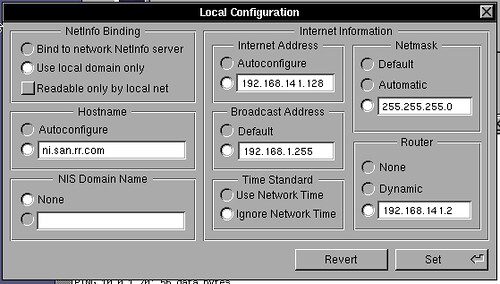
I can ping things at least :)
Edit:
My joy is tempered by being able to ftp to sites but not actually look at them, I was able to ftp to peak.org (207.55.97.224) and log in, but if I do an ls I get "200 PORT command successful. Consider using PASV" followed by a loooong pause, and then "425 Failed to establish connection"
bummer...
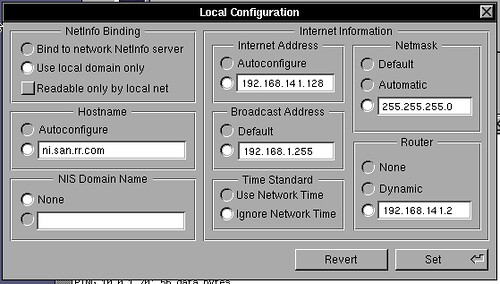
I can ping things at least :)
Edit:
My joy is tempered by being able to ftp to sites but not actually look at them, I was able to ftp to peak.org (207.55.97.224) and log in, but if I do an ls I get "200 PORT command successful. Consider using PASV" followed by a loooong pause, and then "425 Failed to establish connection"
bummer...
Title: How to setup NS3.3's to share the host's IP (NAT) in VMWare?
Post by: andreas_g on May 02, 2009, 05:12:01 AM
Post by: andreas_g on May 02, 2009, 05:12:01 AM
i think maybe the broadcast adress should be set to 192.168.141.255 in your case.
at least this would match the described configuration in this thread and should work.
i wonder if you get it to work under 2.0.4. good luck!
at least this would match the described configuration in this thread and should work.
i wonder if you get it to work under 2.0.4. good luck!
Title: How to setup NS3.3's to share the host's IP (NAT) in VMWare?
Post by: slynce on May 14, 2009, 01:36:54 AM
Post by: slynce on May 14, 2009, 01:36:54 AM
Quote from: "un"I tried again and got OpenStep 4.2 working under 2.0.4 so far.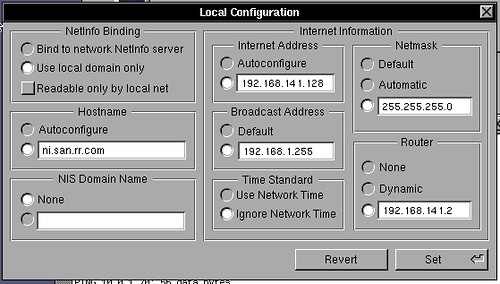
I can ping things at least :)
Edit:
My joy is tempered by being able to ftp to sites but not actually look at them, I was able to ftp to peak.org (207.55.97.224) and log in, but if I do an ls I get "200 PORT command successful. Consider using PASV" followed by a loooong pause, and then "425 Failed to establish connection"
bummer...
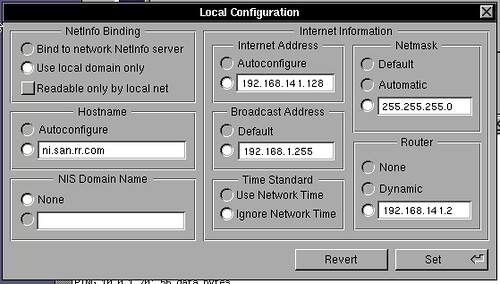
by the way in your screen shot the third digit from the broadcast address - "192.168.1.255" is different from your third digit in the other IP's - e.g. - "192.168.141.128" ( I mean the digit "141" ). Isn't it necessary the IP addresses for the virtual machine to be with same first three digits ?
p.s.
by the way, UN, remove the characters after the jpg extension of your image url description in order it to be displayed ( as I did in my quotation ;) )
Title: How to setup NS3.3's to share the host's IP (NAT) in VMWare?
Post by: andreas_g on October 28, 2009, 01:23:02 PM
Post by: andreas_g on October 28, 2009, 01:23:02 PM
Thanks all for the help! I finally found the problem and solved it!
Here i posted how it can be done:
http://www.nextcomputers.org/forums/viewtopic.php?t=2285
Here i posted how it can be done:
http://www.nextcomputers.org/forums/viewtopic.php?t=2285