Title: OpenSTEP 4.2 running in Parallels
Post by: bkmoore on January 02, 2009, 03:46:53 AM
Post by: bkmoore on January 02, 2009, 03:46:53 AM
I'm a long-time ago NeXT user. I was running NS3.3 on intel back in '94 while in college. I decided to try getting OpenSTEP running in Parallels as a good weekend project.
My observations, lessons learned:
1. The best configuration is the Other/Other standard config. Don't change any settings except for the memory and VRAM. I set the HD to a 2 gB static drive.
2. I was able to get networking running using the NE2000 driver disk. Once I had the network running, I FTP'd to my computer and got the user patch with the video driver.
3. I set up my virtual machine as the NetInfo domain host. I configured my macintosh to connect to the Virtual Machine for the NetInfo server. I then set up my macintosh as a clone of the parent NetInfo domain. This is critical so the Mac will boot and not hanging waiting for NetInfo to come online. It might be better to set the mac as the domain host, but 10.4 has a lot of the NetInfo capability removed. Ugh. It was easier to go the other way and just set up a clone.
4. Once NetInfo was up, it was a snap to set up the network file system.
5. I didn't need to deactivate VT-X support. OpenSTEP seemed to work fine with it on on my system. :? Sometimes it would hang during booting. I just forced it to hard reset until it boot. These old operating systems are a bit finicky.
6. I need to figure out a good way to sync the time with my macintosh. I found a hack on the VMWare forums. There has to be a better way.
All in all, a nice blast from the past. Now if someone would write a sound driver and SCSI driver for the parallels virtual machine, we'd be cooking with gas. I'm asking my parents to mail me my NS Academic bundle so I can play with all the developer tools again. If it keeps being fun, I'll try to get a color slab. I dreamed of having one in college, but they were way too expensive at the time.
Brian Moore
My observations, lessons learned:
1. The best configuration is the Other/Other standard config. Don't change any settings except for the memory and VRAM. I set the HD to a 2 gB static drive.
2. I was able to get networking running using the NE2000 driver disk. Once I had the network running, I FTP'd to my computer and got the user patch with the video driver.
3. I set up my virtual machine as the NetInfo domain host. I configured my macintosh to connect to the Virtual Machine for the NetInfo server. I then set up my macintosh as a clone of the parent NetInfo domain. This is critical so the Mac will boot and not hanging waiting for NetInfo to come online. It might be better to set the mac as the domain host, but 10.4 has a lot of the NetInfo capability removed. Ugh. It was easier to go the other way and just set up a clone.
4. Once NetInfo was up, it was a snap to set up the network file system.
5. I didn't need to deactivate VT-X support. OpenSTEP seemed to work fine with it on on my system. :? Sometimes it would hang during booting. I just forced it to hard reset until it boot. These old operating systems are a bit finicky.
6. I need to figure out a good way to sync the time with my macintosh. I found a hack on the VMWare forums. There has to be a better way.
All in all, a nice blast from the past. Now if someone would write a sound driver and SCSI driver for the parallels virtual machine, we'd be cooking with gas. I'm asking my parents to mail me my NS Academic bundle so I can play with all the developer tools again. If it keeps being fun, I'll try to get a color slab. I dreamed of having one in college, but they were way too expensive at the time.
Brian Moore
Title: Parallels without disabling VT-X
Post by: gkaplan on January 03, 2009, 05:22:56 PM
Post by: gkaplan on January 03, 2009, 05:22:56 PM
That's a nice finding. Did you just tried several times until it booted up?
I wasn't able to boot with VT-X enabled on Parallels 3 (build 5608). I'm using a Santa Rosa MacBook Pro 2.2 Ghz / 4Gb and Leopard with all patches. Don't know if it would be relevant...
G.
I wasn't able to boot with VT-X enabled on Parallels 3 (build 5608). I'm using a Santa Rosa MacBook Pro 2.2 Ghz / 4Gb and Leopard with all patches. Don't know if it would be relevant...
G.
Title: OpenSTEP 4.2 running in Parallels
Post by: bkmoore on January 04, 2009, 03:45:16 AM
Post by: bkmoore on January 04, 2009, 03:45:16 AM
I'm running Parallels 4.0 Build 4.0.3540 on Tiger (10.4.11), hosting OpenSTEP 4.2 with User Patch set 4. My iMac is the white 20" with 2.16 GHz core 2 dual (T7400). I'm not sure what the name for that chip set is. I have Intel VT-x turned on and haven't had any issues. I saw the posts recommending turning it off, but my mind set is if it ain't broke, why fix it?
The only time my virtual machine has hung while booting is occasionally while loading the ISA/EISA drivers. This usually happened after I changed a configuration setting. I saw some gouge on cycling PnP support using Configure.app in config=Default mode to get it to boot. I did that a couple of times at first, but then I noticed that if I just did a hard reset when it hung, it would boot cleanly most of the time.
Brian
The only time my virtual machine has hung while booting is occasionally while loading the ISA/EISA drivers. This usually happened after I changed a configuration setting. I saw some gouge on cycling PnP support using Configure.app in config=Default mode to get it to boot. I did that a couple of times at first, but then I noticed that if I just did a hard reset when it hung, it would boot cleanly most of the time.
Brian
Title: running openstep in parallels (or fusion or other emulator)
Post by: dan on March 08, 2009, 05:01:18 AM
Post by: dan on March 08, 2009, 05:01:18 AM
I have an openstep system (intel) that i would also like to run
under parallels (or fusion, or some other emulator).
I don't think i have any cds for it, so i wouldn't have a way
to make an iso image.
So how would i make a virtual machine with what i do have?
("What i do have" meaning my running open step system.)
dan
under parallels (or fusion, or some other emulator).
I don't think i have any cds for it, so i wouldn't have a way
to make an iso image.
So how would i make a virtual machine with what i do have?
("What i do have" meaning my running open step system.)
dan
Title: Re: running openstep in parallels (or fusion or other emulat
Post by: kb7sqi on March 08, 2009, 09:25:54 AM
Post by: kb7sqi on March 08, 2009, 09:25:54 AM
Quote from: "dan"I have an openstep system (intel) that i would also like to run
under parallels (or fusion, or some other emulator).
I don't think i have any cds for it, so i wouldn't have a way
to make an iso image.
So how would i make a virtual machine with what i do have?
("What i do have" meaning my running open step system.)
dan
Check your PM's. :-) In theory it'd be possible to "dd" your current disk to an image that could be used under a virtual environment, but it'd probably be quicker/easier to just start out from scratch & then copy stuff over the network from your current system. Once you have a working system virtually it is pretty simple to convert it over for other systems. Since I use Virtual Box, Fusion, Parallels, & qemu I do this all the time. I use a patched version of qemu-img that supports all the formats. Make's the whole process pretty painless. Just need plenty of hard drive space. :-) Take care.
Title: OpenSTEP 4.2 running in Parallels
Post by: Yoshi on July 04, 2009, 03:23:22 PM
Post by: Yoshi on July 04, 2009, 03:23:22 PM
Hi. I've managed to get OS 4.2 to run under parallels 4 (build 4.0.3810) on Leopard (10.5.6) after a bit of playing around. The settings I've used for the vm are 2GB HDD, 128 MB RAM, 8 MB VRAM. I haven't turned off vt-x or used any other advanced system flags (like disabling acpi) which has been recommended by some parallels users, as I that it refuses to boot at all when disabling these settings.
Anyways, it sort of works. I've got no sound, and I haven't attempted to try and get networking going yet so I don't know if there are any problems there yet.
My iss-ewe at the moment is the display. Monochrome @ 640x480, bleh. It's barely usable and it's very slow. I've tried the vesa driver, but it won't go. If I try and use it it freezes during startup, just at the point where it's enabling plug and play for EISA. I disabled pnp, but then it freezes when it gets to "hc0: device detected at [...]" Screenshots for reference:
before disabling pnp:
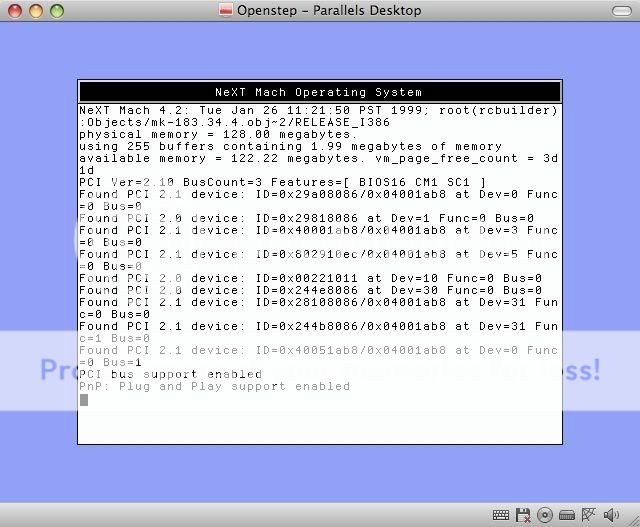
after disabling pnp:
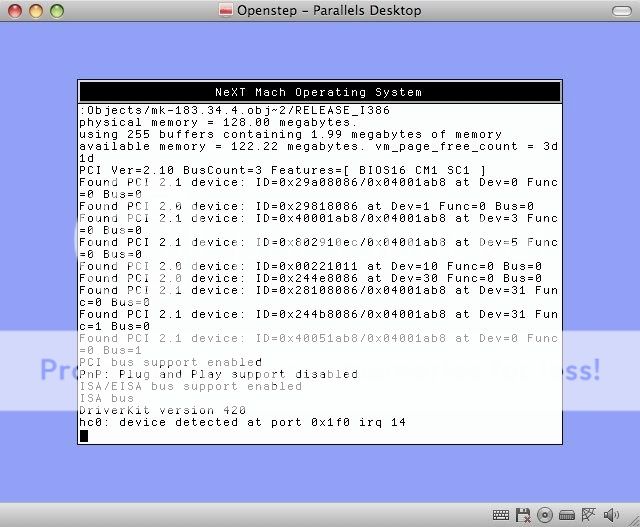
Oh, and another annoying thing is that I get a dialogue box pop up just after logging in that says "error, the floppy disc is unreadable" or something to that effect, asking me if I want to eject or initialise it. I just choose eject and it's all good after that. I just don't understand why I get this at all. I have no floppy image inserted into the parallels drive, and no cd either. So there's nothing it should be complaining about :shock:
Also this is my first post here, so hai, I'm Yoshi (or Dan, call me either :P). Long time lurker, only just decided to join :D
Anyways, it sort of works. I've got no sound, and I haven't attempted to try and get networking going yet so I don't know if there are any problems there yet.
My iss-ewe at the moment is the display. Monochrome @ 640x480, bleh. It's barely usable and it's very slow. I've tried the vesa driver, but it won't go. If I try and use it it freezes during startup, just at the point where it's enabling plug and play for EISA. I disabled pnp, but then it freezes when it gets to "hc0: device detected at [...]" Screenshots for reference:
before disabling pnp:
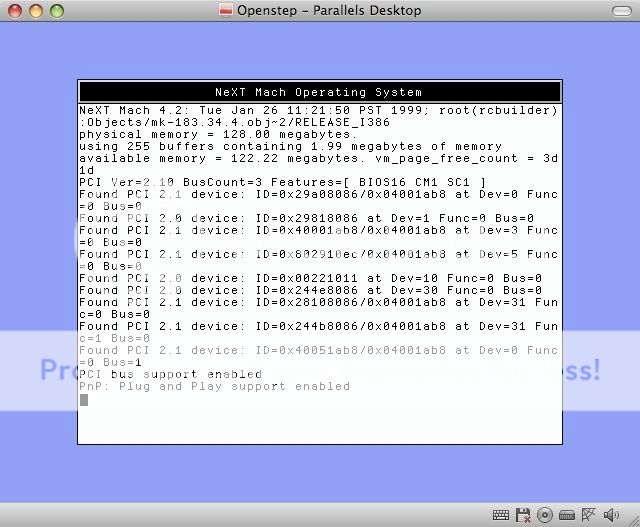
after disabling pnp:
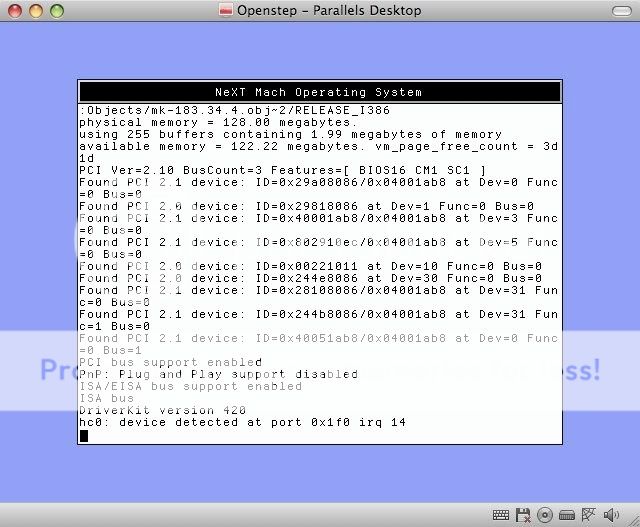
Oh, and another annoying thing is that I get a dialogue box pop up just after logging in that says "error, the floppy disc is unreadable" or something to that effect, asking me if I want to eject or initialise it. I just choose eject and it's all good after that. I just don't understand why I get this at all. I have no floppy image inserted into the parallels drive, and no cd either. So there's nothing it should be complaining about :shock:
Also this is my first post here, so hai, I'm Yoshi (or Dan, call me either :P). Long time lurker, only just decided to join :D
Title: OpenSTEP 4.2 running in Parallels
Post by: eagle on July 05, 2009, 05:58:58 AM
Post by: eagle on July 05, 2009, 05:58:58 AM
Have you tried the Parallels forums? I'm sure there are walkthroughs for running NS33 and OS42 in Parallels, just as there are for running them in VMware.
I have NS33 and OS42 running in VMware, with full mouse integration, network, sound, and 1024x768 color display, and I got there using the posted walkthroughs. (I don't really care about getting a higher resolution, so I didn't worry about figuring out how to do that.)
I have NS33 and OS42 running in VMware, with full mouse integration, network, sound, and 1024x768 color display, and I got there using the posted walkthroughs. (I don't really care about getting a higher resolution, so I didn't worry about figuring out how to do that.)
Title: OpenSTEP 4.2 running in Parallels
Post by: Yoshi on July 05, 2009, 06:07:24 AM
Post by: Yoshi on July 05, 2009, 06:07:24 AM
I've searched the parallels forums and found a few topics with people's experiences installing OS in Parallels. Most have had 4.2 working fine in parallels 3 but not in parallels 4. There aren't any walkthroughs or instructions there for getting OpenStep installed (apart from a quick summary of how someone got it to install). It's obviously possible to get it going ok in Parallels 4 with full colour video and networking (I know I'll never get sound but that's not a problem). I think I'm more likely to find someone on here who knows what they're on about than I will on the parallels boards
Title: OpenStep 4.2 on Parallels 4
Post by: gkaplan on July 22, 2009, 02:04:30 PM
Post by: gkaplan on July 22, 2009, 02:04:30 PM
I have a working OpenStep 4.2 on Parallels 4 for some time. In Parallels 4 there seems to be no way to disable VT-x but I works anyway so it seems that was an issue with previous versions of Parallels.
On the display driver side, I have the Vesa driver working with 32 bit color and full resolution with 1440x900 in my MBP with Leopard 1.5.7. Networking is also ok with the NE2000 driver, but I haven't found any suitable driver for the sound.
On the hanging error with the disk drive, you may try with a 1 Gb drive, as the time of OpenStep drives bigger than 1 Gb were quite rare.
Hope this helps, G.
On the display driver side, I have the Vesa driver working with 32 bit color and full resolution with 1440x900 in my MBP with Leopard 1.5.7. Networking is also ok with the NE2000 driver, but I haven't found any suitable driver for the sound.
On the hanging error with the disk drive, you may try with a 1 Gb drive, as the time of OpenStep drives bigger than 1 Gb were quite rare.
Hope this helps, G.
Title: OpenSTEP 4.2 running in Parallels
Post by: carp-enter on October 25, 2009, 09:48:20 AM
Post by: carp-enter on October 25, 2009, 09:48:20 AM
Quote from: "Yoshi"Hi. I've managed to get OS 4.2 to run under parallels 4 (build 4.0.3810) on Leopard (10.5.6) after a bit of playing around. The settings I've used for the vm are 2GB HDD, 128 MB RAM, 8 MB VRAM. I haven't turned off vt-x or used any other advanced system flags (like disabling acpi) which has been recommended by some parallels users, as I that it refuses to boot at all when disabling these settings.I have the same problem, but with 64 MB RAM and 32 MB VRAM. I change the RAM to 128 and ist works fine with 1024 x 768. It seems very tricky. Best is to make a copy of the running system after installing the VESA Driver, before configuring it.
Anyways, it sort of works. I've got no sound, and I haven't attempted to try and get networking going yet so I don't know if there are any problems there yet.
My iss-ewe at the moment is the display. Monochrome @ 640x480, bleh. It's barely usable and it's very slow. I've tried the vesa driver, but it won't go. If I try and use it it freezes during startup, just at the point where it's enabling plug and play for EISA. I disabled pnp, but then it freezes when it gets to "hc0: device detected at [...]" Screenshots for reference:
Regards Volker from Palatinate
Title: Openstep 4.2 in Parallels 6 Crazy Train?
Post by: Rob Blessin Black Hole on February 18, 2011, 03:37:51 AM
Post by: Rob Blessin Black Hole on February 18, 2011, 03:37:51 AM
Hello NeXT / Apple community: I have a Mac Mini and Parallels 6 , I also have earlier versions of Parallels but figured might as well go for the latest and greatest and see if it will work ,
How do I get it to Openstep to start booting from a floppy or floppy image in any version of parallels as the Mini does not have a floppy do I just connect a USB floppy and try that route or is there a way to get the boot floppy image to mount like in VM Ware to start things off? Once I can do that I'm off to the races. I'm guessing use the dual channel driver eide?
Any one have a step through on where to find the vesa driver was it on a Y2k patch CD ??? and how to configure it?
Any help appreciated, in VM Ware it was easy to get the boot floppy image to go, parallels , I'm spinning my wheels any help appreciated.
Best regards Rob Blessin
How do I get it to Openstep to start booting from a floppy or floppy image in any version of parallels as the Mini does not have a floppy do I just connect a USB floppy and try that route or is there a way to get the boot floppy image to mount like in VM Ware to start things off? Once I can do that I'm off to the races. I'm guessing use the dual channel driver eide?
Any one have a step through on where to find the vesa driver was it on a Y2k patch CD ??? and how to configure it?
Any help appreciated, in VM Ware it was easy to get the boot floppy image to go, parallels , I'm spinning my wheels any help appreciated.
Best regards Rob Blessin
Quote from: "carp-enter"8) 8)Quote from: "Yoshi"Hi. I've managed to get OS 4.2 to run under parallels 4 (build 4.0.3810) on Leopard (10.5.6) after a bit of playing around. The settings I've used for the vm are 2GB HDD, 128 MB RAM, 8 MB VRAM. I haven't turned off vt-x or used any other advanced system flags (like disabling acpi) which has been recommended by some parallels users, as I that it refuses to boot at all when disabling these settings.I have the same problem, but with 64 MB RAM and 32 MB VRAM. I change the RAM to 128 and ist works fine with 1024 x 768. It seems very tricky. Best is to make a copy of the running system after installing the VESA Driver, before configuring it.
Anyways, it sort of works. I've got no sound, and I haven't attempted to try and get networking going yet so I don't know if there are any problems there yet.
My iss-ewe at the moment is the display. Monochrome @ 640x480, bleh. It's barely usable and it's very slow. I've tried the vesa driver, but it won't go. If I try and use it it freezes during startup, just at the point where it's enabling plug and play for EISA. I disabled pnp, but then it freezes when it gets to "hc0: device detected at [...]" Screenshots for reference:
Regards Volker from Palatinate
Title: OpenSTEP 4.2 running in Parallels
Post by: bkmoore on February 18, 2011, 05:39:38 AM
Post by: bkmoore on February 18, 2011, 05:39:38 AM
Rob,
Since I started this thread, I'll reply. Parallels can boot off of a .fdd image. If you look in the /Library/Parallels/Tools folder there are several .fdd files. You can just copy several to your desktop then use dd to dump the boot and driver images off of this web site to make a set of OS images. I don't remember the exact syntax for dd, but if you look at the man page, it's pretty simple.
Make sure in your VM settings you enable floppy booting. You should be able to mount the virtual HDD and install OpenStep like on any PC at that point.
Hope this helps,
Brian
Since I started this thread, I'll reply. Parallels can boot off of a .fdd image. If you look in the /Library/Parallels/Tools folder there are several .fdd files. You can just copy several to your desktop then use dd to dump the boot and driver images off of this web site to make a set of OS images. I don't remember the exact syntax for dd, but if you look at the man page, it's pretty simple.
Make sure in your VM settings you enable floppy booting. You should be able to mount the virtual HDD and install OpenStep like on any PC at that point.
Hope this helps,
Brian
Title: OpenSTEP 4.2 running in Parallels
Post by: iDork on February 18, 2011, 08:54:43 AM
Post by: iDork on February 18, 2011, 08:54:43 AM
Just download the boot & driver floppy images from Apple's web site, change the filename extension to "img" and capture them in Parallels as required (either using the menu command or the little floppy icon on the vm window).
The patches you can put on a CD image (preferably in Mac format). Use DiskUtility of Toast to create the CD image.
The patches you can put on a CD image (preferably in Mac format). Use DiskUtility of Toast to create the CD image.
Title: Parallels 6 now running Openstep 4.2 on a Mac Mini Duo
Post by: Rob Blessin Black Hole on February 22, 2011, 02:38:41 AM
Post by: Rob Blessin Black Hole on February 22, 2011, 02:38:41 AM
Hello NeXT/ Apple Community: Appreciate the help, the install is crawling along but it is working, does anyone else have Parallels running on a Mac Mini with Openstep 4.2 ? I'm just wondering the best approach to networking this beast as well as trying to get color, I'm guessing the VESA VBE driver , I'm trying to locate this one and assume it will be a right of passage trying to configure it and perhaps the NE 2000 for Networking but hoping someone has been there and done that.
Install:
For the initial floppy disk to be recognised , I mounted a Openstep 4.2 boot floppyimage , you can also change the extension to fdd , thanks for the help on that one !
Then for the Openstep 4.2 drivers disk, I unmounted the boot floppy and mounted the Openstep 4.2 drivers disk changing the extension to .fdd ,
I chose the dual channel eide driver , to get there type 7 then enter and 7 again then enter this brings you to the 3rd page of drivers pick the dual channel driver for Hard Drive , then repeat above and pick dual channel driver for CDROM and 2 to exit without loading additional drivers.
It should ask you a series of questions just default through and say yes to install on the partition which is 8Gb , from there it starts installing.
Once it says install complete, make sure and unmount the Openstep drive floppy image before rebooting at this point or it'll hang ! Then press reboot it should bring you to a configuration page, I picked the default vga for the monitor adaptor, clicked done at the bottom of the configure page, it'll give 640 by 480 grey scale and should reboot to the install packages page.
Now I'm currently installing all of the packages which I'm going to let go overnight for some reason the install is crawling this may have to do with hardware acceleration , it seems VMware was faster and I may compare the 2 in a future thread as far as which is easier to configure if there is interestso I'll update this thread as I make progress, my goal is to have color and network it to surf the web on omniweb or better yet Tim Berners Lee's original WWW software written on a NeXT cube, also it would be cool to network to my NeXT computers so I can have fun sending mail and networking stuff back and forth, it would be fun to get a NeXT mail address going to an old NeXT server so people can test to see if there and my NeXT mail is working again at the Black Hole, it has been awhile !
It might be fun to be able to NeXTmail them/ vice versa NeXT apps and other cool stuff
I'm trying to see if I can use an old Airport to configure a Wireless ethernet bridge for the old school NeXT network to use and ping this Mac Mini , I think it will work but I probably need some guru advice on configuring this at any rate thanks for any help or advice in advance.
P.S. If you have a need We have lots of NeXT hardware still in stock so if you need anything or just help getting your original NeXT running or giving her a tune up drop me an email, I'll be glad to help to [email protected] or phone 303-741-9998 , we also accept donations, broker and purchase old NeXT hardware and find new homes for it .
Best regards Rob Blessin
:P
Install:
For the initial floppy disk to be recognised , I mounted a Openstep 4.2 boot floppyimage , you can also change the extension to fdd , thanks for the help on that one !
Then for the Openstep 4.2 drivers disk, I unmounted the boot floppy and mounted the Openstep 4.2 drivers disk changing the extension to .fdd ,
I chose the dual channel eide driver , to get there type 7 then enter and 7 again then enter this brings you to the 3rd page of drivers pick the dual channel driver for Hard Drive , then repeat above and pick dual channel driver for CDROM and 2 to exit without loading additional drivers.
It should ask you a series of questions just default through and say yes to install on the partition which is 8Gb , from there it starts installing.
Once it says install complete, make sure and unmount the Openstep drive floppy image before rebooting at this point or it'll hang ! Then press reboot it should bring you to a configuration page, I picked the default vga for the monitor adaptor, clicked done at the bottom of the configure page, it'll give 640 by 480 grey scale and should reboot to the install packages page.
Now I'm currently installing all of the packages which I'm going to let go overnight for some reason the install is crawling this may have to do with hardware acceleration , it seems VMware was faster and I may compare the 2 in a future thread as far as which is easier to configure if there is interestso I'll update this thread as I make progress, my goal is to have color and network it to surf the web on omniweb or better yet Tim Berners Lee's original WWW software written on a NeXT cube, also it would be cool to network to my NeXT computers so I can have fun sending mail and networking stuff back and forth, it would be fun to get a NeXT mail address going to an old NeXT server so people can test to see if there and my NeXT mail is working again at the Black Hole, it has been awhile !
It might be fun to be able to NeXTmail them/ vice versa NeXT apps and other cool stuff
I'm trying to see if I can use an old Airport to configure a Wireless ethernet bridge for the old school NeXT network to use and ping this Mac Mini , I think it will work but I probably need some guru advice on configuring this at any rate thanks for any help or advice in advance.
P.S. If you have a need We have lots of NeXT hardware still in stock so if you need anything or just help getting your original NeXT running or giving her a tune up drop me an email, I'll be glad to help to [email protected] or phone 303-741-9998 , we also accept donations, broker and purchase old NeXT hardware and find new homes for it .
Best regards Rob Blessin
:P
Title: OpenSTEP 4.2 running in Parallels
Post by: bkmoore on February 22, 2011, 02:43:11 PM
Post by: bkmoore on February 22, 2011, 02:43:11 PM
This is to answer a question under White Hardware, but really applies to Emulation under Parallels. I found the source of the NE2K driver floppy. It was posted on the Parallels forums: http://forum.parallels.com/showthread.php?t=3408. There's also some good info for getting OpenSTEP configured under Parallels.
On the VESA driver, from the link,
Hope this helps,
Brian Moore
On the VESA driver, from the link,
QuoteI'm nor sure what the author means by difficult. I never had any problems getting the driver installed with the Patch.
Apprently, the final OpenStep 4.2 patchset 4 adds VESA compatibility. Getting the proper file into OpenStep can be very difficult, however. :( ....
Hope this helps,
Brian Moore
Title: OpenSTEP 4.2 running in Parallels
Post by: it68000 on April 30, 2011, 11:23:04 AM
Post by: it68000 on April 30, 2011, 11:23:04 AM
Quote
I have the same problem, but with 64 MB RAM and 32 MB VRAM. I change the RAM to 128 and ist works fine with 1024 x 768. It seems very tricky. Best is to make a copy of the running system after installing the VESA Driver, before configuring it.
Regards Volker from Palatinate
Indeed very very tricky, same settings, VESA driver and Parallels 4:
for me 1024x768 freezes the startup, but if I choice 1280x1024 everything is fine. :?
In any case it is good to have no problems at the highest resolution :D
Title: Success installing Openstep 4.2 in Parallels 8 Mavericks
Post by: Rob Blessin Black Hole on June 16, 2014, 05:33:24 PM
Post by: Rob Blessin Black Hole on June 16, 2014, 05:33:24 PM
Hello NeXT Community: I have Openstep 4.2 happily running on a Mac Mini running Mavericks using Parallels 8. Choose the MS Dos 6.22 OS else it hangs on install , I used the dual channel eide drivers and VESA VBE for color . I'll try N2K driver for networking following advice of Brian Moore and others to configure. Very cool though my Openstep is back!
Title: OpenSTEP 4.2 running in Parallels
Post by: eagle on June 16, 2014, 08:27:27 PM
Post by: eagle on June 16, 2014, 08:27:27 PM
I had OPENSTEP 4.2 running in VMware, with VMware tools drivers for network, display, keyboard, and mouse. Maybe sound too, I forget. Unfortunately, my OS4.2 VM is broken, so I need to rebuild it. I should get on that.