Title: Installing Nextstep 3.3 in qemu on Windows XP
Post by: neozeed on April 16, 2006, 05:33:49 PM
Post by: neozeed on April 16, 2006, 05:33:49 PM
Please note that Im not going to build an 'accelerated' version of qemu, im trying
to keep this build as 'stable' as possible. I'm going to assume you know how to use
vi. I would recommend trying the 0.8.0 before you try a snapshot. The snapshot may
not work, or it may behave eradicaly. It is worth nothing that my pentium 3 cannot start the GUI portion. I really dont know why. (I did try -O1 for CFLAGS)
Also with regard to the nextstep part
Im using ISO images. I have just had too many problems with the physical media.
download the following to c:\install\qemu-build
from http://www.mingw.org/download.shtml
MinGW-3.1.0-1.exe
MSYS-1.0.9.exe
msysDTK-1.0.1.exe
gcc-core-3.4.5-20060117-1.tar.gz
gcc-g++-3.4.5-20060117-1.tar.gz
w32api-3.6.tar.gz
mingw-runtime-3.9.tar.gz
http://www.libsdl.org/release/SDL-1.2.9.tar.gz
http://www.zlib.net/zlib-1.2.3.tar.gz
http://www.mail-archive.com/[email protected]/msg03326/qemu-0.8.0-openstep-busmouse-2.diff.gz
http://fabrice.bellard.free.fr/qemu/qemu-0.8.0.tar.gz
http://qemu.dad-answers.com/download/qemu/qemu-snapshot-2006-04-15_23.tar.bz2 *
http://download.info.apple.com/Apple_Support_Area/Apple_Software_Updates/MultiCountry/Enterprise/nextstep/floppyimages/3.3_Beta_Drivers.floppyimage
http://download.info.apple.com/Apple_Support_Area/Apple_Software_Updates/MultiCountry/Enterprise/nextstep/floppyimages/3.3_Boot_Disk.floppyimage
http://download.info.apple.com/Apple_Support_Area/Apple_Software_Updates/MultiCountry/Enterprise/nextstep/floppyimages/3.3_Core_Drivers.floppyimage
Install MinGW - default options
install msys - defualt options
-----8<-----8<-----8<-----8<-----8<
Do you wish to continue with the post install? [yn ] y
Do you have MinGW installed? [yn ] y
Please answer the following in the form of c:/foo/bar.
Where is your MinGW installation? c:/mingw
-----8<-----8<-----8<-----8<-----8<
install msysDTK - default options
Start -> run -> mingw -> msys -> msys
cd /mingw
tar -zxvf /c/install/qemu-build/gcc-core-3.4.5-20060117-1.tar.gz
tar -zxvf /c/install/qemu-build/gcc-g++-3.4.5-20060117-1.tar.gz
tar -zxvf /c/install/qemu-build/w32api-3.6.tar.gz
tar -zxvf /c/install/qemu-build/mingw-runtime-3.9.tar.gz
gcc -v should return:
Reading specs from c:/mingw/bin/../lib/gcc/mingw32/3.4.5/specs
Configured with: ../gcc-3.4.5/configure --with-gcc --with-gnu-ld --with-gnu-as
--host=mingw32 --target=mingw32 --prefix=/mingw --enable-threads --disable-nls
--enable-languages=c,c++,f77,ada,objc,java --disable-win32-registry
--disable-shared --enable-sjlj-exceptions --enable-libgcj --disable-java-awt
--without-x --enable-java-gc=boehm --disable-libgcj-debug --enable-interpreter
--enable-hash-synchronization --enable-libstdcxx-debug
Thread model: win32
gcc version 3.4.5 (mingw special)
cd /
mkdir -p /usr/src
cd /usr/src
tar -zxvf /c/install/qemu-build/SDL-1.2.9.tar.gz
cd SDL-1.2.9
./configure
make
make install
cd /usr/src
tar -zxvf /c/install/qemu-build/zlib-1.2.3.tar.gz
./configure
make
make install
Then to compensate for qemu's configure
cd /mingw/include
ln -s /usr/local/include/zconf.h .
ln -s /usr/local/include/zlib.h .
ln -s /usr/local/include/SDL .
cd /mingw/lib
ln -s /usr/local/lib/libSDL.a .
ln -s /usr/local/lib/libz.a .
cd /bin
ln -s true.exe texi2html.exe
ln -s true.exe pod2man.exe
SNAPSHOT NOTES
===============
Remember the qemu qemu-snapshot-2006-04-15_23.tar.bz2 will be whatever todays date is...!
cd /usr/src
bzip2 -dc /c/install/qemu-build/qemu-snapshot-2006-04-15_23.tar.bz2 | tar -xvf -
cd qemu-snapshot-2006-04-15_23
Ok now we are going to 'hack' a bunch of stuff here. 1st we want the easy one, which is the SoundBlaster 16.
We want it to use irq 7.
vi hw/sb16.c
/0x220
now we want to chagne the line from
} conf = {5, 4, 5, 1, 5, 0x220};
to
} conf = {5, 4, 7, 1, 5, 0x220};
Ok now time to run the patch, I know it'll fail, but dont worry, its not that hard to fix.
gzip -dc /c/install/qemu-build/qemu-0.8.0-openstep-busmouse-2.diff.gz | patch -p1
vi hw/ps2.c
comment out the qemu_add_mouse_event_handler line.
vi hw/busmouse.c
qemu_add_mouse_event_handler(busmouse_event,s);
change that line to:
qemu_add_mouse_event_handler(busmouse_event,s,0);
./configure
make
qemu-0.8.0 NOTES
===============
cd /usr/src
tar -zxvf /c/install/qemu-build/qemu-0.8.0.tar.gz
cd qemu-0.8.0
gzip -dc /c/install/qemu-build/qemu-0.8.0-openstep-busmouse-2.diff.gz | patch -p1
Ok now we are going to 'hack' the sound card here. 1st we want the easy one, which is the SoundBlaster 16.
We want it to use irq 7.
vi hw/sb16.c
/0x220
now we want to chagne the line from
} conf = {5, 4, 5, 1, 5, 0x220};
to
} conf = {5, 4, 7, 1, 5, 0x220};
./configure
make
If you had any issues building qemu you can use the binary here:
http://gunkies.org/w/images/2/2e/NeXTSTEP_install_qemu-busmouse-win32.zip
Ok now lets start with nextstep. Im going to populate a standalone copy of qemu
mkdir /c/install/nextstep
cp i386-softmmu/qemu /c/install/nextstep
cp /usr/local/bin/SDL.dll /c/install/nextstep
cp pc-bios/bios.bin /c/install/nextstep
cp pc-bios/vgabios-cirrus.bin /c/install/nextstep
Lets create the 2 gig disk image..
qemu-img create -f qcow /c/install/nextstep/ns33.qcow 2G
Ok now here is the iso's that Im going to use in my c:\install directory:
04/15/2006 09:10 PM 373,764,096 NeXTSTEP 3.3 User (m68k, i386).iso
04/15/2006 10:04 PM 1,474,560 3.3_Beta_Drivers.floppyimage
04/15/2006 10:04 PM 1,474,560 3.3_Boot_Disk.floppyimage
04/15/2006 10:04 PM 1,474,560 3.3_Core_Drivers.floppyimage
Ok lets get started! Im using the cmd.exe so I can paste stuff in & out. Also I copy the disk images ontop of 'disk'
because some qemu hosts dont have the ctrl-alt-2 function...
cd \install\nextstep
copy ..\3.3_Beta_Drivers.floppyimage beta
copy ..\3.3_Boot_Disk.floppyimage boot
copy ..\3.3_Core_Drivers.floppyimage core
copy boot disk
C:\install\nextstep>qemu.exe -L . -m 32 -hda ns33.qcow -cdrom "..\NeXTSTEP 3.3 User (m68k, i386).iso" -fda disk -boot a
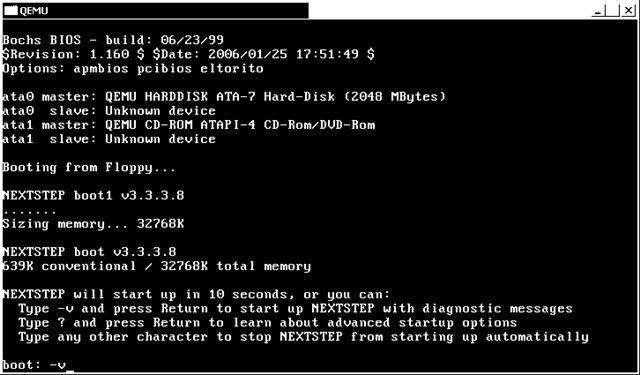
-v (enter)
I like the verbose booting so I can see what is going on.
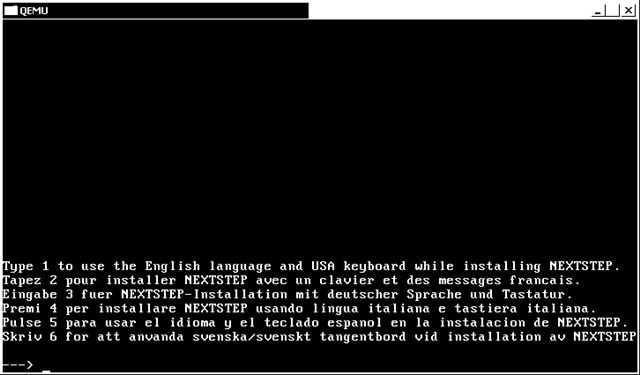
1 (enter)
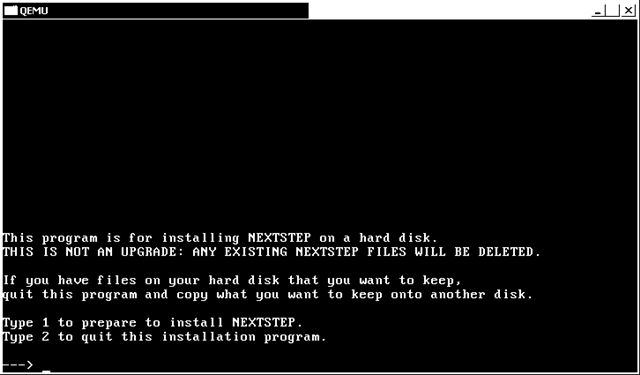
1 (enter)
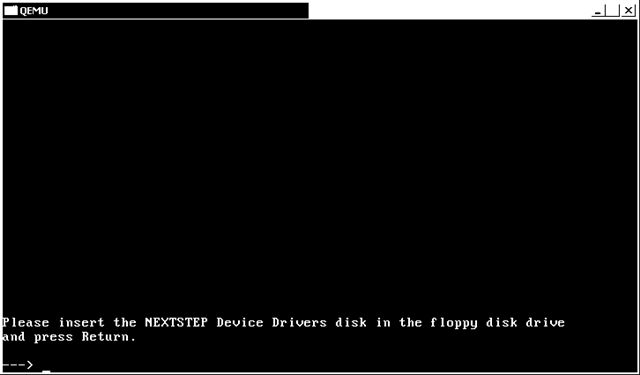
time to copy the core disk onto 'disk' and press enter to continue. From a 2nd cmd.exe do a :
copy core disk
(enter)
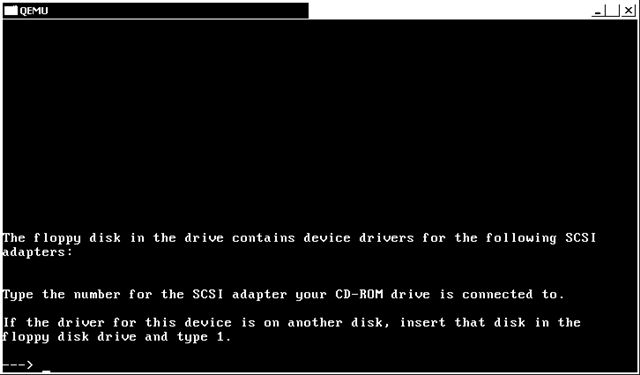
time to copy the beta disk onto the 'disk' and press enter to continue. From the 2nd cmd.exe do a:
copy beta disk
(enter)
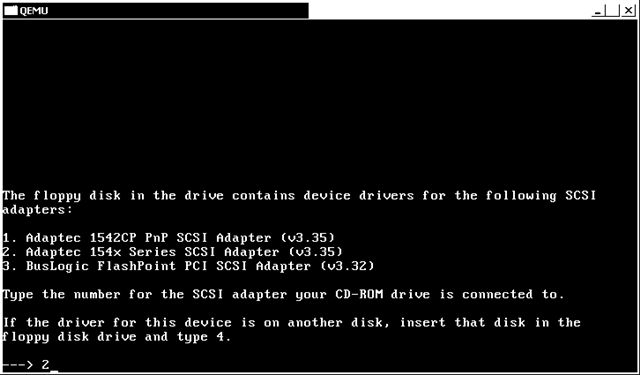
Now this part of the disk is corrupt (its on all the beta 3.3 disks) so we have to select some scsi driver in order to get to the ATAPI. I choose #2
2 (enter)
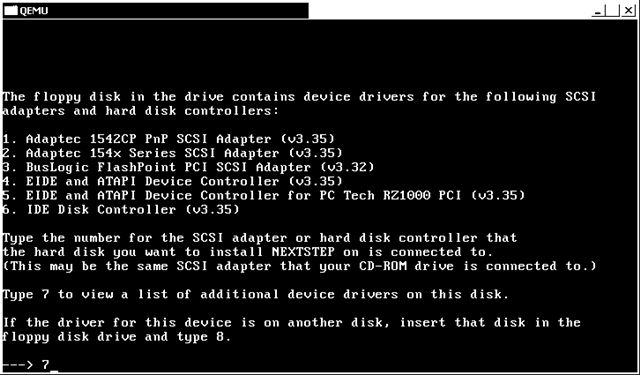
Now we can procede to the ATAPI
7 (enter)
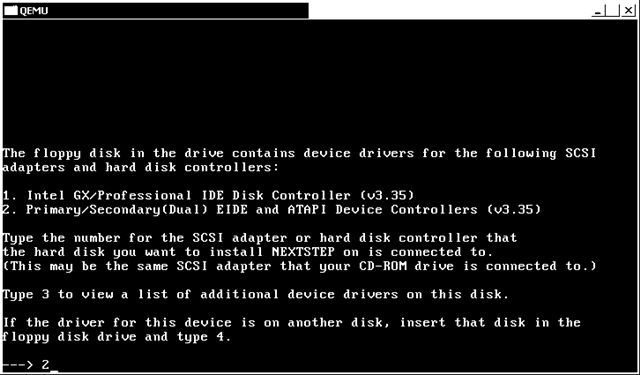
2 (enter)
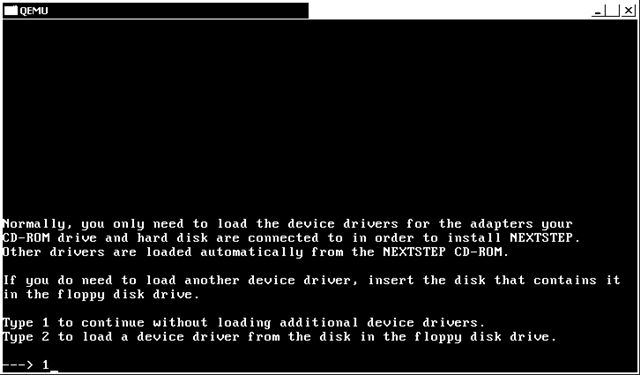
1 (enter)
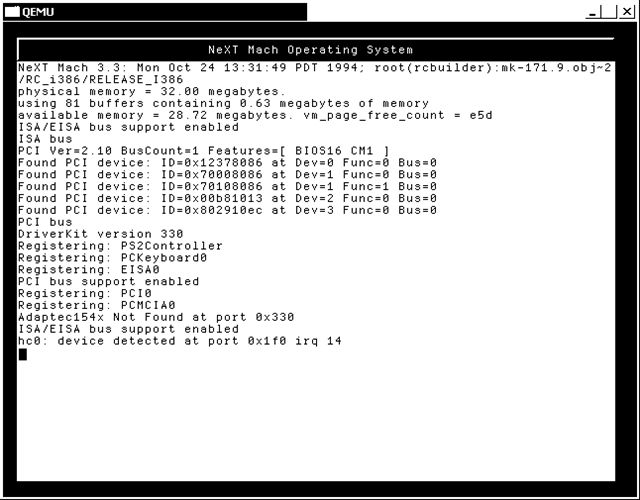
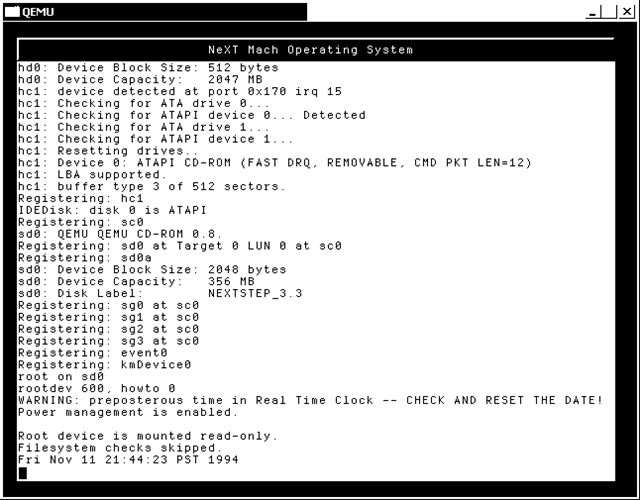
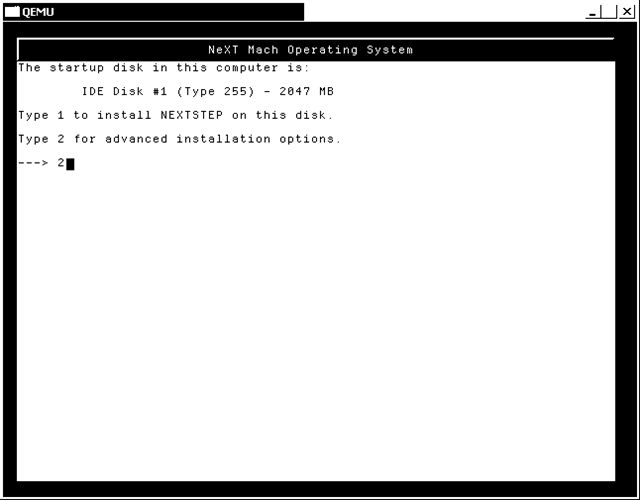
I like the advanced install. So lets go with #2
2 (enter)
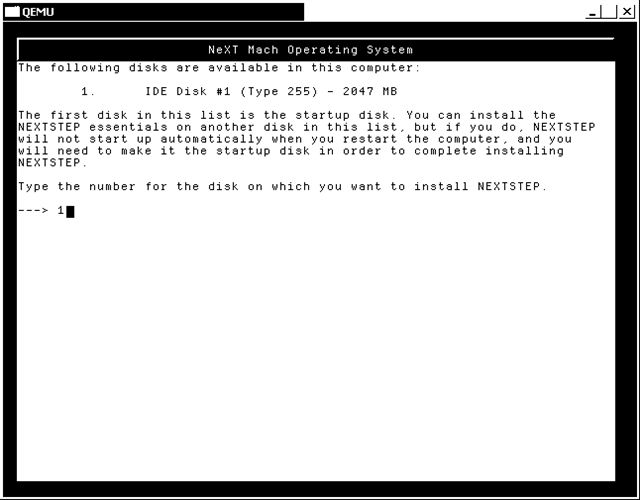
We are going to install on the #1 (and only) disk
1 (enter)
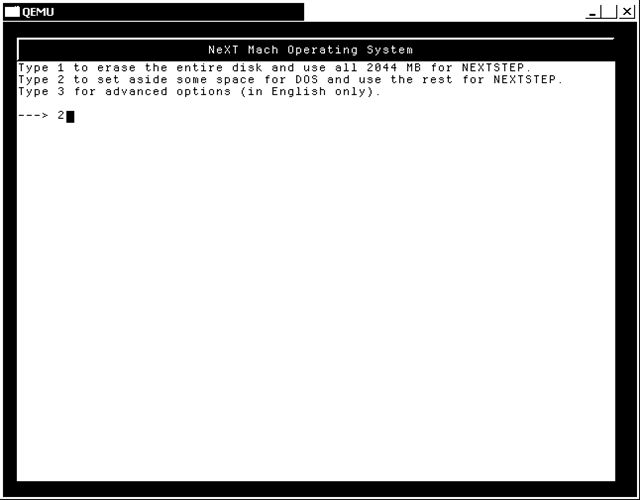
Since the ne2000 currently doesnt work, I want a small partition to copy files on & off the vm.
2 (enter)
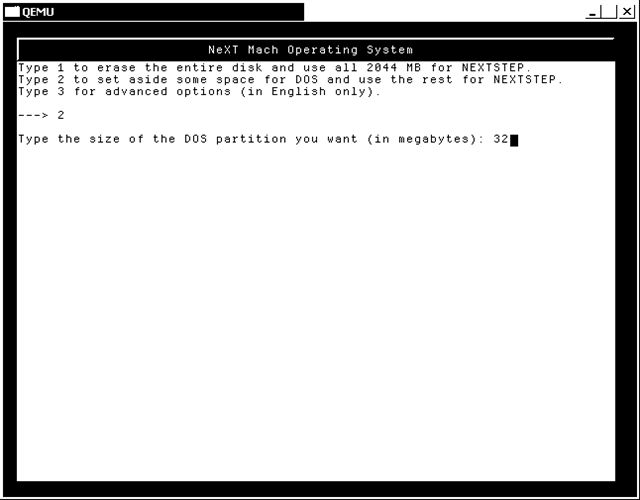
Lets go with 32 megabytes
32 (enter)
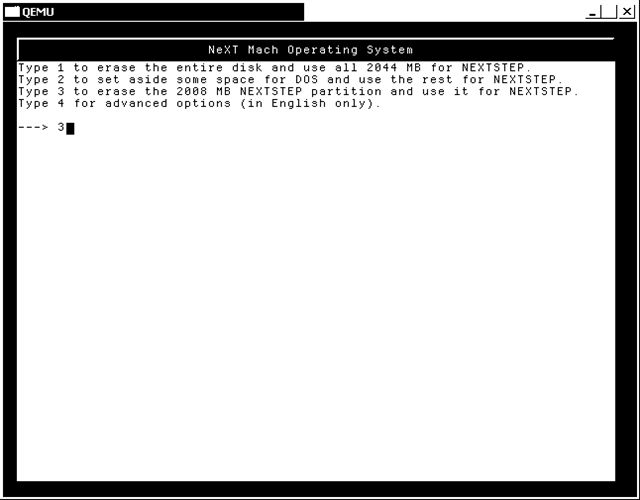
Ok looks good!
3 (enter)
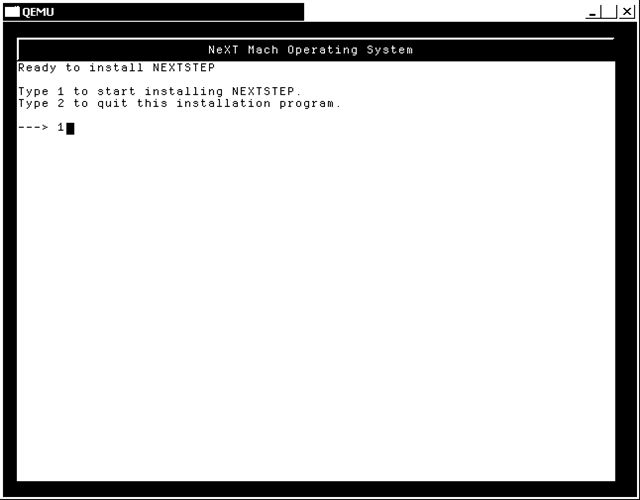
1 (enter)
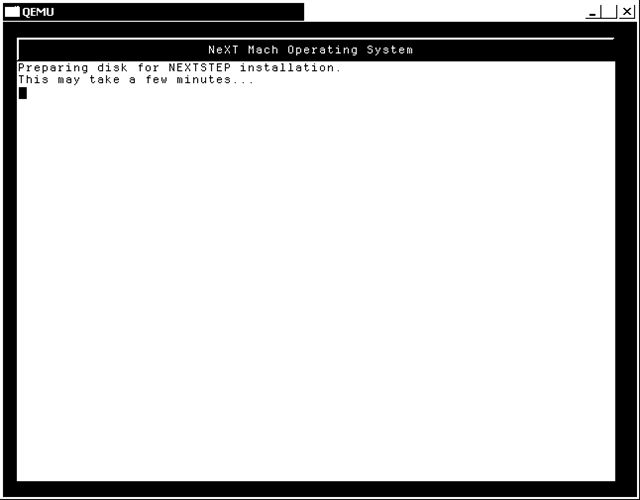
Now the disk is being partitioned & formatted. This could take a minute.
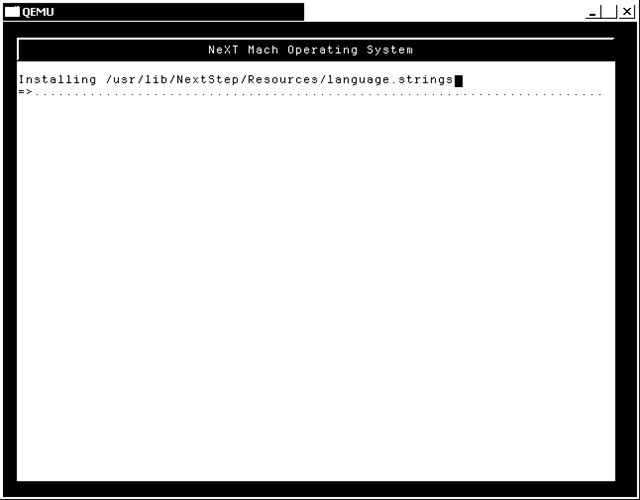
files are being copied.
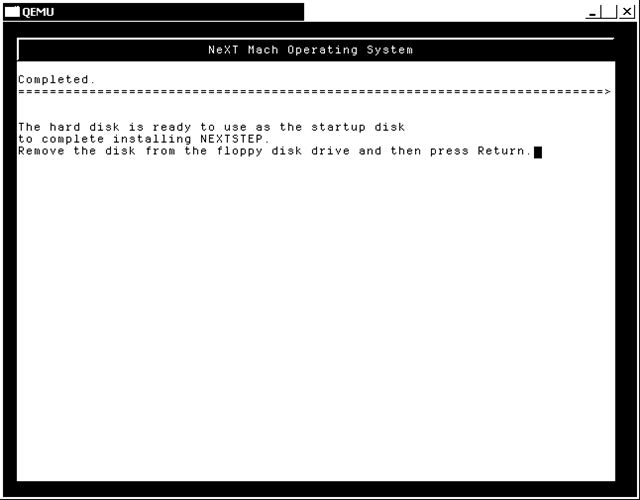
Ok we are done here. Press enter
(enter)
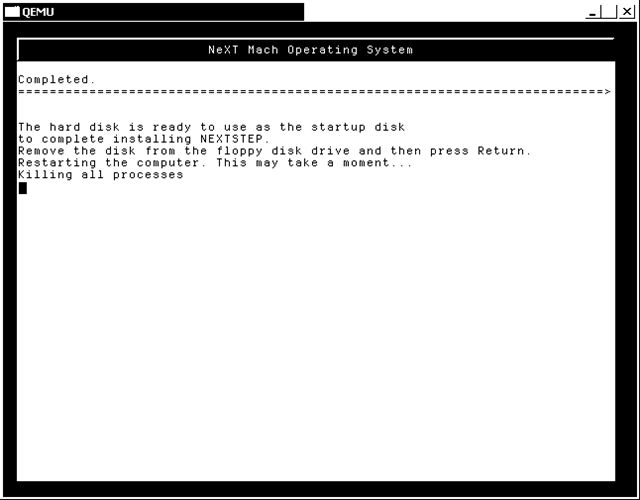
Now at this point you can kill the emulator. For the sake of being 'easy' lets copy the core file back ontop of the 'disk'
Now we re-launch qemu as follows:
C:\install\nextstep>qemu.exe -L . -m 32 -soundhw sb16 -hda ns33.qcow -cdrom "..\NeXTSTEP 3.3 User (m68k, i386).iso" -fda disk -boot c
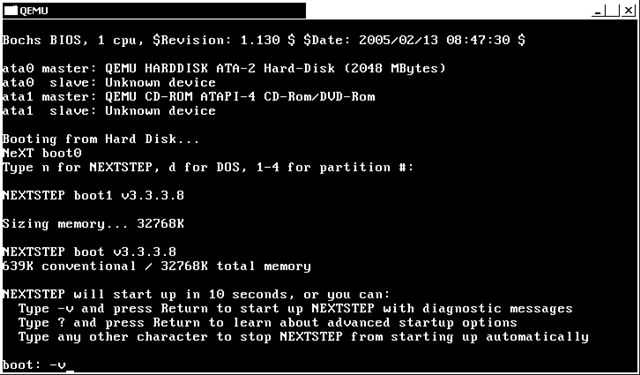
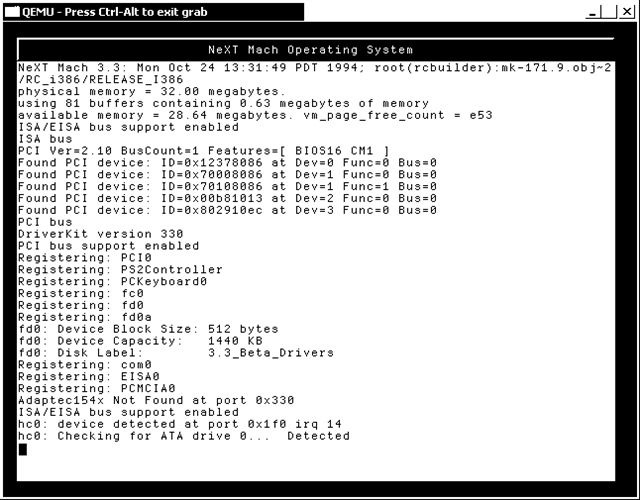
Again lets boot verbose
-v (enter)
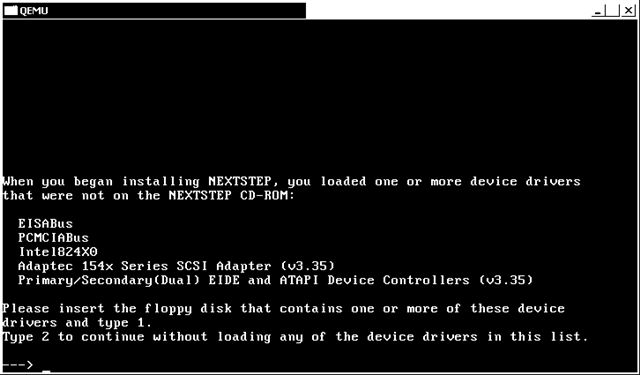
1 (enter)
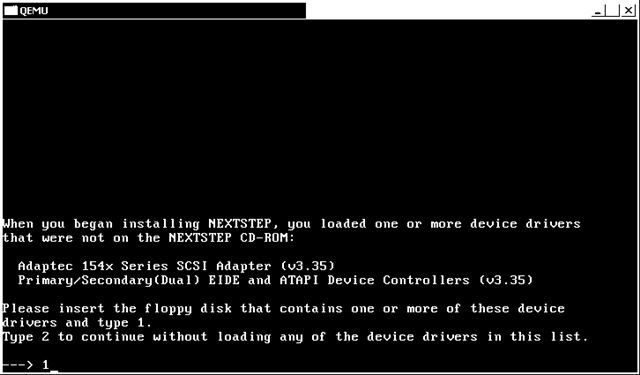
copy the beta onto disk
1 (enter)
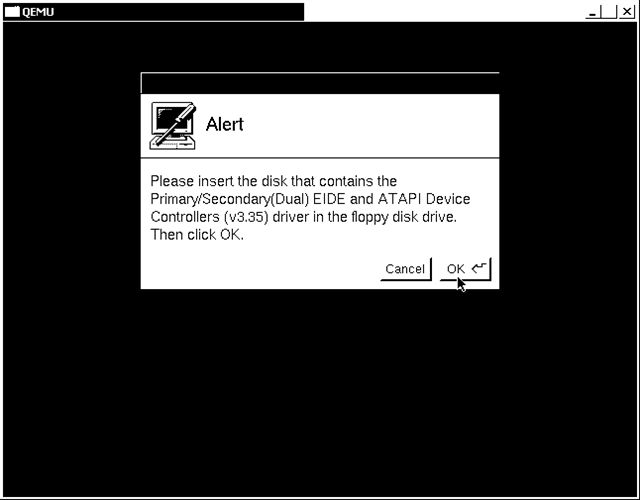
(enter)

copy core onto disk
(enter)

Click on the monitor (from the top). We are going to install the VGA driver for now.

Select the Default VGA Adapter (v3.30) and press the 'Add' button

Now sleect the mouse button (from the top), then select the "PS/2-Style Mouse (v3.30)". Click the remove button.

Select the system icon from the top (the box with the question mark on it), and then choose the "On-Board Parallel Port (v3.30)" and press the remove button.

Now select the audio icon (the speaker icon from the top) and lets add the "Sound Blaster 16 (v3.30)" driver.

You will get a warning about an irq conflict, you can close it. (this is why we changed the sb16.c file from irq 5 (the busmouse) to irq7.

Select IRQ 7.

Now press the Done button.

press enter.
(enter)

At this point NeXTSTEP 3.3 is installed. Pressing enter will sync the disk & reboot the VM. Next you select your keyboard, and you are good to go.
As long as my bandwidth doesnt go to hell, here is a copy of the y2k patches and other stuff on an iso.
http://gunkies.org/w/images/2/2e/NeXTSTEP_install_ns33patches.iso
Hopefully this has helped someone out there!
---edit I'm fixing the images...
to keep this build as 'stable' as possible. I'm going to assume you know how to use
vi. I would recommend trying the 0.8.0 before you try a snapshot. The snapshot may
not work, or it may behave eradicaly. It is worth nothing that my pentium 3 cannot start the GUI portion. I really dont know why. (I did try -O1 for CFLAGS)
Also with regard to the nextstep part
Im using ISO images. I have just had too many problems with the physical media.
download the following to c:\install\qemu-build
from http://www.mingw.org/download.shtml
MinGW-3.1.0-1.exe
MSYS-1.0.9.exe
msysDTK-1.0.1.exe
gcc-core-3.4.5-20060117-1.tar.gz
gcc-g++-3.4.5-20060117-1.tar.gz
w32api-3.6.tar.gz
mingw-runtime-3.9.tar.gz
http://www.libsdl.org/release/SDL-1.2.9.tar.gz
http://www.zlib.net/zlib-1.2.3.tar.gz
http://www.mail-archive.com/[email protected]/msg03326/qemu-0.8.0-openstep-busmouse-2.diff.gz
http://fabrice.bellard.free.fr/qemu/qemu-0.8.0.tar.gz
http://qemu.dad-answers.com/download/qemu/qemu-snapshot-2006-04-15_23.tar.bz2 *
http://download.info.apple.com/Apple_Support_Area/Apple_Software_Updates/MultiCountry/Enterprise/nextstep/floppyimages/3.3_Beta_Drivers.floppyimage
http://download.info.apple.com/Apple_Support_Area/Apple_Software_Updates/MultiCountry/Enterprise/nextstep/floppyimages/3.3_Boot_Disk.floppyimage
http://download.info.apple.com/Apple_Support_Area/Apple_Software_Updates/MultiCountry/Enterprise/nextstep/floppyimages/3.3_Core_Drivers.floppyimage
Install MinGW - default options
install msys - defualt options
-----8<-----8<-----8<-----8<-----8<
Do you wish to continue with the post install? [yn ] y
Do you have MinGW installed? [yn ] y
Please answer the following in the form of c:/foo/bar.
Where is your MinGW installation? c:/mingw
-----8<-----8<-----8<-----8<-----8<
install msysDTK - default options
Start -> run -> mingw -> msys -> msys
cd /mingw
tar -zxvf /c/install/qemu-build/gcc-core-3.4.5-20060117-1.tar.gz
tar -zxvf /c/install/qemu-build/gcc-g++-3.4.5-20060117-1.tar.gz
tar -zxvf /c/install/qemu-build/w32api-3.6.tar.gz
tar -zxvf /c/install/qemu-build/mingw-runtime-3.9.tar.gz
gcc -v should return:
Reading specs from c:/mingw/bin/../lib/gcc/mingw32/3.4.5/specs
Configured with: ../gcc-3.4.5/configure --with-gcc --with-gnu-ld --with-gnu-as
--host=mingw32 --target=mingw32 --prefix=/mingw --enable-threads --disable-nls
--enable-languages=c,c++,f77,ada,objc,java --disable-win32-registry
--disable-shared --enable-sjlj-exceptions --enable-libgcj --disable-java-awt
--without-x --enable-java-gc=boehm --disable-libgcj-debug --enable-interpreter
--enable-hash-synchronization --enable-libstdcxx-debug
Thread model: win32
gcc version 3.4.5 (mingw special)
cd /
mkdir -p /usr/src
cd /usr/src
tar -zxvf /c/install/qemu-build/SDL-1.2.9.tar.gz
cd SDL-1.2.9
./configure
make
make install
cd /usr/src
tar -zxvf /c/install/qemu-build/zlib-1.2.3.tar.gz
./configure
make
make install
Then to compensate for qemu's configure
cd /mingw/include
ln -s /usr/local/include/zconf.h .
ln -s /usr/local/include/zlib.h .
ln -s /usr/local/include/SDL .
cd /mingw/lib
ln -s /usr/local/lib/libSDL.a .
ln -s /usr/local/lib/libz.a .
cd /bin
ln -s true.exe texi2html.exe
ln -s true.exe pod2man.exe
SNAPSHOT NOTES
===============
Remember the qemu qemu-snapshot-2006-04-15_23.tar.bz2 will be whatever todays date is...!
cd /usr/src
bzip2 -dc /c/install/qemu-build/qemu-snapshot-2006-04-15_23.tar.bz2 | tar -xvf -
cd qemu-snapshot-2006-04-15_23
Ok now we are going to 'hack' a bunch of stuff here. 1st we want the easy one, which is the SoundBlaster 16.
We want it to use irq 7.
vi hw/sb16.c
/0x220
now we want to chagne the line from
} conf = {5, 4, 5, 1, 5, 0x220};
to
} conf = {5, 4, 7, 1, 5, 0x220};
Ok now time to run the patch, I know it'll fail, but dont worry, its not that hard to fix.
gzip -dc /c/install/qemu-build/qemu-0.8.0-openstep-busmouse-2.diff.gz | patch -p1
vi hw/ps2.c
comment out the qemu_add_mouse_event_handler line.
vi hw/busmouse.c
qemu_add_mouse_event_handler(busmouse_event,s);
change that line to:
qemu_add_mouse_event_handler(busmouse_event,s,0);
./configure
make
qemu-0.8.0 NOTES
===============
cd /usr/src
tar -zxvf /c/install/qemu-build/qemu-0.8.0.tar.gz
cd qemu-0.8.0
gzip -dc /c/install/qemu-build/qemu-0.8.0-openstep-busmouse-2.diff.gz | patch -p1
Ok now we are going to 'hack' the sound card here. 1st we want the easy one, which is the SoundBlaster 16.
We want it to use irq 7.
vi hw/sb16.c
/0x220
now we want to chagne the line from
} conf = {5, 4, 5, 1, 5, 0x220};
to
} conf = {5, 4, 7, 1, 5, 0x220};
./configure
make
If you had any issues building qemu you can use the binary here:
http://gunkies.org/w/images/2/2e/NeXTSTEP_install_qemu-busmouse-win32.zip
Ok now lets start with nextstep. Im going to populate a standalone copy of qemu
mkdir /c/install/nextstep
cp i386-softmmu/qemu /c/install/nextstep
cp /usr/local/bin/SDL.dll /c/install/nextstep
cp pc-bios/bios.bin /c/install/nextstep
cp pc-bios/vgabios-cirrus.bin /c/install/nextstep
Lets create the 2 gig disk image..
qemu-img create -f qcow /c/install/nextstep/ns33.qcow 2G
Ok now here is the iso's that Im going to use in my c:\install directory:
04/15/2006 09:10 PM 373,764,096 NeXTSTEP 3.3 User (m68k, i386).iso
04/15/2006 10:04 PM 1,474,560 3.3_Beta_Drivers.floppyimage
04/15/2006 10:04 PM 1,474,560 3.3_Boot_Disk.floppyimage
04/15/2006 10:04 PM 1,474,560 3.3_Core_Drivers.floppyimage
Ok lets get started! Im using the cmd.exe so I can paste stuff in & out. Also I copy the disk images ontop of 'disk'
because some qemu hosts dont have the ctrl-alt-2 function...
cd \install\nextstep
copy ..\3.3_Beta_Drivers.floppyimage beta
copy ..\3.3_Boot_Disk.floppyimage boot
copy ..\3.3_Core_Drivers.floppyimage core
copy boot disk
C:\install\nextstep>qemu.exe -L . -m 32 -hda ns33.qcow -cdrom "..\NeXTSTEP 3.3 User (m68k, i386).iso" -fda disk -boot a
-v (enter)
I like the verbose booting so I can see what is going on.
1 (enter)
1 (enter)
time to copy the core disk onto 'disk' and press enter to continue. From a 2nd cmd.exe do a :
copy core disk
(enter)
time to copy the beta disk onto the 'disk' and press enter to continue. From the 2nd cmd.exe do a:
copy beta disk
(enter)
Now this part of the disk is corrupt (its on all the beta 3.3 disks) so we have to select some scsi driver in order to get to the ATAPI. I choose #2
2 (enter)
Now we can procede to the ATAPI
7 (enter)
2 (enter)
1 (enter)
I like the advanced install. So lets go with #2
2 (enter)
We are going to install on the #1 (and only) disk
1 (enter)
Since the ne2000 currently doesnt work, I want a small partition to copy files on & off the vm.
2 (enter)
Lets go with 32 megabytes
32 (enter)
Ok looks good!
3 (enter)
1 (enter)
Now the disk is being partitioned & formatted. This could take a minute.
files are being copied.
Ok we are done here. Press enter
(enter)
Now at this point you can kill the emulator. For the sake of being 'easy' lets copy the core file back ontop of the 'disk'
Now we re-launch qemu as follows:
C:\install\nextstep>qemu.exe -L . -m 32 -soundhw sb16 -hda ns33.qcow -cdrom "..\NeXTSTEP 3.3 User (m68k, i386).iso" -fda disk -boot c
Again lets boot verbose
-v (enter)
1 (enter)
copy the beta onto disk
1 (enter)
(enter)
copy core onto disk
(enter)
Click on the monitor (from the top). We are going to install the VGA driver for now.
Select the Default VGA Adapter (v3.30) and press the 'Add' button
Now sleect the mouse button (from the top), then select the "PS/2-Style Mouse (v3.30)". Click the remove button.
Select the system icon from the top (the box with the question mark on it), and then choose the "On-Board Parallel Port (v3.30)" and press the remove button.
Now select the audio icon (the speaker icon from the top) and lets add the "Sound Blaster 16 (v3.30)" driver.
You will get a warning about an irq conflict, you can close it. (this is why we changed the sb16.c file from irq 5 (the busmouse) to irq7.
Select IRQ 7.
Now press the Done button.
press enter.
(enter)
At this point NeXTSTEP 3.3 is installed. Pressing enter will sync the disk & reboot the VM. Next you select your keyboard, and you are good to go.
As long as my bandwidth doesnt go to hell, here is a copy of the y2k patches and other stuff on an iso.
http://gunkies.org/w/images/2/2e/NeXTSTEP_install_ns33patches.iso
Hopefully this has helped someone out there!
---edit I'm fixing the images...
Title: Installing Nextstep 3.3 in qemu on Windows XP
Post by: nuss on April 27, 2006, 04:33:20 AM
Post by: nuss on April 27, 2006, 04:33:20 AM
Thank you very much for this detailed instructions and informations.
I now have OS42 up and running with 800x600 graphics and sound on Qemu
:D
It installed quite similar to your NS3.3 instructions on my Linux Box with Qemu 0.8.0.
Greetings
-nuss
I now have OS42 up and running with 800x600 graphics and sound on Qemu
:D
It installed quite similar to your NS3.3 instructions on my Linux Box with Qemu 0.8.0.
Greetings
-nuss
Title: Color?
Post by: Boroda on January 14, 2007, 03:32:22 PM
Post by: Boroda on January 14, 2007, 03:32:22 PM
Thank you very much for such impressive instruction.
I'm interested in emulators and in old OS.
So could you please give an advise how to use drivers on your iso to make color 1024x768 screen? Is it possible.
You've mentioned somewhere, that there is a patch for qemu-0.8.2, coluld you provide a link?
Thank you in advance!
I'm interested in emulators and in old OS.
So could you please give an advise how to use drivers on your iso to make color 1024x768 screen? Is it possible.
You've mentioned somewhere, that there is a patch for qemu-0.8.2, coluld you provide a link?
Thank you in advance!
Title: Installing Nextstep 3.3 in qemu on Windows XP
Post by: Boroda on January 15, 2007, 02:50:53 PM
Post by: Boroda on January 15, 2007, 02:50:53 PM
Seems that there is no corresponding driver for Cirrus CL-GD5446 under NextStep.
There is, however, OpenStep version of this driver
http://docs.info.apple.com/article.html?artnum=72229
wich could be also downloaded from here:
http://apple.doit.wisc.edu/mirrors/Apple_Software_Updates/MultiCountry/Enterprise/openstep/drivers/released/
But it is very limited in color and resolution due to the memory supported by the driver:
The GD5436 & GD5446 do not support 32 bit color modes. Only 8 & 16 bit modes are available for adapters based on these chips.
The VirtualPC installation has more success, thanks to S3 Dirver. But QEMU variant is faster.
There is, however, OpenStep version of this driver
http://docs.info.apple.com/article.html?artnum=72229
wich could be also downloaded from here:
http://apple.doit.wisc.edu/mirrors/Apple_Software_Updates/MultiCountry/Enterprise/openstep/drivers/released/
But it is very limited in color and resolution due to the memory supported by the driver:
The GD5436 & GD5446 do not support 32 bit color modes. Only 8 & 16 bit modes are available for adapters based on these chips.
The VirtualPC installation has more success, thanks to S3 Dirver. But QEMU variant is faster.
Title: it's too bad, isn't it?
Post by: neozeed on January 16, 2007, 06:52:29 PM
Post by: neozeed on January 16, 2007, 06:52:29 PM
So close. But I love the speed of qemu over virtual pc.
Title: Rhapsody Dr2
Post by: Boroda on January 25, 2007, 01:25:14 AM
Post by: Boroda on January 25, 2007, 01:25:14 AM
I've tried to install Rhapsody DR2 on QEMU, but encounter strange mouse behavior. Left click cause menu appearense -- so I was unable to make configuration while install.
Title: Installing Nextstep 3.3 in qemu on Windows XP
Post by: itomato on February 10, 2007, 10:19:52 PM
Post by: itomato on February 10, 2007, 10:19:52 PM
I'm trying to install Openstep 4.2 under qemu on Ubuntu Feisty herd 3 (latest test version). That may be my problem, however, I'm wondering why you specifically compile in support for bus mice in your tutorial.
I tried to patch version 0.9.0 last night, and after getting and resolving complaints about my GCC version (4 vs 3), I still don't have a patched version to test.
Qemu emulates a PS/2 mouse by default, and this should work in NeXTSTEP. I know it does with Openstep. Is it because of qemu?
I am unable to get the mouse pointer to move, even by using the mouse_move command from the qemu monitor. All I need to do is click some buttons!
Any ideas?
I tried to patch version 0.9.0 last night, and after getting and resolving complaints about my GCC version (4 vs 3), I still don't have a patched version to test.
Qemu emulates a PS/2 mouse by default, and this should work in NeXTSTEP. I know it does with Openstep. Is it because of qemu?
I am unable to get the mouse pointer to move, even by using the mouse_move command from the qemu monitor. All I need to do is click some buttons!
Any ideas?
Title: Installing Nextstep 3.3 in qemu on Windows XP
Post by: cuby on February 11, 2007, 12:50:38 PM
Post by: cuby on February 11, 2007, 12:50:38 PM
Quote from: "itomato"I tried to patch version 0.9.0 last night, and after getting and resolving complaints about my GCC version (4 vs 3), I still don't have a patched version to test.
I'll try and see if I can find the problem. qemu 0.9.0 is quite new, so maybe some internals have changed.
QuoteQemu emulates a PS/2 mouse by default, and this should work in NeXTSTEP. I know it does with Openstep. Is it because of qemu?
It's a problem of Openstep's ps/2 mouse driver. The driver also causes problems with vmware, virtual pc and several real ps/2 mice. A patched driver created from the Rhapsody kernel sources would be even better - but I don't really know where the problem lies...
Title: well..
Post by: neozeed on February 11, 2007, 09:51:58 PM
Post by: neozeed on February 11, 2007, 09:51:58 PM
I can't promise much, but I got a new laptop running vista. From what I've heard the mingw toolchain doesnt work on vista. If it does I'll take a stab at the busmouse patches... no promises though.
Has anyone tried virtual pc 2007??
I'm almost guessing it doesnt work.
Has anyone tried virtual pc 2007??
I'm almost guessing it doesnt work.
Title: Installing Nextstep 3.3 in qemu on Windows XP
Post by: mgtremaine on March 23, 2007, 10:33:14 AM
Post by: mgtremaine on March 23, 2007, 10:33:14 AM
I can confirm that the busmouse patch works for 0.90 with a few small changes.
First the add_mouse_event_handles has an extra argument. It should read like so.
qemu_add_mouse_event_handler(busmouse_event, s, 0, "QEMU Bus Mouse");
Second the Makefile is different I had to edit the Makefile.target.
Otherwise I think that was all I did. There is a little gotcha when compiling that probably will not get most people but you can not use -march=pentium3 as a CFLAG or CXXFLAG qemu does not handle it well you want something like "-O2 -march=i486 -mtune=i686 -pipe"
-Mike
First the add_mouse_event_handles has an extra argument. It should read like so.
qemu_add_mouse_event_handler(busmouse_event, s, 0, "QEMU Bus Mouse");
Second the Makefile is different I had to edit the Makefile.target.
Otherwise I think that was all I did. There is a little gotcha when compiling that probably will not get most people but you can not use -march=pentium3 as a CFLAG or CXXFLAG qemu does not handle it well you want something like "-O2 -march=i486 -mtune=i686 -pipe"
-Mike
Title: Installing Nextstep 3.3 in qemu on Windows XP
Post by: cjbriare on July 09, 2007, 03:00:48 PM
Post by: cjbriare on July 09, 2007, 03:00:48 PM
:?
I tried VMWare Workstation 5,
it worked but the mouse gets very screwed up after a minute of booting NeXTSTEP. And when i try Virtual PC 2007, it gets a "timeout error"
Virtual PC 2004 did the same.
P.s: I use Q, which is a mac version of QEMU with a GUI,
It just hangs after the NeXT Mach install screen is done.
How can i fix this?
Thanks.
(NeXT=Awesome!)
I tried VMWare Workstation 5,
it worked but the mouse gets very screwed up after a minute of booting NeXTSTEP. And when i try Virtual PC 2007, it gets a "timeout error"
Virtual PC 2004 did the same.
P.s: I use Q, which is a mac version of QEMU with a GUI,
It just hangs after the NeXT Mach install screen is done.
How can i fix this?
Thanks.
(NeXT=Awesome!)
Title: Installing Nextstep 3.3 in qemu on Windows XP
Post by: Morgon on July 09, 2007, 05:33:11 PM
Post by: Morgon on July 09, 2007, 05:33:11 PM
Quote from: "cjbriare":?
I tried VMWare Workstation 5,
it worked but the mouse gets very screwed up after a minute of booting NeXTSTEP.
Install the mouse driver from my site http://mitglied.lycos.de/Morgon_de/ and your mouse should work well.
After installing the driver make sure to enter the correct screen resolution you use in the mouse drivers settings or your mouse will be limited to the upper left 640x480 corner of the screen. When using the interface in Configure.app ensure that you leave each of the fields either by tab or by return or the value entered in that field will not get used.
There is driver for the VM network interface on my site too, as the AMD driver isn't working for VMWare avove version 4.5.2.
Greetings,
Morgon
PS: there are several other threads about installing NeXTStep and OpenStep in VMWare in this forum :-)
Title: Installing Nextstep 3.3 in qemu on Windows XP
Post by: neozeed on May 26, 2010, 04:17:02 AM
Post by: neozeed on May 26, 2010, 04:17:02 AM
I've been fixing this up to point to a server with images.... since I don't own vaxenrule.com anymore...
But if anyone wants to feel free to edit up http://gunkies.org/wiki/NeXTSTEP
But if anyone wants to feel free to edit up http://gunkies.org/wiki/NeXTSTEP