Title: Have my new drive in, System still hangs - need help :(
Post by: rob-catron on July 18, 2009, 05:47:44 PM
Post by: rob-catron on July 18, 2009, 05:47:44 PM
Hi all
I did receive my drive in today from Black Hole. Unfortunately, it appears that my drive may not have been my problem in the first place, as my boot still hangs at the same point.
It gets to the ROM Monitor screen and all the way to the message that reads:
IP protocol enabled for interface en0, type "10MB Ethernet"
I can hit command~ and get the "Restart or power off" prompt, but other than that - nothing.
Any thoughts? I received a 4GB Seagate drive.
Thank you
I did receive my drive in today from Black Hole. Unfortunately, it appears that my drive may not have been my problem in the first place, as my boot still hangs at the same point.
It gets to the ROM Monitor screen and all the way to the message that reads:
IP protocol enabled for interface en0, type "10MB Ethernet"
I can hit command~ and get the "Restart or power off" prompt, but other than that - nothing.
Any thoughts? I received a 4GB Seagate drive.
Thank you
Title: Update on system problems after phone conversation with Rob
Post by: rob-catron on July 18, 2009, 08:58:58 PM
Post by: rob-catron on July 18, 2009, 08:58:58 PM
Ok, I spent some nice time on the phone with Rob tonight @ Blackhole and I've stumped him with this one.
Basically I sent him my 2GB drive to have a clean format install of the OS/Apps, etc and ordered a 4GB from him. He had both working and tested fine.
As I mentioned in my previous post, I can get the system to boot up to a certain point (see photo for screen shot) with either drive. Rob suggested that I post to the forum to see if anyone had any thoughts.
I am running BIOS v.70 which Rob says he is not familiar with (it is an older one he says). It also appears to be a turbo board in a Color Case - not sure if that was just a mismatched case top, or some type of upgrade job. He thinks that it is somehow network related - perhaps the University had customized the bios in some way for security reasons?
Here's a link to the screen shot:
http://kyauctionman.com/biosscreen.JPG
We removed the battery to reset the BIOS, then change it back to boot to the drive. That didn't help. I have tried booting with a cable inserted and removed from the ethernet port, but there was no difference.
Thanks again in advance for any help.
Rob[/url]
Basically I sent him my 2GB drive to have a clean format install of the OS/Apps, etc and ordered a 4GB from him. He had both working and tested fine.
As I mentioned in my previous post, I can get the system to boot up to a certain point (see photo for screen shot) with either drive. Rob suggested that I post to the forum to see if anyone had any thoughts.
I am running BIOS v.70 which Rob says he is not familiar with (it is an older one he says). It also appears to be a turbo board in a Color Case - not sure if that was just a mismatched case top, or some type of upgrade job. He thinks that it is somehow network related - perhaps the University had customized the bios in some way for security reasons?
Here's a link to the screen shot:
http://kyauctionman.com/biosscreen.JPG

We removed the battery to reset the BIOS, then change it back to boot to the drive. That didn't help. I have tried booting with a cable inserted and removed from the ethernet port, but there was no difference.
Thanks again in advance for any help.
Rob[/url]
Title: Hmmm..May have figured it out
Post by: rob-catron on July 18, 2009, 09:13:54 PM
Post by: rob-catron on July 18, 2009, 09:13:54 PM
I just poured through the forums searching for other's bsd-s results and what was printed on the screen.
It looks like that the next line that normally posts after the bit about:
IP protocol enabled for interface en0, type "10MB Ethernet"
is dsp0 at 0x2008000
If I go back to what the system test told me was bad (in my other post on this forum) - the error e2 - could be that the chip is bad (isn't the DSP / DMA the same thing?)
So, I am thinking something on the board is bad (the DSP chip probably)
It looks like that the next line that normally posts after the bit about:
IP protocol enabled for interface en0, type "10MB Ethernet"
is dsp0 at 0x2008000
If I go back to what the system test told me was bad (in my other post on this forum) - the error e2 - could be that the chip is bad (isn't the DSP / DMA the same thing?)
So, I am thinking something on the board is bad (the DSP chip probably)
Title: Have my new drive in, System still hangs - need help :(
Post by: Ferrari-Dude on July 18, 2009, 09:50:44 PM
Post by: Ferrari-Dude on July 18, 2009, 09:50:44 PM
I'm new to this board but I'm a pretty good troubleshooter of networks and PC hardware, so here is my $.02
If Rob @ BH had your stuff working, logic suggests that the config of your system or the hardware in your system is (or has) going (or gone) bad.
It seems to me that I remember browsing somewhere on this board and saw and FTP directory with some diagnostic utilities provided by a former NeXT employee. If I recall correctly, they were floppy based but don't hold me to that.
I would start by seeing if there is a hardware diag routine that you can run. I'm guessing it would have to be bootable. If all passes, then I would look to the software config.
The other thing you should be willing to rule out is "has anything changed on my network which would cause this box to crap-out.
-Dono
If Rob @ BH had your stuff working, logic suggests that the config of your system or the hardware in your system is (or has) going (or gone) bad.
It seems to me that I remember browsing somewhere on this board and saw and FTP directory with some diagnostic utilities provided by a former NeXT employee. If I recall correctly, they were floppy based but don't hold me to that.
I would start by seeing if there is a hardware diag routine that you can run. I'm guessing it would have to be bootable. If all passes, then I would look to the software config.
The other thing you should be willing to rule out is "has anything changed on my network which would cause this box to crap-out.
-Dono
Title: Have my new drive in, System still hangs - need help :(
Post by: Nitro on July 18, 2009, 09:51:13 PM
Post by: Nitro on July 18, 2009, 09:51:13 PM
Hi Rob,
Can you post a picture of your motherboard? I just want to verify that it's a turbo chipset motherboard, and that someone didn't put a turbo v70 ROM on a non-turbo board.
The v70 ROM is the earliest one that I know of for turbo chipset machines, but it shouldn't be a show-stopper. Can you get into the ROM and issue the "p" command and tell us the output from each setting?
A few more questions. How many main memory slots does your motherboard have? Is there a memory chip in the lone memory slot in the middle of the motherboard?
Can you post a picture of your motherboard? I just want to verify that it's a turbo chipset motherboard, and that someone didn't put a turbo v70 ROM on a non-turbo board.
The v70 ROM is the earliest one that I know of for turbo chipset machines, but it shouldn't be a show-stopper. Can you get into the ROM and issue the "p" command and tell us the output from each setting?
A few more questions. How many main memory slots does your motherboard have? Is there a memory chip in the lone memory slot in the middle of the motherboard?
Title: Have my new drive in, System still hangs - need help :(
Post by: rob-catron on July 19, 2009, 06:47:46 AM
Post by: rob-catron on July 19, 2009, 06:47:46 AM
Quote from: "Nitro"Hi Rob,
Can you post a picture of your motherboard? I just want to verify that it's a turbo chipset motherboard, and that someone didn't put a turbo v70 ROM on a non-turbo board.
The v70 ROM is the earliest one that I know of for turbo chipset machines, but it shouldn't be a show-stopper. Can you get into the ROM and issue the "p" command and tell us the output from each setting?
A few more questions. How many main memory slots does your motherboard have? Is there a memory chip in the lone memory slot in the middle of the motherboard?
Thanks, Nitro Here are some photos:
http://www.kyauctionman.com/nextmb001.JPG

http://www.kyauctionman.com/nextmb002.JPG

http://www.kyauctionman.com/nextmb003.JPG

As you can see, I have 4 sim slots and there is nothing in the center slot.
Here are the outputs when I go through the P command:
boot command: sd?
DRAM tests: yes?
perform power-on system test? yes?
sound out tests: no?
SCSI Tests: no?
loop until keypress: no?
verbose test mode: no?
boot extended diagnostics: no?
serial port A is alternat console: no?
allow any ROM command even if password Protected: no?
allow boot from any devide even if password protected: no?
allow optical drive #0 eject even if password protected: no?
enable parity checking if parity memory is present: no?
So there is not a lot there.
I appreciate any help that you may offer. Like I mentioned, Rob Blessin walked me through some basic things, but he was pretty much stumped on it.
Thanks again
Rob
Title: Have my new drive in, System still hangs - need help :(
Post by: Nitro on July 19, 2009, 10:59:51 AM
Post by: Nitro on July 19, 2009, 10:59:51 AM
I don't see anything unusual from the photos except a missing hard drive mounting bracket. You might want to put something non-conductive under the drive to keep it from grounding out to the mainboard.
Ferrari-Dude brought up a good point about trying the diagnostic programs from NeXT.
http://www.nextcomputers.org/NeXTfiles/Software/Diagnostic_Utilities/
The 68040.tar.gz file looks to be the one to use. I converted the program documentation from postscript to PDF format.
http://www.nextcomputers.org/NeXTfiles/Software/Diagnostic_Utilities/68040_manual.pdf
Hopefully that will flag any problems the board might have. Also, check the BNC network connector for damage. Since it sticks out from the case they sometime have broken or bent pins that could cause problems. Hope this helps.
Ferrari-Dude brought up a good point about trying the diagnostic programs from NeXT.
http://www.nextcomputers.org/NeXTfiles/Software/Diagnostic_Utilities/
The 68040.tar.gz file looks to be the one to use. I converted the program documentation from postscript to PDF format.
http://www.nextcomputers.org/NeXTfiles/Software/Diagnostic_Utilities/68040_manual.pdf
Hopefully that will flag any problems the board might have. Also, check the BNC network connector for damage. Since it sticks out from the case they sometime have broken or bent pins that could cause problems. Hope this helps.
Title: Have my new drive in, System still hangs - need help :(
Post by: rob-catron on July 19, 2009, 02:03:55 PM
Post by: rob-catron on July 19, 2009, 02:03:55 PM
Quote from: "Nitro"The 68040.tar.gz file looks to be the one to use. I converted the program documentation from postscript to PDF format.
http://www.nextcomputers.org/NeXTfiles/Software/Diagnostic_Utilities/68040_manual.pdf
Hopefully that will flag any problems the board might have. Also, check the BNC network connector for damage. Since it sticks out from the case they sometime have broken or bent pins that could cause problems. Hope this helps.
Hmmm, well I downloaded it and put on a 1.44 IBM FAT formatted floppy (right off of my desktop), but when I try to load it at the Next> prompt, I get a series of bad version errors...
Do I need to do anything special with the floppy format?
Title: Have my new drive in, System still hangs - need help :(
Post by: helf on July 20, 2009, 03:24:05 PM
Post by: helf on July 20, 2009, 03:24:05 PM
I haven't looked, but if its supposed to be a bootable utility, you need to use a program like DD or rawrite for windows to copy the floppy image file to the floppy.
rawrite is at http://www.chrysocome.net/rawwrite
selecting the "dvt040" file via rawrite and writing it to a floppy and see what happens.
rawrite is at http://www.chrysocome.net/rawwrite
selecting the "dvt040" file via rawrite and writing it to a floppy and see what happens.
Title: Have my new drive in, System still hangs - need help :(
Post by: rob-catron on July 20, 2009, 05:25:13 PM
Post by: rob-catron on July 20, 2009, 05:25:13 PM
Quote from: "helf"I haven't looked, but if its supposed to be a bootable utility, you need to use a program like DD or rawrite for windows to copy the floppy image file to the floppy.
rawrite is at http://www.chrysocome.net/rawwrite
selecting the "dvt040" file via rawrite and writing it to a floppy and see what happens.
No - I tried that too. Same bad errors. Strange.
Title: Have my new drive in, System still hangs - need help :(
Post by: cubist on July 20, 2009, 06:37:07 PM
Post by: cubist on July 20, 2009, 06:37:07 PM
Quote from: "rob-catron"I don't think the boot rom knows how to read any FAT format. Floppy likely needs to be FFS formatted. You might try net booting the image served on another host.
Hmmm, well I downloaded it and put on a 1.44 IBM FAT formatted floppy (right off of my desktop), but when I try to load it at the Next> prompt, I get a series of bad version errors...
Do I need to do anything special with the floppy format?
First, however, I'll turn up the self-test a little bit enabling more of the monitor options.
Title: Have my new drive in, System still hangs - need help :(
Post by: Nitro on July 26, 2009, 12:21:48 PM
Post by: Nitro on July 26, 2009, 12:21:48 PM
I tried the diagnostic program on my turbo color Slab and it wouldn't run, so it may be for non-turbo machines only. I ran it on a non-turbo Cube a few years ago and it worked fine.
Other than the self-tests that Cubist suggested, I don't know of anything else to try.
Other than the self-tests that Cubist suggested, I don't know of anything else to try.
Title: Have my new drive in, System still hangs - need help :(
Post by: rob-catron on July 26, 2009, 12:45:53 PM
Post by: rob-catron on July 26, 2009, 12:45:53 PM
Quote from: "Nitro"I tried the diagnostic program on my turbo color Slab and it wouldn't run, so it may be for non-turbo machines only. I ran it on a non-turbo Cube a few years ago and it worked fine.
Other than the self-tests that Cubist suggested, I don't know of anything else to try.
Well, rob @ black hole tells me he can get me a turbo mobo for $75. That should surely fix it but i am not sure if I want to keep sinking money into it (in case it will not)
I am thinking about just cutting my losses, but I was really excited about getting it all working.
Thank you all for the help and let me know if you think of anything else.
Rob
Title: Have my new drive in, System still hangs - need help :(
Post by: helf on July 27, 2009, 08:25:03 AM
Post by: helf on July 27, 2009, 08:25:03 AM
$75 is a worthy investment to get a working Turbo, imo. *IF* you can afford to blow that much on an old computer. Sorry that you are having so much trouble with yours. NeXT really are wonderful machines, I've never had any problems with mine.
Title: Have my new drive in, System still hangs - need help :(
Post by: rob-catron on July 27, 2009, 09:31:36 AM
Post by: rob-catron on July 27, 2009, 09:31:36 AM
Quote from: "helf"$75 is a worthy investment to get a working Turbo, imo. *IF* you can afford to blow that much on an old computer. Sorry that you are having so much trouble with yours. NeXT really are wonderful machines, I've never had any problems with mine.
I decided to go ahead and do it. This would HAVE to fix the problem. I couldn't see what else it could be if the MoBo was replaced. Rob assured me it would have the most recent BIOS, etc. Plus, he'll test it prior to shipping to make sure all is well.
Thanks to all, and I'll update everyone once I get the Board installed.
Rob
Title: Have my new drive in, System still hangs - need help :(
Post by: helf on July 27, 2009, 11:21:42 AM
Post by: helf on July 27, 2009, 11:21:42 AM
hm, here is a thought. Did you ever try a *different* 50 pin scsi cable? I've had flaky scsi/ide cables cause bizarre issues on computers before.
Title: Have my new drive in, System still hangs - need help :(
Post by: Ferrari-Dude on July 27, 2009, 09:18:27 PM
Post by: Ferrari-Dude on July 27, 2009, 09:18:27 PM
Quote from: "helf"hm, here is a thought. Did you ever try a *different* 50 pin scsi cable? I've had flaky scsi/ide cables cause bizarre issues on computers before.
That's a good thought. Poor cabling can cause data corruption on the SCSI bus.
For that matter, have you checked the SCSI termination? A bad terminator can have the same effect, since the bus becomes unbalanced.
Title: Ok, mostly working now
Post by: rob-catron on August 10, 2009, 05:24:59 PM
Post by: rob-catron on August 10, 2009, 05:24:59 PM
I received my turbo color board from Rob Blessin and the system comes up. I still get the e2 startup error, and to the best I can tell, no sound.
This has to be either the soundbox or the cable as, like I said, the entire motherboard, BIOS, CPU, everything was tested by Rob prior to shipping.
I am not sure, though if I have the soundbox/cable setup correctly. I have the "Y" section of the cable plugged into the back of the slab, it has one (the short end, I think) that goes to the monitor, then another end (without the different sized pins - just like normal pins) going into the soundbox. I did notice that the cable end that I have plugged into the soundbox only has 10 pins - not sure if that is normal or not. When I plug and unplug that cable, I can hear the speaker power on. Any thoughts on sound?
I also wonder about networking the unit. I have a network cable ran from my router to the slab, and I get the notice during startup to press Control-C to boot without network (not sure the exact wording). What would I need to do to get the network working correctly?
Thanks
Rob
This has to be either the soundbox or the cable as, like I said, the entire motherboard, BIOS, CPU, everything was tested by Rob prior to shipping.
I am not sure, though if I have the soundbox/cable setup correctly. I have the "Y" section of the cable plugged into the back of the slab, it has one (the short end, I think) that goes to the monitor, then another end (without the different sized pins - just like normal pins) going into the soundbox. I did notice that the cable end that I have plugged into the soundbox only has 10 pins - not sure if that is normal or not. When I plug and unplug that cable, I can hear the speaker power on. Any thoughts on sound?
I also wonder about networking the unit. I have a network cable ran from my router to the slab, and I get the notice during startup to press Control-C to boot without network (not sure the exact wording). What would I need to do to get the network working correctly?
Thanks
Rob
Title: Have my new drive in, System still hangs - need help :(
Post by: Nitro on August 10, 2009, 10:09:39 PM
Post by: Nitro on August 10, 2009, 10:09:39 PM
Can you post a picture of how your system is setup? Pictures of the keyboard, and both ends of the Y-cable would be helpful. Here's an old picture of my non-ADB turbo color slab wired to an LCD monitor as an example:
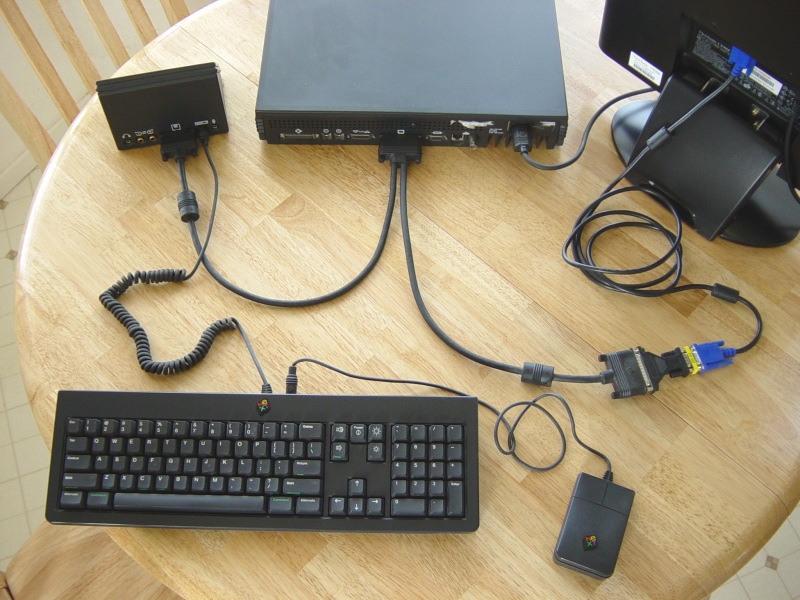
I'm wondering if your soundbox is bad or that you might be using an ADB keyboard with a non-ADB Y-cable.
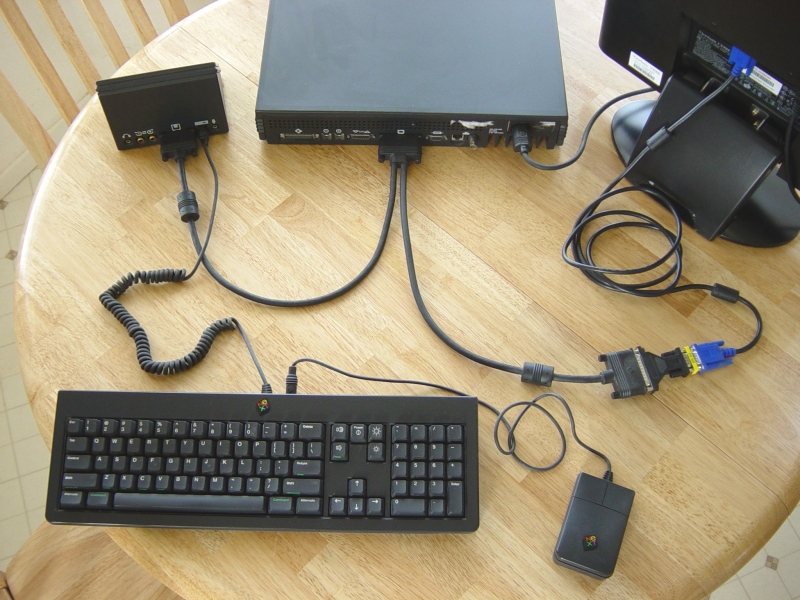
I'm wondering if your soundbox is bad or that you might be using an ADB keyboard with a non-ADB Y-cable.
Title: Re: Ok, mostly working now
Post by: Andreas on August 11, 2009, 01:27:34 AM
Post by: Andreas on August 11, 2009, 01:27:34 AM
Quote from: "rob-catron"I received my turbo color board from Rob Blessin and the system comes up. I still get the e2 startup error, and to the best I can tell, no sound.
Do you have also ordered a hd mounting plate? Maybe the harddrive do some short cuts.
Title: Have my new drive in, System still hangs - need help :(
Post by: rob-catron on August 11, 2009, 05:07:58 AM
Post by: rob-catron on August 11, 2009, 05:07:58 AM
Thank you gentlemen - I will send a photo of my setup.
I do not think it is the hard drive bracket, as it does the same thing when I put the 2GB drive in (which fits in the bracket perfectily as it should). This 4GB unit that Rob sent me is just so thick (but he said he uses these all of the time).
I opened the Sound Box last night. The unit looks perfect inside (Rob told me to look for a worn speaker with a hole in it and to make sure the Mic and speaker are both attached). The Mic works find, I can load the sound app and see the meter graphic move with my voice as I talk). I have pushed all of the chips down to make sure they are seated...no avail. I tried headphones as well, and no sound came through them.
I am starting to think it is the cable, or the statement Nitro made about the ADB keyboard with non-ADB cable may be correct. How can I tell if my keyboard/cable is ADB or non?
I know that the plug of the cable that plugs into the soundbox only has 10 pins - is that normal? The ends that plug into the monitor and slab have the unique larger pins (not sure what you guys call it, the NeXT Proprietary plug ends). Would the cable give the e2 BIOS error, though? I pretty much think it has to be one of the two.
Otherwise, the system feels pretty zippy - much faster than I expected. I have 128MB of RAM and supposedly a fairly fast performing 4GB drive.
Thanks much, guys!
Rob
I do not think it is the hard drive bracket, as it does the same thing when I put the 2GB drive in (which fits in the bracket perfectily as it should). This 4GB unit that Rob sent me is just so thick (but he said he uses these all of the time).
I opened the Sound Box last night. The unit looks perfect inside (Rob told me to look for a worn speaker with a hole in it and to make sure the Mic and speaker are both attached). The Mic works find, I can load the sound app and see the meter graphic move with my voice as I talk). I have pushed all of the chips down to make sure they are seated...no avail. I tried headphones as well, and no sound came through them.
I am starting to think it is the cable, or the statement Nitro made about the ADB keyboard with non-ADB cable may be correct. How can I tell if my keyboard/cable is ADB or non?
I know that the plug of the cable that plugs into the soundbox only has 10 pins - is that normal? The ends that plug into the monitor and slab have the unique larger pins (not sure what you guys call it, the NeXT Proprietary plug ends). Would the cable give the e2 BIOS error, though? I pretty much think it has to be one of the two.
Otherwise, the system feels pretty zippy - much faster than I expected. I have 128MB of RAM and supposedly a fairly fast performing 4GB drive.
Thanks much, guys!
Rob
Title: Have my new drive in, System still hangs - need help :(
Post by: Andreas on August 11, 2009, 05:27:27 AM
Post by: Andreas on August 11, 2009, 05:27:27 AM
Quote from: "rob-catron"This 4GB unit that Rob sent me is just so thick (but he said he uses these all of the time).
I have used the same drive and it fits on the bracket. But its a horrible drive, you should dig out an IBM 4,3 or 9 GB drive and clone the content.
Quote
I am starting to think it is the cable, or the statement Nitro made about the ADB keyboard with non-ADB cable may be correct. How can I tell if my keyboard/cable is ADB or non?
The Y-cable should habe a number beginning with 4, the non-ADB cables have AFAIK a number with 2 in the beginning. If i'm home a can tell you exactly the numbers.
Title: Have my new drive in, System still hangs - need help :(
Post by: rob-catron on August 11, 2009, 05:33:21 AM
Post by: rob-catron on August 11, 2009, 05:33:21 AM
Quote from: "Andreas"
I have used the same drive and it fits on the bracket. But its a horrible drive, you should dig out an IBM 4,3 or 9 GB drive and clone the content.
Hmmmm...Rob didn't tell me that the drive wasn't too good (he said he liked them and they were fast). Would I be better off putting the 2GB ST32107 back in it? He reformatted it and loaded it up with stuff, too. I couldn't get the drive to fit because the back of it (with the SCSI/Power) would interfere with the onboard interface - am I missing something there?
It looks like he put OpenSTEP 4.2 on both drives - is that the best version of the OS to use?
Title: Have my new drive in, System still hangs - need help :(
Post by: rob-catron on August 11, 2009, 06:31:16 AM
Post by: rob-catron on August 11, 2009, 06:31:16 AM
Ok, here are my part numbers for cable: 2286.01 (it looks physically different than the one in the photo above - it only has one barrel shaped piece - whereas the one in your photos has two). One this cable, that part (with the barrel shaped piece) plugs into the monitor. It only has the three large white female type pins inside - there are no prongs in it). The other end that goes into the soundbox has 10 prongs (none of the female style white pins). The side that plugs into the computer has three white female pins and 5 prongs) - at least this is the way I think it connects. When I tried switching the computer, monitor plugs, the video worked but the keyboard did not.
Sound Box Part No = 1974 (model = N4004)
Keyboard = ABP2627894. The sticker on the bottom of the keyboard reads, "Listed Accessory for use with NeXT Monitor model N4000A and NeXT Sound Box model N40004."
My monitor is actually the 17" color unit, N40006, not the N4000A.
Would anything here be a problem?
Sound Box Part No = 1974 (model = N4004)
Keyboard = ABP2627894. The sticker on the bottom of the keyboard reads, "Listed Accessory for use with NeXT Monitor model N4000A and NeXT Sound Box model N40004."
My monitor is actually the 17" color unit, N40006, not the N4000A.
Would anything here be a problem?
Title: Have my new drive in, System still hangs - need help :(
Post by: Andreas on August 11, 2009, 06:59:08 AM
Post by: Andreas on August 11, 2009, 06:59:08 AM
Quote from: "rob-catron"Ok, here are my part numbers for cable: 2286.01
its definitly not the ADB Y-Cable.
Quote
One this cable, that part (with the barrel shaped piece) plugs into the monitor. It only has the three large white female type pins inside - there are no prongs in it). The other end that goes into the soundbox has 10 prongs (none of the female style white pins). The side that plugs into the computer has three white female pins and 5 prongs) - at least this is the way I think it connects. When I tried switching the computer, monitor plugs, the video worked but the keyboard did not.
OK, my english isn't good enough to understand what your cable loooks like other than others, but the part number says, that this cable is only for non-ADB soundboxes
Quote
Keyboard = ABP2627894. The sticker on the bottom of the keyboard reads, "Listed Accessory for use with NeXT Monitor model N4000A and NeXT Sound Box model N40004."
I have no access to my hardware yet, but you can take a look ar these (made with an defective camera) starting point kits and how your keyboard looks like:
http://freenet-homepage.de/a_berger/
Quote
My monitor is actually the 17" color unit, N40006, not the N4000A.
the N4000A is a megapixeldisplay, only for "mono" machines. Your display is right, and also that only the 3 colors are on the plug for the monitor. (sorry for my english)
Title: Have my new drive in, System still hangs - need help :(
Post by: Andreas on August 11, 2009, 07:11:20 AM
Post by: Andreas on August 11, 2009, 07:11:20 AM
Quote from: "rob-catron"
Hmmmm...Rob didn't tell me that the drive wasn't too good (he said he liked them and they were fast).
...and they make a lot of noise and a lot of heat ;-).
Quote
Would I be better off putting the 2GB ST32107 back in it?
No. If sometimes the machine will work proper, you could dig out from eBay an IBM DCAS-34330 or an DNES-309170 with 50 pol. interface, and clone the 4.3 GB hd to these drives. (in an external case)
You could look here, wich hd will work with some kind of work:
http://www.deadstart.net/NeXT/disktab/
after that, and if the new drives will work proper, you can exchange these new drives with the old one. the old one is than an backup for you.
If you set your internal hd to adress 1, you can everytime boot from an external hd if these drive is set to 0 without changing something in the hardwaremonitor.
Quote
He reformatted it and loaded it up with stuff, too. I couldn't get the drive to fit because the back of it (with the SCSI/Power) would interfere with the onboard interface - am I missing something there?
i had get it in, don't know, whats wrong with your drive.
Quote
It looks like he put OpenSTEP 4.2 on both drives - is that the best version of the OS to use?
I prefer NeXTstep 3.3 on black hardware, but OS4.2 isn't wrong.
Title: Have my new drive in, System still hangs - need help :(
Post by: rob-catron on August 11, 2009, 01:21:43 PM
Post by: rob-catron on August 11, 2009, 01:21:43 PM
Quote from: "Andreas"I have no access to my hardware yet, but you can take a look ar these (made with an defective camera) starting point kits and how your keyboard looks like:
http://freenet-homepage.de/a_berger/
Based on those photos, my keyboard appears to be non-ADB, then - it's power button is not green, and it has the two thick rubber feet on the bottom as spacers.
So, it appears that my keyboard/cable is correct. Still I will upload photos tonight.
Title: Have my new drive in, System still hangs - need help :(
Post by: rob-catron on August 11, 2009, 01:24:40 PM
Post by: rob-catron on August 11, 2009, 01:24:40 PM
Quote from: "Andreas"Quote from: "rob-catron"
Hmmmm...Rob didn't tell me that the drive wasn't too good (he said he liked them and they were fast).
...and they make a lot of noise and a lot of heat ;-).
You are correct - it is the LOUDEST, most noisy drive I have ever encountered - it sounds like a jetliner taking off - very high pitched shrill noise.
Title: Have my new drive in, System still hangs - need help :(
Post by: Andreas on August 18, 2009, 10:19:10 AM
Post by: Andreas on August 18, 2009, 10:19:10 AM
Quote from: "rob-catron"Quote from: "Andreas"Quote from: "rob-catron"
Hmmmm...Rob didn't tell me that the drive wasn't too good (he said he liked them and they were fast).
...and they make a lot of noise and a lot of heat ;-).
You are correct - it is the LOUDEST, most noisy drive I have ever encountered - it sounds like a jetliner taking off - very high pitched shrill noise.
BTW, isn't this very expensive for a Turbo build in an non-Turbo case?
http://search.ebay.com/390083258507
Title: Have my new drive in, System still hangs - need help :(
Post by: rob-catron on August 18, 2009, 10:25:05 AM
Post by: rob-catron on August 18, 2009, 10:25:05 AM
Quote from: "Andreas"BTW, isn't this very expensive for a Turbo build in an non-Turbo case?
http://search.ebay.com/390083258507
Hi, Anreas.
I have no idea. I do not have the time (nor space) to try and figure it out anymore, and I have sank a bit too much money into it as is. It needs to find someone that will appreciate it more.
What would you say it is worth? I know the monitor isn't worth anything because the shipping is ridiculous as it weighs over 50 US pounds.
Rob
Title: Have my new drive in, System still hangs - need help :(
Post by: tomaz on August 18, 2009, 05:49:42 PM
Post by: tomaz on August 18, 2009, 05:49:42 PM
Rob Blessin seems to have TurboColor slabs (slab only) listed from time to time for $150.
I'm not sure the monitor is worthless. I don't see original NeXT colour monitors for sale all that often. But yes international shipping on them is outrageously expensive.
I'm not sure the monitor is worthless. I don't see original NeXT colour monitors for sale all that often. But yes international shipping on them is outrageously expensive.