Title: NeXTdimension x 3
Post by: Nitro on August 31, 2009, 09:35:45 PM
Post by: Nitro on August 31, 2009, 09:35:45 PM
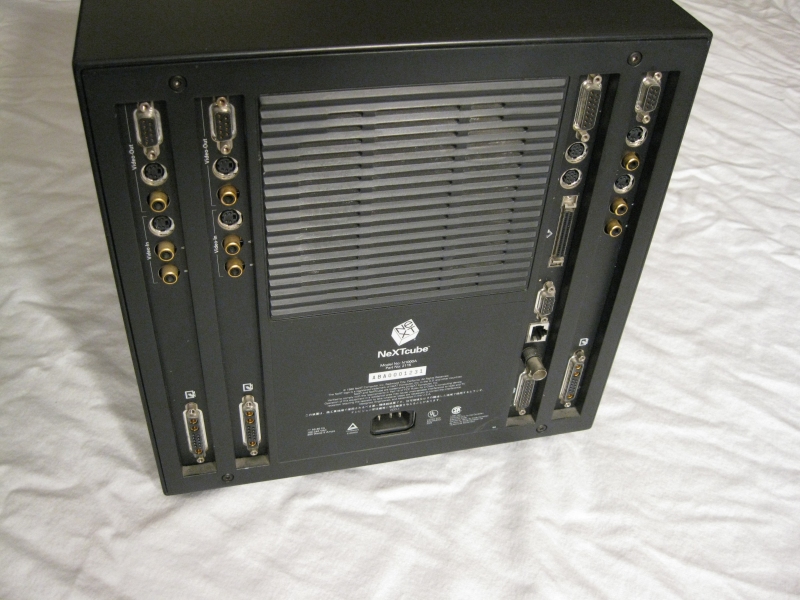
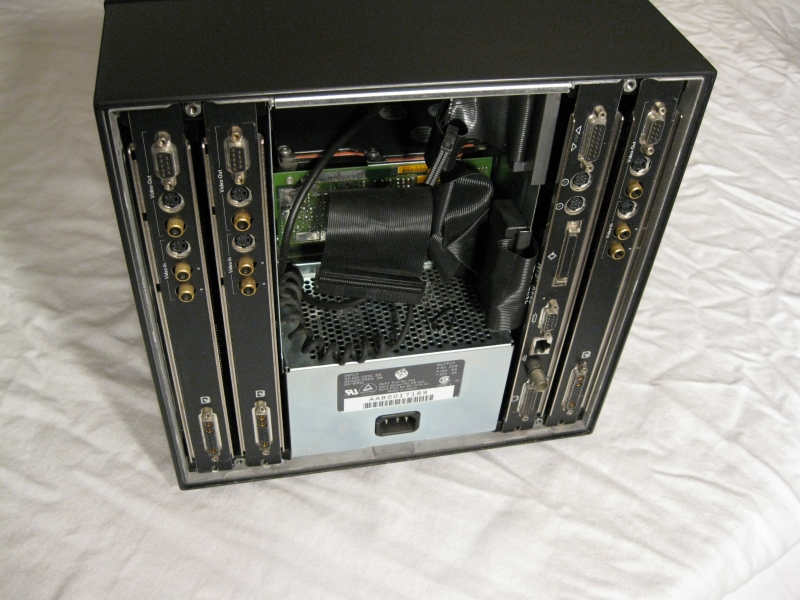
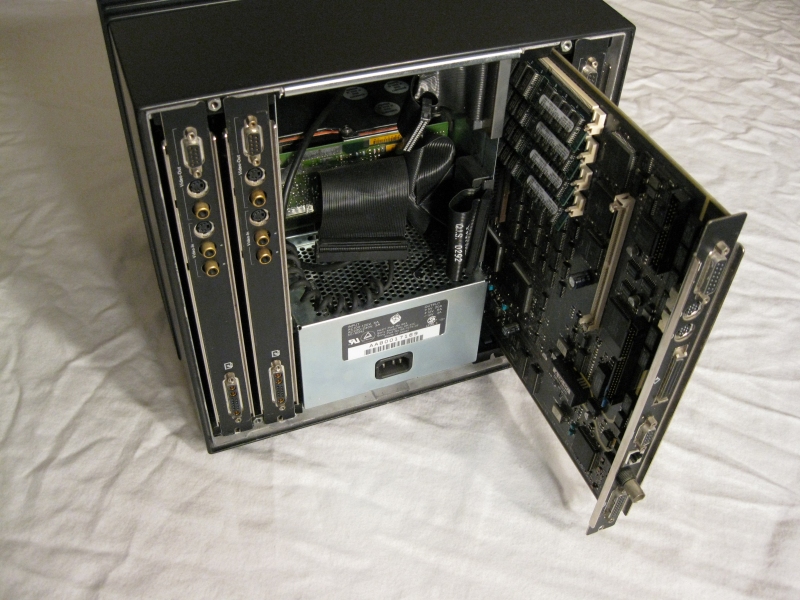
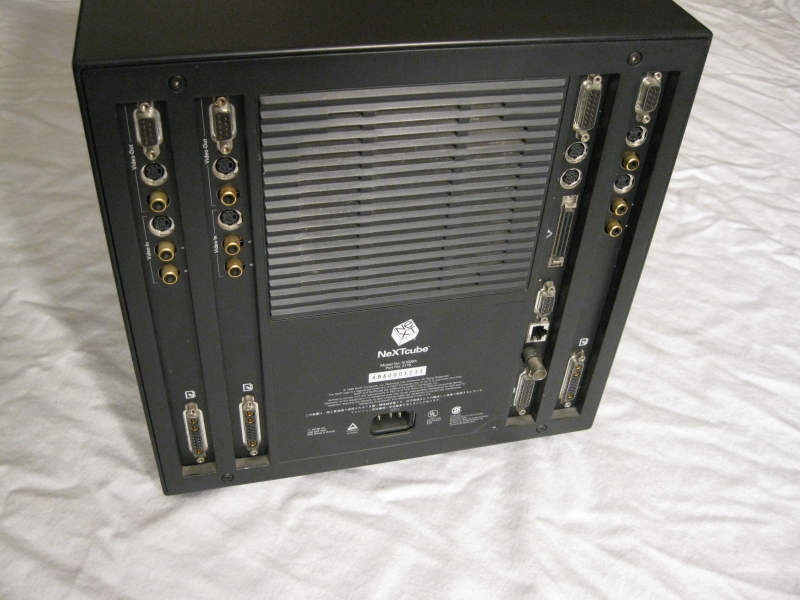
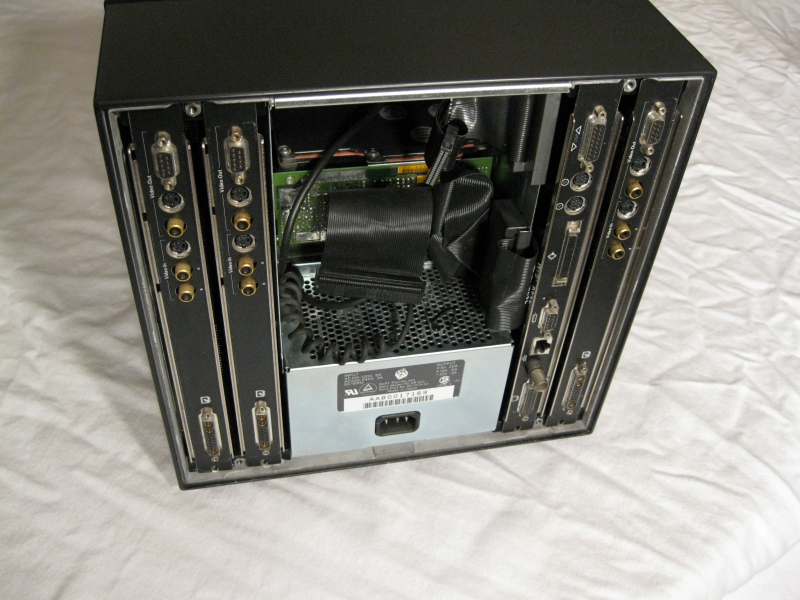
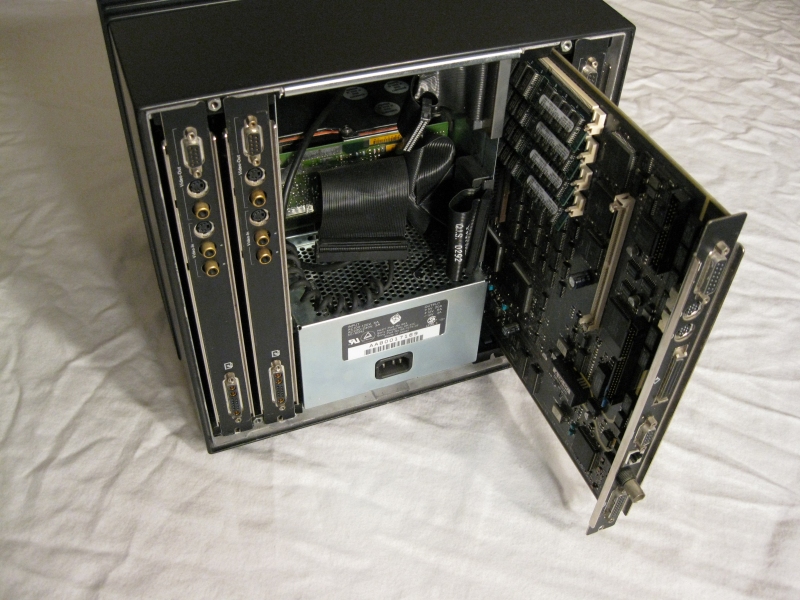
Here's a few pic's of my Turbo Cube with three Dimension boards. I just dug it out of storage. Putting a Dimension board in the far left expansion slot requires low(er) profile memory than the other slots. I can't decide if that's a design flaw or a feature. :mrgreen:
Title: NeXTdimension x 3
Post by: helf on September 01, 2009, 08:15:05 AM
Post by: helf on September 01, 2009, 08:15:05 AM
That is so... pretty... Does it power up fine with all 3 boards in it?
Title: NeXTdimension x 3
Post by: gtnicol on September 01, 2009, 12:40:06 PM
Post by: gtnicol on September 01, 2009, 12:40:06 PM
I have one that has 2 motherboards and 2 dimension boards
Title: NeXTdimension x 3
Post by: helf on September 01, 2009, 12:49:38 PM
Post by: helf on September 01, 2009, 12:49:38 PM
how does that work? does one netboot off the other or is each booting an internally mounted scsi drive?
Title: NeXTdimension x 3
Post by: Nitro on September 02, 2009, 11:26:18 PM
Post by: Nitro on September 02, 2009, 11:26:18 PM
Quote from: "gtnicol"I have one that has 2 motherboards and 2 dimension boards
Pictures! Pictures! :)
Quote from: "helf"That is so... pretty... Does it power up fine with all 3 boards in it?
It worked fine a few years ago, but as you can probably tell from the pictures it has the original full height hard drive, so I hope it'll power up. :?:
Title: NeXTdimension x 3
Post by: pentium on September 03, 2009, 08:13:27 PM
Post by: pentium on September 03, 2009, 08:13:27 PM
You just make me wish I had an ND board of my own.
It would rock to see that all running in a multi-monitor setup.
It would rock to see that all running in a multi-monitor setup.
Title: Re: NeXTdimension x 3
Post by: crimsonRE on October 27, 2009, 10:03:52 PM
Post by: crimsonRE on October 27, 2009, 10:03:52 PM
Quote from: NitroHere's a few pic's of my Turbo Cube with three Dimension boards. I just dug it out of storage. Putting a Dimension board in the far left expansion slot requires low(er) profile memory than the other slots. I can't decide if that's a design flaw or a feature. :mrgreen:
Just dug it out of storage!?! Don't you give it a nice bit of exercise each week? I feel that I have to do that to mine NeXT boxen, as well as my old SGI's (all the way back to the PI's, & PowerSeries biggies). Didn't do it for a couple of my SPARCstations, and now they need some work to bring back to life...
Title: NeXTdimension x 3
Post by: Nitro on October 29, 2009, 05:43:07 AM
Post by: Nitro on October 29, 2009, 05:43:07 AM
I moved recently, and I'll probably be moving again next summer. So, much of my NeXT gear is in storage. I use a NeXT Turbo Color Slab (NEXTSTEP/OPENSTEP) as well as an OPENSTEP/Intel box as my daily drivers. I would love to have this NeXTcube set up permanently, but I can't at this time.
Title: Re: NeXTdimension x 3 Advice please!
Post by: Rob Blessin Black Hole on March 23, 2010, 04:00:45 AM
Post by: Rob Blessin Black Hole on March 23, 2010, 04:00:45 AM
Hello: I am configuring a NeXT Dimension board for a customer currently and saw this post and thought I would try 2 dimension boards , one thing I've noticed in doing a fresh install with just a single board , please correct me if I'm wrong, If I don't have a monitor hooked up and powered on on the dimension board side , it appears the NeXTSTEP 3.3 CD does not install a dimension board driver, I've done a lot of installs in the past and am wondering if it is something I am doing wrong that is causing this, it appears like this install is a go as the monitor lights up and hopefully I'll be able to configure the color monitor like normally through preferences.
Question here is if I add a second and third dimension board , is there a way to configure all 3 of them in preferences , does it simply mean find the target monitor and perhaps it adds them automatically , I may be able to answer my own question ,I'll follow up this post in the next day or so hopefully with photos showing a 3 headed cube , 2 dimension boards and 1 040 board and internal slot CD Rom Drive he he he. Best Regards Rob Blessin 8)
Question here is if I add a second and third dimension board , is there a way to configure all 3 of them in preferences , does it simply mean find the target monitor and perhaps it adds them automatically , I may be able to answer my own question ,I'll follow up this post in the next day or so hopefully with photos showing a 3 headed cube , 2 dimension boards and 1 040 board and internal slot CD Rom Drive he he he. Best Regards Rob Blessin 8)
Quote from: crimsonREQuote from: "Nitro"Here's a few pic's of my Turbo Cube with three Dimension boards. I just dug it out of storage. Putting a Dimension board in the far left expansion slot requires low(er) profile memory than the other slots. I can't decide if that's a design flaw or a feature. :mrgreen:8)
Just dug it out of storage!?! Don't you give it a nice bit of exercise each week? I feel that I have to do that to mine NeXT boxen, as well as my old SGI's (all the way back to the PI's, & PowerSeries biggies). Didn't do it for a couple of my SPARCstations, and now they need some work to bring back to life...
Title: Re: NeXTdimension x 3 Advice please!
Post by: Rob Blessin Black Hole on March 23, 2010, 10:37:52 PM
Post by: Rob Blessin Black Hole on March 23, 2010, 10:37:52 PM
Hello NeXT Community: I think I have answered my own question , it appears the problem is with one of the 2 dimension boards I own having recently sold one of them , I test them before sending them out .
After trying to configure the first one every way spending hours and days of frustration thinking I had botched the installs or was not doing something right , I then got back to the basics , I had trihed everything I could think of a lightbulb finally went off and I thought lets try the second dimension board one and see if it works, it came up right away.
I've discovered this the NeXT dimension driver appears to be installed automatically and remains latent in preferences until you have a fully function dimension board that fully powers up in place. Then you can see it in preferences and easily configure the board what was throwing me off is the board with the problem actually appeared in the boot script when booting bsd -s but I did not see the error message until I checked:
The specific problem of the first board I was using checking usr/adm/messages said ndboard in slot 2 romversion 43 memory controllerstep 64mbytes of dram installed ntsc video then monitor disconnected then power-on self test failure then post failure code 0 failure addr 0x00000000. badbits 0x00000000 this was with both an original NeXT color monitor and the flatpanel, with the other good board in place either single or dual it was followed by NeXT Dimension Server Running (7936) , with the problematic board on its own you don't get that message and my theory is it does not load the dimensionboard driver option in preferences !
I inspected the problematic board and everything looks ok except right at the 13W3 connector where you plug in the monitor, it looks like a little metal fatigue as affected this specific connection and that may be where the problem lies, it may simply need to be resoldered to the board , if anyone has any experience with this particular problem and can shed light on the solution please let us know as I'm sure I'm not the only person this has happened to just trying to help keep all the nexts running! My customer will be happy to receive the working board glad I checked before sending out the non working one.
I was unable to check to see if a triple head cube was easy to configure because of this problem , it looks like with the NeXT dimension server running it did light the 3rd monitor but there was no way to configure it because it was probably over ridden by the bios check. I tried!
Best Regards Rob Blessin :shock:
After trying to configure the first one every way spending hours and days of frustration thinking I had botched the installs or was not doing something right , I then got back to the basics , I had trihed everything I could think of a lightbulb finally went off and I thought lets try the second dimension board one and see if it works, it came up right away.
I've discovered this the NeXT dimension driver appears to be installed automatically and remains latent in preferences until you have a fully function dimension board that fully powers up in place. Then you can see it in preferences and easily configure the board what was throwing me off is the board with the problem actually appeared in the boot script when booting bsd -s but I did not see the error message until I checked:
The specific problem of the first board I was using checking usr/adm/messages said ndboard in slot 2 romversion 43 memory controllerstep 64mbytes of dram installed ntsc video then monitor disconnected then power-on self test failure then post failure code 0 failure addr 0x00000000. badbits 0x00000000 this was with both an original NeXT color monitor and the flatpanel, with the other good board in place either single or dual it was followed by NeXT Dimension Server Running (7936) , with the problematic board on its own you don't get that message and my theory is it does not load the dimensionboard driver option in preferences !
I inspected the problematic board and everything looks ok except right at the 13W3 connector where you plug in the monitor, it looks like a little metal fatigue as affected this specific connection and that may be where the problem lies, it may simply need to be resoldered to the board , if anyone has any experience with this particular problem and can shed light on the solution please let us know as I'm sure I'm not the only person this has happened to just trying to help keep all the nexts running! My customer will be happy to receive the working board glad I checked before sending out the non working one.
I was unable to check to see if a triple head cube was easy to configure because of this problem , it looks like with the NeXT dimension server running it did light the 3rd monitor but there was no way to configure it because it was probably over ridden by the bios check. I tried!
Best Regards Rob Blessin :shock:
Quote from: Rob Blessin Black HoleHello: I am configuring a NeXT Dimension board for a customer currently and saw this post and thought I would try 2 dimension boards , one thing I've noticed in doing a fresh install with just a single board , please correct me if I'm wrong, If I don't have a monitor hooked up and powered on on the dimension board side , it appears the NeXTSTEP 3.3 CD does not install a dimension board driver, I've done a lot of installs in the past and am wondering if it is something I am doing wrong that is causing this, it appears like this install is a go as the monitor lights up and hopefully I'll be able to configure the color monitor like normally through preferences.
Question here is if I add a second and third dimension board , is there a way to configure all 3 of them in preferences , does it simply mean find the target monitor and perhaps it adds them automatically , I may be able to answer my own question ,I'll follow up this post in the next day or so hopefully with photos showing a 3 headed cube , 2 dimension boards and 1 040 board and internal slot CD Rom Drive he he he. Best Regards Rob Blessin 8)Quote from: "crimsonRE":shock:Quote from: "Nitro"Here's a few pic's of my Turbo Cube with three Dimension boards. I just dug it out of storage. Putting a Dimension board in the far left expansion slot requires low(er) profile memory than the other slots. I can't decide if that's a design flaw or a feature. :mrgreen:8)
Just dug it out of storage!?! Don't you give it a nice bit of exercise each week? I feel that I have to do that to mine NeXT boxen, as well as my old SGI's (all the way back to the PI's, & PowerSeries biggies). Didn't do it for a couple of my SPARCstations, and now they need some work to bring back to life...
Title: Re: NeXTdimension x 3 Advice please!
Post by: cubist on March 24, 2010, 01:48:15 AM
Post by: cubist on March 24, 2010, 01:48:15 AM
Quote from: "Rob Blessin Black Hole"
I inspected the problematic board and everything looks ok except right at the 13W3 connector where you plug in the monitor, it looks like a little metal fatigue as affected this specific connection and that may be where the problem lies, it may simply need to be resoldered to the board ,
The ND only uses the RGB lines on the 13W3 and while I seem to remember that you can detect termination through the BT463 ramdac, I don't think that will fail the self-test. More likely, whatever event damaged the connector did something else. Examine every pad over the entire board looking for cracked joints.
Title: Re: NeXTdimension x 3 Advice please!
Post by: Rob Blessin Black Hole on March 25, 2010, 01:35:43 AM
Post by: Rob Blessin Black Hole on March 25, 2010, 01:35:43 AM
Hello : Thanks for your advice, I figured it out it was a bad stick of ram that caused it not to power up, so I have the triplehead dimension running with internal cd drive and flat panel ! I'll upload some images once I figure out how! . Best regards Rob Blessin 
Quote from: "cubist"Quote from: "Rob Blessin Black Hole"
I inspected the problematic board and everything looks ok except right at the 13W3 connector where you plug in the monitor, it looks like a little metal fatigue as affected this specific connection and that may be where the problem lies, it may simply need to be resoldered to the board ,
The ND only uses the RGB lines on the 13W3 and while I seem to remember that you can detect termination through the BT463 ramdac, I don't think that will fail the self-test. More likely, whatever event damaged the connector did something else. Examine every pad over the entire board looking for cracked joints.
Title: NeXTdimension x 3
Post by: sdinet on March 25, 2010, 06:46:06 PM
Post by: sdinet on March 25, 2010, 06:46:06 PM
Glad to hear Rob, I literally was just about to post a reply recommending swapping the ram out, you beat me to it!
Title: Re: NeXTdimension x 3
Post by: NeXTsociety on June 16, 2010, 08:04:39 PM
Post by: NeXTsociety on June 16, 2010, 08:04:39 PM
Can someone tell me how the ports are numbered from the pics below. Is it logic board, the one nearest the power supply on the right of these rear shot pics, is considered #1 port? Then the board nearest the power supply on the left side is considered #2? Then #3 is the one farthest in the left and #4 is the one farthest right looking from the rear like these pics below?
Curious.
tj
Curious.
tj
Quote from: "Nitro"Here's a few pic's of my Turbo Cube with three Dimension boards. I just dug it out of storage. Putting a Dimension board in the far left expansion slot requires low(er) profile memory than the other slots. I can't decide if that's a design flaw or a feature. :mrgreen:
Title: NeXTdimension x 3
Post by: mikeboss on May 06, 2013, 02:43:57 AM
Post by: mikeboss on May 06, 2013, 02:43:57 AM
the slots in the cube are numbered as follows:
SLOT#6 SLOT#2 SLOT#0 SLOT#4
the CPU needs to be in SLOT#0
SLOT#6 SLOT#2 SLOT#0 SLOT#4
the CPU needs to be in SLOT#0
Title: Re: NeXTdimension x 3
Post by: user341 on June 06, 2022, 01:08:46 AM
Post by: user341 on June 06, 2022, 01:08:46 AM
Can anyone tell me how to arrange screens in the Multiple Screen Layout Preferences (I'm using OPENSTEP 4.2 on Previous with 3 next dimensions and one grayscale megapixel display).
All the screens work and show up in the list and in the panel. I can even move the little login icon as between the screens. But I cannot move the displays into any new arrangement. Is there some trick to it?
All the screens work and show up in the list and in the panel. I can even move the little login icon as between the screens. But I cannot move the displays into any new arrangement. Is there some trick to it?
Title: Re: NeXTdimension x 3
Post by: andreas_g on June 06, 2022, 09:09:40 AM
Post by: andreas_g on June 06, 2022, 09:09:40 AM
Seems to work here without any problems. Maybe your preferences are somehow corrupted. Maybe disable all boards and re-enable them after reboot?
Title: Re: NeXTdimension x 3
Post by: user341 on June 06, 2022, 08:20:07 PM
Post by: user341 on June 06, 2022, 08:20:07 PM
I tried disabling and re-enabling using Previous. Interestingly, even if I do not enable any or all NeXTdimension boards in previous, they show up in the multi monitor preferences list in the right part of that prefs panel (although Previous properly shows extra windows only for NeXTdimension/displays I do enable).
So I suspect youre right, it may be a corrupt set of preferences. Do you (or anyone) happen to know where that preference setting resides. My guess is to nuke it and let a clean preferences set re-appear?
So I suspect youre right, it may be a corrupt set of preferences. Do you (or anyone) happen to know where that preference setting resides. My guess is to nuke it and let a clean preferences set re-appear?