Title: NEXTSTEP 3.3 in Virtual PC 4 Issues
Post by: InkBlot on September 28, 2009, 11:55:17 AM
Post by: InkBlot on September 28, 2009, 11:55:17 AM
I've gotten it installed and was about to install some additional drivers that would give me a color display instead of B&W when I realized I do not have no way to log in as root. How is this accomplished? Also, I've been searching with no luck, is there are User's Guide available online somewhere, other than the Network and Systems Administration and the Developer's documentation?
Any help is appreciated.
Any help is appreciated.
Title: NEXTSTEP 3.3 in Virtual PC 4 Issues
Post by: RacerX on September 28, 2009, 02:16:57 PM
Post by: RacerX on September 28, 2009, 02:16:57 PM
As I recall (and it has been a while since I last set up a system), you go to preferences (the clock icon) and set a password for your "me" account. You should then be able to log out and log back in as root using the same password.
Personally, the first thing I normally do is create a new account for myself and delete the "me" stuff... but I also use this on real hardware (like my ThinkPad) so it is sometimes out in public with me (plus I've made separate accounts for my wife on all my systems).
As for a user's guide, if you are wanting to learn how most of the stuff in NEXTSTEP/OPENSTEP works I'd suggest the documentation put out by Sun. It may have been for OpenStep Solaris, but it is the best coverage of the NeXT environment (NS 3.3 and OS 4.x) that is still available online. Suggested reading...
You may also want to use NeXTanswers (http://www.shawcomputing.net/resources/next/software/nextanswers/nextanswers_index.html) for some issues or questions you might have. I'd also put in a good word for getting to know about Services (http://www.shawcomputing.net/resources/next/software/services/services_1.html) and Bundled Resources (http://www.shawcomputing.net/resources/next/software/bundled/bundled_1.html).
Have fun! :D
Personally, the first thing I normally do is create a new account for myself and delete the "me" stuff... but I also use this on real hardware (like my ThinkPad) so it is sometimes out in public with me (plus I've made separate accounts for my wife on all my systems).
As for a user's guide, if you are wanting to learn how most of the stuff in NEXTSTEP/OPENSTEP works I'd suggest the documentation put out by Sun. It may have been for OpenStep Solaris, but it is the best coverage of the NeXT environment (NS 3.3 and OS 4.x) that is still available online. Suggested reading...
- Quick Start to Using the OpenStep Desktop (http://docs.sun.com/app/docs/doc/802-2101)
- Using the OpenStep Desktop (http://docs.sun.com/app/docs/doc/802-2102)
You may also want to use NeXTanswers (http://www.shawcomputing.net/resources/next/software/nextanswers/nextanswers_index.html) for some issues or questions you might have. I'd also put in a good word for getting to know about Services (http://www.shawcomputing.net/resources/next/software/services/services_1.html) and Bundled Resources (http://www.shawcomputing.net/resources/next/software/bundled/bundled_1.html).
Have fun! :D
Title: NEXTSTEP 3.3 in Virtual PC 4 Issues
Post by: InkBlot on September 28, 2009, 03:39:04 PM
Post by: InkBlot on September 28, 2009, 03:39:04 PM
I tried setting a password, but it always responded by telling me it failed to change the password. Is there an actual reference to a "me" account, or is it just a NeXT terminology thing?
Title: NEXTSTEP 3.3 in Virtual PC 4 Issues
Post by: InkBlot on September 28, 2009, 03:48:03 PM
Post by: InkBlot on September 28, 2009, 03:48:03 PM
I'm afraid I wasn't very specific in the last response. The text field actually has "You Don't Have A Password" entered in it. I chose to create one, after which I was given the password change failure notice. I thought a password would have been set up during the installation. Is this not the case with NEXTSTEP?
Title: NEXTSTEP 3.3 in Virtual PC 4 Issues
Post by: RacerX on September 29, 2009, 12:53:25 AM
Post by: RacerX on September 29, 2009, 12:53:25 AM
Quote from: "InkBlot"I'm afraid I wasn't very specific in the last response. The text field actually has "You Don't Have A Password" entered in it. I chose to create one, after which I was given the password change failure notice. I thought a password would have been set up during the installation. Is this not the case with NEXTSTEP?No... no password is set up during installation. If that had been the case I wouldn't have had you go to preferences to set up one.
Quote from: "InkBlot"I tried setting a password, but it always responded by telling me it failed to change the password. Is there an actual reference to a "me" account, or is it just a NeXT terminology thing?Okay... lets take this a couple steps back. If you don't know what I'm talking about when I refer to the default account as "me" then I'm not quite sure you've actually gotten NS 3.3 installed yet.
Maybe it would be helpful to post screen grabs of what you are seeing... this is Virtual PC, so grabbing shots of what you are presented with shouldn't be an issue.
For example, this is a screen grab I made back in 1999 at the conclusion of a standard install of NS 3.3 using Virtual PC 3.0...
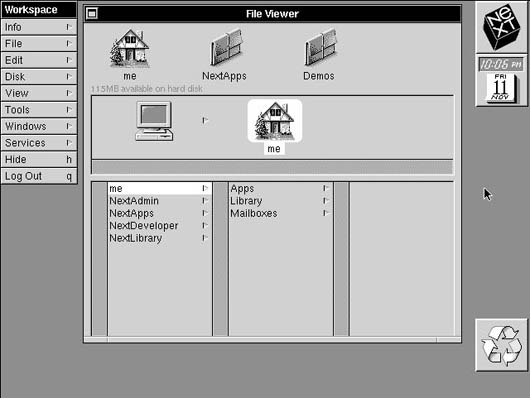
... and you can see that the home directory at this point is labeled "me". So if you aren't sure what I was talking about, I'm not sure you've gotten this far.
So rather than attempting to describe what you are seeing, show us so we'll have a better idea what is happening (and can even point out things on screen you might be missing).
I'm not sure that any additional documentation would help here as this is the last paragraph from my NS 3.3 installation manual's first chapter...
"If you're working on a standalone computer, you can assign me a password, log out, and then log in as root to set up user accounts and perform any other administrative tasks you need to before you log in as yourself."
Title: NEXTSTEP 3.3 in Virtual PC 4 Issues
Post by: InkBlot on September 29, 2009, 09:03:44 AM
Post by: InkBlot on September 29, 2009, 09:03:44 AM
OK, this is all very odd. I managed to find a Virtual PC 4.0.2 update. After the very next launch of NEXTSTEP I was able to change the password. Also, prior to the update, the Home directory was not labeled as "me", though I can no longer remember what it was. I thank you for you assistance, RacerX. Hopefully everything will run more or less smoothly now. I take it is advisable to set up two passwords, one for root, and one for a regular user? Anyway, for those hoping to run NEXTSTEP 3.3 in Virtual PC 4.0, it is possible as long as you apply the 4.0.2 update.