Title: Installing OPENSTEP 4.2 the *easy* way!
Post by: ebann on February 22, 2011, 12:57:10 PM
Post by: ebann on February 22, 2011, 12:57:10 PM
GOAL:
To get an OPENSTEP 4.2 system up and running as fast and as simple as possible on an x86 Intel platform (desktop or laptop) with an IDE controller. Cheaply too!
MATERIALS NEEDED:
- 2GB compact flash card
- CF card reader
- 'dd' command line tool (I used Mac OS X)
- CF-to-IDE adapter (*)
- pre-installed OS4.2 image (**)
(*) There are two kinds:
For desktop 3.5" disk ($4.95)
http://www.amazon.com/CompactFlash-Card-Hard-Adapter-IDE-40/dp/B0019H2GNM/ref=sr_1_8?ie=UTF8&qid=1298399643&sr=8-8
For laptop 2.5" disk ($6.78 )
http://www.amazon.com/Syba-SY-IDE2CF-NB25-Compact-Adapter-2-5-Inch/dp/B001B19HGA/ref=sr_1_1?ie=UTF8&qid=1298399643&sr=8-1
(**) I need a place to host the 1.28GB image file.
Used Primary/Secondary (Dual) IDE and ATAPI Device Controller twice.
Video set as 'Default VGA'.
All languages and optionals installed.
User 'me' has no password set.
I did *NOT* install any patches nor development tools.
PROCEDURE: (for desktop, laptop users please improvise)
1) Insert CF card into CF reader and connect to Mac OS X computer.
2) If there was a previous filesystem in the CF card, please open DiskUtility, select the CF 'disk' and press 'Unmount' button. If there was no mountable system present, simply select 'Ignore' when Mac OS X complains about it.
3) Open Terminal and type:
diskutil list
Find out which /dev/diskX the CF card is shown as, where 'X' is an integer, then type:
dd if=SanDisk_2GB_OPENSTEP_4.2_Basic_Install.img of=/dev/diskX
where 'X' is the disk number from above.
4) Wait until the entire image is transferred to the CF card. From DiskUtility, eject the CF card.
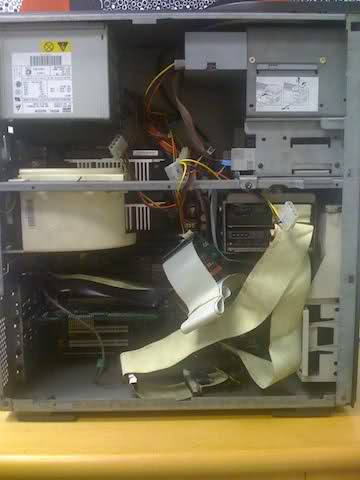
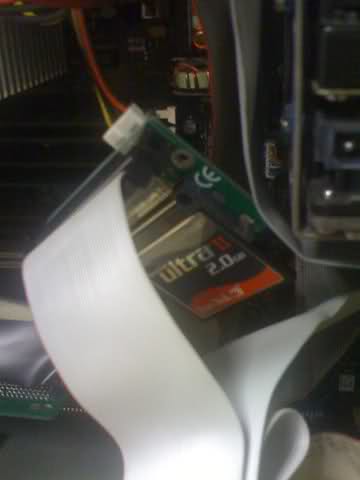
5) Insert CF card in adapter, connect IDE cable to primary IDE controller and set CF card as master.
5) Connect the IDE/ATAPI CD-ROM drive as master on secondary IDE controller *or* if you lack a secondary IDE controller, set it as slave in primary IDE controller.
6) Connect the floppy drive power cable onto the adapter.
7) Boot the computer and enjoy OS4.2!
To get an OPENSTEP 4.2 system up and running as fast and as simple as possible on an x86 Intel platform (desktop or laptop) with an IDE controller. Cheaply too!
MATERIALS NEEDED:
- 2GB compact flash card
- CF card reader
- 'dd' command line tool (I used Mac OS X)
- CF-to-IDE adapter (*)
- pre-installed OS4.2 image (**)
(*) There are two kinds:
For desktop 3.5" disk ($4.95)
http://www.amazon.com/CompactFlash-Card-Hard-Adapter-IDE-40/dp/B0019H2GNM/ref=sr_1_8?ie=UTF8&qid=1298399643&sr=8-8
For laptop 2.5" disk ($6.78 )
http://www.amazon.com/Syba-SY-IDE2CF-NB25-Compact-Adapter-2-5-Inch/dp/B001B19HGA/ref=sr_1_1?ie=UTF8&qid=1298399643&sr=8-1
(**) I need a place to host the 1.28GB image file.
Used Primary/Secondary (Dual) IDE and ATAPI Device Controller twice.
Video set as 'Default VGA'.
All languages and optionals installed.
User 'me' has no password set.
I did *NOT* install any patches nor development tools.
PROCEDURE: (for desktop, laptop users please improvise)
1) Insert CF card into CF reader and connect to Mac OS X computer.
2) If there was a previous filesystem in the CF card, please open DiskUtility, select the CF 'disk' and press 'Unmount' button. If there was no mountable system present, simply select 'Ignore' when Mac OS X complains about it.
3) Open Terminal and type:
diskutil list
Find out which /dev/diskX the CF card is shown as, where 'X' is an integer, then type:
dd if=SanDisk_2GB_OPENSTEP_4.2_Basic_Install.img of=/dev/diskX
where 'X' is the disk number from above.
4) Wait until the entire image is transferred to the CF card. From DiskUtility, eject the CF card.
5) Insert CF card in adapter, connect IDE cable to primary IDE controller and set CF card as master.
5) Connect the IDE/ATAPI CD-ROM drive as master on secondary IDE controller *or* if you lack a secondary IDE controller, set it as slave in primary IDE controller.
6) Connect the floppy drive power cable onto the adapter.
7) Boot the computer and enjoy OS4.2!
Title: Installing OPENSTEP 4.2 the *easy* way!
Post by: Lewp1973 on February 28, 2011, 09:14:10 AM
Post by: Lewp1973 on February 28, 2011, 09:14:10 AM
Hi Ebann,
I have managed to get a Nextstep installation onto a CF card. When I run from the CF card (with IDE adapter) the system reacts much more slowly than the actual hard drive. I was under the impression it would work at least as fast. Do you see the same thing running Openstep?
Cheers,
Lewp1973
I have managed to get a Nextstep installation onto a CF card. When I run from the CF card (with IDE adapter) the system reacts much more slowly than the actual hard drive. I was under the impression it would work at least as fast. Do you see the same thing running Openstep?
Cheers,
Lewp1973
Title: Installing OPENSTEP 4.2 the *easy* way!
Post by: iDork on February 28, 2011, 02:55:47 PM
Post by: iDork on February 28, 2011, 02:55:47 PM
I've been running OPENSTEP 4.2 installed on a 133x CF card for a few months now, and I am not happy with the performance. The system freezes for long periods of time (~10-20s) when an app gets launched and even after I start using the app. I performed the installation on a P133 Compaq LTE 5000-series (I can't remember the exact model) and then I moved the CF to a Toshiba Portege 2000. I've never had a "real" HD inthat laptop (it uses 1.8" HDs), so I can't compare the performance, but I'm guessing the CF is not the only problem. The freezes could be caused by poor IDE controller support. I also have Windows 98se and Slitaz Linux on the same laptop and while I still get the "freezes", they happen with less frequency and for shorter periods of time.
Title: Installing OPENSTEP 4.2 the *easy* way!
Post by: Lewp1973 on February 28, 2011, 03:01:35 PM
Post by: Lewp1973 on February 28, 2011, 03:01:35 PM
I have been searching the web for some info and it seems that the CF to IDE adapter I have may not support UDMA mode. I'll need to order a new adapter that supports this and test.
Cheers.
Cheers.
Title: Installing OPENSTEP 4.2 the *easy* way!
Post by: iDork on February 28, 2011, 09:15:39 PM
Post by: iDork on February 28, 2011, 09:15:39 PM
I'm not an expert, but aren't all these adapters "dumb"? I have 3 different CF to 2.5" IDE adapters and a CF to 1.8" IDE adapter and they are all just PCBs w/ wires between the two connectors (CF and IDE). Some have jumpers for switching between Master/Slave/Cable Select and/or 5/3.3V, but those are passive switches - the CF circuitry actually does all the work. AFAIK different CF cards support different DMA modes and some of them can (theoretically) be switched to other DMA modes. I don't know exactly what role the IDE driver plays in setting the DMA mode and in the actual data transfer, but my guess would be that these problems are caused by the fact that the CF card and the IDE controller don't speak the same language (DMA is probably disabled) and the IDE driver doesn't know how to tell the CF card and IDE controller what language they should use to communicate effectively.
Title: Installing OPENSTEP 4.2 the *easy* way!
Post by: ebann on February 28, 2011, 09:18:48 PM
Post by: ebann on February 28, 2011, 09:18:48 PM
As an example, an ACARD AEC-7720U (or UW) Ultra SCSI-to-IDE Bridge and a generic IDE-to-CF adapter, the maximum throughput that the 7720U allows is 20 MB/s, so any CF card around 133x is an excellent choice, i.e. 133 * 150 kB/s = 19,950 kB/s ~ 20 MB/s. IDE to CF adapters lack high speed ATA (66+ MB/s) cable support and therefore is limited to 33 MB/s. The old SanDisk Ultra II are rated 10 MB/s, while the new ones are labeled on the card itself as 15 MB/s. The old SanDisk Extreme III are rated 20 MB/s, while the new ones are labeled on the card itself as 30 MB/s. For comparison, Ultra SCSI has a transfer rate of 20 MB/s, Wide Ultra SCSI 40 MB/s, and Wide Ultra2 SCSI 80 MB/s.
I do not experience any long pauses during system use but it is surely slower than my IDE hard disk and obviously my SCSI UW hard disk as well. I love to use this setup to partition my large SCSI drives into 8GB pieces prior to installing OS42. It is surely a lot less quieter which is very nice. My CF card is rated 10 MB/s so I was prepared for a slow system.
I do not experience any long pauses during system use but it is surely slower than my IDE hard disk and obviously my SCSI UW hard disk as well. I love to use this setup to partition my large SCSI drives into 8GB pieces prior to installing OS42. It is surely a lot less quieter which is very nice. My CF card is rated 10 MB/s so I was prepared for a slow system.
Title: Installing OPENSTEP 4.2 the *easy* way!
Post by: ebann on February 28, 2011, 09:24:35 PM
Post by: ebann on February 28, 2011, 09:24:35 PM
My system has PIIX4 chipset so it is supported by OS42. If your IDE controller is not supported by the system, the OS42 IDE driver defaults to PIO mode which is extremely slow... Painfully slow which might explain your extremely sluggish system. My white box was carefully specced for 100% compatibility.
Title: Installing OPENSTEP 4.2 the *easy* way!
Post by: Lewp1973 on March 01, 2011, 06:58:10 AM
Post by: Lewp1973 on March 01, 2011, 06:58:10 AM
My system runs very nicely with the IDE hard drive installed. Certainly there is no noticeable lag. However when the IDE to CF adapter is in the lag is quite huge. Maybe I should buy a SCI-IDE adapter and see if that speeds things up.
iDork, I assumed the same as you about the adapters but I have found some manufacturers that state DMA/UDMA supported. I also found a forum where someone mentioned it was important to have this. Of course, the CF cards support different modes and maybe changing this would help. Does someone know where to change the mode? is it in the bios? I am away from my system for the next few days and cannot check it out!
Cheers.
iDork, I assumed the same as you about the adapters but I have found some manufacturers that state DMA/UDMA supported. I also found a forum where someone mentioned it was important to have this. Of course, the CF cards support different modes and maybe changing this would help. Does someone know where to change the mode? is it in the bios? I am away from my system for the next few days and cannot check it out!
Cheers.
Title: Installing OPENSTEP 4.2 the *easy* way!
Post by: stevebez on November 18, 2011, 04:34:46 PM
Post by: stevebez on November 18, 2011, 04:34:46 PM
I know I'm bringing a thread back from the dead, but has anyone run OS from a CF card in a PCMCIA adapter? That sure would be a handy way to dual boot a laptop.