Title: Printing from a VM
Post by: eagle on August 29, 2012, 03:56:53 PM
Post by: eagle on August 29, 2012, 03:56:53 PM
Hi, all.
I wonder if anyone has a guide on how to configure printing from a NeXTSTEP or OPENSTEP VM?
I assume I would use lpr, but when I go to configure a new printer in PrintManager.app, the only options I am given are HP JetDirect, Parallel, and Serial, and obviously the last two wouldn't work at all.
I have a Samsung CLP-315w printer, which I use wirelessly from my Macs. I assume I would set up a print queue on one of the Macs, to redirect to the Samsung. If it helps, I also have a CentOS 5 VM running 24x7, which could be the print server for my NS/OS VMs.
Any thoughts?
Thanks.
I wonder if anyone has a guide on how to configure printing from a NeXTSTEP or OPENSTEP VM?
I assume I would use lpr, but when I go to configure a new printer in PrintManager.app, the only options I am given are HP JetDirect, Parallel, and Serial, and obviously the last two wouldn't work at all.
I have a Samsung CLP-315w printer, which I use wirelessly from my Macs. I assume I would set up a print queue on one of the Macs, to redirect to the Samsung. If it helps, I also have a CentOS 5 VM running 24x7, which could be the print server for my NS/OS VMs.
Any thoughts?
Thanks.
Title: Printing from a VM
Post by: Shuren on August 30, 2012, 10:29:56 AM
Post by: Shuren on August 30, 2012, 10:29:56 AM
Hi, you need to simulate a JetDirect server with Cups, on OSX or CentOS.
First configure Cups to listen in LAN:
edit cupsd.conf:
then remove the comment (#) from
Restart Cups.
Now, edit inetd.conf (the superdaemon, in OSX is xinetd I think, also in CentOS: required an appropriate configuration) like this:
where "printername" is the name of the printer in the Cups configuration.
Restart inetd (or xinetd).
Use the wizard in NeXTSTep to configure a JetDirect printer.
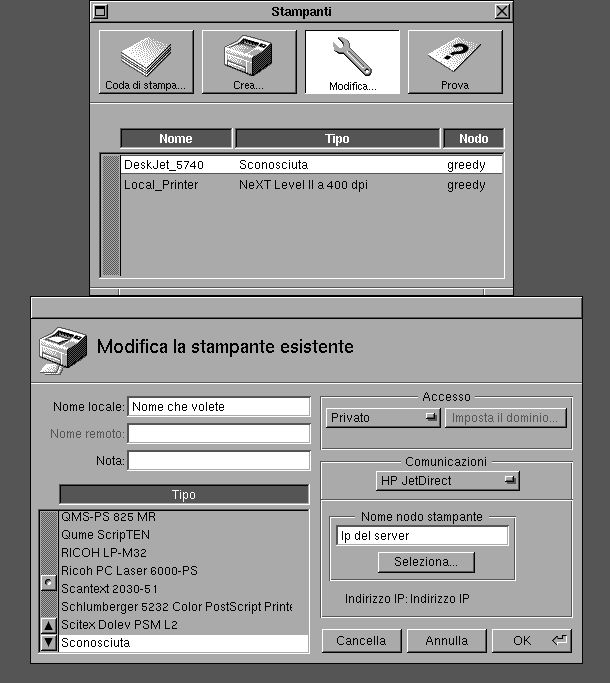
First configure Cups to listen in LAN:
edit cupsd.conf:
Code Select
# Allow remote access
Port 631
Listen /var/run/cups/cups.sock
# Enable printer sharing and shared printers.
Browsing On
BrowseOrder allow,deny
BrowseAllow all
BrowseRemoteProtocols CUPS
BrowseAddress @LOCAL
BrowseLocalProtocols CUPS
DefaultAuthType Basic
WebInterface Yes
<Location />
  # Allow shared printing and remote administration...
  Order deny,allow
  Deny all
  Allow from 192.168.0.*
</Location>
then remove the comment (#) from
Code Select
application/octet-stream line in ../cups/mime.types and ../cups/mime.conf (in recent versions these files are missing).Restart Cups.
Now, edit inetd.conf (the superdaemon, in OSX is xinetd I think, also in CentOS: required an appropriate configuration) like this:
Code Select
9100 stream tcp nowait lp /usr/bin/lp-cups lp-cups -d printername
where "printername" is the name of the printer in the Cups configuration.
Restart inetd (or xinetd).
Use the wizard in NeXTSTep to configure a JetDirect printer.
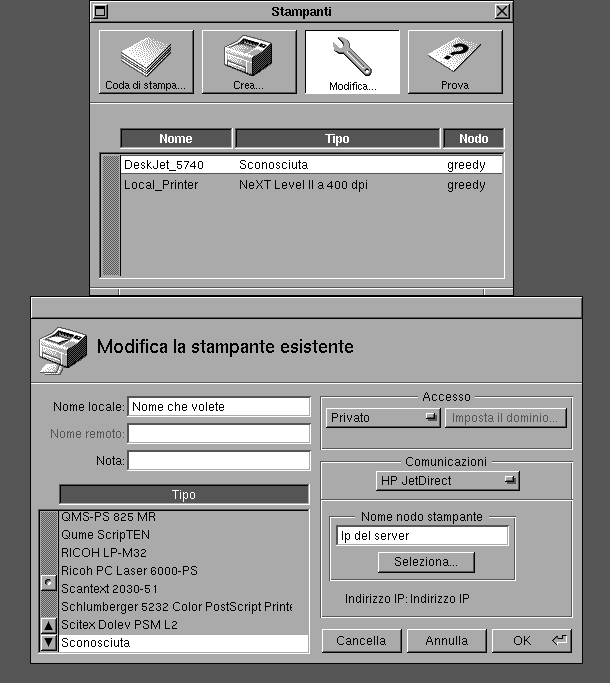
Title: Printing from a VM
Post by: eagle on September 09, 2012, 10:07:46 PM
Post by: eagle on September 09, 2012, 10:07:46 PM
Thanks, I tried this and am so far not getting anywhere. :(
My printer is a Samsung CLP-315W on my network, and apparently it has a builtin JetDirect server. So, I just need a PPD or some way to tell the NeXT how to drive it, and then I should be good.
Or I can use CUPS to convert postscript to something my printer can print, using one of the NeXT's built-in drivers.
On the NeXT, I configured the printer as an "Unknown" type, JetDirect to the IP address. When I print a test page, the printer starts up like it's going to print something, but it never does.
The Samsung doesn't speak PostScript, or I'd try any of the HP LaserJet drivers in the NeXT.
I guess I'll try configuring an LPR printer in the NeXT, to my CentOS box, then use CUPS in the CentOS box to send the printout to my printer. Unfortunately I haven't been able to configure the CentOS box to use the printer either... :(
Any other tips or ideas? Thanks.
My printer is a Samsung CLP-315W on my network, and apparently it has a builtin JetDirect server. So, I just need a PPD or some way to tell the NeXT how to drive it, and then I should be good.
Or I can use CUPS to convert postscript to something my printer can print, using one of the NeXT's built-in drivers.
On the NeXT, I configured the printer as an "Unknown" type, JetDirect to the IP address. When I print a test page, the printer starts up like it's going to print something, but it never does.
The Samsung doesn't speak PostScript, or I'd try any of the HP LaserJet drivers in the NeXT.
I guess I'll try configuring an LPR printer in the NeXT, to my CentOS box, then use CUPS in the CentOS box to send the printout to my printer. Unfortunately I haven't been able to configure the CentOS box to use the printer either... :(
Any other tips or ideas? Thanks.
Title: Printing from a VM
Post by: jaallen on September 11, 2012, 11:58:10 AM
Post by: jaallen on September 11, 2012, 11:58:10 AM
You will need to compile CUPS with Ghostscript support. Then CUPS will translate postscript for you, then to the printer, this is why, after page feed, your printer does not print.
All else is right. You have to understand, NeXT is all Postscript, even the Display Server.
All else is right. You have to understand, NeXT is all Postscript, even the Display Server.
Title: Printing from a VM
Post by: eagle on September 11, 2012, 12:07:30 PM
Post by: eagle on September 11, 2012, 12:07:30 PM
Thanks, yeah, I remember that's what I did years ago. This is all coming back to me now.
I need to:
- configure CUPS to print to my printer
- configure Ghostscript in CUPS
- configure NeXT to send to the Ghostscript printer
After all that, I should be able to print. I seem to recall configuring my NeXT to use an lpr printer. Not sure if I created a printcap file and then niloaded that, or if I used PrintManager.app, but years ago I did have it working. I should boot my NeXT Computer to see if it's still configured there, and document that and copy it to the VM if it is.
I need to:
- configure CUPS to print to my printer
- configure Ghostscript in CUPS
- configure NeXT to send to the Ghostscript printer
After all that, I should be able to print. I seem to recall configuring my NeXT to use an lpr printer. Not sure if I created a printcap file and then niloaded that, or if I used PrintManager.app, but years ago I did have it working. I should boot my NeXT Computer to see if it's still configured there, and document that and copy it to the VM if it is.
Title: Printing from a VM
Post by: jaallen on September 11, 2012, 12:24:04 PM
Post by: jaallen on September 11, 2012, 12:24:04 PM
Yes, you create the printcap file yourself (Its in the sysadmin manual bookshelf under mixed networks)
then, the command to pull it into netinfo is:
niload printcap / </printcap
this is the path to the printcap file!
I use an LPR server for my next printers out there on an mac mini server, they are then loaded into my master netinfo server, so any VM's or stations i build, automatically gets them after joined to netinfo. (if the drive doesnt fail, LOL!)
then, the command to pull it into netinfo is:
niload printcap / </printcap
this is the path to the printcap file!
I use an LPR server for my next printers out there on an mac mini server, they are then loaded into my master netinfo server, so any VM's or stations i build, automatically gets them after joined to netinfo. (if the drive doesnt fail, LOL!)
Title: Printing from a VM
Post by: eagle on September 11, 2012, 12:26:07 PM
Post by: eagle on September 11, 2012, 12:26:07 PM
One thing I never played with was NetInfo. I should try that out.
Title: Printing from a VM
Post by: jaallen on September 11, 2012, 12:28:50 PM
Post by: jaallen on September 11, 2012, 12:28:50 PM
Its easy, once you get your head around it. Just a database for all the "UNIX" flat config files.
The sysadmin manual makes it easy to grasp. Once you get a master rolling, leave a VM running on a machine you keep up, then its always there for 'step clients.
The sysadmin manual makes it easy to grasp. Once you get a master rolling, leave a VM running on a machine you keep up, then its always there for 'step clients.
Title: Printing from a VM
Post by: jaallen on September 11, 2012, 12:32:41 PM
Post by: jaallen on September 11, 2012, 12:32:41 PM
oh, remember, the last part of the niload statement is the path to the printcap FILE!
So many get that wrong and give up in a rage, so
</printcap would be that I have my printcap file read from root, where I saved it.
The middle / is the actual root domain for netinfo, has nothing to do with the file system.
So many get that wrong and give up in a rage, so
</printcap would be that I have my printcap file read from root, where I saved it.
The middle / is the actual root domain for netinfo, has nothing to do with the file system.
Title: Re: Printing from a VM
Post by: cbrunschen on September 14, 2012, 10:06:58 AM
Post by: cbrunschen on September 14, 2012, 10:06:58 AM
Quote from: "eagle"Hi, all.
I wonder if anyone has a guide on how to configure printing from a NeXTSTEP or OPENSTEP VM?
I assume I would use lpr, but when I go to configure a new printer in PrintManager.app, the only options I am given are HP JetDirect, Parallel, and Serial, and obviously the last two wouldn't work at all.
Why would those latter things not work? In most VMs you can specify that the emulated serial port should be connected to an actual serial port, or to a file, or even a socket.
The first option may not be very useful.
The second option - a file - would allow you to capture whatever was being sent to the printer in that file.
The third option - a socket - would allow you to run a program that intercepted anything sent to the serial port and forward it elsewhere such as to an actual printer - or to ghostscript, to perhaps produce PDFs. A useful program in that context is 'socat'.
Quote from: "eagle"I have a Samsung CLP-315w printer, which I use wirelessly from my Macs. I assume I would set up a print queue on one of the Macs, to redirect to the Samsung. If it helps, I also have a CentOS 5 VM running 24x7, which could be the print server for my NS/OS VMs.
Any thoughts?
Thanks.
I'm not sure if the above is at all useful :)
// Christian
Title: Printing from a VM
Post by: eagle on September 15, 2012, 02:11:14 PM
Post by: eagle on September 15, 2012, 02:11:14 PM
Oh man, I am so close. From my iMac, I can issue this:
and it does what I expect it to. That is the NeXT test page.
So, now all I need is a way to get the printout from the NeXT to the iMac. The obvious choice for that is lpr, and here is the printcap I loaded in:
I created /usr/spool/lpd.samsung, owned by agent.daemon, permissions 770.
I used lpc to start the queue:
So, now the problem is that the NeXT cannot contact lpd on the iMac. And, it's obvious why that is the case:
If anyone knows how to enable LPD on Mountain Lion (actually, directions from any system using CUPS would probably work) then that should finish this up.
I have tried this:
but that hasn't started a listener on the printer service, as you see above.
I am SO CLOSE...
I guess the other option is to configure a TCP listener through launchd that takes STDIN (from the NeXT) and sends it to "gs | lpr" - that would probably work too. I bet that's all JetDirect does - I bet it takes PostScript directly and prints it.
Code Select
cat testpage.ps | gs | lprand it does what I expect it to. That is the NeXT test page.
So, now all I need is a way to get the printout from the NeXT to the iMac. The obvious choice for that is lpr, and here is the printcap I loaded in:
Code Select
samsung:\
:lp=:rm=franklin\
:rp=Samsung_CLP_310_Series__samsung_clp315w_\
:sd=/usr/spool/lpd.samsung:\
:ty=SamsungCLP315W:
I created /usr/spool/lpd.samsung, owned by agent.daemon, permissions 770.
I used lpc to start the queue:
Code Select
lpc> start samsung
samsung:
        printing enabled
        daemon started
lpc> status
samsung:
        queuing is enabled
        printing is enabled
        3 entries in spool area
        Waiting for franklin to come up
lpc>
So, now the problem is that the NeXT cannot contact lpd on the iMac. And, it's obvious why that is the case:
Code Select
[eagle@franklin:/Users/eagle]netstat -an | grep LISTEN|grep 515
[eagle@franklin:/Users/eagle]
If anyone knows how to enable LPD on Mountain Lion (actually, directions from any system using CUPS would probably work) then that should finish this up.
I have tried this:
Code Select
[eagle@franklin:/Users/eagle]cupsctl --share-printers
[eagle@franklin:/Users/eagle]cupsctl 'BrowseLocalProtocols="dnssd lpd"'
but that hasn't started a listener on the printer service, as you see above.
I am SO CLOSE...
I guess the other option is to configure a TCP listener through launchd that takes STDIN (from the NeXT) and sends it to "gs | lpr" - that would probably work too. I bet that's all JetDirect does - I bet it takes PostScript directly and prints it.
Title: Printing from a VM
Post by: eagle on September 15, 2012, 02:31:14 PM
Post by: eagle on September 15, 2012, 02:31:14 PM
Aha, I found the listener: it is called cups-lpd. I found that it is installed but disabled on Mountain Lion.
All I had to do was:
Obviously I had to enable it as well.
Now there is a listener for LPD on the iMac, and it looks like the NeXT can print to it, but it only works partway: I got one cover sheet from CUPS saying that the NeXT had printed something, but none of the 3 jobs I had printed actually came out of the printer.
More to do, but I'm getting there.
Update: The NeXT can print just fine. I had goofed and had run niload twice, so I had two printers:
# niload printcap / < ~eagle/printcap
# niload printcap . < ~eagle/printcap
So, I had two printers available via lpr, both with the same name. Who knows what kind of trouble that was causing.... I deleted one of them and then restarted lpd, and now I can print! It's slow, and I get a cover sheet from CUPS with every job (surely that's a setting on the Mac; I'll find it) -- but it does print - and in color! Very nice.
All I had to do was:
Code Select
% launchctl load /System/Library/LaunchDaemons/org.cups.cups-lpd.plist
% launchctl start org.cups.cups-lpd
Obviously I had to enable it as well.
Now there is a listener for LPD on the iMac, and it looks like the NeXT can print to it, but it only works partway: I got one cover sheet from CUPS saying that the NeXT had printed something, but none of the 3 jobs I had printed actually came out of the printer.
More to do, but I'm getting there.
Update: The NeXT can print just fine. I had goofed and had run niload twice, so I had two printers:
# niload printcap / < ~eagle/printcap
# niload printcap . < ~eagle/printcap
So, I had two printers available via lpr, both with the same name. Who knows what kind of trouble that was causing.... I deleted one of them and then restarted lpd, and now I can print! It's slow, and I get a cover sheet from CUPS with every job (surely that's a setting on the Mac; I'll find it) -- but it does print - and in color! Very nice.
Title: Printing from a VM
Post by: eagle on September 17, 2012, 04:36:41 PM
Post by: eagle on September 17, 2012, 04:36:41 PM
And, I found the solution for the CUPS cover sheets:
https://bugzilla.redhat.com/show_bug.cgi?id=414161
You need to add "-o job-sheets=none" to the cups-lpd command line. After that, no more cover sheets.
SUCCESS! :D
https://bugzilla.redhat.com/show_bug.cgi?id=414161
You need to add "-o job-sheets=none" to the cups-lpd command line. After that, no more cover sheets.
SUCCESS! :D
Title: Printing from a VM
Post by: jaallen on September 17, 2012, 07:26:17 PM
Post by: jaallen on September 17, 2012, 07:26:17 PM
Excellent. Good Job mah mang!
This is also full of good Mountain Lion LPD fixes as well.
8)
This is also full of good Mountain Lion LPD fixes as well.
8)