Title: Best VGA LCD for NeXTstation Color?
Post by: blakespot on June 12, 2014, 09:39:40 PM
Post by: blakespot on June 12, 2014, 09:39:40 PM
I have a NeXTstation Turbo Color and a 21" NeXT color CRT. I am giving the CRT to an IRC friend, as I want to use an LCD with the system. What is a good VGA LCD that can render that - what - 1152x864? display looking fairly native - not so much with blocky scaled pixels?
I have a 13W3 to VGA adapter that works with my 19" Samsung, but it looks pretty roughly scaled.
Thanks.
bp
I have a 13W3 to VGA adapter that works with my 19" Samsung, but it looks pretty roughly scaled.
Thanks.
bp
Title: Best VGA LCD for NeXTstation Color?
Post by: mikeboss on June 13, 2014, 01:42:21 AM
Post by: mikeboss on June 13, 2014, 01:42:21 AM
have a look at this thread ->
http://www.nextcomputers.org/forums/viewtopic.php?t=2535
the NEC MultySync 1980FXi or 1980SX will give a pixelperfect picture.
the native resolution of black hardware is 1120x832.
http://www.nextcomputers.org/forums/viewtopic.php?t=2535
the NEC MultySync 1980FXi or 1980SX will give a pixelperfect picture.
the native resolution of black hardware is 1120x832.
Title: Best VGA LCD for NeXTstation Color?
Post by: blakespot on June 13, 2014, 05:45:34 PM
Post by: blakespot on June 13, 2014, 05:45:34 PM
Thanks much. I saw a 1980 FXi in excellent condition on eBay for $60 and grabbed it. Can't wait to get it on the Turbo slab.
Cheers.
bp
Cheers.
bp
Title: Best VGA LCD for NeXTstation Color?
Post by: blakespot on June 20, 2014, 06:05:36 AM
Post by: blakespot on June 20, 2014, 06:05:36 AM
And, there it is!
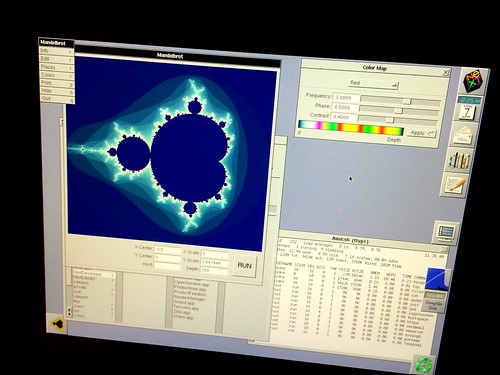 (https://www.flickr.com/photos/blakespot/14485204113/)
pixel perfection on the NEC MultiSync LCD 1980FXi (https://www.flickr.com/photos/blakespot/14485204113/) by blakespot (https://www.flickr.com/people/blakespot/), on Flickr
bp[/img]
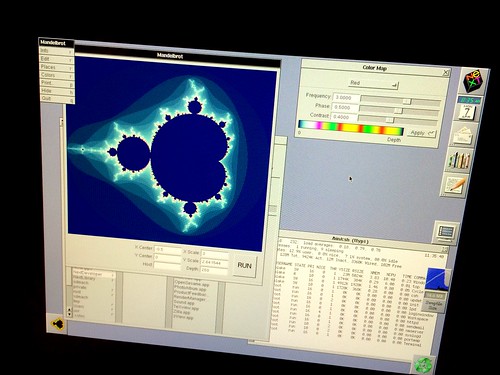 (https://www.flickr.com/photos/blakespot/14485204113/)
pixel perfection on the NEC MultiSync LCD 1980FXi (https://www.flickr.com/photos/blakespot/14485204113/) by blakespot (https://www.flickr.com/people/blakespot/), on Flickr
bp[/img]
Title: Well, that didn't go so well...
Post by: blakespot on July 24, 2014, 08:02:12 AM
Post by: blakespot on July 24, 2014, 08:02:12 AM
So, I spent some real $$ convincing a local-pickup eBay seller in NYC to ship me his excellent condition NEC MultiSync LCD1980FXi, and it worked great for a few minutes after I laid it on my slab.
Then things went south.
Vertical lines on the screen, attached to different computers. I decided it was the digital driver board and I found a replacement on eBay and installed it ---- same result.
https://twitter.com/blakespot/status/489624082477252609
I spoke with @y816 (Tony Diaz) who is a comp surplus guy and he tells me that this line is prone to failure of the edge connections inside the panel. He sees it more on the silver / white units for some reason.
So. What other brand / model LCD screen will give a pixel perfect display for the color 1120x832 output of a color slab?
Thanks.
bp
Then things went south.
Vertical lines on the screen, attached to different computers. I decided it was the digital driver board and I found a replacement on eBay and installed it ---- same result.
https://twitter.com/blakespot/status/489624082477252609
I spoke with @y816 (Tony Diaz) who is a comp surplus guy and he tells me that this line is prone to failure of the edge connections inside the panel. He sees it more on the silver / white units for some reason.
So. What other brand / model LCD screen will give a pixel perfect display for the color 1120x832 output of a color slab?
Thanks.
bp
Title: Re: Well, that didn't go so well...
Post by: pitz on July 24, 2014, 11:10:27 AM
Post by: pitz on July 24, 2014, 11:10:27 AM
Quote from: "blakespot"
So. What other brand / model LCD screen will give a pixel perfect display for the color 1120x832 output of a color slab?
I use two that work with the color slabs, but of the same brand:
NEC 1980SXi (19-inch, has since been put into storage due to lack of desk space)
NEC 1770GX (17-inch, smaller but easier to move around)
The 17" actually has a faster response time (8ms), and has a narrower black border around the 1120x832 display area.
Title: Best VGA LCD for NeXTstation Color?
Post by: nextchef on July 24, 2014, 11:43:49 AM
Post by: nextchef on July 24, 2014, 11:43:49 AM
That is a real bummer about the monitor. Hopefully you can re-sell the second digital driver board and recoup some funds.
I do not know about pixel perfect rendering, but I used an older sun 18in lcd monitor with my color slab setup. It was the LSA800 model that had a 13w3 and a vga connector, which was very nice. My sun systems were all run through a 13w3 kvm switch for connection to the monitor. The slab was connected to the vga input using the adapter + gender changer trick discussed here in other threads. The slab only got infrequent use, so I can not be sure about what kind of stretching/warping there might have been, but I do not recall it being any sort of issue.
As this is an old monitor that is hard to come by, it is probably not a good option but I wanted to point it out.
I do not know about pixel perfect rendering, but I used an older sun 18in lcd monitor with my color slab setup. It was the LSA800 model that had a 13w3 and a vga connector, which was very nice. My sun systems were all run through a 13w3 kvm switch for connection to the monitor. The slab was connected to the vga input using the adapter + gender changer trick discussed here in other threads. The slab only got infrequent use, so I can not be sure about what kind of stretching/warping there might have been, but I do not recall it being any sort of issue.
As this is an old monitor that is hard to come by, it is probably not a good option but I wanted to point it out.
Title: Best VGA LCD for NeXTstation Color?
Post by: NeXTnewbe on July 24, 2014, 04:22:20 PM
Post by: NeXTnewbe on July 24, 2014, 04:22:20 PM
I use an IBM 9494-HBO and it looks great and is a close match for the colour
http://www.citgrup.ro/monitoare/second-hand/ibm_lenovo_9494-hbo/3606.html
http://www.citgrup.ro/monitoare/second-hand/ibm_lenovo_9494-hbo/3606.html
Title: Best VGA LCD for NeXTstation Color?
Post by: blakespot on July 25, 2014, 08:11:15 AM
Post by: blakespot on July 25, 2014, 08:11:15 AM
Quote from: "NeXTnewbe"I use an IBM 9494-HBO and it looks great and is a close match for the colour
http://www.citgrup.ro/monitoare/second-hand/ibm_lenovo_9494-hbo/3606.html
Ahh, nice. So it will render pixel-perfect, no scaling - with a border, I assume? Pixel-perfect, no scaling is key, for me.
Thanks.
bp
Title: Re: Well, that didn't go so well...
Post by: t-rexky on July 25, 2014, 11:05:38 PM
Post by: t-rexky on July 25, 2014, 11:05:38 PM
Quote from: "blakespot"So, I spent some real $$ convincing a local-pickup eBay seller in NYC to ship me his excellent condition NEC MultiSync LCD1980FXi, and it worked great for a few minutes after I laid it on my slab.
Then things went south.
Vertical lines on the screen, attached to different computers. I decided it was the digital driver board and I found a replacement on eBay and installed it ---- same result.
I am really sorry to hear about your experience. I have two LCD1980SX, both acquired second hand through Kijiji. One has somewhere between 1000 and 2000 hours and the second one has in excess of 30000 hours. Both are working flawlessly. Interestingly I originally picked up a LCD1980SXi and had to replace it with the SX because of the same symptoms that you are having. The two models use different panels and different electronics. The SXi/FXi also have the desirable hardware LUT based calibration that works with SpectraViewII. But their reliability seems to be worse than the SX based on this anecdotal evidence. I hope you can return the defective display to the seller as DOA.
Title: Best VGA LCD for NeXTstation Color?
Post by: blakespot on July 30, 2014, 05:27:53 PM
Post by: blakespot on July 30, 2014, 05:27:53 PM
Will the NEC 1990sxp or 92v work for a pixel-perfect display for the 1120x832 NeXTstation? I see some black units I could grab.
Thanks.
bp
Thanks.
bp
Title: Best VGA LCD for NeXTstation Color?
Post by: barcher174 on July 30, 2014, 09:40:05 PM
Post by: barcher174 on July 30, 2014, 09:40:05 PM
I have a 1990SX and a 1990SXI which both work perfectly.
--
Brian
--
Brian
Title: Best VGA LCD for NeXTstation Color?
Post by: blakespot on July 31, 2014, 10:32:41 AM
Post by: blakespot on July 31, 2014, 10:32:41 AM
Quote from: "barcher174"I have a 1990SX and a 1990SXI which both work perfectly.Thanks to this, I've got a 1990SXP on the way, black. Let's hope it does pixel perfect.
--
Brian
bp
Title: Best VGA LCD for NeXTstation Color?
Post by: t-rexky on July 31, 2014, 10:51:42 AM
Post by: t-rexky on July 31, 2014, 10:51:42 AM
Quote from: "blakespot"Thanks to this, I've got a 1990SXP on the way, black. Let's hope it does pixel perfect.
bp
I am certain that all NEC "pro" monitors will display the NeXT resolutions pixel perfect. They are effectively true multi-sync LCD monitors via the electronics that perform the appropriate conversions for the display panel. I am sure that the same applies to the EIZO monitors, but they tend to be more expensive than NEC. In comparison, most "PC monitors" will only recognize the standard resolutions and are not multi-sync. This is why they cannot produce a pixel perfect display.
Title: Best VGA LCD for NeXTstation Color?
Post by: marmacc on August 05, 2014, 09:28:06 AM
Post by: marmacc on August 05, 2014, 09:28:06 AM
I work with an Dell UltraSharp 1907FP. Works perfect.
Title: Best VGA LCD for NeXTstation Color?
Post by: t-rexky on August 05, 2014, 09:44:01 AM
Post by: t-rexky on August 05, 2014, 09:44:01 AM
Quote from: "marmacc"I work with an Dell UltraSharp 1907FP. Works perfect.
I guess you have a non-ADB setup? I have this exact same monitor and it does not work on my TurboColor ADB with its 72Hz refresh rate. The image is stretched and cropped.
Title: Best VGA LCD for NeXTstation Color?
Post by: marmacc on August 05, 2014, 03:09:43 PM
Post by: marmacc on August 05, 2014, 03:09:43 PM
Yes it is a Non-ADB Setup
Title: Best VGA LCD for NeXTstation Color?
Post by: barcher174 on August 05, 2014, 04:52:55 PM
Post by: barcher174 on August 05, 2014, 04:52:55 PM
Is the 72hz a problem for flat panels in general or just this model? Because I think it's possible to still use an ADB sound box at 68hz refresh with a simple mod.
--
Brian
--
Brian
Title: Best VGA LCD for NeXTstation Color?
Post by: t-rexky on August 05, 2014, 05:50:12 PM
Post by: t-rexky on August 05, 2014, 05:50:12 PM
I don't know for sure, but it is something about the pixel rate and the refresh rate that combined make the "standard" LCD panels choose a VESA resolution that causes the stretch and crop... It would always be worth a try to switch to the lower refresh rate and see if that unconfuses the panels.
Title: Best VGA LCD for NeXTstation Color?
Post by: blakespot on August 06, 2014, 09:25:27 PM
Post by: blakespot on August 06, 2014, 09:25:27 PM
How do I get this NEC LCD1990SXp to go 1120x832? I can't seem to set the res in settings...
bp
bp
Title: Best VGA LCD for NeXTstation Color?
Post by: barcher174 on August 06, 2014, 09:34:31 PM
Post by: barcher174 on August 06, 2014, 09:34:31 PM
How is it displaying now? Stretched?
Title: Best VGA LCD for NeXTstation Color?
Post by: blakespot on August 06, 2014, 09:40:20 PM
Post by: blakespot on August 06, 2014, 09:40:20 PM
Quote from: "barcher174"How is it displaying now? Stretched?
So I followed an Atari Falcon guide and got it set, I think. Set H.Size to 1599 (??) and nothing seems scaled. It reports the wrong res, but the image seems rock solid on target native per pixel.
There's a VERY grey border around the screen tho. Adjusting cont and bright does not seem to help get rid of it...
The NEC LCD1980xxx seemed a little nicer in the settings.
Am I stuck with this grey border?
bp
Title: Best VGA LCD for NeXTstation Color?
Post by: barcher174 on August 06, 2014, 09:42:59 PM
Post by: barcher174 on August 06, 2014, 09:42:59 PM
I don't think my models have this problem. Can you post a pic?
Title: Best VGA LCD for NeXTstation Color?
Post by: blakespot on August 07, 2014, 08:38:56 AM
Post by: blakespot on August 07, 2014, 08:38:56 AM
Here it is. You can see what res the screen thinks the NeXT is outputting (vs. 1120x832 literal). The diff there is the dark black frame. Beyond is grey. I'd like to lose the grey...
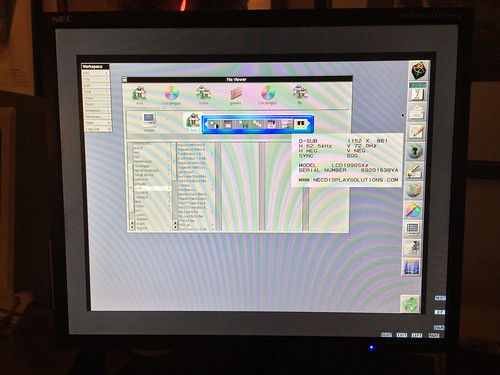 (https://flic.kr/p/okUjGU)NEC MultiSync LCD1990SXp on a NeXTstation (https://flic.kr/p/okUjGU) by blakespot (https://www.flickr.com/people/35448539@N00/), on Flickr
bp
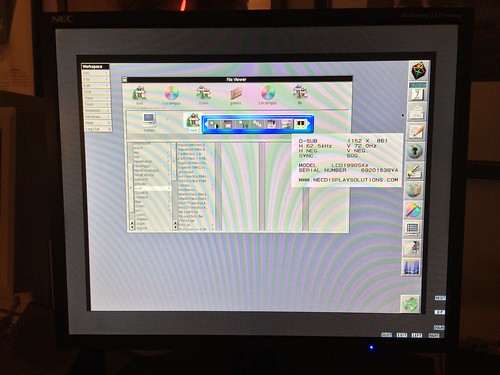 (https://flic.kr/p/okUjGU)NEC MultiSync LCD1990SXp on a NeXTstation (https://flic.kr/p/okUjGU) by blakespot (https://www.flickr.com/people/35448539@N00/), on Flickr
bp
Title: Best VGA LCD for NeXTstation Color?
Post by: t-rexky on August 07, 2014, 08:59:06 AM
Post by: t-rexky on August 07, 2014, 08:59:06 AM
Have you tried the Advanced Menu procedure that I outlined in the following thread: http://www.nextcomputers.org/forums/viewtopic.php?t=2535
Here is the excerpt:
Here is the excerpt:
Quote from: "t-rexky"Here is how I adjusted the monitor, since the auto adjust function was at first cropping the image:
1. Activate the 'Advanced OSM' by turning ON the monitor with the front "POWER" button while pressing the "SELECT" button.
2. Navigate to OSM menu item '9' and press "SELECT" on the 'MODE' item.
3. Adjust to set the NeXT display resolution of 1120 by 832.
4. Power the monitor OFF and then back ON with the front "POWER" button.
5. Navigate to OSM menu item 'AUTO' and select 'AUTO ADJUST'.
6. Enjoy a 1:1 pixel perfect display from your NeXT, or modify the scaling to fill the whole display.
I am sure that this will work for both ADB and also non-ADB machines. I am also convinced that ALL NEC MultiSync LCD monitors that are specified to support 1280x1024 "at 60 Hz to 75 Hz", sync-on-green and have the 'Advanced OSM' menu can be adjusted the same way.
I hope this saves some time and aggravation to people looking for replacement monitors.
Title: Best VGA LCD for NeXTstation Color?
Post by: blakespot on August 07, 2014, 11:43:38 AM
Post by: blakespot on August 07, 2014, 11:43:38 AM
T-Rexky,
That worked! Thanks.
Screen is pix perfect centered, but border is still grey. In the pic above note black border (small) is black, so the outer grey must be rendering actual grey. Now the image takes up the whole center (no more black border).
I wonder if it's possible to make the grey border black?
bp
That worked! Thanks.
Screen is pix perfect centered, but border is still grey. In the pic above note black border (small) is black, so the outer grey must be rendering actual grey. Now the image takes up the whole center (no more black border).
I wonder if it's possible to make the grey border black?
bp
Title: Best VGA LCD for NeXTstation Color?
Post by: t-rexky on August 10, 2014, 10:11:43 PM
Post by: t-rexky on August 10, 2014, 10:11:43 PM
The grey border looks like a possible setting rather than a monitor issue. From the photo it looks like your monitor is able to produce deep black and the border is rendered grey rather than black. I would suggest that you study the manual and perform a factory setting reset first, then readjust the NeXT resolution settings again and see if that makes a difference.
Also there may be a setting in the menus to adjust this - perhaps they keep the border pixels partially "twisted" when the image is scaled to reduce image persistence. Yes, I have seen LCD image persistence with my own eyes. I noticed that there seems to be a "SIDE BORDER COLOR" setting, although this probably is not it.
Also there may be a setting in the menus to adjust this - perhaps they keep the border pixels partially "twisted" when the image is scaled to reduce image persistence. Yes, I have seen LCD image persistence with my own eyes. I noticed that there seems to be a "SIDE BORDER COLOR" setting, although this probably is not it.
Title: Best VGA LCD for NeXTstation Color?
Post by: blakespot on August 17, 2014, 06:15:20 PM
Post by: blakespot on August 17, 2014, 06:15:20 PM
Little side note. I liked the rotating, square base of the NEC 1980FXi better than the V base of the 1990SXp, so I swapped bases (and threw the 1980FXi and the V stand in the garbage...).
bp
bp
Title: Best VGA LCD for NeXTstation Color?
Post by: ominimicu on December 16, 2014, 09:20:56 PM
Post by: ominimicu on December 16, 2014, 09:20:56 PM
Quote from: "blakespot"And, there it is!Wow, looks cool, work that good?
pixel perfection on the NEC MultiSync LCD 1980FXi (https://www.flickr.com/photos/blakespot/14485204113/) by blakespot (https://www.flickr.com/people/blakespot/), on Flickr
bp[/img]
samsung note 3 handyhülle (http://www.nextcomputers.org/forums)