Title: Networking Guide
Post by: bobo68 on October 24, 2015, 03:40:30 PM
Post by: bobo68 on October 24, 2015, 03:40:30 PM
Hi,
now that I have 2 NeXTstations up and running I'd like to move some apps onto them. I thought that ftping to my Mac might be a good idea.
Is there a simple guide available on how to bring a NeXTstation with NS 3.3 onto a normal TCP/IP Ethernet LAN?
Of course I searched this forum and the interwebs but much stuff seems to be no longer available.
TIA, bobo68
now that I have 2 NeXTstations up and running I'd like to move some apps onto them. I thought that ftping to my Mac might be a good idea.
Is there a simple guide available on how to bring a NeXTstation with NS 3.3 onto a normal TCP/IP Ethernet LAN?
Of course I searched this forum and the interwebs but much stuff seems to be no longer available.
TIA, bobo68
Title: Networking Guide
Post by: SlateBlue on October 24, 2015, 06:26:42 PM
Post by: SlateBlue on October 24, 2015, 06:26:42 PM
I'll try to get you some kind of write-up of what I have done. In a nutshell, I created an NFS share on a PC running Ubuntu Linux and used that computer to download software from the NeXT Computers archive. Then, I used NFS Manager to point my NeXT Slab to the IP of my Linux machine so that I could access the downloads locally on the NeXT.
I've heard of others doing something similar under modern versions of Windows Server.
I've heard of others doing something similar under modern versions of Windows Server.
Title: Networking Guide
Post by: bobo68 on October 24, 2015, 06:52:36 PM
Post by: bobo68 on October 24, 2015, 06:52:36 PM
That would be helpful. Although I first need to get basic IP networking up and running.
I configured HostManager according to this guide http://www.cilinder.be/docs/next/NeXTStep/3.3/nsa/11_MixedNet.htmld/index.html#11s.
When the NeXTstation boots there is a connection to the switch for some seconds (led lights up at the switch) but it goes off again and stays like that. I cannot ping any other hosts.
I configured HostManager according to this guide http://www.cilinder.be/docs/next/NeXTStep/3.3/nsa/11_MixedNet.htmld/index.html#11s.
When the NeXTstation boots there is a connection to the switch for some seconds (led lights up at the switch) but it goes off again and stays like that. I cannot ping any other hosts.
Title: Networking Guide
Post by: barcher174 on October 24, 2015, 10:40:29 PM
Post by: barcher174 on October 24, 2015, 10:40:29 PM
This is a pretty good guide:
http://www.nextcomputers.org/NeXTfiles/Docs/TjLs_Cable_Modem_Guide.pdf
I haven't had much luck with DHCP so I use a static IP for each of my NeXTs.
http://www.nextcomputers.org/NeXTfiles/Docs/TjLs_Cable_Modem_Guide.pdf
I haven't had much luck with DHCP so I use a static IP for each of my NeXTs.
Title: Networking Guide
Post by: bobo68 on October 25, 2015, 11:06:41 AM
Post by: bobo68 on October 25, 2015, 11:06:41 AM
Ok, IP networking is up and running. I probably forgot to specify all network config parameters like broadcast, router, ... yesterday and relied on automatic. ftp works, too.
I had no luck so far to get NFS to work between the NeXTstations and a modern Mac with OS X El Capitan (both directions). Sometimes I seemed to be almost there (e.g. the NFS share from the Mac showed up under /Net but it had no contents).
Maybe NFS in Mac OS X is too young (protocols) or constrained in some way (security, ...) to make a connection.
I had no luck so far to get NFS to work between the NeXTstations and a modern Mac with OS X El Capitan (both directions). Sometimes I seemed to be almost there (e.g. the NFS share from the Mac showed up under /Net but it had no contents).
Maybe NFS in Mac OS X is too young (protocols) or constrained in some way (security, ...) to make a connection.
Title: Networking Guide
Post by: SlateBlue on October 25, 2015, 12:08:11 PM
Post by: SlateBlue on October 25, 2015, 12:08:11 PM
When I did it under Linux, I had to specify my Linux servers hostname in the Net Info Manager, I think. Once I did that it worked. I might have time this evening to sit down and work with the setup again. This link (https://help.ubuntu.com/community/SettingUpNFSHowTo) gave instructions for how to set up the NFS share on Ubuntu and listed any additional software packages that needed to be installed.
Title: Networking Guide
Post by: eagle on November 11, 2015, 07:40:14 AM
Post by: eagle on November 11, 2015, 07:40:14 AM
I wrote up a howto on setting up autonfsmount on NeXT. Try this and see if it helps...
http://www.nextcomputers.org/forums/viewtopic.php?t=3598
http://www.nextcomputers.org/forums/viewtopic.php?t=3598
Title: Networking Guide
Post by: paolo.bertolo on May 05, 2016, 02:20:33 PM
Post by: paolo.bertolo on May 05, 2016, 02:20:33 PM
Hello Everybody,
just wanted to share my experience for getting my NeXTstation on line.
As usual, the documentation and the instructions available on this forum helped a lot, still I could not get anything out of it until...
Situation: just wanted to connect the NeXTstation to my Macbook, via Ethernet, since I thought bringing the NeXT online would have been impossible.
Big headache and no results.
So I approached the problem from a different side.
WLAN at my place is very basic: I just have an Apple AirPort TimeCapsule which is connected to the modem. I also have an AirPort Express which I use for streaming tunes to my living room.
Quite obviously, the whole set up process did happen in pure Apple style, plug and play.
So I took the NeXTstation and connected it to the AirPort Express via an Ethernet cable (crossed).
Then I opened the tutorial "TjLs-Cable-Modem-Howto-for-NeXTStep.pdf", which is indeed good but it kinda lets you down when it comes to the actual data that one has to enter in each of the fields to fill up.
And here comes the trick that did save a newbie like myself.
I've just opened my iPhone and checked "Settings > Wi-Fi > Info": there you find IP Address / Subnet Mask / Router / Search Domains, basically all is needed for going through the instructions in the tutorial file. When it comes to setting up "resolv.conf", just to be sure I simply copied the one local to my MacBook.
One just has to manually assign an IP address that is not already in use. How to check it? Just run "AirPort Utility", click on each AirPort station connected to your WLAN and check the IP in use by the connected devices. Then simply choose a different one.
End of the story, ten mins later my NeXT was on line (this post has been edited on it and posted using OmniWeb).
Finally, using RBrowser (on the Mac) you can directly move files back and forth via FTP.
just wanted to share my experience for getting my NeXTstation on line.
As usual, the documentation and the instructions available on this forum helped a lot, still I could not get anything out of it until...
Situation: just wanted to connect the NeXTstation to my Macbook, via Ethernet, since I thought bringing the NeXT online would have been impossible.
Big headache and no results.
So I approached the problem from a different side.
WLAN at my place is very basic: I just have an Apple AirPort TimeCapsule which is connected to the modem. I also have an AirPort Express which I use for streaming tunes to my living room.
Quite obviously, the whole set up process did happen in pure Apple style, plug and play.
So I took the NeXTstation and connected it to the AirPort Express via an Ethernet cable (crossed).
Then I opened the tutorial "TjLs-Cable-Modem-Howto-for-NeXTStep.pdf", which is indeed good but it kinda lets you down when it comes to the actual data that one has to enter in each of the fields to fill up.
And here comes the trick that did save a newbie like myself.
I've just opened my iPhone and checked "Settings > Wi-Fi > Info": there you find IP Address / Subnet Mask / Router / Search Domains, basically all is needed for going through the instructions in the tutorial file. When it comes to setting up "resolv.conf", just to be sure I simply copied the one local to my MacBook.
One just has to manually assign an IP address that is not already in use. How to check it? Just run "AirPort Utility", click on each AirPort station connected to your WLAN and check the IP in use by the connected devices. Then simply choose a different one.
End of the story, ten mins later my NeXT was on line (this post has been edited on it and posted using OmniWeb).
Finally, using RBrowser (on the Mac) you can directly move files back and forth via FTP.
Title: Networking Guide
Post by: Rob Blessin Black Hole on May 06, 2016, 03:09:27 AM
Post by: Rob Blessin Black Hole on May 06, 2016, 03:09:27 AM
Quote from: "paolo.bertolo"Hello Everybody,Hello Paolo: That is a great tip on how to find the info to set up resolv.conf , I'll have to try it. Best Regards Rob Blessin
just wanted to share my experience for getting my NeXTstation on line.
As usual, the documentation and the instructions available on this forum helped a lot, still I could not get anything out of it until...
Situation: just wanted to connect the NeXTstation to my Macbook, via Ethernet, since I thought bringing the NeXT online would have been impossible.
Big headache and no results.
So I approached the problem from a different side.
WLAN at my place is very basic: I just have an Apple AirPort TimeCapsule which is connected to the modem. I also have an AirPort Express which I use for streaming tunes to my living room.
Quite obviously, the whole set up process did happen in pure Apple style, plug and play.
So I took the NeXTstation and connected it to the AirPort Express via an Ethernet cable (crossed).
Then I opened the tutorial "TjLs-Cable-Modem-Howto-for-NeXTStep.pdf", which is indeed good but it kinda lets you down when it comes to the actual data that one has to enter in each of the fields to fill up.
And here comes the trick that did save a newbie like myself.
I've just opened my iPhone and checked "Settings > Wi-Fi > Info": there you find IP Address / Subnet Mask / Router / Search Domains, basically all is needed for going through the instructions in the tutorial file. When it comes to setting up "resolv.conf", just to be sure I simply copied the one local to my MacBook.
One just has to manually assign an IP address that is not already in use. How to check it? Just run "AirPort Utility", click on each AirPort station connected to your WLAN and check the IP in use by the connected devices. Then simply choose a different one.
End of the story, ten mins later my NeXT was on line (this post has been edited on it and posted using OmniWeb).
Finally, using RBrowser (on the Mac) you can directly move files back and forth via FTP.
Title: Networking Guide
Post by: bobo68 on May 08, 2016, 04:23:15 PM
Post by: bobo68 on May 08, 2016, 04:23:15 PM
I finally got my NeXT machines onto the LAN and was able to surf the web and connect to a local NFS share. Most of the hints have been given in this thread. Just wanted to sum it up in one story line:
Configure networking on the NeXT via the HostManager.app:
see http://www.nextcomputers.org/NeXTfiles/Docs/TjLs_Cable_Modem_Guide.pdf for general instructions
I used
Configure DNS nameserver's IP address on the NeXT. It is used to resolve Internet host names like www.apple.com
Create or edit the file /etc/resolv.conf with contents on the NeXT
Many Internet routers work as a DNS proxy, so you can use its address here. Otherwise use an external DNS like Google's public servers: 8.8.8.8
-> Now your NeXT should be able to reach machines on the LAN (try ping) and access Internet servers, e.g. web sites (try OmniWeb).
Set up NFS file sharing (NeXT as a client)
If your server is a Mac / UNIX machine, create file /etc/exports with a line for every directory you want to share on the server. e.g.
Mount that directory on the NeXT using the shell (given the server IP of 192.168.1.20):
-> If you open the /Net directory on the NeXT you should see the files of the server
Configure networking on the NeXT via the HostManager.app:
see http://www.nextcomputers.org/NeXTfiles/Docs/TjLs_Cable_Modem_Guide.pdf for general instructions
I used
- Internet Address (= the IP address of your NeXT): 192.168.1.200 (depends on your LAN IP range; avoid conflicts with other machines on the LAN)
Broadcast Address: 192.168.1.255
Netmask: 255.255.255.0
Router (= usually the IP of your Wifi or LAN router which connects to the Internet): 192.168.1.1
Configure DNS nameserver's IP address on the NeXT. It is used to resolve Internet host names like www.apple.com
Create or edit the file /etc/resolv.conf with contents on the NeXT
Code Select
nameserver 192.168.1.1Many Internet routers work as a DNS proxy, so you can use its address here. Otherwise use an external DNS like Google's public servers: 8.8.8.8
-> Now your NeXT should be able to reach machines on the LAN (try ping) and access Internet servers, e.g. web sites (try OmniWeb).
Set up NFS file sharing (NeXT as a client)
If your server is a Mac / UNIX machine, create file /etc/exports with a line for every directory you want to share on the server. e.g.
Code Select
/Users/bobo68/PublicMount that directory on the NeXT using the shell (given the server IP of 192.168.1.20):
Code Select
mount -t nfs 192.168.1.20:/Users/bobo68/Public /Net-> If you open the /Net directory on the NeXT you should see the files of the server
Title: Networking Guide
Post by: paolo.bertolo on October 01, 2016, 10:04:53 AM
Post by: paolo.bertolo on October 01, 2016, 10:04:53 AM
Hello Everybody,
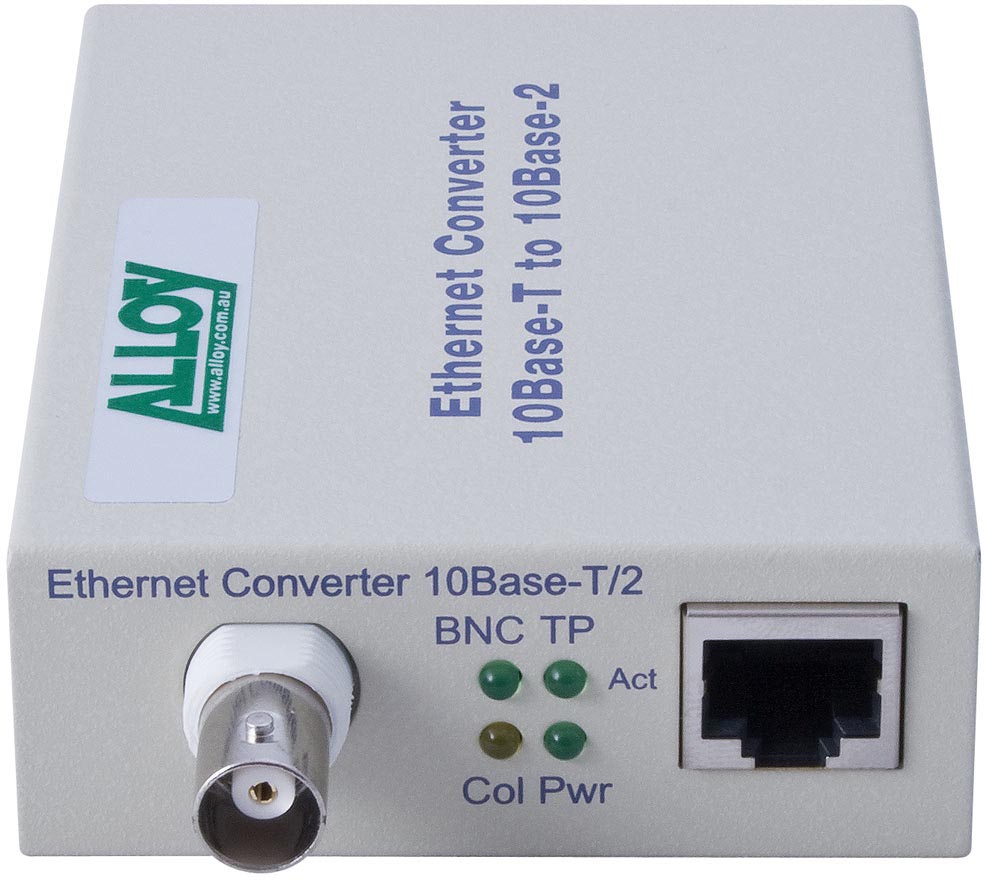
has anyone ever tried this kind of adapter?
I would like to connect my Cube 030 to a network and I need an adapter...
Any suggestion about this or alternative solutions?
Thanks in advance for your feedback!
Paolo
http://www.myithub.com.au/ALLOY-ECR10R-Ethernet-StandaloneRackmount-Media-Converter-10Base-T-RJ-45-to-10Base-2-BNC-185m-P27519.aspx
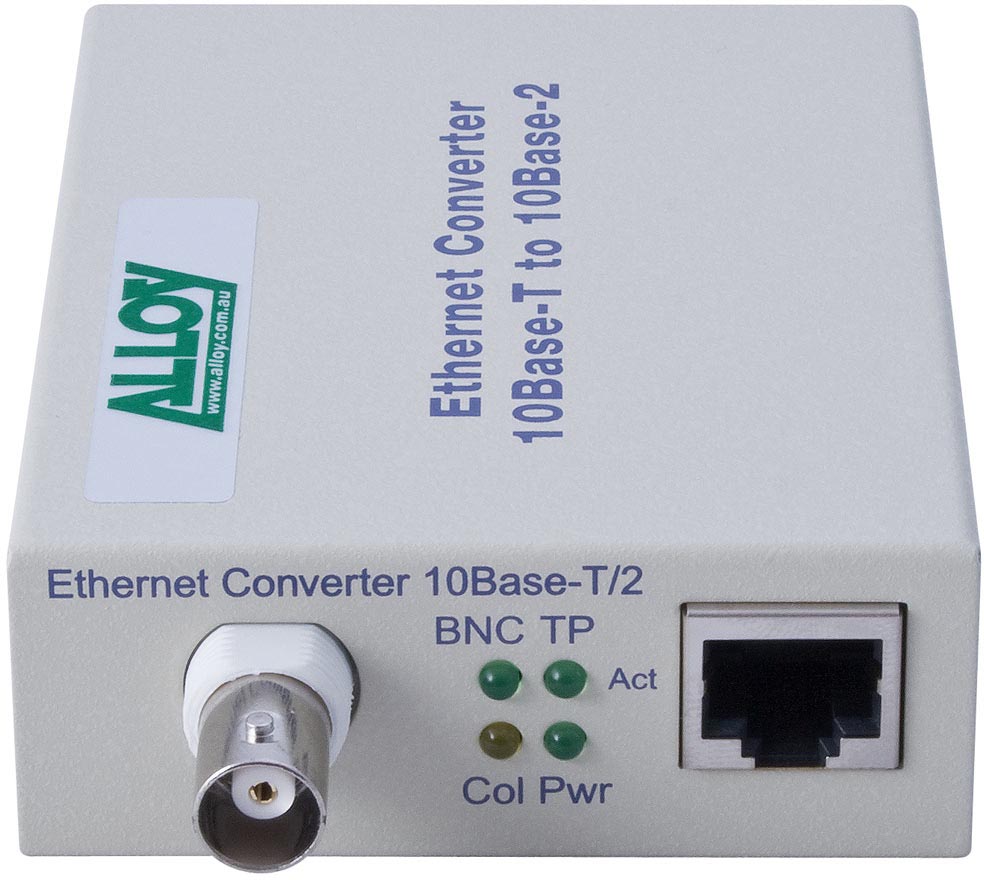
has anyone ever tried this kind of adapter?
I would like to connect my Cube 030 to a network and I need an adapter...
Any suggestion about this or alternative solutions?
Thanks in advance for your feedback!
Paolo
http://www.myithub.com.au/ALLOY-ECR10R-Ethernet-StandaloneRackmount-Media-Converter-10Base-T-RJ-45-to-10Base-2-BNC-185m-P27519.aspx
Title: Networking Guide
Post by: Andreas on October 01, 2016, 11:57:13 AM
Post by: Andreas on October 01, 2016, 11:57:13 AM
i have tried this one, but never success
 (http://www.bilder-upload.eu/show.php?file=b6347e-1475341261.jpg)
(http://www.bilder-upload.eu/show.php?file=b6347e-1475341261.jpg)

Title: Networking Guide
Post by: paolo.bertolo on October 01, 2016, 12:39:44 PM
Post by: paolo.bertolo on October 01, 2016, 12:39:44 PM
I remember I've seen somewhere, probably in this forum, a picture with some comments of a successful installation: Cube 030, media adapter, wi fi router. Unfortunately, I can't find it anymore...
Anyhow, if I remember well, the box was not connected directly, but via a T connector terminated on one side.
Anyhow, if I remember well, the box was not connected directly, but via a T connector terminated on one side.
Title: thin wire
Post by: cubist on October 01, 2016, 01:06:33 PM
Post by: cubist on October 01, 2016, 01:06:33 PM
The last time I used thin wire on a NeXT, my layout was:
* NeXT talking to 3Com OfficeConnect 10B2/10BT Hub (and likely not a switch masquerading as a hub)
* Above talking to 3Com OfficeConnect 10/100BT Hub/Switch
* More modern stuff talking to that.
That was robust in the face autonegotiation and other challenges. Do terminate the thin wire correctly (BNC T & termination resistor). Do have a real switch (any modern 'router') between the NeXT and the rest of your network.
* NeXT talking to 3Com OfficeConnect 10B2/10BT Hub (and likely not a switch masquerading as a hub)
* Above talking to 3Com OfficeConnect 10/100BT Hub/Switch
* More modern stuff talking to that.
That was robust in the face autonegotiation and other challenges. Do terminate the thin wire correctly (BNC T & termination resistor). Do have a real switch (any modern 'router') between the NeXT and the rest of your network.
Title: Networking Guide
Post by: mikeboss on October 01, 2016, 03:10:36 PM
Post by: mikeboss on October 01, 2016, 03:10:36 PM
I have this one (Allied Telesys AT-MC15): http://www.ebay.com/itm/291161240078
bought mine off of ricardo.ch for little money, works just fine.
of course, you'll need two T connectors and two terminators also!
BRACK seems to sell converters: https://www.brack.ch/generic-et-509-medien-converter-142032
regards,
michael
EDIT:
the thread you were looking for: http://www.nextcomputers.org/forums/viewtopic.php?t=3306

bought mine off of ricardo.ch for little money, works just fine.
of course, you'll need two T connectors and two terminators also!
BRACK seems to sell converters: https://www.brack.ch/generic-et-509-medien-converter-142032
regards,
michael
EDIT:
the thread you were looking for: http://www.nextcomputers.org/forums/viewtopic.php?t=3306
Title: Networking Guide
Post by: pentium on October 01, 2016, 10:19:33 PM
Post by: pentium on October 01, 2016, 10:19:33 PM
Quote from: "paolo.bertolo"Hello Everybody,
has anyone ever tried this kind of adapter?
I would like to connect my Cube 030 to a network and I need an adapter...
Any suggestion about this or alternative solutions?
Thanks in advance for your feedback!
Paolo
http://www.myithub.com.au/ALLOY-ECR10R-Ethernet-StandaloneRackmount-Media-Converter-10Base-T-RJ-45-to-10Base-2-BNC-185m-P27519.aspx
I have not used it with a NeXT before but I have used one of those adapters to get an IBM onto a wireless network.
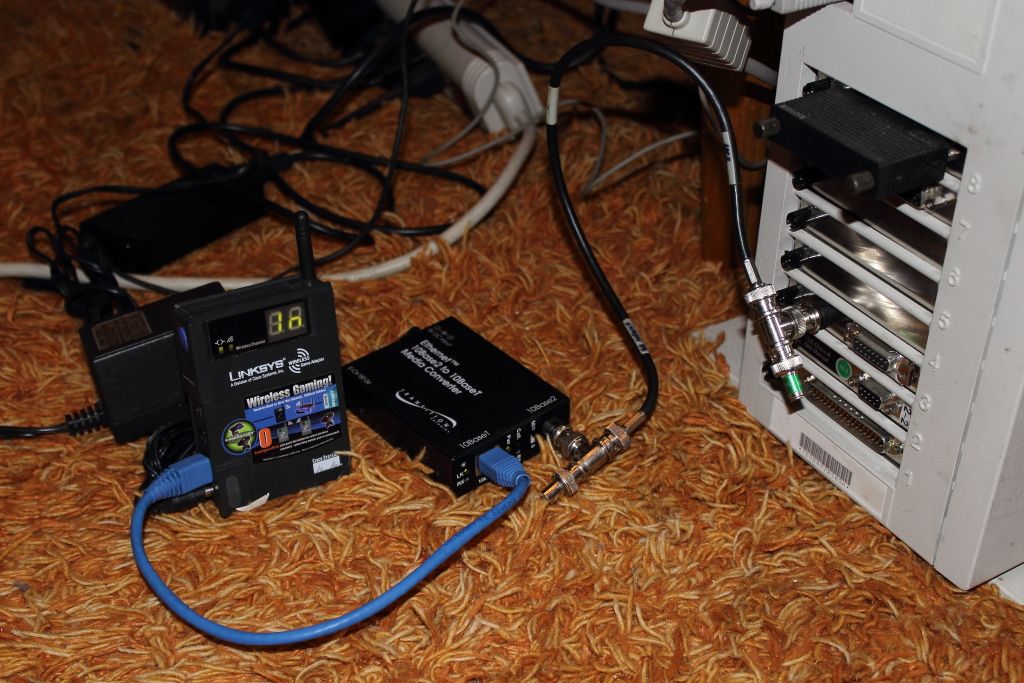
They require pretty much no configuration as they only operate at the network level and are invisible to the computer and the LAN.
Title: Networking Guide
Post by: paolo.bertolo on October 02, 2016, 07:35:51 AM
Post by: paolo.bertolo on October 02, 2016, 07:35:51 AM
Dear All,
thanks for the feedback, I will give it a try...
Paolo
thanks for the feedback, I will give it a try...
Paolo
Title: Networking Guide
Post by: pitz on October 03, 2016, 11:32:50 AM
Post by: pitz on October 03, 2016, 11:32:50 AM
If your objective is to connect the cube to a network, an alternative you might like is to use a 10BASE-5 to 10BASE-T adapter. These adapters also sell cheaply around the net.
I've used them to connect my 030 cube to my network, and less hassle than the 10BASE-2 BNC connectors and their need for proper termination. Same caveat with the other adapters mentioned -- once you are in the 10BASE-T part, some routers/hubs do not auto-detect and downgrade to the 10Mbps speed needed by these adapters. I've always kept and used an old NetGear 10Mbps intermediary hub for older equipment that expect 10Mbps.
I've used them to connect my 030 cube to my network, and less hassle than the 10BASE-2 BNC connectors and their need for proper termination. Same caveat with the other adapters mentioned -- once you are in the 10BASE-T part, some routers/hubs do not auto-detect and downgrade to the 10Mbps speed needed by these adapters. I've always kept and used an old NetGear 10Mbps intermediary hub for older equipment that expect 10Mbps.
Title: Networking Guide
Post by: paolo.bertolo on December 10, 2016, 04:24:12 AM
Post by: paolo.bertolo on December 10, 2016, 04:24:12 AM
Some update on this topic. I finally managed to get one RJ45 to BNC Ethernet adapter. Mine is branded "RS Components", but it's just a sticker on a very generic device you can find with different brands.
BNC cabling must be of the right class and properly terminated at both ends. The adapter is then connected straight into an AirPort base.
Other than this, no special configuration whatsoever is needed, it's pretty much plug and play. Tested working on both Cube 030 and Station Mono.
Actually, this post is being edited on Cube 030 + OmniWeb 2.0 (I guess the least specified machine I've ever managed to connect to the internet).
BNC cabling must be of the right class and properly terminated at both ends. The adapter is then connected straight into an AirPort base.
Other than this, no special configuration whatsoever is needed, it's pretty much plug and play. Tested working on both Cube 030 and Station Mono.
Actually, this post is being edited on Cube 030 + OmniWeb 2.0 (I guess the least specified machine I've ever managed to connect to the internet).
Title: Networking Guide
Post by: paolo.bertolo on December 10, 2016, 04:31:29 AM
Post by: paolo.bertolo on December 10, 2016, 04:31:29 AM
Here's the setup on the Cube 030

