Title: How to configure 68 pin Seagate Barracuda drive NeXTSTATION
Post by: Rob Blessin Black Hole on March 16, 2016, 03:31:58 AM
Post by: Rob Blessin Black Hole on March 16, 2016, 03:31:58 AM
Hello NeXT Community: This will save somebody out there time !
As SCSI 50 pin drives usually are these days harder to find and more expensive than the faster 68 pin scsi drives.
Yes I'm aware of Micro SD and have MicroSD working with this 68 Pin solution as well!
I had fun with this project:
A NeXTSTATION won't normally see a 68 Pin Drive in this case a mono turbo V74 Motherboard with 25Mhz Chip ,128 Mb of Ram.
After trial and error this works you will need a
50 pin female to 68 pin female adaptor this plugs into the onboard scsi 50 pin scsi connector.
A 68 pin ribbon cable with male connectors, I used an LVD cable and yes it works.
68pin 4Gb Seagate Barracuda which has a 68 pin female connector as most if not all 68 pin hard drives do, I have a cache of 4GbBarracudas from good old DEC Servers that are in excellent condition.
So for fun I also hooked up a Micro SD drive which I had preinstalled Openstep 4.2 User, Developer and Y2k patches using a second female 68 pin plugged into ribbon cable to 50 pin female adaptor plugged into Micro SD.
The Advantage is using the build disk utility and yes it is working so the Micro SD drive is building the 4Gb Barracuda and installing 23 packages ...
I've seen a few drives that had a custom builddisk setup that also allowed for installing all of the local apps as well as user, developer and Y2k , may be someone remembers how to do this! I know DD and all but I like buildisk as it shows you what is actually happening in graphic mode and console app under tools which shows whats happening in unix like the intialization and formatting.
Also it does see a 50 pin external scsi cdrom so that install option will also work !
I also set the 2 termination jumpers on the Seagate drive and the scsi id is set to 2 , the micro sd drive is set to 1 and the cdrom drive is set to 6.
I'll also test when builddisk is finished to see if the 68 pin drive will boot up without having an external terminator.
>>>> The following issue is now resolved see fo0llow up post as well below!
I did try several configurations using a 50 pin cable and a 50 pin to 68 pin adaptor , it would see the 50 pin micro sd drive but it would not see the 4Gb 68 pin Seagate Barracuda drive .
:D Best regards Rob Blessin I'll upload photos note to self
As SCSI 50 pin drives usually are these days harder to find and more expensive than the faster 68 pin scsi drives.
Yes I'm aware of Micro SD and have MicroSD working with this 68 Pin solution as well!
I had fun with this project:
A NeXTSTATION won't normally see a 68 Pin Drive in this case a mono turbo V74 Motherboard with 25Mhz Chip ,128 Mb of Ram.
After trial and error this works you will need a
50 pin female to 68 pin female adaptor this plugs into the onboard scsi 50 pin scsi connector.
A 68 pin ribbon cable with male connectors, I used an LVD cable and yes it works.
68pin 4Gb Seagate Barracuda which has a 68 pin female connector as most if not all 68 pin hard drives do, I have a cache of 4GbBarracudas from good old DEC Servers that are in excellent condition.
So for fun I also hooked up a Micro SD drive which I had preinstalled Openstep 4.2 User, Developer and Y2k patches using a second female 68 pin plugged into ribbon cable to 50 pin female adaptor plugged into Micro SD.
The Advantage is using the build disk utility and yes it is working so the Micro SD drive is building the 4Gb Barracuda and installing 23 packages ...
I've seen a few drives that had a custom builddisk setup that also allowed for installing all of the local apps as well as user, developer and Y2k , may be someone remembers how to do this! I know DD and all but I like buildisk as it shows you what is actually happening in graphic mode and console app under tools which shows whats happening in unix like the intialization and formatting.
Also it does see a 50 pin external scsi cdrom so that install option will also work !
I also set the 2 termination jumpers on the Seagate drive and the scsi id is set to 2 , the micro sd drive is set to 1 and the cdrom drive is set to 6.
I'll also test when builddisk is finished to see if the 68 pin drive will boot up without having an external terminator.
>>>> The following issue is now resolved see fo0llow up post as well below!
I did try several configurations using a 50 pin cable and a 50 pin to 68 pin adaptor , it would see the 50 pin micro sd drive but it would not see the 4Gb 68 pin Seagate Barracuda drive .
:D Best regards Rob Blessin I'll upload photos note to self
Title: How to configure 68 pin Seagate Barracuda drive NeXTSTATION
Post by: bobo68 on March 16, 2016, 09:03:14 AM
Post by: bobo68 on March 16, 2016, 09:03:14 AM
Hi Rob,
which 50-to-68 pin adapter did you use?
Your experience cannot be generalized (at least from my experience :) ).
As a rule of thumb one can say: the more jumpers a drive has the better because you have more options. e.g. to configure termination, TERMPWR, parity, forced SE mode, unit attention, etc. pp.
It also depends on how sensitive the drive is and how the adapter is built. With a 50-to-68-pin adapter you have 8 out of 16 data lines unused. If these are not terminated (i.e. floating) a sensitive drive will refuse to work.
which 50-to-68 pin adapter did you use?
Your experience cannot be generalized (at least from my experience :) ).
As a rule of thumb one can say: the more jumpers a drive has the better because you have more options. e.g. to configure termination, TERMPWR, parity, forced SE mode, unit attention, etc. pp.
It also depends on how sensitive the drive is and how the adapter is built. With a 50-to-68-pin adapter you have 8 out of 16 data lines unused. If these are not terminated (i.e. floating) a sensitive drive will refuse to work.
Title: How to configure 68 pin Seagate Barracuda drive NeXTSTATION
Post by: Rob Blessin Black Hole on March 16, 2016, 08:21:19 PM
Post by: Rob Blessin Black Hole on March 16, 2016, 08:21:19 PM
Quote from: "bobo68"Hi Rob,
which 50-to-68 pin adapter did you use?
Your experience cannot be generalized (at least from my experience :) ).
As a rule of thumb one can say: the more jumpers a drive has the better because you have more options. e.g. to configure termination, TERMPWR, parity, forced SE mode, unit attention, etc. pp.
It also depends on how sensitive the drive is and how the adapter is built. With a 50-to-68-pin adapter you have 8 out of 16 data lines unused. If these are not terminated (i.e. floating) a sensitive drive will refuse to work.
Thanks that got my wheels turning and I found this doc http://www.seagate.com/support/disc/manuals/scsi/28880d.pdf
and on page 51 it shows the termination jumpers for pins on jumper block JO1 Termination power to scsi bus and drive then on block JO4 enable drive terminator jumper eliminates need for an external terminator so now it works with either the 50 pin cable and 50 to 68 pin adaptor or a 50 pin to 68 pin adaptor with 68 pin cable which is very cool !
Page 48 of the same document shows the Segate 15150N The Jumper blocks differ in that block JO1 has 3 sets of pins and jumper all 3 Terminates power to the scsi bus and drive as well as enables termination.
You are right Termination is usually half the battle in configuring scsi drives in my experience as well always good to have an extra thoughts on configuration issues.
Title: How to configure 68 pin Seagate Barracuda drive NeXTSTATION
Post by: bobo68 on March 17, 2016, 11:30:30 AM
Post by: bobo68 on March 17, 2016, 11:30:30 AM
Good.
If I may repeat my question: which adapter are you using? :-)
Keep in mind that pulling/up down ("terminating") the unused data lines is not done by the normal SCSI terminator. The former pulls these lines to a defined 0 or 1 level and is a feature of the adapter, the latter avoids signal reflections on the cable.
If I may repeat my question: which adapter are you using? :-)
Keep in mind that pulling/up down ("terminating") the unused data lines is not done by the normal SCSI terminator. The former pulls these lines to a defined 0 or 1 level and is a feature of the adapter, the latter avoids signal reflections on the cable.
Title: How to configure 68 pin Seagate Barracuda drive NeXTSTATION
Post by: Rob Blessin Black Hole on March 18, 2016, 12:46:29 AM
Post by: Rob Blessin Black Hole on March 18, 2016, 12:46:29 AM
Quote from: "bobo68"Good.
If I may repeat my question: which adapter are you using? :-)
Keep in mind that pulling/up down ("terminating") the unused data lines is not done by the normal SCSI terminator. The former pulls these lines to a defined 0 or 1 level and is a feature of the adapter, the latter avoids signal reflections on the cable.
I think you are asking if they are active or passive terminators which I'm not sure as they don't have part number or markings even on the packaging . They are generic but appear to be quality made and I purchased them awhile back on eBay.
Option a)When using the 68 pin ribbon cable , I use the 50 pin female connector that plugs into the motherboard and has a 68 pin female connector where you plug the 68 pin ribbon cable in . The lvd 68 pin ribbon cable has 3 68 pin male connectors and a terminator on the end of the cable.
Option b) a50 pin ribbon cable plugs directly into the motherboard with multiple 50 pin female connectors , in this case I use a 50 pin male to 68 pin male connector which plugs into the drive.
I use a power splitter 4 pin molex connector to power additional drives works great.
Title: How to configure 68 pin Seagate Barracuda drive NeXTSTATION
Post by: bobo68 on March 18, 2016, 07:23:27 AM
Post by: bobo68 on March 18, 2016, 07:23:27 AM
I just wanted to know the exact maker/model of the adapter. Maybe you can share a photo?
Best, bobo68
Best, bobo68
Title: How to configure 68 pin Seagate Barracuda drive NeXTSTATION
Post by: Rob Blessin Black Hole on March 21, 2016, 04:25:16 AM
Post by: Rob Blessin Black Hole on March 21, 2016, 04:25:16 AM
Quote from: "bobo68"I just wanted to know the exact maker/model of the adapter. Maybe you can share a photo?Holy crap I figured out how to do images LOL>
Best, bobo68
This shows the 4Gb UW Barracuda with the 3 jumpers : Termination power Vertical jumpers to 1) bus and 2) drive upper right corner front face of drive .
as well as 3) termination enabled horizontal jumper lower left front face of drive.
Also note the 68 pin male to 50 pin adapter!
I'm over coming a learning curve on Gimp , its free but seems as good as photoshop so soon I'll be able to add text and arrows.... yeah
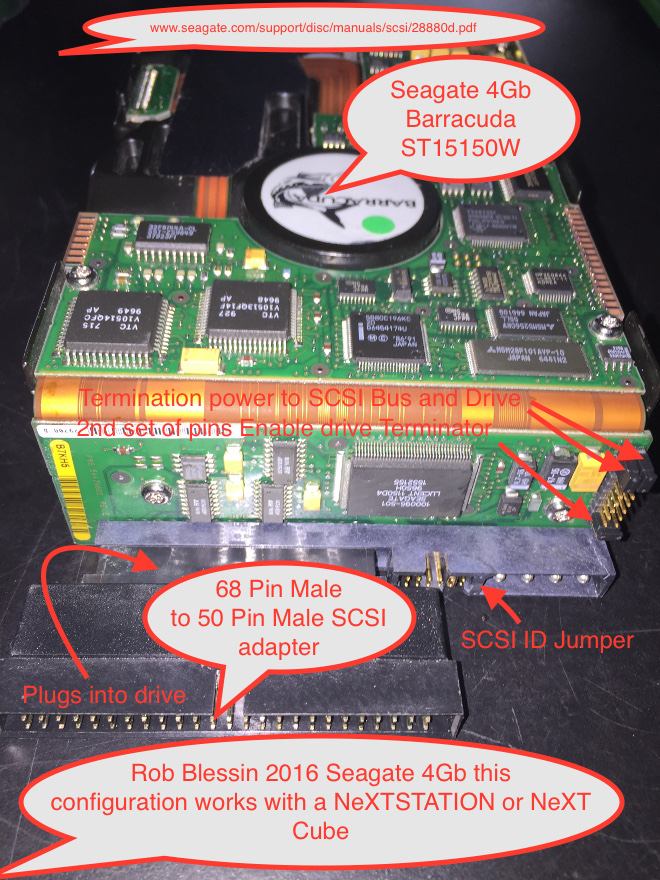
Best regards Rob
Title: How to configure 68 pin Seagate Barracuda drive NeXTSTATION
Post by: bobo68 on March 21, 2016, 10:52:31 AM
Post by: bobo68 on March 21, 2016, 10:52:31 AM
Holy crap, what a monster of a HDD. :shock: Never seen a 3,5" HHD where the electronics are also on the side with a flat flex connection in between.
If I were you I wound use a slimmer and hopefully less power hungry HDD. I heard that the PSU in the NeXTstations has not much room for extra load.
Best, bobo68
P.S. if you are on a Mac you can do image editing, text and arrows with the supplied Preview app.
If I were you I wound use a slimmer and hopefully less power hungry HDD. I heard that the PSU in the NeXTstations has not much room for extra load.
Best, bobo68
P.S. if you are on a Mac you can do image editing, text and arrows with the supplied Preview app.
Title: How to configure 68 pin Seagate Barracuda drive NeXTSTATION
Post by: Rob Blessin Black Hole on March 22, 2016, 08:42:05 PM
Post by: Rob Blessin Black Hole on March 22, 2016, 08:42:05 PM
Quote from: "bobo68"Holy crap, what a monster of a HDD. :shock: Never seen a 3,5" HHD where the electronics are also on the side with a flat flex connection in between.
If I were you I wound use a slimmer and hopefully less power hungry HDD. I heard that the PSU in the NeXTstations has not much room for extra load.
Best, bobo68
P.S. if you are on a Mac you can do image editing, text and arrows with the supplied Preview app.
It actually looks pretty good inside a NeXTSTATION or Cube agreed they are monster drives but were rated for 800,000 hours. , thanks for the tip on preview now I have an easy way to show what I'm trying to explain , picture says a 1000 words.