Title: Adaptec2940: Can't get configSpace; ABORTING
Post by: rey on May 12, 2017, 02:18:18 AM
Post by: rey on May 12, 2017, 02:18:18 AM

I got this while attempting to install NEXTSTEP 3.3 x86 version.
I have a SCSI Adaptec2940 PCI card... weird that the pci bios says Adaptec 2940AU but on the hardware/pci card itself it says Adaptec 2940UW.
I read from somewhere to try to put this scsi pci card in the first pci slot 0.. I haven't tried that yet, but not sure why I should.
I got this 2nd batch of device drivers from apple's website 17 years ago lol... but that extra floppy disk came with more hardware support such as EIDE for EIDE hard drives. but CD-ROM seems to be SCSCI only for NS 3.3.
What are my options?
Thanks in advance![/img]
Title: Adaptec2940: Can't get configSpace; ABORTING
Post by: neozeed on May 12, 2017, 04:00:25 AM
Post by: neozeed on May 12, 2017, 04:00:25 AM
Well glancing at driverkit I see this:
Sadly this would be a function in the PCIBus driver, which we don't have source code to.
http://wiki.osdev.org/PCI#Configuration_Space_Access_Mechanism_.232
Give some hints on what it could be, along with https://opensource.apple.com/source/boot/boot-83.2/i386/libsaio/legacy/PCI.h.auto.html
So yeah I'd assume that your card is one that it's detecting incorrectly, or there is not enough memory space around where it wants to be... I guess disable and remove as much hardware as you can, maybe try different slots?
Code Select
/*
 * Reads the device's entire configuration space.  Returns IO_R_SUCCESS if
 * successful.  If this method fails, the driver should make no assumptions
 * about the state of the data returned in the IOPCIConfigSpace struct.
 */
+ (IOReturn)getPCIConfigSpace: (IOPCIConfigSpace *) configSpace
        withDeviceDescription: descr;

- (IOReturn)getPCIConfigSpace: (IOPCIConfigSpace *) configSpace;
Sadly this would be a function in the PCIBus driver, which we don't have source code to.
http://wiki.osdev.org/PCI#Configuration_Space_Access_Mechanism_.232
Give some hints on what it could be, along with https://opensource.apple.com/source/boot/boot-83.2/i386/libsaio/legacy/PCI.h.auto.html
So yeah I'd assume that your card is one that it's detecting incorrectly, or there is not enough memory space around where it wants to be... I guess disable and remove as much hardware as you can, maybe try different slots?
Title: After some research.. I discovered I should remove SCSI.
Post by: rey on May 13, 2017, 02:12:45 PM
Post by: rey on May 13, 2017, 02:12:45 PM
So moving the SCSI card to PCI 0 (the first one) did not work for me.
I did some googling and found that I should remove the SCSI altogether, and Nextstep 3.3 actually supports a pure EIDE/Atapi setup in master/slave configuration on Primary IDE!!
Note on ATAPI CD-ROM
(From NeXTanswers number 1933, EIDE and ATAPI CDROM Support in NEXTSTEP 3.3)
ATAPI devices appear to the system as SCSI devices. Hence it is possible to install NEXTSTEP using an ATAPI CD-ROM and use it with other applications like CDPlayer.
If you are installing NEXTSTEP using an ATAPI CD-ROM you must connect the IDE hard disk and CD-ROM to the primary controller. The hard disk should be configured as master or as master with slave present (if this option is available). The ATAPI CD-ROM should be configured as slave. This is usually accomplished by changing a jumper on the device.
After this you can proceed with NEXTSTEP installation in the usual way. See Installing and Configuring NEXTSTEP Release 3.3 for Intel Processors and NeXT Computers for details.
When prompted to select the SCSI adapter connected to your CD-ROM drive, select the Adaptec 154x SCSI driver to continue. When prompted for the type of disk controller the hard drive is connected to, select the EIDE and ATAPI driver. Once NEXTSTEP is installed you should remove the Adaptec154x driver with Configure.app. Requiring a SCSI driver to be loaded is a bug and will be fixed in a later version of NEXTSTEP.
---End---
I found this from http://www.shawcomputing.net/resources/next/software/install/ns_install.html
I will try this tonight and let you know if it works!
I did some googling and found that I should remove the SCSI altogether, and Nextstep 3.3 actually supports a pure EIDE/Atapi setup in master/slave configuration on Primary IDE!!
Note on ATAPI CD-ROM
(From NeXTanswers number 1933, EIDE and ATAPI CDROM Support in NEXTSTEP 3.3)
ATAPI devices appear to the system as SCSI devices. Hence it is possible to install NEXTSTEP using an ATAPI CD-ROM and use it with other applications like CDPlayer.
If you are installing NEXTSTEP using an ATAPI CD-ROM you must connect the IDE hard disk and CD-ROM to the primary controller. The hard disk should be configured as master or as master with slave present (if this option is available). The ATAPI CD-ROM should be configured as slave. This is usually accomplished by changing a jumper on the device.
After this you can proceed with NEXTSTEP installation in the usual way. See Installing and Configuring NEXTSTEP Release 3.3 for Intel Processors and NeXT Computers for details.
When prompted to select the SCSI adapter connected to your CD-ROM drive, select the Adaptec 154x SCSI driver to continue. When prompted for the type of disk controller the hard drive is connected to, select the EIDE and ATAPI driver. Once NEXTSTEP is installed you should remove the Adaptec154x driver with Configure.app. Requiring a SCSI driver to be loaded is a bug and will be fixed in a later version of NEXTSTEP.
---End---
I found this from http://www.shawcomputing.net/resources/next/software/install/ns_install.html
I will try this tonight and let you know if it works!
Title: Adaptec2940: Can't get configSpace; ABORTING
Post by: rey on May 15, 2017, 11:17:32 AM
Post by: rey on May 15, 2017, 11:17:32 AM
I'm guessing I should give up. My motherboard is the Supermicro p4sga, which was almost like the one that others successfully installed 3.3, but not exactly.
It hangs after the last line.
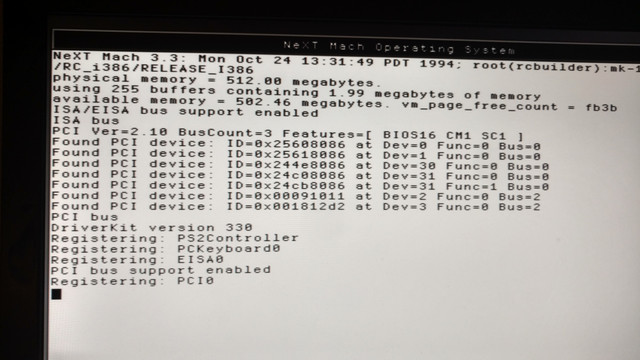 (https://ibb.co/gJLrVk)
private image sharing (https://imgbb.com/)
It hangs after the last line.
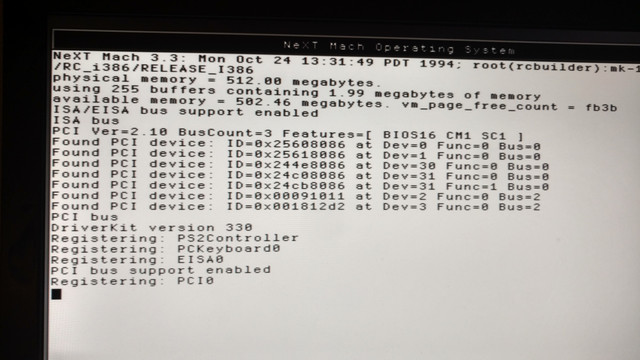 (https://ibb.co/gJLrVk)
private image sharing (https://imgbb.com/)
Title: Adaptec2940: Can't get configSpace; ABORTING
Post by: Morgon on May 15, 2017, 01:50:59 PM
Post by: Morgon on May 15, 2017, 01:50:59 PM
The error message you get just means that the driver could not identify any supported card by it's PCI IDs.
IIRC you need to use the Adaptec78xx driver for the UW boards. I'm not sure if you have to add some PCI IDs to the autodetect string in the drivers default.table.
Hope that helps.
Morgon
IIRC you need to use the Adaptec78xx driver for the UW boards. I'm not sure if you have to add some PCI IDs to the autodetect string in the drivers default.table.
Hope that helps.
Morgon
Title: Adaptec2940: Can't get configSpace; ABORTING
Post by: neozeed on May 15, 2017, 03:05:06 PM
Post by: neozeed on May 15, 2017, 03:05:06 PM
16bit bios... Hmm.. I wonder if that may be the issue, it may not support some of the "newer" pci calls?
Title: Adaptec2940: Can't get configSpace; ABORTING
Post by: wa2flq on May 15, 2017, 05:17:14 PM
Post by: wa2flq on May 15, 2017, 05:17:14 PM
I use a 2490UW under Openstep, but I didn't have one when I was running NS. I use the 2490 driver. My boot shows PCI Ver 2.10 as well and BIOS16
I vaguely recall that there are problems with large memory machines, even though the documentation says it supports up to 512 Mb. I've run as much as 384Mb. You might want to try 'maxmem=num-kbytes' as a boot option and limit the ram NS tries to use.
I vaguely recall that there are problems with large memory machines, even though the documentation says it supports up to 512 Mb. I've run as much as 384Mb. You might want to try 'maxmem=num-kbytes' as a boot option and limit the ram NS tries to use.
Title: Adaptec2940: Can't get configSpace; ABORTING
Post by: neozeed on May 15, 2017, 08:32:23 PM
Post by: neozeed on May 15, 2017, 08:32:23 PM
Quote from: "wa2flq"I use a 2490UW under Openstep, but I didn't have one when I was running NS. I use the 2490 driver. My boot shows PCI Ver 2.10 as well and BIOS16
I vaguely recall that there are problems with large memory machines, even though the documentation says it supports up to 512 Mb. I've run as much as 384Mb. You might want to try 'maxmem=num-kbytes' as a boot option and limit the ram NS tries to use.
You may be onto something there, perhaps that is where it is colliding with, wihere the 16bit PCI bios is trying to keep it's config space.
The IBM PC is rife with 'limits' that were thrown in place, as each early CPU generation gave us a 1MB, then 16MB address space with the 8086, and the 80286. Sadly with the 80386 we didn't jump to actual 4GB physical address spaces, so you may need to try capping ram at 16MB, or 64MB... or even in the middle at 32.
I just went through this hell with Rhapsody, as it will boot up and panic with too much RAM.
Title: Adaptec2940: Can't get configSpace; ABORTING
Post by: rey on May 15, 2017, 09:38:27 PM
Post by: rey on May 15, 2017, 09:38:27 PM
Thanks for all suggestions. How can I get documentation on these commands like maxmem, etc?
Title: Adaptec2940: Can't get configSpace; ABORTING
Post by: rey on May 15, 2017, 09:57:13 PM
Post by: rey on May 15, 2017, 09:57:13 PM
As I fall down the marix rabbit hole, I find a PDF that says to use a different driver named:
"Primary/Secondary(Dual) EIDE and ATAPI Device Controllers"
And it speaks of two more driver floppies..a 4th and 5th floppy....I only knew of the 2nd (from NeXT with official sticker) floppy, and the 3rd floppy being a downloadable.
A fourth and fifth floppy? I feel like I'm hunting for the dead sea scrolls.
It was from a PDF for installation on emulators/virtual..sorry I can't find the link nor can I attach PDF here :(
"Primary/Secondary(Dual) EIDE and ATAPI Device Controllers"
And it speaks of two more driver floppies..a 4th and 5th floppy....I only knew of the 2nd (from NeXT with official sticker) floppy, and the 3rd floppy being a downloadable.
A fourth and fifth floppy? I feel like I'm hunting for the dead sea scrolls.
It was from a PDF for installation on emulators/virtual..sorry I can't find the link nor can I attach PDF here :(
Title: Adaptec2940: Can't get configSpace; ABORTING
Post by: wa2flq on May 15, 2017, 10:00:08 PM
Post by: wa2flq on May 15, 2017, 10:00:08 PM
Quote from: "rey"Thanks for all suggestions. How can I get documentation on these commands like maxmem, etc?
Follow this link http://www.nextcomputers.org/NeXTfiles/Docs/NeXTStep/3.3/nsa/09_StartShut.htmld/index.html
Jerry
Title: Adaptec2940: Can't get configSpace; ABORTING
Post by: neozeed on May 16, 2017, 12:02:10 AM
Post by: neozeed on May 16, 2017, 12:02:10 AM
there is some stuff burried in the recently found source:
i386_init.c (http://unix.superglobalmegacorp.com/cgi-bin/cvsweb.cgi/kernel/machdep/i386/i386_init.c?rev=1.1.1.1;cvsroot=Darwin0)
In the kernel init, this
So here is some things the kernel will check. Although looking at this, I should probably patch the subtype for Darwin0.3 ..
i386_init.c (http://unix.superglobalmegacorp.com/cgi-bin/cvsweb.cgi/kernel/machdep/i386/i386_init.c?rev=1.1.1.1;cvsroot=Darwin0)
In the kernel init, this
Code Select
	"nbuf", &nbuf,
	"rootdev", (int*) rootdevice,
	"maxmem", &maxmem,
	"subtype", &subtype,
	"srv", &srv,
	"ncl", &ncl,
So here is some things the kernel will check. Although looking at this, I should probably patch the subtype for Darwin0.3 ..
Title: Adaptec2940: Can't get configSpace; ABORTING
Post by: rey on May 17, 2017, 11:00:36 AM
Post by: rey on May 17, 2017, 11:00:36 AM
Ok I really threw in the towel.
The bright side is that I have black hardware that I will revive, which should be easier!
But for this thread of white hardware, I installed OpenStep 4.2 on the first try and got it working without any scsi! It even recognized my atapi DVD-ROM on the first shot.
It was an effortless install.
So why bother with this Adaptec 2940AU?
Maybe I'll put this SCSI equipment in storage...
Thanks again everyone. Lesson learned. Stick with 4.2 on Pentium 4.
The bright side is that I have black hardware that I will revive, which should be easier!
But for this thread of white hardware, I installed OpenStep 4.2 on the first try and got it working without any scsi! It even recognized my atapi DVD-ROM on the first shot.
It was an effortless install.
So why bother with this Adaptec 2940AU?
Maybe I'll put this SCSI equipment in storage...
Thanks again everyone. Lesson learned. Stick with 4.2 on Pentium 4.
Title: Adaptec2940: Can't get configSpace; ABORTING
Post by: rey on May 17, 2017, 11:03:44 AM
Post by: rey on May 17, 2017, 11:03:44 AM
Terrible summary. I didn't solve the problem due to time constraints but I'm sure someone else with Adaptec 2940AU on Supermicro ps4ga can solve this. Good luck.
Title: Adaptec2940: Can't get configSpace; ABORTING
Post by: t-rexky on May 17, 2017, 11:28:25 AM
Post by: t-rexky on May 17, 2017, 11:28:25 AM
There has to be something peculiar about your setup. I have two IBM P4 IntelliStation machines. One is running NS3.3, the other one OS4.2. One has an Adaptec 2940UW and the other 2940U2W. The U2W needed convincing by changing the PCI ID in the driver. Everything works flawlessly.
The issue with IDE is that very new hardware will either not be recognized or may not run in UDMA mode. This gives SCSI a big advantage in terms of portability and performance. Generally speaking, of course - if it does not work then it is of no help...
The issue with IDE is that very new hardware will either not be recognized or may not run in UDMA mode. This gives SCSI a big advantage in terms of portability and performance. Generally speaking, of course - if it does not work then it is of no help...
Title: Adaptec2940: Can't get configSpace; ABORTING
Post by: wa2flq on May 17, 2017, 01:21:58 PM
Post by: wa2flq on May 17, 2017, 01:21:58 PM
Quote from: "t-rexky"There has to be something peculiar about your setup. I have two IBM P4 IntelliStation machines. One is running NS3.3, the other one OS4.2. One has an Adaptec 2940UW and the other 2940U2W. The U2W needed convincing by changing the PCI ID in the driver. Everything works flawlessly.
The issue with IDE is that very new hardware will either not be recognized or may not run in UDMA mode. This gives SCSI a big advantage in terms of portability and performance. Generally speaking, of course - if it does not work then it is of no help...
The other advantage for SCSI is the amount of storage you can attach. IDE is limited to a a few IDE 8 GB (BIOS limited) max drives. Less if you have a CDROM. With a SCSI I can add 19 GB drives until I run out of SCSI ID's . :wink:
Title: Adaptec2940: Can't get configSpace; ABORTING
Post by: neozeed on May 17, 2017, 08:50:59 PM
Post by: neozeed on May 17, 2017, 08:50:59 PM
Quote from: "wa2flq"Quote from: "t-rexky"There has to be something peculiar about your setup. I have two IBM P4 IntelliStation machines. One is running NS3.3, the other one OS4.2. One has an Adaptec 2940UW and the other 2940U2W. The U2W needed convincing by changing the PCI ID in the driver. Everything works flawlessly.
The issue with IDE is that very new hardware will either not be recognized or may not run in UDMA mode. This gives SCSI a big advantage in terms of portability and performance. Generally speaking, of course - if it does not work then it is of no help...
The other advantage for SCSI is the amount of storage you can attach. IDE is limited to a a few IDE 8 GB (BIOS limited) max drives. Less if you have a CDROM. With a SCSI I can add 19 GB drives until I run out of SCSI ID's . :wink:
got a dmesg?
I notice in the kernel source & the newfs that the disk types are limited to an unsigned short for how many cylinders a disk can have, which is only 65,535 cylinders.... (16 bits).
Title: Adaptec2940: Can't get configSpace; ABORTING
Post by: wa2flq on May 17, 2017, 11:05:59 PM
Post by: wa2flq on May 17, 2017, 11:05:59 PM
Quote from: "neozeed"Quote from: "wa2flq"Quote from: "t-rexky"There has to be something peculiar about your setup. I have two IBM P4 IntelliStation machines. One is running NS3.3, the other one OS4.2. One has an Adaptec 2940UW and the other 2940U2W. The U2W needed convincing by changing the PCI ID in the driver. Everything works flawlessly.
The issue with IDE is that very new hardware will either not be recognized or may not run in UDMA mode. This gives SCSI a big advantage in terms of portability and performance. Generally speaking, of course - if it does not work then it is of no help...
The other advantage for SCSI is the amount of storage you can attach. IDE is limited to a a few IDE 8 GB (BIOS limited) max drives. Less if you have a CDROM. With a SCSI I can add 19 GB drives until I run out of SCSI ID's . :wink:
got a dmesg?
I notice in the kernel source & the newfs that the disk types are limited to an unsigned short for how many cylinders a disk can have, which is only 65,535 cylinders.... (16 bits).
The 2490 is ID 0x81789004
Code Select
 Mar 25 14:23:22 starbase mach: NeXT Mach 4.2: Tue Jan 26 11:21:50 PST 1999; root(rcbuilder):Objects/mk-183.34.4.obj~2/RELEASE_I386
 Mar 25 14:23:22 starbase mach: physical memory = 384.00 megabytes.
 Mar 25 14:23:22 starbase mach: using 255 buffers containing 1.99 megabytes of memory
 Mar 25 14:23:22 starbase mach: available memory = 375.35 megabytes. vm_page_free_count = bbad
 Mar 25 14:23:22 starbase mach: PnP: Plug and Play support enabled
 Mar 25 14:23:22 starbase mach: PnP: Plug and Play BIOS present
 Mar 25 14:23:22 starbase mach: PnP: read port 0x0, max csn 0
 Mar 25 14:23:22 starbase mach: ISA/EISA bus support enabled
 Mar 25 14:23:22 starbase mach: PCI Ver=2.10 BusCount=2 Features=[ BIOS16 CM1 SC1 ]
 Mar 25 14:23:22 starbase mach: Found PCI 2.0 device: ID=0x71908086 at Dev=0 Func=0 Bus=0
 Mar 25 14:23:22 starbase mach: Found PCI 2.0 device: ID=0x71918086 at Dev=1 Func=0 Bus=0
 Mar 25 14:23:22 starbase mach: Found PCI 2.1 device: ID=0x12298086/0x00098086 at Dev=3 Func=0 Bus=0
 Mar 25 14:23:22 starbase mach: Found PCI 2.1 device: ID=0x30381106/0x30381106 at Dev=4 Func=0 Bus=0
 Mar 25 14:23:22 starbase mach: Found PCI 2.1 device: ID=0x30381106/0x30381106 at Dev=4 Func=1 Bus=0
 Mar 25 14:23:22 starbase mach: Found PCI 2.1 device: ID=0x31041106/0x31041106 at Dev=4 Func=2 Bus=0
 Mar 25 14:23:22 starbase mach: Found PCI 2.1 device: ID=0x30441106/0x30441106 at Dev=4 Func=3 Bus=0
 Mar 25 14:23:22 starbase mach: Found PCI 2.0 device: ID=0x81789004 at Dev=6 Func=0 Bus=0
 Mar 25 14:23:22 starbase mach: Found PCI 2.1 device: ID=0x8009104c/0xb11f0e11 at Dev=19 Func=0 Bus=0
 Mar 25 14:23:22 starbase mach: Found PCI 2.0 device: ID=0x71108086 at Dev=20 Func=0 Bus=0
 Mar 25 14:23:22 starbase mach: Found PCI 2.0 device: ID=0x71118086 at Dev=20 Func=1 Bus=0
 Mar 25 14:23:22 starbase mach: Found PCI 2.1 device: ID=0x4c421002/0x00441002 at Dev=0 Func=0 Bus=1
 Mar 25 14:23:22 starbase mach: PCI bus support enabled
 Mar 25 14:23:22 starbase mach: ISA bus
 Mar 25 14:23:22 starbase mach: DriverKit version 420
 Mar 25 14:23:22 starbase mach: configureDriver: driver class '' was not loaded
 Mar 25 14:23:22 starbase mach: Driver  could not be configured
 Mar 25 14:23:22 starbase mach: Registering: EISA0
 Mar 25 14:23:22 starbase mach: PCI bus support enabled
 Mar 25 14:23:22 starbase mach: Registering: PCI0
 Mar 25 14:23:22 starbase mach: Registering: PCMCIA0
 Mar 25 14:23:22 starbase mach: PCIC: No device at base address 0x03e0
 Mar 25 14:23:22 starbase mach: Registering: PS2Controller
 Mar 25 14:23:22 starbase mach: Registering: PCKeyboard0
 Mar 25 14:23:22 starbase mach: Registering: fc0
 Mar 25 14:23:22 starbase mach: Registering: fd0
 Mar 25 14:23:22 starbase mach: Registering: ISASerialPort0
 Mar 25 14:23:22 starbase mach: ISASerialPort0: Base=0x03f8, IRQ=4, Type=16550AF/C/CF, FIFO=16
 Mar 25 14:23:22 starbase mach: Adaptec 2940 Host Adapter found at Bus 0 Device 6
 Mar 25 14:23:22 starbase mach: a2940_0: 16 Targets per Bus
 Mar 25 14:23:22 starbase mach: Resetting SCSI Bus...
 Mar 25 14:23:22 starbase mach: Registering: a2940_0 at 0x2400
 Mar 25 14:23:22 starbase mach: Registering: sc0 at a2940_0 SCSI Bus 0 Target 7
 Mar 25 14:23:22 starbase mach: sd0: SEAGATE ST318438LW 0003
 Mar 25 14:23:22 starbase mach: Registering: sd0 at Target 0 LUN 0 at sc0
 Mar 25 14:23:22 starbase mach: sd0: Device Block Size: 512 bytes
 Mar 25 14:23:22 starbase mach: sd0: Device Capacity:   19001 MB
 Mar 25 14:23:22 starbase mach: sd0: Disk Label:        Disk
 Mar 25 14:23:22 starbase mach: sd1: SEAGATE ST318438LW 0003
 Mar 25 14:23:22 starbase mach: Registering: sd1 at Target 1 LUN 0 at sc0
 Mar 25 14:23:22 starbase mach: sd1: No Valid Disk Label
 Mar 25 14:23:22 starbase mach: sd1: Device Block Size: 512 bytes
 Mar 25 14:23:22 starbase mach: sd1: Device Capacity:   19001 MB
 Mar 25 14:23:22 starbase mach: Registering: sg0 at sc0
 Mar 25 14:23:22 starbase mach: Registering: sg1 at sc0
 Mar 25 14:23:22 starbase mach: Registering: sg2 at sc0
 Mar 25 14:23:22 starbase mach: Registering: sg3 at sc0
 Mar 25 14:23:22 starbase mach: hc0: PIIX4 PCI IDE Controller at Dev:20 Func:1 Bus:0
 Mar 25 14:23:22 starbase mach: hc0: PCI bus master DMA: Enabled
 Mar 25 14:23:22 starbase mach: hc0: device detected at port 0x1f0 irq 14
 Mar 25 14:23:22 starbase mach: hc0: Checking for ATA drive 0...  Detected
 Mar 25 14:23:22 starbase mach: hc0: Checking for ATA drive 1...
 Mar 25 14:23:22 starbase mach: hc0: Checking for ATAPI drive 1...
 Mar 25 14:23:22 starbase mach: hc0: Resetting drives...
 Mar 25 14:23:22 starbase mach: hc0: interrupt timeout, cmd: 0xc8
 Mar 25 14:23:22 starbase mach: hc0: PIIX IDE status:0x20 error:6
 Mar 25 14:23:22 starbase mach: hc0: Drive 0 DMA test FAILED
 Mar 25 14:23:22 starbase mach: hc0: Drive 0: PIO Mode 4
 Mar 25 14:23:22 starbase mach: Registering: hc0
 Mar 25 14:23:22 starbase mach: hd0: MAXTOR STM3160815A 3.AAD
 Mar 25 14:23:22 starbase mach: hd0: 16383 cylinders, 16 heads, 63 spt (disk geometry)
 Mar 25 14:23:22 starbase mach: hd0: using multisector (16) transfers.
 Mar 25 14:23:22 starbase mach: Registering: hd0
 Mar 25 14:23:22 starbase mach: hd0: No Valid Disk Label
 Mar 25 14:23:22 starbase mach: hd0: Device Block Size: 512 bytes
 Mar 25 14:23:22 starbase mach: hd0: Device Capacity:   8063 MB
 Mar 25 14:23:22 starbase mach: hc1: PIIX4 PCI IDE Controller at Dev:20 Func:1 Bus:0
 Mar 25 14:23:22 starbase mach: hc1: PCI bus master DMA: Enabled
 Mar 25 14:23:22 starbase mach: hc1: no devices detected at port 0x170
 Mar 25 14:23:22 starbase mach: Registering: event0
 Mar 25 14:23:22 starbase mach: Registering: kmDevice0
 Mar 25 14:23:22 starbase mach: root on sd0a
 Mar 25 14:23:22 starbase mach: rootdev 600, howto 0
 Mar 25 14:23:22 starbase mach: Power management is enabled.
 Mar 25 14:23:22 starbase mach: Installing interfaces:
 Mar 25 14:23:22 starbase mach: Registering: ppp0
 Mar 25 14:23:22 starbase mach: Registering: ppp1
 Mar 25 14:23:22 starbase mach: Registering: PS2Mouse
 Mar 25 14:23:22 starbase mach: SerialPointingDevice: No mouse detected on serial port ISASerialPort0.
 Mar 25 14:23:22 starbase mach: PCPointer probe: mouseInit failure
 Mar 25 14:23:22 starbase mach: Display0: ATI Rage/Rage II/Rage Pro Found!
 Mar 25 14:23:22 starbase mach: Display0: Type LT.  Gamma: YES.  Memory: 8 MBytes.
 Mar 25 14:23:22 starbase mach: Display: Mode selected: 1280 x 1024 @ 60 Hz (RGB:888/32)
 Mar 25 14:23:22 starbase mach: Display0: 24 Bit Color Configuration = Default
 Mar 25 14:23:22 starbase mach: Registering: Display0
 Mar 25 14:23:22 starbase mach: Registering: pp0
 Mar 25 14:23:22 starbase mach: Registering: NEXTIME_Sound
 Mar 25 14:23:22 starbase mach: Intel82557: PCI Dev: 3 Func: 0 Bus: 0
 Mar 25 14:23:22 starbase mach: Registering: en0
 Mar 25 14:23:22 starbase mach: en0: Intel EtherExpress PRO/100B PCI memory 0x41800000 irq 3 100Base-TX full duplex
 Mar 25 14:23:22 starbase mach: IP protocol enabled for interface en0, type "10MB Ethernet"
 Mar 25 14:23:22 starbase mach: en0: Ethernet address 02:95:44:33:21:90
 Mar 25 14:23:22 starbase mach: SoundBlaster16 hardware version is 4.11
 Mar 25 14:23:22 starbase mach: SoundBlaster16 at dma channels 1 and 5 irq 10
 Mar 25 14:23:22 starbase mach: Registering: SoundBlaster16
 Mar 25 14:23:22 starbase mach: st: major number 7
 Mar 25 14:23:27 starbase reboot: Reboot complete
Title: Adaptec2940: Can't get configSpace; ABORTING
Post by: neozeed on May 18, 2017, 12:16:55 AM
Post by: neozeed on May 18, 2017, 12:16:55 AM
is your sd0a one big partition/filesystem?
It's such a PITA that white box hardware is so .... touch and go for support ... :|
It's such a PITA that white box hardware is so .... touch and go for support ... :|
Title: Adaptec2940: Can't get configSpace; ABORTING
Post by: neozeed on May 18, 2017, 12:23:20 AM
Post by: neozeed on May 18, 2017, 12:23:20 AM
Quote from: "rey"I'm guessing I should give up. My motherboard is the Supermicro p4sga, which was almost like the one that others successfully installed 3.3, but not exactly.
It hangs after the last line.
private image sharing (https://imgbb.com/)
Looking back at this image, we probably should have looked at the detected PCI table. I've just done a google for every device, and you know what I'm not seeing? There is no SCSI card.
Code Select
chip0@pci0:0:0:	class=0x060000 card=0x25608086 chip=0x25608086 rev=0x02 hdr=0x00
    vendor   = 'Intel Corporation'
    device   = '82845G/GL/GV/GE/PE DRAM Controller / Host-Hub I/F Bridge'
    class    = bridge
    subclass = HOST-PCI

pcib1@pci0:1:0:	class=0x060400 card=0x00000000 chip=0x25618086 rev=0x02 hdr=0x01
    vendor   = 'Intel Corporation'
    device   = '82845G/GL/GV/GE/PE Brookdale Host-to-AGP Bridge'
    class    = bridge
    subclass = PCI-PCI

pcib2@pci0:30:0:	class=0x060400 card=0x00000000 chip=0x244e8086 rev=0x82 hdr=0x01
    vendor   = 'Intel Corporation'
    device   = '82801BA/CA/DB (ICH2/3/4) Hub Interface to PCI Bridge (244E)'
    class    = bridge
    subclass = PCI-PCI

isab0@pci0:31:0:	class=0x060100 card=0x00000000 chip=0x24c08086 rev=0x02 hdr=0x00
    vendor   = 'Intel Corporation'
    device   = '82801DB (ICH4) LPC Interface Bridge'
    class    = bridge
    subclass = PCI-ISA

atapci0@pci0:31:1:	class=0x01018a card=0x53568086 chip=0x24cb8086 rev=0x02 hdr=0x00
    vendor   = 'Intel Corporation'
    device   = '82801DB (ICH4) UltraATA/100 EIDE Controller'
    class    = mass storage
    subclass = ATA

de0@pci0:10:0:	class=0x020000 card=0x21140a00 chip=0x00091011 rev=0x20 hdr=0x00
    vendor   = 'Digital Equipment Corporation'
    device   = 'DecChip 21140 Fast Ethernet Adapter'
    class    = network
    subclass = ethernet

none0@pci1:0:0:    class=0x030000 card=0x1b1e10b4 chip=0x001812d2 rev=0x10 hdr=0x00
    vendor     = 'Nvidia (Was:STB,SGS Thompson)'
    device     = 'RIVA 128 2D/3D GUI Accelerator'
    class      = display
    subclass   = VGA
Your card is either dead, or some other hardware issue is up.
And here is wa2flq's PCI ID, which of course is the Adaptec card in question...
Code Select
ahc0 at pci2:9:0:  class=0x010000 card=0x00000000 chip=0x81789004 rev=0x00 hdr=0x00
    vendor   = 'Adaptec Inc'
    device   = 'AHA-2940U/UW/2940D Ultra/Ultra Wide/Dual SCSI Host Adapter'
    class    = mass storage
    subclass = SCSI
Title: Adaptec2940: Can't get configSpace; ABORTING
Post by: wa2flq on May 18, 2017, 12:26:19 AM
Post by: wa2flq on May 18, 2017, 12:26:19 AM
Quote from: "neozeed"is your sd0a one big partition/filesystem?
It's such a PITA that white box hardware is so .... touch and go for support ... :|
sd0a is a 4GB partition, the most OS 4.2 will support. There are 4 other similar partitions and one slightly smaller on that drive. I've had 5 drives, plus the DDS tape attached at one time. I can boot from other drives and partitions if I take the time to set them up. If you google around, its not hard to find which hardware works and has driver support.
Title: Adaptec2940: Can't get configSpace; ABORTING
Post by: itomato on May 26, 2017, 11:53:30 PM
Post by: itomato on May 26, 2017, 11:53:30 PM
Quote from: "rey"
So why bother with this Adaptec 2940AU?
Maybe I'll put this SCSI equipment in storage...
The device ID of your 2940AU might not be detected. Check Configure.app to see if the PCI device is shown next to the Adaptec driver.
As for why to bother, if you have a Wide SCSI device, you'll notice the difference, especially at 10K RPMs. Wide SCSI is something like 10MB/s vs. 3 MB/s for EIDE.