Title: NeXT2USB - Plug your NeXT keyboard into USB
Post by: drakar on December 29, 2017, 09:11:55 AM
Post by: drakar on December 29, 2017, 09:11:55 AM
As I was working with keyboard protocols and building some electronics I thought it'd be fun to make a little adapter so that I could use the NeXT non-ADB keyboard (and its excellent Alps switches) on a modern system.
Plug your non-ADB keyboard in one side, USB in the other, and you've got a USB keyboard! The volume keys work too.
Available at https://drakware.com


I'm also working on one for ADB and a device to do the opposite - plug USB peripherals into a NeXT system.
Plug your non-ADB keyboard in one side, USB in the other, and you've got a USB keyboard! The volume keys work too.
Available at https://drakware.com
I'm also working on one for ADB and a device to do the opposite - plug USB peripherals into a NeXT system.
Title: NeXT2USB - Plug your NeXT keyboard into USB
Post by: pergamon on December 30, 2017, 06:03:14 PM
Post by: pergamon on December 30, 2017, 06:03:14 PM
Very nice!
Title: NeXT2USB - Plug your NeXT keyboard into USB
Post by: Rob Blessin Black Hole on January 01, 2018, 05:21:12 PM
Post by: Rob Blessin Black Hole on January 01, 2018, 05:21:12 PM
Hello: I'm interested in reselling them , you can PM. Is there is discount for 10? Best regards Rob Blessin
Title: NeXT2USB - Plug your NeXT keyboard into USB
Post by: eagle on January 02, 2018, 09:46:30 AM
Post by: eagle on January 02, 2018, 09:46:30 AM
Awesome. Just placed an order. I had been wanting one of these:
https://learn.adafruit.com/usb-next-keyboard-with-arduino-micro/overview
but I am happy to buy yours instead. :)
Thanks!
Can't wait to check it out.
https://learn.adafruit.com/usb-next-keyboard-with-arduino-micro/overview
but I am happy to buy yours instead. :)
Thanks!
Can't wait to check it out.
Title: Re: NeXT2USB - Plug your NeXT keyboard into USB
Post by: Rob Blessin Black Hole on January 02, 2018, 01:04:50 PM
Post by: Rob Blessin Black Hole on January 02, 2018, 01:04:50 PM
I'm also working on one for ADB and a device to do the opposite - plug USB peripherals into a NeXT system.[/quote]
To let you know there is the Wombat from Big Mess of Wires , it works good but competition is always great and I would happily buy yours as well.
I have a ton of NeXT ADB keyboards and NeXT ADB Mice.
Best Regards Rob Blessin
To let you know there is the Wombat from Big Mess of Wires , it works good but competition is always great and I would happily buy yours as well.
I have a ton of NeXT ADB keyboards and NeXT ADB Mice.
Best Regards Rob Blessin
Title: NeXT2USB - Plug your NeXT keyboard into USB
Post by: drakar on January 02, 2018, 01:10:55 PM
Post by: drakar on January 02, 2018, 01:10:55 PM
The first two are on their way! Let me know how they work for you.
Title: NeXT2USB - Plug your NeXT keyboard into USB
Post by: krazycat on January 02, 2018, 01:12:46 PM
Post by: krazycat on January 02, 2018, 01:12:46 PM
Cool project, congrats! I am happy to buy one, If you ships to Europe :)
Title: NeXT2USB - Plug your NeXT keyboard into USB
Post by: drakar on January 02, 2018, 01:36:21 PM
Post by: drakar on January 02, 2018, 01:36:21 PM
I can certainly ship to Europe, it does cost a little more though.
Title: NeXT2USB - Plug your NeXT keyboard into USB
Post by: eagle on January 02, 2018, 01:55:34 PM
Post by: eagle on January 02, 2018, 01:55:34 PM
I should have asked, but I assume they work on a Mac. :)
Title: NeXT2USB - Plug your NeXT keyboard into USB
Post by: krazycat on January 02, 2018, 02:01:04 PM
Post by: krazycat on January 02, 2018, 02:01:04 PM
Quote from: "eagle"I should have asked, but I assume they work on a Mac. :)Same question, I have only a Mac at home...
Title: NeXT2USB - Plug your NeXT keyboard into USB
Post by: drakar on January 02, 2018, 02:04:16 PM
Post by: drakar on January 02, 2018, 02:04:16 PM
Yep! Anything that can use a USB keyboard should work. I've tested on Windows, Linux, and Mac.
Title: NeXT2USB - Plug your NeXT keyboard into USB
Post by: Rob Blessin Black Hole on January 02, 2018, 03:36:10 PM
Post by: Rob Blessin Black Hole on January 02, 2018, 03:36:10 PM
Hello Drak: Did you design the PCB , very cool stuff , I can hardly wiait to try this , will a NeXT NON ADB Mouse plugged into the NeXT NON ADB keyboard work as well?
Best regards Rob Blessin
Best regards Rob Blessin
Title: NeXT2USB - Plug your NeXT keyboard into USB
Post by: drakar on January 02, 2018, 04:13:40 PM
Post by: drakar on January 02, 2018, 04:13:40 PM
Yes, this is all my design after lots of research into the keyboard protocol.
Right now the mouse won't do anything but it could work with a firmware update. I also plan to add a way to customize the key map. Users will just have to download the new firmware and run a little update program.
Right now the mouse won't do anything but it could work with a firmware update. I also plan to add a way to customize the key map. Users will just have to download the new firmware and run a little update program.
Title: NeXT2USB - Plug your NeXT keyboard into USB
Post by: eagle on January 02, 2018, 04:16:57 PM
Post by: eagle on January 02, 2018, 04:16:57 PM
I'd love a working mouse too. :)
Title: NeXT2USB - Plug your NeXT keyboard into USB
Post by: Rob Blessin Black Hole on January 02, 2018, 07:59:21 PM
Post by: Rob Blessin Black Hole on January 02, 2018, 07:59:21 PM
Quote from: "drakar"Yes, this is all my design after lots of research into the keyboard protocol.
Right now the mouse won't do anything but it could work with a firmware update. I also plan to add a way to customize the key map. Users will just have to download the new firmware and run a little update program.
This would be great as I have a lot of NeXT Keyboards with different language layouts and a working mouse would be awesome! including Italian, French, German, Spanish and Kanji. I would be more than happy to loan any of them to you if needed or beta test the key mapping firmware when ready.
I think the layouts are under preferences on NeXTSTEP .
Best regards Rob Blessin
Title: NeXT2USB - Plug your NeXT keyboard into USB
Post by: pergamon on January 05, 2018, 07:45:04 AM
Post by: pergamon on January 05, 2018, 07:45:04 AM
drakar: I added some rudimentary mouse support to this branch of the Arduino project a while ago you might be able to use as reference: https://github.com/mgrdcm/USB-NeXT-Keyboard/tree/mouse
Also this work done by a friend of mine might help: http://andromeda.dapyr.net/~degs/nextkeyboard.html
Also this work done by a friend of mine might help: http://andromeda.dapyr.net/~degs/nextkeyboard.html
Title: NeXT2USB - Plug your NeXT keyboard into USB
Post by: drakar on January 05, 2018, 08:26:33 AM
Post by: drakar on January 05, 2018, 08:26:33 AM
Thanks! Already got it running though :)
It's much less sensitive than a USB mouse, the NeXT values go from about -12 to +12 and USB is -127 to +127. I put an optional sensitivity boost in which sort of helps, that's a personal preference though. People can stick with the default and adjust in their OS to get it feeling right.
Now to write firmware updaters for all of the operating systems...
It's much less sensitive than a USB mouse, the NeXT values go from about -12 to +12 and USB is -127 to +127. I put an optional sensitivity boost in which sort of helps, that's a personal preference though. People can stick with the default and adjust in their OS to get it feeling right.
Now to write firmware updaters for all of the operating systems...
Title: NeXT2USB - Plug your NeXT keyboard into USB
Post by: eagle on January 10, 2018, 06:59:10 AM
Post by: eagle on January 10, 2018, 06:59:10 AM
This is such a cool little unit - thanks, drakar!
Unfortunately I discovered that my NeXT keyboard has a bad 'R' key, so I need to have that fixed. I seem to recall having another one with a bad 'R' key 20+ years ago -- but I threw that one away.
Unfortunately I discovered that my NeXT keyboard has a bad 'R' key, so I need to have that fixed. I seem to recall having another one with a bad 'R' key 20+ years ago -- but I threw that one away.
Title: NeXT2USB - Plug your NeXT keyboard into USB
Post by: Rob Blessin Black Hole on January 11, 2018, 02:04:49 PM
Post by: Rob Blessin Black Hole on January 11, 2018, 02:04:49 PM
Hello NeXT community:
I'm taking the connector for test spin on my Mac mini and using it to type this as we speak ....
the mouse is a bit slow on Mac OSX High Sierra but interestingly when I launch Previous the Mouse works great https://youtu.be/MSo2lDnOrpQ, probably just need to dial the mouse in what ever they did on previous works!
Cool stuff!
I'm taking the connector for test spin on my Mac mini and using it to type this as we speak ....
the mouse is a bit slow on Mac OSX High Sierra but interestingly when I launch Previous the Mouse works great https://youtu.be/MSo2lDnOrpQ, probably just need to dial the mouse in what ever they did on previous works!
Cool stuff!
Title: NeXT2USB - Plug your NeXT keyboard into USB
Post by: eagle on January 15, 2018, 07:36:15 PM
Post by: eagle on January 15, 2018, 07:36:15 PM
I pulled out all of my NeXT keyboards. Turns out that one has a bad "R" key, one has a bad "." on the numeric keypad, and 3 have the L-shaped enter key. Literally right now -- as I type this -- I am typing on my NeXT keyboard (the one with the bad numeric-keypad "." key). I am LOVING this old keyboard, even though it is taking a little time getting used to because it has no function keys and no right control key (I use software to change the right-alt on my Macs to right-control).
Totally dig it - thanks drakar! So so cool. Great project! I hope you sell bunches of these.
Totally dig it - thanks drakar! So so cool. Great project! I hope you sell bunches of these.
Title: NeXT2USB - Plug your NeXT keyboard into USB
Post by: Rob Blessin Black Hole on January 16, 2018, 11:54:58 AM
Post by: Rob Blessin Black Hole on January 16, 2018, 11:54:58 AM
Hello NeXT community : They are cool, anyone know of a Mac OSX Keyboard mapper that would allow the function keys to map to or handshake with the accountants keypad keys ? Ie f1 = 1 f2 = 2 etc...
Title: NeXT2USB - Plug your NeXT keyboard into USB
Post by: eagle on January 16, 2018, 11:56:53 AM
Post by: eagle on January 16, 2018, 11:56:53 AM
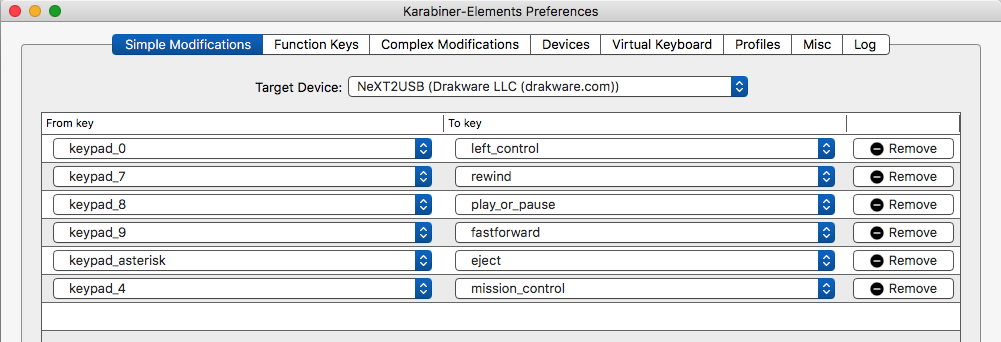
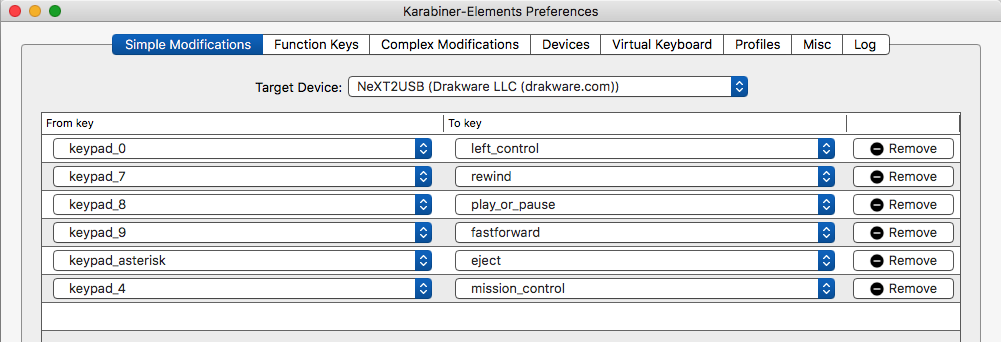
Ohhhhh..... I wonder if I could use Karabiner-Elements to remap the numeric keypad to function keys.........
Title: NeXT2USB - Plug your NeXT keyboard into USB
Post by: eagle on January 16, 2018, 12:07:47 PM
Post by: eagle on January 16, 2018, 12:07:47 PM
Yup, Karabiner works perfectly for this. LOVING this device more and more every day. Thanks, drakar!!
Title: NeXT2USB - Plug your NeXT keyboard into USB
Post by: eagle on January 16, 2018, 12:08:49 PM
Post by: eagle on January 16, 2018, 12:08:49 PM
Quote from: "Rob Blessin Black Hole"Hello NeXT community : They are cool, anyone know of a Mac OSX Keyboard mapper that would allow the function keys to map to or handshake with the accountants keypad keys ? Ie f1 = 1 f2 = 2 etc...Check out Karabiner or Karabiner-Elements (depends on what version of OS X you are using).
https://pqrs.org
Title: NeXT2USB - Plug your NeXT keyboard into USB
Post by: Rob Blessin Black Hole on January 16, 2018, 02:38:57 PM
Post by: Rob Blessin Black Hole on January 16, 2018, 02:38:57 PM
Thanks I'll give it a go!
Title: NeXT2USB - Plug your NeXT keyboard into USB
Post by: jdanna on January 21, 2018, 04:39:36 PM
Post by: jdanna on January 21, 2018, 04:39:36 PM
Hey - I just got mine and it's behaving a bit oddly for me.
When I plug it in initially, it hangs and sends a bunch of '0's to the USB, until i press a key.
Then the keyboard works, and all the keys work - but if you type any faster then super slow, it ignores the keystrokes.
And I press the command key (which maps to the windows key) - from that moment on - that is the only key that works until i unplug it and plug it back in.
any ideas? I was at first thinking my keyboard was broken - but all the keys seem to work, just slowly, and not if i press command.
When I plug it in initially, it hangs and sends a bunch of '0's to the USB, until i press a key.
Then the keyboard works, and all the keys work - but if you type any faster then super slow, it ignores the keystrokes.
And I press the command key (which maps to the windows key) - from that moment on - that is the only key that works until i unplug it and plug it back in.
any ideas? I was at first thinking my keyboard was broken - but all the keys seem to work, just slowly, and not if i press command.
Title: NeXT2USB - Plug your NeXT keyboard into USB
Post by: drakar on January 22, 2018, 08:41:46 AM
Post by: drakar on January 22, 2018, 08:41:46 AM
It sounds like an issue with the keyboard, maybe some component has drifted out of spec over the years and is affecting the timing. Do you have another one that you can try?
Title: NeXT2USB - Plug your NeXT keyboard into USB
Post by: jdanna on January 23, 2018, 01:19:02 PM
Post by: jdanna on January 23, 2018, 01:19:02 PM
Quote from: "drakar"It sounds like an issue with the keyboard, maybe some component has drifted out of spec over the years and is affecting the timing. Do you have another one that you can try?
Unfortunately my only other one is an ADB. I have a buddy that might have one - I'll see if he can track one down and test it with that.
Title: NeXT2USB - Plug your NeXT keyboard into USB
Post by: Rob Blessin Black Hole on January 23, 2018, 04:19:15 PM
Post by: Rob Blessin Black Hole on January 23, 2018, 04:19:15 PM
Hello Jdanna: I have a known good working NeXT NON ADB keyboard that I can sell you for $25 and $19.50 Shipping USPS priority mail. Which style of keyboard is it the L shaped or small enter key? Best regards Rob Blessin