Title: Running Previous 2.0 w/ NS3.3 - trying to get networking up
Post by: blakespot on April 20, 2018, 01:12:35 PM
Post by: blakespot on April 20, 2018, 01:12:35 PM
I have Previous 2.0 on Windows and a NS3.3 .dd volume I downloaded and after following the instructions for setting up networking that came with the .dd, I see the EN light blink a bit and when I
telnet bbs.fozztexx.com
The command sits there thinking and the EN light blinks, but nothing happens. So it's somewhat setup correctly. I followed these instructions:
(I used vi from terminal to edit, fwiw.) But -- not quite working. Any ideas? Thanks.
bp[/quote]
telnet bbs.fozztexx.com
The command sits there thinking and the EN light blinks, but nothing happens. So it's somewhat setup correctly. I followed these instructions:
QuoteHowto: Setup networking on NeXTstep 3.0 and later:
1. Use Simple Network Starter (you find it in the NextAdmin directory)
and set up some values:
a Check "Provide the services specified below."
b Choose a hostname (whatever you want).
c Set IP address to "10.0.2.15".
d Go to "Network Options..." and set
Router to "10.0.2.2"
Broadcast Address to "10.0.2.255"
Netmask to "255.255.255.0" and
NIS Domain Name to "None".
e Hit configure. You will be prompted to connect the Ethernet
cable.
f If not already done, connect emulated Ethernet now using
Previous' GUI and hit OK.
2. Using root access rights open and edit these files:
a /etc/hostconfig and replace "-ROUTER-" with "10.0.2.2".
b /etc/resolv.conf and add "nameserver 10.0.2.3".
If this file does not exist, you have to first create it.
Be sure you create a plain text file. If you use Edit.app
you can do this by selecting Format > Text > Make ASCII.
Howto: Open the above files using root privileges (NeXTstep 3.3):
a Open the /etc directory with this command in Terminal:
"open /etc"
b Select the file/application to open and from Workspace select
Services > Open Sesame > Open As Root.
c For making a new resolv.conf open Edit.app the same way (b)
and in the save dialog type as name "/etc/resolv.conf"
3. Reboot.
(I used vi from terminal to edit, fwiw.) But -- not quite working. Any ideas? Thanks.
bp[/quote]
Title: Running Previous 2.0 w/ NS3.3 - trying to get networking up
Post by: neozeed on April 21, 2018, 12:14:44 AM
Post by: neozeed on April 21, 2018, 12:14:44 AM
start with the basics..
with SLiRP the only thing you can ping is the gateway, see if that works.
ping 10.0.2.2
I think NeXTSTEP should have nslookup, try to resolve a DNS name...
with SLiRP the only thing you can ping is the gateway, see if that works.
ping 10.0.2.2
I think NeXTSTEP should have nslookup, try to resolve a DNS name...
Title: Running Previous 2.0 w/ NS3.3 - trying to get networking up
Post by: blakespot on April 21, 2018, 08:16:40 AM
Post by: blakespot on April 21, 2018, 08:16:40 AM
Quote from: "neozeed"start with the basics..
with SLiRP the only thing you can ping is the gateway, see if that works.
ping 10.0.2.2
I think NeXTSTEP should have nslookup, try to resolve a DNS name...
Well, first ping isn't on the system. I'll need to get that solved first. :-) I will look into mounting a shared volume thru Previous, which I'm guessing is possible.
bp
Title: Running Previous 2.0 w/ NS3.3 - trying to get networking up
Post by: andreas_g on April 21, 2018, 08:28:25 AM
Post by: andreas_g on April 21, 2018, 08:28:25 AM
Ping is normally present on a NeXTstep 3.3 installation. But on my system it is not recognized, if I am running it as normal user. I need to run it as super user: #su
Title: Running Previous 2.0 w/ NS3.3 - trying to get networking up
Post by: t-rexky on April 21, 2018, 08:38:54 AM
Post by: t-rexky on April 21, 2018, 08:38:54 AM
If I recall, this is just a path issue - it's not on the search path unless you are a superuser...
Title: Running Previous 2.0 w/ NS3.3 - trying to get networking up
Post by: blakespot on April 23, 2018, 08:51:45 AM
Post by: blakespot on April 23, 2018, 08:51:45 AM
Quote from: "neozeed"start with the basics..As root I can, indeed, ping 10.0.2.2 -- getting successful ping returns. I can't nslookup anything -- just stalls. Any ideas from here? Thanks.
with SLiRP the only thing you can ping is the gateway, see if that works.
ping 10.0.2.2
I think NeXTSTEP should have nslookup, try to resolve a DNS name...
bp
Title: Running Previous 2.0 w/ NS3.3 - trying to get networking up
Post by: neozeed on April 23, 2018, 08:56:27 AM
Post by: neozeed on April 23, 2018, 08:56:27 AM
Quote from: "blakespot"Quote from: "neozeed"start with the basics..As root I can, indeed, ping 10.0.2.2 -- getting successful ping returns. I can't nslookup anything -- just stalls. Any ideas from here? Thanks.
with SLiRP the only thing you can ping is the gateway, see if that works.
ping 10.0.2.2
I think NeXTSTEP should have nslookup, try to resolve a DNS name...
bp
what is your /etc/resolv.conf
I'd try the following:
10.0.2.3
this should have slirp intercept and ask the OS on your behalf...
8.8.8.8
the google....
1.1.1.1
1.0.0.1 the new cloudflare ones...
also check your route table..
netstat -nr
make sure your gateway is set to 10.0.2.2
Title: Running Previous 2.0 w/ NS3.3 - trying to get networking up
Post by: blakespot on April 23, 2018, 09:29:55 AM
Post by: blakespot on April 23, 2018, 09:29:55 AM
Quote from: "neozeed"
what is your /etc/resolv.conf
I'd try the following:
10.0.2.3
this should have slirp intercept and ask the OS on your behalf...
8.8.8.8
the google....
1.1.1.1
1.0.0.1 the new cloudflare ones...
also check your route table..
netstat -nr
make sure your gateway is set to 10.0.2.2
I can ping and get returns on 10.0.2.3 but none of the other IPs you mention -- 100% packet loss there. My /etc/resolv.conf is the one following line:
nameserver 10.0.2.3
And my netstat -nr output is:
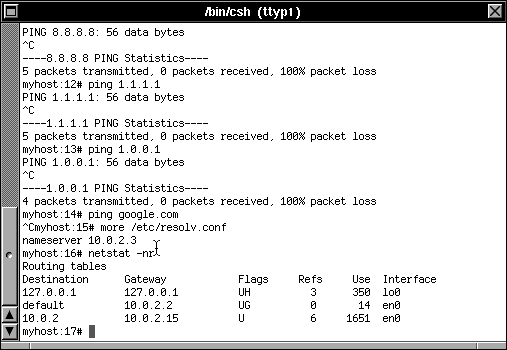
Thanks.
bp
Title: Running Previous 2.0 w/ NS3.3 - trying to get networking up
Post by: neozeed on April 23, 2018, 09:34:37 AM
Post by: neozeed on April 23, 2018, 09:34:37 AM
Yep you can only ping 10.0.2.2
Try nslookup
Try all the servers... See if any of this resolves...
Try telnetting to 71.95.196.34
Try nslookup
Code Select
nslookup
> server 1.1.1.1
Default server: 1.1.1.1
Address: 1.1.1.1#53
> www.google.com
Server:         1.1.1.1
Address:        1.1.1.1#53

Non-authoritative answer:
Name:   www.google.com
Address: 74.125.201.99
Name:   www.google.com
Address: 74.125.201.103
Name:   www.google.com
Address: 74.125.201.104
Name:   www.google.com
Address: 74.125.201.105
Name:   www.google.com
Address: 74.125.201.106
Name:   www.google.com
Address: 74.125.201.147
>
Try all the servers... See if any of this resolves...
Try telnetting to 71.95.196.34
Title: Running Previous 2.0 w/ NS3.3 - trying to get networking up
Post by: blakespot on April 23, 2018, 09:41:40 AM
Post by: blakespot on April 23, 2018, 09:41:40 AM
Quote from: "neozeed"nslookup just stalls pointing at 1.1.1.1 or 1.0.0.1, etc. Telnet to the .34 IP just stalls.
Try all the servers... See if any of this resolves...
Try telnetting to 71.95.196.34
bp
Title: Running Previous 2.0 w/ NS3.3 - trying to get networking up
Post by: neozeed on April 23, 2018, 09:50:26 AM
Post by: neozeed on April 23, 2018, 09:50:26 AM
I'm not sure.. I'm stuck with only my Android phone and an ancient g4 MacBook at the moment.... So I can't really do anything windows like.
Did you boot with the Ethernet connected?
I find it works best with it unconnected at the ROM, and to enable it after the kernel starts to look initialize
Did you boot with the Ethernet connected?
I find it works best with it unconnected at the ROM, and to enable it after the kernel starts to look initialize
Title: Running Previous 2.0 w/ NS3.3 - trying to get networking up
Post by: blakespot on April 23, 2018, 09:59:05 AM
Post by: blakespot on April 23, 2018, 09:59:05 AM
Trying it running as Administrator. I don't do much with Windows, myself, but game. I just couldn't find Previous 2.x on macOS. Do you happen to know where it can be had, precompiled? Thanks.
bp
bp
Title: Running Previous 2.0 w/ NS3.3 - trying to get networking up
Post by: neozeed on April 23, 2018, 10:02:26 AM
Post by: neozeed on April 23, 2018, 10:02:26 AM
Admin privileges shouldn't matter at all when it comes to slirp...
What version of Windows was it anyway?
Cmake hides everything so I really have no idea if it's doing anything strange while building...
What version of Windows was it anyway?
Cmake hides everything so I really have no idea if it's doing anything strange while building...
Title: Running Previous 2.0 w/ NS3.3 - trying to get networking up
Post by: blakespot on April 23, 2018, 10:05:15 AM
Post by: blakespot on April 23, 2018, 10:05:15 AM
Quote from: "neozeed"Admin privileges shouldn't matter at all when it comes to slirp...A recent version (if not very latest update) of Windows 10 Pro 64-bit.
What version of Windows was it anyway?
Cmake hides everything so I really have no idea if it's doing anything strange while building...
bp
Title: Running Previous 2.0 w/ NS3.3 - trying to get networking up
Post by: blakespot on April 24, 2018, 10:40:26 AM
Post by: blakespot on April 24, 2018, 10:40:26 AM
I've tried only enabling Ethernet in Pervious options at different points in the boot sequence and nothing is working. Have you heard of others running Previous 2, Windows 10 Pro 64 having networking work?
Frustrating.
bp
Frustrating.
bp
Title: Running Previous 2.0 w/ NS3.3 - trying to get networking up
Post by: blakespot on April 24, 2018, 05:43:37 PM
Post by: blakespot on April 24, 2018, 05:43:37 PM
Wait, I don't need to explicitly run SLiRP under Windows right? It's rolled into Previous, ya? Is that my problem?
Title: Running Previous 2.0 w/ NS3.3 - trying to get networking up
Post by: eagle on April 25, 2018, 06:49:40 AM
Post by: eagle on April 25, 2018, 06:49:40 AM
Quote from: "blakespot"I just couldn't find Previous 2.x on macOS. Do you happen to know where it can be had, precompiled? Thanks.Hey Blake - it is available on my Previous site - http://previous.unixdude.net/download.html
Title: Running Previous 2.0 w/ NS3.3 - trying to get networking up
Post by: blakespot on April 25, 2018, 01:06:30 PM
Post by: blakespot on April 25, 2018, 01:06:30 PM
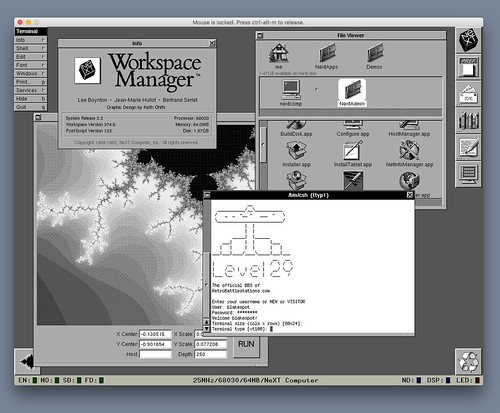
Quote from: "eagle"Thank you! And networking works for me under OS X. Not sure why Windows 10 setup didn't work as far as networking.Quote from: "blakespot"I just couldn't find Previous 2.x on macOS. Do you happen to know where it can be had, precompiled? Thanks.Hey Blake - it is available on my Previous site - http://previous.unixdude.net/download.html
 (https://flic.kr/p/26taPHU)
Logging into Level 29 BBS on an original NeXT computer (...emulated via Previous 2.0) (https://flic.kr/p/26taPHU) by Blake Patterson (https://www.flickr.com/photos/blakespot/), on Flickr
Cheers.
Title: Running Previous 2.0 w/ NS3.3 - trying to get networking up
Post by: eagle on April 25, 2018, 01:26:29 PM
Post by: eagle on April 25, 2018, 01:26:29 PM
I generally use NFS or an ISO disk image to transfer files. A while ago, some NFS activity would cause Previous to crash but I have not tried it lately.
Title: Running Previous 2.0 w/ NS3.3 - trying to get networking up
Post by: paolo.bertolo on December 27, 2018, 04:45:42 AM
Post by: paolo.bertolo on December 27, 2018, 04:45:42 AM
Exactly the same situation, but this time with Previous 2.1 + NS3.3 on MacOS (tried on two different machines with different OS). Checked all I could, apparently everything is fine, consistent with what the real NeXT machines are reading (bar for the addresses, of course), but still no way to get networking up and running.
Title: Running Previous 2.0 w/ NS3.3 - trying to get networking up
Post by: paolo.bertolo on January 13, 2019, 01:19:42 PM
Post by: paolo.bertolo on January 13, 2019, 01:19:42 PM
Tried to run the whole thing all over again, but networking still does not fully work. E.g. if I ping www.apple.com, the address is resolved but all packets are lost.
Title: Running Previous 2.0 w/ NS3.3 - trying to get networking up
Post by: multi on January 13, 2019, 07:04:28 PM
Post by: multi on January 13, 2019, 07:04:28 PM
Quote from: "paolo.bertolo"Tried to run the whole thing all over again, but networking still does not fully work. E.g. if I ping www.apple.com, the address is resolved but all packets are lost.
what's your gateway address? do a netstat -rn and look for a 'default' or a '0.0.0.0' (sorry, dont have a NS/OS box handy to tell you exactly what to look for). Or just post the whole output here.
The gateway would need to be local (same network).
Title: Running Previous 2.0 w/ NS3.3 - trying to get networking up
Post by: paolo.bertolo on January 17, 2019, 01:32:03 PM
Post by: paolo.bertolo on January 17, 2019, 01:32:03 PM
The Previous stuff (NeXTComputer - NeXTStep 3.3)
previous: 1# netstat -rn
Routing tables
Destination Gateway Flags Refs Use Interface
127.0.0.1 127.0.0.1 UH 2 282 lo0
default 10.0.2.2 UG 0 0 en0
10.2.2 10.0.2.15 U 4 755 en0
previous: 2#
The real thing (NeXTComputer - NeXTStep 3.3)
nextcomputer:6# netstat -rn
Routing tables
Destination Gateway Flags Refs Use Interface
127.0.0.1 127.0.0.1 UH 2 300 lo0
default 192.168.88.1 UG 0 4 en0
192.168.88 192.168.88.55 U 4 1207 en0
nextcomputer:7#
previous: 1# netstat -rn
Routing tables
Destination Gateway Flags Refs Use Interface
127.0.0.1 127.0.0.1 UH 2 282 lo0
default 10.0.2.2 UG 0 0 en0
10.2.2 10.0.2.15 U 4 755 en0
previous: 2#
The real thing (NeXTComputer - NeXTStep 3.3)
nextcomputer:6# netstat -rn
Routing tables
Destination Gateway Flags Refs Use Interface
127.0.0.1 127.0.0.1 UH 2 300 lo0
default 192.168.88.1 UG 0 4 en0
192.168.88 192.168.88.55 U 4 1207 en0
nextcomputer:7#
Title: Re: Running Previous 2.0 w/ NS3.3 - trying to get networking up
Post by: dylanmcnamee on November 10, 2019, 04:44:04 PM
Post by: dylanmcnamee on November 10, 2019, 04:44:04 PM
My host setup: macOS Catalina, SLiRP networking over the thin interface. Guest is a NeXTStation Color Turbo.
I'm trying to get networking going with Previous and NS3.3, and like the most recent poster in this thread, have got name service working (can lookup hosts), but can't ping or otherwise access them. Also can't ping machines on my local network. So the guest is somewhat configured, but something is missing.
EDIT: I fired up OmniWeb, and pointed it at a web page served in my local network, and it worked (!). This suggests that Previous hosts some kind of user-level proxy, but I'm a bit puzzled how I'm supposed to contact the guest from the host.
How does SLiRP work from the host-perspective? Is it running a NAT, or some other level? When I run ifconfig on my host machine, I don't see any new interfaces, so I'm not sure how I can / should test the networking setup from the host inward.
I'm trying to get networking going with Previous and NS3.3, and like the most recent poster in this thread, have got name service working (can lookup hosts), but can't ping or otherwise access them. Also can't ping machines on my local network. So the guest is somewhat configured, but something is missing.
EDIT: I fired up OmniWeb, and pointed it at a web page served in my local network, and it worked (!). This suggests that Previous hosts some kind of user-level proxy, but I'm a bit puzzled how I'm supposed to contact the guest from the host.
How does SLiRP work from the host-perspective? Is it running a NAT, or some other level? When I run ifconfig on my host machine, I don't see any new interfaces, so I'm not sure how I can / should test the networking setup from the host inward.
Title: Re: Running Previous 2.0 w/ NS3.3 - trying to get networking up
Post by: rumbeard on November 11, 2019, 11:18:47 PM
Post by: rumbeard on November 11, 2019, 11:18:47 PM
Quote from: dylanmcnamee on November 10, 2019, 04:44:04 PMMy host setup: macOS Catalina, SLiRP networking over the thin interface. Guest is a NeXTStation Color Turbo.
I'm trying to get networking going with Previous and NS3.3, and like the most recent poster in this thread, have got name service working (can lookup hosts), but can't ping or otherwise access them. Also can't ping machines on my local network. So the guest is somewhat configured, but something is missing.
EDIT: I fired up OmniWeb, and pointed it at a web page served in my local network, and it worked (!). This suggests that Previous hosts some kind of user-level proxy, but I'm a bit puzzled how I'm supposed to contact the guest from the host.
How does SLiRP work from the host-perspective? Is it running a NAT, or some other level? When I run ifconfig on my host machine, I don't see any new interfaces, so I'm not sure how I can / should test the networking setup from the host inward.
You have to re-compile Previous after editing one file. I confirmed you can use this for telnet and SSH and everything I tried.
Quote from: rumbeard on February 21, 2019, 11:36:35 PMSo I have this working according to instructions and I can even telnet back to the host on 42323. My question is... do I have to rebuild from source to use the other 5 re-direct slots?
Ideally I'd swap out 42323 with 42322 for SSH, port 80, 443, 25, and maybe one other.
I can't seem to figure out even from a glance at the source where the slirp.conf stuff is.
Quote from: neozeed on February 24, 2019, 12:40:53 AMhttps://sourceforge.net/p/previous/code/HEAD/tree/trunk/src/enet_slirp.c
It's in enet_slirp_startCode Selectvoid enet_slirp_start(Uint8 *mac) {
struct in_addr guest_addr;
if (!slirp_inited) {
Log_Printf(LOG_WARN, "Initializing SLIRP");
slirp_inited=1;
slirp_init();
inet_aton("10.0.2.15", &guest_addr);
slirp_redir(0, 42323, guest_addr, 23);
}
if (slirp_inited && !slirp_started) {
Log_Printf(LOG_WARN, "Starting SLIRP");
slirp_started=1;
slirpq = QueueCreate();
slirp_mutex=SDL_CreateMutex();
tick_func_handle=SDL_CreateThread(tick_func,"SLiRPTickThread", (void *)NULL);
}
}
Specifically this line:Code Selectslirp_redir(0, 42323, guest_addr, 23);
Title: Re: Running Previous 2.0 w/ NS3.3 - trying to get networking up
Post by: rumbeard on November 11, 2019, 11:20:25 PM
Post by: rumbeard on November 11, 2019, 11:20:25 PM
I can provide a patched binary if you get stuck. I think it's 80, 443, 22, and I forget what other two.
Title: Re: Running Previous 2.0 w/ NS3.3 - trying to get networking up
Post by: dylanmcnamee on November 17, 2019, 04:23:33 PM
Post by: dylanmcnamee on November 17, 2019, 04:23:33 PM
I made a tweaked version that forwards the telnet, ftp, ssh and http ports, it built just fine, and now I'm happily bi-directionally networking.
I added these lines to my enet_slirp.c:
And on my host machine, I can both telnet and ftp to the guest with these commands:
I added these lines to my enet_slirp.c:
        slirp_redir(0, 40220, guest_addr, 20); // ftp data
        slirp_redir(0, 40221, guest_addr, 21); // ftp control
        slirp_redir(0, 40222, guest_addr, 22); // ssh
        slirp_redir(0, 40223, guest_addr, 23); // telnet
        slirp_redir(0, 40233, guest_addr, 1023); // nfs ?
        slirp_redir(0, 40280, guest_addr, 80); // http
And on my host machine, I can both telnet and ftp to the guest with these commands:
% ncftp -u <my username> -P 40221 localhost
- and -
% telnet localhost 40223
Title: Re: Running Previous 2.0 w/ NS3.3 - trying to get networking up
Post by: stefan on July 06, 2024, 12:31:30 PM
Post by: stefan on July 06, 2024, 12:31:30 PM
Quote from: dylanmcnamee on November 17, 2019, 04:23:33 PMI made a tweaked version that forwards the telnet, ftp, ssh and http ports, it built just fine, and now I'm happily bi-directionally networking.
I added these lines to my enet_slirp.c:
        slirp_redir(0, 40220, guest_addr, 20); // ftp data
        slirp_redir(0, 40221, guest_addr, 21); // ftp control
        slirp_redir(0, 40222, guest_addr, 22); // ssh
        slirp_redir(0, 40223, guest_addr, 23); // telnet
        slirp_redir(0, 40233, guest_addr, 1023); // nfs ?
        slirp_redir(0, 40280, guest_addr, 80); // http
And on my host machine, I can both telnet and ftp to the guest with these commands:
% ncftp -u <my username> -P 40221 localhost
- and -
% telnet localhost 40223
Fabulous! Can we get this change into the official builds?
Title: Re: Running Previous 2.0 w/ NS3.3 - trying to get networking up
Post by: andreas_g on July 07, 2024, 12:31:39 AM
Post by: andreas_g on July 07, 2024, 12:31:39 AM
Quote from: stefan on July 06, 2024, 12:31:30 PMFabulous! Can we get this change into the official builds?
This sounds like a good idea. Short question:
There is already this line in the code:
Code Select
slirp_redir(0, 42323, guest_addr, 23);Do we still need
Code Select
slirp_redir(0, 40223, guest_addr, 23); // telnetand why are those new lines using port 402xx instead of 423xx?
Title: Re: Running Previous 2.0 w/ NS3.3 - trying to get networking up
Post by: stefan on July 07, 2024, 01:24:19 AM
Post by: stefan on July 07, 2024, 01:24:19 AM
Thank you Andreas for picking this up!
I am not sure why the original commenter changed the port to 402xx but I would imagine that using 423xx for ftp, ssh and http would enable a lot of people's tinkering with services running on NeXTstep
I am not sure why the original commenter changed the port to 402xx but I would imagine that using 423xx for ftp, ssh and http would enable a lot of people's tinkering with services running on NeXTstep
Title: Re: Running Previous 2.0 w/ NS3.3 - trying to get networking up
Post by: andreas_g on July 07, 2024, 01:43:42 AM
Post by: andreas_g on July 07, 2024, 01:43:42 AM
Quote from: stefan on July 07, 2024, 01:24:19 AMThank you Andreas for picking this up!
I am not sure why the original commenter changed the port to 402xx but I would imagine that using 423xx for ftp, ssh and http would enable a lot of people's tinkering with services running on NeXTstep
So adding/keeping these lines would be OK?
Code Select
slirp_redir(0, 42320, guest_addr, 20); /* ftp data */
slirp_redir(0, 42321, guest_addr, 21); /* ftp control */
slirp_redir(0, 42322, guest_addr, 22); /* ssh */
slirp_redir(0, 42323, guest_addr, 23); /* telnet */
slirp_redir(0, 42380, guest_addr, 80); /* http */
Title: Re: Running Previous 2.0 w/ NS3.3 - trying to get networking up
Post by: stefan on July 07, 2024, 01:44:20 PM
Post by: stefan on July 07, 2024, 01:44:20 PM
Quote from: andreas_g on July 07, 2024, 01:43:42 AMSo adding/keeping these lines would be OK?Code Selectslirp_redir(0, 42320, guest_addr, 20); /* ftp data */
slirp_redir(0, 42321, guest_addr, 21); /* ftp control */
slirp_redir(0, 42322, guest_addr, 22); /* ssh */
slirp_redir(0, 42323, guest_addr, 23); /* telnet */
slirp_redir(0, 42380, guest_addr, 80); /* http */
Perfect!
Title: Re: Running Previous 2.0 w/ NS3.3 - trying to get networking up
Post by: andreas_g on July 07, 2024, 02:10:56 PM
Post by: andreas_g on July 07, 2024, 02:10:56 PM
Great! Can you write a short paragraph for the readme to document this feature? I'm afraid I am missing the words to do so.
Title: Re: Running Previous 2.0 w/ NS3.3 - trying to get networking up
Post by: user217 on July 07, 2024, 07:04:08 PM
Post by: user217 on July 07, 2024, 07:04:08 PM
Quote from: andreas_g on July 07, 2024, 02:10:56 PMGreat! Can you write a short paragraph for the readme to document this feature? I'm afraid I am missing the words to do so.
I've got you covered:
Code Select
 SLiRP Port Forwards
 -------------------

When networking with SLiRP, Previous listens on the following TCP ports, and will forward connections to the guest machine:

Host Port		Internal Port		Service
42320			20					FTP data
42321			21					FTP control
42322			22					SSH
42323			23					Telnet
42380			80					HTTP

So e.g. to connect to telnet on the emulated machine, you can point your client at localhost port 42323.

Note that the guest OS has to have these services running in order to actually connect to them! NeXTSTEP and OPENSTEP do not include servers for SSH or HTTP.
Title: Re: Running Previous 2.0 w/ NS3.3 - trying to get networking up
Post by: stefan on July 07, 2024, 08:12:44 PM
Post by: stefan on July 07, 2024, 08:12:44 PM
Oh, we overlapped at posting! I like your table better. Maybe it's worth adding an example though:
Code Select
diff -u a/networking.howto.txt b/networking.howto.txt
--- a/networking.howto.txt
+++ b/networking.howto.txt
@@ -194,3 +194,32 @@ NOWTO: Setup networking on Mac OS:
      Subnet Mask: 255.255.255.0
      Gateway/Router Address: 10.0.2.2
      Domain Name Server Information: Domain home, IP Address 10.0.2.3
+
+
+NOWTO: Accessing the emulated machine from the host machine through TCP/IP
+
+When using SLiRP, the emulated machine is not directly visible / accessible
+through its own IP address 10.0.2.2. Instead, Previous provides a number of
+port redirects that allow you to access certain ports on the emulated NeXT
+machine:
+
+  FTP: 42320 / 42321
+  SSH: 42322
+  Telnet: 42323
+  HTTP: 42380
+
+Examples:
+
+So, if you wamt to telnet into your emulated NeXT machine, you can do so by
+running the following command on your host machine:
+
+  telnet localhost 42323
+
+In order to connect through SSH (if installed on the NeXT side), do
+
+  ssh me@localhost -p 42322
+
+You can ftp into your emulated NeXT machine with
+
+  ncftp -P 42321 ftp://me@localhost
+
Title: Re: Running Previous 2.0 w/ NS3.3 - trying to get networking up
Post by: andreas_g on July 08, 2024, 03:38:09 PM
Post by: andreas_g on July 08, 2024, 03:38:09 PM
Title: Re: Running Previous 2.0 w/ NS3.3 - trying to get networking up
Post by: user217 on July 14, 2024, 02:33:08 AM
Post by: user217 on July 14, 2024, 02:33:08 AM
To whom it may concern in the future: some FTP clients will have trouble finding the alternate data port. Forcing a passive connection in your connection settings will solve this problem.
In WinSCP, this can be done with the "Force IP address for passive mode connections" checkbox under the "FTP" section.
In WinSCP, this can be done with the "Force IP address for passive mode connections" checkbox under the "FTP" section.
Title: Re: Running Previous 2.0 w/ NS3.3 - trying to get networking up
Post by: daniel.dlds on December 03, 2024, 04:28:52 PM
Post by: daniel.dlds on December 03, 2024, 04:28:52 PM
Just got this port mapping done. It works great to get into the emulator from the host machine.
But anyone knows if there is a way of getting networking to work with pcap? (I tried on OSX Monterey but got some messages related to the something failing in the kernel on boot)
But anyone knows if there is a way of getting networking to work with pcap? (I tried on OSX Monterey but got some messages related to the something failing in the kernel on boot)
Title: Re: Running Previous 2.0 w/ NS3.3 - trying to get networking up
Post by: andreas_g on December 04, 2024, 07:16:49 AM
Post by: andreas_g on December 04, 2024, 07:16:49 AM
Quote from: daniel.dlds on December 03, 2024, 04:28:52 PMJust got this port mapping done. It works great to get into the emulator from the host machine.
But anyone knows if there is a way of getting networking to work with pcap? (I tried on OSX Monterey but got some messages related to the something failing in the kernel on boot)
Please post the messages here. I'll have a look and see if I can fix it.
Title: Re: Running Previous 2.0 w/ NS3.3 - trying to get networking up
Post by: daniel.dlds on December 14, 2024, 03:48:17 AM
Post by: daniel.dlds on December 14, 2024, 03:48:17 AM
Please see the screenshot at :
https://ibb.co/2KkGr47
https://ibb.co/2KkGr47
Title: Re: Running Previous 2.0 w/ NS3.3 - trying to get networking up
Post by: andreas_g on December 14, 2024, 08:08:01 AM
Post by: andreas_g on December 14, 2024, 08:08:01 AM
Quote from: daniel.dlds on December 14, 2024, 03:48:17 AMPlease see the screenshot at :
https://ibb.co/2KkGr47
I am getting the same message. I don't know why we get that message, but there do not seem to be any issues related to this. It is not related to your networking problems.
I think your network configuration might be faulty. For example it seems your netmask is set to 0.0.0.0.