Title: DOOM II performance on 040?
Post by: elemenoh on September 05, 2019, 12:02:30 AM
Post by: elemenoh on September 05, 2019, 12:02:30 AM
I recently installed DOOM II on my 040 Cube. It launches, but runs very slowly and the window is small (https://www.instagram.com/p/B2AxQeOgbzi/?utm_source=ig_web_copy_link) and seems to not be resizable. Is this expected on an 040 with 16MB RAM? Is there anything I can do to speed it up? Is it possible to make it full-screen?
Thanks!
Thanks!
Title: Re: DOOM II performance on 040?
Post by: nuss on September 05, 2019, 01:09:03 PM
Post by: nuss on September 05, 2019, 01:09:03 PM
NeXTstep Doom.app (Doom I) had options to resize the window to 200% and 400%.
As far as I remember, increasing the window size reduced the performance noticeable.
I am not aware of any window resize or full screen option in DoomII.app.
DoomII runs better on a Turbo machine, or a Pyro Cube, but it is not really fast.
As far as I remember, increasing the window size reduced the performance noticeable.
I am not aware of any window resize or full screen option in DoomII.app.
DoomII runs better on a Turbo machine, or a Pyro Cube, but it is not really fast.
Title: Re: DOOM II performance on 040?
Post by: eagle on September 05, 2019, 02:52:59 PM
Post by: eagle on September 05, 2019, 02:52:59 PM
nuss beat me to it.
I am cleaning out Dropbox right now and I found an old Doom screenshot; my screenshot shows a menu option to zoom to 200%.
I am cleaning out Dropbox right now and I found an old Doom screenshot; my screenshot shows a menu option to zoom to 200%.
Title: Re: DOOM II performance on 040?
Post by: nuss on September 06, 2019, 01:52:06 PM
Post by: nuss on September 06, 2019, 01:52:06 PM
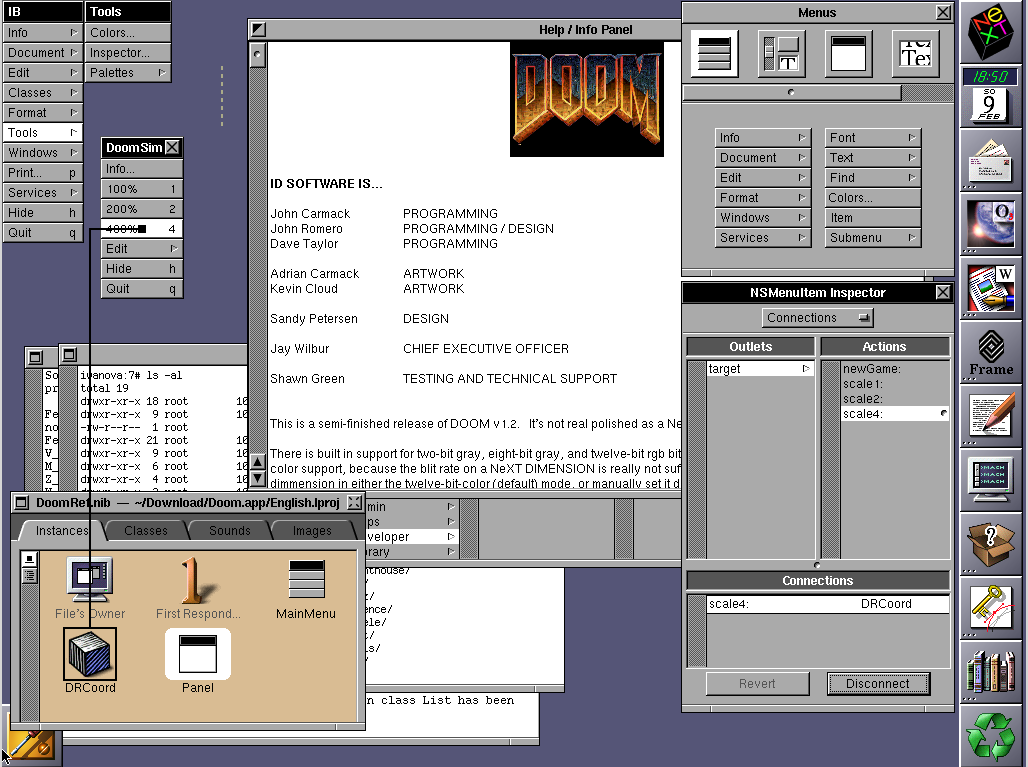
Sidenote: The option for 400% was available in the code of Doom 1.2, but you had to add a menu-item with InterfaceBuilder (NeXTstep 3.0 or 3.3) and connect it to the action "scale4:" as found in Doom.app/English.lproj/DoomRef.nib/data.classes.
Have tried to re-construct it with OpenSteps InterfaceBuilder, but the resulting NIB crashes, therefore can not present screenshot of 400% Doom :(
Anyhow 400% view was kind of huge and slow (on my 25MHz slab), so I assume that id Software decided to removed the menu-item before releasing Doom 1.2 FAT simply for not being blamed for "poor performance" 8)
Have tried to re-construct it with OpenSteps InterfaceBuilder, but the resulting NIB crashes, therefore can not present screenshot of 400% Doom :(
Anyhow 400% view was kind of huge and slow (on my 25MHz slab), so I assume that id Software decided to removed the menu-item before releasing Doom 1.2 FAT simply for not being blamed for "poor performance" 8)