Title: NeXTStation Turbo & hardware diagnostics (dvt040)
Post by: dylanmcnamee on November 16, 2019, 06:04:23 PM
Post by: dylanmcnamee on November 16, 2019, 06:04:23 PM
I'm trying to diagnose my NeXTStation Turbo with intermittent failures. I now have it running "pretty well", but eventually (after a day or so) I'm pretty reliably getting a kernel panic (with the small square window overlayed on the NextStep screen).
I have recapped the board (the 220 and 47uF caps, not any tiny smd's), and have tried different SCSI2SD boards, but so far nothing has been fully reliable.
I'm looking in this directory: http://www.nextcomputers.org/NeXTfiles/Software/Diagnostic_Utilities/
From there, I am trying to use the "dvt040" hardware diagnostics utility. I've written it to a 1.44mb floppy and at the boot prompt type "bfd dvt040". The floppy makes this happy click-click-click noise, then the screen slowly redraws another Rom monitor prompt, but no hardware diagnostics seem to be available.
I tried the 68030 "diagnostics" utility, but it didn't successfully load at all.
Does anyone have experience with dvt040? Am I missing a trick or key step somewhere?
thanks!
I have recapped the board (the 220 and 47uF caps, not any tiny smd's), and have tried different SCSI2SD boards, but so far nothing has been fully reliable.
I'm looking in this directory: http://www.nextcomputers.org/NeXTfiles/Software/Diagnostic_Utilities/
From there, I am trying to use the "dvt040" hardware diagnostics utility. I've written it to a 1.44mb floppy and at the boot prompt type "bfd dvt040". The floppy makes this happy click-click-click noise, then the screen slowly redraws another Rom monitor prompt, but no hardware diagnostics seem to be available.
I tried the 68030 "diagnostics" utility, but it didn't successfully load at all.
Does anyone have experience with dvt040? Am I missing a trick or key step somewhere?
thanks!
Title: Re: NeXTStation Turbo & hardware diagnostics (dvt040)
Post by: scarecrow on November 17, 2019, 04:07:38 AM
Post by: scarecrow on November 17, 2019, 04:07:38 AM
Type just "bfd"
Title: Re: NeXTStation Turbo & hardware diagnostics (dvt040)
Post by: dylanmcnamee on November 17, 2019, 05:04:02 PM
Post by: dylanmcnamee on November 17, 2019, 05:04:02 PM
Quote from: scarecrow on November 17, 2019, 04:07:38 AMType just "bfd"
I just tried that, and got the following:
NeXT>bfd
boot fd(0,0,0)
blk0 boot: fd()fdmach
fdmach: not found
load failed
This suggested renaming dvt040 to fdmach, so I did that and tried again, which gave the the same results as bfd dvt040, which is that it spent about 30 seconds loading, then slowly cleared and redrew the NeXT Rom monitor screen, and gave me a fresh NeXT> prompt. Hmmm. Thanks for helping! What should I try next?
Title: Re: NeXTStation Turbo & hardware diagnostics (dvt040)
Post by: barcher174 on November 17, 2019, 05:24:54 PM
Post by: barcher174 on November 17, 2019, 05:24:54 PM
The available diagnostics will not work with the turbo models in my experience.
Title: Re: NeXTStation Turbo & hardware diagnostics (dvt040)
Post by: dylanmcnamee on November 17, 2019, 09:41:11 PM
Post by: dylanmcnamee on November 17, 2019, 09:41:11 PM
Quote from: barcher174 on November 17, 2019, 05:24:54 PMThe available diagnostics will not work with the turbo models in my experience.
Oh, this isn't good news. My machine is booting, but panics after an hour or so, and I can't figure out what's up. I currently suspect DRAM, but ... it'll be difficult to diagnose.
Do you know what it is about the turbo that breaks it? The 68040 processor only had the one set of instructions, and I wouldn't think the speed would matter. What else in there could break the diagnostics? Thanks for the help!
Title: Re: NeXTStation Turbo & hardware diagnostics (dvt040)
Post by: Rob Blessin Black Hole on November 18, 2019, 01:22:03 AM
Post by: Rob Blessin Black Hole on November 18, 2019, 01:22:03 AM
To rule out a flaky stick of ram , may be try removing 2 sticks and see if she panics with 64 , then try the other 2. Also may try swapping out the data cable as the SD is powered from this that may be causing it also make sure the scsi2sd pcb is not intermittently contacting nany metal creating a short also check the metal stripping along the case where the motherboard connectors are to make sure
there is nothing rogue. You can also try reseating the motherboard , I blew out the dust bunnies underneath but you probably did this when recapping as well. Also try a different power cable to make sure nothing is intermittant in the cord :)
there is nothing rogue. You can also try reseating the motherboard , I blew out the dust bunnies underneath but you probably did this when recapping as well. Also try a different power cable to make sure nothing is intermittant in the cord :)
Title: Re: NeXTStation Turbo & hardware diagnostics (dvt040)
Post by: dylanmcnamee on November 18, 2019, 05:49:12 PM
Post by: dylanmcnamee on November 18, 2019, 05:49:12 PM
I back-ported memtester, from http://pyropus.ca/software/memtester/, to compile on the NeXTStation, and sure enough, have a smoking gun: with two sticks in, the tester runs to completion when asked to test 40 Megabytes (after booting, there are about 45MB free out of 64), but with the other two sticks in, the tester fails almost immediately.
I'd be happy to contribute the source and compiled binaries for this hacked-up tool. Here's the output of the working, and the bad memory:
Working:
Not-working:
And so on.
Here's something odd, however: The same test works just fine on my Mac Pro, but it fails within Previous 2.1, running NeXTStep 3.3. Interesting! I don't know if this is a Previous bug, a bug in my test, or what.
EDIT: Nevermind - I did a clean rebuild on my virtual system, and the memtest is passing fine now. Still mysterious, but I believe the mem tester is accurate.
I'd be happy to contribute the source and compiled binaries for this hacked-up tool. Here's the output of the working, and the bad memory:
Working:
./memtester 40M
memtester version 4.3.0 (64-bit)
modified in 2019 for NeXTStep 3.3 by Dylan McNamee
Copyright (C) 2001-2012 Charles Cazabon.
Licensed under the GNU General Public License version 2 (only).

pagesize is 4096
pagesizemask is 0xfffff000
want 40MB (41943040 bytes)
got  40MB (41943040 bytes)
Loop 1:
  Stuck Address       : ok
  Random Value        : ok
  Compare XOR         : ok
  Compare SUB         : ok
  Compare MUL         : ok
  Compare DIV         : ok
  Compare OR          : ok
  Compare AND         : ok
  Sequential Increment: ok
  Solid Bits          : ok
  Block Sequential    : ok
  Checkerboard        : ok
  Bit Spread          : ok
  Bit Flip            : ok
  Walking Ones        : ok
  Walking Zeroes      : ok
  8-bit Writes        : ok
  16-bit Writes       : ok
Not-working:
Loop 1:
  Stuck Address       : testing   0FAILURE: possible bad address line at offset 0x00831f78.
Skipping to next test...
  Random Value        : FAILURE: 0x79639cc8 != 0x796394c8 at offset 0x00877b3c.
FAILURE: 0x1b1b3902 != 0x131b3902 at offset 0x00b43ce8.
FAILURE: 0xe725791c != 0xe725711c at offset 0x00b5dcb4.
FAILURE: 0xf43dae6c != 0xf43da66c at offset 0x00b5dd94.
FAILURE: 0xecdd463c != 0xecdd4634 at offset 0x00b95bc4.
FAILURE: 0x8ff7101a != 0x8ff71012 at offset 0x00b97948.
FAILURE: 0xfaf78a56 != 0xfaf78256 at offset 0x00bf9e20.
...
  Compare XOR         : FAILURE: 0x3a829b7a != 0x3a82a37a at offset 0x00877b3c.
FAILURE: 0x181afe44 != 0x201afe44 at offset 0x00b43ce8.
FAILURE: 0xac453e4e != 0xac45464e at offset 0x00b5dcb4.
FAILURE: 0xbf3c68de != 0xbf3c70de at offset 0x00b5dd94.
FAILURE: 0xa6dd512e != 0xa6dd5136 at offset 0x00b95bc4.
FAILURE: 0x83f7274c != 0x83f72754 at offset 0x00b97948.
FAILURE: 0xb8f68d18 != 0xb8f69518 at offset 0x00bf9e20.
...
  Compare SUB         : FAILURE: 0xf86f0988 != 0xe33fa988 at offset 0x00877b3c.
FAILURE: 0xf0b3c550 != 0x90b3c550 at offset 0x00b43ce8.
FAILURE: 0x9c664a18 != 0x8736ea18 at offset 0x00b5dcb4.
FAILURE: 0x2cfc3d58 != 0x17ccdd58 at offset 0x00b5dd94.
FAILURE: 0x0e4a8398 != 0xa6355438 at offset 0x00b95bc4.
FAILURE: 0xe13bc9f0 != 0x79269a90 at offset 0x00b97948.
FAILURE: 0x419575e0 != 0x2c6615e0 at offset 0x00bf9e20.
FAILURE: 0x08ddf548 != 0xa0c8c5e8 at offset 0x00c51d2c.
And so on.
EDIT: Nevermind - I did a clean rebuild on my virtual system, and the memtest is passing fine now. Still mysterious, but I believe the mem tester is accurate.
Title: Re: NeXTStation Turbo & hardware diagnostics (dvt040)
Post by: MarkL on November 20, 2019, 05:48:26 AM
Post by: MarkL on November 20, 2019, 05:48:26 AM
But dv040 from the file archive does not work either on a standard NeXTstation under NS3.1.
That's what I experienced last night.
That's what I experienced last night.
Title: Re: NeXTStation Turbo & hardware diagnostics (dvt040)
Post by: t-rexky on November 23, 2019, 10:59:31 AM
Post by: t-rexky on November 23, 2019, 10:59:31 AM
Quote from: dylanmcnamee on November 17, 2019, 09:41:11 PMOh, this isn't good news. My machine is booting, but panics after an hour or so, and I can't figure out what's up. I currently suspect DRAM, but ... it'll be difficult to diagnose.
Do you know what it is about the turbo that breaks it? The 68040 processor only had the one set of instructions, and I wouldn't think the speed would matter. What else in there could break the diagnostics? Thanks for the help!
The Turbo architecture is quite different, in terms of the custom chipset. That's likely breaking the utilities.
If your issue is not memory related, it could be the power supply. Do you have any way of confirming the power quality from the supply? Such as an oscilloscope, etc? Have you re-capped the power supply?
Title: Re: NeXTStation Turbo & hardware diagnostics (dvt040)
Post by: dylanmcnamee on November 26, 2019, 11:36:19 PM
Post by: dylanmcnamee on November 26, 2019, 11:36:19 PM
I do have an oscilloscope - I can look at the power supply voltage...am I just looking for "anything but DC"? Is there a pinout / advice for particularly important lines to check? My power supply is one of Rob's new old stock ones, but that doesn't mean the caps are good, I realize. Thanks for the help! I'll report back with updates.
Title: Re: NeXTStation Turbo & hardware diagnostics (dvt040)
Post by: dylanmcnamee on December 06, 2019, 07:49:22 PM
Post by: dylanmcnamee on December 06, 2019, 07:49:22 PM
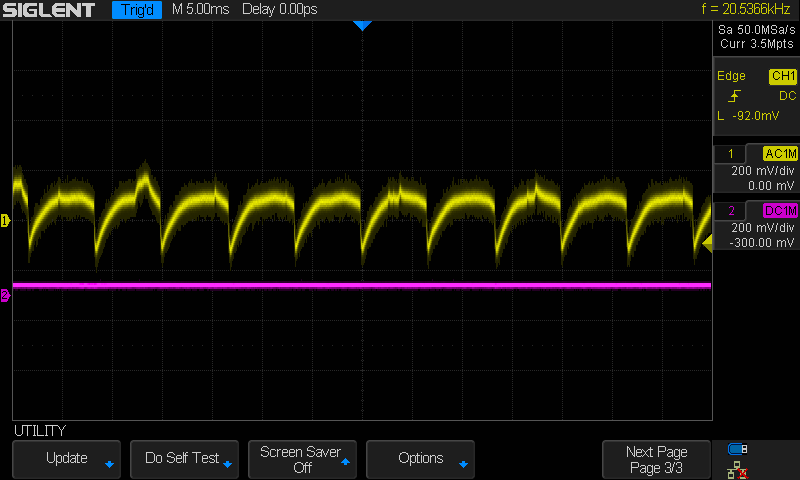
Here is the oscilloscope output -- not very DC. The yellow line is 12V +- 0.3V. The magenta line is a well-behaved 5V at the same scale. Rob's sending a new PSU, which I'll try over the weekend.