Title: New owner of a NeXT Computer + TurboColor slab here - I've got pics & questions!
Post by: Huxley on September 07, 2020, 02:28:27 PM
Post by: Huxley on September 07, 2020, 02:28:27 PM
Thanks to an outstanding package put together by @barcher174 + amazingly generous encouragement and support from my wife, I'm now the overjoyed, can't-really-believe-his-luck owner of a pair of gorgeous NeXT computers: a NeXT Cube (well, technically a "NeXT Computer" since this one is a very early revision from before they were formally called the Cube), and a NeXT TurboColor workstation. I'll try attaching a couple pics to this thread (always a bit hit-or-miss for me), but tons of detail and additional pics can be found here: https://imgur.com/gallery/ssBpdz0
The NeXT Computer workstation (https://i.imgur.com/4OhMHVG.jpeg)
The TurboColor Slab (https://i.imgur.com/JJFP4od.jpeg)
So, here are a couple questions - apologies if these are very basic, I'm an experienced retrocomputing enthusiast but this is my first time getting hands-on with NeXT hardware or software. I know the Cube isn't really / formally a "Cube" since it's such an early-run machine, but for purposes of clarity and sanity I'll refer to it as a Cube here.
1. Along with the stock (gold!) 68030 motherboard that the Cube came with, Brian also supplied me with a later Cube motherboard sporting the beefier 68040 CPU. When I boot the Cube with the '030 motherboard inserted, it boots just fine and I can explore the OS just fine. However, when I put the '040 motherboard in, the machine boots in Verbose mode (I'm guessing this is a setting / variable which is retained in PRAM, if that Mac concept applies here), and it goes through all the pre-boot and diagnostic routines, but when it should load the login panel, all I get is a grey screen. The mouse cursor is present and moves, I can adjust the display brightness, and tapping the Power key gets a "bonk" sound, but otherwise I can't get it to display anything other than the mouse + grey screen. I did find this post which perfectly matches what I'm experiencing (http://www.nextcomputers.org/forums/index.php?topic=4474.0), but inserting / removing the Ethernet cable doesn't change this behavior. Thanks for any tips or suggestions on this!
2. The original 68030 motherboard for the Cube doesn't have a modern-style Ethernet socket, and only has the "BNC" network connector. I'm reasonably competent with networking stuff, but I've never used this style of Ethernet before. What kind of adapter would I need to connect this BNC port to my modern LAN? Also, once I've got the physical connections figured out, will the NeXT OS work with DHCP or will I need to manually assign an IP and manually set my DNS?
3. The non-ADB keyboard that Brian included with this package has immediately become one of my favorite keyboards ever. Much of my daily work is done on a variety of Apple Extended Keyboard II's which I've used and loved for 20+ years, but this NeXT keyboard is really something special. Brian mentioned that someone on this forum has made and sold adapters for these which convert them to USB, but I'm having a hard time finding it - can anyone point me to the right person / thread / eBay store / whatever? I'd love to use this keyboard on other systems!
The NeXT Computer workstation (https://i.imgur.com/4OhMHVG.jpeg)

The TurboColor Slab (https://i.imgur.com/JJFP4od.jpeg)

So, here are a couple questions - apologies if these are very basic, I'm an experienced retrocomputing enthusiast but this is my first time getting hands-on with NeXT hardware or software. I know the Cube isn't really / formally a "Cube" since it's such an early-run machine, but for purposes of clarity and sanity I'll refer to it as a Cube here.
1. Along with the stock (gold!) 68030 motherboard that the Cube came with, Brian also supplied me with a later Cube motherboard sporting the beefier 68040 CPU. When I boot the Cube with the '030 motherboard inserted, it boots just fine and I can explore the OS just fine. However, when I put the '040 motherboard in, the machine boots in Verbose mode (I'm guessing this is a setting / variable which is retained in PRAM, if that Mac concept applies here), and it goes through all the pre-boot and diagnostic routines, but when it should load the login panel, all I get is a grey screen. The mouse cursor is present and moves, I can adjust the display brightness, and tapping the Power key gets a "bonk" sound, but otherwise I can't get it to display anything other than the mouse + grey screen. I did find this post which perfectly matches what I'm experiencing (http://www.nextcomputers.org/forums/index.php?topic=4474.0), but inserting / removing the Ethernet cable doesn't change this behavior. Thanks for any tips or suggestions on this!
2. The original 68030 motherboard for the Cube doesn't have a modern-style Ethernet socket, and only has the "BNC" network connector. I'm reasonably competent with networking stuff, but I've never used this style of Ethernet before. What kind of adapter would I need to connect this BNC port to my modern LAN? Also, once I've got the physical connections figured out, will the NeXT OS work with DHCP or will I need to manually assign an IP and manually set my DNS?
3. The non-ADB keyboard that Brian included with this package has immediately become one of my favorite keyboards ever. Much of my daily work is done on a variety of Apple Extended Keyboard II's which I've used and loved for 20+ years, but this NeXT keyboard is really something special. Brian mentioned that someone on this forum has made and sold adapters for these which convert them to USB, but I'm having a hard time finding it - can anyone point me to the right person / thread / eBay store / whatever? I'd love to use this keyboard on other systems!
Title: Re: New owner of a NeXT Computer + TurboColor slab here - I've got pics & questions!
Post by: Compgeke on September 07, 2020, 05:33:37 PM
Post by: Compgeke on September 07, 2020, 05:33:37 PM
Quote from: Huxley on September 07, 2020, 02:28:27 PM2. The original 68030 motherboard for the Cube doesn't have a modern-style Ethernet socket, and only has the "BNC" network connector. I'm reasonably competent with networking stuff, but I've never used this style of Ethernet before. What kind of adapter would I need to connect this BNC port to my modern LAN?
An old school network hub would do the trick. Think, something like this. It'll work to bridge the "thin net" to the modern RJ networks. (10Base-2 to 10Base-T)
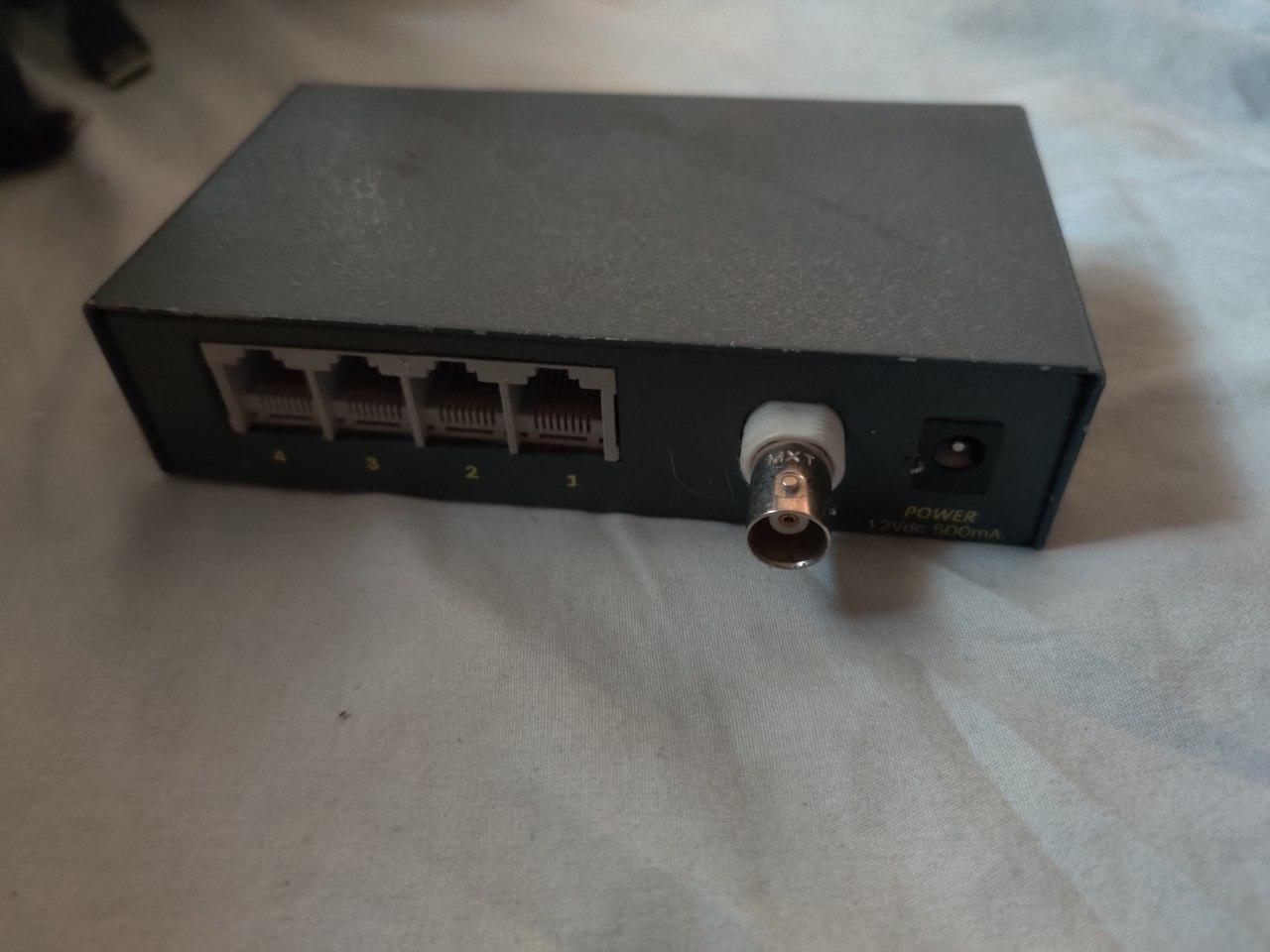
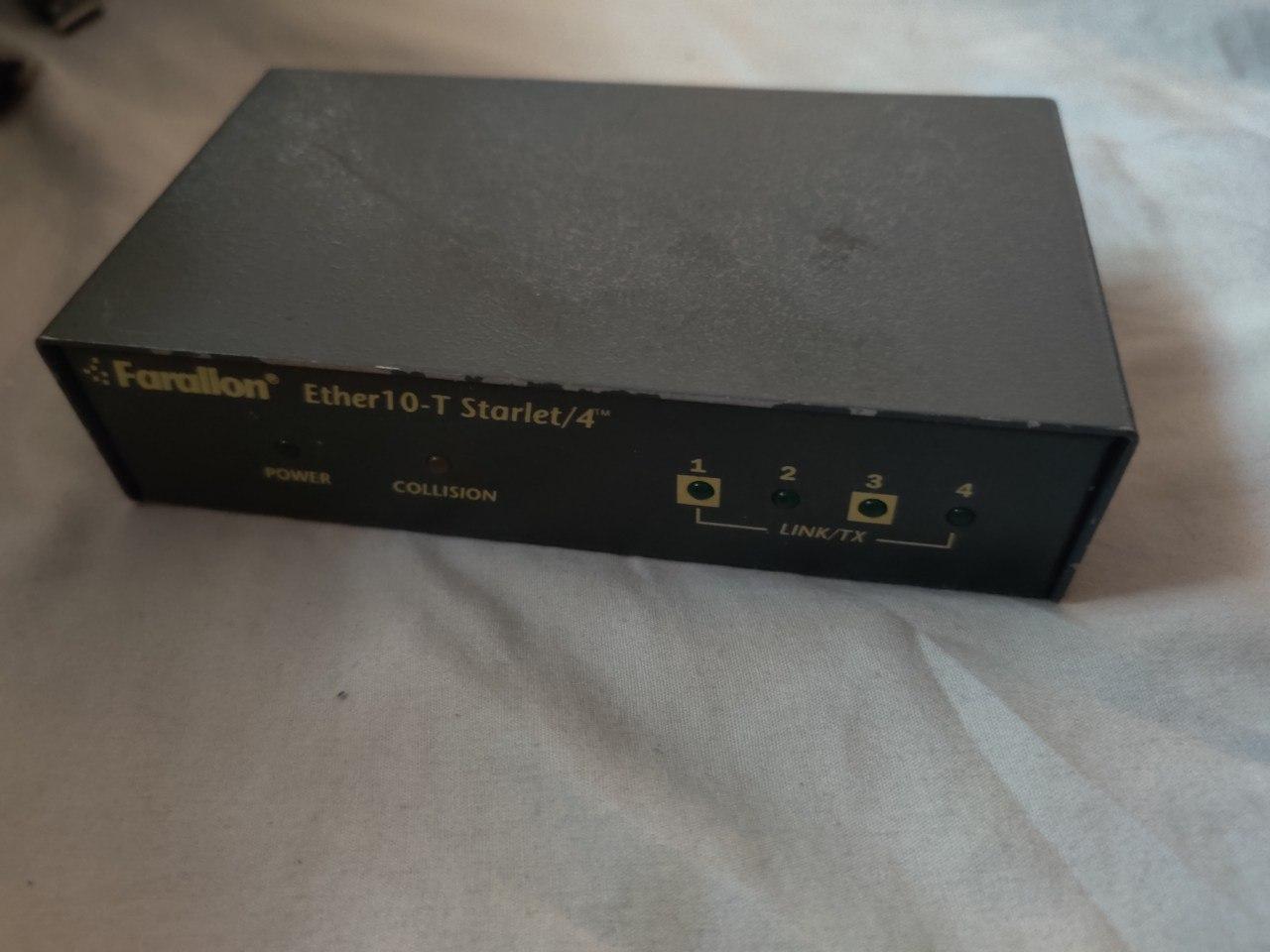
iirc you're a Bay Area local so I can give this exact hub by you after work one day if you'd like. It's just collecting dust.
You'll still need some other BNC goodies. Specifically two Ts, two terminators and a cable. I don't have spares of those but they shouldn't be too hard to find. Here're a couple reference images for how it'd work:
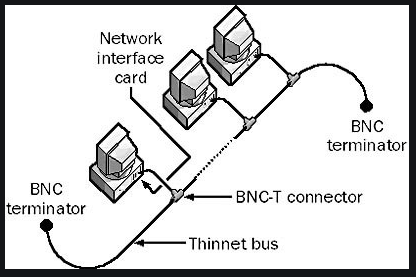
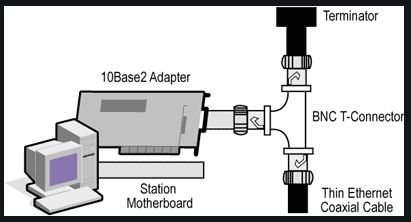
Title: Re: New owner of a NeXT Computer + TurboColor slab here - I've got pics & questions!
Post by: rbz on September 07, 2020, 05:38:16 PM
Post by: rbz on September 07, 2020, 05:38:16 PM
First off, welcome! Like yourself I had always wanted a NeXT since the 90s, and a few years ago was fortunate enough to get a NeXTstation Turbo Mono and recently picked up a Turbo Color.
You will need a 10-Base2 to 10-BaseT converter to get the system networked. Here is one on Amazon 10BaseT RJ45 to 10Base2 (https://www.amazon.com/10BaseT-10Base2-Converter-Ethernet-10Base-T/dp/B07KSW4MZ6) and here are a couple on eBay 10base2 to 10baset (https://www.ebay.com/sch/i.html?_from=R40&_trksid=p2334524.m570.l1313&_nkw=10base2+to+10baset&_sacat=0&LH_TitleDesc=0&_odkw=bnc+to+10baset&_osacat=0&_blrs=spell_check). You can also search for "BNC to RJ45" or "BNC to 10BaseT". I would probably try the $25 one on eBay right now as a first step. It would probably be good to confirm your switch/hub/router supports 10mbps mode as well but it should.
NeXTstep doesn't support DHCP as far as I know so you will need to set them up with static IPs and setting the default route, netmask and DNS, its pretty straight forward and here is a good guide for where to set the appropriate settings under NeXTstep: Tj's_Cable_Modem_Guide.pdf (http://www.nextcomputers.org/NeXTfiles/Docs/TjLs_Cable_Modem_Guide.pdf) Note: This guide seems more focused towards adding it directly to the cable modem not behind a router on a private network, so remember to adjust your IPs to fit your network. Also I assume you can edit the files directly without the GUI and when I setup mine I don't recall having to set a password for me or login as root, but its been awhile.
@drakar makes the NEXT2USB converter, available here: NeXT2USB (https://drakware.com/product/NeXT2USB)
If you want to make your own Adafruit came out with an guide on how they converted their non-ADB NeXT keyboards to USB with an arduino: https://learn.adafruit.com/usb-next-keyboard-with-arduino-micro
Quote from: Huxley on September 07, 2020, 02:28:27 PM2. The original 68030 motherboard for the Cube doesn't have a modern-style Ethernet socket, and only has the "BNC" network connector. I'm reasonably competent with networking stuff, but I've never used this style of Ethernet before. What kind of adapter would I need to connect this BNC port to my modern LAN? Also, once I've got the physical connections figured out, will the NeXT OS work with DHCP or will I need to manually assign an IP and manually set my DNS?
You will need a 10-Base2 to 10-BaseT converter to get the system networked. Here is one on Amazon 10BaseT RJ45 to 10Base2 (https://www.amazon.com/10BaseT-10Base2-Converter-Ethernet-10Base-T/dp/B07KSW4MZ6) and here are a couple on eBay 10base2 to 10baset (https://www.ebay.com/sch/i.html?_from=R40&_trksid=p2334524.m570.l1313&_nkw=10base2+to+10baset&_sacat=0&LH_TitleDesc=0&_odkw=bnc+to+10baset&_osacat=0&_blrs=spell_check). You can also search for "BNC to RJ45" or "BNC to 10BaseT". I would probably try the $25 one on eBay right now as a first step. It would probably be good to confirm your switch/hub/router supports 10mbps mode as well but it should.
NeXTstep doesn't support DHCP as far as I know so you will need to set them up with static IPs and setting the default route, netmask and DNS, its pretty straight forward and here is a good guide for where to set the appropriate settings under NeXTstep: Tj's_Cable_Modem_Guide.pdf (http://www.nextcomputers.org/NeXTfiles/Docs/TjLs_Cable_Modem_Guide.pdf) Note: This guide seems more focused towards adding it directly to the cable modem not behind a router on a private network, so remember to adjust your IPs to fit your network. Also I assume you can edit the files directly without the GUI and when I setup mine I don't recall having to set a password for me or login as root, but its been awhile.
Quote from: Huxley on September 07, 2020, 02:28:27 PM3. The non-ADB keyboard that Brian included with this package has immediately become one of my favorite keyboards ever. Much of my daily work is done on a variety of Apple Extended Keyboard II's which I've used and loved for 20+ years, but this NeXT keyboard is really something special. Brian mentioned that someone on this forum has made and sold adapters for these which convert them to USB, but I'm having a hard time finding it - can anyone point me to the right person / thread / eBay store / whatever? I'd love to use this keyboard on other systems!
@drakar makes the NEXT2USB converter, available here: NeXT2USB (https://drakware.com/product/NeXT2USB)
If you want to make your own Adafruit came out with an guide on how they converted their non-ADB NeXT keyboards to USB with an arduino: https://learn.adafruit.com/usb-next-keyboard-with-arduino-micro
Title: Re: New owner of a NeXT Computer + TurboColor slab here - I've got pics & questions!
Post by: rbz on September 07, 2020, 05:40:18 PM
Post by: rbz on September 07, 2020, 05:40:18 PM
Quote from: Compgeke on September 07, 2020, 05:33:37 PMAn old school network hub would do the trick. Think, something like this. It'll work to bridge the "thin net" to the modern RJ networks. (10Base-2 to 10Base-T)
I totally forgot about these old bridge hubs, something like this is a good idea as it may be cheaper than standalone adapter route.
Title: Re: New owner of a NeXT Computer + TurboColor slab here - I've got pics & questions!
Post by: user341 on September 07, 2020, 08:55:03 PM
Post by: user341 on September 07, 2020, 08:55:03 PM
I was able to add dhcp to my old cube back in the day. I recall it was a pain to setup but once I did it worked fine. I used it with ppp via dialup modem. Seems like it was in another life.
Title: Re: New owner of a NeXT Computer + TurboColor slab here - I've got pics & questions!
Post by: Huxley on September 09, 2020, 01:34:26 AM
Post by: Huxley on September 09, 2020, 01:34:26 AM
Hope you guys don't mind another batch of questions! This time I'm focusing on the NeXTstation TurboColor I also picked up in this package from Brian. I'm trying to get the TurboColor working, but as of now it hasn't 'liked' any of the displays I've tried connecting to. Here are my questions:
Brian included both a Y-cable and a nu_io board with this package. If I'm using the Y-cable to connect the TurboColor to the nu_io board, do I use the VGA branch of the Y-cable to plug into my monitor, or do I use a normal VGA cable to connect the monitor to the nu_io board's VGA socket?
Also: I'm under the impression that "sync on green" is a requirement here, but is that true for a display plugged into the nu_io board? The display I'm currently testing with is a ViewSonic VE170 LCD panel (a sidewalk find from a few months ago) - according to this datasheet, it does support sync-on-green: http://pdf.textfiles.com/manuals/STARINMANUALS/ViewSonic/VE170.pdf
Thanks for any clarification!
Huxley
Brian included both a Y-cable and a nu_io board with this package. If I'm using the Y-cable to connect the TurboColor to the nu_io board, do I use the VGA branch of the Y-cable to plug into my monitor, or do I use a normal VGA cable to connect the monitor to the nu_io board's VGA socket?
Also: I'm under the impression that "sync on green" is a requirement here, but is that true for a display plugged into the nu_io board? The display I'm currently testing with is a ViewSonic VE170 LCD panel (a sidewalk find from a few months ago) - according to this datasheet, it does support sync-on-green: http://pdf.textfiles.com/manuals/STARINMANUALS/ViewSonic/VE170.pdf
Thanks for any clarification!
Huxley
Title: Re: New owner of a NeXT Computer + TurboColor slab here - I've got pics & questions!
Post by: barcher174 on September 09, 2020, 03:03:24 AM
Post by: barcher174 on September 09, 2020, 03:03:24 AM
Hi Huxley,
The VGA connector on the nu_io will not work with the color system. Use the VGA connector on the Y cable. The 1120x832@68 display setting can be a problem for some monitors even if they support SoG. If you search the forums you will find a recommendation thread with known working monitors.
The VGA connector on the nu_io will not work with the color system. Use the VGA connector on the Y cable. The 1120x832@68 display setting can be a problem for some monitors even if they support SoG. If you search the forums you will find a recommendation thread with known working monitors.
Title: Re: New owner of a NeXT Computer + TurboColor slab here - I've got pics & questions!
Post by: Huxley on September 09, 2020, 08:31:25 AM
Post by: Huxley on September 09, 2020, 08:31:25 AM
Quote from: barcher174 on September 09, 2020, 03:03:24 AMHi Huxley,
The VGA connector on the nu_io will not work with the color system. Use the VGA connector on the Y cable. The 1120x832@68 display setting can be a problem for some monitors even if they support SoG. If you search the forums you will find a recommendation thread with known working monitors.
Got it - sounds like a little more homework is called for! I realized that the monitor I'd previously used with a SOG system (my SGI Indigo2 IMPACT10000) might not support SOG at all - I only got it working when using a pretty cool 13w3-to-VGA cable that has a ton of DIP switches for manipulating video signals between the host and display, but that option doesn't work here given the requirement for the nu_io to sit in the middle... and this ViewSonic which (supposedly) does like SOG may not be viable either. Oh well - the hunt continues!
One more semi-related question: if I use the nu_io (and the internal PSU-load-board) for the Cube so I can connect the Cube to a VGA monitor, does that also require a SOG-compliant monitor despite the Cube being a greyscale-only system?
Thanks again for all the info - this is fun to learn about!
Huxley
Title: Re: New owner of a NeXT Computer + TurboColor slab here - I've got pics & questions!
Post by: Rob Blessin Black Hole on September 09, 2020, 11:41:54 AM
Post by: Rob Blessin Black Hole on September 09, 2020, 11:41:54 AM
Hello NeXT Community: For NeXT color systems the Flat Panel monitors need to support 1280 by 1024 and synch on green like most old dell 19" and 20" non wide flat panel monitors. M
ono systems and cubes any monitor that supports 2 bit grey scale should work 17" or better :)
Y Monitor cables are always centered at the cpu to work correctly.... cube or slab!
The Y cable will power upthe NeXT Color Station if centered at a 13W3 monitor to with 13W3 at CPU to DB 19 at soundbox but it won't have an image on the screen.
ono systems and cubes any monitor that supports 2 bit grey scale should work 17" or better :)
Y Monitor cables are always centered at the cpu to work correctly.... cube or slab!
The Y cable will power upthe NeXT Color Station if centered at a 13W3 monitor to with 13W3 at CPU to DB 19 at soundbox but it won't have an image on the screen.
Title: Re: New owner of a NeXT Computer + TurboColor slab here - I've got pics & questions!
Post by: barcher174 on September 09, 2020, 12:44:57 PM
Post by: barcher174 on September 09, 2020, 12:44:57 PM
The mono vga signal does not require SoG. Its's just vanilla vga at a fixed resolution.
Title: Re: New owner of a NeXT Computer + TurboColor slab here - I've got pics & questions!
Post by: barcher174 on September 09, 2020, 01:30:47 PM
Post by: barcher174 on September 09, 2020, 01:30:47 PM
I have a dell that works with the mono if you find yourself in the neighborhood. Yours for an iced vanilla latte.
Title: Re: New owner of a NeXT Computer + TurboColor slab here - I've got pics & questions!
Post by: Huxley on September 10, 2020, 08:45:16 PM
Post by: Huxley on September 10, 2020, 08:45:16 PM
Thank you for the great info guys - I'm learning a lot!
A semi-local pal has offered to loan me a Sony CRT monitor, specifically this one (https://www.manualslib.com/manual/242728/Sony-Cpd-100es-L-Operating-Instructions-Primary-Manual.html?page=9#manual). Before I try to make arrangements to pick it up, could anyone here confirm that the specs look correct? I think it should work for my TurboColor setup, but a little extra confirmation can't hurt given how new I am with the NeXT platform...
Thanks!
Huxley
A semi-local pal has offered to loan me a Sony CRT monitor, specifically this one (https://www.manualslib.com/manual/242728/Sony-Cpd-100es-L-Operating-Instructions-Primary-Manual.html?page=9#manual). Before I try to make arrangements to pick it up, could anyone here confirm that the specs look correct? I think it should work for my TurboColor setup, but a little extra confirmation can't hurt given how new I am with the NeXT platform...
Thanks!
Huxley
Title: Re: New owner of a NeXT Computer + TurboColor slab here - I've got pics & questions!
Post by: Rob Blessin Black Hole on September 11, 2020, 08:37:44 PM
Post by: Rob Blessin Black Hole on September 11, 2020, 08:37:44 PM
It looks it should but it is a small screen at 14", one way to find out , plug it in.
Best regards Rob Blessin
Best regards Rob Blessin