Title: Previous working on Apple Silicon (natively!)
Post by: larbob on December 30, 2020, 09:24:54 PM
Post by: larbob on December 30, 2020, 09:24:54 PM
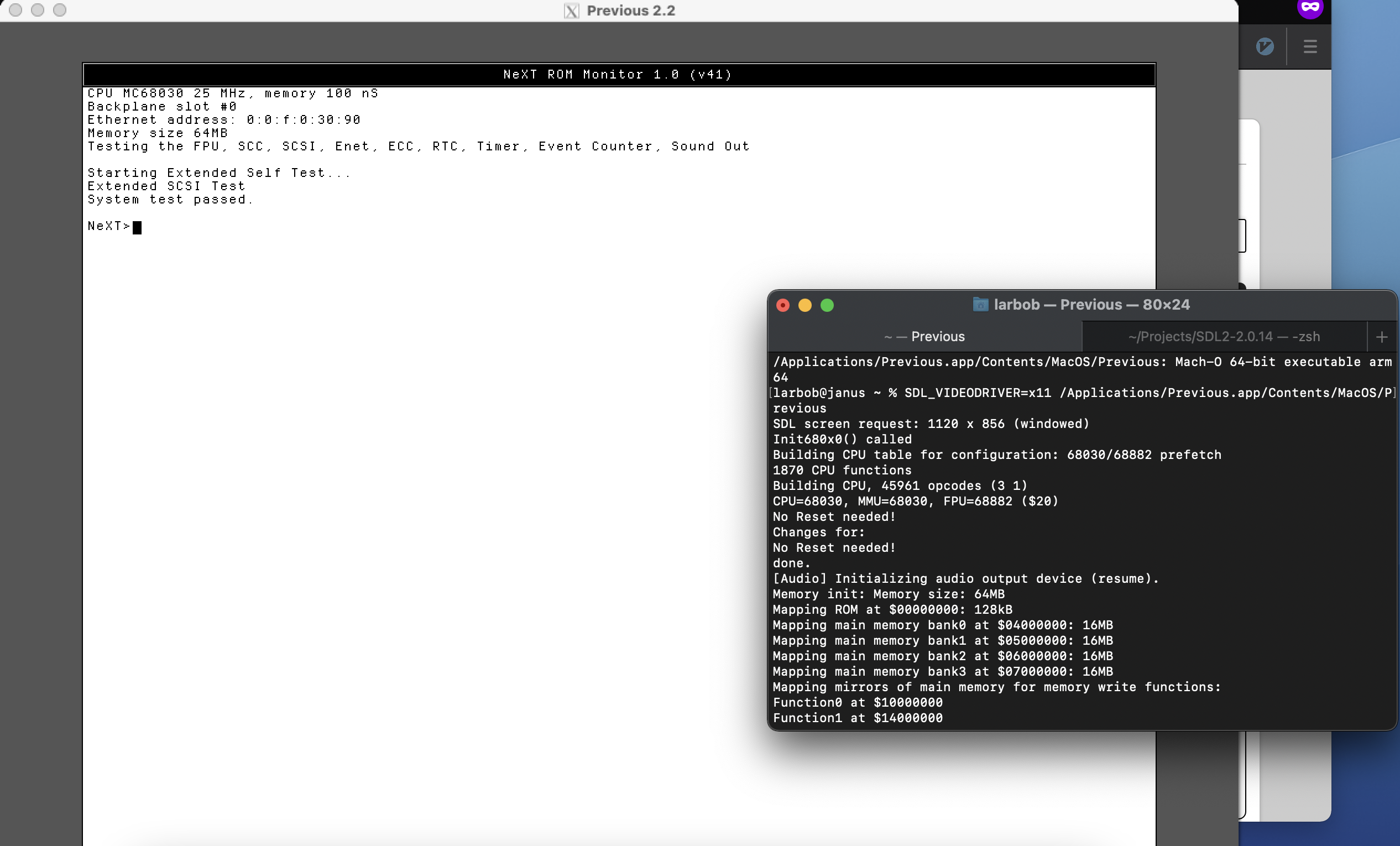
Got it working! Here's how you can get it working too:
Make sure you have xorg-server, readline, zlib, libpng, mesa, and cmake installed through MacPorts.
Then, grab SDL2 2.0.14 from http://libsdl.org/release/SDL2-2.0.14.tar.gz (http://libsdl.org/release/SDL2-2.0.14.tar.gz) and extract it. Edit `src/video/x11/SDL_x11opengl.c` and change line 42 (`#define DEFAULT_OPENGL "/opt/X11/lib/libGL.1.dylib"`) to `#define DEFAULT_OPENGL "/opt/local/lib/libGL.1.dylib"`. This fixes where SDL2 looks for the OpenGL dynamic library since the official XQuartz.app doesn't support Apple Silicon yet. You can't use MacPorts' SDL2 X11 variant as it doesn't actually patch this properly (I've submitted a ticket).
Compile SDL2 with `./configure --disable-x11-shared --x-libraries=/opt/local/lib --x-includes=/opt/local/include` and install it with `sudo make install`.
You can then build Previous. I have the source up on GitHub, so you can grab it with `git clone https://github.com/larb0b/previous`. You can install it with something like `mkdir build && cd build && cmake .. && make -j && sudo make install`.
This'll give you a working app in /Applications, but it'll crash on launch normally. It needs the environment variable SDL_VIDEODRIVER set to x11, so I've been launching it in the terminal with `SDL_VIDEODRIVER=x11 /Applications/Previous.app/Contents/MacOS/Previous`. Also, make sure the X server is running when you launch Previous (`/Applications/MacPorts/X11.app`). There seems to be some incompatibility between Previous and SDL2's Cocoa support past SDL2 ~.10 or ~.12, even on Intel.
Also, you might want to enable "Option keys send Alt_L and Alt_R" in the X11.app preferences. You won't be able to unlock the mouse otherwise. Furthermore, you'll want to disable mouse auto-locking in the Previous configuration otherwise the mouse won't work properly once you've clicked in a Previous window.
EDIT: I've posted a link to a build here: http://www.nextcomputers.org/forums/index.php?msg=26610
EDIT 2: Xquartz now has alpha builds (https://www.xquartz.org/releases/index.html) available with native support for Apple Silicon. With this, you shouldn't need to install mesa or xorg-server from MacPorts, and you shouldn't need to make that change to `src/video/x11/SDL_x11opengl.c`.
Title: Re: Previous working on Apple Silicon
Post by: larbob on December 30, 2020, 10:16:48 PM
Post by: larbob on December 30, 2020, 10:16:48 PM
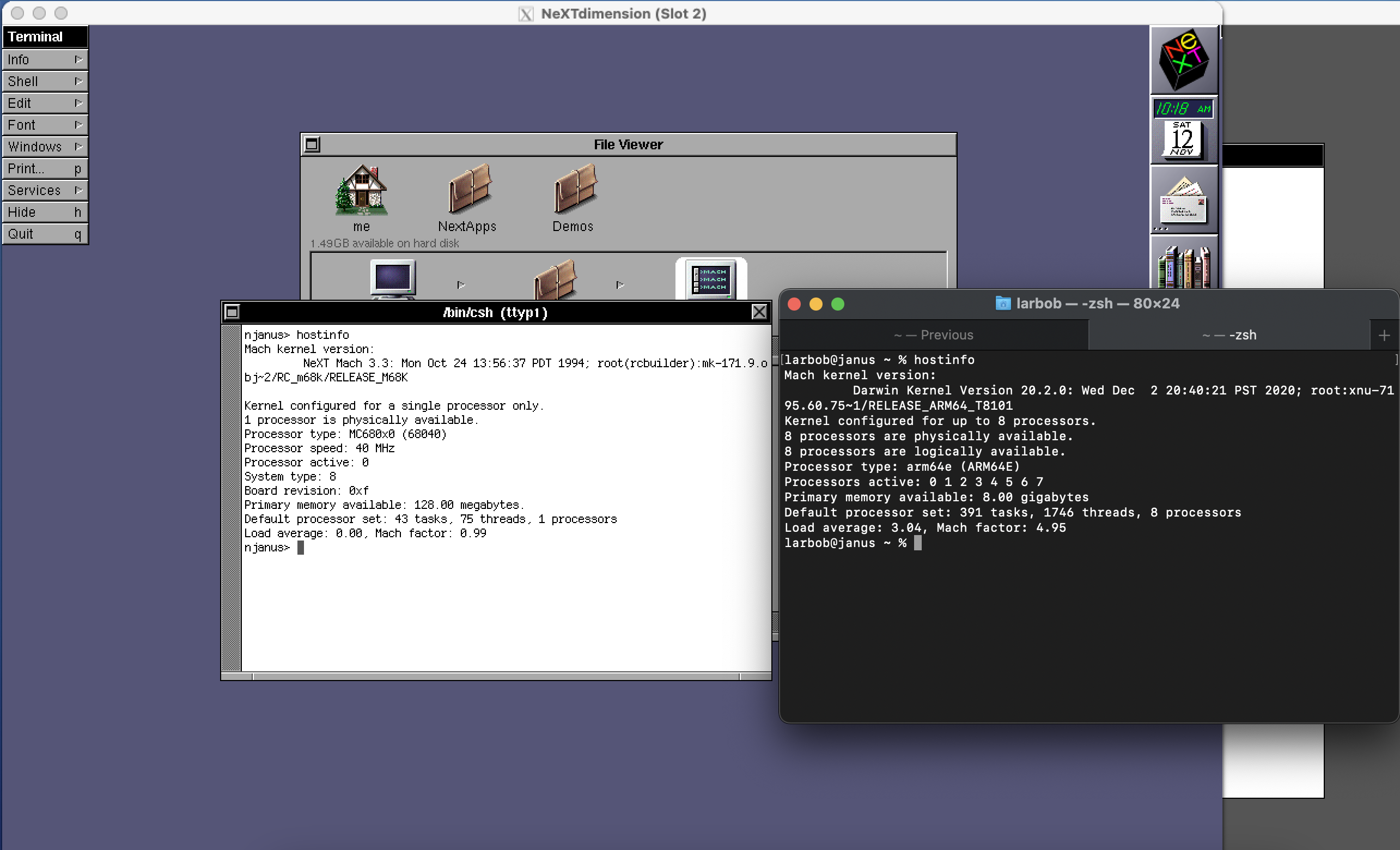
Title: Re: Previous working on Apple Silicon (natively!)
Post by: mikeboss on December 31, 2020, 07:53:50 AM
Post by: mikeboss on December 31, 2020, 07:53:50 AM
this is great news! thanks!
Title: Re: Previous working on Apple Silicon (natively!)
Post by: larbob on January 01, 2021, 05:32:04 PM
Post by: larbob on January 01, 2021, 05:32:04 PM
Here's a copy: http://mirror.rqsall.com/misc/next/previous/apple_silicon/Previous.dmg (http://mirror.rqsall.com/misc/next/previous/apple_silicon/Previous.dmg)
You're going to want xorg-server, mesa, readline, libpng, and zlib from MacPorts installed before trying to use this. SDL2 is bundled inside the .app as I had to patch it to look for the OpenGL library in the correct place.
You don't need to set the SDL_VIDEODRIVER environment variable like I had to above, this does it for you. You just need to launch Previous.app and everything should work fine as long as you have those prerequisites installed. It should automatically launch X11.app for you if you don't have it open already when launching.
You're going to want xorg-server, mesa, readline, libpng, and zlib from MacPorts installed before trying to use this. SDL2 is bundled inside the .app as I had to patch it to look for the OpenGL library in the correct place.
You don't need to set the SDL_VIDEODRIVER environment variable like I had to above, this does it for you. You just need to launch Previous.app and everything should work fine as long as you have those prerequisites installed. It should automatically launch X11.app for you if you don't have it open already when launching.
Title: Re: Previous working on Apple Silicon (natively!)
Post by: larbob on January 01, 2021, 06:12:06 PM
Post by: larbob on January 01, 2021, 06:12:06 PM
Here's a video of me launching it and booting the OPENSTEP 4.2 installer: https://www.youtube.com/watch?v=TmX0hy9qSHU
Title: Re: Previous working on Apple Silicon (natively!)
Post by: itomato on January 05, 2021, 09:53:44 PM
Post by: itomato on January 05, 2021, 09:53:44 PM
NXBench results please :)
Title: Re: Previous working on Apple Silicon (natively!)
Post by: eagle on January 08, 2021, 07:42:17 AM
Post by: eagle on January 08, 2021, 07:42:17 AM
I don't recall Previous/x64 requiring X11; why is it required for the ARM version? I mean, this is very cool, awesome work, I'm just curious.
Title: Re: Previous working on Apple Silicon (natively!)
Post by: larbob on January 09, 2021, 07:19:10 PM
Post by: larbob on January 09, 2021, 07:19:10 PM
Quote from: eagle on January 08, 2021, 07:42:17 AMI don't recall Previous/x64 requiring X11; why is it required for the ARM version? I mean, this is very cool, awesome work, I'm just curious.
Something seems to be broken between Previous' Cocoa stuff and the latest SDL2 versions, so using X11 instead seemed like a good enough solution.
Title: Re: Previous working on Apple Silicon (natively!)
Post by: larbob on January 09, 2021, 07:31:32 PM
Post by: larbob on January 09, 2021, 07:31:32 PM
Quote from: itomato on January 05, 2021, 09:53:44 PMNXBench results please :)
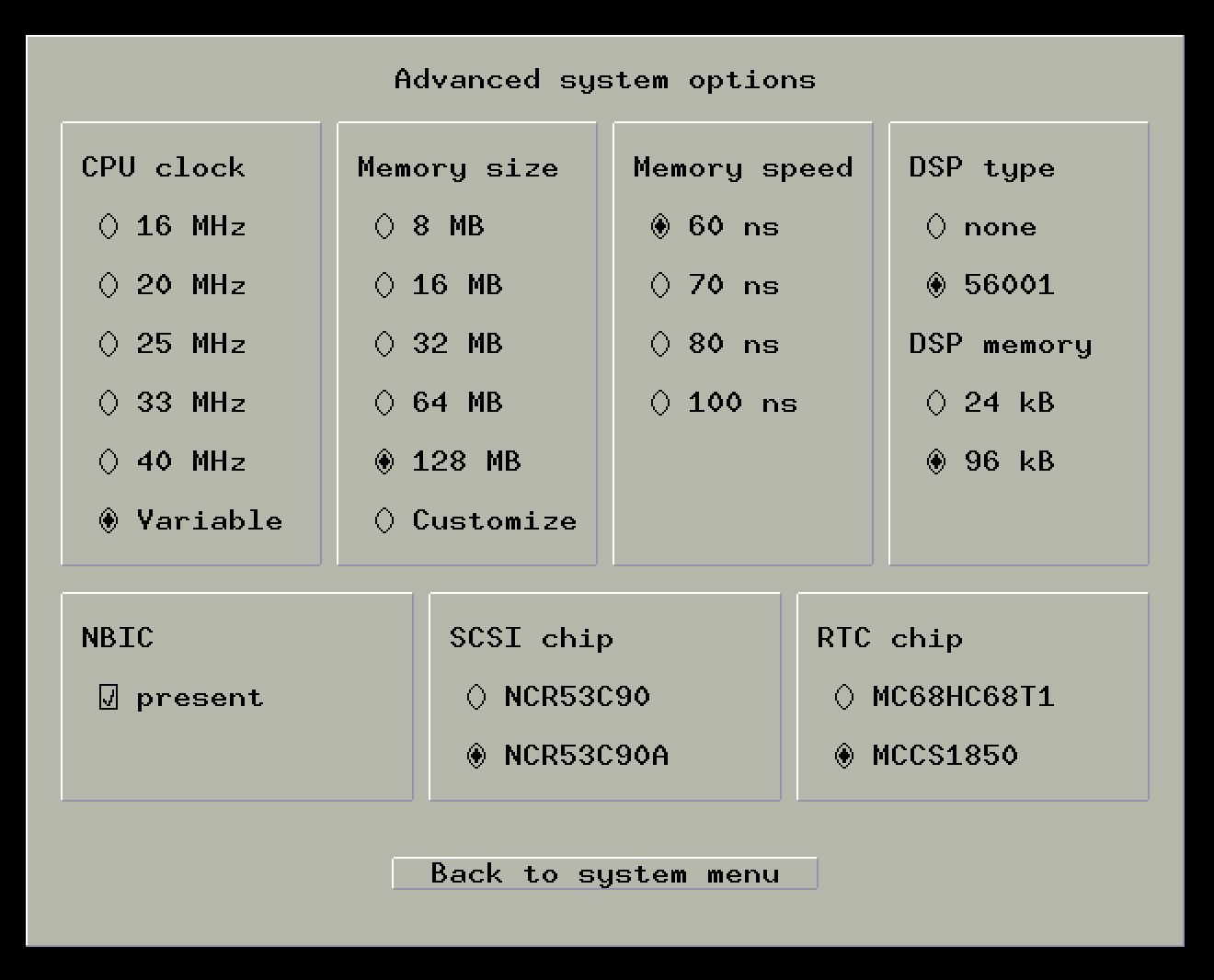
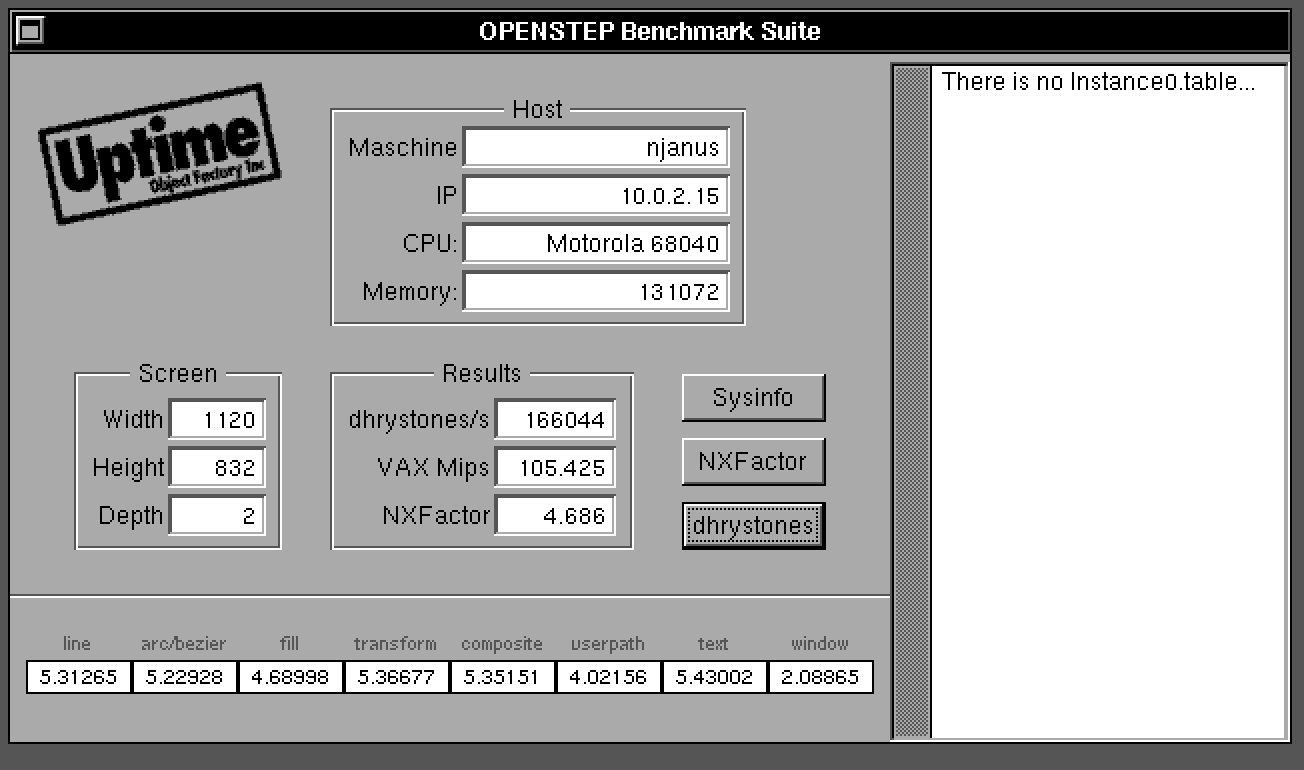
NeXTcube Turbo, no NeXTdimensions, NXBench 2.5. This was done on my M1 Air on battery power.
Title: Re: Previous working on Apple Silicon (natively!)
Post by: MahRain on July 24, 2021, 09:39:40 AM
Post by: MahRain on July 24, 2021, 09:39:40 AM
I was able to compile from source (r1033-Trunk) and run on Big Sur 11.5 on an iMac M1. There was one bug related to a file named 'VERSION' in the src/Slirp folder, where renaming this to anything else fixes it (a known bug with macOS SDK 11.3).
I installed SDL from source and I don't need X11. Let me know if you need me to upload a binary somewhere?
I installed SDL from source and I don't need X11. Let me know if you need me to upload a binary somewhere?
Title: Re: Previous working on Apple Silicon (natively!)
Post by: user341 on July 25, 2021, 11:27:41 AM
Post by: user341 on July 25, 2021, 11:27:41 AM
I'm curious how fast the "variable" CPU reports when running on the M1. On the Mac Pro, I think it gets up to around 50Mhz. So not much faster than a standard cube. Would be great to see numbers get over 100MHz.
Title: Re: Previous working on Apple Silicon (natively!)
Post by: eagle on July 25, 2021, 04:58:00 PM
Post by: eagle on July 25, 2021, 04:58:00 PM
If you have a tarball, I'm happy to put it on my site -- previous.unixdude.net. And, I'd love to have it for myself. :D
Title: Re: Previous working on Apple Silicon (natively!)
Post by: MahRain on July 26, 2021, 03:25:40 AM
Post by: MahRain on July 26, 2021, 03:25:40 AM
Quote from: zombie on July 25, 2021, 11:27:41 AMI'm curious how fast the "variable" CPU reports when running on the M1. On the Mac Pro, I think it gets up to around 50Mhz. So not much faster than a standard cube. Would be great to see numbers get over 100MHz.
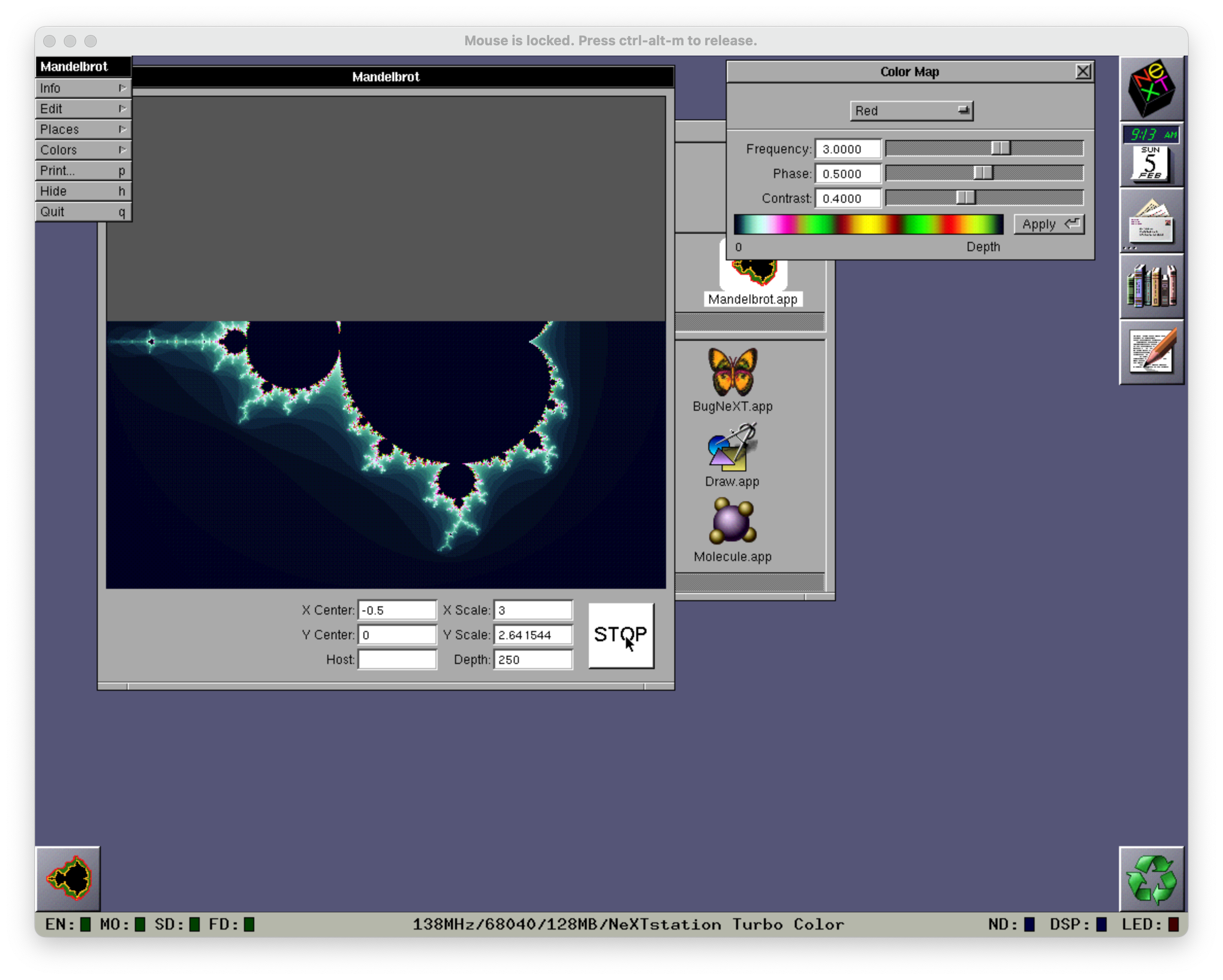
I see the CPU number changes a bit, and increases with higher workloads. This is the highest I've seen it go doing a Mandelbrot calculation. Let me know if this is right, else I can run some other tests.
138MHz.
Title: Re: Previous working on Apple Silicon (natively!)
Post by: andreas_g on July 26, 2021, 04:23:44 AM
Post by: andreas_g on July 26, 2021, 04:23:44 AM
It is normal that the CPU frequency changes in variable mode. Only user mode code is executed at full speed. Supervisor mode code is always executed at the same (more realistic) speed. This is required, because else the timings would get out of control and on fast systems you would see weird problems causing instability. As a positive side effect Previous eats less host CPU cycles while being idle.
I just checked on my system (iMac early 2009, 2.66 GHz Intel Core 2 Duo): It peaks at 40 MHz when running the Mandelbrot demo. Note that CPU emulation only uses one CPU core, so we only compare single core performance here.
I just checked on my system (iMac early 2009, 2.66 GHz Intel Core 2 Duo): It peaks at 40 MHz when running the Mandelbrot demo. Note that CPU emulation only uses one CPU core, so we only compare single core performance here.
Title: Re: Previous working on Apple Silicon (natively!)
Post by: user341 on July 27, 2021, 12:04:10 AM
Post by: user341 on July 27, 2021, 12:04:10 AM
I notice that the emulator bombs and runs more buggy when using 60ns memory instead of 70. Is there a chance that is bad interplay with the variable CPU speed?
Title: Re: Previous working on Apple Silicon (natively!)
Post by: andreas_g on July 27, 2021, 01:28:01 AM
Post by: andreas_g on July 27, 2021, 01:28:01 AM
Quote from: zombie on July 27, 2021, 12:04:10 AMI notice that the emulator bombs and runs more buggy when using 60ns memory instead of 70. Is there a chance that is bad interplay with the variable CPU speed?
Because Previous does not yet simulate memory timings the memory speed preference has no real effect. It just reports different memory to the guest system. What kinds of bugs or crashes do you experience? Can you reproduce the problems? If yes, it would be great if you could give me an instruction on how to reproduce it and I'll see if I have the same problem here.
Title: Re: Previous working on Apple Silicon (natively!)
Post by: user341 on July 31, 2021, 09:01:45 PM
Post by: user341 on July 31, 2021, 09:01:45 PM
Well to be honest, almost all the time when I run the NeXTdimension on a turbo cube, filled to the top with memory, set to variable CPU and 60ns memory in part, but even with 70ns memory. The bugs/hangs are random seeming, so not sure I can reproduce a particular action chain.
That said, the very same setup but using a next turbo color station instead, is significantly more stable.
That said, the very same setup but using a next turbo color station instead, is significantly more stable.
Title: Re: Previous working on Apple Silicon (natively!)
Post by: andreas_g on August 01, 2021, 03:47:15 AM
Post by: andreas_g on August 01, 2021, 03:47:15 AM
What happens when the issue occurs? Does it only happen using variable CPU speed mode?
Title: Re: Previous working on Apple Silicon (natively!)
Post by: user341 on August 02, 2021, 12:28:29 PM
Post by: user341 on August 02, 2021, 12:28:29 PM
I haven't tried it with non variable. I will do so and report back.
Title: Re: Previous working on Apple Silicon (natively!)
Post by: andreas_g on August 02, 2021, 02:57:52 PM
Post by: andreas_g on August 02, 2021, 02:57:52 PM
What symptoms occur with the issue (kernel panics, crashing applications, drawing glitches, etc)?
Title: Re: Previous working on Apple Silicon (natively!)
Post by: dotsam on August 03, 2021, 03:36:17 PM
Post by: dotsam on August 03, 2021, 03:36:17 PM
Just as a note, I was also able to build the current trunk version of Previous from https://sourceforge.net/p/previous/code/HEAD/tree/ along with sdl2, zlib, libpng, libpcap and cmake from Homebrew. I might even make a Homebrew formula to make this easier for others.
I originally thought there might be been an issue with the emulation as I was having strange issues compiling software, but after trying the same with an x86 build under Rosetta 2, I don't think it's the Apple Silicon part that's the problem (if Previous is even the problem).
I originally thought there might be been an issue with the emulation as I was having strange issues compiling software, but after trying the same with an x86 build under Rosetta 2, I don't think it's the Apple Silicon part that's the problem (if Previous is even the problem).
Title: Re: Previous working on Apple Silicon (natively!)
Post by: andreas_g on August 11, 2021, 03:52:30 AM
Post by: andreas_g on August 11, 2021, 03:52:30 AM
Can anyone test if Performance is still the same in variable speed mode using the new SDL2 v2.0.16?
Title: Re: Previous working on Apple Silicon (natively!)
Post by: pomosapien on September 11, 2021, 08:53:26 AM
Post by: pomosapien on September 11, 2021, 08:53:26 AM
This is a cool result.
Even if you don't get more clock in the guest, being able to use less CPU on the host is beneficial, in terms of heat, battery and host multitasking.
Even if you don't get more clock in the guest, being able to use less CPU on the host is beneficial, in terms of heat, battery and host multitasking.
Title: Re: Previous working on Apple Silicon (natively!)
Post by: ExFruityNextGuy on April 06, 2022, 12:20:13 PM
Post by: ExFruityNextGuy on April 06, 2022, 12:20:13 PM
Hi All,
I've built a Apple Silicon native (no special workarounds required to use) version of Previous 2.4 (r1124). If anyone wants it DM me. Or you can just email (disposable address) helots06spacers (at) iCloud (dot) com
I've built a Apple Silicon native (no special workarounds required to use) version of Previous 2.4 (r1124). If anyone wants it DM me. Or you can just email (disposable address) helots06spacers (at) iCloud (dot) com
Title: Re: Previous working on Apple Silicon (natively!)
Post by: pomosapien on April 08, 2022, 04:11:18 PM
Post by: pomosapien on April 08, 2022, 04:11:18 PM
> Can anyone test if Performance is still the same in variable speed mode using the new SDL2 v2.0.16?
Did anyone do this? What is the baseline for comparison?
Did anyone do this? What is the baseline for comparison?
Title: Re: Previous working on Apple Silicon (natively!)
Post by: andreas_g on April 09, 2022, 04:22:29 AM
Post by: andreas_g on April 09, 2022, 04:22:29 AM
Quote from: pomosapien on April 08, 2022, 04:11:18 PM> Can anyone test if Performance is still the same in variable speed mode using the new SDL2 v2.0.16?
Did anyone do this? What is the baseline for comparison?
This is no longer relevant. Thank you anyway.
Title: Re: Previous working on Apple Silicon (natively!)
Post by: pomosapien on April 11, 2022, 03:10:50 PM
Post by: pomosapien on April 11, 2022, 03:10:50 PM
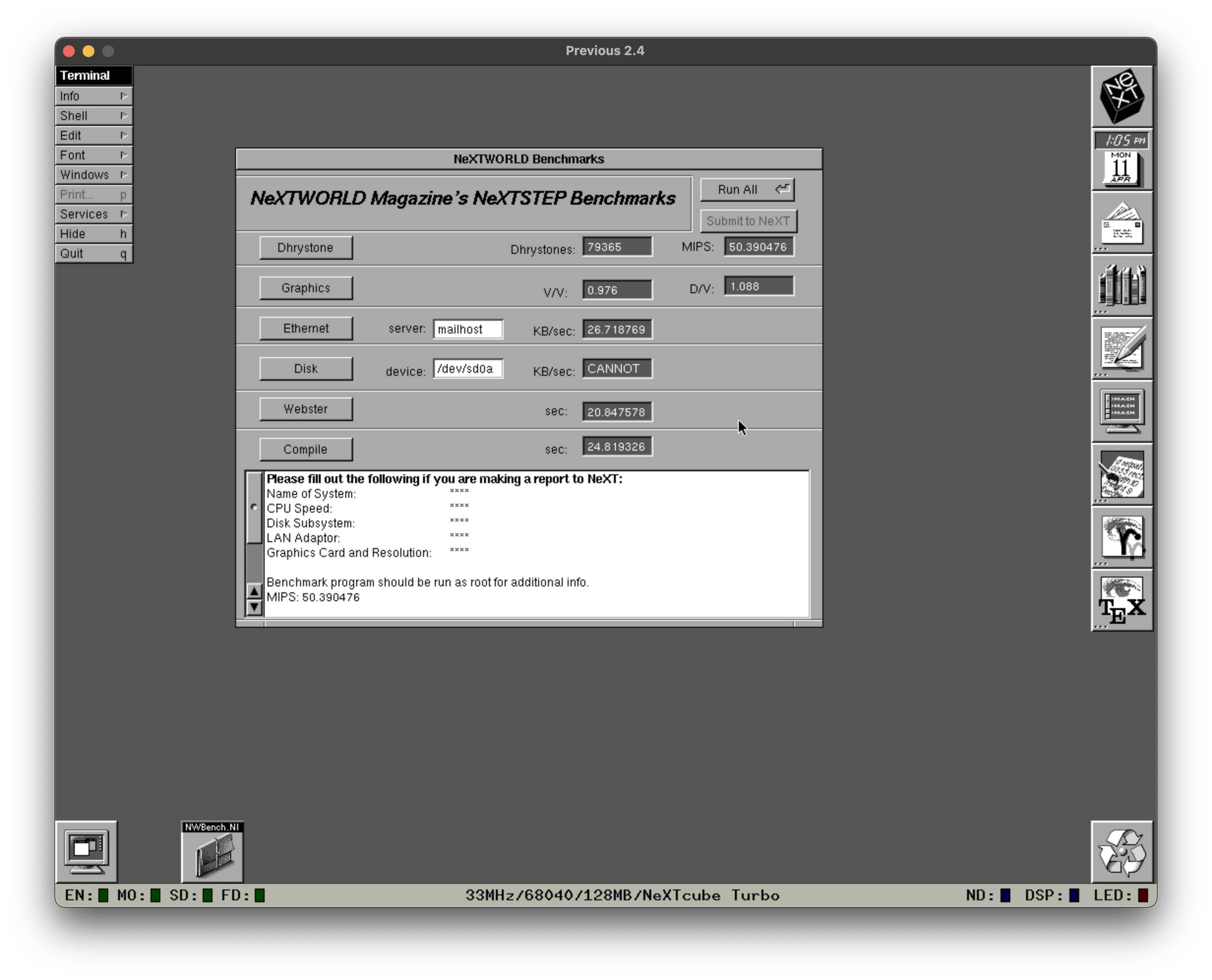
Was messing about with variable clock mode. Statusbar speeds vary between 60 and 120 when compiling or downloading from the forum. Ran nwbench:
Title: Re: Previous working on Apple Silicon (natively!)
Post by: andreas_g on April 12, 2022, 02:57:54 AM
Post by: andreas_g on April 12, 2022, 02:57:54 AM
Quote from: pomosapien on April 11, 2022, 03:10:50 PMWas messing about with variable clock mode. Statusbar speeds vary between 60 and 120 when compiling or downloading from the forum. Ran nwbench:
For comparing performance between different systems and versions I do the following:
- Configure Previous to simualte NeXT Computer (68030) with variable speed mode
- Boot NeXTstep 1.0
- Click and hold the title bar of the Workspace window
- Wait until the Statusbar speed settles and note it
This is of course no real benchmark, but the easiest way for comparing.
Title: Re: Previous working on Apple Silicon (natively!)
Post by: mikeboss on April 16, 2022, 09:57:42 AM
Post by: mikeboss on April 16, 2022, 09:57:42 AM
thanks to forum member @ExFruityNextGuy we finally have a fully working universal binary of Previous! this is version 2.4 (r1124). do not forget to right-click -> open when starting the app for the first time on your Mac.
download:
https://mega.nz/file/U4J2iIBZ#FVitwoQZIewFhMAYfNGxSVgtns3NI8BvG-alnuJc7_g
download:
https://mega.nz/file/U4J2iIBZ#FVitwoQZIewFhMAYfNGxSVgtns3NI8BvG-alnuJc7_g
Title: Re: Previous working on Apple Silicon (natively!)
Post by: eagle on April 16, 2022, 05:07:57 PM
Post by: eagle on April 16, 2022, 05:07:57 PM
Thanks, mike. I will put it on my site soon, after I test it on my M1 MBA. I was meaning to get up with that user to grab that version.
Title: Re: Previous working on Apple Silicon (natively!)
Post by: andreas_g on April 17, 2022, 01:59:43 AM
Post by: andreas_g on April 17, 2022, 01:59:43 AM
QuoteHi All,
I've built a Apple Silicon native (no special workarounds required to use) version of Previous 2.4 (r1124). If anyone wants it DM me. Or you can just email (disposable address) helots06spacers (at) iCloud (dot) com
Thank you for providing this build! Just two little suggestions: If you add libpng it would enable printing to PNG files. Some people might be stuck on older versions of macOS for different reason. It might make sense to set the deployment target to some earlier version of the OS (10.11 if you want me to test your build).
Title: Re: Previous working on Apple Silicon (natively!)
Post by: ExFruityNextGuy on April 18, 2022, 01:48:44 PM
Post by: ExFruityNextGuy on April 18, 2022, 01:48:44 PM
Hi,
The lowest OS version that supports Universal binaries (AFAIK) is "Big Sur" 11.x. I was thinking since that's only current (as of now anyway) -1 it just made sense to target 12.x (12.3 specifically). I can target 11.x if people want just not sure of the benefit.
As to LIB PNG that's been a bigger pain. There are binary and intel distributions available from home-brew but they for some reason I haven't sorted yet can't be fused with lipo and I can't get the sources to compile universal (or at all honestly). I didn't want to delay getting a universal build out until I was able to sort (if ever) the PNG issue.
Currently, I was thinking about building a Swift UI wrapper for the App so that it sorta followed a ~Parallels style interaction as an open source project. But, that's a bunch more work and not sure there would be interest. (I think I could keep the emulator core files the ~in sync with source as it's not changing to much. (Gilles's and Andreas's excellent work stands alone pretty well at this point).
Any interest from the Mac users out there if this would be something they would upgrade to?
The lowest OS version that supports Universal binaries (AFAIK) is "Big Sur" 11.x. I was thinking since that's only current (as of now anyway) -1 it just made sense to target 12.x (12.3 specifically). I can target 11.x if people want just not sure of the benefit.
As to LIB PNG that's been a bigger pain. There are binary and intel distributions available from home-brew but they for some reason I haven't sorted yet can't be fused with lipo and I can't get the sources to compile universal (or at all honestly). I didn't want to delay getting a universal build out until I was able to sort (if ever) the PNG issue.
Currently, I was thinking about building a Swift UI wrapper for the App so that it sorta followed a ~Parallels style interaction as an open source project. But, that's a bunch more work and not sure there would be interest. (I think I could keep the emulator core files the ~in sync with source as it's not changing to much. (Gilles's and Andreas's excellent work stands alone pretty well at this point).
Any interest from the Mac users out there if this would be something they would upgrade to?
Title: Re: Previous working on Apple Silicon (natively!)
Post by: andreas_g on April 19, 2022, 06:57:06 AM
Post by: andreas_g on April 19, 2022, 06:57:06 AM
I am using some applications on my old Mac running OS X v10.11.6 (El Capitan) that are x86_64/arm64 universal binaries. So it should be possible to target older systems. Anyway for me this has no high priority.
I have installed an i386/x86_64 univeral binary version of libpng via MacPorts. But I don't know if an x86_64/arm64 universal binary is also available. Installing was easy, no manual merging necessary. Anyway to add it to the .app-bundle I had to modify some linking stuff using name_install_tool. I can send you my instructions later today.
Native UI sounds interesting but I'm not sure if it is worth the trouble. For me the SDL GUI works well enough and it would be more like a cosmetic improvement.
I have installed an i386/x86_64 univeral binary version of libpng via MacPorts. But I don't know if an x86_64/arm64 universal binary is also available. Installing was easy, no manual merging necessary. Anyway to add it to the .app-bundle I had to modify some linking stuff using name_install_tool. I can send you my instructions later today.
Native UI sounds interesting but I'm not sure if it is worth the trouble. For me the SDL GUI works well enough and it would be more like a cosmetic improvement.
Title: Re: Previous working on Apple Silicon (natively!)
Post by: mikeboss on April 19, 2022, 11:42:03 AM
Post by: mikeboss on April 19, 2022, 11:42:03 AM
QuoteNative UI sounds interesting but I'm not sure if it is worth the trouble. For me the SDL GUI works well enough and it would be more like a cosmetic improvement.
me very much likes a pretty GUI ;-) for example, using FS-UAE Vs. vAmiga is like night and day...
Title: Re: Previous working on Apple Silicon (natively!)
Post by: ExFruityNextGuy on April 19, 2022, 09:33:55 PM
Post by: ExFruityNextGuy on April 19, 2022, 09:33:55 PM
Hello all.
Here's a new build of Previous (r1126) built Universal with libpng statically linked. This build still requires Mac OS 12.3 (sorry Andreas_G if huge issue let me know). But on the plus side this build can print.
I've done some lightweight testing on both x86 and Apple Silicon and everything seems to be in order.
If people have problems please let me know and feel free to distribute the zip (it's legal as it has no ROMS or disk images)
Thx and If anyone wants it just email (disposable address) helots06spacers (at) iCloud (dot) com
Here's a new build of Previous (r1126) built Universal with libpng statically linked. This build still requires Mac OS 12.3 (sorry Andreas_G if huge issue let me know). But on the plus side this build can print.
I've done some lightweight testing on both x86 and Apple Silicon and everything seems to be in order.
If people have problems please let me know and feel free to distribute the zip (it's legal as it has no ROMS or disk images)
Thx and If anyone wants it just email (disposable address) helots06spacers (at) iCloud (dot) com
Title: Re: Previous working on Apple Silicon (natively!)
Post by: andreas_g on April 20, 2022, 12:45:02 AM
Post by: andreas_g on April 20, 2022, 12:45:02 AM
Great, thank you for adding libpng! Requring 12.3 is not a problem for me, as I make my own builds anyway during development. I don't know if other people are stuck with older systems like me but then they could also use my release build which runs from 10.9 upwards (but lacks native Apple Silicon support).
Title: Re: Previous working on Apple Silicon (natively!)
Post by: user341 on April 20, 2022, 03:23:08 AM
Post by: user341 on April 20, 2022, 03:23:08 AM
Quote from: ExFruityNextGuy on April 19, 2022, 09:33:55 PMHello all.
Here's a new build of Previous (r1126) built Universal with libpng statically linked. This build still requires Mac OS 12.3 (sorry Andreas_G if huge issue let me know). But on the plus side this build can print.
I've done some lightweight testing on both x86 and Apple Silicon and everything seems to be in order.
If people have problems please let me know and feel free to distribute the zip (it's legal as it has no ROMS or disk images)
Thx and If anyone wants it just email (disposable address) helots06spacers (at) iCloud (dot) com
Can you give us the link to the latest build? Thank you!
Title: Re: Previous working on Apple Silicon (natively!)
Post by: mikeboss on April 20, 2022, 10:29:25 AM
Post by: mikeboss on April 20, 2022, 10:29:25 AM
latest release of
Previous 2.4 (r1126) (Universal)
https://mega.nz/file/Bh4iEJjb#ViPgBWRJXwt5Qy8xQ-CELweKVqqOqkqEpbfFUGuiM88
Previous 2.4 (r1126) (Universal)
https://mega.nz/file/Bh4iEJjb#ViPgBWRJXwt5Qy8xQ-CELweKVqqOqkqEpbfFUGuiM88