Title: SCSI.blue work/better than SCSI2SD
Post by: user341 on August 10, 2021, 06:59:29 PM
Post by: user341 on August 10, 2021, 06:59:29 PM
Has anyone tied this? It's supposed to be faster and be completely open source (you can build your own):
https://scsi.blue/
https://twitter.com/bluescsi/status/1424850574936264704?s=21
https://scsi.blue/
https://twitter.com/bluescsi/status/1424850574936264704?s=21
Title: Re: SCSI.blue work/better than SCSI2SD
Post by: Rob Blessin Black Hole on August 12, 2021, 03:23:12 PM
Post by: Rob Blessin Black Hole on August 12, 2021, 03:23:12 PM
Hello Zombie: I ordered a kit and will try it out. It will probably take awhile for me to get to it , ought to fun to compare against scsi2sd 5.2 Best regards Rob Blessin
Title: Re: SCSI.blue work/better than SCSI2SD
Post by: itomato on August 25, 2021, 10:05:19 AM
Post by: itomato on August 25, 2021, 10:05:19 AM
I just did a quick experiment on PCBway.
We could do a special run in black soldermask with nice thick PCB and top-notch plating.
50 pieces (assembled) of the 1.0-c BOM comes out to $411 shipped
We could do a small run. I can set up a Patreon or somesuch.
Vote away:
https://twitter.com/itomato/status/1430548376517586945
BlueSCSI posted a pic in response showing what a matte black part looks like: https://pbs.twimg.com/media/E9pVAtxWUAcgglD?format=jpg
We could do a special run in black soldermask with nice thick PCB and top-notch plating.
50 pieces (assembled) of the 1.0-c BOM comes out to $411 shipped
We could do a small run. I can set up a Patreon or somesuch.
Vote away:
https://twitter.com/itomato/status/1430548376517586945
BlueSCSI posted a pic in response showing what a matte black part looks like: https://pbs.twimg.com/media/E9pVAtxWUAcgglD?format=jpg
Title: Re: SCSI.blue work/better than SCSI2SD
Post by: nextchef on August 25, 2021, 01:43:42 PM
Post by: nextchef on August 25, 2021, 01:43:42 PM
The "Supported Systems" page on github now lists 040 cubes as "Working without issue".
Title: Re: SCSI.blue work/better than SCSI2SD
Post by: bobo68 on January 31, 2022, 11:17:54 AM
Post by: bobo68 on January 31, 2022, 11:17:54 AM
Hi I ordered a BlueSCSI. Who got it to work with a NeXT, someone from this forum? The (virtual) drive geometry might pose a problem as it was with SCSI2SD.
Title: Re: SCSI.blue work/better than SCSI2SD
Post by: pergamon on January 31, 2022, 09:54:29 PM
Post by: pergamon on January 31, 2022, 09:54:29 PM
I ordered a BlueSCSI that arrived a few days ago, but haven't had a chance to try it yet!
Title: Re: SCSI.blue work/better than SCSI2SD
Post by: pixel on March 31, 2022, 06:08:23 PM
Post by: pixel on March 31, 2022, 06:08:23 PM
I'm trying to get one to work on my NeXTStation Color, with not much luck. It attempts to read the drive, but fails with "exception #3 (0xc) at 0x100034c". I'm using the "Nextstep 3.3 HD Image With Previous" from Winworld, so I'm not sure if that is the issue.
Has anyone else had any luck with BlueSCSI?
Has anyone else had any luck with BlueSCSI?
Title: Re: SCSI.blue work/better than SCSI2SD
Post by: tomekwojcik on January 06, 2023, 07:54:57 AM
Post by: tomekwojcik on January 06, 2023, 07:54:57 AM
Quote from: pixel on March 31, 2022, 06:08:23 PMI'm trying to get one to work on my NeXTStation Color, with not much luck. It attempts to read the drive, but fails with "exception #3 (0xc) at 0x100034c". I'm using the "Nextstep 3.3 HD Image With Previous" from Winworld, so I'm not sure if that is the issue.
Has anyone else had any luck with BlueSCSI?
Yeah, I'm having similar issues with BlueSCSI - kernel panics, SCSI hangs, read errors. Tried both FAT32 and ExFAT on multiple cards. SCSI2SD works well with the same image. I'm running a NeXTstation Turbo Color.
Title: Re: SCSI.blue work/better than SCSI2SD
Post by: MacintoshLibrarian on January 06, 2023, 07:59:29 AM
Post by: MacintoshLibrarian on January 06, 2023, 07:59:29 AM
Quote from: pixel on March 31, 2022, 06:08:23 PMI'm trying to get one to work on my NeXTStation Color, with not much luck. It attempts to read the drive, but fails with "exception #3 (0xc) at 0x100034c". I'm using the "Nextstep 3.3 HD Image With Previous" from Winworld, so I'm not sure if that is the issue.
Has anyone else had any luck with BlueSCSI?
I had to set my image name to "HD30_512_..."
Once it was set to SCSI device 3 (by renaming the file like above) it booted just fine.
Another thing you can try is booting the image in Previous first.. see if it runs there.
Title: Re: SCSI.blue work/better than SCSI2SD
Post by: Nitro on March 08, 2023, 07:32:52 PM
Post by: Nitro on March 08, 2023, 07:32:52 PM
Title: Re: SCSI.blue work/better than SCSI2SD
Post by: Nitro on March 09, 2023, 09:15:06 PM
Post by: Nitro on March 09, 2023, 09:15:06 PM
Title: Re: SCSI.blue work/better than SCSI2SD
Post by: Nitro on March 16, 2023, 12:06:23 PM
Post by: Nitro on March 16, 2023, 12:06:23 PM
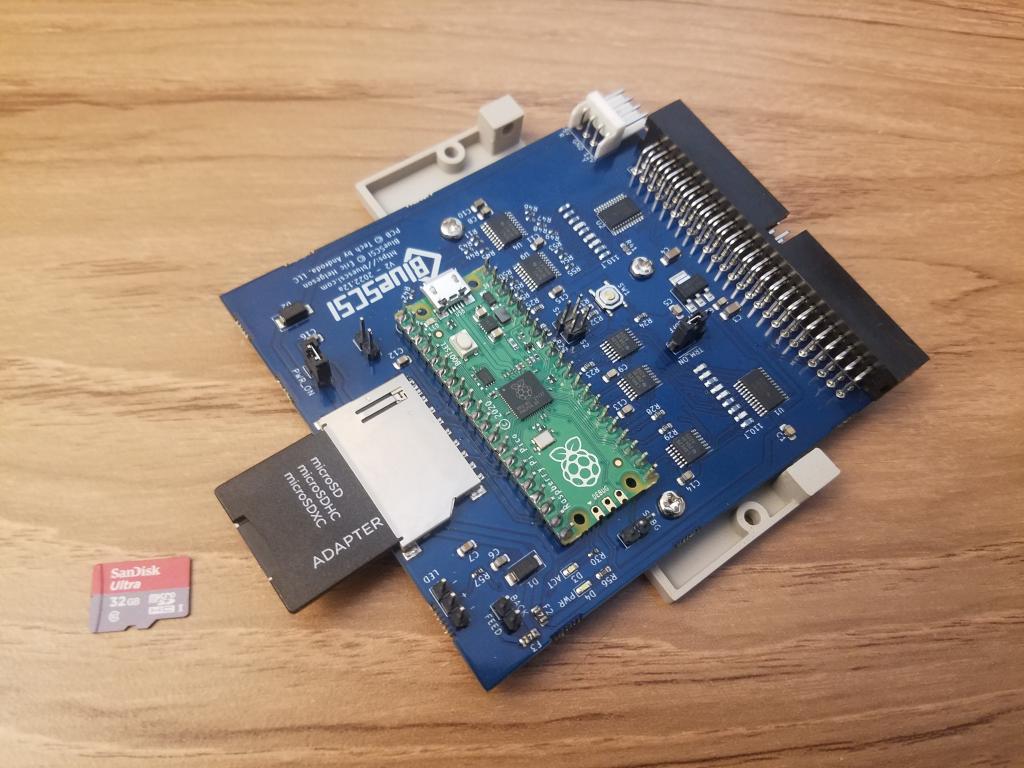
I received the BlueSCSI V2 Desktop version and it's working well so far in my Turbo Color slab. I'm using a 14 GB NEXTSTEP 3.3 image with seven 2 GB partitions. The first microSD card that I tried (Kingston 16GB) gave a lot of errors but I switched to a SanDisk 32GB card and it works fine. The microSD card is formatted exFAT and the image is named HD10_512_NEXTSTEP_3.3.hda. The card arrived fully assembled for $50.00 + $5.50 for first class shipping. It included a 3D printed mounting bracket. The card draws it power from the SCSI cable so it wasn't necessary to connect power to the Berg connector. I'm giving it two thumbs up so far.
Edit: I just wanted to mention that I'm not affiliated with the BlueSCSI project; I'm simply a happy customer. I paid for this out of my pocket. :) I also tested this with a 32 GB Samsung Pro Endurance MicroSD card ($8.99) and it works well. https://www.amazon.com/dp/B09WB35BXS
Edit: I just wanted to mention that I'm not affiliated with the BlueSCSI project; I'm simply a happy customer. I paid for this out of my pocket. :) I also tested this with a 32 GB Samsung Pro Endurance MicroSD card ($8.99) and it works well. https://www.amazon.com/dp/B09WB35BXS
Title: Re: SCSI.blue work/better than SCSI2SD
Post by: NeXTnewbe on March 30, 2023, 10:36:26 AM
Post by: NeXTnewbe on March 30, 2023, 10:36:26 AM
MMM, I wonder
which good industrial grade SD card can be used, as user grade SD cards have a short life span
which good industrial grade SD card can be used, as user grade SD cards have a short life span
Title: Re: SCSI.blue work/better than SCSI2SD
Post by: Nitro on March 31, 2023, 04:55:17 AM
Post by: Nitro on March 31, 2023, 04:55:17 AM
Quote from: NeXTnewbe on March 30, 2023, 10:36:26 AMMMM, I wonder
which good industrial grade SD card can be used, as user grade SD cards have a short life span
Tom's hardware has a recent article comparing microSD cards, including endurance cards which claim to have up to 25 times greater longevity.
I have nearly a dozen Raspberry Pi's going back to the original Raspberry Pi Model B from 2012, and I must say that I've never had an SD/microSD card fail even after 500+ compiles, so my experience has been different. I also have two SanDisk 128 GB High Endurance microSD cards in 4K video cameras that have been writing continuously to the cards 24/7/365 for more than two years now without failure, so I've had a good experience with the endurance cards too. Good luck with your search and I hope you find what you're looking for.
https://www.tomshardware.com/best-picks/raspberry-pi-microsd-cards (https://www.tomshardware.com/best-picks/raspberry-pi-microsd-cards)
https://www.pidramble.com/wiki/benchmarks/microsd-cards (https://www.pidramble.com/wiki/benchmarks/microsd-cards)
Title: Re: SCSI.blue work/better than SCSI2SD
Post by: nuss on March 31, 2023, 08:08:47 AM
Post by: nuss on March 31, 2023, 08:08:47 AM
Hi, I use almost the same microSD cards like Nitro does: SanDisk Ultra 32GB HCI (class 10)
About twenty of them are used for several years in Smartphones, Tablets, but with more read/write in Raspis and now for two days in NeXT machines. From those cards none got broken yet, but in my experience there is also much luck involved :)
From this said, I can confirm that my external BlueSCSI v2 work perfectly fine to boot and run a NeXTstation Turbo color and also my NeXTcube. I have no experience with the internal ones (still have to finish soldering them), also not with long term reliance.
About twenty of them are used for several years in Smartphones, Tablets, but with more read/write in Raspis and now for two days in NeXT machines. From those cards none got broken yet, but in my experience there is also much luck involved :)
From this said, I can confirm that my external BlueSCSI v2 work perfectly fine to boot and run a NeXTstation Turbo color and also my NeXTcube. I have no experience with the internal ones (still have to finish soldering them), also not with long term reliance.
Title: Re: SCSI.blue work/better than SCSI2SD
Post by: mlroider on March 31, 2023, 12:36:24 PM
Post by: mlroider on March 31, 2023, 12:36:24 PM
Hi
Just picked up a BlueScsi V2 card and I am attempting to install a fresh version of Openstep on it.
The card comes up during boot from Floppy / CD install process and I have the ROM disk off and the bytes per sector and heads set property. But as soon as it starts the install it errors out with Cannot initialize the disk. Is this a know issue? Should I build the image elsewhere?
Thanks
Just picked up a BlueScsi V2 card and I am attempting to install a fresh version of Openstep on it.
The card comes up during boot from Floppy / CD install process and I have the ROM disk off and the bytes per sector and heads set property. But as soon as it starts the install it errors out with Cannot initialize the disk. Is this a know issue? Should I build the image elsewhere?
Thanks
Title: Re: SCSI.blue work/better than SCSI2SD
Post by: nuss on March 31, 2023, 02:16:36 PM
Post by: nuss on March 31, 2023, 02:16:36 PM
Hi mlroider, I have not yet tried installing onto BlueSCSI, but used existing disk-images with OpenStep and NeXTstep.
How did you create and what is the size of your hard drive-image files on the BlueSCSI?
What are the names of this hard drive-image files?
How did you create and what is the size of your hard drive-image files on the BlueSCSI?
What are the names of this hard drive-image files?
Title: Re: SCSI.blue work/better than SCSI2SD
Post by: cuby on March 31, 2023, 02:23:31 PM
Post by: cuby on March 31, 2023, 02:23:31 PM
What is the size of the disk image you are trying to initialize?
NeXT/OpenStep has limits at least in the size of partitions (2 GB for NeXTstep, 4 for OpenStep IIRC), see this thread for details (http://www.nextcomputers.org/forums/index.php?topic=4573.0).
NeXT/OpenStep has limits at least in the size of partitions (2 GB for NeXTstep, 4 for OpenStep IIRC), see this thread for details (http://www.nextcomputers.org/forums/index.php?topic=4573.0).
Title: Re: SCSI.blue work/better than SCSI2SD
Post by: mlroider on March 31, 2023, 02:46:02 PM
Post by: mlroider on March 31, 2023, 02:46:02 PM
Its a 1.4 gig image ... just using the empty one from the default previous package
Title: Re: SCSI.blue work/better than SCSI2SD
Post by: Nitro on March 31, 2023, 04:09:14 PM
Post by: Nitro on March 31, 2023, 04:09:14 PM
I haven't tried to install directly to the drive yet. I created an image on a second Compact Flash drive first using a disktab on a turbo color slab. Then I put the CF card in a USB card reader and used Linux dd to save it to an image file. Since the image I used has seven 2 GB partitions, I formatted the microSD card with the exFAT file system. I then copied the 14 GB image file to the microSD card and named the file per instructions in the video by @MacintoshLibrarian posted earlier in the thread. It's important for the naming convention of the disk image file on the microSD card to match your device. I hope that helps you get things running.
Title: Re: SCSI.blue work/better than SCSI2SD
Post by: mlroider on March 31, 2023, 06:36:42 PM
Post by: mlroider on March 31, 2023, 06:36:42 PM
Sort of got it working. I was able to use an existing clean image of OS 4.2 and it booted right up.
Title: Re: SCSI.blue work/better than SCSI2SD
Post by: CygnusTM on June 27, 2023, 07:10:07 AM
Post by: CygnusTM on June 27, 2023, 07:10:07 AM
Just for another datapoint, I've been using a BlueSCSI v2 internal and external with a Mono Slab. Things have worked well, even CD emulation. I was seeing some errors on one of the drives, but then I noticed that the BlueSCSI was reporting that the drive file was fragmented. I copied the files off the SD, reformatted, and copied them back. The problems disappeared. I've had no other problems. Running NS3.3 and OS4.2.
I had been using a SCSI2SD before that, which was working fine with a single disk, but I could never figure out how to copy an image to a second disk. BlueSCSI is so much easier to use for multiple disks.
I had been using a SCSI2SD before that, which was working fine with a single disk, but I could never figure out how to copy an image to a second disk. BlueSCSI is so much easier to use for multiple disks.
Title: Re: SCSI.blue work/better than SCSI2SD
Post by: Nitro on September 29, 2023, 01:58:10 AM
Post by: Nitro on September 29, 2023, 01:58:10 AM
How To Build BlueSCSI v2 ... and also WiFi! - JCM Live
Video starts around 90 seconds in.
https://www.youtube.com/watch?v=oy4Aq7ojz6A
Video starts around 90 seconds in.
https://www.youtube.com/watch?v=oy4Aq7ojz6A
Title: Re: SCSI.blue work/better than SCSI2SD
Post by: paolo.bertolo on September 30, 2023, 03:29:42 AM
Post by: paolo.bertolo on September 30, 2023, 03:29:42 AM
The wi-fi is for Mac only, as it relies on some drivers for a specific SCSI to Enet legacy device which is now emulated. I'm using a v2.0 on 68k Macs and it just... works. Highly recommended.
Title: Re: SCSI.blue work/better than SCSI2SD
Post by: NeXTnewbe on October 16, 2023, 11:21:37 AM
Post by: NeXTnewbe on October 16, 2023, 11:21:37 AM
I think the BlueScsi needs to include audio as clicking sound like a real old vintage hdd,that will be amazing :D
Title: Re: SCSI.blue work/better than SCSI2SD
Post by: TXviking on March 11, 2024, 04:17:41 PM
Post by: TXviking on March 11, 2024, 04:17:41 PM
Quote from: mlroider on March 31, 2023, 12:36:24 PMHiA year later, I ran into this same issue with a 1GB blank image on a ZuluSCSI. I am perusing the various threads now to see what solutions I can find, but it does appear that the OpenStep 4.2 installer is very picky about disk geometry.
Just picked up a BlueScsi V2 card and I am attempting to install a fresh version of Openstep on it.
The card comes up during boot from Floppy / CD install process and I have the ROM disk off and the bytes per sector and heads set property. But as soon as it starts the install it errors out with Cannot initialize the disk. Is this a know issue? Should I build the image elsewhere?
Thanks
I spoke with the ZuluSCSI developer, and he did share the following /etc/disktab entry, which apparently worked for another customer with some kind of NeXT hardware. Note that this is for a 2GB volume.
Code Select
ZULUSCSIHARDDRIVE:\
        :ty=fixed_rw_scsi:nc#3952:nt#16:ns#63:ss#512:fp#320:bp#0:ng#0:gs#0:\
        :ao#0:os=mach_kernel:z0#64:z1#192:oa=time:pa#0:sa#3983296:ba#8192:fa#1024:\
        :ca#8:da#4096:ra#10:ia:hn=localhost:ro=1:ta=4.3BSD:
Title: Re: SCSI.blue work/better than SCSI2SD
Post by: SpaceRat2k on May 03, 2024, 02:57:42 PM
Post by: SpaceRat2k on May 03, 2024, 02:57:42 PM
The Zulu chip is older. But if config zuluscsi.ini file, you can make it comparable in speed.
Space
Space