Title: Mounting NFS volumes from a Mac
Post by: smith on September 02, 2021, 12:53:07 PM
Post by: smith on September 02, 2021, 12:53:07 PM
Hi,
I've got my NeXTStation running with networking set up and now I'd like to be able to share files from my home network.
I don't have any type of NAS set up, but I have the MacBook Pro I do all my work on.
I've attempted to follow https://www.jonandnic.com/2020/08/28/nextstep-openstep-nfs-file-share-with-a-raspberry-pi/,
and have this set up on my Mac's /etc/exports, with nfsd running and the firewall turned off:
I added the ip of the "mac" into netinfo and /etc/hosts
On the next I try running:
and I get:
Nothing is printed in /usr/adm/messages.
I originally tried putting -network 192.168.0.0 -netmask 255.255.0.0 in /etc/exports on the mac but I get access denied if I do that.
mount says it's giving up but I'm not! Has anybody gotten NFS working with a mac? Or mounting SMB? I'm on openstep and ran /usr/samba/install_samba but don't know how to mount anything with it.
Thanks!
I've got my NeXTStation running with networking set up and now I'd like to be able to share files from my home network.
I don't have any type of NAS set up, but I have the MacBook Pro I do all my work on.
I've attempted to follow https://www.jonandnic.com/2020/08/28/nextstep-openstep-nfs-file-share-with-a-raspberry-pi/,
and have this set up on my Mac's /etc/exports, with nfsd running and the firewall turned off:
Code Select
/Users/smith/Dropbox *(rw,fsid=1,all_squash,insecure,sync,no_subtree_check,anonuid=501,anongid=20)I added the ip of the "mac" into netinfo and /etc/hosts
On the next I try running:
Code Select
mount -o rw,bg,mnttimeo=8,retry=1 mac:/Users/smith/Dropbox /Net/Dropboxand I get:
Code Select
mount: giving up on:
    /Net/Dropbox
Nothing is printed in /usr/adm/messages.
I originally tried putting -network 192.168.0.0 -netmask 255.255.0.0 in /etc/exports on the mac but I get access denied if I do that.
mount says it's giving up but I'm not! Has anybody gotten NFS working with a mac? Or mounting SMB? I'm on openstep and ran /usr/samba/install_samba but don't know how to mount anything with it.
Thanks!
Title: Re: Mounting NFS volumes from a Mac
Post by: andreas_g on September 02, 2021, 02:20:10 PM
Post by: andreas_g on September 02, 2021, 02:20:10 PM
I wrote the following procedure for an older version of Previous (when it did not have an internal NFS server). Maybe it also works for you.
Quote from: undefinedNOTE: This procedure has been tested using NeXTstep 1.0a and 3.3
as client and Mac OS X v10.9 as server.
This procedure is only valid when using SLiRP as networking
interface.
For this procedure to work networking must be setup first
(see networking.howto.txt for details).
To edit files inside /etc you need super user privileges.
X.X.X.X = Your host system's IP-Address (e.g. 192.168.0.1)
serverhostname = Your host system's hostname
clienthostname = Your NeXTstep hostname (see networking.howto)
Howto: Setup NFS file sharing under Mac OS X:
1. Create the folder you want to share and change permissions using
this command from the command line:
chmod 777 /Path/To/Shared/Folder
2. Add the folder you want to share to /etc/exports by adding this
line to the end of the file:
/Path/To/Shared/Folder -maproot=nobody
3. Load the edited file using these commands from the command line:
sudo nfsd checkexports
sudo nfsd enable
sudo nfsd stop
sudo nfsd -N
4. You can confirm that the operation was successful using this
command:
showmount -e
NOTE: Step 3 needs to be repeated after every reboot of the host
system because nfsd -N is not permanent.
Howto: Setup NFS file sharing under NeXTstep 3.3:
1. Edit the file "/etc/hosts" by adding your host system to
the last line of the file (host system IP-Address followed
by hostname of file server):
10.0.2.15 clienthostname
X.X.X.X serverhostname
2. Edit the file "/etc/fstab" by adding the shared filesystem.
Add this line at the end of the file:
serverhostname:/Path/To/Shared/Folder /Net nfs rw,net 0 0
3. Load the edited files using these commands from the command
line:
su
niload hosts / < /etc/hosts
niload fstab / < /etc/fstab
4. Reboot. The shared folder should be accessible from /Net
directory. You can confirm that the operation was successful
using this command:
/usr/etc/showmount -e serverhostname
Howto: Open the above files using root privileges (NeXTstep 3.3):
a Open the /etc directory with this command in Terminal:
"open /etc"
b Select the file to open and from Workspace select
Services > Open Sesame > Open As Root.
Title: Re: Mounting NFS volumes from a Mac
Post by: smith on September 02, 2021, 05:04:23 PM
Post by: smith on September 02, 2021, 05:04:23 PM
Wow! Really close to working now. The only thing that's not working is the fact that it isn't mounted when I reboot; I had to type the mount command manually. Not sure what I'm doing wrong there, but look!
Thank you!
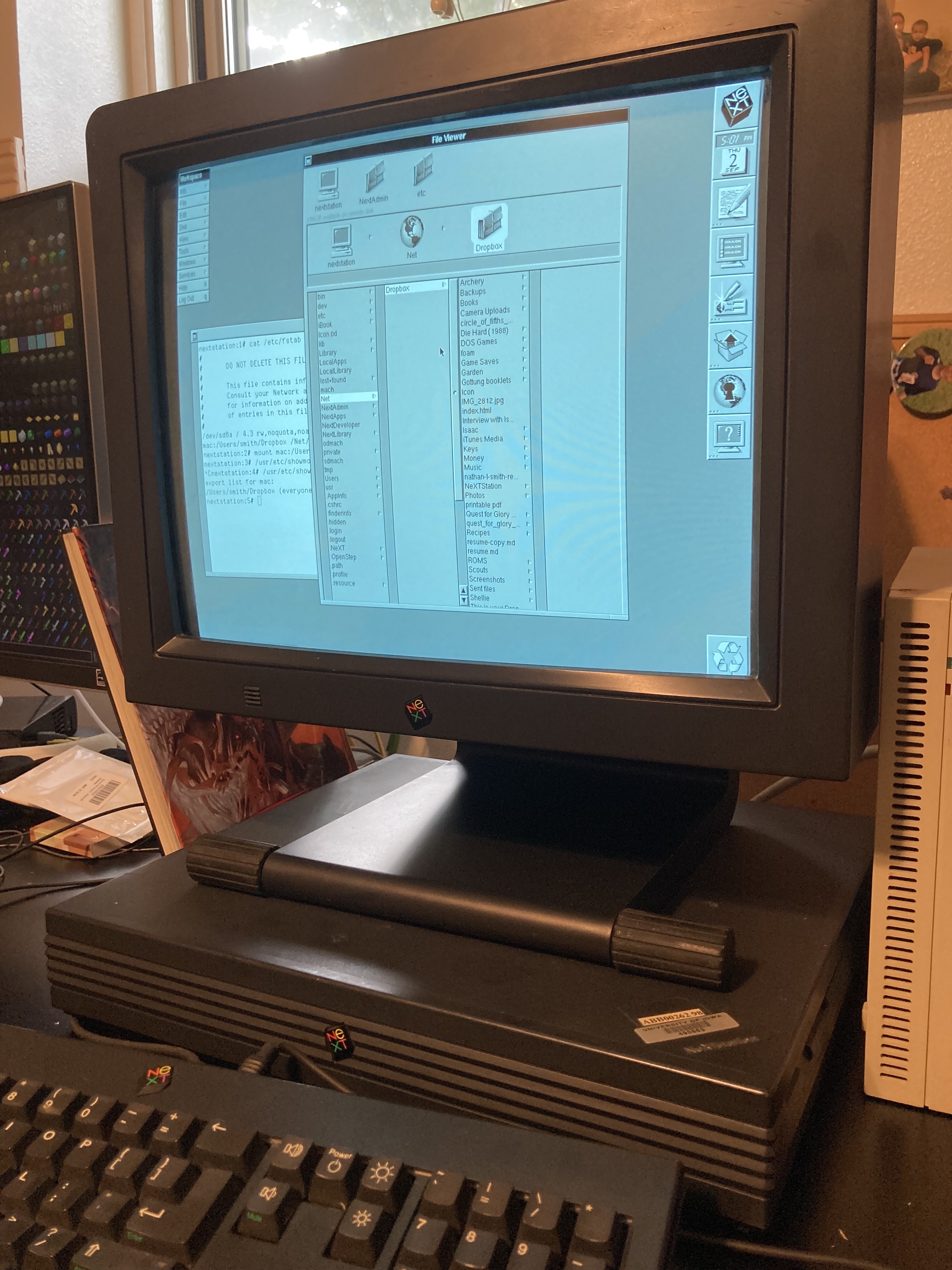
Thank you!
Title: Re: Mounting NFS volumes from a Mac
Post by: andreas_g on September 03, 2021, 01:02:12 AM
Post by: andreas_g on September 03, 2021, 01:02:12 AM
Great to see that it mostly worked! I also had occassional problems with automounting. The autonfsmounter is a bit annoying. Did you note that the client entry in /etc/hosts needs to be adjusted? The one in the instructions is only valid for SLiRP but not for real hardware. The file needs to contain the hostname of your NeXTstation and its IP address (which is most likely not 10.0.2.15).
If that does not help I am afraid I have run out of ideas. Maybe one could retry the niload commands or check in NetInfo Manager if the entries for machines and mounts are in place.
If that does not help I am afraid I have run out of ideas. Maybe one could retry the niload commands or check in NetInfo Manager if the entries for machines and mounts are in place.
Title: Re: Mounting NFS volumes from a Mac
Post by: smith on September 03, 2021, 04:24:01 PM
Post by: smith on September 03, 2021, 04:24:01 PM
I went in and found "mounts" in netinfo and added the data that looked like what was in fstab (I'm assuming niload was supposed to do this, but didn't for some reason.) Once I added that, it mounted on boot. Thanks again for your help!
The next step (ha ha) for me for this project is getting an scsi2sd and loading it with the OS and all the archive apps I can find.
The next step (ha ha) for me for this project is getting an scsi2sd and loading it with the OS and all the archive apps I can find.