Title: Migrate OS4.2 from VMWare to qemu
Post by: mbert on March 26, 2022, 01:41:04 PM
Post by: mbert on March 26, 2022, 01:41:04 PM
I recently moved to Apple silicon, so that my OS4.2 (intel) installation would no longer run in VMWare. Along with all my other vintage operating systems I started migrating my installation (into which I had put a lot of work) to qemu - converted the vmdsk images to qcow2, created a machine with (hopefully) the same specs as before, imported the disk.
The kernel loads just fine, but then I always run into a kernel panic (cannot mount root). I played around with device enumeration, i.e. added additional IDE disks, changed their order etc., but no effect. I tried mounting the disk into other guest OSes like Linux in order to take a look into the fstab file, but they don't seem to know how to deal with the partition table.
I also tried using the install CD. I am not sure whether it supports this at all, I tried booting it with `-s', but it would run straight into the same error, so maybe this is not supported? It does seem to be able to load the installation program which I then of course abort to avoid overwriting my installation. Is there any option to boot from the install CD into a single user system so that I can mount my disk partitions and inspect what's there? Or is there any downloadable ISO image for a minimal operating system that could be used for this?
Or maybe the error does not even mean that the root partition in the fstab file is wrong (e.g. differently named disks etc.) but the OS simply fails to handle the virtual disk?
Any help would be greatly appreciated, I would hate to lose my carefully set up installation with all the software I had collected over the years.
The kernel loads just fine, but then I always run into a kernel panic (cannot mount root). I played around with device enumeration, i.e. added additional IDE disks, changed their order etc., but no effect. I tried mounting the disk into other guest OSes like Linux in order to take a look into the fstab file, but they don't seem to know how to deal with the partition table.
I also tried using the install CD. I am not sure whether it supports this at all, I tried booting it with `-s', but it would run straight into the same error, so maybe this is not supported? It does seem to be able to load the installation program which I then of course abort to avoid overwriting my installation. Is there any option to boot from the install CD into a single user system so that I can mount my disk partitions and inspect what's there? Or is there any downloadable ISO image for a minimal operating system that could be used for this?
Or maybe the error does not even mean that the root partition in the fstab file is wrong (e.g. differently named disks etc.) but the OS simply fails to handle the virtual disk?
Any help would be greatly appreciated, I would hate to lose my carefully set up installation with all the software I had collected over the years.
Title: Re: Migrate OS4.2 from VMWare to qemu
Post by: mikeboss on March 28, 2022, 04:30:01 AM
Post by: mikeboss on March 28, 2022, 04:30:01 AM
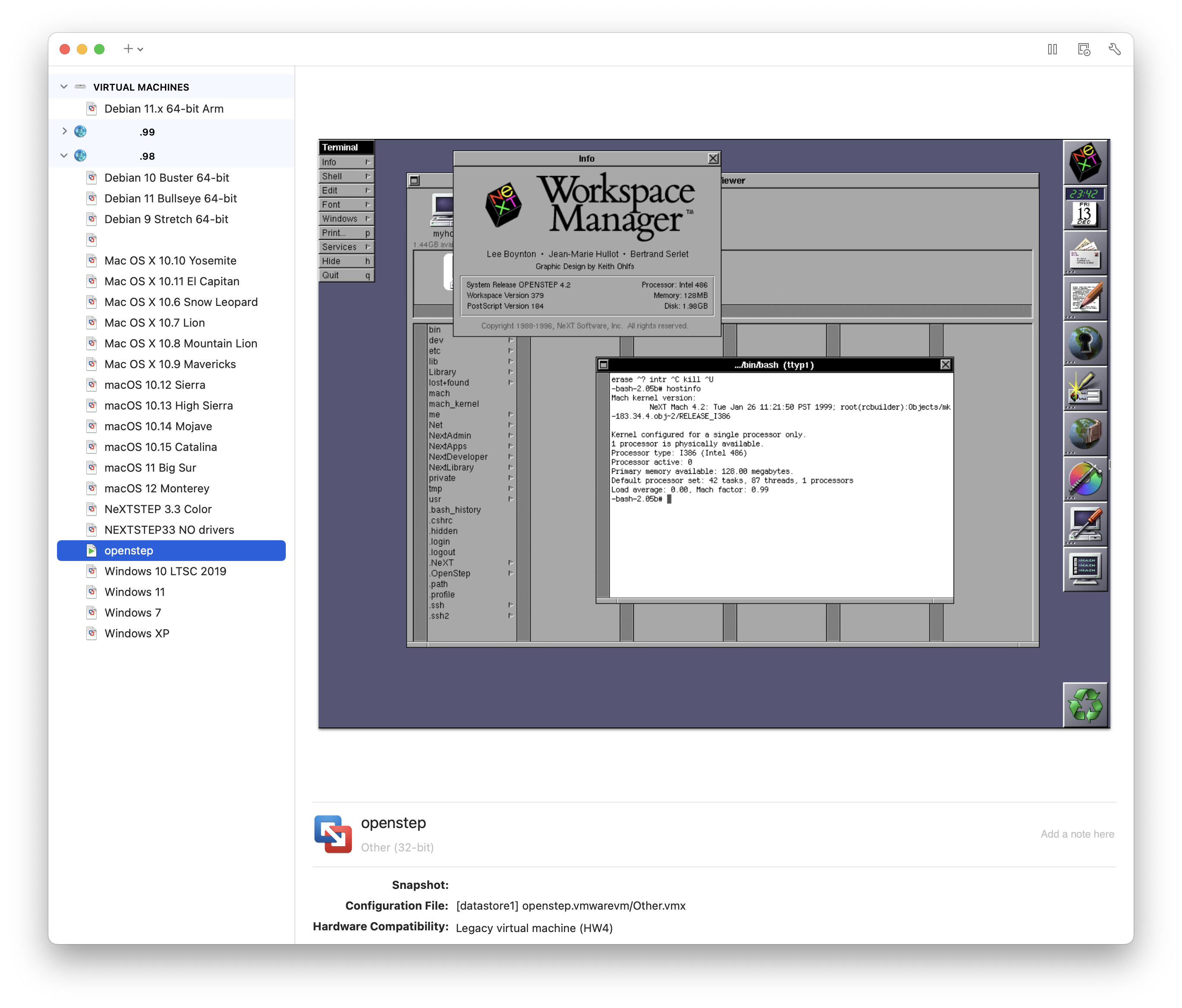
I moved all my x86 VMs to a Mac mini (Late 2014) running ESXi (free).
https://customerconnect.vmware.com/web/vmware/evalcenter?p=free-esxi7
https://customerconnect.vmware.com/web/vmware/evalcenter?p=free-esxi7
Title: Re: Migrate OS4.2 from VMWare to qemu
Post by: eagle on March 28, 2022, 08:16:42 AM
Post by: eagle on March 28, 2022, 08:16:42 AM
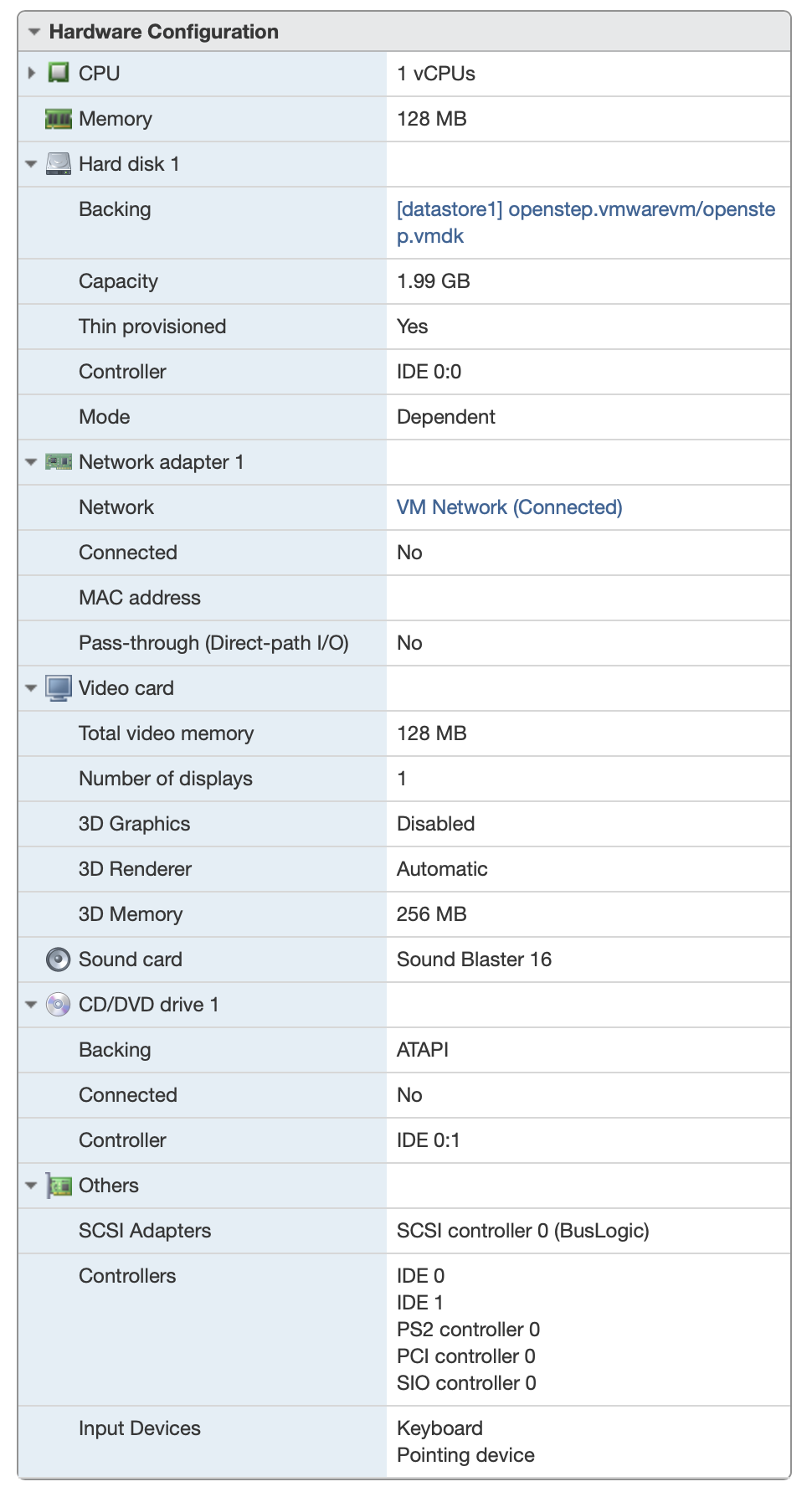
Quote from: mikeboss on March 28, 2022, 04:30:01 AMI moved all my x86 VMs to a Mac mini (Late 2014) running ESXi (free).Cool - I need to get my NeXTSTEP VMs moved over, but I tried a while back and couldn't get them to run there. Could you describe your VM "hardware" setup? I run ESXi for most of my virtualization needs today, but on a Lenovo M900.
Title: Re: Migrate OS4.2 from VMWare to qemu
Post by: mikeboss on March 28, 2022, 12:54:54 PM
Post by: mikeboss on March 28, 2022, 12:54:54 PM
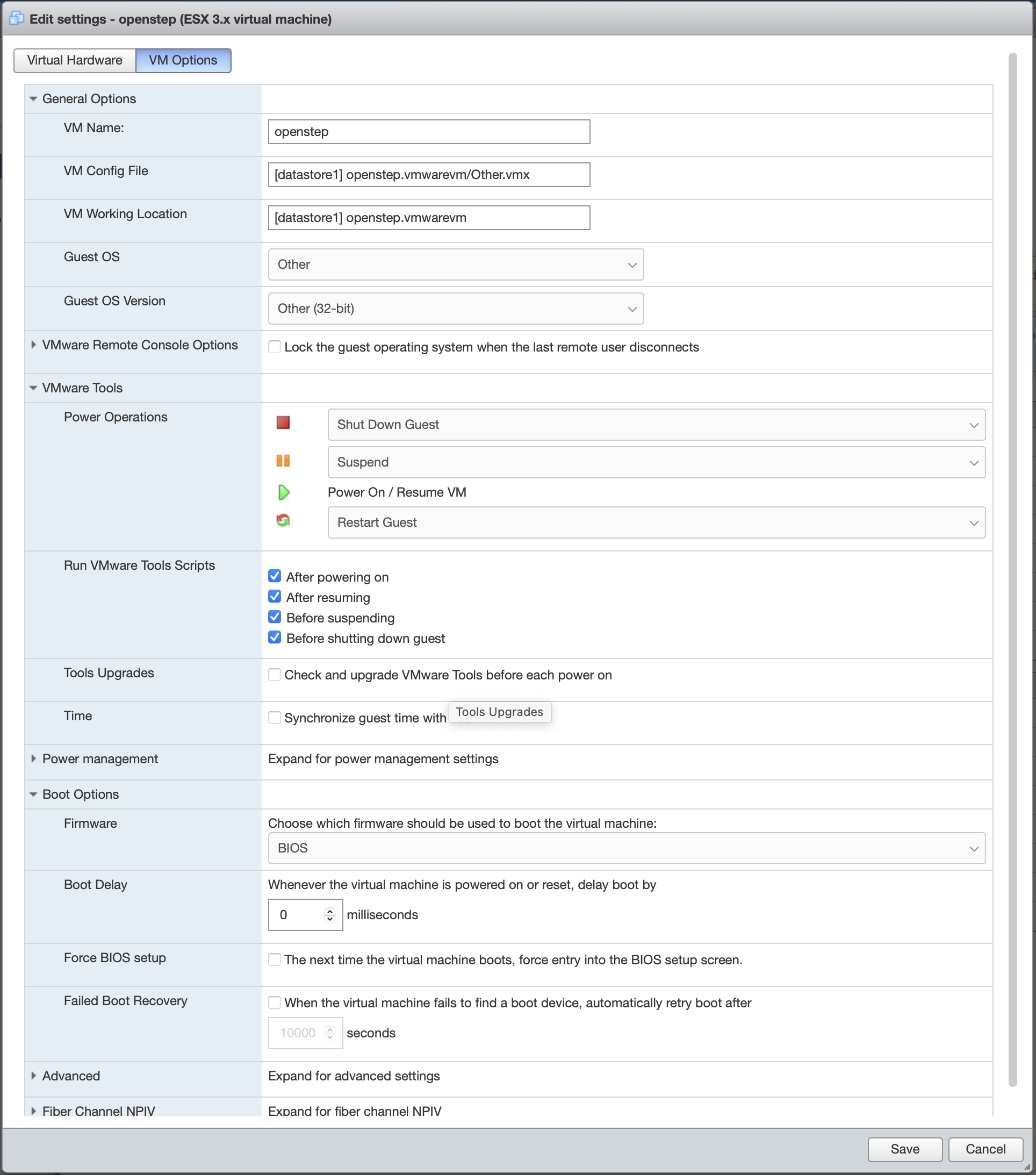
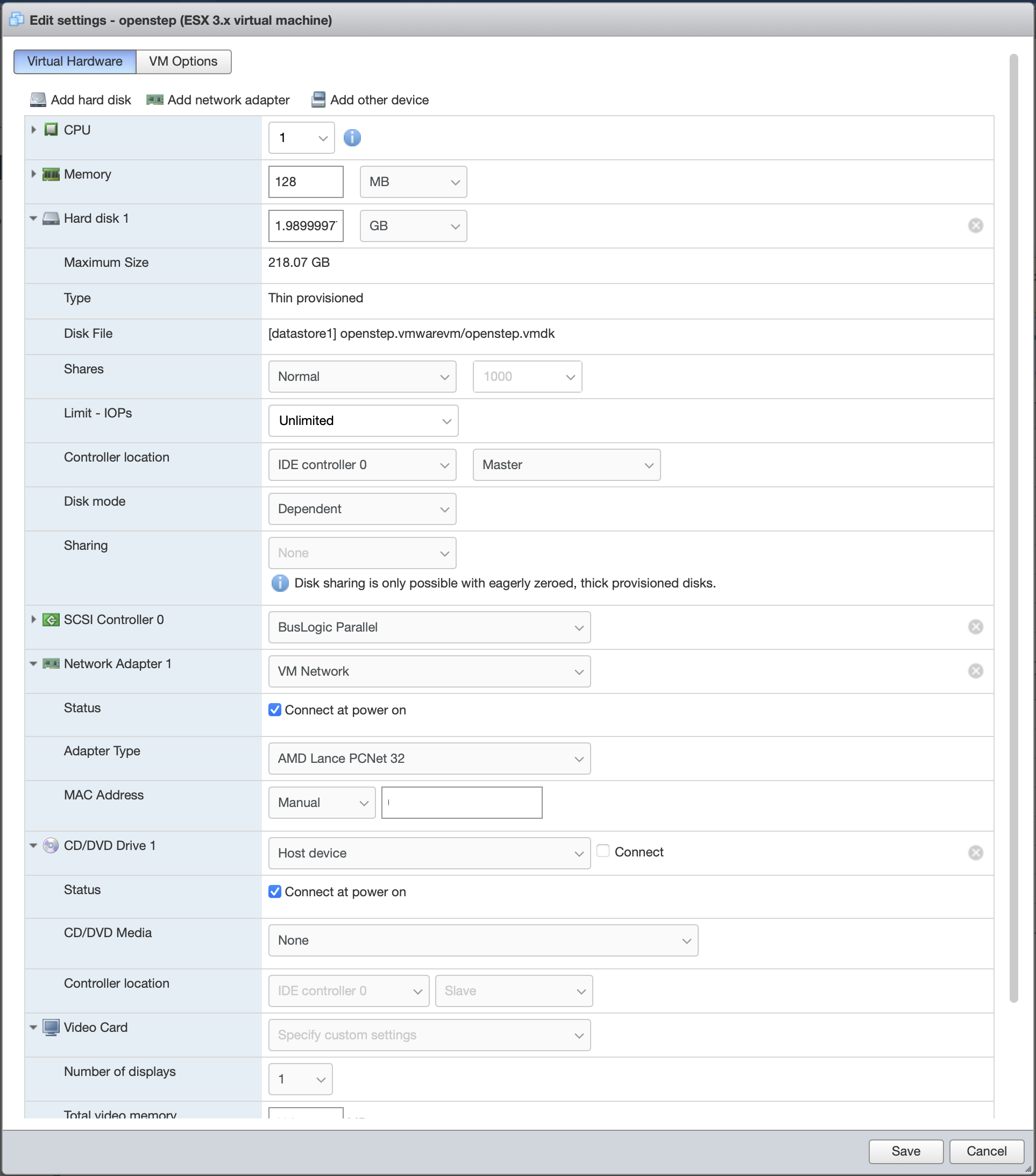
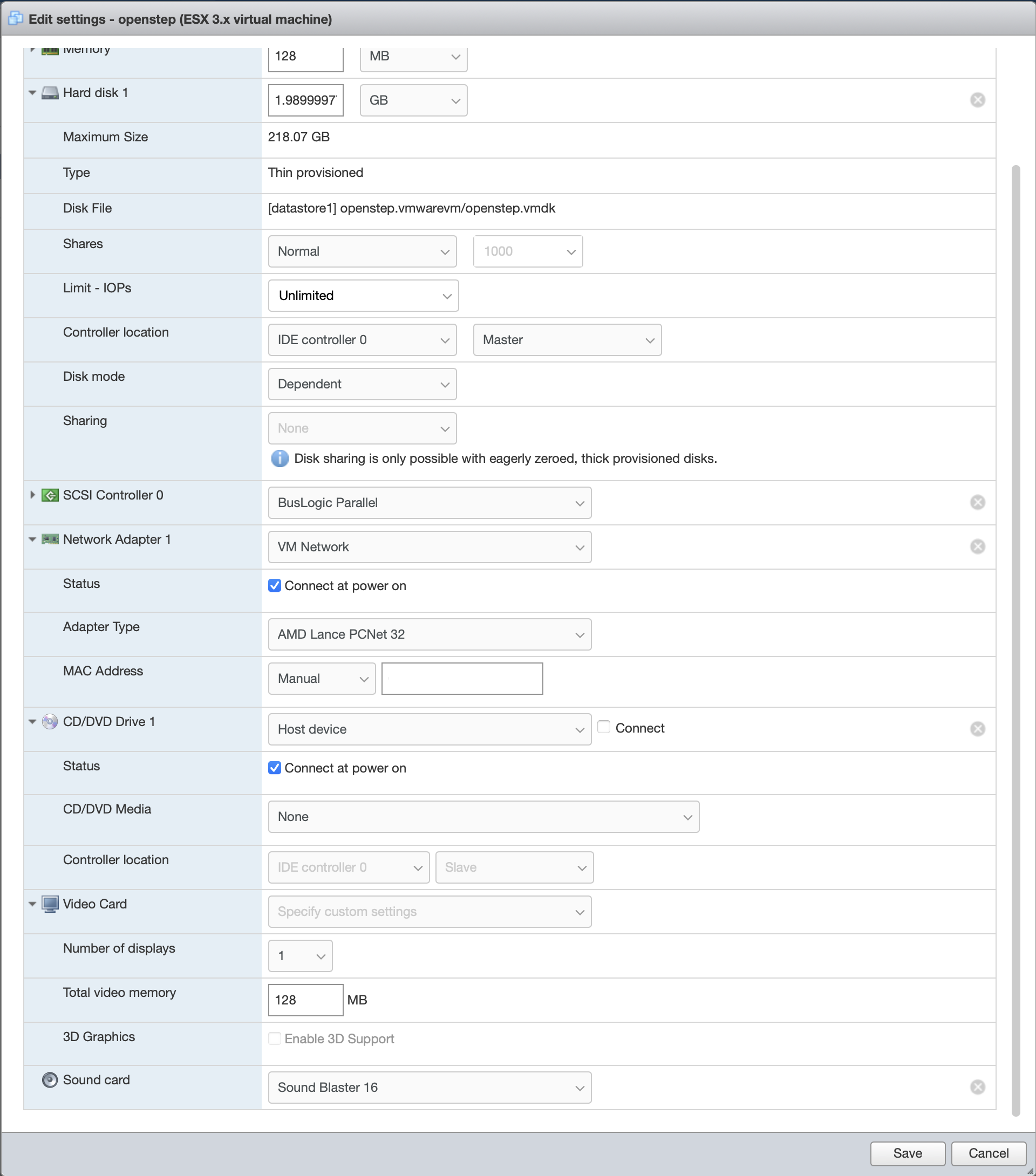
I just moved the VMs from VMware Fusion to ESXi. here's what the vmx file of OPENSTEP looks like:
.encoding = "UTF-8"
config.version = "8"
virtualHW.version = "4"
scsi0.present = "TRUE"
memsize = "128"
ide0:0.present = "TRUE"
ide0:0.fileName = "openstep.vmdk"
ethernet0.present = "TRUE"
sound.present = "TRUE"
sound.virtualDev = "sb16"
sound.fileName = "-1"
sound.autodetect = "TRUE"
displayName = "openstep"
guestOS = "other"
ide0:1.present = "TRUE"
ide0:1.deviceType = "atapi-cdrom"
ethernet0.addressType = "static"
uuid.location = "XXXXXXXXXXXXXXXXXXXXXXXXXXXXXXXX"
uuid.bios = "XXXXXXXXXXXXXXXXXXXXXXXXXXXXXXXX"
extendedConfigFile = "Other.vmxf"
ide0:1.startConnected = "FALSE"
tools.syncTime = "FALSE"
cleanShutdown = "TRUE"
ide0:1.fileName = "auto detect"
ethernet0.address = "A1:B2:C3:D4:E5:F6"
sound.startConnected = "FALSE"
ide1:0.present = "FALSE"
svga.vramSize = "134217728"
sched.ide0:0.throughputCap = "off"
tools.upgrade.policy = "manual"
sched.cpu.units = "mhz"
sched.cpu.affinity = "all"
sched.ide0:0.shares = "normal"
toolScripts.afterPowerOn = "TRUE"
toolScripts.afterResume = "TRUE"
toolScripts.beforeSuspend = "TRUE"
toolScripts.beforePowerOff = "TRUE"
sched.cpu.min = "0"
sched.cpu.shares = "normal"
sched.mem.min = "0"
sched.mem.minSize = "0"
sched.mem.shares = "normal"
ethernet0.networkName = "VM Network"
sched.cpu.latencySensitivity = "normal"
tools.guest.desktop.autolock = "FALSE"
MemAllowAutoScaleDown = "FALSE"
sound.synth.operational = "true"
sound.baseAddr = "0x220"
sound.dma16 = "7"
sound.dma8 = "1"
sound.irq = "5"
sound.mpu401baseAddr = "0x330"
sound.Opl3BaseAddr = "0x388"
nvram = "Other.nvram"
ide0:1.autodetect = "TRUE"
tools.remindInstall = "FALSE"
virtualHW.productCompatibility = "hosted"
replay.supported = "FALSE"
vmotion.checkpointFBSize = "134217728"
gui.viewModeAtPowerOn = "windowed"
gui.lastPoweredViewMode = "windowed"
softPowerOff = "FALSE"
monitor.phys_bits_used = "36"
numa.autosize.cookie = "10001"
numa.autosize.vcpu.maxPerVirtualNode = "1"
migrate.hostLog = "./Other-blah-blah.hlog"
floppy0.present = "FALSE"
sched.swap.derivedName = "/vmfs/volumes/blah-blah-blah-blah/openstep.vmwarevm/Other-blah-blah.vswp"
ide0:0.redo = ""
hostCPUID.0 = "XXXXXXXXXXXXXXXXXXXXXXXXXXXXXXXX"
hostCPUID.1 = "XXXXXXXXXXXXXXXXXXXXXXXXXXXXXXXX"
hostCPUID.80000001 = "0000000000000000000000212c100800"
guestCPUID.0 = "XXXXXXXXXXXXXXXXXXXXXXXXXXXXXXXX"
guestCPUID.1 = "XXXXXXXXXXXXXXXXXXXXXXXXXXXXXXXX"
guestCPUID.80000001 = "XXXXXXXXXXXXXXXXXXXXXXXXXXXXXXXX"
userCPUID.0 = "XXXXXXXXXXXXXXXXXXXXXXXXXXXXXXXX"
userCPUID.1 = "0XXXXXXXXXXXXXXXXXXXXXXXXXXXXXXXX"
userCPUID.80000001 = "XXXXXXXXXXXXXXXXXXXXXXXXXXXXXXXX"
evcCompatibilityMode = "FALSE"
.encoding = "UTF-8"
config.version = "8"
virtualHW.version = "4"
scsi0.present = "TRUE"
memsize = "128"
ide0:0.present = "TRUE"
ide0:0.fileName = "openstep.vmdk"
ethernet0.present = "TRUE"
sound.present = "TRUE"
sound.virtualDev = "sb16"
sound.fileName = "-1"
sound.autodetect = "TRUE"
displayName = "openstep"
guestOS = "other"
ide0:1.present = "TRUE"
ide0:1.deviceType = "atapi-cdrom"
ethernet0.addressType = "static"
uuid.location = "XXXXXXXXXXXXXXXXXXXXXXXXXXXXXXXX"
uuid.bios = "XXXXXXXXXXXXXXXXXXXXXXXXXXXXXXXX"
extendedConfigFile = "Other.vmxf"
ide0:1.startConnected = "FALSE"
tools.syncTime = "FALSE"
cleanShutdown = "TRUE"
ide0:1.fileName = "auto detect"
ethernet0.address = "A1:B2:C3:D4:E5:F6"
sound.startConnected = "FALSE"
ide1:0.present = "FALSE"
svga.vramSize = "134217728"
sched.ide0:0.throughputCap = "off"
tools.upgrade.policy = "manual"
sched.cpu.units = "mhz"
sched.cpu.affinity = "all"
sched.ide0:0.shares = "normal"
toolScripts.afterPowerOn = "TRUE"
toolScripts.afterResume = "TRUE"
toolScripts.beforeSuspend = "TRUE"
toolScripts.beforePowerOff = "TRUE"
sched.cpu.min = "0"
sched.cpu.shares = "normal"
sched.mem.min = "0"
sched.mem.minSize = "0"
sched.mem.shares = "normal"
ethernet0.networkName = "VM Network"
sched.cpu.latencySensitivity = "normal"
tools.guest.desktop.autolock = "FALSE"
MemAllowAutoScaleDown = "FALSE"
sound.synth.operational = "true"
sound.baseAddr = "0x220"
sound.dma16 = "7"
sound.dma8 = "1"
sound.irq = "5"
sound.mpu401baseAddr = "0x330"
sound.Opl3BaseAddr = "0x388"
nvram = "Other.nvram"
ide0:1.autodetect = "TRUE"
tools.remindInstall = "FALSE"
virtualHW.productCompatibility = "hosted"
replay.supported = "FALSE"
vmotion.checkpointFBSize = "134217728"
gui.viewModeAtPowerOn = "windowed"
gui.lastPoweredViewMode = "windowed"
softPowerOff = "FALSE"
monitor.phys_bits_used = "36"
numa.autosize.cookie = "10001"
numa.autosize.vcpu.maxPerVirtualNode = "1"
migrate.hostLog = "./Other-blah-blah.hlog"
floppy0.present = "FALSE"
sched.swap.derivedName = "/vmfs/volumes/blah-blah-blah-blah/openstep.vmwarevm/Other-blah-blah.vswp"
ide0:0.redo = ""
hostCPUID.0 = "XXXXXXXXXXXXXXXXXXXXXXXXXXXXXXXX"
hostCPUID.1 = "XXXXXXXXXXXXXXXXXXXXXXXXXXXXXXXX"
hostCPUID.80000001 = "0000000000000000000000212c100800"
guestCPUID.0 = "XXXXXXXXXXXXXXXXXXXXXXXXXXXXXXXX"
guestCPUID.1 = "XXXXXXXXXXXXXXXXXXXXXXXXXXXXXXXX"
guestCPUID.80000001 = "XXXXXXXXXXXXXXXXXXXXXXXXXXXXXXXX"
userCPUID.0 = "XXXXXXXXXXXXXXXXXXXXXXXXXXXXXXXX"
userCPUID.1 = "0XXXXXXXXXXXXXXXXXXXXXXXXXXXXXXXX"
userCPUID.80000001 = "XXXXXXXXXXXXXXXXXXXXXXXXXXXXXXXX"
evcCompatibilityMode = "FALSE"
Title: Re: Migrate OS4.2 from VMWare to qemu
Post by: mikeboss on March 28, 2022, 12:57:56 PM
Post by: mikeboss on March 28, 2022, 12:57:56 PM
Title: Re: Migrate OS4.2 from VMWare to qemu
Post by: mikeboss on March 28, 2022, 12:59:16 PM
Post by: mikeboss on March 28, 2022, 12:59:16 PM
Title: Re: Migrate OS4.2 from VMWare to qemu
Post by: mikeboss on March 28, 2022, 01:00:50 PM
Post by: mikeboss on March 28, 2022, 01:00:50 PM
Title: Re: Migrate OS4.2 from VMWare to qemu
Post by: mikeboss on March 28, 2022, 01:02:22 PM
Post by: mikeboss on March 28, 2022, 01:02:22 PM
Title: Re: Migrate OS4.2 from VMWare to qemu
Post by: mbert on March 28, 2022, 01:15:04 PM
Post by: mbert on March 28, 2022, 01:15:04 PM
This is all very interesting. But nobody here who got things running in qemu?
Or help me help myself: any hint on the install/boot CD? Can it be used to boot a minimal OS system, or is there any rescue boot CD image available on the net?
Or help me help myself: any hint on the install/boot CD? Can it be used to boot a minimal OS system, or is there any rescue boot CD image available on the net?
Title: Re: Migrate OS4.2 from VMWare to qemu
Post by: mikeboss on March 28, 2022, 04:54:04 PM
Post by: mikeboss on March 28, 2022, 04:54:04 PM
you could try and ask this guy on Twitter:
https://twitter.com/astr0baby/
he runs almost anything inside qemu.
https://twitter.com/astr0baby/
he runs almost anything inside qemu.
Title: Re: Migrate OS4.2 from VMWare to qemu
Post by: eagle on March 29, 2022, 07:47:07 AM
Post by: eagle on March 29, 2022, 07:47:07 AM
Wow, thanks for all of that, and sorry mbert for taking over your thread. Anyway, mikeboss, I tried moving the VMs a few years ago and they didn't work, but I was able to move them today, and all of my x86 NeXT-related VMs work on ESXi 7.0U2.
Title: Re: Migrate OS4.2 from VMWare to qemu
Post by: mikeboss on April 03, 2022, 09:04:10 AM
Post by: mikeboss on April 03, 2022, 09:04:10 AM
Quote from: mbert on March 28, 2022, 01:15:04 PMThis is all very interesting. But nobody here who got things running in qemu?
Or help me help myself: any hint on the install/boot CD? Can it be used to boot a minimal OS system, or is there any rescue boot CD image available on the net?
following this guide
https://gunkies.org/wiki/Installing_NeXTSTEP_on_Qemu
loosely, I tried it with QEMU 6.2.0 and couldn't get it to work either...
using this command
/opt/local/bin/qemu-system-x86_64 -L . -m 32 -drive file=/Users/me/Desktop/OS42_2GB.qcow2,index=0,if=ide,media=disk -drive file=/Users/me/Desktop/openstep42.iso,index=1,if=ide,media=cdrom -net nic,model=ne2k_pci -net user -device sb16 -drive file=/Users/me/Documents/qemu_nextstep/boot.img,index=0,if=floppy,format=raw -boot a
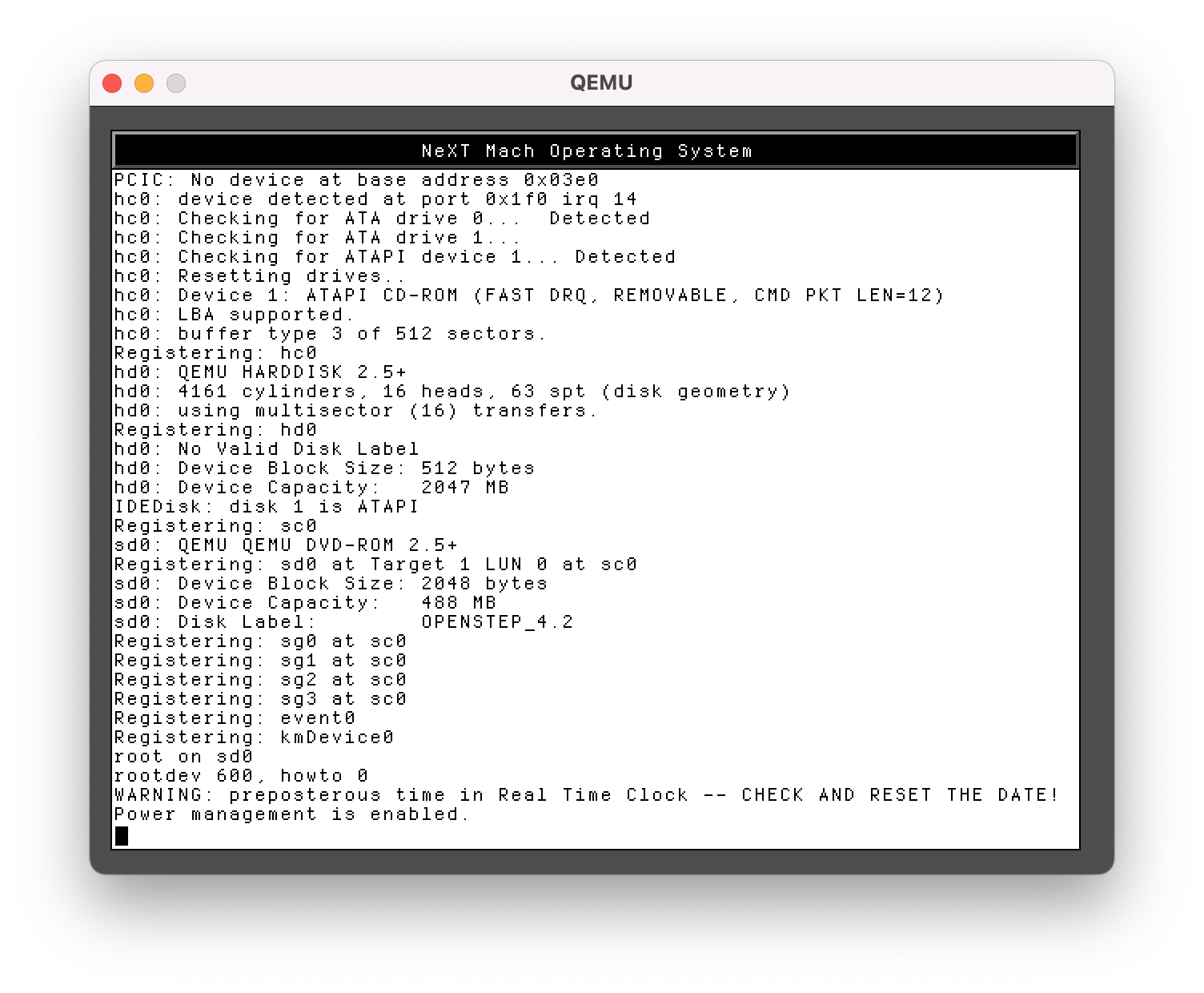
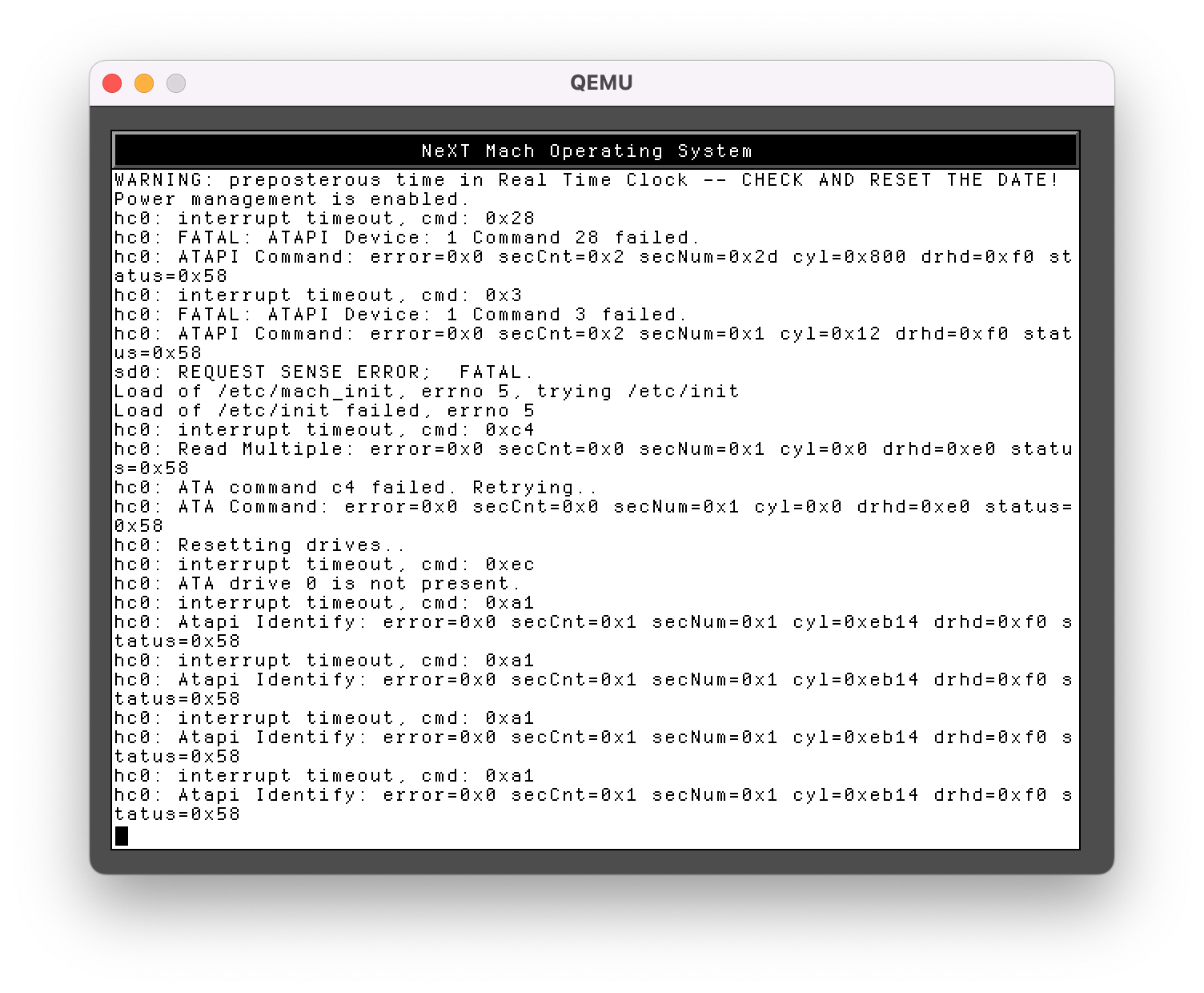
I got this far:
Title: Re: Migrate OS4.2 from VMWare to qemu
Post by: mikeboss on April 03, 2022, 09:37:33 AM
Post by: mikeboss on April 03, 2022, 09:37:33 AM
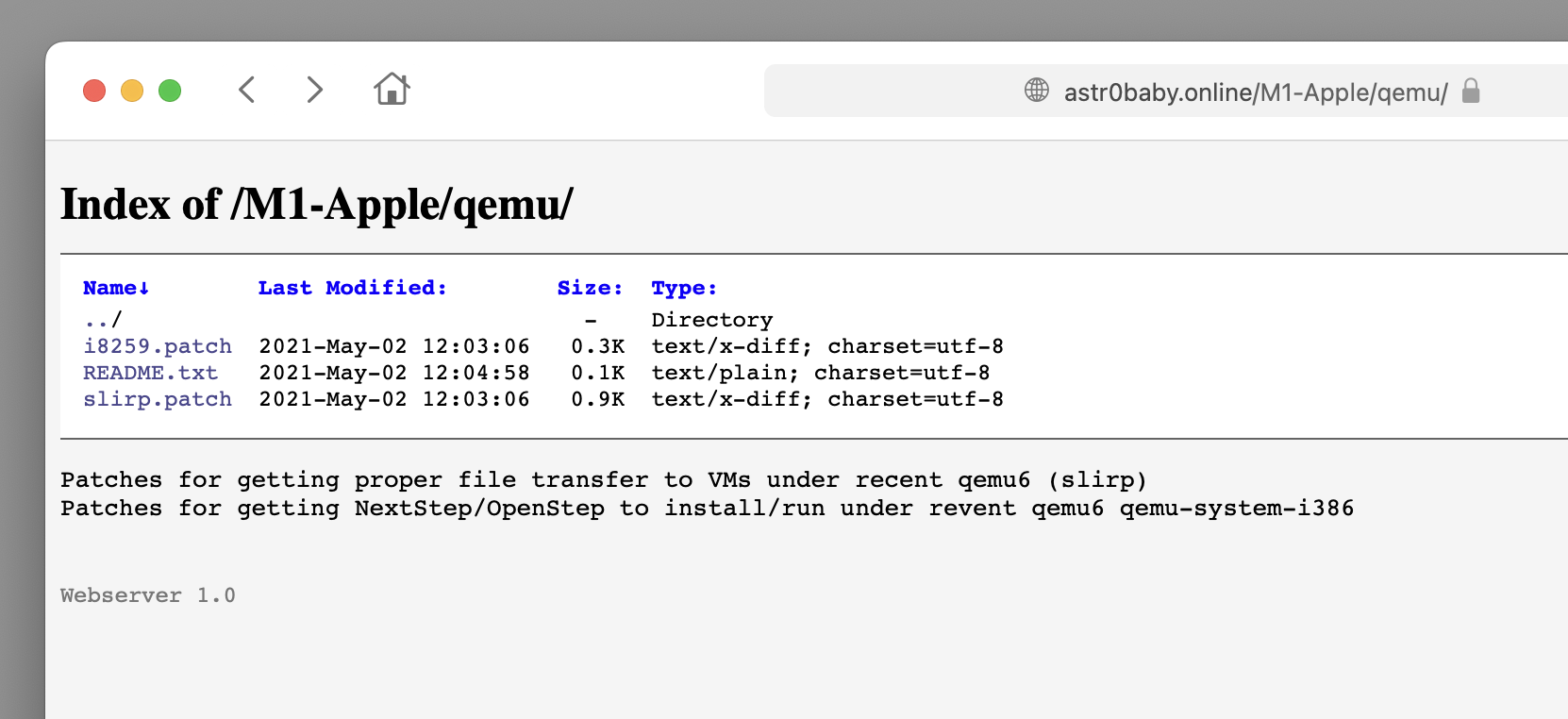
just found QEMU 6.x patches on astr0baby's fileserver. specifically for running NeXTSTEP:
https://astr0baby.online/M1-Apple/qemu/
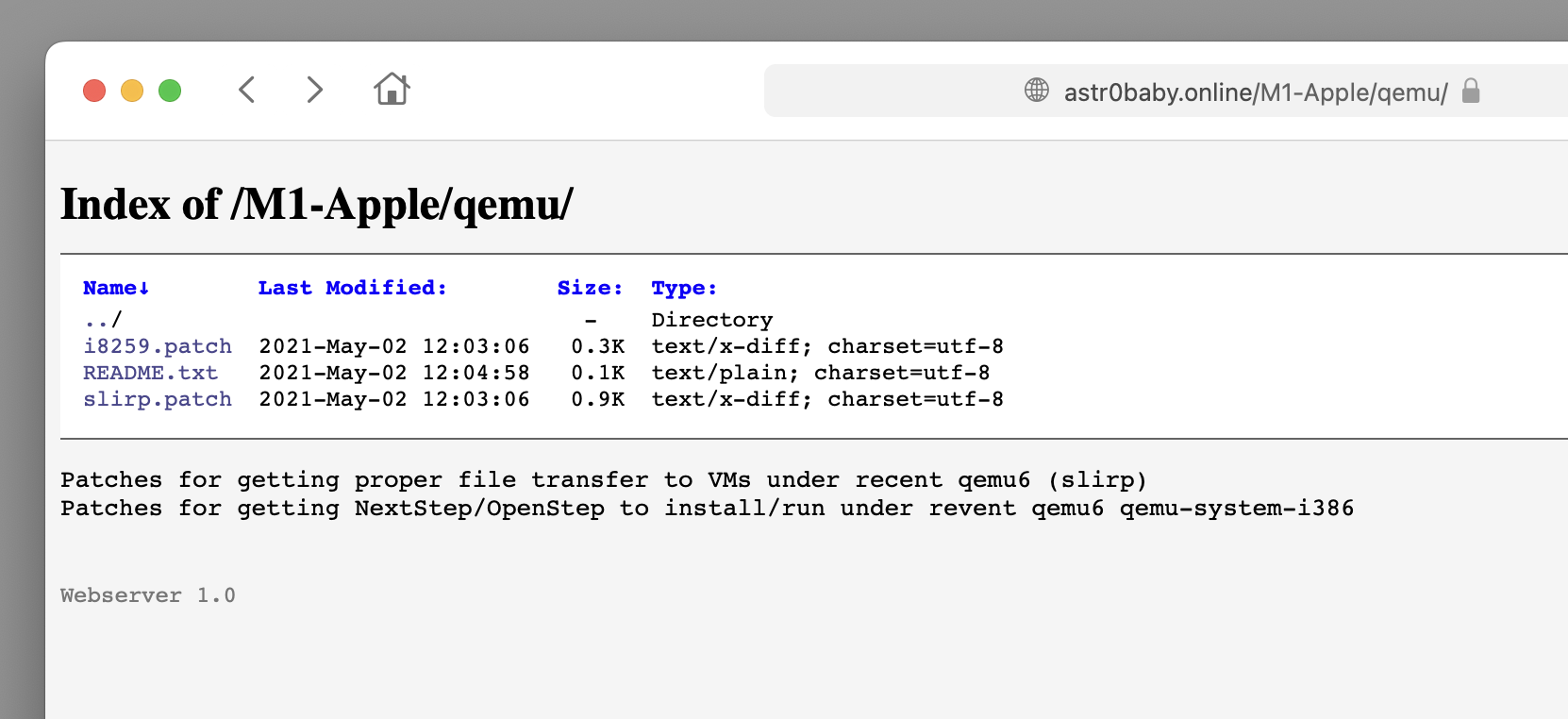
unfortunately, I haven't got a clue about how to apply these...
https://astr0baby.online/M1-Apple/qemu/
unfortunately, I haven't got a clue about how to apply these...
Title: Re: Migrate OS4.2 from VMWare to qemu
Post by: mikeboss on April 03, 2022, 11:05:17 AM
Post by: mikeboss on April 03, 2022, 11:05:17 AM
astr0baby definitely got it up und running back in may 2021. although, the mouse seems not to work properly and needs additional patches.
https://twitter.com/astr0baby/status/1388669296486887425
https://github.com/michaelengel/qemuNextSTEPpatches
https://twitter.com/astr0baby/status/1388669296486887425
https://github.com/michaelengel/qemuNextSTEPpatches
Title: Re: Migrate OS4.2 from VMWare to qemu
Post by: mbert on June 08, 2023, 01:52:57 AM
Post by: mbert on June 08, 2023, 01:52:57 AM
An update: while the above still does not work on quemu (the best I could get was the boot process getting stuck when preparing the hard disks as in the screenshot by @mikeboss), it does work with 86box. I downloaded the ready-to-run HD + configuration from http://next.haleblian.com/emu/86box/ and could get a machine running and even mount my old system's HD into the system.
One observation on the downloaded HD image: thought the image size is pretty much similar to my existing one's I have just about half of the disk space inside. I am unable to deal with the system's very rudimentary fdisk program, is there any easier way to find out which partitions the disk image has?
One observation on the downloaded HD image: thought the image size is pretty much similar to my existing one's I have just about half of the disk space inside. I am unable to deal with the system's very rudimentary fdisk program, is there any easier way to find out which partitions the disk image has?