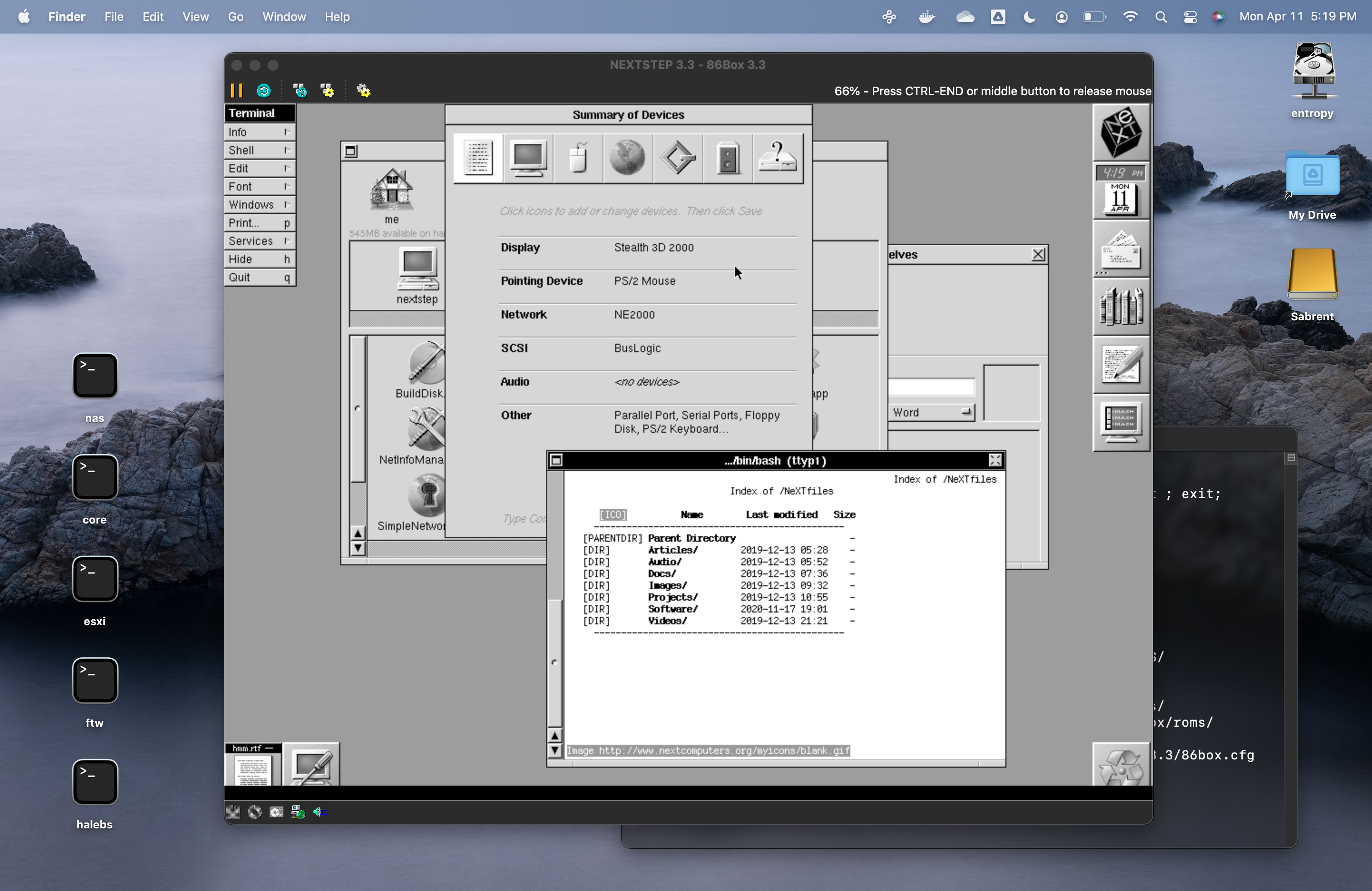
screenshot (
http://next.haleblian.com/picture/forum/86box.png)
86box emulates a variety of old x86 hardware, some of which have corresponding drivers.
Performance is pretty good, except for networking, which may mean the emulation is merely too accurate. :P
It works better for me in the Intel case than VMware Player or Virtualbox, which have broken devices.
So far I have tried a Pentium 166 and I'm sure I'll try to clock it higher. The above is from an experimental build running Apple Silicon native.
ref:
https://86box.net
BTW if you're thinking of taking a spin yourself, here is a config that works for me:
https://gist.github.com/rhaleblian/f345231516aded15d8feb8fcbe14d1c0I have been able to provide a Previous disk image file directly, so in theory you may not need to go through installation. I did, and it can/does succeed.
So -- bootable disk images do not come across from Previous.
A disk image for 3.3 is in here:
http://next.haleblian.com/emu/86box
Thanks for this
Sure. I'm using release 3.11 now:
https://github.com/86Box/86Box/releases/tag/v3.11It removes that rendering problem you see where there is a black bar at screen bottom.
I should post updated images...
Hi.
You have no problems with Networking as well?
I'm having trouble with Networking on OpenStep4.2 (intel) installed on VirtualBox on lubuntu (which I will start in another thread).
I was hoping to install NS3.3 after OS4.2.
Regards PTek
Hi PTek, I don't get notification for some reason, just saw this... networking is OK, I can reach this site's file area with a CLI web browser for example.
Anybody who has been running the OS this way and would care probably knows this, but: the 86box team has been releasing Apple Silicon native (Universal) builds of 86box for a while now, it's no longer beta. I'm running the latest 4.0.1 release. 100% emulation speed on a 128MB 200MHz Pentium on an M1 MacBook.
For those who are interested I was able to Install NeXTSTEP 3.3 and OPENSTEP 4.2 on 86box.
Years ago I had them running under VMWare Fusion, VirtualBox, and others on my Intel Mac. Now that I have an Arm64 Mac, those won't work anymore.
I found the Previous emulator and installed 68k version NeXTSTEP and OPENSTEP on that. I then decided to see if I could run the x86 version of them. I tried to do it with qemu, but it would never work with the IDE driver. I then found 86box. Both Operating Systems install and work great. I was able to find the correct combination of drivers in the Operating Systems and the emulated hardware on 86box.
To install each Operating System, you go through the standard steps of booting off the boot floppy image, then insert the Drivers disk image, then insert the Beta Drivers Disk image and load the Primary/Secondary(Dual) EIDE and ATAPI Device Controllers driver from the beta floppy image and install the Operating System from the User CD. Once you get to the Configure.app, you can set the device drivers for the video, sound, SCSI, and network cards. The Adaptec SCSI card is optional. I did it because I could. You can use it to attach additional virtual disks and CD-ROM drives.
I started with OPENSTEP 4.2 first. I found pre-installed drivers that worked for the video, sound, SCSI, and network card. When I went to Install NeXTSTEP 3.3, I only found a pre-installed driver that worked for the video card. I had to download beta drivers for the sound, SCSI, and network cards, burn them to an ISO, attach it to the VM, and then install them in NeXTSTEP. I could then select them in the Configure.app and they worked.
You can create a new RAW disk image in 86box.
Here is the Configuration needed for 86box to work with OPENSTEP 4.2:
Machine Type: [1995] Socket 8
CPU Type: Intel Pentium Pro
Frequency: 200
FPU: Internal
Wait States: Default
PIT Mode: Auto
Memory: 128MB
Softfloat CPU - ON
Time Synchronization: Enabled (local time)
Video: [PCI] Matrox Millennium
Memory Size: 8MB
Mouse: Standard PS/2 Mouse
Sound: [ISA16] Sound Blaster 16
Address: 0x220
MPU-401 Address 0x330
IRQ 5
DMA Low 1
DMA High 5
Enable OPL - ON
Receive input (DSP MIDI) - ON
Use FLOAT32 sound - ON
Nuked (more accurate)
NIC: Mode: Null Driver
Adapter: [PCI] AMD PCnet-PCI II
HD Controller: [PCI] IDE Controller (Dual-Channel)
FD Controller: Internal controller
SCSI Controller 1: [ISA16] Adaptec AHA-154xB
Address: 0x334
IRQ 11
DMA 6
Host ID 7
BIOS Address Disabled
IDE (0:0), RAM Disk (max. speed)
Floppy1: 3.5" 1.44M
Check BPB: ON
CD-ROM drives:
ATAPI (0:1), 8x, 86BOX CD-ROM 1.00
SCSI (0:00), 8x, 86BOX CD-ROM 1.00
Here is the Configure.app settings in OPENSTEP 4.2 that are needed:
Video: Matrox MGA Millennium (8MB)
1024x768, 60Hz, RGB: 888/32
Mouse: PS/2-Style Mouse (v4.00)
IRQ 12
Network: AMD PCnet-32 PCI Ethernet Adapter (v4.00)
SCSI: Adaptec 154x Series SCSI Adapter (v4.01)
DMA 6
Port Address 0x334
IRQ 11
Sound: Sound Blaster 16 PnP (v4.01)
DMA Low 1
DMA High 5
Port Address 0x220
IRQ 5
Here is the Configuration needed for 86box to work with NeXTSTEP 3.3:
Same as above but this is different:
Video: [PCI] S3 Vision964 (Diamond Stealth64 VRAM)
4MB
Here is the Configure.app settings in NeXTSTEP 3.3 that are needed:
Same as above but this is different:
Video: Diamond Stealth 64 PCI-Bus 4MB Modes (v3.30)
1024x768, 60Hz, RGB: 888/32
NIC: AMD PCnet-32 PCI Ethernet Adapter (v3.33)
Sound: Sound Blaster 16 PnP (v3.34)
DMA Low 1
DMA High 5
Port Address 0x220
IRQ 5
Disk Image with full NeXTSTEP 3.3 User & Developer & Y2k patches installed:
https://drive.google.com/file/d/1YAsWSR81nZ6xUklVzRWySERzEGsZ8mup/view?usp=share_linkDisk Image with full OPENSTEP 4.2 User & Developer & Y2k patches installed:
https://drive.google.com/file/d/1SQf6cFr666OhmHMFk5nIS4S8E1loupHp/view?usp=share_linkISO Image with the beta drivers needed for NeXTSTEP 3.3:
https://drive.google.com/file/d/1kzuJvWb23i095SvJhlEBcrxHz7xV6i9J/view?usp=share_linkEnjoy!
Quote from: jhonnaker on October 05, 2024, 12:00:42 PMFor those who are interested I was able to Install NeXTSTEP 3.3 and OPENSTEP 4.2 on 86box.
Years ago I had them running under VMWare Fusion, VirtualBox, and others on my Intel Mac. Now that I have an Arm64 Mac, those won't work anymore.
VirtualBox user here (Which sometimes have troubles running when Lubuntu does a kernal update).
How do you find 86Box to VirtualBox? I see that
VirtualBox86Box offers more GFX and hardware card support if you want to practice your development skills compared to VirtualBox.
Good tutorial. 128MB RAM, Your must be doing some serious work in your virtual NeXT machine, I've just got mine set to 64MB (Although my system only has 4GB RAM).
They run really well and fast in 86box. Faster than running the m86k version in the Previous Emulator. I think faster than Virtual Box. I just gave it the max RAM because I could. They run fine on much less than 128MB.
If you want to install NeXTSTEP 4.0 PR1, the one with the alternate UI that was abandoned, this is the way:
The boot floppies that come with the USER install CD do not work. You have to have a NeXTSTEP 3.3 machine installed and running in 86box. Then you have to insert the 4.0 PR1 CD in to the virtual CD Drive and run the Upgrader.app on the CD.
Is there an ISO of the 4.0 PR1 CD anywhere?
Quote from: crispin on October 10, 2024, 09:16:47 PMIs there an ISO of the 4.0 PR1 CD anywhere?
Untested:
https://www.betaarchive.com/database/search.php?q=OpenstepApparently one needs to register before download is possible.
BetaArchive's policy isn't merely registration—you actually have to upload something before you can download. The Internet Archive has it, but since that's temporarily down, I'll post it. Will take a little while to upload.
Found the place again i once downloaded the PR1beta from:
tenox.pdp-11.ru/os/nextopenstep/NeXTSTEP%204.0%20PR1%20(beta)/ (
http://tenox.pdp-11.ru/os/nextopenstep/NeXTSTEP%204.0%20PR1%20(beta)/)
The remaining content of the site is rather impressive, too.
Forgot to mention this on my 86box config:
Machine: [i440FX] Intel AP440FX
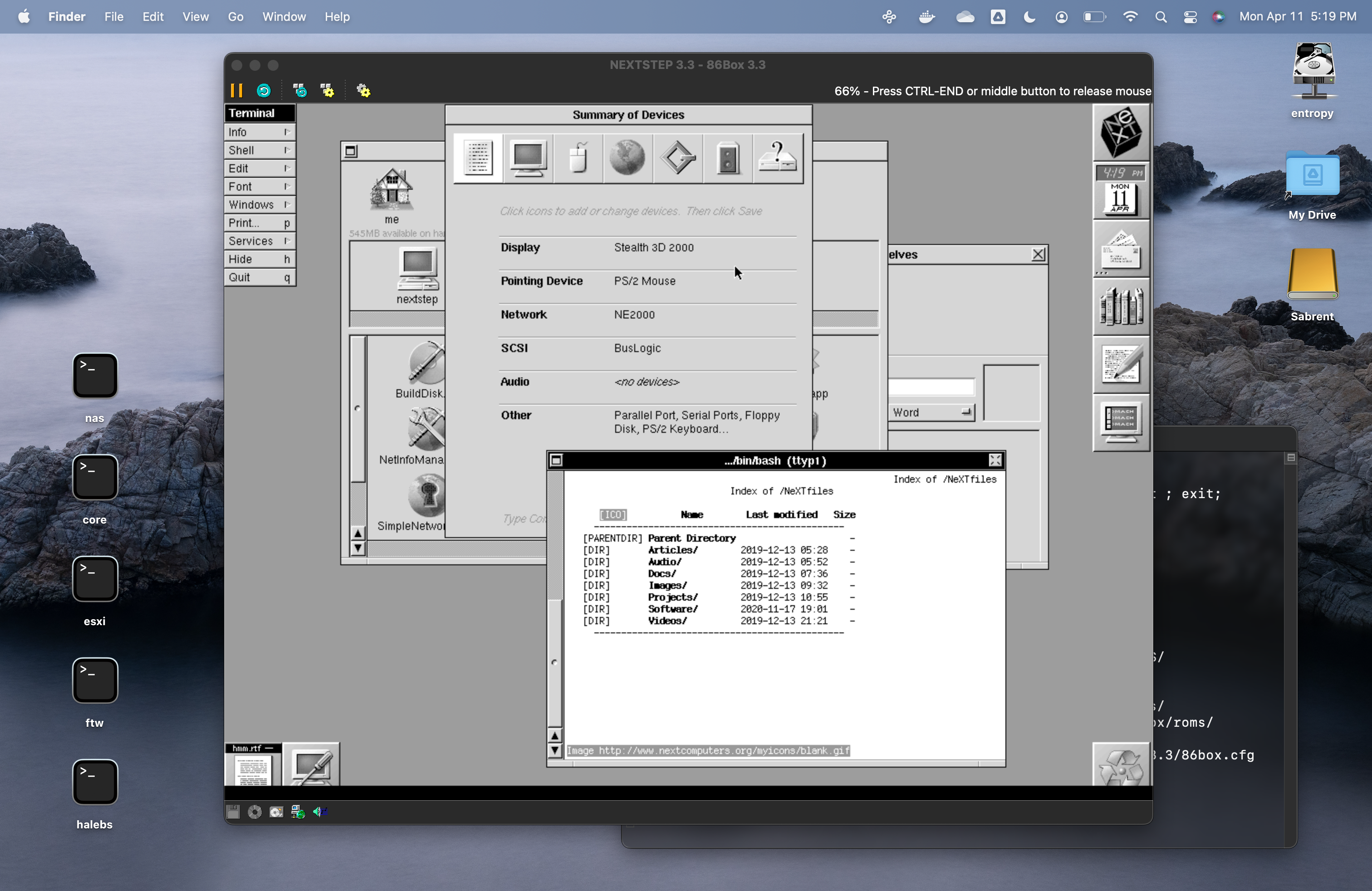
Quote from: pomosapien on April 12, 2022, 08:42:21 AMscreenshot (http://next.haleblian.com/picture/forum/86box.png)
86box emulates a variety of old x86 hardware, some of which have corresponding drivers.
Performance is pretty good, except for networking, which may mean the emulation is merely too accurate. :P
It works better for me in the Intel case than VMware Player or Virtualbox, which have broken devices.
So far I have tried a Pentium 166 and I'm sure I'll try to clock it higher. The above is from an experimental build running Apple Silicon native.
ref: https://86box.net
what OS are you using in that screenshot?
For those of us running a Debian/Bookworm system or any of its derivatives, there are 86box Debian packages for i386, amd64, and arm64 available from here:
wmlive.rumbero.org/repo/pool/main/8/86box (
https://wmlive.rumbero.org/repo/pool/main/8/86box/)
These packages were created for inclusion in the Debian/Bookworm based Window Maker Live Linux distribution (
https://wmlive.sourceforge.net) and should work on any Debian/Bookworm compatible system.
The packages includes a wrapper script for 86box that allows downloading the required set of ROM dumps during its first run if not already installed.