Title: Any way to change the desktop background/wallpaper?
Post by: Barrakuda on January 25, 2023, 01:54:20 PM
Post by: Barrakuda on January 25, 2023, 01:54:20 PM
Hello group. Is there any way to change the desktop background/wallpaper on a NeXTcube with NeXSTEP 3.3?
I looked online and a NeXSTEP User Guide and found nothing.
Thanks for the help in advance.
I looked online and a NeXSTEP User Guide and found nothing.
Thanks for the help in advance.
Title: Re: Any way to change the desktop background/wallpaper?
Post by: user341 on January 25, 2023, 04:22:47 PM
Post by: user341 on January 25, 2023, 04:22:47 PM
So the display preferences will let you change the color. To change the background, one common way is to get a preference panel called BackSpace. It lets you set the background to any image OR to a animated screen saver.
Title: Re: Any way to change the desktop background/wallpaper?
Post by: verdraith on January 25, 2023, 09:30:26 PM
Post by: verdraith on January 25, 2023, 09:30:26 PM
Some workspace utilities -- such as Fiend -- also let you use a background image.
Title: Re: Any way to change the desktop background/wallpaper?
Post by: MindWalker on February 10, 2023, 01:03:08 PM
Post by: MindWalker on February 10, 2023, 01:03:08 PM
Quote from: zombie on January 25, 2023, 04:22:47 PMTo change the background, one common way is to get a preference panel called BackSpace. It lets you set the background to any image OR to a animated screen saver.
Can you share a link where to download BackSpace? I can't seem to find it. I tried Fiend, but I couldn't make out the UI on how to do the background.
Title: Re: Any way to change the desktop background/wallpaper?
Post by: nuss on February 11, 2023, 02:45:43 AM
Post by: nuss on February 11, 2023, 02:45:43 AM
Hi @MindWalker , as far as I remember, BackSpace gets installed with a full installation of NeXTstep User + Developer (maybe not even required).
At least on my minimum 3.3 it is installed here:
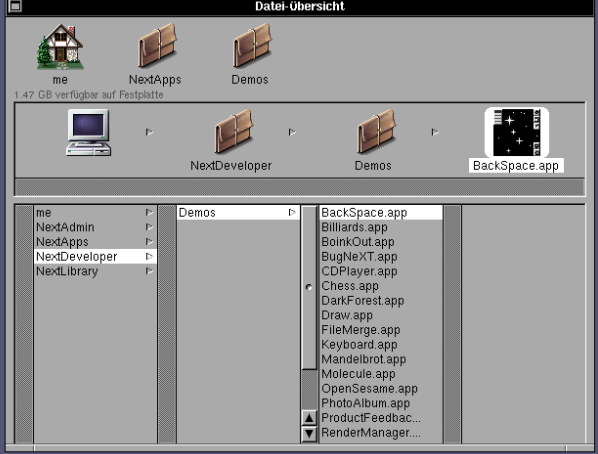
You can check (e.g.) the Peanuts CD-ROMs (ISOs can be found in download section of this site, path on CD-ROM is ca. Peanuts/NeXTSTEP/Tools/screen/backspace) for many additional BackSpace modules.
It was common to add BackSpace to your Dock (on the right side) and auto-start it from there.
At least on my minimum 3.3 it is installed here:
You can check (e.g.) the Peanuts CD-ROMs (ISOs can be found in download section of this site, path on CD-ROM is ca. Peanuts/NeXTSTEP/Tools/screen/backspace) for many additional BackSpace modules.
It was common to add BackSpace to your Dock (on the right side) and auto-start it from there.
Title: Re: Any way to change the desktop background/wallpaper?
Post by: Nitro on February 11, 2023, 03:30:07 AM
Post by: Nitro on February 11, 2023, 03:30:07 AM
Quote from: MindWalker on February 10, 2023, 01:03:08 PMCan you share a link where to download BackSpace? I can't seem to find it. I tried Fiend, but I couldn't make out the UI on how to do the background.
BackSpace is a great app. For those that use Fiend for a desktop image the background image setting is buried in the menu - Info > Preferences. The Fiend preferences menu may open in a small window, so you have to scroll to the bottom to find the background image setting.
Title: Re: Any way to change the desktop background/wallpaper?
Post by: MindWalker on February 11, 2023, 10:09:24 AM
Post by: MindWalker on February 11, 2023, 10:09:24 AM
Thank you @nuss and @Nitro, you were correct on both counts. Haha I was silly not to notice BackSpace in the Demos! I was sure I had seen it somewhere! And indeed the Fiend preferences opens small and option is there.
What image formats are supported out of the box? I tested that TIFF seems to open with Fiend at least. Any recommendations on how to minimize the hit on RAM with wallpapers?
Edit: do I need a module to do wallpapers with BackSpace?
What image formats are supported out of the box? I tested that TIFF seems to open with Fiend at least. Any recommendations on how to minimize the hit on RAM with wallpapers?
Edit: do I need a module to do wallpapers with BackSpace?
Title: Re: Any way to change the desktop background/wallpaper?
Post by: nuss on February 11, 2023, 11:25:57 AM
Post by: nuss on February 11, 2023, 11:25:57 AM
Hallo @MindWalker ,
TIFF, JPG and EPS work fine in Fiend. For testing the JPG was converted from a TIFF today with ToyViewer (version 2).
While converting to JPG, I found that ToyViewer 2 can also set wallpapers, but not sure how persistent they are. Just open an image (many formats) and use the "Wallpaper" menu.
For BackSpace I could not find an option to set a simple image as wallpaper, also no module that does it. I think that SlideShow (a BackSpace module) will do the job, if you place just one TIFF (file) in the later to be selected "name.anim" folder. But this is more like a workaround.
I first thought that my nice "Spock"-wallpaper was set by BackSpace in the 1990s. But in meantime I know that my wallpaper was handled by Fiend, while it (Fiend) also included BackSpace as screensaver (only).
20 years quite blur memories ;)
TIFF, JPG and EPS work fine in Fiend. For testing the JPG was converted from a TIFF today with ToyViewer (version 2).
While converting to JPG, I found that ToyViewer 2 can also set wallpapers, but not sure how persistent they are. Just open an image (many formats) and use the "Wallpaper" menu.
For BackSpace I could not find an option to set a simple image as wallpaper, also no module that does it. I think that SlideShow (a BackSpace module) will do the job, if you place just one TIFF (file) in the later to be selected "name.anim" folder. But this is more like a workaround.
I first thought that my nice "Spock"-wallpaper was set by BackSpace in the 1990s. But in meantime I know that my wallpaper was handled by Fiend, while it (Fiend) also included BackSpace as screensaver (only).
20 years quite blur memories ;)