Title: Help with NeXTSTEP/OpenStep 4.0 PR1 installation
Post by: MiLToS_666 on February 12, 2023, 02:45:56 PM
Post by: MiLToS_666 on February 12, 2023, 02:45:56 PM
Hello everyone! ;D
I tried to upgrade from a working NeXTSTEP 3.3 installation to 4.0 PR1 using the .iso file I recently found online and I get the following problems with i386 and m68k versions:
- Under Previous 2.5 x64 (in Windows 11 22H2) > Upgrade completes and upon reboot, all seems fine with the startup until I am presented with a gray screen with the mouse cursor (that I can move) and it just hangs there forever. :(
- Under 86Box latest version (in Windows 11 22H2) > Upgrade completes and upon reboot I get a System Panic: vfs_mountroot: cannot mount root :'(
I also have a premade "NS40_2GB.dd" image that also doesn't boot and it shows a similar error message that I can't remember now... ::)
Has anyone actually managed to get this working that can share some helpful information?
Thanks!
I tried to upgrade from a working NeXTSTEP 3.3 installation to 4.0 PR1 using the .iso file I recently found online and I get the following problems with i386 and m68k versions:
- Under Previous 2.5 x64 (in Windows 11 22H2) > Upgrade completes and upon reboot, all seems fine with the startup until I am presented with a gray screen with the mouse cursor (that I can move) and it just hangs there forever. :(
- Under 86Box latest version (in Windows 11 22H2) > Upgrade completes and upon reboot I get a System Panic: vfs_mountroot: cannot mount root :'(
I also have a premade "NS40_2GB.dd" image that also doesn't boot and it shows a similar error message that I can't remember now... ::)
Has anyone actually managed to get this working that can share some helpful information?
Thanks!
Title: Re: Help with NeXTSTEP/OpenStep 4.0 PR1 installation
Post by: Rob Blessin Black Hole on February 12, 2023, 04:11:31 PM
Post by: Rob Blessin Black Hole on February 12, 2023, 04:11:31 PM
Hello : Have you tried just a regular clean installation not an upgrade. Did you do the upgrade logged in as root from NeXTSTEP 3.3 ? It is an Alpha or Beta Release with weird folders along the bottom as I recall. I think it also came up as NeXTSTEP 4.0.
Title: Re: Help with NeXTSTEP/OpenStep 4.0 PR1 installation
Post by: Nitro on February 12, 2023, 09:43:38 PM
Post by: Nitro on February 12, 2023, 09:43:38 PM
There's some information in this old thread that may help.
https://www.nextcomputers.org/forums/index.php?topic=2109.msg16555#msg16555 (https://www.nextcomputers.org/forums/index.php?topic=2109.msg16555#msg16555)
https://www.nextcomputers.org/forums/index.php?topic=2109.msg16555#msg16555 (https://www.nextcomputers.org/forums/index.php?topic=2109.msg16555#msg16555)
Title: Re: Help with NeXTSTEP/OpenStep 4.0 PR1 installation
Post by: mikeboss on February 13, 2023, 04:04:45 AM
Post by: mikeboss on February 13, 2023, 04:04:45 AM
I did create the "NS40_2GB.dd" image a while ago on black hardware. just tested this on Previous 2.7 and it appears to work just fine...
Title: Re: Help with NeXTSTEP/OpenStep 4.0 PR1 installation
Post by: MiLToS_666 on February 13, 2023, 04:22:17 AM
Post by: MiLToS_666 on February 13, 2023, 04:22:17 AM
Thank you all for your replies! Like the old thread mentioned, I will try to edit the upgrade plan so that it doesn't modify the drivers and see where that gets me. :D
@Rob Blessin Black Hole yes I can only do that when logged in as root. Can't do a clean install as the iso image found online is not properly made... :-\
@mikeboss The latest build I can find for Windows is 2.5 and I remember now that your hdd image boots, it shows the loading process, it shows the gray screen with the cursor for a moment and then sends me back to the text mode asking to login manually. Unfortunately I don't know if there is a root password because I tried that.
@Rob Blessin Black Hole yes I can only do that when logged in as root. Can't do a clean install as the iso image found online is not properly made... :-\
@mikeboss The latest build I can find for Windows is 2.5 and I remember now that your hdd image boots, it shows the loading process, it shows the gray screen with the cursor for a moment and then sends me back to the text mode asking to login manually. Unfortunately I don't know if there is a root password because I tried that.
Title: Re: Help with NeXTSTEP/OpenStep 4.0 PR1 installation
Post by: mikeboss on February 13, 2023, 06:45:43 AM
Post by: mikeboss on February 13, 2023, 06:45:43 AM
yup, AFAIK v2.5 is the latest version available on Microsoft Windows. I also tested this version a few minutes ago: same result, works flawless for me (using NS40_2GB.dd). config I tested was NeXTstation Turbo Color.
PS
I created these images on black hardware. they have never been booted after successful installation. both users (root and me) don't have a password set, just as it came from the factory back in the day.
PS
I created these images on black hardware. they have never been booted after successful installation. both users (root and me) don't have a password set, just as it came from the factory back in the day.
Title: Re: Help with NeXTSTEP/OpenStep 4.0 PR1 installation
Post by: MiLToS_666 on February 13, 2023, 08:21:33 AM
Post by: MiLToS_666 on February 13, 2023, 08:21:33 AM
Quote from: mikeboss on February 13, 2023, 06:45:43 AMyup, AFAIK v2.5 is the latest version available on Microsoft Windows. I also tested this version a few minutes ago: same result, works flawless for me (using NS40_2GB.dd). config I tested was NeXTstation Turbo Color.
PS
I created these images on black hardware. they have never been booted after successful installation. both users (root and me) don't have a password set, just as it came from the factory back in the day.
Thanks again, I will try it once more like that and post a screenshot if I'm stuck, I think I have used the same config too.
Title: Re: Help with NeXTSTEP/OpenStep 4.0 PR1 installation
Post by: MiLToS_666 on February 13, 2023, 12:27:38 PM
Post by: MiLToS_666 on February 13, 2023, 12:27:38 PM
@mikeboss I tried your image again with Previous 2.0 and 2.5 and I got the same result, I have two screeshots:
https://ibb.co/yFnLprx
https://ibb.co/kD5QGrw
The first shows what I'm thrown back to after the startup procedure seems to finish loading.
The second one shows me trying to login as root and then me without typing a password and it's not accepted.
https://ibb.co/yFnLprx
https://ibb.co/kD5QGrw
The first shows what I'm thrown back to after the startup procedure seems to finish loading.
The second one shows me trying to login as root and then me without typing a password and it's not accepted.
Title: Re: Help with NeXTSTEP/OpenStep 4.0 PR1 installation
Post by: mikeboss on February 13, 2023, 12:38:20 PM
Post by: mikeboss on February 13, 2023, 12:38:20 PM
what's the checksum of the freshly unzipped "NS40_2GB.dd"? should be:
SHA1 e12522113cb1b6761e0370fa28d8eb54b181dd21
MD5 f185550827d3eb84954be016bf111a80
SHA1 e12522113cb1b6761e0370fa28d8eb54b181dd21
MD5 f185550827d3eb84954be016bf111a80
Title: Re: Help with NeXTSTEP/OpenStep 4.0 PR1 installation
Post by: MiLToS_666 on February 13, 2023, 12:48:00 PM
Post by: MiLToS_666 on February 13, 2023, 12:48:00 PM
Mine's different! :o
SHA1 E076690A669CE772E54C9093C1DE926B1D6CD402
MD5 86611B34147841542EBD0F2E5DDE1FD0
SHA1 E076690A669CE772E54C9093C1DE926B1D6CD402
MD5 86611B34147841542EBD0F2E5DDE1FD0
Title: Re: Help with NeXTSTEP/OpenStep 4.0 PR1 installation
Post by: crispin on February 13, 2023, 04:13:21 PM
Post by: crispin on February 13, 2023, 04:13:21 PM
Can anyone point me to a copy of the PR1 ISO? I've like to check it out.
Title: Re: Help with NeXTSTEP/OpenStep 4.0 PR1 installation
Post by: mikeboss on February 13, 2023, 05:52:00 PM
Post by: mikeboss on February 13, 2023, 05:52:00 PM
Quote from: MiLToS_666 on February 13, 2023, 12:48:00 PMMine's different! :o
SHA1 E076690A669CE772E54C9093C1DE926B1D6CD402
MD5 86611B34147841542EBD0F2E5DDE1FD0
oh, wow, sorry! I feel stupid: I checksummed and tested with "OS40_2GB.dd" instead of "NS40_2GB.dd".
your checksums are fine. "NS40_2GB.dd" doesn't boot correctly for me either. and so far I have no clue as of why this is...
I have no reason to believe that Previous is to blame here. it was almost 10 years ago that I created these images. it's entirely possible that NS40_2GB.dd never worked properly.
Title: Re: Help with NeXTSTEP/OpenStep 4.0 PR1 installation
Post by: verdraith on February 14, 2023, 10:24:50 AM
Post by: verdraith on February 14, 2023, 10:24:50 AM
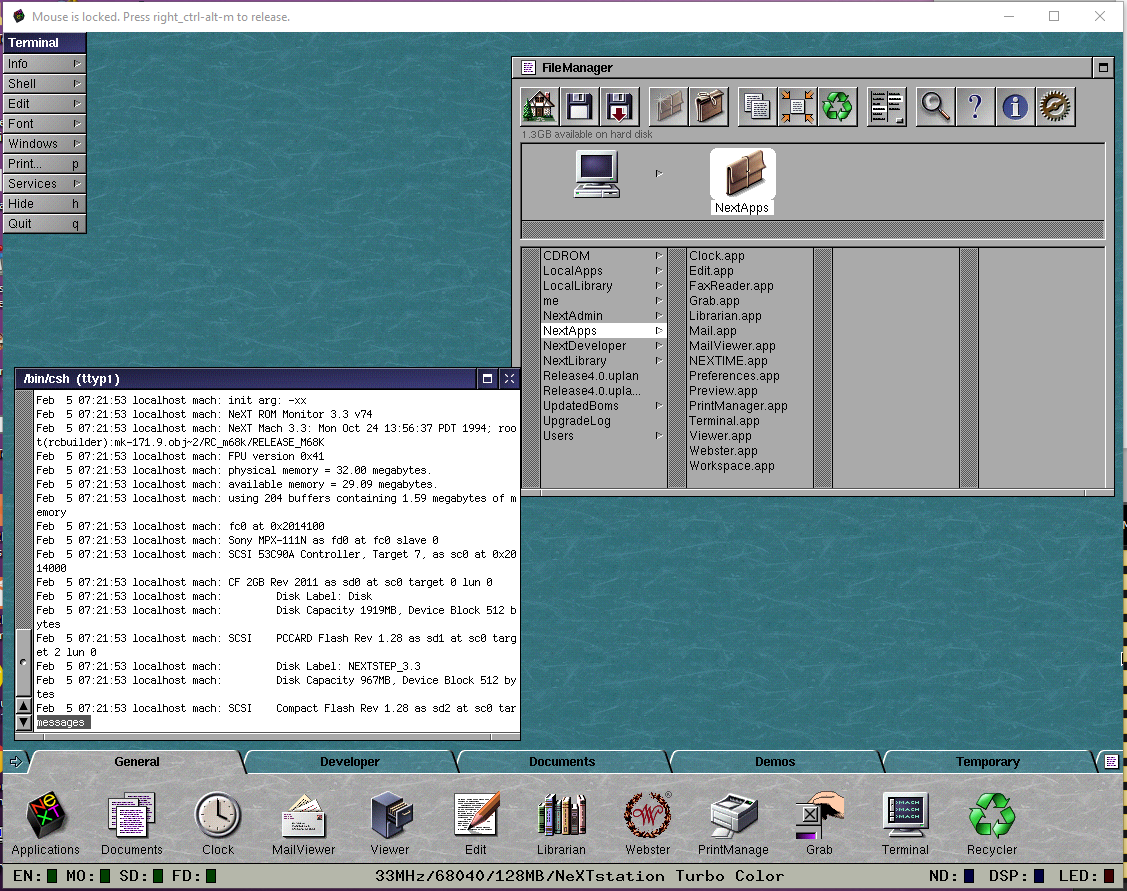
Is that the same image? The host details given there lead me to conclude that I downloaded that disk image from somewhere.
I don't recall if I had to do anything else to get it working -- the config file did have the Mecca devel ISO attached, so I might just have installed the devel packages and left it alone.
Anyway, it just has 'me' and 'demo' users, so I can provide a copy if needed.
--edit--
As an aside, I also have OPENSTEP 4.0 PR1 running in VMware. It was installed as an upgrade on top of a fully-patched NEXTSTEP 3.3 install. Standalone installation fails for reasons that escape me now.
--another edit--
Actually, looking at the logs... 13 boots -- 9 of which were 3.3, and 4 of which were 4.0... starting to suspect I copied NS33_2GB.dd to NS40_2GB.dd and then did an upgrade to Mecca.
Title: Re: Help with NeXTSTEP/OpenStep 4.0 PR1 installation
Post by: MiLToS_666 on February 14, 2023, 03:02:45 PM
Post by: MiLToS_666 on February 14, 2023, 03:02:45 PM
Please do share your image file! :o :-[
Edit: I can confirm that verdraith's image boots to the desktop!
Edit: I can confirm that verdraith's image boots to the desktop!
Title: Re: Help with NeXTSTEP/OpenStep 4.0 PR1 installation
Post by: wlewisiii on February 15, 2023, 09:00:20 AM
Post by: wlewisiii on February 15, 2023, 09:00:20 AM
Quote from: verdraith on February 14, 2023, 10:24:50 AM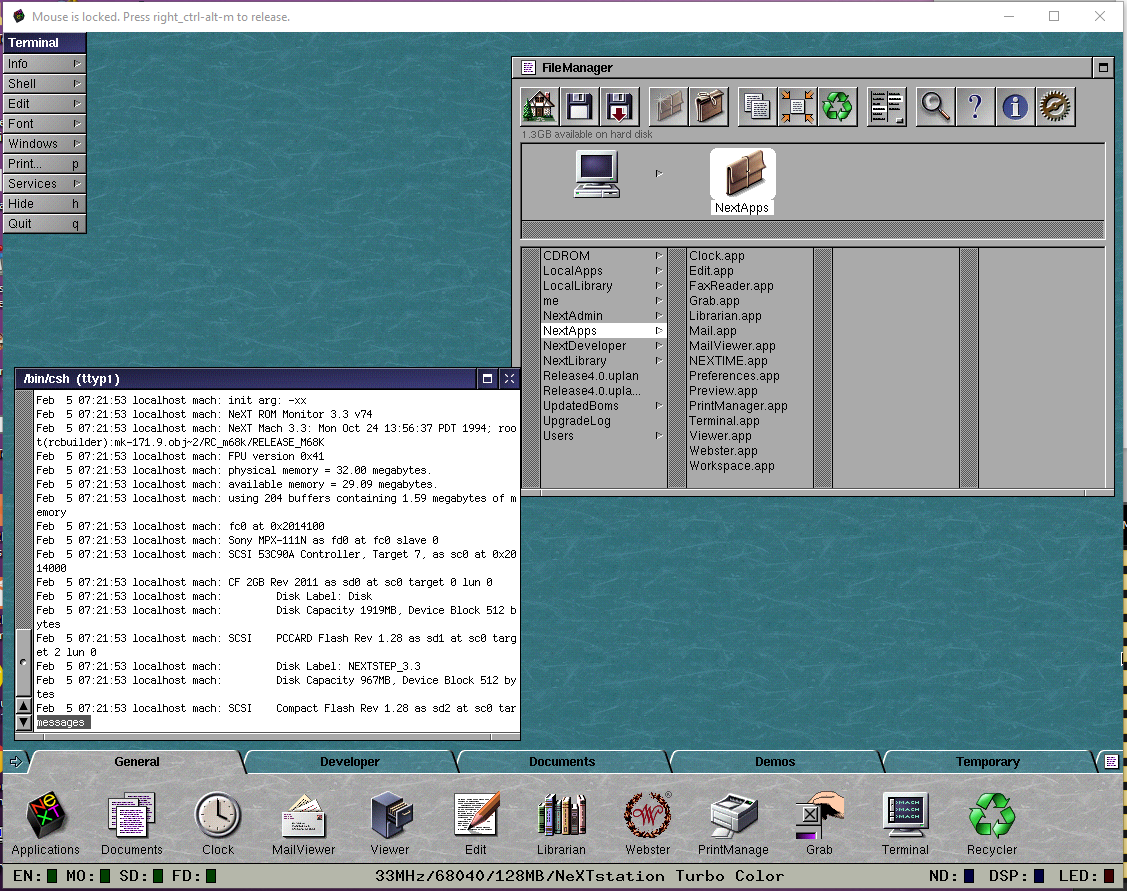
Anyway, it just has 'me' and 'demo' users, so I can provide a copy if needed.
Please & Thank you!