Title: Creating replacement ROMs when they fail
Post by: Nitro on August 08, 2023, 01:36:52 AM
Post by: Nitro on August 08, 2023, 01:36:52 AM
Recently I recapped and repaired a 040 cube motherboard that was damaged during shipment years ago. It looked like the repair failed because the board wouldn't boot. The ROM chip was replaced as a last ditch effort to get the board running, and that turned out to be the boot issue. So that meant that I had another NeXT box without a ROM, so it was time to break out my ancient EPROM programmer to create a new one. The old eBay special EPROM programmer that was used has a parallel port interface, and it was necessary to set up an old WinXP box to use the programming software that came with the unit. I had an old Dell 3000 with Windows XP and a parallel port so that was set up to program a new EPROM.
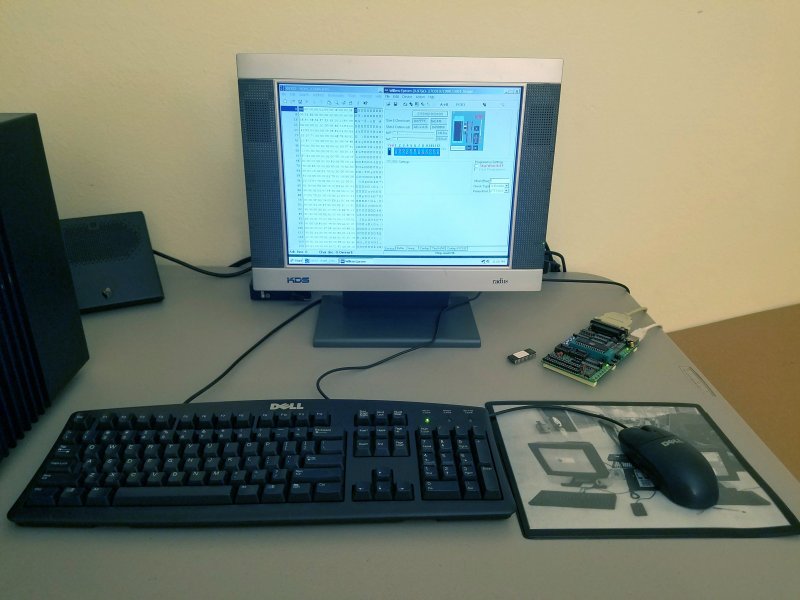
When I was a member of the old "Z80.org/Openstep.se" forums I figured out how to calculate a ROM checksum (https://www.nextcomputers.org/forums/index.php?topic=11), which is necessary when creating a new ROM image with a unique MAC address. I had plenty of help with the process from @Andreas and others. That was approximately 19 years ago, so it was necessary to brew a fresh cup of coffee and give the old memory cells a workout. Here's a picture of the vintage Dell setup I used to replace the failed EPROM, ball mouse and all.
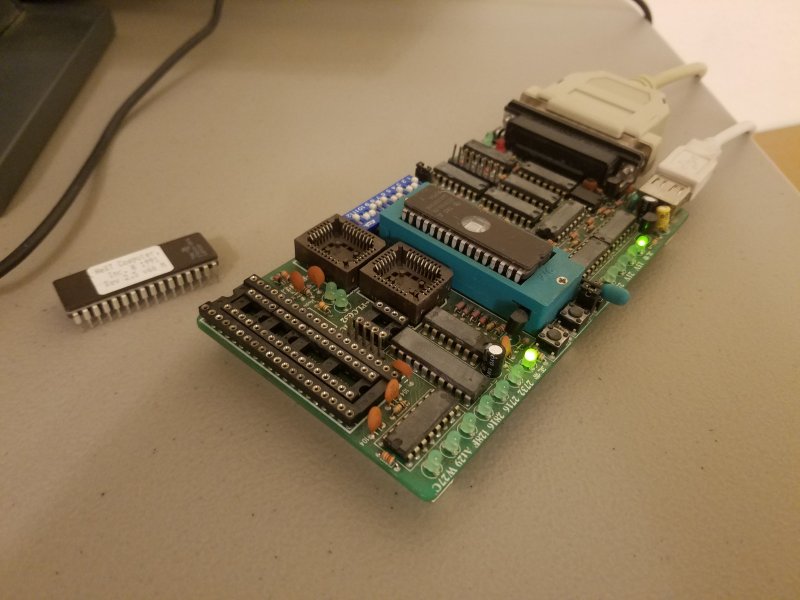
A new checksum (not shown) was calculated with the XVI32 hex editor (http://www.chmaas.handshake.de/delphi/freeware/xvi32/xvi32.htm). The fresh EPROM (https://www.futurlec.com/Memory/27C010-120pr.shtml) worked with its custom MAC address, so another NeXT stays in service. It's probably getting time to recap the EPROM burner too.
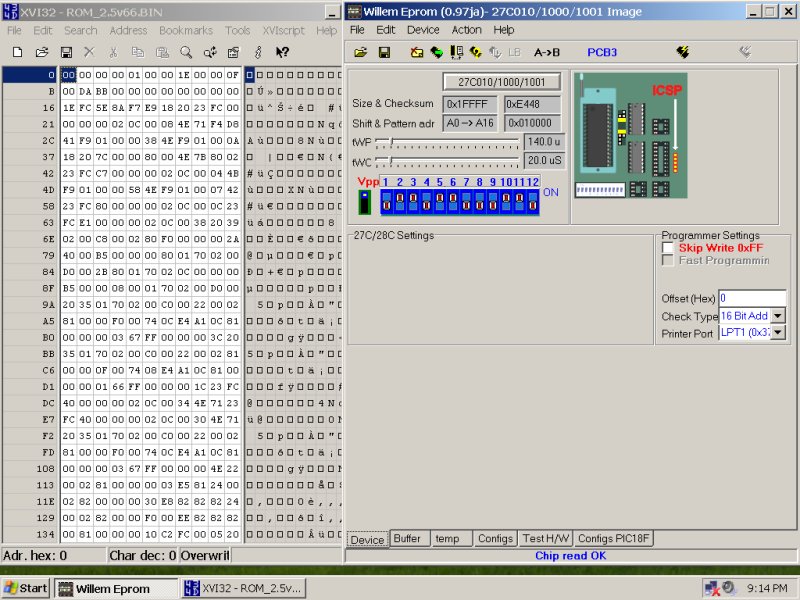
When I was a member of the old "Z80.org/Openstep.se" forums I figured out how to calculate a ROM checksum (https://www.nextcomputers.org/forums/index.php?topic=11), which is necessary when creating a new ROM image with a unique MAC address. I had plenty of help with the process from @Andreas and others. That was approximately 19 years ago, so it was necessary to brew a fresh cup of coffee and give the old memory cells a workout. Here's a picture of the vintage Dell setup I used to replace the failed EPROM, ball mouse and all.
A new checksum (not shown) was calculated with the XVI32 hex editor (http://www.chmaas.handshake.de/delphi/freeware/xvi32/xvi32.htm). The fresh EPROM (https://www.futurlec.com/Memory/27C010-120pr.shtml) worked with its custom MAC address, so another NeXT stays in service. It's probably getting time to recap the EPROM burner too.
Title: Re: Creating replacement ROMs when they fail
Post by: user341 on August 08, 2023, 01:12:36 PM
Post by: user341 on August 08, 2023, 01:12:36 PM
Wow that is awesome. It would be a great value to the community if you would consider making a video of the entire process and the checksum process too!
Thanks for sharing!
Thanks for sharing!
Title: Re: Creating replacement ROMs when they fail
Post by: Nitro on August 08, 2023, 07:29:53 PM
Post by: Nitro on August 08, 2023, 07:29:53 PM
Quote from: zombie on August 08, 2023, 01:12:36 PMWow that is awesome. It would be a great value to the community if you would consider making a video of the entire process and the checksum process too!
Thanks for sharing!
You're welcome, glad to help out. Although the information is scattered across three or more threads here I'll condense it into a single post, hopefully with some good screenshots if my Paint Shop Pro skills are up to it.
Title: Re: Creating replacement ROMs when they fail
Post by: Nitro on August 11, 2023, 04:29:27 AM
Post by: Nitro on August 11, 2023, 04:29:27 AM
Here's a quick guide for making a replacement EPROM to keep your NeXT computer in service. I should start out by saying that I'm not the first person to figure this whole process out, not an expert, and other people did most of the heavy lifting.
Although the examples shown below are for a v66 ROM, the same process applies to a v74 ROM for turbo chipset motherboards. The goal in this example is to modify the standard v66 ROM file in the archives here to change the Ethernet MAC address (https://en.wikipedia.org/wiki/MAC_address) to a unique value. This requires calculating a new checksum and saving that data to a modified ROM file. The modified data can then be written to a new EPROM (https://www.futurlec.com/Memory/27C010-120pr.shtml).
The first step is to download the v66 ROM file (Rev_2.5_v66.BIN (https://www.nextcomputers.org/NeXTfiles/Software/ROM_Files/68040_Non-Turbo_Chipset/Rev_2.5_v66.BIN)) from the archives. Next load the ROM file into your favorite hex editor. I like the XVI32 hex editor (http://www.chmaas.handshake.de/delphi/freeware/xvi32/xvi32.htm). I use a small trick to make the code a little bit easier to read. If your hex editor allows it then resize the window so that you have 11 columns of hexadecimal pairs, which is 22 hexadecimal digits per row as shown below. Hexadecimal digits are 0-9 or A-F.
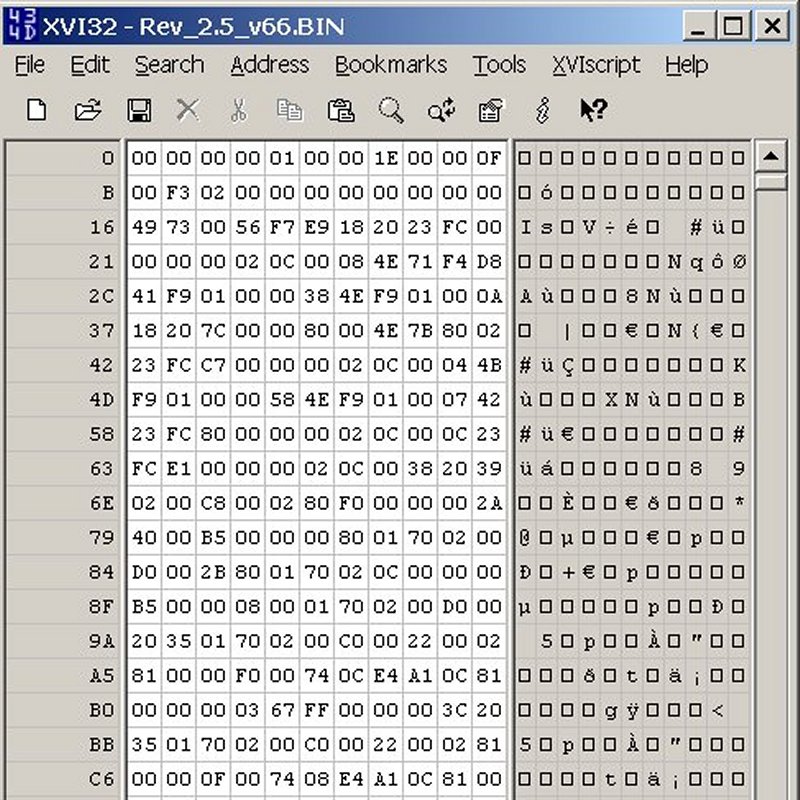
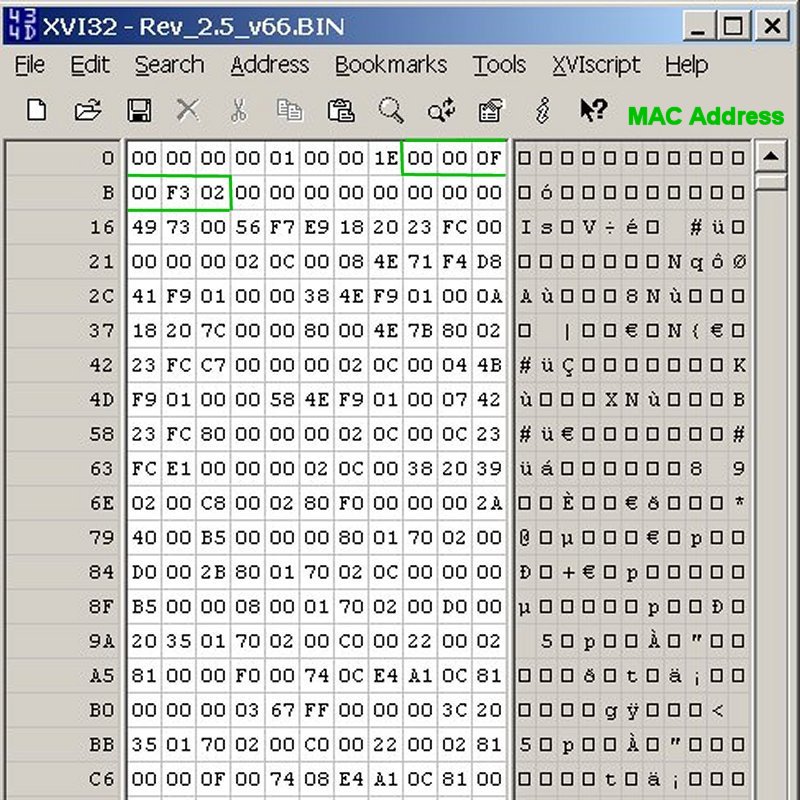
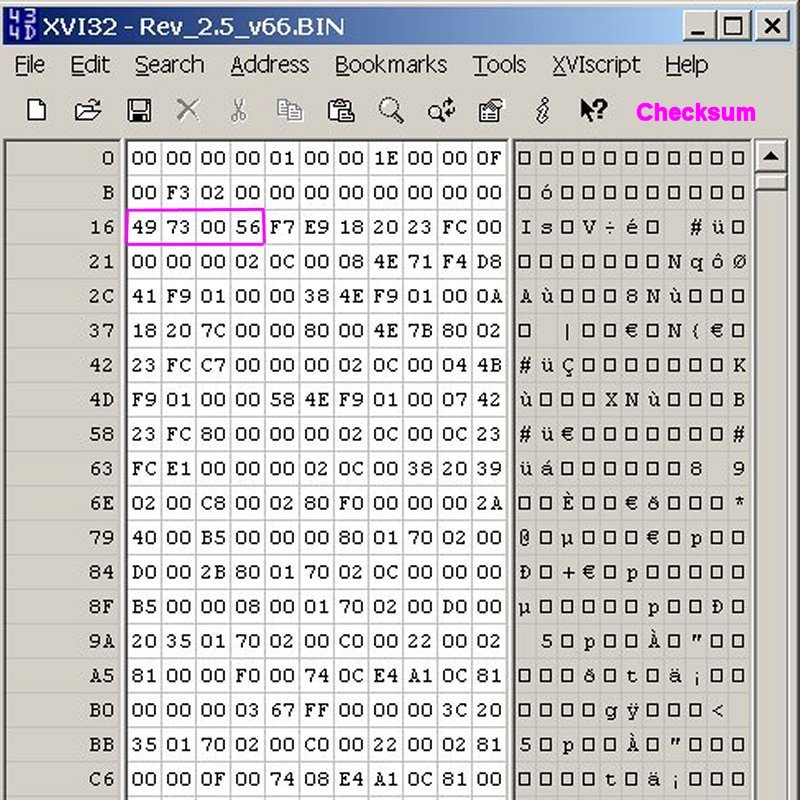
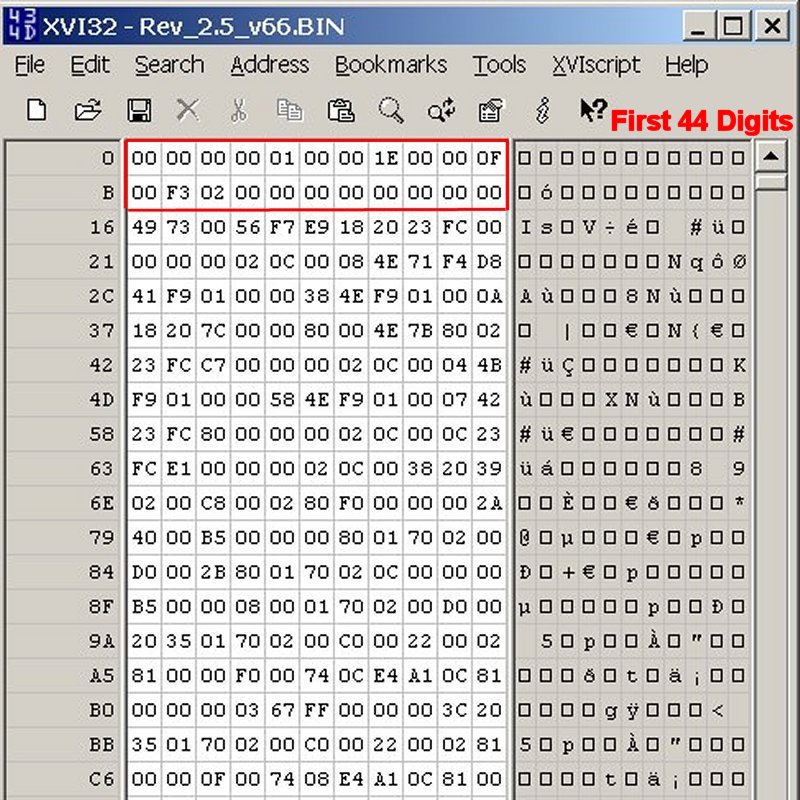
There are three groups of digits that need to be identified at the beginning of the ROM file. The first group is the MAC address, the second group is the checksum, and the third group is the first 44 hexadecimal digits of the file (this includes the MAC address), and these 44 digits are used to calculate the checksum.
Here's the location of the 12 digit MAC address:
Here's the location of the 8 digit Checksum:
These are the hexadecimal digits for the checksum calculation (first 44 digits of the file):
The next step is to modify the MAC address to make it unique. The MAC address consists of 12 hexadecimal digits, the first six of which are unique to NeXT (00-00-0F) and probably should remain unchanged. You can see the OUI (https://en.wikipedia.org/wiki/Organizationally_unique_identifier) numbers assigned to NeXT on this list (http://standards-oui.ieee.org/oui/oui.txt), just search the list for 00-00-0F. The last six digits of the MAC address can be changed to any unique hexadecimal digits you want, although starting with something like FF would probably keep you above the range already used by NeXT (just a guess). You could also throw caution to the wind and just use Hex Words (https://nedbatchelder.com/text/hexwords.html). Once you have your new MAC address chosen then overwrite the old MAC address hexadecimal digits with your new ones. If you're just changing the last six digits of the MAC address then these will be located at the beginning of the second row. For this example I'll change the last six digits of the MAC address to "C0FFEE" (for clarity that's a zero, not the letter O).
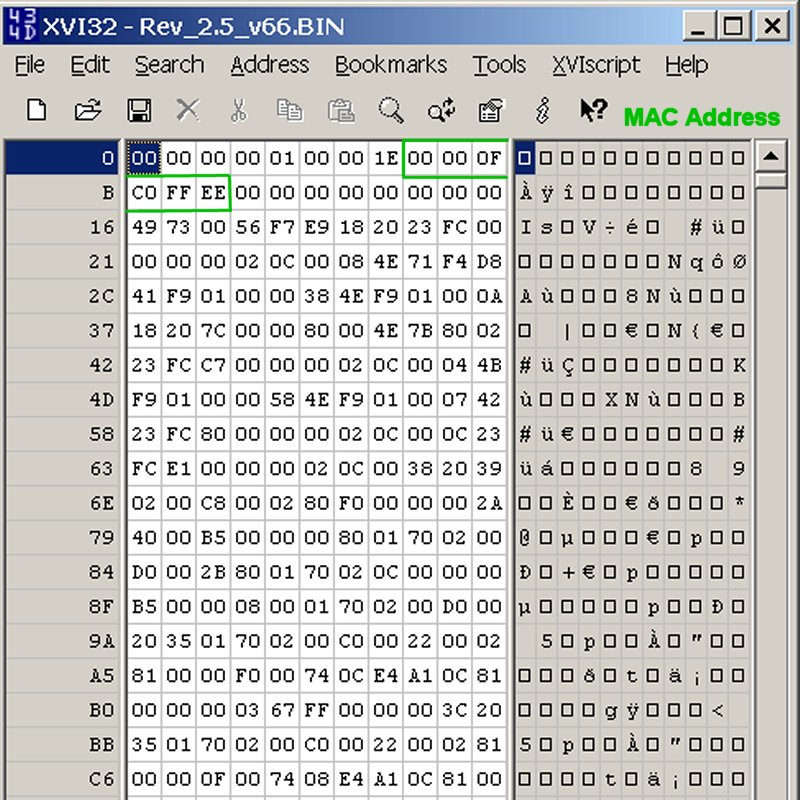
You're now ready to calculate the new checksum, so highlight the first two rows of hexadecimal digits (first 44 digits), then calculate a CRC32 checksum of those 44 digits. To do this in the XVI32 hex editor choose from the menu tab:
Edit > Block <n> chars...
On the popup menu select "decimal" and enter 22, then select OK. This should change the color of the first 44 hexadecimal digits to red. Next we'll calculate the CRC32 checksum of those 44 digits with:
Tools > CRC
On the fourth line of the popup window it should read:
CRC32 (PKZIP) of selected block: 2EE4BE57
The number shown is the new checksum for the MAC address 00-00-0F-C0-FF-EE, so we can now change the first eight hexadecimal digits of row three to the new checksum. Here's the modified data ready to be saved to a different file and then programed to a new EPROM:
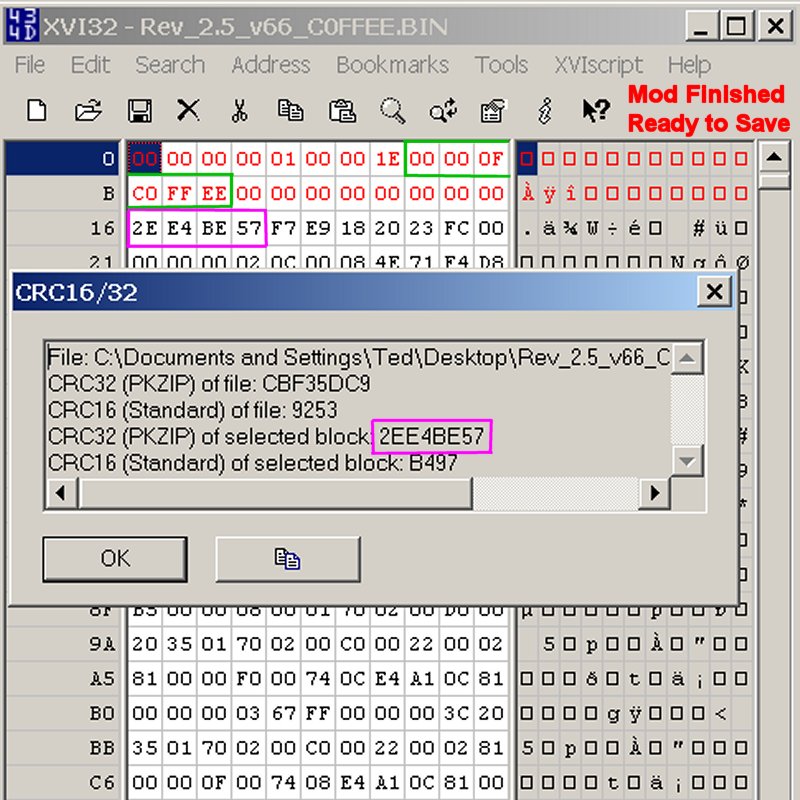
You can probably see now why resizing the hex editor window to 22 digits per row makes it a little bit easier to find the relevant groups of digits.
Next the modified ROM file is read into the EPROM programmer software and is ready to be programed.
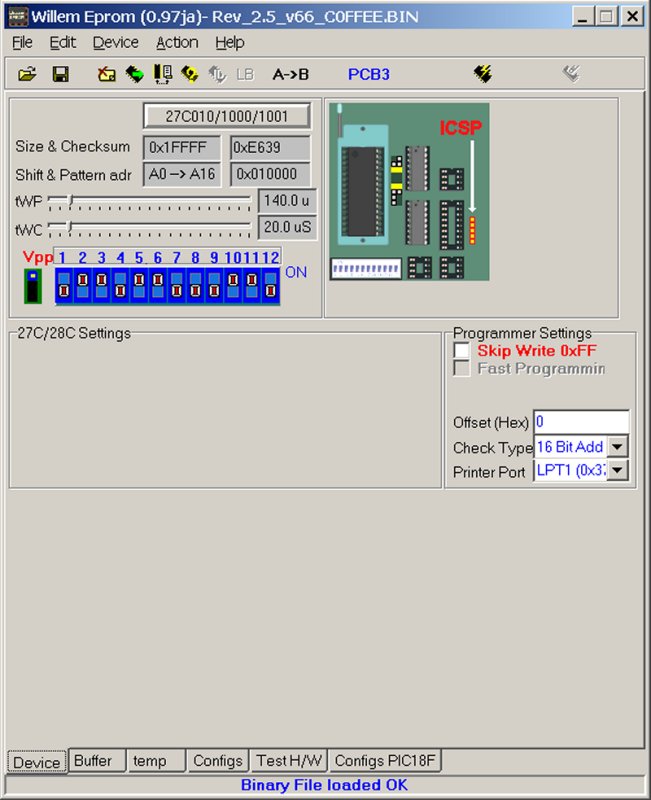
Write the data to the new EPROM.
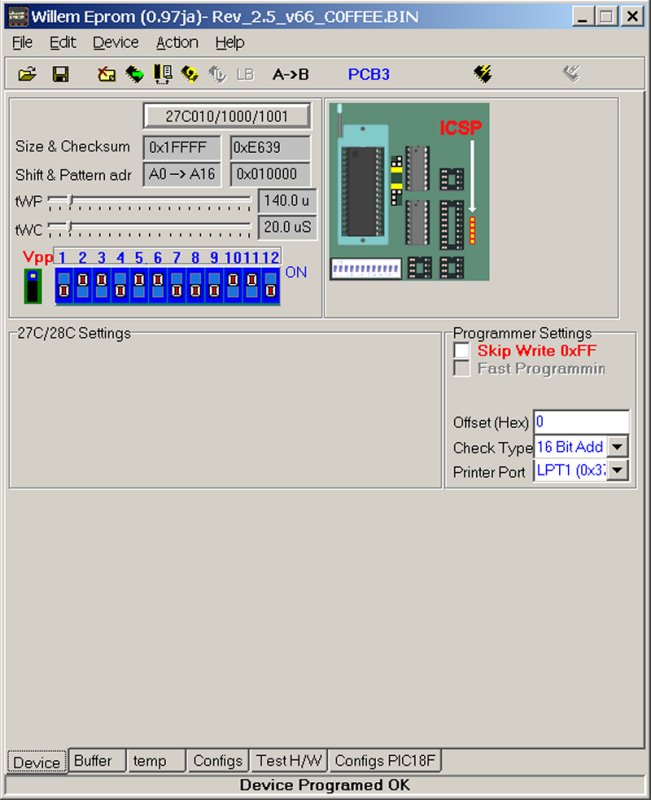
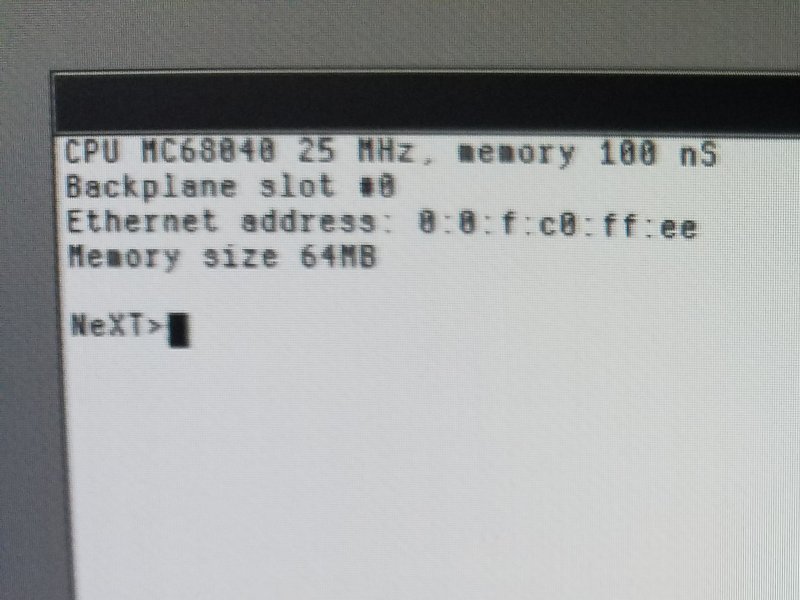
Power down the EPROM programmer and remove the chip. Place the EPROM in your NeXT and test it by booting. Enter the ROM monitor and check the Ethernet MAC address.
As an optional last step you can print a v66 ROM label (https://www.nextcomputers.org/NeXTfiles/Software/ROM_Files/68040_Non-Turbo_Chipset/Rev_2.5_v66_Label.jpg) for the new EPROM on a sheet of matte sticky-back paper (https://www.amazon.com/dp/B09GFL95JV).
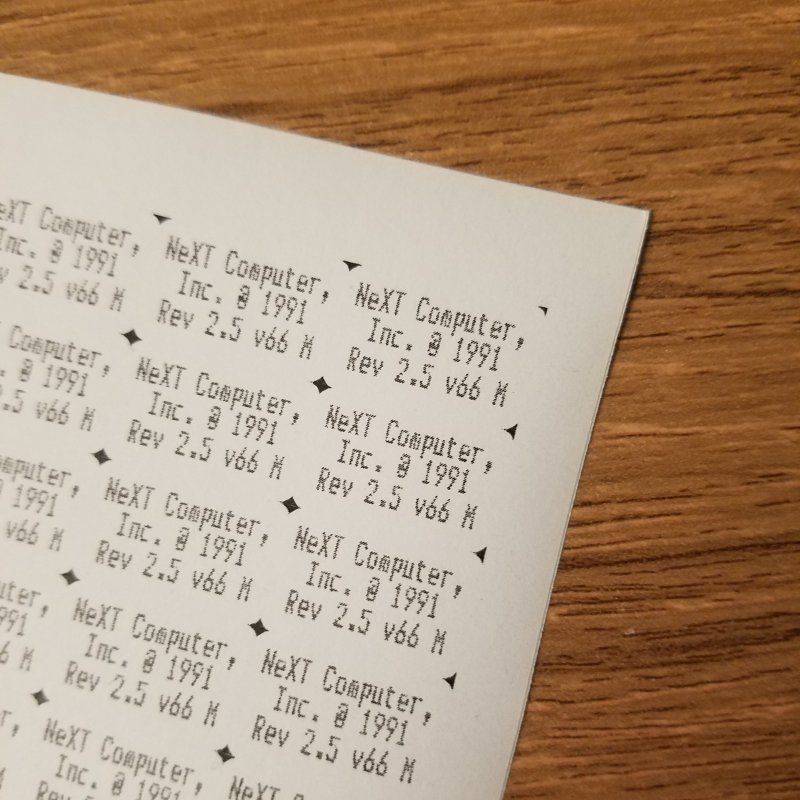
The process is the same for a v74 ROM (Rev_3.3_v74.BIN (https://www.nextcomputers.org/NeXTfiles/Software/ROM_Files/68040_Turbo_Chipset/Rev_3.3_v74.BIN)) for turbo chipset NeXT machines, and the v74 ROM label (https://www.nextcomputers.org/NeXTfiles/Software/ROM_Files/68040_Turbo_Chipset/Rev_3.3_v74_Label.jpg) is available in the archives too. These instructions apply to 040 NeXT computers, as the 030's use a different EPROM and I don't remember if they have a similar structure. Let me know if you see any errors. There has to be a typo in all of this somewhere. :) Hopefully this helps someone out.
Although the examples shown below are for a v66 ROM, the same process applies to a v74 ROM for turbo chipset motherboards. The goal in this example is to modify the standard v66 ROM file in the archives here to change the Ethernet MAC address (https://en.wikipedia.org/wiki/MAC_address) to a unique value. This requires calculating a new checksum and saving that data to a modified ROM file. The modified data can then be written to a new EPROM (https://www.futurlec.com/Memory/27C010-120pr.shtml).
The first step is to download the v66 ROM file (Rev_2.5_v66.BIN (https://www.nextcomputers.org/NeXTfiles/Software/ROM_Files/68040_Non-Turbo_Chipset/Rev_2.5_v66.BIN)) from the archives. Next load the ROM file into your favorite hex editor. I like the XVI32 hex editor (http://www.chmaas.handshake.de/delphi/freeware/xvi32/xvi32.htm). I use a small trick to make the code a little bit easier to read. If your hex editor allows it then resize the window so that you have 11 columns of hexadecimal pairs, which is 22 hexadecimal digits per row as shown below. Hexadecimal digits are 0-9 or A-F.
There are three groups of digits that need to be identified at the beginning of the ROM file. The first group is the MAC address, the second group is the checksum, and the third group is the first 44 hexadecimal digits of the file (this includes the MAC address), and these 44 digits are used to calculate the checksum.
Here's the location of the 12 digit MAC address:
Here's the location of the 8 digit Checksum:
These are the hexadecimal digits for the checksum calculation (first 44 digits of the file):
The next step is to modify the MAC address to make it unique. The MAC address consists of 12 hexadecimal digits, the first six of which are unique to NeXT (00-00-0F) and probably should remain unchanged. You can see the OUI (https://en.wikipedia.org/wiki/Organizationally_unique_identifier) numbers assigned to NeXT on this list (http://standards-oui.ieee.org/oui/oui.txt), just search the list for 00-00-0F. The last six digits of the MAC address can be changed to any unique hexadecimal digits you want, although starting with something like FF would probably keep you above the range already used by NeXT (just a guess). You could also throw caution to the wind and just use Hex Words (https://nedbatchelder.com/text/hexwords.html). Once you have your new MAC address chosen then overwrite the old MAC address hexadecimal digits with your new ones. If you're just changing the last six digits of the MAC address then these will be located at the beginning of the second row. For this example I'll change the last six digits of the MAC address to "C0FFEE" (for clarity that's a zero, not the letter O).
You're now ready to calculate the new checksum, so highlight the first two rows of hexadecimal digits (first 44 digits), then calculate a CRC32 checksum of those 44 digits. To do this in the XVI32 hex editor choose from the menu tab:
Edit > Block <n> chars...
On the popup menu select "decimal" and enter 22, then select OK. This should change the color of the first 44 hexadecimal digits to red. Next we'll calculate the CRC32 checksum of those 44 digits with:
Tools > CRC
On the fourth line of the popup window it should read:
CRC32 (PKZIP) of selected block: 2EE4BE57
The number shown is the new checksum for the MAC address 00-00-0F-C0-FF-EE, so we can now change the first eight hexadecimal digits of row three to the new checksum. Here's the modified data ready to be saved to a different file and then programed to a new EPROM:
You can probably see now why resizing the hex editor window to 22 digits per row makes it a little bit easier to find the relevant groups of digits.
Next the modified ROM file is read into the EPROM programmer software and is ready to be programed.
Write the data to the new EPROM.
Power down the EPROM programmer and remove the chip. Place the EPROM in your NeXT and test it by booting. Enter the ROM monitor and check the Ethernet MAC address.
As an optional last step you can print a v66 ROM label (https://www.nextcomputers.org/NeXTfiles/Software/ROM_Files/68040_Non-Turbo_Chipset/Rev_2.5_v66_Label.jpg) for the new EPROM on a sheet of matte sticky-back paper (https://www.amazon.com/dp/B09GFL95JV).

The process is the same for a v74 ROM (Rev_3.3_v74.BIN (https://www.nextcomputers.org/NeXTfiles/Software/ROM_Files/68040_Turbo_Chipset/Rev_3.3_v74.BIN)) for turbo chipset NeXT machines, and the v74 ROM label (https://www.nextcomputers.org/NeXTfiles/Software/ROM_Files/68040_Turbo_Chipset/Rev_3.3_v74_Label.jpg) is available in the archives too. These instructions apply to 040 NeXT computers, as the 030's use a different EPROM and I don't remember if they have a similar structure. Let me know if you see any errors. There has to be a typo in all of this somewhere. :) Hopefully this helps someone out.

Title: Re: Creating replacement ROMs when they fail
Post by: MindWalker on August 11, 2023, 10:15:37 AM
Post by: MindWalker on August 11, 2023, 10:15:37 AM
Great guide!
I love the fact that there is a scan of the ROM label included in the NeXTfiles 8)
I find it neat that most IP scanner apps have the complete list of manufactorers included, and thus can correctly detect all of those long-gone companies that had their own MAC headers. (I've tested this and seen both NeXT and Commodore show up correctly in my home network!).
By the way; are there any release notes for the ROM versions? My mono-slab has Rev 2.4 v65 ROM and I was wondering if there were any improvements worth reflashing to the latest 2.5 Rev66?
I love the fact that there is a scan of the ROM label included in the NeXTfiles 8)
I find it neat that most IP scanner apps have the complete list of manufactorers included, and thus can correctly detect all of those long-gone companies that had their own MAC headers. (I've tested this and seen both NeXT and Commodore show up correctly in my home network!).
By the way; are there any release notes for the ROM versions? My mono-slab has Rev 2.4 v65 ROM and I was wondering if there were any improvements worth reflashing to the latest 2.5 Rev66?
Title: Re: Creating replacement ROMs when they fail
Post by: user341 on August 11, 2023, 12:33:35 PM
Post by: user341 on August 11, 2023, 12:33:35 PM
This is a great guide. I wonder, since we have the ROMs if there is some cool stuff to be done. I guess first we could try with Previous in changing things in ROM as a test. And then in hardware. Things like maybe increasing maximum RAM (although there may be limitations on that elsewhere).
Regardless, super cool project. Thanks for sharing!
Regardless, super cool project. Thanks for sharing!
Title: Re: Creating replacement ROMs when they fail
Post by: Nitro on August 11, 2023, 03:52:31 PM
Post by: Nitro on August 11, 2023, 03:52:31 PM
Quote from: MindWalker on August 11, 2023, 10:15:37 AMGreat guide!
I love the fact that there is a scan of the ROM label included in the NeXTfiles 8)
I find it neat that most IP scanner apps have the complete list of manufactorers included, and thus can correctly detect all of those long-gone companies that had their own MAC headers. (I've tested this and seen both NeXT and Commodore show up correctly in my home network!).
By the way; are there any release notes for the ROM versions? My mono-slab has Rev 2.4 v65 ROM and I was wondering if there were any improvements worth reflashing to the latest 2.5 Rev66?
Thanks. :) I don't know of any release notes, but the source code for an older version of the ROM is on GitHub.
Quote from: zombie on August 11, 2023, 12:33:35 PMThis is a great guide. I wonder, since we have the ROMs if there is some cool stuff to be done. I guess first we could try with Previous in changing things in ROM as a test. And then in hardware. Things like maybe increasing maximum RAM (although there may be limitations on that elsewhere).
Regardless, super cool project. Thanks for sharing!
Thanks. I agree 100%. It would be interesting if Apple released the source code for the v66 and v74 ROMS as well as the 030 ROM. Personally I would like to see lower memory timings added for 60ns RAM, and 50ns RAM too. If I remember correctly someone on YouTube even made some memory modules with 40ns RAM. The cube motherboard I used for the screenshot above has 60ns RAM, yet it's identified as 100ns. On my turbo color slab I have 60ns RAM installed, and it's identified as 60ns, yet it benchmarks faster if I install slower 70ns RAM. ??? I see 60ns timings in the older ROM on GitHub, so maybe there's a compatibility issue with some RAM modules. Second on the wish list would be to add the ability for non-turbo chipset machines to boot off of a CD-ROM drive like the turbos can.
Even if I had the source code for the ROM I don't know if I could do anything with it. It would have to be modified by someone with a much better understanding of the hardware than me, but we can dream. :)
Title: Re: Creating replacement ROMs when they fail
Post by: sappas on May 10, 2024, 01:12:33 PM
Post by: sappas on May 10, 2024, 01:12:33 PM
It shoud be interesting to change vertical sync from 72 hz to original 68.4 hz...
Title: Re: Creating replacement ROMs when they fail
Post by: cuby on May 10, 2024, 02:40:33 PM
Post by: cuby on May 10, 2024, 02:40:33 PM
Quote from: sappas on May 10, 2024, 01:12:33 PMIt shoud be interesting to change vertical sync from 72 hz to original 68.4 hz...The attached diff might work...
The first diff disables the CRC check for the upper part of the ROM (after the ethernet CRC), the second diff should disable setting P_TMC_HCRG and P_TMC_VCRG differently for Turbo color and mono machines.
@andreas_g The modified ROM boots in Previous - is there a way to check the screen refresh rate that is used in the emulator? (haven't tested this on a real machine so far)
Code Select
--- Rev_3.3_v74.hex    2024-05-10 20:59:33
+++ Rev_3.3_v74_68Hz.hex    2024-05-10 21:36:33
@@ -61,7 +61,7 @@
 000003c0  23 c0 02 20 00 10 60 ff  00 00 00 04 42 b9 02 00  |#.. ..`.....B...|
 000003d0  78 00 22 7c 01 00 00 1e  26 3c 01 02 00 00 04 83  |x."|....&<......|
 000003e0  01 00 00 1e 41 f9 01 00  03 f0 60 ff 00 00 3d a2  |....A.....`...=.|
-000003f0  30 7c 00 01 b0 b9 01 00  00 1a 66 ff 00 00 3c f0  |0|........f...<.|
+000003f0  30 7c 00 01 b0 b9 01 00  00 1a 67 ff 00 00 3c f0  |0|........g...<.|
 00000400  22 7c 01 00 00 00 26 3c  01 00 00 16 04 83 01 00  |"|....&<........|
 00000410  00 00 41 f9 01 00 04 1e  60 ff 00 00 3d 74 30 7c  |..A.....`...=t0||
 00000420  00 02 b0 b9 01 00 00 16  66 ff 00 00 3c c2 4e 7a  |........f...<.Nz|
@@ -3164,7 +3164,7 @@
 0000c640  48 78 13 88 61 ff ff ff  c2 f0 48 6e ff f4 48 6e  |Hx..a.....Hn..Hn|
 0000c650  ff f8 48 78 00 03 48 78  00 02 61 ff ff ff fe 9e  |..Hx..Hx..a.....|
 0000c660  4a ae ff f4 67 56 08 39  00 04 02 00 d0 02 67 4c  |J...gV.9......gL|
-0000c670  42 80 10 2a 03 a8 59 80  72 05 b0 81 62 3e 20 7c  |B..*..Y.r...b> ||
+0000c670  42 80 10 2a 03 a8 59 80  72 05 b0 81 63 3e 20 7c  |B..*..Y.r...c> ||
 0000c680  01 01 21 24 20 70 0c 00  4e d0 20 7c 02 20 00 88  |..!$ p..N. |. ..|
 0000c690  20 bc 29 04 41 18 20 7c  02 20 00 8c 20 bc 02 1a  | .).A. |. .. ...|
 0000c6a0  03 40 60 18 20 7c 02 20  00 88 20 bc 5b 02 b1 18  |.@`. |. .. .[...|
Title: Re: Creating replacement ROMs when they fail
Post by: sappas on May 10, 2024, 03:05:39 PM
Post by: sappas on May 10, 2024, 03:05:39 PM
Thanks a lot, i found the second occurence but not the first, is this macadress or crc control
Title: Re: Creating replacement ROMs when they fail
Post by: sappas on May 11, 2024, 04:30:32 AM
Post by: sappas on May 11, 2024, 04:30:32 AM
It's work and there are several rom 3.3 V74, mine and the Macintosh repository one !
This is the last one who is running now on my adb turbo slab
Thanks a lot
This is the last one who is running now on my adb turbo slab
Thanks a lot
Title: Re: Creating replacement ROMs when they fail
Post by: cuby on May 11, 2024, 06:15:31 AM
Post by: cuby on May 11, 2024, 06:15:31 AM
Quote from: sappas on May 11, 2024, 04:30:32 AMIt does not work, maybe there was several rom 74
My original (unmodified) ROM has the checksum
MD5 (Rev_3.3_v74.BIN) = dadf3fb6b6b18b2d325eb42b61d83175
If the first diff isn't applied, then the (not modified) checksum is checked. If this check fails, Previous shows a blinking red LED.
Maybe the real hardware also does not like if the P_TMC_HCRG and P_TMC_VCRG registers are not set at all.
Which station did try this with, a color or mono Turbo? My EPROMmer and Turbo Color station are in the office, I can perhaps try the ROM on Monday (but I'm not sure if I have an appropriate EPROM here).
Title: Re: Creating replacement ROMs when they fail
Post by: sappas on May 11, 2024, 06:51:56 AM
Post by: sappas on May 11, 2024, 06:51:56 AM
I ve a Color Turbo, in fact i ve two, one is 3.1 v71 and an Adb 3.3 V74 patch by you
And i ve a Mono Turbo in Paris with non Adb keyboard/Mice
And i ve a Mono Turbo in Paris with non Adb keyboard/Mice
Title: Re: Creating replacement ROMs when they fail
Post by: sappas on May 11, 2024, 06:55:36 AM
Post by: sappas on May 11, 2024, 06:55:36 AM
Quote from: cuby on May 11, 2024, 06:15:31 AMI can perhaps try the ROM on Monday (but I'm not sure if I have an appropriate EPROM here).It's working !
Thanks a lot
Title: Re: Creating replacement ROMs when they fail
Post by: cuby on May 11, 2024, 07:26:06 AM
Post by: cuby on May 11, 2024, 07:26:06 AM
Quote from: sappas on May 11, 2024, 06:55:36 AMIt's working !You're very welcome, thanks for testing!
Thanks a lot
Great to see that it works - so did this patch in fact reduce the refresh rate to 68 Hz?
Title: Re: Creating replacement ROMs when they fail
Post by: barcher174 on May 11, 2024, 02:55:10 PM
Post by: barcher174 on May 11, 2024, 02:55:10 PM
OH! Can I make a request? Can you enable serial console by default? That would be super helpful for people with no soundbox to test.
Title: Re: Creating replacement ROMs when they fail
Post by: cuby on May 11, 2024, 02:58:26 PM
Post by: cuby on May 11, 2024, 02:58:26 PM
Quote from: barcher174 on May 11, 2024, 02:55:10 PMCan you enable serial console by default?Hm, that's a NVRAM setting, so I guess it should be possible to change the default at least. I'll see if I can find the relevant location in the PROM...
Title: Re: Creating replacement ROMs when they fail
Post by: cuby on May 11, 2024, 05:21:23 PM
Post by: cuby on May 11, 2024, 05:21:23 PM
Quote from: cuby on May 11, 2024, 07:26:06 AMGreat to see that it works - so did this patch in fact reduce the refresh rate to 68 Hz?Just tested the mod myself - it works, the monitor shows a 68 Hz refresh rate (and wasn't too happy with the 72 Hz refresh before).
Title: Re: Creating replacement ROMs when they fail
Post by: barcher174 on May 11, 2024, 07:42:24 PM
Post by: barcher174 on May 11, 2024, 07:42:24 PM
This is fantastic! Should help a lot with LCDs.
Title: Re: Creating replacement ROMs when they fail
Post by: cuby on May 14, 2024, 07:33:40 AM
Post by: cuby on May 14, 2024, 07:33:40 AM
Quote from: barcher174 on May 11, 2024, 02:55:10 PMOH! Can I make a request? Can you enable serial console by default? That would be super helpful for people with no soundbox to test.This modification for Rev 3.3 (v74) should work (it also includes the 68 Hz patch and the disabled CRC check). This removes the check for the NVRAM setting for alternate console on serial A but is only effective if the machine doesn't get a reply from the screen (resp. soundbox).
My Turbo Color station boots with the modified ROM, but it seems that all my Mini-DIN 8 serial cables are at home and not in the office, so I can't test it right now.
I think that the serial emulation in Previous is still mostly a stub, so testing in Previous probably won't show anything interesting...
Code Select
--- Rev_3.3_v74.hex	2024-05-14 14:18:16
+++ Rev_3.3_v74_68Hz_sercons.hex	2024-05-14 14:27:49
@@ -61,7 +61,7 @@
 000003c0  23 c0 02 20 00 10 60 ff  00 00 00 04 42 b9 02 00  |#.. ..`.....B...|
 000003d0  78 00 22 7c 01 00 00 1e  26 3c 01 02 00 00 04 83  |x."|....&<......|
 000003e0  01 00 00 1e 41 f9 01 00  03 f0 60 ff 00 00 3d a2  |....A.....`...=.|
-000003f0  30 7c 00 01 b0 b9 01 00  00 1a 66 ff 00 00 3c f0  |0|........f...<.|
+000003f0  30 7c 00 01 b0 b9 01 00  00 1a 67 ff 00 00 3c f0  |0|........g...<.|
 00000400  22 7c 01 00 00 00 26 3c  01 00 00 16 04 83 01 00  |"|....&<........|
 00000410  00 00 41 f9 01 00 04 1e  60 ff 00 00 3d 74 30 7c  |..A.....`...=t0||
 00000420  00 02 b0 b9 01 00 00 16  66 ff 00 00 3c c2 4e 7a  |........f...<.Nz|
@@ -2436,7 +2436,7 @@
 000098b0  6d d8 24 40 30 2a 01 70  02 40 00 40 66 00 00 b0  |m.$@0*.p.@.@f...|
 000098c0  2f 3c 00 02 49 f0 61 ff  ff ff f0 6e 2f 3c ef 00  |/<..I.a....n/<..|
 000098d0  00 00 48 78 00 c5 61 ff  00 00 0c 02 de fc 00 0c  |..Hx..a.........|
-000098e0  08 00 00 1e 67 18 08 2a  00 03 00 16 67 10 74 01  |....g..*....g.t.|
+000098e0  08 00 00 1e 67 18 08 2a  00 03 00 16 66 10 74 01  |....g..*....f.t.|
 000098f0  25 42 03 18 25 42 03 1c  42 80 60 00 00 e0 08 2a  |%B..%B..B.`....*|
 00009900  00 00 00 24 67 2a 30 2a  01 70 02 40 02 00 66 20  |...$g*0*[email protected] |
 00009910  2f 3c 00 03 00 00 48 78  00 c5 61 ff 00 00 0b be  |/<....Hx..a.....|
@@ -3164,7 +3164,7 @@
 0000c640  48 78 13 88 61 ff ff ff  c2 f0 48 6e ff f4 48 6e  |Hx..a.....Hn..Hn|
 0000c650  ff f8 48 78 00 03 48 78  00 02 61 ff ff ff fe 9e  |..Hx..Hx..a.....|
 0000c660  4a ae ff f4 67 56 08 39  00 04 02 00 d0 02 67 4c  |J...gV.9......gL|
-0000c670  42 80 10 2a 03 a8 59 80  72 05 b0 81 62 3e 20 7c  |B..*..Y.r...b> ||
+0000c670  42 80 10 2a 03 a8 59 80  72 05 b0 81 63 3e 20 7c  |B..*..Y.r...c> ||
 0000c680  01 01 21 24 20 70 0c 00  4e d0 20 7c 02 20 00 88  |..!$ p..N. |. ..|
 0000c690  20 bc 29 04 41 18 20 7c  02 20 00 8c 20 bc 02 1a  | .).A. |. .. ...|
 0000c6a0  03 40 60 18 20 7c 02 20  00 88 20 bc 5b 02 b1 18  |.@`. |. .. .[...|
Title: Re: Creating replacement ROMs when they fail
Post by: barcher174 on May 14, 2024, 10:08:29 AM
Post by: barcher174 on May 14, 2024, 10:08:29 AM
Fantastic! I will try it on a real machine as soon as I can find time. If this works maybe we could also default the boot option to be SCSI to solve another long standing new user issue.
Title: Re: Creating replacement ROMs when they fail
Post by: cuby on May 14, 2024, 10:56:39 AM
Post by: cuby on May 14, 2024, 10:56:39 AM
Hm, maybe we can convince the coreboot (or oreboot) people to target NeXT black hardware and have open source firmware for our machines :)...
Title: Re: Creating replacement ROMs when they fail
Post by: cuby on May 15, 2024, 09:32:05 AM
Post by: cuby on May 15, 2024, 09:32:05 AM
A quick update - the patch does not enable the serial console by default, so there's something wrong...
I get a single '@' character when starting up the NeXT instead, no idea what that means... with the original ROM and serial console enabled in NVRAM, I can access the serial console.
I get a single '@' character when starting up the NeXT instead, no idea what that means... with the original ROM and serial console enabled in NVRAM, I can access the serial console.
Title: Re: Creating replacement ROMs when they fail
Post by: cuby on May 15, 2024, 12:01:56 PM
Post by: cuby on May 15, 2024, 12:01:56 PM
...but this fix works for me (now in an EEPROM M28F101 from ST Micro, this is much nicer to use... amazing what you can find in some old boxes :)). This replaces the check for the alternate console on ttya by a NOP and still includes the 68 Hz fix. So with a connected soundbox/keyboard, the firmware uses the video console and only switches to ttya when no soundbox/keyboard is responding.
The parameters for the serial console are 9600 bps 7E1.
I don't know if Rev 3.3/v74 works in any other machine than Turbo Color stations, does anyone have an overview of compatible firmware versions to systems?
The parameters for the serial console are 9600 bps 7E1.
I don't know if Rev 3.3/v74 works in any other machine than Turbo Color stations, does anyone have an overview of compatible firmware versions to systems?
Code Select
--- Rev_3.3_v74.hex	2024-05-14 14:18:16
+++ Rev_3.3_v74_68Hz_sercons_V3.hex	2024-05-15 18:58:49
@@ -61,7 +61,7 @@
 000003c0  23 c0 02 20 00 10 60 ff  00 00 00 04 42 b9 02 00  |#.. ..`.....B...|
 000003d0  78 00 22 7c 01 00 00 1e  26 3c 01 02 00 00 04 83  |x."|....&<......|
 000003e0  01 00 00 1e 41 f9 01 00  03 f0 60 ff 00 00 3d a2  |....A.....`...=.|
-000003f0  30 7c 00 01 b0 b9 01 00  00 1a 66 ff 00 00 3c f0  |0|........f...<.|
+000003f0  30 7c 00 01 b0 b9 01 00  00 1a 67 ff 00 00 3c f0  |0|........g...<.|
 00000400  22 7c 01 00 00 00 26 3c  01 00 00 16 04 83 01 00  |"|....&<........|
 00000410  00 00 41 f9 01 00 04 1e  60 ff 00 00 3d 74 30 7c  |..A.....`...=t0||
 00000420  00 02 b0 b9 01 00 00 16  66 ff 00 00 3c c2 4e 7a  |........f...<.Nz|
@@ -2436,7 +2436,7 @@
 000098b0  6d d8 24 40 30 2a 01 70  02 40 00 40 66 00 00 b0  |m.$@0*.p.@.@f...|
 000098c0  2f 3c 00 02 49 f0 61 ff  ff ff f0 6e 2f 3c ef 00  |/<..I.a....n/<..|
 000098d0  00 00 48 78 00 c5 61 ff  00 00 0c 02 de fc 00 0c  |..Hx..a.........|
-000098e0  08 00 00 1e 67 18 08 2a  00 03 00 16 67 10 74 01  |....g..*....g.t.|
+000098e0  08 00 00 1e 67 18 08 2a  00 03 00 16 4e 71 74 01  |....g..*....Nqt.|
 000098f0  25 42 03 18 25 42 03 1c  42 80 60 00 00 e0 08 2a  |%B..%B..B.`....*|
 00009900  00 00 00 24 67 2a 30 2a  01 70 02 40 02 00 66 20  |...$g*0*[email protected] |
 00009910  2f 3c 00 03 00 00 48 78  00 c5 61 ff 00 00 0b be  |/<....Hx..a.....|
@@ -3164,7 +3164,7 @@
 0000c640  48 78 13 88 61 ff ff ff  c2 f0 48 6e ff f4 48 6e  |Hx..a.....Hn..Hn|
 0000c650  ff f8 48 78 00 03 48 78  00 02 61 ff ff ff fe 9e  |..Hx..Hx..a.....|
 0000c660  4a ae ff f4 67 56 08 39  00 04 02 00 d0 02 67 4c  |J...gV.9......gL|
-0000c670  42 80 10 2a 03 a8 59 80  72 05 b0 81 62 3e 20 7c  |B..*..Y.r...b> ||
+0000c670  42 80 10 2a 03 a8 59 80  72 05 b0 81 63 3e 20 7c  |B..*..Y.r...c> ||
 0000c680  01 01 21 24 20 70 0c 00  4e d0 20 7c 02 20 00 88  |..!$ p..N. |. ..|
 0000c690  20 bc 29 04 41 18 20 7c  02 20 00 8c 20 bc 02 1a  | .).A. |. .. ...|
 0000c6a0  03 40 60 18 20 7c 02 20  00 88 20 bc 5b 02 b1 18  |.@`. |. .. .[...|
Title: Re: Creating replacement ROMs when they fail
Post by: cuby on May 15, 2024, 12:11:11 PM
Post by: cuby on May 15, 2024, 12:11:11 PM
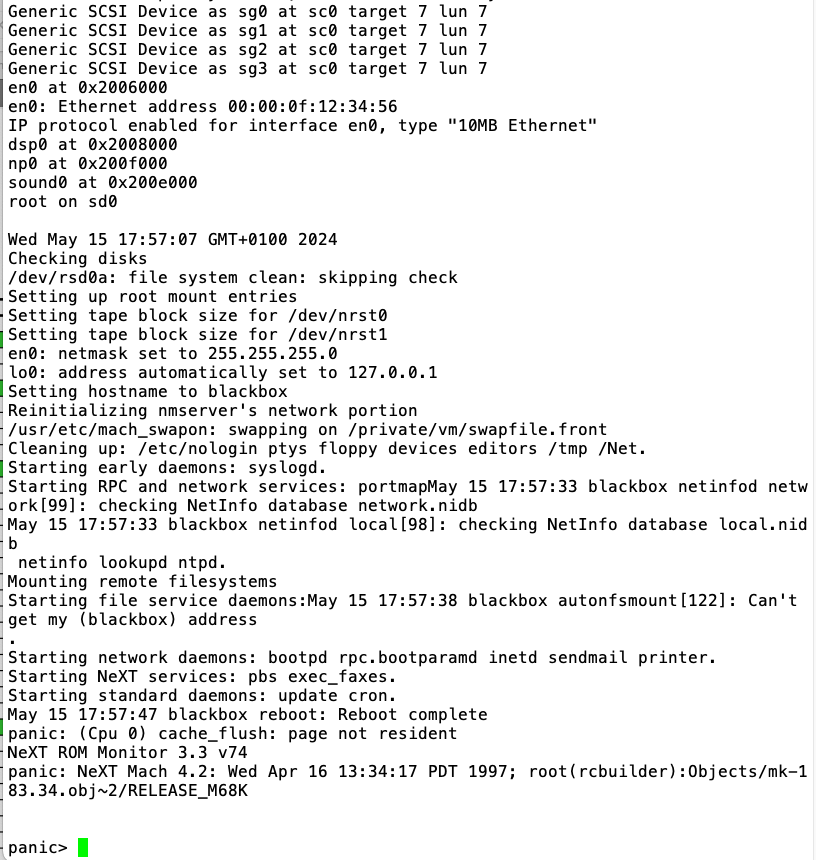
...at least OpenSTEP 4.2 is not too happy with a serial console, though, and crashes with a panic. This does not happen when using the ADB peripherals and monitor...
Title: Re: Creating replacement ROMs when they fail
Post by: stefan on July 11, 2024, 12:25:29 AM
Post by: stefan on July 11, 2024, 12:25:29 AM
Quote from: sappas on May 10, 2024, 01:12:33 PMIt shoud be interesting to change vertical sync from 72 hz to original 68.4 hz...
What's the benefit of doing this?
Title: Re: Creating replacement ROMs when they fail
Post by: barcher174 on July 11, 2024, 09:46:33 AM
Post by: barcher174 on July 11, 2024, 09:46:33 AM
Quote from: stefan on July 11, 2024, 12:25:29 AMWhat's the benefit of doing this?
Some LCDs don't like the higher refresh.
Title: Re: Creating replacement ROMs when they fail
Post by: ramalhais on July 12, 2024, 08:32:03 PM
Post by: ramalhais on July 12, 2024, 08:32:03 PM
Quote from: cuby on May 15, 2024, 09:32:05 AMA quick update - the patch does not enable the serial console by default, so there's something wrong...
I get a single '@' character when starting up the NeXT instead, no idea what that means... with the original ROM and serial console enabled in NVRAM, I can access the serial console.
The @ is the character sent for the serial loopback test
EDIT: For the console to be enabled, the "soundcard"/monitor must be disconnected
Title: Re: Creating replacement ROMs when they fail
Post by: ramalhais on July 12, 2024, 08:44:29 PM
Post by: ramalhais on July 12, 2024, 08:44:29 PM
Quote from: barcher174 on May 11, 2024, 02:55:10 PMOH! Can I make a request? Can you enable serial console by default? That would be super helpful for people with no soundbox to test.If you boot this linux kernel from NFS it will enable the console in the PROM and also disable auto booting
https://github.com/ramalhais/linux/releases/download/build%2F2024-04-29-21.47.55_6.6.0-rc1_7601ffdc3753363fb07284fc0984eae3ed9d38aa/vmlinux-NeXT.aout
EDIT:
Code:
https://github.com/ramalhais/linux/blob/linux-6.9.y-NeXT/arch/m68k/next/rtc.c#L154
I guess you can also copy the linux kernel to the nextstep partition to file /linux and then boot with command in PROM: bsd/linux or b sd(0,0,0)/linux
Title: Re: Creating replacement ROMs when they fail
Post by: trixster on July 22, 2024, 03:34:32 PM
Post by: trixster on July 22, 2024, 03:34:32 PM
Thanks for the guide, @Nitro , I successfully burnt a rev2.5 v66 rom for my cube following your guide, worked perfectly.
Does anyone have a changelog for the rom updates? I'd be interesting to know what what changed from 2.4 v65 to 2.5 v66.
Does anyone have a changelog for the rom updates? I'd be interesting to know what what changed from 2.4 v65 to 2.5 v66.