Title: Raspberry Pi 4 NFS/Samba File Server for NS/OS, Linux, Mac and Windows
Post by: Nitro on September 13, 2023, 09:20:14 PM
Post by: Nitro on September 13, 2023, 09:20:14 PM
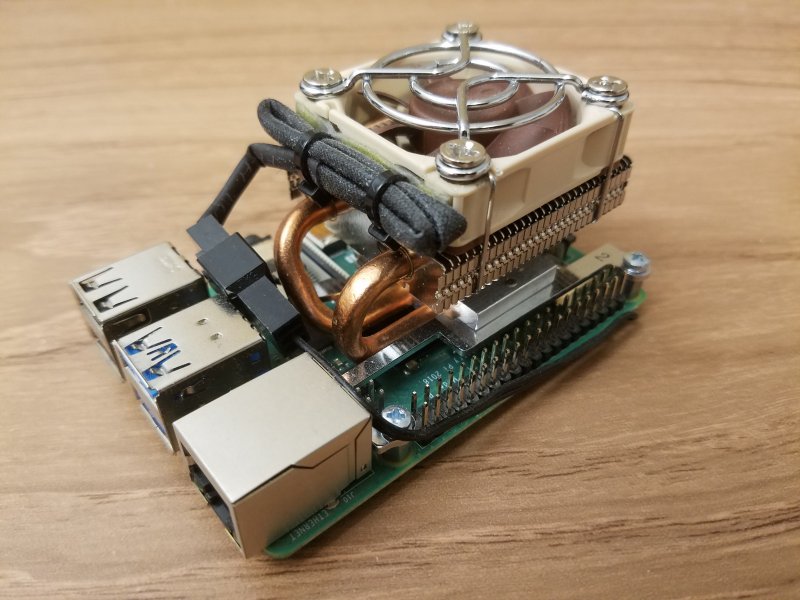
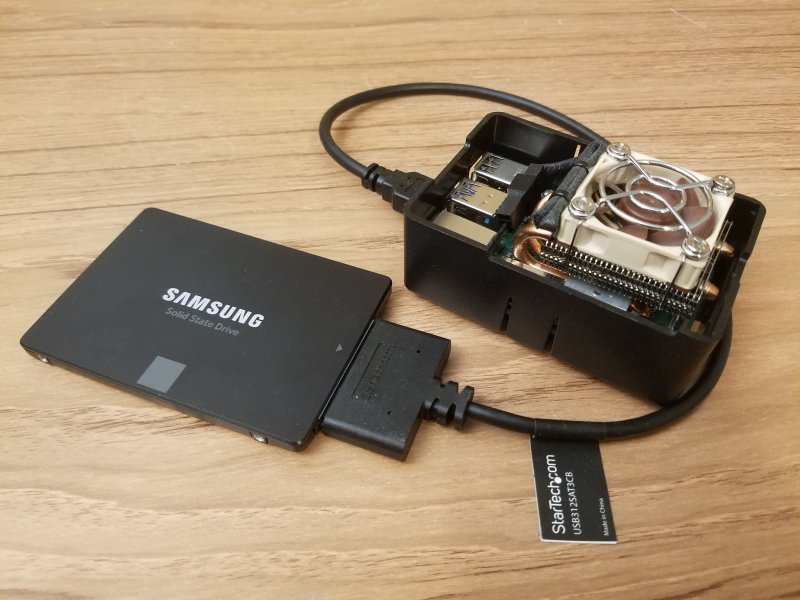
I've wanted to build an inexpensive and efficient file server for a long time, and I noticed that a few people here and around the web have used a Raspberry Pi to build one. It would be nice to be able to share files between NEXTSTEP, OPENSTEP, Linux, Mac and Windows. It would also be nice to use parts that are already sitting idle on the shelf. :) I started with a Raspberry Pi 4 model with 4GB of RAM. It has a first-gen low-profile ICE Tower Heat Pipe heatsink. The LED fan has been replaced with a Noctua 40mm 5V fan running at 3.3V through a 3 pin pigtail. The heatsink hex standoffs have been replaced with slightly shorter ones so that thermal paste could be used instead of the provided thermal pad for better cooling performance. The Pi case is a simple bathtub unit from the PiHut, although I hope in the future to move it to a 3D printed Cube case designed by Nina Makes (https://www.ninamakes.co.uk/builds/next-computer-replica-raspberry-pi-case/). The file storage/boot drive is a Samsung 2TB SSD with a StarTech (USB312SAT3CB) SATA to USB adapter. I tried two other SATA to USB adapters that didn't work, so I consulted this web page (https://jamesachambers.com/raspberry-pi-4-usb-boot-config-guide-for-ssd-flash-drives/) to find one that would. When the Pi was fired up for the first time it complained of low voltage with the official RPI power supply. I switched to a 3.5A power supply from CanaKit and the issue went away.
Rather than go through the setup process step by step I'll just point to the articles that I used for reference. The first task was to install Raspberry Pi OS and set up the Pi to boot off of the SSD.
https://www.pragmaticlinux.com/2021/12/directly-boot-your-raspberry-pi-4-from-a-usb-drive/ (https://www.pragmaticlinux.com/2021/12/directly-boot-your-raspberry-pi-4-from-a-usb-drive/)
https://www.pragmaticlinux.com/2021/03/fix-for-getting-your-ssd-working-via-usb-3-on-your-raspberry-pi/ (https://www.pragmaticlinux.com/2021/03/fix-for-getting-your-ssd-working-via-usb-3-on-your-raspberry-pi/)
The next task was to set up NFS for NS/OS and Linux access.
https://pimylifeup.com/raspberry-pi-nfs/ (https://pimylifeup.com/raspberry-pi-nfs/)
https://www.jonandnic.com/2020/08/28/nextstep-openstep-nfs-file-share-with-a-raspberry-pi/ (https://www.jonandnic.com/2020/08/28/nextstep-openstep-nfs-file-share-with-a-raspberry-pi/)
Up next was to install Samba for Mac and Windows access.
https://pimylifeup.com/raspberry-pi-samba/ (https://pimylifeup.com/raspberry-pi-samba/)
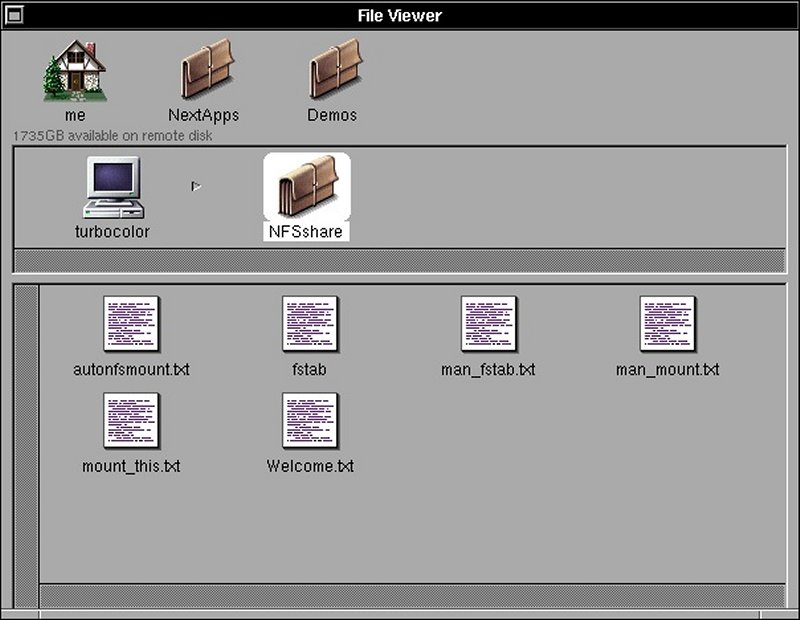
It took quite a bit of wrestling with different settings to get things working but I was finally able to simultaneously connect to the NFS/Samba server with a Turbo Color running OPENSTEP 4.2, a PC running Ubuntu 22.04 and another PC running Windows 10. If you look under the OPENSTEP home icon below it says "1735GB available on remote disk", which is ~1.7TB. NFS for the win.
(Click to enlarge)
Rather than go through the setup process step by step I'll just point to the articles that I used for reference. The first task was to install Raspberry Pi OS and set up the Pi to boot off of the SSD.
https://www.pragmaticlinux.com/2021/12/directly-boot-your-raspberry-pi-4-from-a-usb-drive/ (https://www.pragmaticlinux.com/2021/12/directly-boot-your-raspberry-pi-4-from-a-usb-drive/)
https://www.pragmaticlinux.com/2021/03/fix-for-getting-your-ssd-working-via-usb-3-on-your-raspberry-pi/ (https://www.pragmaticlinux.com/2021/03/fix-for-getting-your-ssd-working-via-usb-3-on-your-raspberry-pi/)
The next task was to set up NFS for NS/OS and Linux access.
https://pimylifeup.com/raspberry-pi-nfs/ (https://pimylifeup.com/raspberry-pi-nfs/)
https://www.jonandnic.com/2020/08/28/nextstep-openstep-nfs-file-share-with-a-raspberry-pi/ (https://www.jonandnic.com/2020/08/28/nextstep-openstep-nfs-file-share-with-a-raspberry-pi/)
Up next was to install Samba for Mac and Windows access.
https://pimylifeup.com/raspberry-pi-samba/ (https://pimylifeup.com/raspberry-pi-samba/)
It took quite a bit of wrestling with different settings to get things working but I was finally able to simultaneously connect to the NFS/Samba server with a Turbo Color running OPENSTEP 4.2, a PC running Ubuntu 22.04 and another PC running Windows 10. If you look under the OPENSTEP home icon below it says "1735GB available on remote disk", which is ~1.7TB. NFS for the win.
(Click to enlarge)
Title: Re: Raspberry Pi 4 NFS/Samba File Server for NS/OS, Linux, Mac and Windows
Post by: wizard on September 14, 2023, 01:26:41 AM
Post by: wizard on September 14, 2023, 01:26:41 AM
What version of Samba are you running?
Title: Re: Raspberry Pi 4 NFS/Samba File Server for NS/OS, Linux, Mac and Windows
Post by: Nitro on September 14, 2023, 01:57:58 AM
Post by: Nitro on September 14, 2023, 01:57:58 AM
On the server it's showing 4.13.13-Debian. I haven't tested Mac access so I don't know if that works or not.
Title: Re: Raspberry Pi 4 NFS/Samba File Server for NS/OS, Linux, Mac and Windows
Post by: Nitro on September 28, 2023, 03:38:04 AM
Post by: Nitro on September 28, 2023, 03:38:04 AM
It looks like the Pi 5 is just around the corner so this server may be short-lived.
https://www.youtube.com/watch?v=nBtOEmUqASQ
https://www.youtube.com/watch?v=nBtOEmUqASQ
Title: Re: Raspberry Pi 4 NFS/Samba File Server for NS/OS, Linux, Mac and Windows
Post by: pTeK on October 02, 2023, 08:19:39 PM
Post by: pTeK on October 02, 2023, 08:19:39 PM
@Nitro When did you get your RPi 4G?
This Covid chip shortage has been nothing but a pain in the @$$. I was wanting to get a FRDM-KL25Z micro-controller board as it is Arduino Pin compatible, has ARM CPU and built in accelerometer to prototype for a drone and the availability on the web was always for the following year :'(
I hope that RPi foundation gets the Rpi shortage sorted, would be cool if they were like NeXT and used RPis to control the manufacturing machines. Would be great publicity.
This Covid chip shortage has been nothing but a pain in the @$$. I was wanting to get a FRDM-KL25Z micro-controller board as it is Arduino Pin compatible, has ARM CPU and built in accelerometer to prototype for a drone and the availability on the web was always for the following year :'(
I hope that RPi foundation gets the Rpi shortage sorted, would be cool if they were like NeXT and used RPis to control the manufacturing machines. Would be great publicity.
Title: Re: Raspberry Pi 4 NFS/Samba File Server for NS/OS, Linux, Mac and Windows
Post by: Nitro on October 03, 2023, 12:21:23 AM
Post by: Nitro on October 03, 2023, 12:21:23 AM
I purchased the Pi 4's soon after they were released, so that was before the shortage. The Pi 5 should be a nice upgrade.
Title: Re: Raspberry Pi 4 NFS/Samba File Server for NS/OS, Linux, Mac and Windows
Post by: Nitro on November 25, 2024, 10:01:41 PM
Post by: Nitro on November 25, 2024, 10:01:41 PM
I decided to go back and reconfigure the Raspberry Pi NFS server and update the OS. The data on the NFS share wasn't using much of the 2TB of storage space so the SSD was swapped with a 250GB drive. A 256GB SD card was also added for automatic daily rsync backups from the SSD.
This seemed like it was going to be a simple swap but it turned out to be a challenge. There were changes to NFS in the latest Raspberry Pi OS that rendered some of my setup information obsolete. The NFS server also had an issue where Windows clients would take about 20 seconds to connect. After testing the fresh OS install it soon became apparent that changes to the configuration file /etc/default/nfs-kernel-server were being ignored. As it turns out, the main NFS configuration for this version of the OS is done in /etc/nfs.conf. I found the answer in a post that @cuby made in another thread (https://www.nextcomputers.org/forums/index.php?topic=5064.msg30013#msg30013). Not only is it necessary to specify NFSv2 but also UDP. Enabling UDP allowed my Turbo Color to connect, and fixed the issue with long connect times on Windows machines too. For my setup I added the following to section [nfsd] in /etc/nfs.conf:
Hopefully this helps someone with a similar setup.
This seemed like it was going to be a simple swap but it turned out to be a challenge. There were changes to NFS in the latest Raspberry Pi OS that rendered some of my setup information obsolete. The NFS server also had an issue where Windows clients would take about 20 seconds to connect. After testing the fresh OS install it soon became apparent that changes to the configuration file /etc/default/nfs-kernel-server were being ignored. As it turns out, the main NFS configuration for this version of the OS is done in /etc/nfs.conf. I found the answer in a post that @cuby made in another thread (https://www.nextcomputers.org/forums/index.php?topic=5064.msg30013#msg30013). Not only is it necessary to specify NFSv2 but also UDP. Enabling UDP allowed my Turbo Color to connect, and fixed the issue with long connect times on Windows machines too. For my setup I added the following to section [nfsd] in /etc/nfs.conf:
Code Select
[nfsd]
udp=y
vers=2
vers=3
vers=4
Hopefully this helps someone with a similar setup.
Title: Re: Raspberry Pi 4 NFS/Samba File Server for NS/OS, Linux, Mac and Windows
Post by: Nitro on December 19, 2024, 05:48:04 PM
Post by: Nitro on December 19, 2024, 05:48:04 PM
The RPI NFS server has been working well for NS/OS but there are still connection issues with Windows clients, so it's time to get a Samba server up and running again. Both NFS and Samba now share the same public directory. NEXTSTEP, OPENSTEP and Linux clients use NFS while a couple of Windows clients use Samba. It seems to be working better now. When the server was reconfigured previously a Pi 4 1GB unit was swapped in. That Pi kept locking up due to the small amount of memory so it was replaced with a 4GB Pi 4 like the original. Then feature creep kicked in and a local web server and nftables firewall was also added. At that point the Pi was swapped for a Pi 4 with 8GB of RAM.
This tiny server sure has been convenient for sharing files between diverse LAN clients. None of the data stored on the server is critical so the automatic daily rsync backups have worked out great. Eventually it would be nice to 3D print a replacement for the bathtub case and get all of the cables going out the back.
This tiny server sure has been convenient for sharing files between diverse LAN clients. None of the data stored on the server is critical so the automatic daily rsync backups have worked out great. Eventually it would be nice to 3D print a replacement for the bathtub case and get all of the cables going out the back.
Title: Re: Raspberry Pi 4 NFS/Samba File Server for NS/OS, Linux, Mac and Windows
Post by: xc68000 on February 06, 2025, 02:32:43 PM
Post by: xc68000 on February 06, 2025, 02:32:43 PM
Quote from: Nitro on November 25, 2024, 10:01:41 PMI decided to go back and reconfigure the Raspberry Pi NFS server and update the OS. The data on the NFS share wasn't using much of the 2TB of storage space so the SSD was swapped with a 250GB drive. A 256GB SD card was also added for automatic daily rsync backups from the SSD.
This seemed like it was going to be a simple swap but it turned out to be a challenge. There were changes to NFS in the latest Raspberry Pi OS that rendered some of my setup information obsolete. The NFS server also had an issue where Windows clients would take about 20 seconds to connect. After testing the fresh OS install it soon became apparent that changes to the configuration file /etc/default/nfs-kernel-server were being ignored. As it turns out, the main NFS configuration for this version of the OS is done in /etc/nfs.conf. I found the answer in a post that @cuby made in another thread (https://www.nextcomputers.org/forums/index.php?topic=5064.msg30013#msg30013). Not only is it necessary to specify NFSv2 but also UDP. Enabling UDP allowed my Turbo Color to connect, and fixed the issue with long connect times on Windows machines too. For my setup I added the following to section [nfsd] in /etc/nfs.conf:Code Select[nfsd]
udp=y
vers=2
vers=3
vers=4
Hopefully this helps someone with a similar setup.
It did thank you! I spent a day trying to figure this out and playing with that config file that is no longer being used. I mean they could have put something like "THIS CONFIG FILE IS DEPRECIATED!" or something in the top.
Title: Re: Raspberry Pi 4 NFS/Samba File Server for NS/OS, Linux, Mac and Windows
Post by: Nitro on February 06, 2025, 02:50:51 PM
Post by: Nitro on February 06, 2025, 02:50:51 PM
Quote from: xc68000 on February 06, 2025, 02:32:43 PMIt did thank you! I spent a day trying to figure this out and playing with that config file that is no longer being used. I mean they could have put something like "THIS CONFIG FILE IS DEPRECIATED!" or something in the top.
I had just typed up a reply to your request for help, and I was going to point you to this thread. :) Glad it helped. I spent quite a while trying to figure it out too.