Title: How to create a transparent window programatically with AppKit
Post by: xuhao394 on October 04, 2023, 04:55:22 AM
Post by: xuhao394 on October 04, 2023, 04:55:22 AM
I'm running OpenStep 4.2 on VMware and I tried to write some simple programs on it. One thing I failed to implement is to draw a line like the dragging line (the line shown when you hold control and connect objects) in InterfaceBuilder. Stack Overflow suggests that we should create a transparent window and draw the line in it (which supposed to work on macOS), so I tried to create the window with commands below:
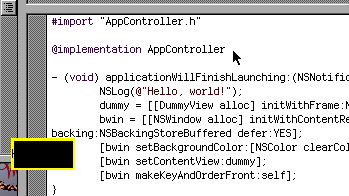
I thought this would give me a transparent window with a yellow border, however when it runs the transparent part appeared in black (see the picture).
Is there anything wrong with such usage? If there is no way to create a transparent window in NeXTSTEP, how can I do the same thing as InterfaceBuilder does? Thank you.
Code Select
win = [[NSWindow alloc] initWithContentRect:NSMakeRect(30,30,64,32) styleMask:NSBorderlessWindowMask backing:NSBackingStoreBuffered defer:YES];
[win setBackgroundColor:[NSColor clearColor]];
[win setContentView:dummyView];
[win makeKeyAndOrderFront:self];
Where dummyView is a simple NSView subclass that draws a yellow border on the view, and draws a "Hello world" string on it.I thought this would give me a transparent window with a yellow border, however when it runs the transparent part appeared in black (see the picture).
Is there anything wrong with such usage? If there is no way to create a transparent window in NeXTSTEP, how can I do the same thing as InterfaceBuilder does? Thank you.
Title: Re: How to create a transparent window programatically with AppKit
Post by: nuss on October 04, 2023, 08:29:51 AM
Post by: nuss on October 04, 2023, 08:29:51 AM
Here is an example from the book "NeXTSTEP Programming Part 1":
So my assumption (can not test atm) is that you can set `[myView setOpaque: NO];` to achieve transparency.
Code Select
NXSetRect(&graphicsRect, 100.0, 350.0, 400.0, 400.0);

myWindow = [ [Window alloc]
    initContent: &graphicsRect
    style: NX_TITLEDSTYLE
    backing: NX_BUFFERED
    buttonMask: NX_MINIATURIZEBUTTONMASK
    defer: NO];

[myWindow setTitle:"Tiny Application Window"];
[myWindow display];

...

myView = [ [View alloc] initFrame: &graphicsRect];
[myView setOpaque: YES];
[myWindow setContentView: myView];
[myWindow makeKeyAndOrderFront: nil];

...
So my assumption (can not test atm) is that you can set `[myView setOpaque: NO];` to achieve transparency.
Title: Re: How to create a transparent window programatically with AppKit
Post by: xuhao394 on October 04, 2023, 09:36:07 AM
Post by: xuhao394 on October 04, 2023, 09:36:07 AM
Quote from: nuss on October 04, 2023, 08:29:51 AMHere is an example from the book "NeXTSTEP Programming Part 1":Thanks for your advice, but unfortunately neither NSView nor NSWindow responds to `setOpaque:` message. Additionally I've found the text below in OpenStep 4.2 documentation:
...
So my assumption (can not test atm) is that you can set `[myView setOpaque: NO];` to achieve transparency.
QuoteWhen it's created, an NSWindow automatically creates two NSViews: An opaque frame view (...) and a transparent content view (...) The frame view and its peripheral elements are private objects that your application can't access directly.From this passage I guess we can't make an NSWindow transparent, because we can't make its "frame view" transparent :(
Maybe subclassing NSWindow will work, but how to make frame view transparent is still undocumented.
Or maybe IB is actually using some undocumented APIs to do the trick...?
Title: Re: How to create a transparent window programatically with AppKit
Post by: mlroider on October 04, 2023, 11:18:37 PM
Post by: mlroider on October 04, 2023, 11:18:37 PM
Try creating 2 windows 1 or 2 pixel wide one horizontal one vertical... I think that is how it was done in IB...