Title: FrameMaker 3.2 Keyboard accent Characters kbmap
Post by: rjnf on December 28, 2023, 03:06:31 AM
Post by: rjnf on December 28, 2023, 03:06:31 AM
Hello,
Don't know who still uses framemaker out there, in any case this week I just got a huge document to make in Frame and since I needed to write it in Portuguese I spent almost 1 hour in a single page due to the accent characters needed. So I got fed up with it and started to look how I could configure it so I could use my PT keyboard normally without any escape sequence blablabla....
I found out a file hanging around the old ftp called append-to-kbmap wich did not solve my problem at all, so I took a look into a lot of documents and groups basically its complicated due to the huge list of NexTStep encoding plus framemaker commands \xXXX. Well seemed a nightmare.
Then I did trial and error with the kbmap file, and it worked it took me a 3 hours at least to figure out but its working perfectly. The file I created simply ditches all other stuff inside the kbmap because I don't use keyboard shortcuts I was only interested in accent characters to work fine for me.
So If anyone is interested in it I paste it here below. Maybe for German French or Spanish you'll need some extra lines bur for PT or PT_BR
*** kbmap *** for PT and PT_BR
<\A \x87 : \x82> Ccedilla
<\A \x587 : \x82 > Ccedille
<\A \´E : \x83> Eacute
<\A \~N : \x84> Ntilde
<\A \´a : \x87> aacute
<\A \`a : \x88> agrave
<\A \^a : \x89> acircumflex
<\A \~a : \x8b> atilde
<\A \xdb : \x8d> ccedilla
<\A \x4db : \x8d > ccedille
<\A \´e : \x8e> eacute
<\A \`e : \x8f> egrave
<\A \^e : \x90> ecircumflex
<\A \´i : \x92> iacute
<\A \`i : \x93> igrave
<\A \^i : \x94> icircumflex
<\A \~n : \x96> ntilde
<\A \´o : \x97> oacute
<\A \`o : \x98> ograve
<\A \^o : \x99> ocircumflex
<\A \~o : \x9b> otilde
<\A \´u : \x9c> uacute
<\A \`u : \x9d> ugrave
<\A \^u : \x9e> ucircumflex
<\A \´A : \xcb> Agrave
<\A \~A : \xcc> Atilde
<\A \~O : \xcd> Otilde
<\A \^A : \xe5> Acircumflex
<\A \^E : \xe6> Ecircumflex
<\A \´A : \xe7> Aacute
<\A \`E : \xe9> Egrave
<\A \´I : \xea> Iacute
<\A \^I : \xeb> Icircumflex
<\A \´I : \xed> Igrave
<\A \´O : \xee> Oacute
<\A \^O : \xef> Ocircumflex
<\A \`O : \xf1> Ograve
<\A \´U : \xf2> Uacute
<\A \^U : \xf3> Ucircumflex
<\A \`U : \xf4> Ugrave
<\A \xcb : \xfc> cedilla
Don't know who still uses framemaker out there, in any case this week I just got a huge document to make in Frame and since I needed to write it in Portuguese I spent almost 1 hour in a single page due to the accent characters needed. So I got fed up with it and started to look how I could configure it so I could use my PT keyboard normally without any escape sequence blablabla....
I found out a file hanging around the old ftp called append-to-kbmap wich did not solve my problem at all, so I took a look into a lot of documents and groups basically its complicated due to the huge list of NexTStep encoding plus framemaker commands \xXXX. Well seemed a nightmare.
Then I did trial and error with the kbmap file, and it worked it took me a 3 hours at least to figure out but its working perfectly. The file I created simply ditches all other stuff inside the kbmap because I don't use keyboard shortcuts I was only interested in accent characters to work fine for me.
So If anyone is interested in it I paste it here below. Maybe for German French or Spanish you'll need some extra lines bur for PT or PT_BR
*** kbmap *** for PT and PT_BR
<\A \x87 : \x82> Ccedilla
<\A \x587 : \x82 > Ccedille
<\A \´E : \x83> Eacute
<\A \~N : \x84> Ntilde
<\A \´a : \x87> aacute
<\A \`a : \x88> agrave
<\A \^a : \x89> acircumflex
<\A \~a : \x8b> atilde
<\A \xdb : \x8d> ccedilla
<\A \x4db : \x8d > ccedille
<\A \´e : \x8e> eacute
<\A \`e : \x8f> egrave
<\A \^e : \x90> ecircumflex
<\A \´i : \x92> iacute
<\A \`i : \x93> igrave
<\A \^i : \x94> icircumflex
<\A \~n : \x96> ntilde
<\A \´o : \x97> oacute
<\A \`o : \x98> ograve
<\A \^o : \x99> ocircumflex
<\A \~o : \x9b> otilde
<\A \´u : \x9c> uacute
<\A \`u : \x9d> ugrave
<\A \^u : \x9e> ucircumflex
<\A \´A : \xcb> Agrave
<\A \~A : \xcc> Atilde
<\A \~O : \xcd> Otilde
<\A \^A : \xe5> Acircumflex
<\A \^E : \xe6> Ecircumflex
<\A \´A : \xe7> Aacute
<\A \`E : \xe9> Egrave
<\A \´I : \xea> Iacute
<\A \^I : \xeb> Icircumflex
<\A \´I : \xed> Igrave
<\A \´O : \xee> Oacute
<\A \^O : \xef> Ocircumflex
<\A \`O : \xf1> Ograve
<\A \´U : \xf2> Uacute
<\A \^U : \xf3> Ucircumflex
<\A \`U : \xf4> Ugrave
<\A \xcb : \xfc> cedilla
Title: Re: FrameMaker 3.2 Keyboard accent Characters kbmap
Post by: Rob Blessin Black Hole on December 28, 2023, 07:09:58 PM
Post by: Rob Blessin Black Hole on December 28, 2023, 07:09:58 PM
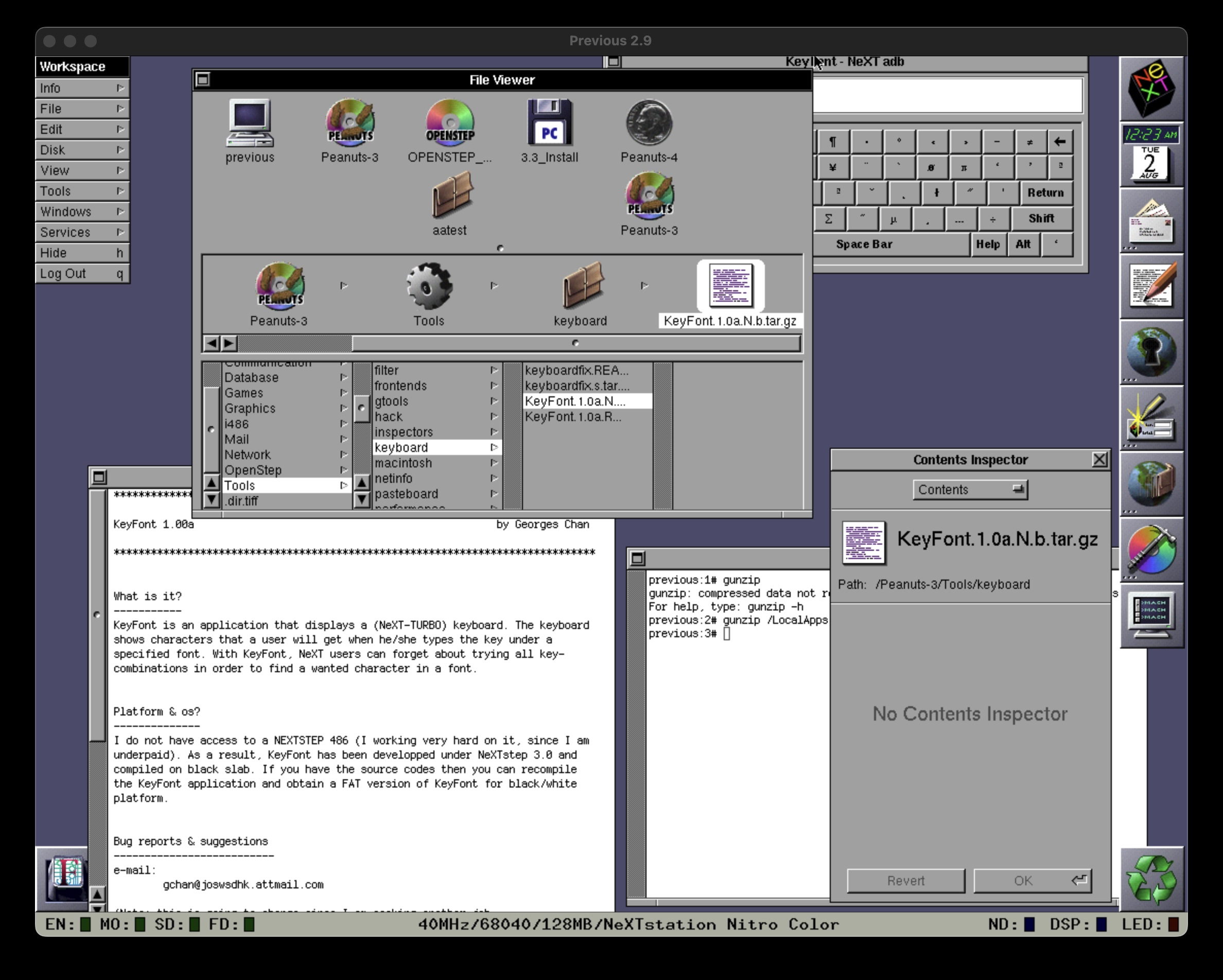
I think this Keyboard app will help you do what you need as it displays all available fonts for the NeXT keyboard using different keyboard combinations. Located on the Peanuts 3.iso the attached graphic shows the app running on my Mac PRO2 Mini in Previous NeXTSTEP 3.3 with the directory path on Peanuts3.iso and
then using gunzip command in Terminal after moving the keyboard.tar.gz file to your local apps directory. Remove the space at the end after drag and drop your .tar.gz into terminal app.
then using gunzip command in Terminal after moving the keyboard.tar.gz file to your local apps directory. Remove the space at the end after drag and drop your .tar.gz into terminal app.