Title: BlueSCSI Settings
Post by: cooltr6 on January 31, 2024, 02:00:25 AM
Post by: cooltr6 on January 31, 2024, 02:00:25 AM
Greetings fellow NeXT enthusiasts! I've been getting in to BlueSCSI as a replacement for all of those 30+ year old spinning platter drives that are starting to fail up a bit.
Of course, the Black Hardware in my stable isn't going to be ignored in this. One Cube already has a SCSI2SD installed [thanks Rob!]. The others, platter drives. Time to make those go.
I've been reading in many places, including on this forum...of people getting BlueSCSI to work with their hardware. I had an external 'portable' BlueSCSI sitting around, so I thought I'd give it a try. One 'drive' that was roughly 2GB, set to SCSI ID 2 and sent to the SD Card.
The first go of testing is with a Turbo Mono Slab with NeXTSTEP 3.0 installed...eventually this will be OPENSTEP 4.2...but needed to start with some basic testing first. Upon startup and getting into Workspace, I got the happy error of 'Disk is damaged...initialize?" Started that process, immediately failed. Console threw errors about there being mismatches. Did some more reading...another test...failed...but BuildDisk and Workspace were making efforts to see the 'disk'.
Fast forward a few minutes -- found a post on TinkerDifferent [https://tinkerdifferent.com/threads/bluescsi-v2-pico-low-cost-open-hardware-fast-scsi-device.2319/page-4 for those who wanna read]...and I found two wonderful things:
1. a bluescsi.ini builder [https://ini.bluescsi.com]
2. The MAGIC NUMBERS to make things really happy.
Because trying to find things simply...so others can benefit is either buried across many posts or just doesn't exist...sooooo here is the ini file you'd wanna send over to your BlueSCSI device...
[SCSI2]
Debug=1 ; On
EnableUnitAttention=1 ; On
EnableSCSI2=1 ; On
MapLunsToIDs=1 ; On
MaxSyncSpeed=10
Vendor=BlueSCSI
Version=2
Type=0 ; Fixed
SectorsPerTrack=139
HeadsPerCylinder=4
Substitute your SCSI ID in the first line.
Make sure the two magic numbers -- SectorsPerTrack and HeadsPerCylinder are set to 139 and 4 respectively. DO NOT change these.
Make sure you have an entry for each 'disk' that are on your SD card - this way all drives will be configured with the same drive parameters.
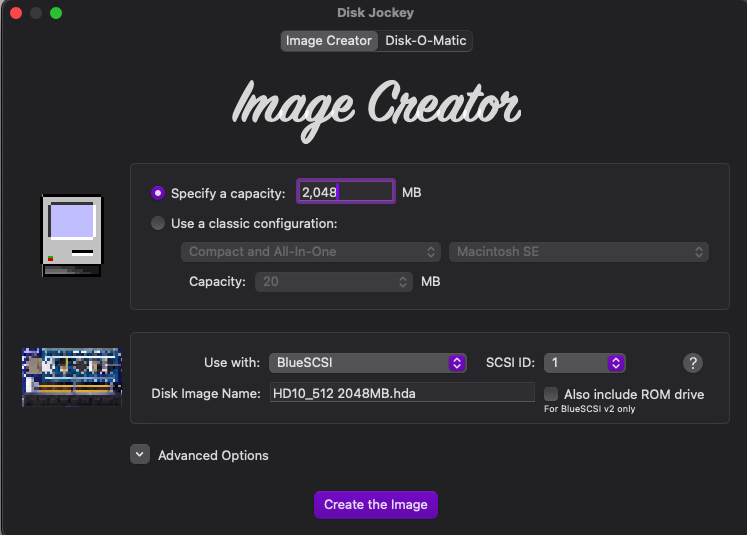
Filenames for your disk should be pretty standard -- HD20_512 OS42_Boot.hda for instance. Use your tool of choice to create your empty disk images. I used Disc Jockey [https://diskjockey.onegeekarmy.eu].
As I'm writing this...BuildDisk is working along happily installing NeXTSTEP 3.0. After that...more testing. =)
Of course, the Black Hardware in my stable isn't going to be ignored in this. One Cube already has a SCSI2SD installed [thanks Rob!]. The others, platter drives. Time to make those go.
I've been reading in many places, including on this forum...of people getting BlueSCSI to work with their hardware. I had an external 'portable' BlueSCSI sitting around, so I thought I'd give it a try. One 'drive' that was roughly 2GB, set to SCSI ID 2 and sent to the SD Card.
The first go of testing is with a Turbo Mono Slab with NeXTSTEP 3.0 installed...eventually this will be OPENSTEP 4.2...but needed to start with some basic testing first. Upon startup and getting into Workspace, I got the happy error of 'Disk is damaged...initialize?" Started that process, immediately failed. Console threw errors about there being mismatches. Did some more reading...another test...failed...but BuildDisk and Workspace were making efforts to see the 'disk'.
Fast forward a few minutes -- found a post on TinkerDifferent [https://tinkerdifferent.com/threads/bluescsi-v2-pico-low-cost-open-hardware-fast-scsi-device.2319/page-4 for those who wanna read]...and I found two wonderful things:
1. a bluescsi.ini builder [https://ini.bluescsi.com]
2. The MAGIC NUMBERS to make things really happy.
Because trying to find things simply...so others can benefit is either buried across many posts or just doesn't exist...sooooo here is the ini file you'd wanna send over to your BlueSCSI device...
[SCSI2]
Debug=1 ; On
EnableUnitAttention=1 ; On
EnableSCSI2=1 ; On
MapLunsToIDs=1 ; On
MaxSyncSpeed=10
Vendor=BlueSCSI
Version=2
Type=0 ; Fixed
SectorsPerTrack=139
HeadsPerCylinder=4
Substitute your SCSI ID in the first line.
Make sure the two magic numbers -- SectorsPerTrack and HeadsPerCylinder are set to 139 and 4 respectively. DO NOT change these.
Make sure you have an entry for each 'disk' that are on your SD card - this way all drives will be configured with the same drive parameters.
Filenames for your disk should be pretty standard -- HD20_512 OS42_Boot.hda for instance. Use your tool of choice to create your empty disk images. I used Disc Jockey [https://diskjockey.onegeekarmy.eu].
As I'm writing this...BuildDisk is working along happily installing NeXTSTEP 3.0. After that...more testing. =)
Title: Re: BlueSCSI Settings
Post by: SpaceRat2k on January 31, 2024, 01:28:44 PM
Post by: SpaceRat2k on January 31, 2024, 01:28:44 PM
Coool ! Huge applause!
Space
Space
Title: Re: BlueSCSI Settings
Post by: don_apple on January 31, 2024, 01:52:43 PM
Post by: don_apple on January 31, 2024, 01:52:43 PM
Welcome to the Forum!
And thanks for sharing this information.
Besides the two parameters SectorsPerTrack and HeadsPerCylinder you most likely don't need any of the others you currently have in your bluescsi.ini at the moment, because as documented at https://github.com/BlueSCSI/BlueSCSI-v2/wiki/bluescsi.ini for most of the ones you have in the bluescsi.ini the value you have specified is the default (for example EnableSCSI2 and MaxSyncSpeed), and therefore if you don't specify it the BlueSCSI will still use the same setting.
And at least one parameter should not be needed at all, which is MapLunsToIDs. This is only needed on the Atari MegaSTE, but should not be needed for a NeXT.
Also "Debug=1" should only be used if you want to really se what is going on on he BlueSCSI, but since this can cause the log.txt to grow pretty quickly it should be avoided for normal use.
And thanks for sharing this information.
Besides the two parameters SectorsPerTrack and HeadsPerCylinder you most likely don't need any of the others you currently have in your bluescsi.ini at the moment, because as documented at https://github.com/BlueSCSI/BlueSCSI-v2/wiki/bluescsi.ini for most of the ones you have in the bluescsi.ini the value you have specified is the default (for example EnableSCSI2 and MaxSyncSpeed), and therefore if you don't specify it the BlueSCSI will still use the same setting.
And at least one parameter should not be needed at all, which is MapLunsToIDs. This is only needed on the Atari MegaSTE, but should not be needed for a NeXT.
Also "Debug=1" should only be used if you want to really se what is going on on he BlueSCSI, but since this can cause the log.txt to grow pretty quickly it should be avoided for normal use.
Title: Re: BlueSCSI Settings
Post by: cooltr6 on February 02, 2024, 01:29:17 AM
Post by: cooltr6 on February 02, 2024, 01:29:17 AM
Hey don_apple. Thank you for the extra detail on this. I did miss removing the line about MapLunsToIDs...meant to do that before posting. As for the rest, you are correct, not all settings are needed, but I did want to be explicit, just to be double sure that things worked.
You mentioned the Debug=1 line...interesting, with all of the testing I've been doing, the log.txt file on the BlueSCSI card has just been simple diagnostic and 'drive readiness' detail, nothing more.
Thanks SpaceRat2k. =)
You mentioned the Debug=1 line...interesting, with all of the testing I've been doing, the log.txt file on the BlueSCSI card has just been simple diagnostic and 'drive readiness' detail, nothing more.
Thanks SpaceRat2k. =)
Title: Re: BlueSCSI Settings
Post by: cooltr6 on February 02, 2024, 01:44:29 AM
Post by: cooltr6 on February 02, 2024, 01:44:29 AM
Testing update...
Since the first build of NeXTSTEP 3.0 on a Turbo Slab, all was successful and I've sent that build to bit heaven and kicked off the second round. I pulled out the good running Cube [a 25MHz '040] and started up OPENSTEP 4.2. One partition on the BlueSCSI card, since there is already a SCSI2SD installed with 4 other partitions. For that, SCSI ID 5 was my friend.
Off to BuildDisk I went,installed the full suite, totaling over 800MB [of a 2GB drive]. It took a while for that build to complete, but when done there was joy in the world. BuildDisk reported that it completed successfully.
Shut everything down, put the Cube away and grabbed the two Slabs [one Turbo, the other non-Turbo]. Since the non-Turbo Slab didn't have a hard drive in it, started testing with that. Connected everything up and a minute or so later, was presented with the initial OPENSTEP setup screen. Got the initial settings set and Workspace loaded up. A spot of testing later, called the non-Turbo Slab testing a success.
On to the Turbo Slab...I removed the hard drive with NEXTSTEP 3.0 and connected up the external BlueSCSI. Starting up just punctuated the testing I had already done, but by this point I had created three other 'drives' and moved the boot drive from SCSI ID 5 to 1 and the others numbered 2-4. Once the Turbo Slab loaded up and into Workspace, the newly 'installed' drives were formatted. Once completed, they showed up on the Shelf...ready for use.
The upshot of this all, having been tested on a non-Turbo '040 Cube, a non-Turbo Slab and a Turbo Slab...BlueSCSI [even the external version] works brilliantly. I'm ramping up to purchase a few internal BlueSCSI devices and make these changes permanent.
That's all for now on this subject...onward to the next bit of tinkering around.
Since the first build of NeXTSTEP 3.0 on a Turbo Slab, all was successful and I've sent that build to bit heaven and kicked off the second round. I pulled out the good running Cube [a 25MHz '040] and started up OPENSTEP 4.2. One partition on the BlueSCSI card, since there is already a SCSI2SD installed with 4 other partitions. For that, SCSI ID 5 was my friend.
Off to BuildDisk I went,installed the full suite, totaling over 800MB [of a 2GB drive]. It took a while for that build to complete, but when done there was joy in the world. BuildDisk reported that it completed successfully.
Shut everything down, put the Cube away and grabbed the two Slabs [one Turbo, the other non-Turbo]. Since the non-Turbo Slab didn't have a hard drive in it, started testing with that. Connected everything up and a minute or so later, was presented with the initial OPENSTEP setup screen. Got the initial settings set and Workspace loaded up. A spot of testing later, called the non-Turbo Slab testing a success.
On to the Turbo Slab...I removed the hard drive with NEXTSTEP 3.0 and connected up the external BlueSCSI. Starting up just punctuated the testing I had already done, but by this point I had created three other 'drives' and moved the boot drive from SCSI ID 5 to 1 and the others numbered 2-4. Once the Turbo Slab loaded up and into Workspace, the newly 'installed' drives were formatted. Once completed, they showed up on the Shelf...ready for use.
The upshot of this all, having been tested on a non-Turbo '040 Cube, a non-Turbo Slab and a Turbo Slab...BlueSCSI [even the external version] works brilliantly. I'm ramping up to purchase a few internal BlueSCSI devices and make these changes permanent.
That's all for now on this subject...onward to the next bit of tinkering around.
Title: Re: BlueSCSI Settings
Post by: blackbeauty on November 09, 2024, 11:33:37 AM
Post by: blackbeauty on November 09, 2024, 11:33:37 AM
Reading the positive reports, I wanted to follow in your footsteps and reactivate my TurboColor slab (Rev 3.1 V71) with a BlueSCSIv2 solution. I copied the OS 4.2 image linked to from the BlueSCSI. used a slightly stripped down version of BlueSCSI.ini as suggested in this thread and only hoped for the best.
However, nothing happened except that I can see that the board gets power. The machine tried to boot from network (graphical mode) and kept doing so until powered off. No log.txt has been written onto the SD card.
Moreover, I couldn't go into the Monitor, because the combination Command-backquote or Command-Alt(Left)-backquote simply doesn't have any effect.
Which honestly leaves me a bit puzzled, since that way I don't see a point where I can troubleshoot this. Does anybody have an idea what might be going wrong?
This is the content of the bluescsi.ini file I used:
[SCSI2]
Debug=1 ; On
EnableUnitAttention=1 ; On
Vendor=BlueSCSI
Version=2
Type=0 ; Fixed
SectorsPerTrack=139
HeadsPerCylinder=4
However, nothing happened except that I can see that the board gets power. The machine tried to boot from network (graphical mode) and kept doing so until powered off. No log.txt has been written onto the SD card.
Moreover, I couldn't go into the Monitor, because the combination Command-backquote or Command-Alt(Left)-backquote simply doesn't have any effect.
Which honestly leaves me a bit puzzled, since that way I don't see a point where I can troubleshoot this. Does anybody have an idea what might be going wrong?
This is the content of the bluescsi.ini file I used:
[SCSI2]
Debug=1 ; On
EnableUnitAttention=1 ; On
Vendor=BlueSCSI
Version=2
Type=0 ; Fixed
SectorsPerTrack=139
HeadsPerCylinder=4
Title: Re: BlueSCSI Settings
Post by: don_apple on November 10, 2024, 01:21:46 PM
Post by: don_apple on November 10, 2024, 01:21:46 PM
Quote from: blackbeauty on November 09, 2024, 11:33:37 AMReading the positive reports, I wanted to follow in your footsteps and reactivate my TurboColor slab (Rev 3.1 V71) with a BlueSCSIv2 solution. I copied the OS 4.2 image linked to from the BlueSCSI. used a slightly stripped down version of BlueSCSI.ini as suggested in this thread and only hoped for the best.If no log.txt is written on the SD card of the BlueSCSI then it is not even initializing. Therefore I would suggest to see what happens if you just attach the BlueSCSI to a PC/mac via USB (sot that it gets power).
However, nothing happened except that I can see that the board gets power. The machine tried to boot from network (graphical mode) and kept doing so until powered off. No log.txt has been written onto the SD card.
Moreover, I couldn't go into the Monitor, because the combination Command-backquote or Command-Alt(Left)-backquote simply doesn't have any effect.
Which honestly leaves me a bit puzzled, since that way I don't see a point where I can troubleshoot this. Does anybody have an idea what might be going wrong?
This is the content of the bluescsi.ini file I used:
[SCSI2]
Debug=1 ; On
EnableUnitAttention=1 ; On
Vendor=BlueSCSI
Version=2
Type=0 ; Fixed
SectorsPerTrack=139
HeadsPerCylinder=4
If some of the LEDs on the BlueSCI start blinking then it is initializing.
After a minute or so when the LEDs stop blinking you can disconnect the USB cable and then check if a log.txt has now been written.
If you haven't already done so I would also suggest to update the Firmware of the BlueSCSIv2 to the lates version: https://github.com/BlueSCSI/BlueSCSI-v2/releases/tag/v2024.10.26
As you can see it now contains a profile for NeXT systems so you don't need to specify the SectorsPerTrack and HeadsPerCylinder in the bluescsi.ini anymore.
Title: Re: BlueSCSI Settings
Post by: blackbeauty on November 12, 2024, 03:09:26 PM
Post by: blackbeauty on November 12, 2024, 03:09:26 PM
It turned out that I used an old Class 4 SD card. With that, no log gets written. I switched to a more modern Class 10 32GB card and got the log.txt. Now, I know about the settings file being pretty much trimmed down, when using the latest firmware and the NeXT profile. In fact, I did that and the log reveals the new firmware to be in effect.
However, the card did not work. I put it into a second BlueSCSI with older firmware and that worked instantly booting flawlessly (using the old .ini file)!
I wonder, what has happened to the first adapter? The firmware update process went exactly as documented. Even the log pretty much is the same, down to the line "Initialization is complete!" But the card doesn't boot, and in the NeXT monitor, this message from the SCSI controller repeatedly pops up:
sc: Didn't complete
Is it possible that I somehow bricked the first BlueSCSI?
However, the card did not work. I put it into a second BlueSCSI with older firmware and that worked instantly booting flawlessly (using the old .ini file)!
I wonder, what has happened to the first adapter? The firmware update process went exactly as documented. Even the log pretty much is the same, down to the line "Initialization is complete!" But the card doesn't boot, and in the NeXT monitor, this message from the SCSI controller repeatedly pops up:
sc: Didn't complete
Is it possible that I somehow bricked the first BlueSCSI?
Title: Re: BlueSCSI Settings
Post by: don_apple on November 12, 2024, 10:20:46 PM
Post by: don_apple on November 12, 2024, 10:20:46 PM
Are the two BlueSCSIv2 adapters the same model, or are there other differences other than the firmware.
If the only difference is the firmware, then it could also be that the latest firmware has a bug.
There was a report in the "Discsussions" section about similar issues on a Mac: https://github.com/BlueSCSI/BlueSCSI-v2/discussions/208
So you might want to start a new discussion there as well so that the maintainer of BlueSCSI can take a look a this.
If the only difference is the firmware, then it could also be that the latest firmware has a bug.
There was a report in the "Discsussions" section about similar issues on a Mac: https://github.com/BlueSCSI/BlueSCSI-v2/discussions/208
So you might want to start a new discussion there as well so that the maintainer of BlueSCSI can take a look a this.
Title: Re: BlueSCSI Settings
Post by: blackbeauty on November 13, 2024, 03:47:46 AM
Post by: blackbeauty on November 13, 2024, 03:47:46 AM
Thanks for your answer! Yes, I got them both in the same batch, but I only updated the firmware on one of them. The GitHub issue seems to match my situation as well. Although I can't contribute so many new details, I'll follow up on your suggestion.
Is it possible to downgrade the firmware to a previous version? Purely technically, I assume it should.
Is it possible to downgrade the firmware to a previous version? Purely technically, I assume it should.
Title: Re: BlueSCSI Settings
Post by: don_apple on November 13, 2024, 05:15:11 AM
Post by: don_apple on November 13, 2024, 05:15:11 AM
Quote from: blackbeauty on November 13, 2024, 03:47:46 AMIs it possible to downgrade the firmware to a previous version? Purely technically, I assume it should.Yes, you can simply upload a different firmware release from the list available at https://github.com/BlueSCSI/BlueSCSI-v2/releases to the Pico on the BlueSCSI board at any point in time.
Installing the same version of the firmware that is on the working BlueSCSI on the one that is not working is a good test to find out if the newer firmware is causing the issue. If the non-working BlueSCSI starts working when you install the older Firmware release then there is definitively an issue with the new firmware release.
Title: Re: BlueSCSI Settings
Post by: blackbeauty on November 13, 2024, 10:52:13 AM
Post by: blackbeauty on November 13, 2024, 10:52:13 AM
That's what I thought as well. Unfortunately, after downgrading the firmware to the September release (and it says so in the log.txt), the same error persists. I continue to get that "Didn't complete" message from the NeXT SCSI controller.
That seems to make that BlueSCSI board unusable as for now:(
That seems to make that BlueSCSI board unusable as for now:(
Title: Re: BlueSCSI Settings
Post by: blackbeauty on December 02, 2024, 04:19:09 AM
Post by: blackbeauty on December 02, 2024, 04:19:09 AM
To conclude this topic: It turned out now that the BlueSCSI card actually was broken, a chip was skewed and a capacitor was missing, probably due to some undetected mechanical force. Which is a good sign in that there was nothing wrong with the process of up- or downgrading the firmware itself.
Thanks for the answers on this!
Thanks for the answers on this!
Title: Re: BlueSCSI Settings
Post by: sappas on January 08, 2025, 01:16:16 PM
Post by: sappas on January 08, 2025, 01:16:16 PM
I've the same issue, but my zuluscsi rp2040 still work fine, not my bluescsi v2 - 202310a
What's your capacitor missing ?
What's your capacitor missing ?