Title: Starting App when loging in?
Post by: wlewisiii on February 11, 2024, 08:56:30 PM
Post by: wlewisiii on February 11, 2024, 08:56:30 PM
I found a dock extender in the Nextfiles archive called Fiend. It makes the dock bigger, starts the screen saver, etc. Neat app. I'd like it to run every time I log into the "Me" account.
But I am failing to accomplish this.
.login doesn't fire off unless I open a terminal
/etc/rc.local doesn't work either.
Can cron do an arbitrary job at login in Nextstep 3.3?
Thanks!
But I am failing to accomplish this.
.login doesn't fire off unless I open a terminal
/etc/rc.local doesn't work either.
Can cron do an arbitrary job at login in Nextstep 3.3?
Thanks!
Title: Re: Starting App when loging in?
Post by: cuby on February 11, 2024, 11:12:04 PM
Post by: cuby on February 11, 2024, 11:12:04 PM
The section "Customizing Login and Logout" in chapter 9 (System Startup and Shutdown) of the NeXT System and Network Administration manual (https://www.nextcomputers.org/files/manuals/nsa/09_StartShut.htmld/index.html#9es) describes how to set a Login Hook - A script or application that runs when anyone logs in.
I think this could be used to start the dock extender, though I cannot see how to customize this to start the extender only for a specific user.
I think this could be used to start the dock extender, though I cannot see how to customize this to start the extender only for a specific user.
Title: Re: Starting App when loging in?
Post by: wlewisiii on February 11, 2024, 11:50:17 PM
Post by: wlewisiii on February 11, 2024, 11:50:17 PM
That would be fine. I didn't think that the login hook could be any arbitrary application so I didn't try that. I'll give it a shot. Thanks!
Title: Re: Starting App when loging in?
Post by: nuss on February 12, 2024, 05:13:08 AM
Post by: nuss on February 12, 2024, 05:13:08 AM
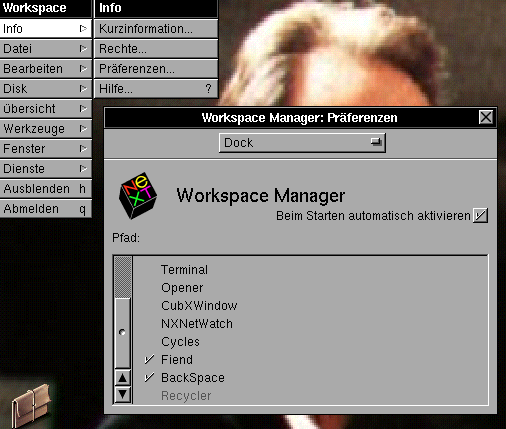
Hi @wlewisiii , maybe I get you wrong, but if you just want to auto-start an application after login into NeXTStep, the best way I know is, to add the app(s) to the Dock and set it/them to "autostart" in the Workspace preferences:
Title: Re: Starting App when loging in?
Post by: cuby on February 12, 2024, 09:39:04 AM
Post by: cuby on February 12, 2024, 09:39:04 AM
Quote from: nuss on February 12, 2024, 05:13:08 AMadd the app(s) to the Dock and set it/them to "autostart" in the Workspace preferencesOh whow, I'm using NeXTstep for almost 30 years and didn't know about this... thanks!
Title: Re: Starting App when loging in?
Post by: wlewisiii on February 12, 2024, 10:08:29 PM
Post by: wlewisiii on February 12, 2024, 10:08:29 PM
Thanks for the lesson! That did the trick.