Title: NFS for Everyone
Post by: cooltr6 on February 20, 2024, 01:51:48 PM
Post by: cooltr6 on February 20, 2024, 01:51:48 PM
We all have differing levels of NeXT equipment set up, but one thing is for sure...how do you get files back and forth between your modern computer and your NeXT's?
You could burn stuff to CD, use FTP, if your NeXT is connected to the Internet, maybe download direct or use a composite image on an SD card to copy files to. There are many methods, but one that could be considered is to setup an NFS server that your modern computer and NeXT can connect to.
Raspberry Pi's, a cheap, single board computer that isn't blazing fast, but can certainly be used to do the job quite happily. That along with a NAS solution called OpenMediaVault, which supports NFSv2, 3, 4 and 4+ can be set up to create an exportable share that your NeXT can connect to.
I already have one of these set up with a tower of drives connected to serve my home network for data, a Time Machine backup location and media storage. Having seen NFS as an available service, I tried creating a share and getting the NeXT to connect to it. Was a no go. Was worth a try and started to give up. Then the thought struck me, i have a spare Pi hanging around, why not set up a 'dedicated to NFS only thing'? Found a blank SD card, loaded it up with Raspberry Pi OS 64-bit Lite (must be the lite version...OpenMediaVault requires it). Basic setup, OS updates and then went on to install OMV.
Some words on this. I have a dedicated network for all of the NeXT's and the NFS server, but my UniFi router allows different networks to cross over, so on my regular network, I can still ping equipment connected to the NeXT network. This also allows my Mac to connect to the NFS share to transfer files. You'll want to set a static IP address for your Raspberry Pi.
After you have the OS setup and OMV installed (and you know the static IP address), create a host record in HostManager...otherwise your NeXT won't know it's there. I found a couple of pages on setting up an NFS server that were helpful in navigating the muddy waters.
On the OMV side, the rest of the setup is done through a web interface. Your Raspberry Pi at this point can be headless and put in a corner somewhere connected to the network doing it's job quietly. Setup a folder to be shared, create a share and then set the NFS service up. Give all kinds of permissions so that there is no chance of not being able to copy stuff to and from the share.
When complete, you'll need to go back over to the NeXT and setup an Imported Directory record in NFSManager. The setup would be the server name you setup in HostManager and the exact share name that was found using exportfs on the Pi NFS server.
On my server, the share is /export/next. This should appear in the Remote Directory field of the Imported Directory setup.
When all this was done, a quick restart of the NeXT was done and logged back in. To my happiness, in Net...was found the NFS server's connection live and files available.
A cheap way to get a quick and dirty NFS server to allow quick file transfer from modern computers back to your NeXT. Total time spent putting this together was about 2 hours. The longest part was the installation of OMV, which can take up to 45 minutes to complete and the other were needed OS updates and installing Git.
Equipment Needed and Resources for Installation
Most versions of the Raspberry Pi will do to run the Lite OS and OMV. We're not looking for performance, just a way to move files back and forth effortlessly.
A 32GB SD card will be more than enough room to install software and have a space for file transfer share.
Raspberry Pi OS Writer: https://www.raspberrypi.com/software/
OpenMediaVault Installation Instructions (although they talk about Windoze, you can use a Mac to accomplish the task through an SSH connection): https://wiki.omv-extras.org/doku.php?id=omv6:raspberry_pi_install
jonandnic dot com - NeXTSTEP/OPENSTEP NFS File Share with a Raspberry Pi – https://www.jonandnic.com/2020/08/28/nextstep-openstep-nfs-file-share-with-a-raspberry-pi/
NeXTSTEP on the HP 712 Part 2: Getting Software – https://blog.pizzabox.computer/posts/hp712-nextstep-part-2/
You could burn stuff to CD, use FTP, if your NeXT is connected to the Internet, maybe download direct or use a composite image on an SD card to copy files to. There are many methods, but one that could be considered is to setup an NFS server that your modern computer and NeXT can connect to.
Raspberry Pi's, a cheap, single board computer that isn't blazing fast, but can certainly be used to do the job quite happily. That along with a NAS solution called OpenMediaVault, which supports NFSv2, 3, 4 and 4+ can be set up to create an exportable share that your NeXT can connect to.
I already have one of these set up with a tower of drives connected to serve my home network for data, a Time Machine backup location and media storage. Having seen NFS as an available service, I tried creating a share and getting the NeXT to connect to it. Was a no go. Was worth a try and started to give up. Then the thought struck me, i have a spare Pi hanging around, why not set up a 'dedicated to NFS only thing'? Found a blank SD card, loaded it up with Raspberry Pi OS 64-bit Lite (must be the lite version...OpenMediaVault requires it). Basic setup, OS updates and then went on to install OMV.
Some words on this. I have a dedicated network for all of the NeXT's and the NFS server, but my UniFi router allows different networks to cross over, so on my regular network, I can still ping equipment connected to the NeXT network. This also allows my Mac to connect to the NFS share to transfer files. You'll want to set a static IP address for your Raspberry Pi.
After you have the OS setup and OMV installed (and you know the static IP address), create a host record in HostManager...otherwise your NeXT won't know it's there. I found a couple of pages on setting up an NFS server that were helpful in navigating the muddy waters.
On the OMV side, the rest of the setup is done through a web interface. Your Raspberry Pi at this point can be headless and put in a corner somewhere connected to the network doing it's job quietly. Setup a folder to be shared, create a share and then set the NFS service up. Give all kinds of permissions so that there is no chance of not being able to copy stuff to and from the share.
When complete, you'll need to go back over to the NeXT and setup an Imported Directory record in NFSManager. The setup would be the server name you setup in HostManager and the exact share name that was found using exportfs on the Pi NFS server.
Code Select
nfs@pi-nfs:~ $ sudo exportfs
/export/next  	<world>
/export       	<world>
On my server, the share is /export/next. This should appear in the Remote Directory field of the Imported Directory setup.
When all this was done, a quick restart of the NeXT was done and logged back in. To my happiness, in Net...was found the NFS server's connection live and files available.
A cheap way to get a quick and dirty NFS server to allow quick file transfer from modern computers back to your NeXT. Total time spent putting this together was about 2 hours. The longest part was the installation of OMV, which can take up to 45 minutes to complete and the other were needed OS updates and installing Git.
Equipment Needed and Resources for Installation
Most versions of the Raspberry Pi will do to run the Lite OS and OMV. We're not looking for performance, just a way to move files back and forth effortlessly.
A 32GB SD card will be more than enough room to install software and have a space for file transfer share.
Raspberry Pi OS Writer: https://www.raspberrypi.com/software/
OpenMediaVault Installation Instructions (although they talk about Windoze, you can use a Mac to accomplish the task through an SSH connection): https://wiki.omv-extras.org/doku.php?id=omv6:raspberry_pi_install
jonandnic dot com - NeXTSTEP/OPENSTEP NFS File Share with a Raspberry Pi – https://www.jonandnic.com/2020/08/28/nextstep-openstep-nfs-file-share-with-a-raspberry-pi/
NeXTSTEP on the HP 712 Part 2: Getting Software – https://blog.pizzabox.computer/posts/hp712-nextstep-part-2/
Title: Re: NFS for Everyone
Post by: cooltr6 on February 21, 2024, 02:10:16 PM
Post by: cooltr6 on February 21, 2024, 02:10:16 PM
Greetings. After working with this new NFS setup, a couple of discoveries...that y'all should know about.
When copying files from your modern Mac [or other computer], there's some hidden whatnot that goes on. If you have the UNIX Expert selection set to true, you'll see hidden files...goes without saying.
The discovery...
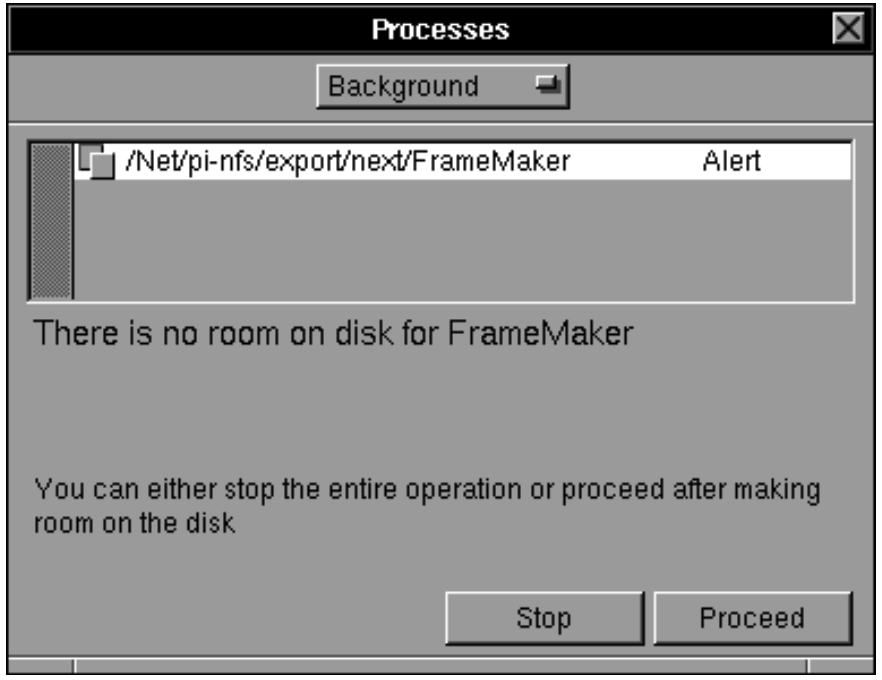
When copying a bunch of files that were downloaded over to the NFS share to install software, there were a number of '._xyz' where 'xyz' was the name of a file that was copied over. These pesky files, if exposed will cause you inordinate pains. Should you have UNIX Expert turned on, be sure to select only the files you're looking to copy over to your NeXT. If you don't, you'll be thrown an error indicating there's no room on the destination disk.
This took me a few times to finally figure this little bit out. How could I be out of room on a 2GB partition with 1.7GB available!?! The question seemed complicated, but the answer wasn't exactly self-evident. After I spent time copying a small folder of items, one by one, grabbing only the 'real' files and not the '._xyz' type files...things went along swimmingly. The answer after all that was simple. =)
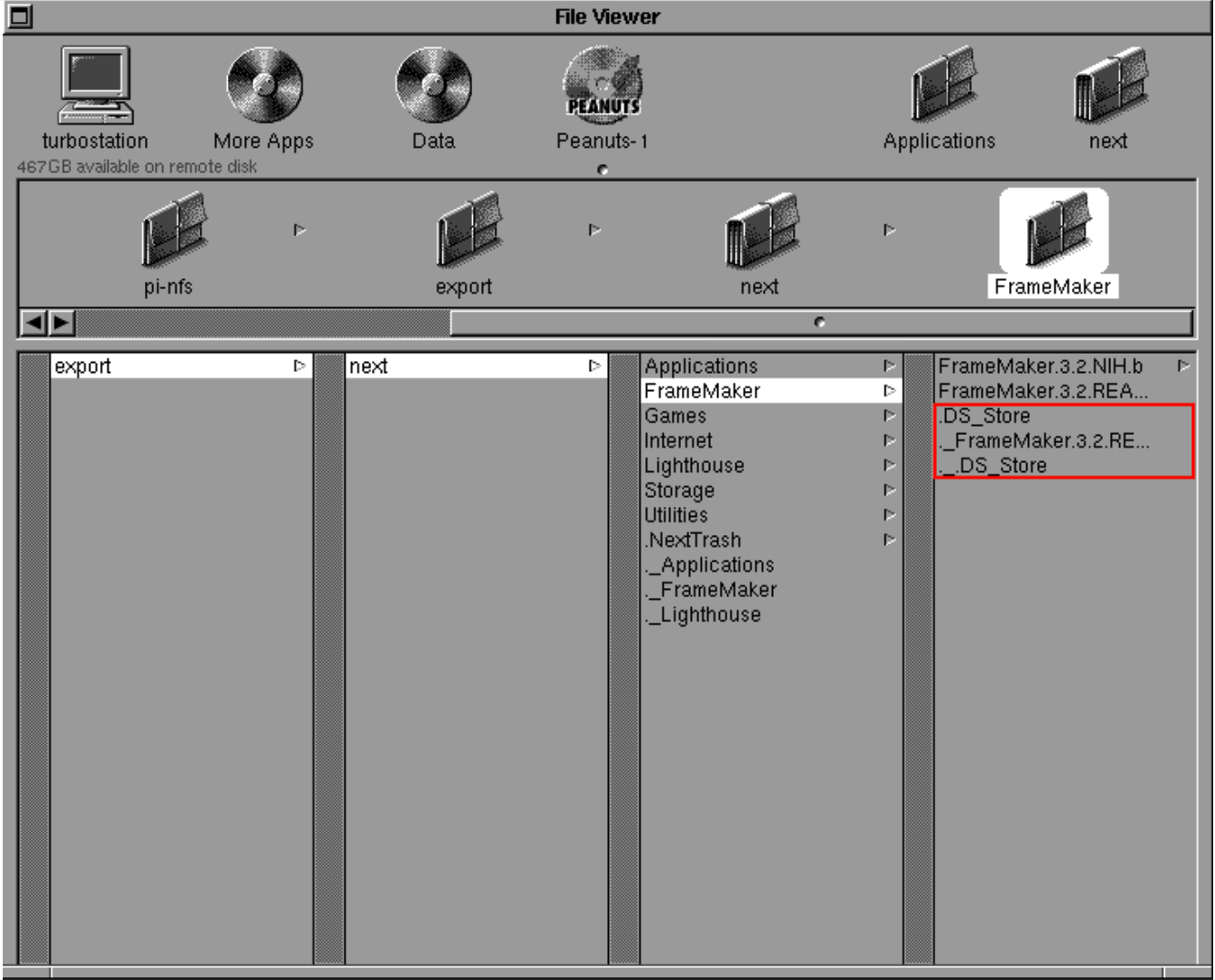
When copying files from your modern Mac [or other computer], there's some hidden whatnot that goes on. If you have the UNIX Expert selection set to true, you'll see hidden files...goes without saying.
The discovery...
When copying a bunch of files that were downloaded over to the NFS share to install software, there were a number of '._xyz' where 'xyz' was the name of a file that was copied over. These pesky files, if exposed will cause you inordinate pains. Should you have UNIX Expert turned on, be sure to select only the files you're looking to copy over to your NeXT. If you don't, you'll be thrown an error indicating there's no room on the destination disk.
This took me a few times to finally figure this little bit out. How could I be out of room on a 2GB partition with 1.7GB available!?! The question seemed complicated, but the answer wasn't exactly self-evident. After I spent time copying a small folder of items, one by one, grabbing only the 'real' files and not the '._xyz' type files...things went along swimmingly. The answer after all that was simple. =)
Title: Re: NFS for Everyone
Post by: cooltr6 on February 21, 2024, 02:14:41 PM
Post by: cooltr6 on February 21, 2024, 02:14:41 PM
Another thought. The question may arise as you're reading this work log, if you choose to use this sort of setup to have a common NFS share that can be accessed by both modern computers and our beloved NeXT hardware...why would you need OpenMediaVault installed? Raspberry Pi OS supports NFS natively.
The answer to this...after all the reading I did about getting NFSv2 up and running on the Raspberry Pi, I found in the small print that NFSv2 wasn't available for use at the command line. NFSv3 and the variants of v4 are supported. OMV put the support for NFSv2 back in place.
More to come on this as continued use and discoveries crop up.
The answer to this...after all the reading I did about getting NFSv2 up and running on the Raspberry Pi, I found in the small print that NFSv2 wasn't available for use at the command line. NFSv3 and the variants of v4 are supported. OMV put the support for NFSv2 back in place.
More to come on this as continued use and discoveries crop up.
Title: Re: NFS for Everyone
Post by: cooltr6 on February 21, 2024, 10:34:46 PM
Post by: cooltr6 on February 21, 2024, 10:34:46 PM
A new discovery, folks...
When copying some files [in my case fonts], there were some files that were properly named and known good files, but I was still getting the 'There is no room on the disk for..." error, even though there was plenty of room on the destination.
If you run into one of these sorts of files, use Workspace's Compress function, take the compressed file and copy it to wherever you need it and decompress it there.
There'll be a need workarounds...that's true. But know that you still have a quick and dirty NFSv2 compatible method to get files to and from your NeXT.
When copying some files [in my case fonts], there were some files that were properly named and known good files, but I was still getting the 'There is no room on the disk for..." error, even though there was plenty of room on the destination.
If you run into one of these sorts of files, use Workspace's Compress function, take the compressed file and copy it to wherever you need it and decompress it there.
There'll be a need workarounds...that's true. But know that you still have a quick and dirty NFSv2 compatible method to get files to and from your NeXT.
Title: Re: NFS for Everyone
Post by: blackbeauty on October 21, 2024, 02:56:00 AM
Post by: blackbeauty on October 21, 2024, 02:56:00 AM
Found your very valuable post as I stumble over the exact same issue. From a stack of old broken hard drives I recovered a smaller disk which I used as boot disk 24 years ago. NFS seemed to be the way to go to backup the disk before it shares the fate of the others.
But I tried to use it the other way round: Exporting shares from the NeXT (TurboColor station, OS 4.2) and trying to mount them on my Mac. Now, modern versions no longer support NFS mounting, soon offering only SMB (bah!). On an old Mac mini of 2009 that currently runs MacOS X Lion (because that's the most modern one to drive my old scanner...) I tried mounting the shares on that machine, but failed. I was under the impression that the NFS on NS/OS uses v2 and Lion does offer that too, but this is what happened:
$ sudo mount -t nfs -o resvport,nolocks,locallocks,intr,soft 192.168.40.3:/.disk01b /private/shared
mount_nfs: can't mount /.disk01b from 192.168.40.3 onto /private/shared: Program version wrong
$ sudo rpcinfo -p 192.168.40.3
program vers proto port
100000 2 tcp 111 portmapper
100000 2 udp 111 portmapper
200100001 1 udp 701 netinfobind
200100001 1 tcp 704 netinfobind
100026 1 udp 740 bootparamd
100011 1 udp 2576 rquotad
100001 1 udp 2577 rstatd
100001 2 udp 2577 rstatd
100001 3 udp 2577 rstatd
100002 1 udp 2578 rusersd
100002 2 udp 2578 rusersd
100012 1 udp 2579 sprayd
100008 1 udp 2580 walld
200100002 1 udp 2581
100003 2 udp 2049 nfs
100005 1 udp 844 mountd
100005 1 tcp 847 mountd
$ sudo mount_nfs -o vers=2,resvport,nolocks,locallocks,intr,soft,mntudp 192.168.40.3:/.disk01b /private/shared
mount_nfs: can't mount /.disk01b from 192.168.40.3 onto /private/shared: RPC prog. not avail
$ sudo mount_nfs -o vers=2,nolocks,locallocks,intr,soft,proto=udp 192.168.40.3:/.disk01b /private/shared
^C
So, NFS service is offered only over UDP, and the last attempt looks better in so far as it does not throw an error message right away and tried to do its thing, but to no avail.
I also use a Unify network and caged my NeXTs into a retro VLAN. Others can contact them in the subnet and it worked fine, when setting up ftpd on a Cube running NS1.0a and using a FileZilla client on the receiving end.
Is there anything obvious here that I might have missed?
But I tried to use it the other way round: Exporting shares from the NeXT (TurboColor station, OS 4.2) and trying to mount them on my Mac. Now, modern versions no longer support NFS mounting, soon offering only SMB (bah!). On an old Mac mini of 2009 that currently runs MacOS X Lion (because that's the most modern one to drive my old scanner...) I tried mounting the shares on that machine, but failed. I was under the impression that the NFS on NS/OS uses v2 and Lion does offer that too, but this is what happened:
$ sudo mount -t nfs -o resvport,nolocks,locallocks,intr,soft 192.168.40.3:/.disk01b /private/shared
mount_nfs: can't mount /.disk01b from 192.168.40.3 onto /private/shared: Program version wrong
$ sudo rpcinfo -p 192.168.40.3
program vers proto port
100000 2 tcp 111 portmapper
100000 2 udp 111 portmapper
200100001 1 udp 701 netinfobind
200100001 1 tcp 704 netinfobind
100026 1 udp 740 bootparamd
100011 1 udp 2576 rquotad
100001 1 udp 2577 rstatd
100001 2 udp 2577 rstatd
100001 3 udp 2577 rstatd
100002 1 udp 2578 rusersd
100002 2 udp 2578 rusersd
100012 1 udp 2579 sprayd
100008 1 udp 2580 walld
200100002 1 udp 2581
100003 2 udp 2049 nfs
100005 1 udp 844 mountd
100005 1 tcp 847 mountd
$ sudo mount_nfs -o vers=2,resvport,nolocks,locallocks,intr,soft,mntudp 192.168.40.3:/.disk01b /private/shared
mount_nfs: can't mount /.disk01b from 192.168.40.3 onto /private/shared: RPC prog. not avail
$ sudo mount_nfs -o vers=2,nolocks,locallocks,intr,soft,proto=udp 192.168.40.3:/.disk01b /private/shared
^C
So, NFS service is offered only over UDP, and the last attempt looks better in so far as it does not throw an error message right away and tried to do its thing, but to no avail.
I also use a Unify network and caged my NeXTs into a retro VLAN. Others can contact them in the subnet and it worked fine, when setting up ftpd on a Cube running NS1.0a and using a FileZilla client on the receiving end.
Is there anything obvious here that I might have missed?
Title: Re: NFS for Everyone
Post by: eagle on October 21, 2024, 08:37:45 AM
Post by: eagle on October 21, 2024, 08:37:45 AM
I'm glad someone else is using NFS. If you didn't see it already, check out my earlier thread on NFS (https://www.nextcomputers.org/forums/index.php?topic=3598.msg20642). I thought I had written more than this, but can't find it.
Title: Re: NFS for Everyone
Post by: blackbeauty on October 22, 2024, 03:32:12 PM
Post by: blackbeauty on October 22, 2024, 03:32:12 PM
Thanks, eagle. I will take a look. Right now, that old disk got media errors, just when I was at the point of somehow securing it to another NeXT:((
So first things first and I need to get black hardware running again. Then I'll tackle the NFS topic again.
So first things first and I need to get black hardware running again. Then I'll tackle the NFS topic again.