Title: Forcing boot despite test failure
Post by: tygre on June 11, 2024, 08:48:53 PM
Post by: tygre on June 11, 2024, 08:48:53 PM
Hi there!
I have this NeXTstation and recently changed the RAM, mismatching RAM with/out parity. The POST fails but then I can go into the monitor (COMMAND + COMMAND + Backtick) and simply type bsd and it boots and runs fine.
I tried to disable all the POSTs but still the NeXTstation will block on the POST and I'll need to manually make it boot.
Is there a way to allow it to continue booting without manual input?
Cheers!
Tygre
I have this NeXTstation and recently changed the RAM, mismatching RAM with/out parity. The POST fails but then I can go into the monitor (COMMAND + COMMAND + Backtick) and simply type bsd and it boots and runs fine.
I tried to disable all the POSTs but still the NeXTstation will block on the POST and I'll need to manually make it boot.
Is there a way to allow it to continue booting without manual input?
Cheers!
Tygre
Title: Re: Forcing boot despite test failure
Post by: barcher174 on June 11, 2024, 09:26:24 PM
Post by: barcher174 on June 11, 2024, 09:26:24 PM
No, there is no option to skip on errors. You disabled the memory checking and it still fails? What is the error?
Title: Re: Forcing boot despite test failure
Post by: tygre on June 12, 2024, 09:57:16 PM
Post by: tygre on June 12, 2024, 09:57:16 PM
Hi Barcher174!
When the test fails with the "unhappy" NeXT, pressing COMMAND + COMMAND + Backtick shows:
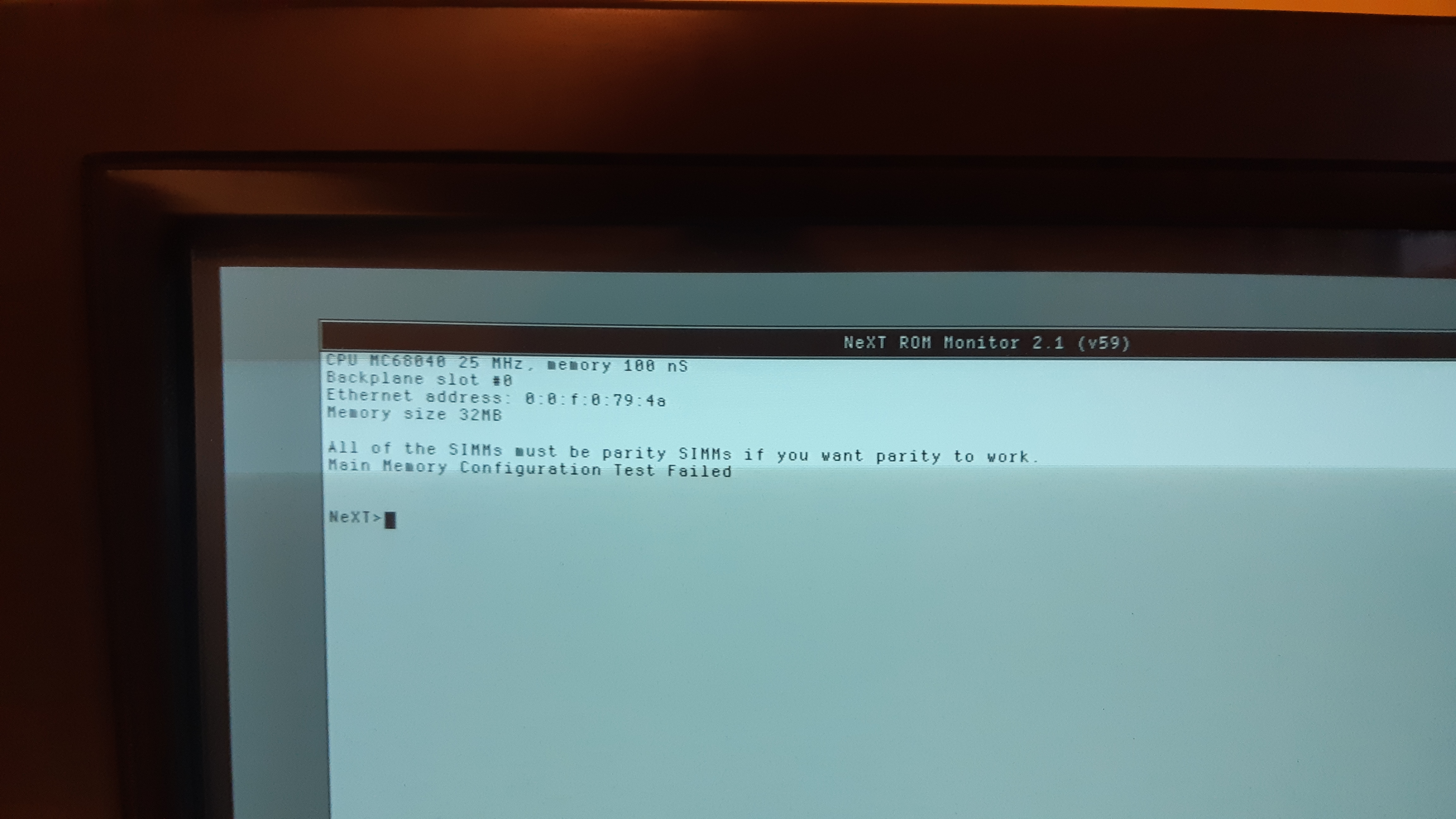
After that, if I type bsd, it boots and works fine :)
When the test fails with the "unhappy" NeXT, pressing COMMAND + COMMAND + Backtick shows:
QuoteAll of the SIMMs must be parity SIMMs if you want parity to work.
Main Memory Configuration Test Failed
NeXT>
After that, if I type bsd, it boots and works fine :)
Title: Re: Forcing boot despite test failure
Post by: cooltr6 on June 12, 2024, 10:14:58 PM
Post by: cooltr6 on June 12, 2024, 10:14:58 PM
Heya @tygre. When going into the Monitor [Command-~] at startup after the "Testing System" bonk...the last line in Parameters:
enable parity checking if parity memory is present:
Is this set to "no"?
Also, you mentioned something about changing RAM around. Mixing Parity and non-Parity RAM [as I remember it] is not recommended. You'd either want Parity RAM or none at all, but not a mix of both. In thinking, did you max out your RAM [32MB]? Have you tried removing the old RAM and trying to boot with just the 'new' RAM?
Trying to help narrow down the possibilities here.
Jason.
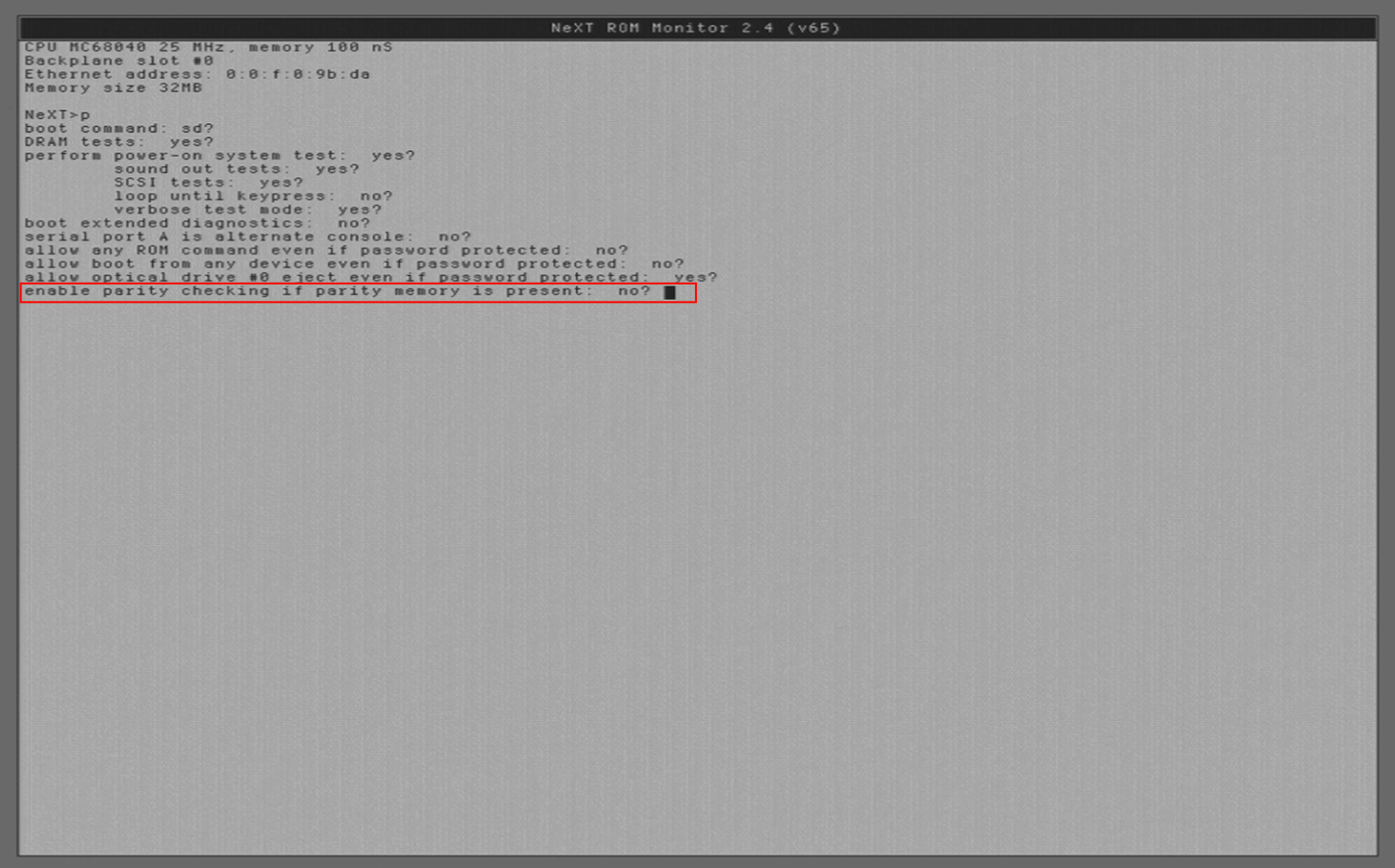
enable parity checking if parity memory is present:
Is this set to "no"?
Also, you mentioned something about changing RAM around. Mixing Parity and non-Parity RAM [as I remember it] is not recommended. You'd either want Parity RAM or none at all, but not a mix of both. In thinking, did you max out your RAM [32MB]? Have you tried removing the old RAM and trying to boot with just the 'new' RAM?
Trying to help narrow down the possibilities here.
Jason.
Title: Re: Forcing boot despite test failure
Post by: Rob Blessin Black Hole on June 13, 2024, 01:58:41 AM
Post by: Rob Blessin Black Hole on June 13, 2024, 01:58:41 AM
Hello Send a picture of te actual simm chips on the motherboard.
Cool Tr6 is right uncheck parity or set to no in system parameters
Cool Tr6 is right uncheck parity or set to no in system parameters
Title: Re: Forcing boot despite test failure
Post by: tygre on June 19, 2024, 09:39:52 PM
Post by: tygre on June 19, 2024, 09:39:52 PM
Hi Cooltr6 and Rob!
Thanks for your answers :)
Yes, I have set all the "tests" to "no", except for the sound check. Still, my NeXTstation refuses to boot. I have ordered new SIMMs (to Rob), the same that I recently put into my NeXTstation. Having all the same SIMMs should definitely resolve this problem!
Cheers!
Tygre
Thanks for your answers :)
Yes, I have set all the "tests" to "no", except for the sound check. Still, my NeXTstation refuses to boot. I have ordered new SIMMs (to Rob), the same that I recently put into my NeXTstation. Having all the same SIMMs should definitely resolve this problem!
Cheers!
Tygre
Title: Re: Forcing boot despite test failure
Post by: cooltr6 on June 30, 2024, 08:45:01 PM
Post by: cooltr6 on June 30, 2024, 08:45:01 PM
@tygre Hey there. Just lookin' in to see if the memory and POST issues have been resolved. Always good to know if things got fixed. 😁
Title: Re: Forcing boot despite test failure
Post by: tygre on July 03, 2024, 12:21:40 PM
Post by: tygre on July 03, 2024, 12:21:40 PM
Hi Cooltr6 and thanks for following up!
No yet :)
I'm waiting for new RAM SIMMs and, in the meantime, my (mechanical) hard disk failed. It spins for a few secs. and then stops entirely. It could be the hard disk itself or some capacitors. I haven't opened my NeXTstation yet. I was thinking that I should replace the hard disk with a ZuluSCSI or BlueSCSI anyway... but maybe there're even better alternatives?
Cheers!
No yet :)
I'm waiting for new RAM SIMMs and, in the meantime, my (mechanical) hard disk failed. It spins for a few secs. and then stops entirely. It could be the hard disk itself or some capacitors. I haven't opened my NeXTstation yet. I was thinking that I should replace the hard disk with a ZuluSCSI or BlueSCSI anyway... but maybe there're even better alternatives?
Cheers!
Title: Re: Forcing boot despite test failure
Post by: cooltr6 on July 03, 2024, 11:18:28 PM
Post by: cooltr6 on July 03, 2024, 11:18:28 PM
No problem at all. Ya got one step closer and got kicked back a few.
Definitely if you haven't recapped...do so. It won't fix all the problems, but it'll certainly give you a better fighting chance. Zulu and BlueSCSI are both legit replacements. There are others out there, but many in the NeXT community have settled on these and SCSI2SD as a means to replace spinning platter drives.
Hopefully the RAM you ordered from Rob comes in soon...at least rule out the RAM part of the problems you've been experiencing. =)
Definitely if you haven't recapped...do so. It won't fix all the problems, but it'll certainly give you a better fighting chance. Zulu and BlueSCSI are both legit replacements. There are others out there, but many in the NeXT community have settled on these and SCSI2SD as a means to replace spinning platter drives.
Hopefully the RAM you ordered from Rob comes in soon...at least rule out the RAM part of the problems you've been experiencing. =)
Title: Re: Forcing boot despite test failure
Post by: tygre on July 06, 2024, 08:30:18 PM
Post by: tygre on July 06, 2024, 08:30:18 PM
Hi Cooltr6!
Thanks for your kind words :)
Yes, Rob's RAM arrived yesterday, I'll install it today...
As for the recapping, it's not done yet. I'll ask a friend who has experience with this sort of thing. Do you have any recommendations as to where to buy replacement caps? (Maybe in a bundle just of a NeXTstation?)
Cheers!
Thanks for your kind words :)
Yes, Rob's RAM arrived yesterday, I'll install it today...
As for the recapping, it's not done yet. I'll ask a friend who has experience with this sort of thing. Do you have any recommendations as to where to buy replacement caps? (Maybe in a bundle just of a NeXTstation?)
Cheers!
Title: Re: Forcing boot despite test failure
Post by: cooltr6 on July 07, 2024, 08:03:56 PM
Post by: cooltr6 on July 07, 2024, 08:03:56 PM
Heya tygre. Well....it just so happens that there are a couple of resources to help with recapping...
1. Brian Archer's recap guides [http://www.asterontech.com/Asterontech/nextstation_mono_retore.htm]
2. A Mouser cart will certainly be helpful to you. There are only 2 types of caps used -- 16V 47µF Ceramic and 25V 220µF electrolytic.
I have Mouser Carts for PN1703-AE [https://www.mouser.com/ProjectManager/ProjectDetail.aspx?AccessID=55322381c3] and PN1703-AD [https://www.mouser.com/ProjectManager/ProjectDetail.aspx?AccessID=60287ab6b2]. All NeXT logic boards, whether Slab or Cube, use the same caps, just in differing quantities.
Look over Brian's recap guides, make sure you know exactly which logic board part you have. He even puts the manufacturer part number in the guide. If it's one of the two carts I provided...all the better...otherwise, count caps and order the quantities needed.
Lemme know if ya need anything else!
Jason.
1. Brian Archer's recap guides [http://www.asterontech.com/Asterontech/nextstation_mono_retore.htm]
2. A Mouser cart will certainly be helpful to you. There are only 2 types of caps used -- 16V 47µF Ceramic and 25V 220µF electrolytic.
I have Mouser Carts for PN1703-AE [https://www.mouser.com/ProjectManager/ProjectDetail.aspx?AccessID=55322381c3] and PN1703-AD [https://www.mouser.com/ProjectManager/ProjectDetail.aspx?AccessID=60287ab6b2]. All NeXT logic boards, whether Slab or Cube, use the same caps, just in differing quantities.
Look over Brian's recap guides, make sure you know exactly which logic board part you have. He even puts the manufacturer part number in the guide. If it's one of the two carts I provided...all the better...otherwise, count caps and order the quantities needed.
Lemme know if ya need anything else!
Jason.
Title: Re: Forcing boot despite test failure
Post by: tygre on August 04, 2024, 12:26:59 AM
Post by: tygre on August 04, 2024, 12:26:59 AM
Hi Cooltr6!
Thanks a lot for all these pointers, very useful!
I'll let you know when I managed to change them :)
Cheers!
Tygre
Thanks a lot for all these pointers, very useful!
I'll let you know when I managed to change them :)
Cheers!
Tygre
Title: Re: Forcing boot despite test failure
Post by: cooltr6 on August 04, 2024, 12:46:48 AM
Post by: cooltr6 on August 04, 2024, 12:46:48 AM
Most welcome. Good luck with the recapping. It'll do your NeXT a world of good. =)
Title: Re: Forcing boot despite test failure
Post by: tygre on September 02, 2024, 08:04:39 PM
Post by: tygre on September 02, 2024, 08:04:39 PM
Hi Cooltr6 and all!
After looking at http://www.asterontech.com/Asterontech/nextstation_mono_retore.htm, it seems that the caps had already been replaced: it was really the hard disk that died :( It was the original hard disk so it may rest in peace :D
Now that I replaced it with a BlueSCSIv2, my NeXTstation works very well again!
Cheers!
Tygre
After looking at http://www.asterontech.com/Asterontech/nextstation_mono_retore.htm, it seems that the caps had already been replaced: it was really the hard disk that died :( It was the original hard disk so it may rest in peace :D
Now that I replaced it with a BlueSCSIv2, my NeXTstation works very well again!
Cheers!
Tygre