Title: Nextstep on 24inch tft monitor at 1920x1200 not stretch
Post by: rjnf on August 11, 2024, 03:55:54 PM
Post by: rjnf on August 11, 2024, 03:55:54 PM
My intel pentium box running nextstep natively, has a matrox g400 32 mb vram graphics board using the Mirko video driver.
Manage to binary hack the driver to allow 1920x1200@60hz.
Looks brutal. So far due to the fact that lcd/tft 24inch at 16:10 are almost limited @60hz, i was using a 19" inch at 1600x1200 before, now I can use my nextstep as my primary work machine.
My specs
1gb of ram nexstep uses 958mb
16gb sdd eide disk only one partition nextstep
Dvd rom atapi
Matrox mga g400 32mb vram
24 inch monitor running at 1920x1200@60hz
Soundblaster 16 pci
Ethernet XL card
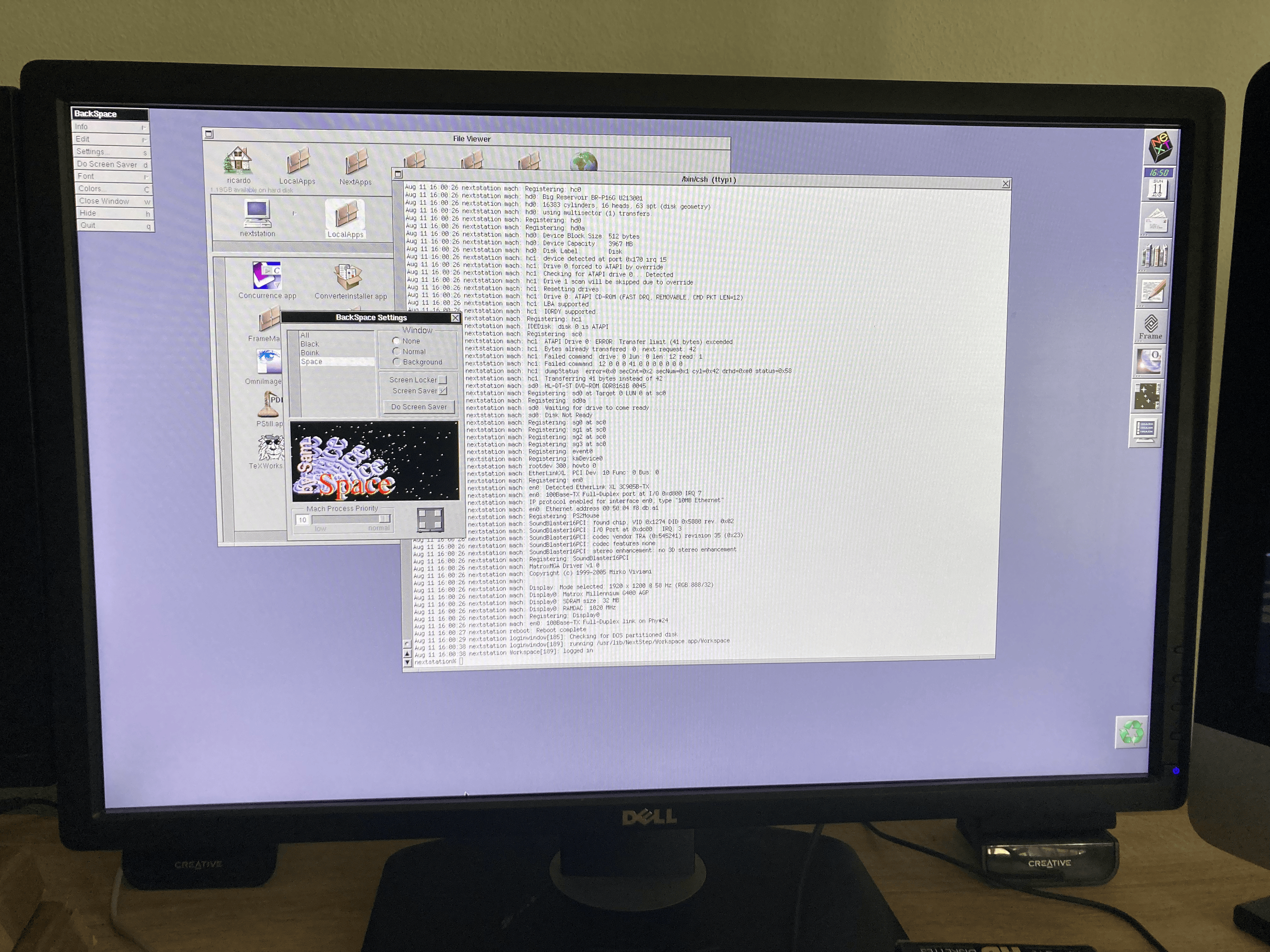
Manage to binary hack the driver to allow 1920x1200@60hz.
Looks brutal. So far due to the fact that lcd/tft 24inch at 16:10 are almost limited @60hz, i was using a 19" inch at 1600x1200 before, now I can use my nextstep as my primary work machine.
My specs
1gb of ram nexstep uses 958mb
16gb sdd eide disk only one partition nextstep
Dvd rom atapi
Matrox mga g400 32mb vram
24 inch monitor running at 1920x1200@60hz
Soundblaster 16 pci
Ethernet XL card
Title: Re: Nextstep on 24inch tft monitor at 1920x1200 not stretch
Post by: user341 on August 11, 2024, 05:55:43 PM
Post by: user341 on August 11, 2024, 05:55:43 PM
Wow really nice. Can nextstep see all 16gb!?!
Title: Re: Nextstep on 24inch tft monitor at 1920x1200 not stretch
Post by: pTeK on August 12, 2024, 02:12:34 AM
Post by: pTeK on August 12, 2024, 02:12:34 AM
Quote from: rjnf on August 11, 2024, 03:55:54 PMMy intel pentium box running nextstep natively, has a matrox g400 32 mb vram graphics board using the Mirko video driver.
Manage to binary hack the driver to allow 1920x1200@60hz.
Some more technical details on the binary hack please. 8)
Quote from: zombie on August 11, 2024, 05:55:43 PMWow really nice. Can nextstep see all 16gb!?!The NeXTSTEP 3.3 patches (https://www.nextcomputers.org/NeXTfiles/Software/NEXTSTEP/Patches/NEXTSTEP_3.3_User_Patch_3/nextstep3.3_patch_3_overview.pdf) were mainly just date patches for the software. Nothing to support bigger hard drive spaces.
The EIDE drivers (V3.30+) have code which reads the size information of the drive and also from the BIOS/CMOS. V3.2 of the EIDE driver only got the hard drive size from the BIOS. (https://web.archive.org/web/19970412215742/http://www.next.com/NeXTanswers/HTMLFiles/1650.htmld/1650.html)
I read somewhere that on NextStep 3.30 if the hard disk was greater that 2GB it would break up all the partitions to less than 2GB partitions so that the 16GB would be split into 8 * 2GB. I think I read that on of the newsgroups posts (Don't have a link sorry).
The updated fdisk and mkfs that was released with OpenStep 4.2 patches has the fixed code to support up to 8GB as per the patch notes. (https://www.nextcomputers.org/NeXTfiles/Software/OPENSTEP/Patches/OS42Patch4ReleaseNotes.pdf) Look at page 17 and 18 of 32.
Maybe the updated fdisk (https://github.com/evolver56k/Darwin-0.3/tree/master/diskdev_cmds-1/fdisk.tproj) and
Title: Re: Nextstep on 24inch tft monitor at 1920x1200 not stretch
Post by: rjnf on August 12, 2024, 02:28:50 AM
Post by: rjnf on August 12, 2024, 02:28:50 AM
Hello guys
Sorry forgot to mention my disk is 16gb but nextstep only sees 2gb, sorry for the miss understanding.
Regarding the hack you need to edit the matrox_reloc file on a hex editor find the lines for configuration for 1920x1200 at 64hz, for 8 bits 16 bits and 24 bits color then calculate video timmings and pixel clock and give those values on another part of the file.
Ill put details later today
Regards
Sorry forgot to mention my disk is 16gb but nextstep only sees 2gb, sorry for the miss understanding.
Regarding the hack you need to edit the matrox_reloc file on a hex editor find the lines for configuration for 1920x1200 at 64hz, for 8 bits 16 bits and 24 bits color then calculate video timmings and pixel clock and give those values on another part of the file.
Ill put details later today
Regards
Title: Re: Nextstep on 24inch tft monitor at 1920x1200 not stretch
Post by: user217 on August 12, 2024, 06:14:48 AM
Post by: user217 on August 12, 2024, 06:14:48 AM
That's pretty incredible work! AFAIK even the VMware drivers can't handle resolutions that big (although they'll offer to do so).
Title: Re: Nextstep on 24inch tft monitor at 1920x1200 not stretch
Post by: pTeK on August 13, 2024, 05:02:48 AM
Post by: pTeK on August 13, 2024, 05:02:48 AM
Quote from: rjnf on August 12, 2024, 02:28:50 AMHello guysMuch appreciated. I want to get my ATI Radeon 9000 mobile laptop screen working and I need to edit the ATI Rage Driver I believe instead of the ATI mach driver so any small pointers will help :).
Sorry forgot to mention my disk is 16gb but nextstep only sees 2gb, sorry for the miss understanding.
Regarding the hack you need to edit the matrox_reloc file on a hex editor find the lines for configuration for 1920x1200 at 64hz, for 8 bits 16 bits and 24 bits color then calculate video timings and pixel clock and give those values on another part of the file.
Ill put details later today
Regards
Does the matrox driver have a PS driver like some of the video card drivers?
Title: Re: Nextstep on 24inch tft monitor at 1920x1200 not stretch
Post by: rjnf on August 13, 2024, 02:19:19 PM
Post by: rjnf on August 13, 2024, 02:19:19 PM
Hello All,
Sorry was not able to post yesterday, too much work before summer holidays.
I'll post what I have done regarding the driver, but before I also need to give credits to Henry Koplien since he has a version of the Driver on his website which allows 2080 x 1536 @ 82 Hz, since I'm a follower of his webpage e notice that his driver was different from the one on Mirko's site, so I contacted Henry to ask him some guidance.
Mirko's Matrox Driver is based on the Xfree86 2002 implementation of the Matrox driver.
I checked the Xfree86 implementation for linux, and honestly it was very difficult because the source code is not commented at all just some sentences here and there which do not help.
Anyways I search a little bit and downloaded the beOS source driver implementation of G400 which is based on Xfree86 also, along with this I managed to check the Examples on the Next Developerfolder there is the source code for the ATI driver as an example which was very useful.
Btw I edited the Mirko Version directly and not Henry's.
So where did I stared? well first I opened the binary Matrox_reloc with an Hex Editor I used "010 hex Editor" for Mac which is very good tool. And I looked around the file.
With some Henry hints he gave me (btw he did not remembered exactly what he did on his hack decades ago) and looking into the BeOS source of MGA G400 and the nextstep driver example of ATI I found that the implementation in the middle of the code is
{With, Height, Total With, TotalWith * bytes per pixel, refresh rate (HZ), —————RRRRRRRRRRRGGGGGGGGBBBBBB & Timing modes
For me it would be using little endian
{1920,1200,1920,7680,60, --------RRRRRRRGGGGGGGGBBBBBB & Timing modes
in hex I had to edit the file for 3 cases 8bit 16 bit and 24 bits
the color is defined by multiplying the total with by 1 for 8 bits by 2 for 16 and by 4 for 32
8bits --> {1920,1200,1920,1920,60, --------WWWWWWWWWWWWWWWWWWWWW & Timing modes
16bits -> {1920,1200,1920,3840,60, --------RRRRRRRGGGGGGGGBBBBBB & Timing modes
24 bits-> {1920,1200,1920,7680,60, --------RRRRRRRGGGGGGGGBBBBBB & Timing modes
So I had to look into the Matrox_reloc for an already existing combination on Mirko's driver which was 1920x1200@64Hz
I looked for
8007 B004 8007 8007 4000
the lines for 16bits and 24 bits are right next to this one
Then I Changed this entry to
8007 B004 8007 8007 3C00
for 16 and 24 bits
8007 B004 8007 000F 3C00
8007 B004 8007 001E 3C00
Then the implementation also gets the video timings and this part I understood only while inspecting the BeOS source code, since they way drivers are ported to BeOS is somehow similar to NextStep.
The implementation of the video timings is
Pixel clock, horizontal visible, HSync Start, Hsync end, Htotal, Vertical visible, Vsync start, Vsync end, Vtotal
Mirko's implementation for 1920x1200@64 hz has a pixel clock of 240500 HZ where you can retrieve the F freq by using Vfrq=(pixel clock)/(HxV)
So I looked into 74ab0300 then I found the remaining fields
This also is repeated 3 times for 8bits 16 bits and 24 bits
But I had a constrain because my Dell 24inch can only do 60 Hz vertical refresh and up to 74khz horizontal
So I used a video timing calculator
and got
Horizontal = 1920 hex 8007
Hsync start = 1920 + front porch -> 48 = 1968 hex B007
Hsync end = 1920 + front porch + hsync = 1920+48+32 = 2000 hex D007
H total = 1920 + front + hsync + back porch = 2080 hex 2008
For vertical same logic
V = 1200 hex b004
Vsync start = 1203 hex b304
Vsync end = 1212 hex bc04
V Total 1233 hex D104
My pixel clock 148.5Mhz in hex 144402
So I replaced all these values on those 3 lines, then I had also do change the .moded file
"Height:1200 Width:1920 Refresh:58Hz ColorSpace:BW:8";
"Height:1200 Width:1920 Refresh:58Hz ColorSpace:RGB:256/8";
"Height:1200 Width:1920 Refresh:58Hz ColorSpace:RGB:555/16";
"Height:1200 Width:1920 Refresh:58Hz ColorSpace:RGB:888/32";
Took me 2 weeks but, happy to help if you need further assistance
Regards
Sorry was not able to post yesterday, too much work before summer holidays.
I'll post what I have done regarding the driver, but before I also need to give credits to Henry Koplien since he has a version of the Driver on his website which allows 2080 x 1536 @ 82 Hz, since I'm a follower of his webpage e notice that his driver was different from the one on Mirko's site, so I contacted Henry to ask him some guidance.
Mirko's Matrox Driver is based on the Xfree86 2002 implementation of the Matrox driver.
I checked the Xfree86 implementation for linux, and honestly it was very difficult because the source code is not commented at all just some sentences here and there which do not help.
Anyways I search a little bit and downloaded the beOS source driver implementation of G400 which is based on Xfree86 also, along with this I managed to check the Examples on the Next Developerfolder there is the source code for the ATI driver as an example which was very useful.
Btw I edited the Mirko Version directly and not Henry's.
So where did I stared? well first I opened the binary Matrox_reloc with an Hex Editor I used "010 hex Editor" for Mac which is very good tool. And I looked around the file.
With some Henry hints he gave me (btw he did not remembered exactly what he did on his hack decades ago) and looking into the BeOS source of MGA G400 and the nextstep driver example of ATI I found that the implementation in the middle of the code is
{With, Height, Total With, TotalWith * bytes per pixel, refresh rate (HZ), —————RRRRRRRRRRRGGGGGGGGBBBBBB & Timing modes
For me it would be using little endian
{1920,1200,1920,7680,60, --------RRRRRRRGGGGGGGGBBBBBB & Timing modes
in hex I had to edit the file for 3 cases 8bit 16 bit and 24 bits
the color is defined by multiplying the total with by 1 for 8 bits by 2 for 16 and by 4 for 32
8bits --> {1920,1200,1920,1920,60, --------WWWWWWWWWWWWWWWWWWWWW & Timing modes
16bits -> {1920,1200,1920,3840,60, --------RRRRRRRGGGGGGGGBBBBBB & Timing modes
24 bits-> {1920,1200,1920,7680,60, --------RRRRRRRGGGGGGGGBBBBBB & Timing modes
So I had to look into the Matrox_reloc for an already existing combination on Mirko's driver which was 1920x1200@64Hz
I looked for
8007 B004 8007 8007 4000
the lines for 16bits and 24 bits are right next to this one
Then I Changed this entry to
8007 B004 8007 8007 3C00
for 16 and 24 bits
8007 B004 8007 000F 3C00
8007 B004 8007 001E 3C00
Then the implementation also gets the video timings and this part I understood only while inspecting the BeOS source code, since they way drivers are ported to BeOS is somehow similar to NextStep.
The implementation of the video timings is
Pixel clock, horizontal visible, HSync Start, Hsync end, Htotal, Vertical visible, Vsync start, Vsync end, Vtotal
Mirko's implementation for 1920x1200@64 hz has a pixel clock of 240500 HZ where you can retrieve the F freq by using Vfrq=(pixel clock)/(HxV)
So I looked into 74ab0300 then I found the remaining fields
This also is repeated 3 times for 8bits 16 bits and 24 bits
But I had a constrain because my Dell 24inch can only do 60 Hz vertical refresh and up to 74khz horizontal
So I used a video timing calculator
and got
Horizontal = 1920 hex 8007
Hsync start = 1920 + front porch -> 48 = 1968 hex B007
Hsync end = 1920 + front porch + hsync = 1920+48+32 = 2000 hex D007
H total = 1920 + front + hsync + back porch = 2080 hex 2008
For vertical same logic
V = 1200 hex b004
Vsync start = 1203 hex b304
Vsync end = 1212 hex bc04
V Total 1233 hex D104
My pixel clock 148.5Mhz in hex 144402
So I replaced all these values on those 3 lines, then I had also do change the .moded file
"Height:1200 Width:1920 Refresh:58Hz ColorSpace:BW:8";
"Height:1200 Width:1920 Refresh:58Hz ColorSpace:RGB:256/8";
"Height:1200 Width:1920 Refresh:58Hz ColorSpace:RGB:555/16";
"Height:1200 Width:1920 Refresh:58Hz ColorSpace:RGB:888/32";
Took me 2 weeks but, happy to help if you need further assistance
Regards
Title: Re: Nextstep on 24inch tft monitor at 1920x1200 not stretch
Post by: user341 on August 13, 2024, 10:32:06 PM
Post by: user341 on August 13, 2024, 10:32:06 PM
Amazing. Thanks for sharing your hard work!
Title: Re: Nextstep on 24inch tft monitor at 1920x1200 not stretch
Post by: pTeK on August 14, 2024, 01:05:12 AM
Post by: pTeK on August 14, 2024, 01:05:12 AM
Thank you for your information it is enough to get me started.
Title: Re: Nextstep on 24inch tft monitor at 1920x1200 not stretch
Post by: rjnf on March 23, 2025, 04:15:16 PM
Post by: rjnf on March 23, 2025, 04:15:16 PM
***Update I have also managed to hack the driver have 1920x1080@60hz since by dell 1920x1200 is being used on my sgi octane machine