Title: Previous Emulator - Increasing Screen Resolution
Post by: jeffberg on August 27, 2024, 09:44:50 PM
Post by: jeffberg on August 27, 2024, 09:44:50 PM
Hi everyone, long time no post. I have recently revived some of my NeXT emulation interest. The only problem now is that I have an Apple Silicon Mac so doing the old VirtualBox technique to run Intel versions of OpenStep doesn't seem to be much of an option.
That said, I have been using Previous with great success. And its fast enough... Not as fast as when I had pure intel version but, what can I do, I no longer have an Intel Mac.
However, the nice thing about the intel version of openstep was that it supported high resolution displays. I wanted to see if the same thing was possible with Previous. I was looking through the source code and I found this line where the resolution is set
https://github.com/probonopd/previous/blob/826b37efefc52d5f1595619c7a35ed15f29f8ed0/src/fast_screen.c#L35
Has anyone tried changing these and then recompiling Previous? I am asking here because I'm not sure if this is the right repository. It seems out of date and its archived. Maybe I am looking in the wrong place. And I am also wondering if someone has already tried this and then figured out that it's not supported because it emulates the real NeXT hardware.
Thanks so much!
-Jeff
That said, I have been using Previous with great success. And its fast enough... Not as fast as when I had pure intel version but, what can I do, I no longer have an Intel Mac.
However, the nice thing about the intel version of openstep was that it supported high resolution displays. I wanted to see if the same thing was possible with Previous. I was looking through the source code and I found this line where the resolution is set
https://github.com/probonopd/previous/blob/826b37efefc52d5f1595619c7a35ed15f29f8ed0/src/fast_screen.c#L35
Quotestatic const int NeXT_SCRN_WIDTH = 1120;
static const int NeXT_SCRN_HEIGHT = 832;
Has anyone tried changing these and then recompiling Previous? I am asking here because I'm not sure if this is the right repository. It seems out of date and its archived. Maybe I am looking in the wrong place. And I am also wondering if someone has already tried this and then figured out that it's not supported because it emulates the real NeXT hardware.
Thanks so much!
-Jeff
Title: Re: Previous Emulator - Increasing Screen Resolution
Post by: andreas_g on August 28, 2024, 01:59:28 AM
Post by: andreas_g on August 28, 2024, 01:59:28 AM
Quote from: jeffberg on August 27, 2024, 09:44:50 PMHas anyone tried changing these and then recompiling Previous? I am asking here because I'm not sure if this is the right repository. It seems out of date and its archived. Maybe I am looking in the wrong place. And I am also wondering if someone has already tried this and then figured out that it's not supported because it emulates the real NeXT hardware.
Unfortunately it is not possible to change the resolution with the 68k (black hardware) versions of NeXTstep. All black hardware used 1120 x 832 and therefore this resolution is hard coded in the operating system. Changing the screen size of Previous cannot override that limitation.
The main repository of Previous is here: https://sourceforge.net/p/previous/code/HEAD/tree/ (https://sourceforge.net/p/previous/code/HEAD/tree/)
Title: Re: Previous Emulator - Increasing Screen Resolution
Post by: jeffberg on August 28, 2024, 02:58:30 AM
Post by: jeffberg on August 28, 2024, 02:58:30 AM
Andreas, thanks so much for your clear answer! Previous is so convenient with its NFS server and everything that I will probably keep using. But might still try to use QEMU to get an intel version going just to see if I can :p
Title: Re: Previous Emulator - Increasing Screen Resolution
Post by: spitfire on August 28, 2024, 02:33:32 PM
Post by: spitfire on August 28, 2024, 02:33:32 PM
Jeff,
As mentioned by others the screen resolution is hardcoded. BUT we have source code for both the 2.x kernel, and the display postscript server which writes to the famebuffer.
You'd have to change the framebuffer size in the kernel, then adapt the DPS server.
It might be possible, but you'd be running a 2.x kernel which likely will cause problems, and an old DPS server. I think the old DPS server would probably be fine.
I've tried recompiling the BSD portion of the next kernel along with userspace.
It actually got fairly far along, and built about a quarter way through userspace tools before breaking.
So there is a chance if you want to give it a shot.
As mentioned by others the screen resolution is hardcoded. BUT we have source code for both the 2.x kernel, and the display postscript server which writes to the famebuffer.
You'd have to change the framebuffer size in the kernel, then adapt the DPS server.
It might be possible, but you'd be running a 2.x kernel which likely will cause problems, and an old DPS server. I think the old DPS server would probably be fine.
I've tried recompiling the BSD portion of the next kernel along with userspace.
It actually got fairly far along, and built about a quarter way through userspace tools before breaking.
So there is a chance if you want to give it a shot.
Title: Re: Previous Emulator - Increasing Screen Resolution
Post by: jeffberg on August 28, 2024, 07:57:00 PM
Post by: jeffberg on August 28, 2024, 07:57:00 PM
Spitfire, that sounds pretty freaking cool. But also beyond my skillset. I think it will be easier to get QEMU booting the intel version... but not sure. It looks like there are basic issues still.
In the meantime, if I am working on a big screen (not my laptop). I am running Previous with 2x Dimension boards to get my wide screen setup. It's kind of a pain, but it works.
In the meantime, if I am working on a big screen (not my laptop). I am running Previous with 2x Dimension boards to get my wide screen setup. It's kind of a pain, but it works.
Title: Re: Previous Emulator - Increasing Screen Resolution
Post by: spitfire on August 28, 2024, 10:09:26 PM
Post by: spitfire on August 28, 2024, 10:09:26 PM
Quote from: jeffberg on August 28, 2024, 07:57:00 PM... I think it will be easier to get QEMU booting the intel version... but not sure. It looks like there are basic issues still.
It will be *much* easier to get intel NS/OS booting on QEMU. If all you want is high resolutions, go the Intel/QEMU route. In fact I'd say always go the Intel route unless you have some specific NeXT hardware or software you need.
NB: I just put two and two together and realized NextStep and OpenStep Intel had multiple resolutions. So at least on those versions the kernel and Display postscript server were compiled with multiple resolution support.
So if we find the source for NS3.2+ or any version of OS, we should find the changes for differing resolutions in there.
Title: Re: Previous Emulator - Increasing Screen Resolution
Post by: jeffberg on August 29, 2024, 03:09:30 AM
Post by: jeffberg on August 29, 2024, 03:09:30 AM
Andreas, I was looking through the source forge link you sent me and I noticed that it looks like you wrote all the code? If so, amazing and thanks for your hard work! But it made me realize I had so many questions.
I was looking at m68000.c and saw that the CPU Freq can go up to 1000. However, if I set any custom values in the preference file, it seems to get reset to 33mhz by some other part of the UI or configuration file reader code. Is that the case? Have you seen problems when running higher frequencies than you can set in the UI?
https://sourceforge.net/p/previous/code/HEAD/tree/trunk/src/m68000.c#l93
I was looking at m68000.c and saw that the CPU Freq can go up to 1000. However, if I set any custom values in the preference file, it seems to get reset to 33mhz by some other part of the UI or configuration file reader code. Is that the case? Have you seen problems when running higher frequencies than you can set in the UI?
https://sourceforge.net/p/previous/code/HEAD/tree/trunk/src/m68000.c#l93
Code Select
void M68000_CheckCpuSettings(void)
{
.......
#else
    if (ConfigureParams.System.nCpuFreq < 1) {
        ConfigureParams.System.nCpuFreq = 1;
    }
    if (ConfigureParams.System.nCpuFreq > 1000) {
        ConfigureParams.System.nCpuFreq = 1000;
    }
Title: Re: Previous Emulator - Increasing Screen Resolution
Post by: user217 on August 29, 2024, 01:44:27 PM
Post by: user217 on August 29, 2024, 01:44:27 PM
I believe the "Variable" checkbox in System > Customize causes emulation to run as quickly as possible, with the fixed clock speed just being reported to the OS.
NeXT ceased development of hardware before NeXTSTEP 3.1 shipped, so unless you're interested in NeXTSTEP 0.8–3.0, you'll probably be served just as well, if not better, by focusing on x86 emulation. (They even use the same installation CDs.) The vast majority of NeXTSTEP software was eventually recompiled for Intel, if not quad-fat (adding in also HP's PA-RISC and Sun SPARC), so there isn't much you'll be missing out on if you're interested in the mid-90s NeXT experience.
NeXT ceased development of hardware before NeXTSTEP 3.1 shipped, so unless you're interested in NeXTSTEP 0.8–3.0, you'll probably be served just as well, if not better, by focusing on x86 emulation. (They even use the same installation CDs.) The vast majority of NeXTSTEP software was eventually recompiled for Intel, if not quad-fat (adding in also HP's PA-RISC and Sun SPARC), so there isn't much you'll be missing out on if you're interested in the mid-90s NeXT experience.
Title: Re: Previous Emulator - Increasing Screen Resolution
Post by: jeffberg on August 29, 2024, 08:31:17 PM
Post by: jeffberg on August 29, 2024, 08:31:17 PM
Thanks Rhetorica. Yeah, back when I had Intel Macs, I always went the virtual box route for OpenStep 4.2 and it was always great. This is my first time exploring the limitations of Black Hardware emulation.
For now, I will stick with previous. I think it's fantastic. It works great on my m1 Air and with the variable clock speed it's pretty fast. However, I think its biggest benefit is its built in NetInfo server and NFS server. It makes it so incredibly easy to share files between the host and guest OS's.
I think for that reason alone, I may put off exploring QEMU. Back in the day, Mac OS X also had easy and GUI supported options for enabling NFS file sharing and stuff, but that has all been slowly removed over time. Back then getting the Virtual Box guest Intel OpenStep to talk to the Mac was easy, but now not so much I think.
Thanks again to everyone's support and for Previous. Its really wonderful!
For now, I will stick with previous. I think it's fantastic. It works great on my m1 Air and with the variable clock speed it's pretty fast. However, I think its biggest benefit is its built in NetInfo server and NFS server. It makes it so incredibly easy to share files between the host and guest OS's.
I think for that reason alone, I may put off exploring QEMU. Back in the day, Mac OS X also had easy and GUI supported options for enabling NFS file sharing and stuff, but that has all been slowly removed over time. Back then getting the Virtual Box guest Intel OpenStep to talk to the Mac was easy, but now not so much I think.
Thanks again to everyone's support and for Previous. Its really wonderful!
Title: Re: Previous Emulator - Increasing Screen Resolution
Post by: user217 on August 29, 2024, 11:35:24 PM
Post by: user217 on August 29, 2024, 11:35:24 PM
Well, if you are sticking with Previous, there is one more option to consider—if you switch to emulating a NeXTcube you could always add a bunch of NeXTdimension displays for extra monitors, though that comes at a heavy speed cost. As a bonus they have full 8-bit color depth, whereas a NeXTstation is limited to 4-bit.
Title: Re: Previous Emulator - Increasing Screen Resolution
Post by: andreas_g on August 31, 2024, 12:57:35 AM
Post by: andreas_g on August 31, 2024, 12:57:35 AM
Quote from: jeffberg on August 29, 2024, 03:09:30 AMI was looking at m68000.c and saw that the CPU Freq can go up to 1000. However, if I set any custom values in the preference file, it seems to get reset to 33mhz by some other part of the UI or configuration file reader code. Is that the case? Have you seen problems when running higher frequencies than you can set in the UI?
It works for me. Make sure you don't change machine type after changing the preferences file. Changing machine type will reset to default parameters.
Title: Re: Previous Emulator - Increasing Screen Resolution
Post by: jeffberg on September 05, 2024, 03:33:31 AM
Post by: jeffberg on September 05, 2024, 03:33:31 AM
Thanks. I have not been able to get it to work. The technique I have found may not be effective, but I enabled the variable frequency and then manually set the clock speed to 499 and this seems to give me the best performance. I think my actual Mac might be the limiting factor. I rarely see above 80mhz in the emulator window on my m1 Air. But I tried on my work M1 Pro and I saw the frequency jump to over 100. So I feel like I'm just limited by a pretty low end processor. Which is fine, it's fast enough.
As always, thanks so much for working on Previous. Its really a cool piece of software!
As always, thanks so much for working on Previous. Its really a cool piece of software!
Title: Re: Previous Emulator - Increasing Screen Resolution
Post by: jeffberg on November 15, 2024, 09:25:13 AM
Post by: jeffberg on November 15, 2024, 09:25:13 AM
I thought I would followup in this thread,
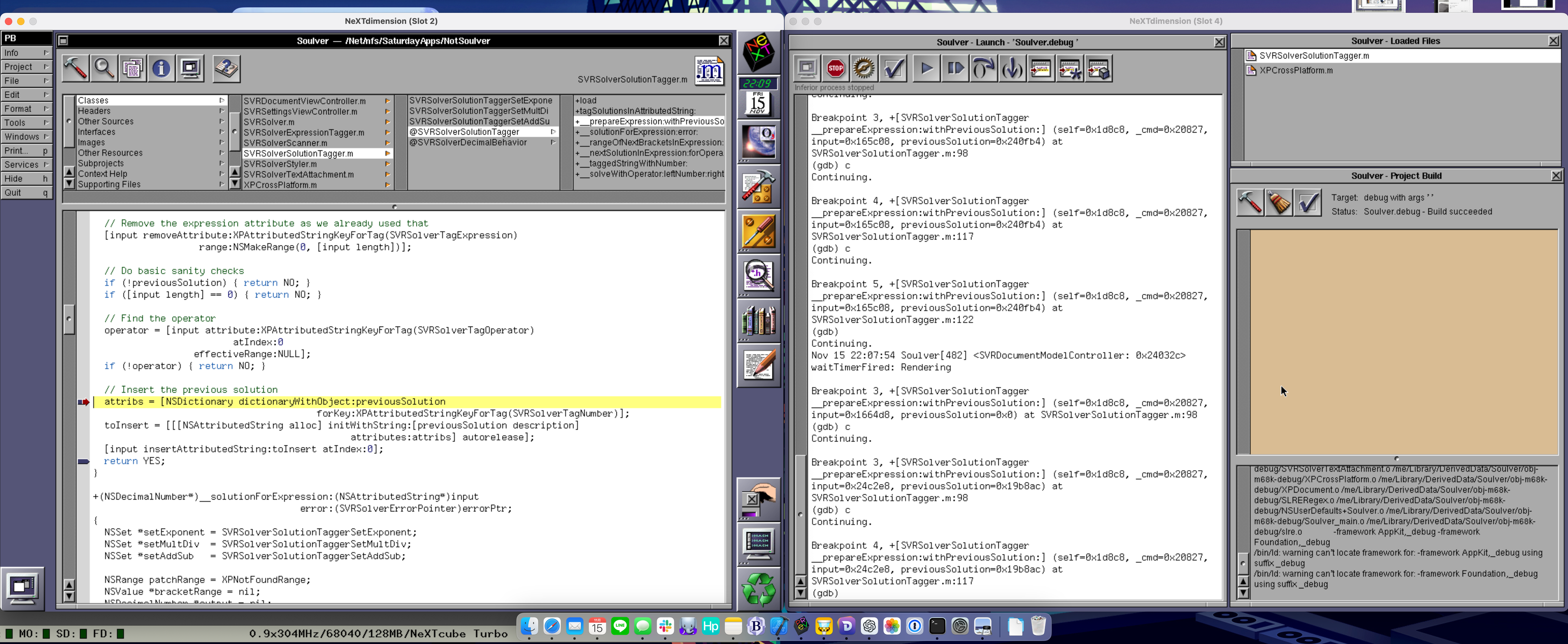
With the help of Andreas, I was able to optimize the performance of Previous so that even with 2 next dimension boards running, it runs at over 300mhz on my chinsy little M1 MacBook Air.
On a 5K display, it's a pretty sweet workstation for running Project Builder and building and debugging my application 😎 So, as always, thanks for your help Andreas, I'm having a ton of fun developing a brand new app for OpenStep and then upgrading it to support every major version of OSX 🤓
Eventually, I will create a full walkthrough, but for now set this in the config file:
That said, by only changing the config file I was able to run only between 200 and 216 MHz comfortably. Then Andreas told me about some caches I could enable in the source code. Enabling these caches and then creating a custom build brought a significant benefit and pushed me into the 300Mhz range.
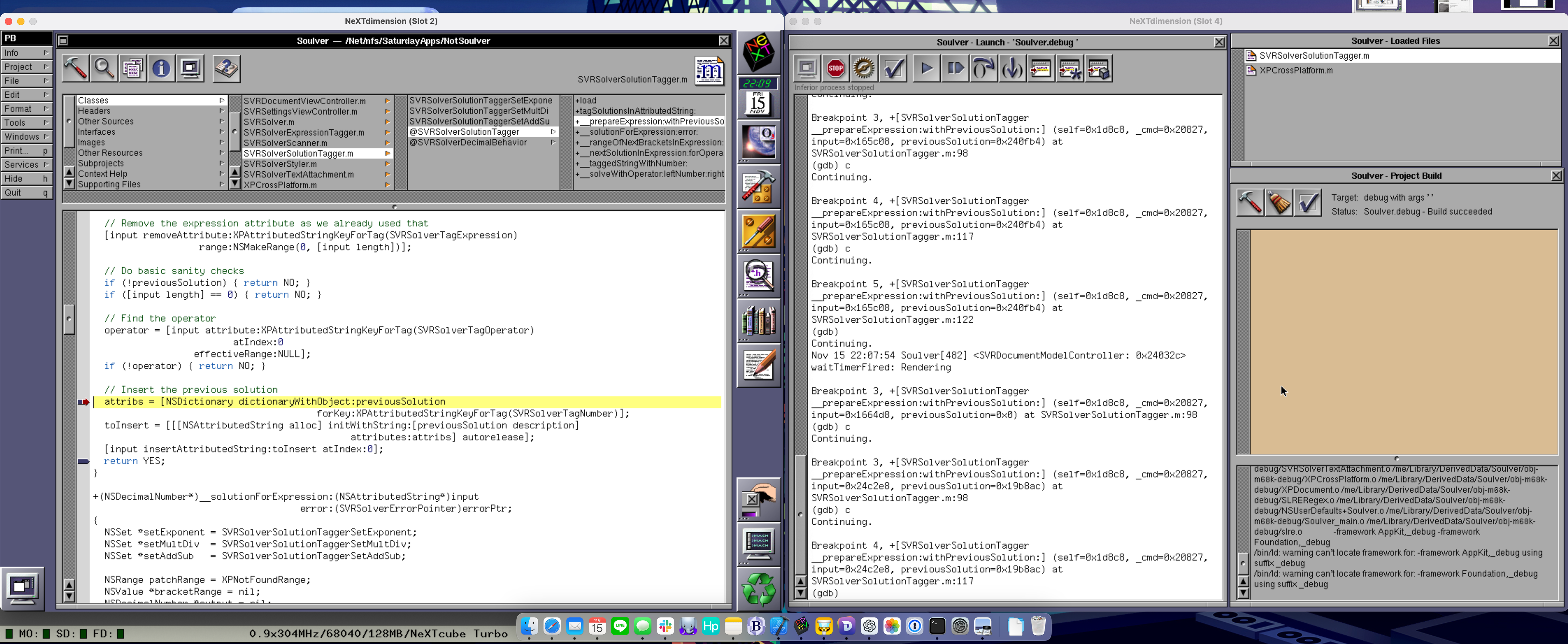
With the help of Andreas, I was able to optimize the performance of Previous so that even with 2 next dimension boards running, it runs at over 300mhz on my chinsy little M1 MacBook Air.
On a 5K display, it's a pretty sweet workstation for running Project Builder and building and debugging my application 😎 So, as always, thanks for your help Andreas, I'm having a ton of fun developing a brand new app for OpenStep and then upgrading it to support every major version of OSX 🤓
Eventually, I will create a full walkthrough, but for now set this in the config file:
Code Select
[System]
nCpuFreq = 304
bRealtime = FALSE
That said, by only changing the config file I was able to run only between 200 and 216 MHz comfortably. Then Andreas told me about some caches I could enable in the source code. Enabling these caches and then creating a custom build brought a significant benefit and pushed me into the 300Mhz range.
Code Select
// cpummu.h
#define MMU_ICACHE 1
#define MMU_IPAGECACHE 1
#define MMU_DPAGECACHE 1

// cpummu030.h
// I don't think this set is needed if you are going for performance.
// If you want performance choose the 68040
#define MMU_DPAGECACHE030 1
#define MMU_IPAGECACHE030 1
Title: Re: Previous Emulator - Increasing Screen Resolution
Post by: user217 on November 15, 2024, 01:48:08 PM
Post by: user217 on November 15, 2024, 01:48:08 PM
Good god those are some insane numbers. I kinda wanna try out those patches!