Title: 3D-printable NeXT mouse gasket
Post by: MindWalker on October 29, 2024, 11:25:12 AM
Post by: MindWalker on October 29, 2024, 11:25:12 AM
Hi,
I guess this is getting good-enough to "advertise".
I am not sure if "gasket" is the correct word, but anyway; the black rubber strip that sits between the halves of the non-ADB NeXT mouse, that's what I mean ;D In my mouse the rubber had started to wore down, it's much thinner on the part where the thumb goes and the material has started to disintegrate; it's getting sticky (almost like sweating) and gross.
I 3D-modeled and printed a replacement in flexible TPU. It's a funny material, almost like foam but it kinda works here (and at least in my mouse, looks much better than the original part). It's not as smooth to the touch as rubber but it's very grippy. So it's not a 100% visually identical, but easily nicer to touch than the worn old rubber.
The version shown here was still a bit too tight (you can see a cut on the top corner of the left mouse button) and the groove was a tad bit too shallow (worked once the screws were put in) but I hope the next revision will be good enough to publish!
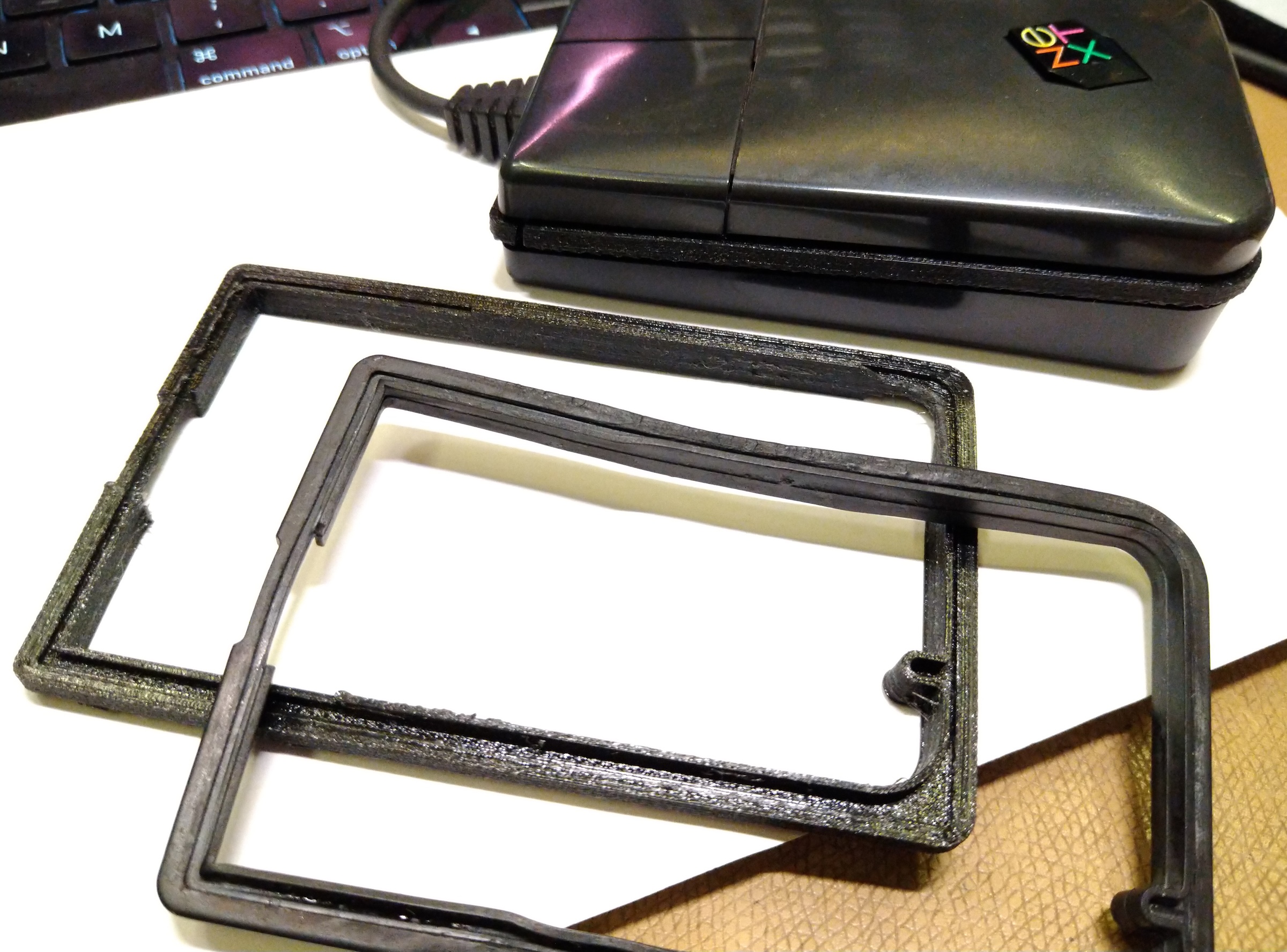
Front/top: original part, below: previous prototype of the print, in the mouse: the current prototype.
I guess this is getting good-enough to "advertise".
I am not sure if "gasket" is the correct word, but anyway; the black rubber strip that sits between the halves of the non-ADB NeXT mouse, that's what I mean ;D In my mouse the rubber had started to wore down, it's much thinner on the part where the thumb goes and the material has started to disintegrate; it's getting sticky (almost like sweating) and gross.
I 3D-modeled and printed a replacement in flexible TPU. It's a funny material, almost like foam but it kinda works here (and at least in my mouse, looks much better than the original part). It's not as smooth to the touch as rubber but it's very grippy. So it's not a 100% visually identical, but easily nicer to touch than the worn old rubber.
The version shown here was still a bit too tight (you can see a cut on the top corner of the left mouse button) and the groove was a tad bit too shallow (worked once the screws were put in) but I hope the next revision will be good enough to publish!
Front/top: original part, below: previous prototype of the print, in the mouse: the current prototype.
Title: Re: 3D-printable NeXT mouse gasket
Post by: barcher174 on October 30, 2024, 02:23:56 PM
Post by: barcher174 on October 30, 2024, 02:23:56 PM
Very cool!
Title: Re: 3D-printable NeXT mouse gasket
Post by: MindWalker on November 05, 2024, 10:01:24 AM
Post by: MindWalker on November 05, 2024, 10:01:24 AM
After some fine-tuning I think this is now done! Available in Thingiverse now: https://www.thingiverse.com/thing:6821213
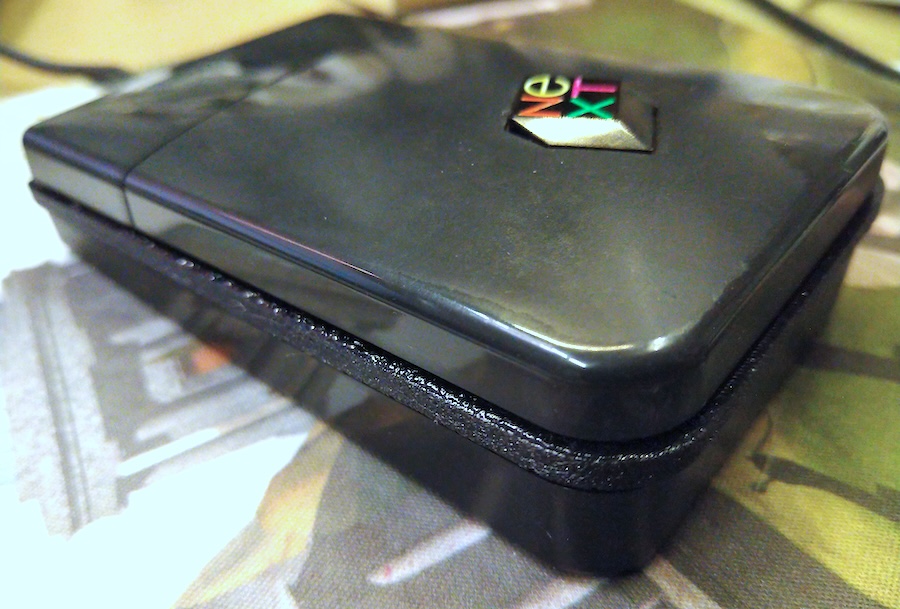
See notes on printing at the end. This was the first time I used "support roof", this really helped to make the bottom surface of the exterior "bar" smoother to touch. The basic support is sparse and leaves much more coarser surface (which doesn't feel that nice when using the mouse). Using "ironing" on the top layers makes that smoother as well (but also gave it a strange almost "wet" look).
I'd love to see how it would look in non-black TPU so please share photos if you attempt it. Not sure if glow-in-dark TPU exists but that would be quite something... ;D
See notes on printing at the end. This was the first time I used "support roof", this really helped to make the bottom surface of the exterior "bar" smoother to touch. The basic support is sparse and leaves much more coarser surface (which doesn't feel that nice when using the mouse). Using "ironing" on the top layers makes that smoother as well (but also gave it a strange almost "wet" look).
I'd love to see how it would look in non-black TPU so please share photos if you attempt it. Not sure if glow-in-dark TPU exists but that would be quite something... ;D
Title: Re: 3D-printable NeXT mouse gasket
Post by: pTeK on November 05, 2024, 11:27:22 AM
Post by: pTeK on November 05, 2024, 11:27:22 AM
Offtopic: Are you using Solid Works to design it?
Title: Re: 3D-printable NeXT mouse gasket
Post by: MindWalker on November 05, 2024, 12:04:21 PM
Post by: MindWalker on November 05, 2024, 12:04:21 PM
Quote from: pTeK on November 05, 2024, 11:27:22 AMOfftopic: Are you using Solid Works to design it?
No, I am using an old free version of SketchUp, which works badly and anything else would've probably made modeling this much easier, but I've been too lazy to learn anything else :P Would Solid Works make a good upgrade path?
Title: Re: 3D-printable NeXT mouse gasket
Post by: pTeK on November 05, 2024, 11:48:00 PM
Post by: pTeK on November 05, 2024, 11:48:00 PM
Quote from: MindWalker on November 05, 2024, 12:04:21 PMNo, I am using an old free version of SketchUp, which works badly and anything else would've probably made modeling this much easier, but I've been too lazy to learn anything else :P Would Solid Works make a good upgrade path?
Only if you have $5,000USD to spend.
Title: Re: 3D-printable NeXT mouse gasket
Post by: Rob Blessin Black Hole on November 23, 2024, 02:23:10 AM
Post by: Rob Blessin Black Hole on November 23, 2024, 02:23:10 AM
I'm excited to try this as Bambu labs is about announce a new ABS TPU 95 filament , it is a game changer:) TPU 95 is a rubber lamment and was incompatible with the 4 filament "juke box " changers , I can now do 16 colors ! I also just got in my Xtools 4 in 1 Craft machine awesome it prints on over 1000 materials and has different modules Laser, Sharp point edging and engraving, Inkjet printer that prints on every thing and a pen drawing tool and soon reportedly a 5th module will support UV printing think of your keycaps , I'll be able to directly print pant on 3d printed objects.
I'm also making a Holomat 2 so it is really cool , using a projector the holomat 2 is a roll out touch screen n your desk and it gets better because programming Jarvis AI is off the chain a real time AI assistant and also I'm going to get approved to sell protohologram.com back to the future :) I hope it will be OK to show the projects here as it is amazing stuff ! https://youtu.be/9PwzX_kjB1w?si=6cFqpz3TCt4VdWhg
I'm also making a Holomat 2 so it is really cool , using a projector the holomat 2 is a roll out touch screen n your desk and it gets better because programming Jarvis AI is off the chain a real time AI assistant and also I'm going to get approved to sell protohologram.com back to the future :) I hope it will be OK to show the projects here as it is amazing stuff ! https://youtu.be/9PwzX_kjB1w?si=6cFqpz3TCt4VdWhg