Title: Next Video Timings
Post by: dotsam on November 16, 2024, 04:05:16 PM
Post by: dotsam on November 16, 2024, 04:05:16 PM
I recently got a great price on a new-old-stock video switcher/scaler (A Kramer VP-728 (https://k.kramerav.com/support/product_downloads.asp?pt=5&pid=1161)) with the intention of being able to easily view/capture retro systems over HDMI, including my NeXTStation Color. The specs indicated support for Sync-on-Green (aka RGsB), as well as support for some Sun resolutions, so I was hopeful it would just work out-of-the box.
Unfortunately, when I received it, this was not the case. The scaler detected some sort of input, but it indicated that it was the 1152x900@66Hz Sun mode, and displayed only a black picture. From what I could see, the scaler didn't have any sort of auto-detect mode, only a list of supported resolutions, with an option for 4 "custom" resolutions.
So I set about trying to figure out the right parameters for a custom resolution for the NeXTStation Color's 1120x832 resolution, mostly using VESA timing calculators, and the specs from around the web that indicated a 61.3kHz horizontal frequency, and a 68Hz vertical frequency. Try as I might, I couldn't get anything to work, but I was also guessing at a lot of the information I needed, and had no idea how close the VESA standards were.
Long story short, I finally decided to break out my (cheap) oscilloscope and probe the Green pin of the video connector to see what I could find out. Here's a video timing diagram for reference:
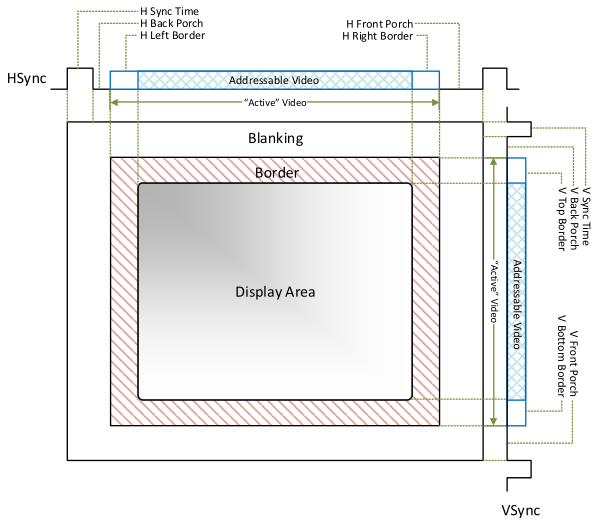
All measurements are approximate, owing to the resolution and measuring cursor of my oscilloscope.
With this timing information and the known resolution and refresh rates, we get a pixel clock of ~100Mhz, and can work out the following pixels/lines:
And success! This was enough to get the scaler to lock in the signal! It ran its auto-image adjustment, and then I proceeded to manually tweak the frequency and phase adjustments to get the cleanest picture I could. Here's a screen grab that has the OSD from the scaler showing the custom resolution:
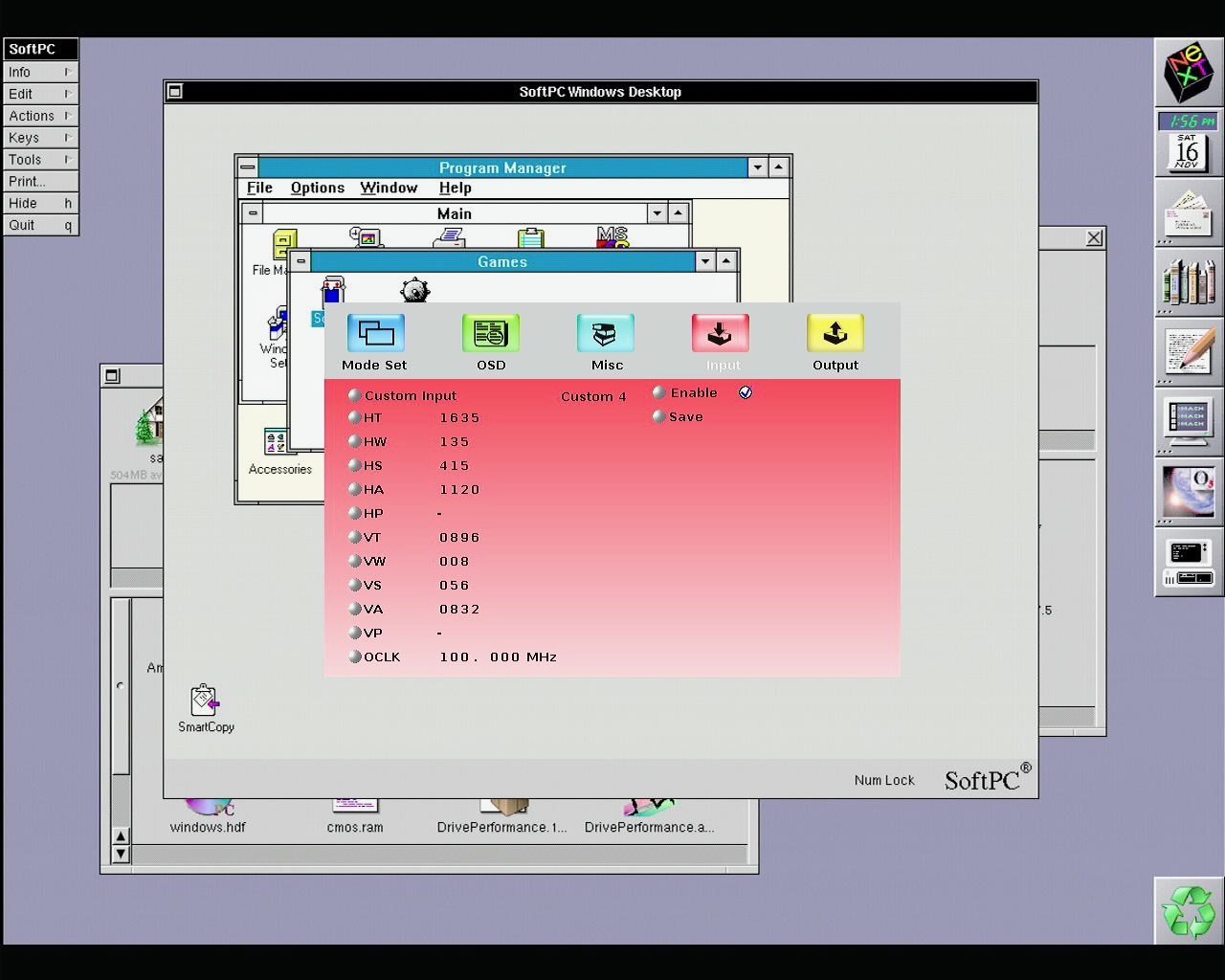
And as text:
I used this video timing calculator (https://www.epanorama.net/faq/vga2rgb/calc.html) to help figure this all out, which produced the following Xfree86 mode line, which you can paste in again to see the full timing information there:
Hopefully this information can help someone else out. As monitors that natively support SoG become harder to find, these sort of scalers may be a good option, or other custom video solutions, any of which may need this timing information.
Unfortunately, when I received it, this was not the case. The scaler detected some sort of input, but it indicated that it was the 1152x900@66Hz Sun mode, and displayed only a black picture. From what I could see, the scaler didn't have any sort of auto-detect mode, only a list of supported resolutions, with an option for 4 "custom" resolutions.
So I set about trying to figure out the right parameters for a custom resolution for the NeXTStation Color's 1120x832 resolution, mostly using VESA timing calculators, and the specs from around the web that indicated a 61.3kHz horizontal frequency, and a 68Hz vertical frequency. Try as I might, I couldn't get anything to work, but I was also guessing at a lot of the information I needed, and had no idea how close the VESA standards were.
Long story short, I finally decided to break out my (cheap) oscilloscope and probe the Green pin of the video connector to see what I could find out. Here's a video timing diagram for reference:
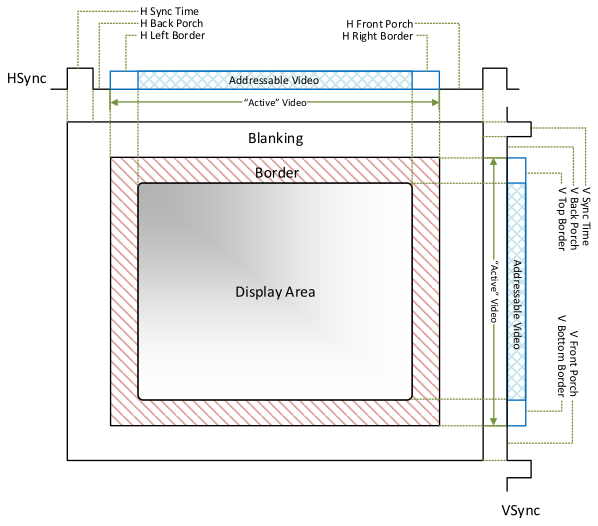
All measurements are approximate, owing to the resolution and measuring cursor of my oscilloscope.
| Video Area | Time Measurement |
| Horizontal Front Porch | 0.98 μs |
| Horizontal Sync Pulse | 1.34 μs |
| Horizontal Back Porch | 2.83 μs |
| Horizontal Active Area | 11.3 μs |
| Vertical Front Porch | 131 μs |
| Vertical Sync Pulse | 131 μs |
| Vertical Back Porch | 784 μs |
| Vertical Active Area | 1360 μs |
With this timing information and the known resolution and refresh rates, we get a pixel clock of ~100Mhz, and can work out the following pixels/lines:
| Video Area | Quantified Measurement |
| Horizontal Front Porch | 100 pixels |
| Horizontal Sync Pulse | 135 pixels |
| Horizontal Back Porch | 280 pixels |
| Horizontal Active Area | 1120 pixels |
| Vertical Front Porch | 8 lines |
| Vertical Sync Pulse | 8 lines |
| Vertical Back Porch | 48 lines |
| Vertical Active Area | 832 lines |
And success! This was enough to get the scaler to lock in the signal! It ran its auto-image adjustment, and then I proceeded to manually tweak the frequency and phase adjustments to get the cleanest picture I could. Here's a screen grab that has the OSD from the scaler showing the custom resolution:
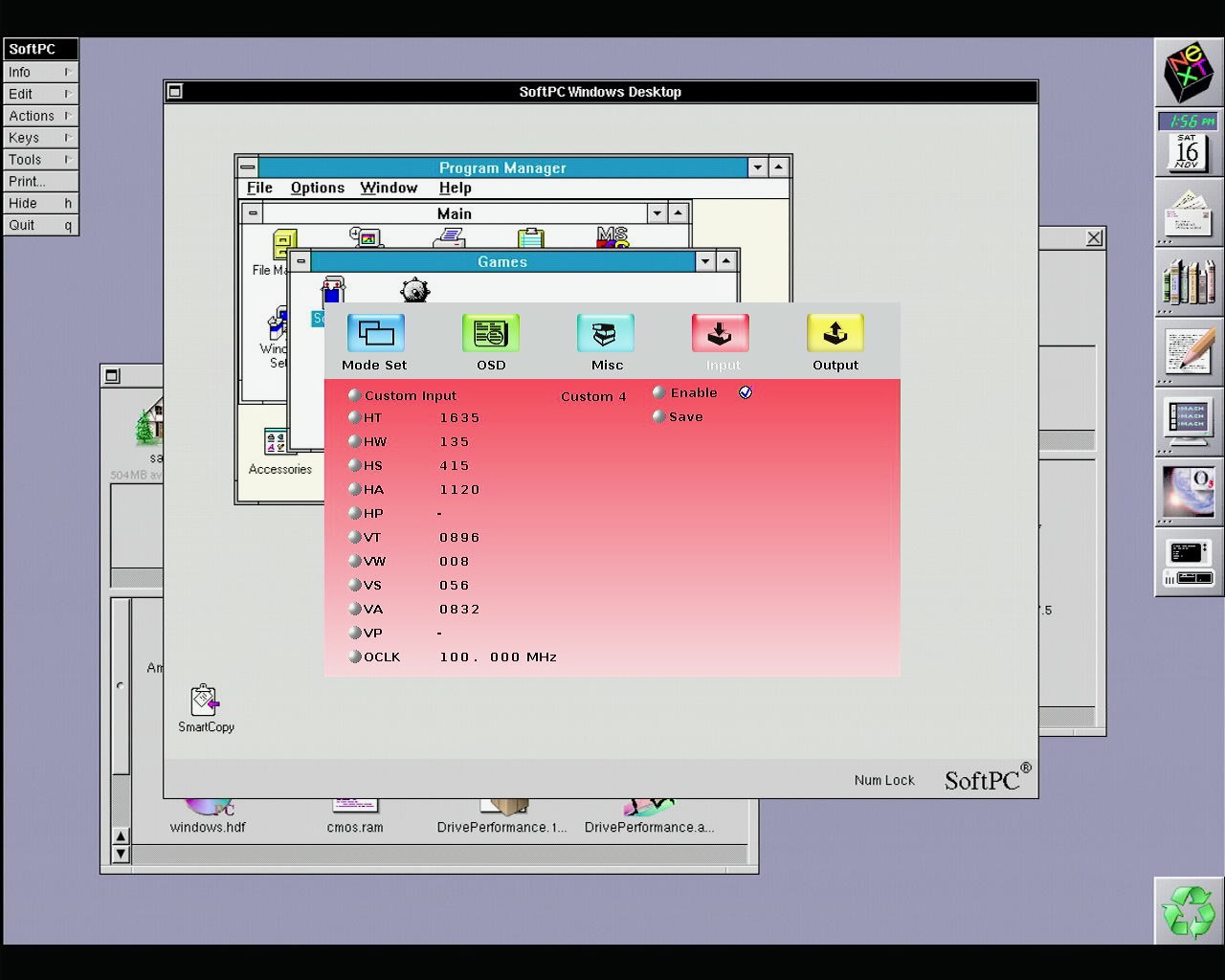
And as text:
Code Select
HT Horizontal Total                 1635

HW Horizontal sync pulse width      135

HS Horizontal active start point    415

HA Horizontal active region         1120

HP Horizontal polarity              -

VT Vertical Total                   896

VW Vertical sync pulse width        8

VS Vertical active start point      56

VA Vertical active region           832

VP Vertical polarity                -

OCLK Output clock                   100
I used this video timing calculator (https://www.epanorama.net/faq/vga2rgb/calc.html) to help figure this all out, which produced the following Xfree86 mode line, which you can paste in again to see the full timing information there:
Code Select
Modeline "1120x832" 100 1120 1220 1355 1635 832 840 848 896 -hsync -vsyncHopefully this information can help someone else out. As monitors that natively support SoG become harder to find, these sort of scalers may be a good option, or other custom video solutions, any of which may need this timing information.
Title: Re: Next Video Timings
Post by: blackbeauty on December 17, 2024, 09:34:42 AM
Post by: blackbeauty on December 17, 2024, 09:34:42 AM
Brilliant work, literally!
Could you perhaps give some information about which hardware components you used and how they were connected? I currently got an Extron 112 Plus with RGB / BNC output and wonder what kind of device would be the best one to grab the signal from there. Or could you somehow connect the Kramer directly to the NeXT?
Thanks!
Could you perhaps give some information about which hardware components you used and how they were connected? I currently got an Extron 112 Plus with RGB / BNC output and wonder what kind of device would be the best one to grab the signal from there. Or could you somehow connect the Kramer directly to the NeXT?
Thanks!
Title: Re: Next Video Timings
Post by: dotsam on February 20, 2025, 06:55:57 PM
Post by: dotsam on February 20, 2025, 06:55:57 PM
Quote from: blackbeauty on December 17, 2024, 09:34:42 AMCould you perhaps give some information about which hardware components you used and how they were connected?The Kramer VP-728 has VGA inputs, so I was able to use just the 13w3 to VGA adapter I've had forever (sold as Sun compatible, I believe).
I've recently paired this setup with a JetKVM (https://jetkvm.com/docs) network KVM, and have plans to try and develop a USB->NeXT Keyboard/Mouse bus converter to make the NeXTStation fully remotely accessible