Title: Backing up an original Maxtor drive in a 68939 cube
Post by: blackbeauty on December 01, 2024, 12:55:57 PM
Post by: blackbeauty on December 01, 2024, 12:55:57 PM
Dear community,
I've been struggling this weekend to get a true backup of an old 349 MB Maxtor drive that is the boot disk inside a trusty old 68030 "NeXT computer", running NEXTSTEP 1.0a
By now, I have prepared a clean disk image that I attached to the machine using the DB-25 version of BlueSCSI. (And, just for the record, an image file that is completely blank (dd-ed from /dev/zero) gives you Bad disk label magic number. Under NS 1.0a, you're not given the opportunity to initialise it from the GUI, however, under NS 2.2 it does).
To avoid hassle with a mounted root system, and not wanting to tar it all over, I thought it would be a smart move to start from another disk and dd the start disk from there to the blank disk. So I started NS 1.0a from the optical disk (yes, it works!), but it turns out that /dev/sd0a is being used for the swap disk of the system on OD. I can reach the blank external disk as /dev/sd1a, but very weirdly not the regular boot disk. Same story on NS 2.2 started from OD. How the heck can I reach the boot disk in this setting?
And what is the right move given the different block size (Maxtor 1024 bytes, image on SD card 512 bytes)? Would I need to let BlueSCSI use a 1024 byte block size instead? If that block size works in Previous as well, I'd do so, but maybe there is some clever way of using dd (on NS1.x/2.x!) to accomplish it right away?
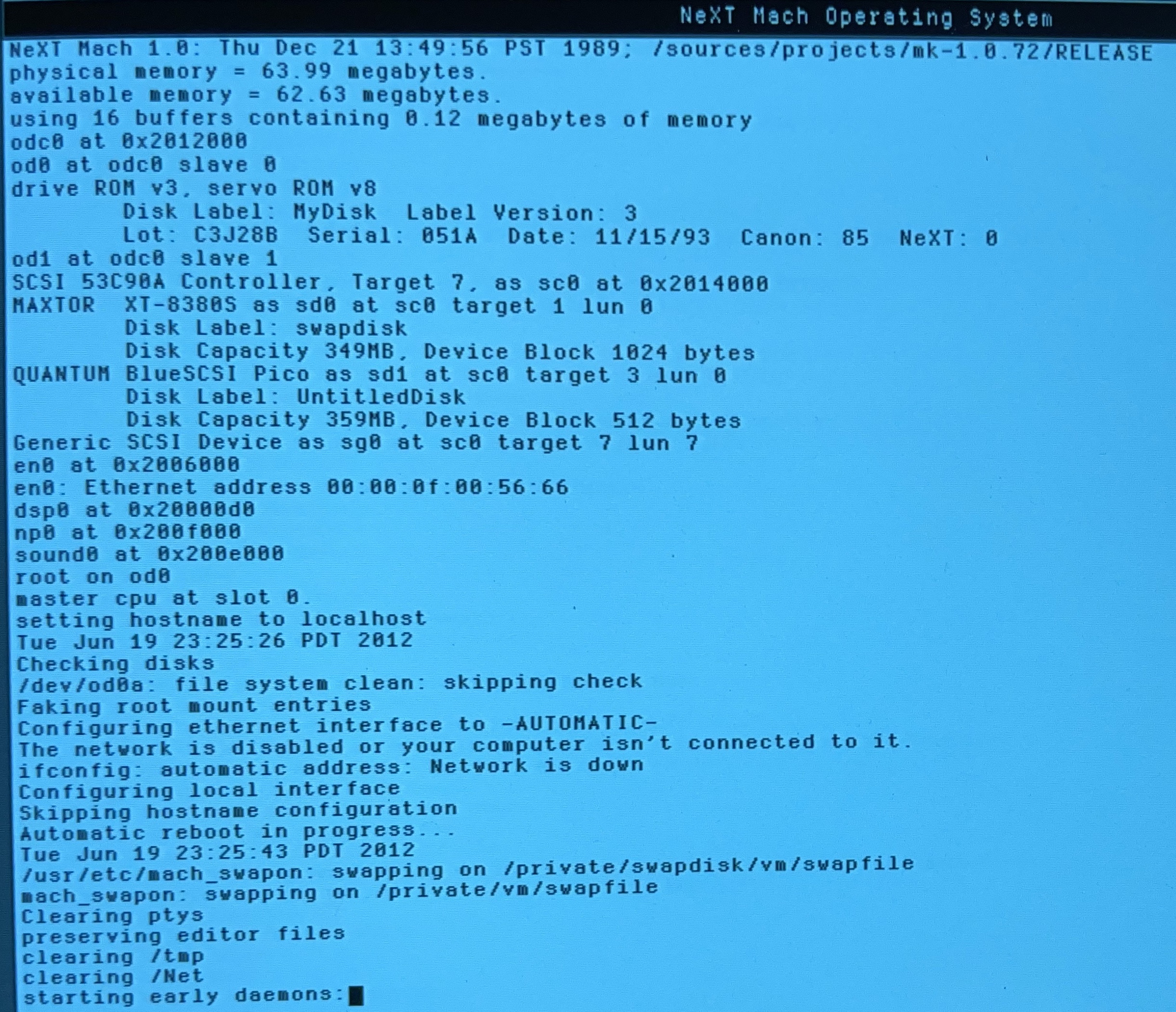
The screenshots show the boot sequences of NS 1.0a and NS 2.2 starting from OD, and how the disks have been mounted.
Any help appreciated, thanks...!
I've been struggling this weekend to get a true backup of an old 349 MB Maxtor drive that is the boot disk inside a trusty old 68030 "NeXT computer", running NEXTSTEP 1.0a
By now, I have prepared a clean disk image that I attached to the machine using the DB-25 version of BlueSCSI. (And, just for the record, an image file that is completely blank (dd-ed from /dev/zero) gives you Bad disk label magic number. Under NS 1.0a, you're not given the opportunity to initialise it from the GUI, however, under NS 2.2 it does).
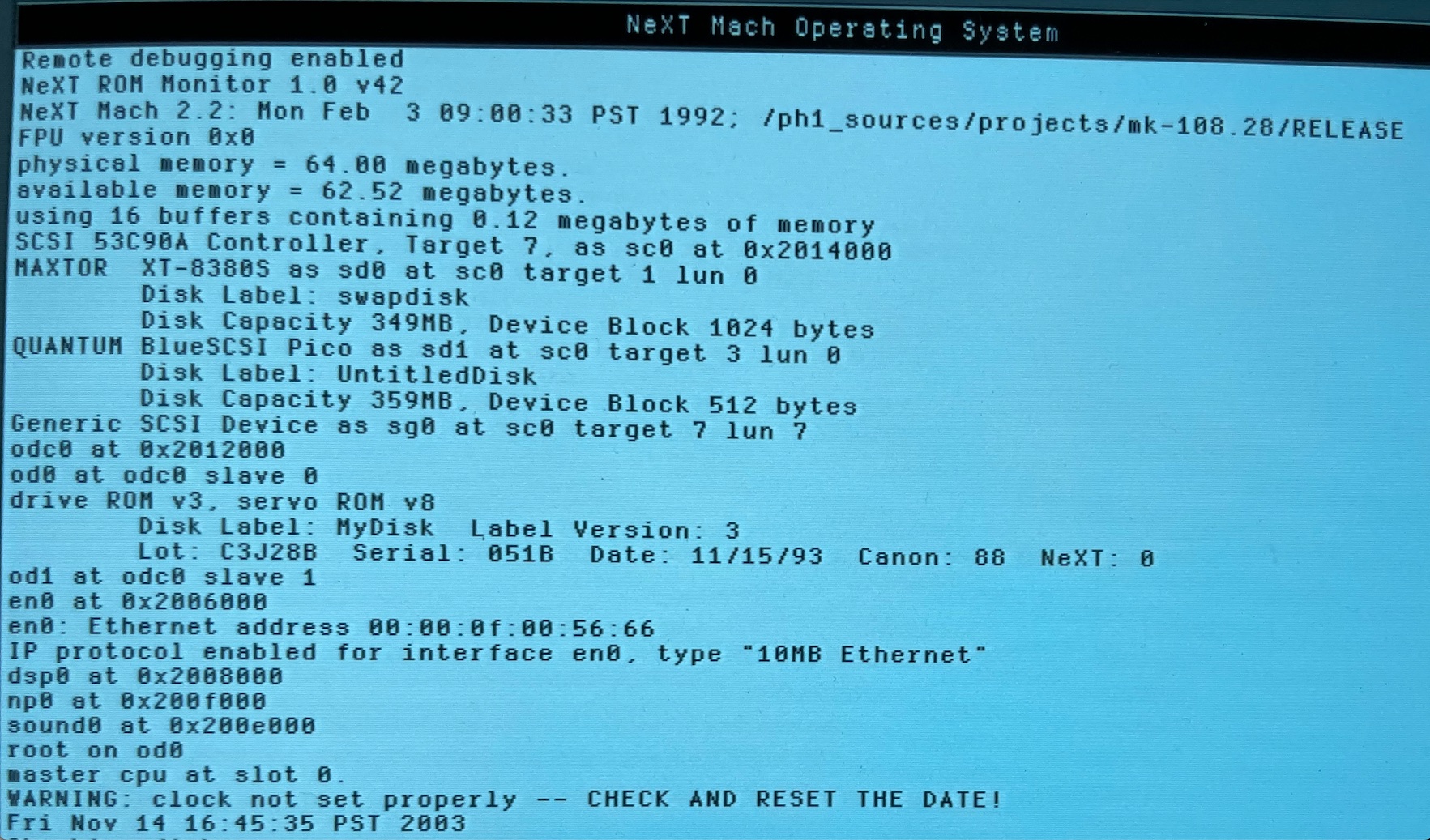
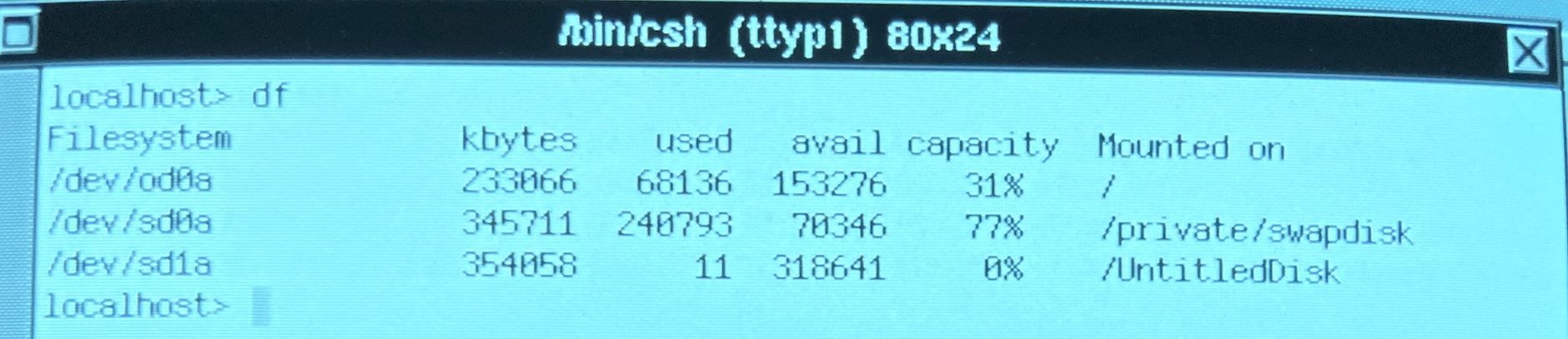
To avoid hassle with a mounted root system, and not wanting to tar it all over, I thought it would be a smart move to start from another disk and dd the start disk from there to the blank disk. So I started NS 1.0a from the optical disk (yes, it works!), but it turns out that /dev/sd0a is being used for the swap disk of the system on OD. I can reach the blank external disk as /dev/sd1a, but very weirdly not the regular boot disk. Same story on NS 2.2 started from OD. How the heck can I reach the boot disk in this setting?
And what is the right move given the different block size (Maxtor 1024 bytes, image on SD card 512 bytes)? Would I need to let BlueSCSI use a 1024 byte block size instead? If that block size works in Previous as well, I'd do so, but maybe there is some clever way of using dd (on NS1.x/2.x!) to accomplish it right away?
The screenshots show the boot sequences of NS 1.0a and NS 2.2 starting from OD, and how the disks have been mounted.
Any help appreciated, thanks...!
Title: Re: Backing up an original Maxtor drive in a 68939 cube
Post by: pl212 on December 01, 2024, 11:42:03 PM
Post by: pl212 on December 01, 2024, 11:42:03 PM
Depending on how new your BlueSCSI is, you may be able to able to use Initiator Mode (https://bluescsi.com/docs/Initiator-Mode), which does a 'forensic' copy of any attached SCSI device to the SD card. You could first back this up, and then turn around and use it as an actual boot/usage device in your Next.
Title: Re: Backing up an original Maxtor drive in a 68939 cube
Post by: stepleton on December 02, 2024, 03:07:02 AM
Post by: stepleton on December 02, 2024, 03:07:02 AM
A deeply UNIX-nerd way to do it is this, assuming you can get NS 1.0a onto a TCP/IP network:
1. Find a version of netcat (https://netcat.sourceforge.net/) that runs on NS 1.0a. Get it on your Cube and (if building from source) compile it. Check that it works by setting up netcat as a listener on another host and connecting to it from the cube's netcat. (Just type "hello" and see that the string is going across the network.)
2. Reboot NS 1.0a in single-user mode. Check that filesystems are mounted read-only; if not, remount them as read-only if possible; if not, at least make sure that your root shell is the only process running.
3. Bring up TCP/IP on the Cube; ping some host to check that it works.
4. Set up netcat as a listener on a remote host again. This time, direct its output into a file: this file will be your disk image.
5. Use dd on the cube to read the entire hard drive from /dev/sd0h or /dev/rsd0h. (I forget which but I'm not sure it matters. Why not do both and compare the result?) This time, don't specify an output file with of= but instead pipe dd into netcat connecting to your remote host listener. The disk data will be transferred to the file on the remote host. (Note that on NEXTSTEP, you will want to use the 'h' partition when taking an image, as this means "the entire disk" (http://vax.polarhome.com/service/man/?qf=sd&af=0&sf=0&of=NeXTSTEP&tf=2).)
6. To confirm a successful image, try your image file on a BlueSCSI or an emulator or what have you.
This procedure can work for disks that are 2 GiB or less in size, with the size limitation coming from how NS's dd command works. For bigger disks, you will need to have a piece of software that talks to NEXTSTEP's scsi driver directly. I've got example code for this somewhere...
1. Find a version of netcat (https://netcat.sourceforge.net/) that runs on NS 1.0a. Get it on your Cube and (if building from source) compile it. Check that it works by setting up netcat as a listener on another host and connecting to it from the cube's netcat. (Just type "hello" and see that the string is going across the network.)
2. Reboot NS 1.0a in single-user mode. Check that filesystems are mounted read-only; if not, remount them as read-only if possible; if not, at least make sure that your root shell is the only process running.
3. Bring up TCP/IP on the Cube; ping some host to check that it works.
4. Set up netcat as a listener on a remote host again. This time, direct its output into a file: this file will be your disk image.
5. Use dd on the cube to read the entire hard drive from /dev/sd0h or /dev/rsd0h. (I forget which but I'm not sure it matters. Why not do both and compare the result?) This time, don't specify an output file with of= but instead pipe dd into netcat connecting to your remote host listener. The disk data will be transferred to the file on the remote host. (Note that on NEXTSTEP, you will want to use the 'h' partition when taking an image, as this means "the entire disk" (http://vax.polarhome.com/service/man/?qf=sd&af=0&sf=0&of=NeXTSTEP&tf=2).)
6. To confirm a successful image, try your image file on a BlueSCSI or an emulator or what have you.
This procedure can work for disks that are 2 GiB or less in size, with the size limitation coming from how NS's dd command works. For bigger disks, you will need to have a piece of software that talks to NEXTSTEP's scsi driver directly. I've got example code for this somewhere...
Title: Re: Backing up an original Maxtor drive in a 68939 cube
Post by: blackbeauty on December 02, 2024, 04:15:08 AM
Post by: blackbeauty on December 02, 2024, 04:15:08 AM
I cannot put it differently than "I like that". Very nerd-ish, yes, but plausible^^ Thank you!
Five minutes before I read your answer, I checked my resulting HD image in Previous and it works exactly as it should. However, I gave in yesterday and tar-ed the content over to the externally attached SD card. And I learned (again) that the stock tar in NS 1.0a has a 255-character limit on file path lengths and is unable to copy device files. GNU tar certainly helps here.
So, original issue resolved, a very interesting solution approach on the table, but still my question stands how I could reach the root HD disk, when booting the OS from the optical disk. That really puzzled me and people must have had that issue back then as well...
Five minutes before I read your answer, I checked my resulting HD image in Previous and it works exactly as it should. However, I gave in yesterday and tar-ed the content over to the externally attached SD card. And I learned (again) that the stock tar in NS 1.0a has a 255-character limit on file path lengths and is unable to copy device files. GNU tar certainly helps here.
So, original issue resolved, a very interesting solution approach on the table, but still my question stands how I could reach the root HD disk, when booting the OS from the optical disk. That really puzzled me and people must have had that issue back then as well...
Title: Re: Backing up an original Maxtor drive in a 68939 cube
Post by: paolo.bertolo on December 02, 2024, 06:06:06 AM
Post by: paolo.bertolo on December 02, 2024, 06:06:06 AM
Just checked on my system (also 030, System 1.0a booted from an MO disk): in my case, the root HD is /dev/sd0a and I can mount it. However, the HD is in fact a SCSI2SD, not an actual, factory installed HD.
Title: Re: Backing up an original Maxtor drive in a 68939 cube
Post by: stepleton on December 02, 2024, 04:03:41 PM
Post by: stepleton on December 02, 2024, 04:03:41 PM
Hmm, I'm not so sure what's going on here, but I have very little experience with dedicated swap disks. I certainly hope that booting from the od hasn't just used your boot disk as a swap disk and killed whatever data is on there! I wouldn't expect that behaviour, though.
Let's assume that this isn't happening. It's curious that the Maxtor has the disklabel "swapdisk". When you boot 1.0a from the hard drive, do the boot messages still say that the hard drive is called "swapdisk"?
What do you find when you boot from the od and list /private/swapdisk/? You may need to be root to see what's in there. I wonder if what you'd find is the entire hard drive filesystem with the swapfile in use at /private/swapdisk/vm/swapfile.
Whatever you do, I think it's important that when you use dd, you specify if=/dev/sd0h (or if=/dev/rsd0h, not sure which, not sure it matters, if in doubt try both). The important part is the "h", which means you copy from block 0 all the way up to the end of the disk. Other letters should only capture specific partitions of the disk: see the manual page I linked to earlier (http://vax.polarhome.com/service/man/?qf=sd&af=0&sf=0&of=NeXTSTEP&tf=2) (or just type `man sd` on your NeXT and read it there).
The block size of the hard disk shouldn't matter from the standpoint of getting a successful read: anything that fits in RAM should work, even bs=1. If dd complains about what you've chosen, then find and use a value that it doesn't complain about. I generally favour a larger size so that dd does more buffering, but that's a hunch about what to do and isn't based on any kind of scientific testing. If the disk has any capability to stream sequential blocks, though, it will very likely be better than reading and then writing one block at a time, which bs=<blocksize> likely does.
Finally, for best results, do your dd's in single-user mode: it could be trouble if some other program comes along and changes the filesystem that you're busy imaging. Probably it'll still work, but it's riskier...
I sure do wish my optical drives worked! Fixing those has been one of those "once I develop more skills" items. I actually think I might be close these days, but I have other projects at the moment.
Let's assume that this isn't happening. It's curious that the Maxtor has the disklabel "swapdisk". When you boot 1.0a from the hard drive, do the boot messages still say that the hard drive is called "swapdisk"?
What do you find when you boot from the od and list /private/swapdisk/? You may need to be root to see what's in there. I wonder if what you'd find is the entire hard drive filesystem with the swapfile in use at /private/swapdisk/vm/swapfile.
Whatever you do, I think it's important that when you use dd, you specify if=/dev/sd0h (or if=/dev/rsd0h, not sure which, not sure it matters, if in doubt try both). The important part is the "h", which means you copy from block 0 all the way up to the end of the disk. Other letters should only capture specific partitions of the disk: see the manual page I linked to earlier (http://vax.polarhome.com/service/man/?qf=sd&af=0&sf=0&of=NeXTSTEP&tf=2) (or just type `man sd` on your NeXT and read it there).
The block size of the hard disk shouldn't matter from the standpoint of getting a successful read: anything that fits in RAM should work, even bs=1. If dd complains about what you've chosen, then find and use a value that it doesn't complain about. I generally favour a larger size so that dd does more buffering, but that's a hunch about what to do and isn't based on any kind of scientific testing. If the disk has any capability to stream sequential blocks, though, it will very likely be better than reading and then writing one block at a time, which bs=<blocksize> likely does.
Finally, for best results, do your dd's in single-user mode: it could be trouble if some other program comes along and changes the filesystem that you're busy imaging. Probably it'll still work, but it's riskier...
I sure do wish my optical drives worked! Fixing those has been one of those "once I develop more skills" items. I actually think I might be close these days, but I have other projects at the moment.