Title: IBM Thinkpad T43 (2005) Install Results. Looks good :)
Post by: pTeK on January 10, 2025, 08:44:56 PM
Post by: pTeK on January 10, 2025, 08:44:56 PM
I have managed to get access to a IBM Thinkpad T43 laptop (https://en.wikipedia.org/wiki/IBM_ThinkPad_T43) (2005). Another IBM Thinkpad T43 page (http://www.ibmfiles.com/pages/t43.htm)
Currently I've managed to get the OpenStep 4.2 CD to boot and run using the CD Driver swap trick that is mentioned in the post on this forum (https://www.nextcomputers.org/forums/index.php?msg=19528).
I still need to create a NextStep 3.3 Driver CD so I can see if it runs. (I have the 3.3 User and Developer CD and boot disks but no drive).
I have not had any luck booting the 2.88MB NextSTEP 3.3 floppy disk (which has the boot disk and drivers on the one 2.88MB disk as per swap trick instructions) on the GRUB with memdisk (https://help.ubuntu.com/community/GrubHowto/BootFloppy) so I can boot custom loadable boot floppies of USB stick which I was using on my Dell Inspiron 5150.
The keyboard also works after the memory test at the beginning unlike the Dell Inspiron 5150.
On Openstep after selecting the IDE drivers it also detects the ATAPI CD-ROM so it can read OpenStep 4.2 CD-ROM and mount it. The Dell Inspiron 5150 could not do that.
This will be updated once I install NS3.3 on it 8)
EDIT: Managed to get NS3.3 partially installed on it.
I had to boot of my OpenStep 4.2 driver disk (CD-ROM) and select the EIDE dual EIDE/ATAPI controller and boot into single user mode. I then had to manually go through /etc/rc.cdrom due to it not recognizing or failing the error checks when it just booted normally on the NS3.3 User CD. I had to do it this way as I didn't have a NS3.3 driver CD-ROM with the updated EIDE/ATAPI controller on it.
I also only copied the essentials as on reboot as I had no CD-ROM driver I couldn't install any extra packages but this will be ok once I copy the updated EIDE driver to the computer, might do it via the MS-DOS partition or just single user boot in again. Will worry about that later.
The VGA window draw speeds are a lot more quicker than VGA draw speeds on my Dell Inspiron 5150.
PCI Hardware strings
/private/Drivers/i386/System.config/Instance0.table
You need to use EIDE.config (V3.35 or V3.37) V3.35 is on the beta disk image, and V3.37 is on this site.
EDIT2: https://tp.krelay.de/index.php?type=2668-84M is the T43 model.
EDIT3: Added Boot Drivers and Active Drivers string from /private/Drivers/i386/System.config/Instance0.table
EDIT4: Still trying to copy over EIDE.config (V3.35 or V3.37) for CD-ROM access.
Currently I've managed to get the OpenStep 4.2 CD to boot and run using the CD Driver swap trick that is mentioned in the post on this forum (https://www.nextcomputers.org/forums/index.php?msg=19528).
I still need to create a NextStep 3.3 Driver CD so I can see if it runs. (I have the 3.3 User and Developer CD and boot disks but no drive).
I have not had any luck booting the 2.88MB NextSTEP 3.3 floppy disk (which has the boot disk and drivers on the one 2.88MB disk as per swap trick instructions) on the GRUB with memdisk (https://help.ubuntu.com/community/GrubHowto/BootFloppy) so I can boot custom loadable boot floppies of USB stick which I was using on my Dell Inspiron 5150.
The keyboard also works after the memory test at the beginning unlike the Dell Inspiron 5150.
On Openstep after selecting the IDE drivers it also detects the ATAPI CD-ROM so it can read OpenStep 4.2 CD-ROM and mount it. The Dell Inspiron 5150 could not do that.
EDIT: Managed to get NS3.3 partially installed on it.
I had to boot of my OpenStep 4.2 driver disk (CD-ROM) and select the EIDE dual EIDE/ATAPI controller and boot into single user mode. I then had to manually go through /etc/rc.cdrom due to it not recognizing or failing the error checks when it just booted normally on the NS3.3 User CD. I had to do it this way as I didn't have a NS3.3 driver CD-ROM with the updated EIDE/ATAPI controller on it.
I also only copied the essentials as on reboot as I had no CD-ROM driver I couldn't install any extra packages but this will be ok once I copy the updated EIDE driver to the computer, might do it via the MS-DOS partition or just single user boot in again. Will worry about that later.
The VGA window draw speeds are a lot more quicker than VGA draw speeds on my Dell Inspiron 5150.
PCI Hardware strings
Code Select
Found PCI device: ID=0x25908086 at Dev=0 Func=0 Bus=0    Mobile 915GM/PM/GMS/910GML Express Processor to DRAM Controller
Found PCI device: ID=0x25918086 at Dev=1 Func=0 Bus=0    Mobile 915GM/PM Express PCI Express Root Port
Found PCI device: ID=0x26608086 at Dev=28 Func=0 Bus=0    82801FB/FBM/FR/FW/FRW (ICH6 Family) PCI Express Port 1
Found PCI device: ID=0x26648086 at Dev=28 Func=2 Bus=0    82801FB/FBM/FR/FW/FRW (ICH6 Family) PCI Express Port 3
Found PCI device: ID=0x26588086 at Dev=29 Func=0 Bus=0    82801FB/FBM/FR/FW/FRW (ICH6 Family) USB UHCI #1
Found PCI device: ID=0x26598086 at Dev=29 Func=1 Bus=0    82801FB/FBM/FR/FW/FRW (ICH6 Family) USB UHCI #2
Found PCI device: ID=0x24488086 at Dev=30 Func=0 Bus=0    82801 Mobile PCI Bridge
Found PCI device: ID=0x266e8086 at Dev=30 Func=2 Bus=0    82801FB/FBM/FR/FW/FRW (ICH6 Family) AC'97 Audio Controller
Found PCI device: ID=0x26418086 at Dev=31 Func=0 Bus=0    82801FBM (ICH6M) LPC Interface Bridge
Found PCI device: ID=0x26538086 at Dev=31 Func=2 Bus=0    82801FBM (ICH6M) SATA Controller
Found PCI device: ID=0x54601002 at Dev=0 Func=0 Bus=1    RV370/M22 [Mobility Radeon X300]
Found PCI device: ID=0x167d14e4 at Dev=0 Func=0 Bus=2    NetXtreme BCM5751M Gigabit Ethernet PCI Express
Found PCI device: ID=0x04761180 at Dev=0 Func=0 Bus=11    Ricoh RL5c476 II
Found PCI device: ID=0x42208086 at Dev=2 Func=0 Bus=11    PRO/Wireless 2200BG [Calexico2] Network Connection
/private/Drivers/i386/System.config/Instance0.table
Code Select
"Boot Drivers"="EIDE PCIC SerialPorts PS2Keyboard PCIBus EISABus"
"Active Drivers"="PS2Mouse VGA"
You need to use EIDE.config (V3.35 or V3.37) V3.35 is on the beta disk image, and V3.37 is on this site.
EDIT2: https://tp.krelay.de/index.php?type=2668-84M is the T43 model.
EDIT3: Added Boot Drivers and Active Drivers string from /private/Drivers/i386/System.config/Instance0.table
EDIT4: Still trying to copy over EIDE.config (V3.35 or V3.37) for CD-ROM access.
Title: Re: IBM Thinkpad T43 (2005) Install Results. Looks good :)
Post by: wmlive on January 11, 2025, 06:16:28 AM
Post by: wmlive on January 11, 2025, 06:16:28 AM
It would be very interesting to know whether the T43's PCMCIA slot is properly working.
Which exact T43 model are you using? Could you provide the MTM number (e.g. 1871-16U) printed on the bottom of the machine?
I basically have OPENSTEP 4.2 runnnig on Thinkpads T60 and T61 with UXGA display resolution. But since neither the PCMCIA slot nor the ethernet device are supported and can't be used, this considerably limits their usefulness.
Which exact T43 model are you using? Could you provide the MTM number (e.g. 1871-16U) printed on the bottom of the machine?
I basically have OPENSTEP 4.2 runnnig on Thinkpads T60 and T61 with UXGA display resolution. But since neither the PCMCIA slot nor the ethernet device are supported and can't be used, this considerably limits their usefulness.
Title: Re: IBM Thinkpad T43 (2005) Install Results. Looks good :)
Post by: pTeK on January 11, 2025, 12:42:40 PM
Post by: pTeK on January 11, 2025, 12:42:40 PM
Quote from: wmlive on January 11, 2025, 06:16:28 AMIt would be very interesting to know whether the T43's PCMCIA slot is properly working.
Which exact T43 model are you using? Could you provide the MTM number (e.g. 1871-16U) printed on the bottom of the machine?
I basically have OPENSTEP 4.2 runnnig on Thinkpads T60 and T61 with UXGA display resolution. But since neither the PCMCIA slot nor the ethernet device are supported and can't be used, this considerably limits their usefulness.
So the monitor reads IBM Thinkpad T43 but the product ID is 2373KXM which when searching on https://www.computer-specifications.com/specifications/ibm.html brings up T40, T40p, T41, T41p, T42 and T42p. Oh well fun times.
Having trouble installing openstep as fdisk only recognised BIOS IDE HD specs instead of the IDE size when read of the disk with the 4.03 Dual EIDE/ATAPI controller. But better than the DELL Inspiron 5150. Fun times
Title: Re: IBM Thinkpad T43 (2005) Install Results. Looks good :)
Post by: wmlive on January 11, 2025, 02:50:50 PM
Post by: wmlive on January 11, 2025, 02:50:50 PM
Quote from: pTeK on January 11, 2025, 12:42:40 PMSo the monitor reads IBM Thinkpad T43 but the product ID is 2373KXM which when searching on https://www.computer-specifications.com/specifications/ibm.html brings up T40, T40p, T41, T41p, T42 and T42p.According to tp.krelay.de/index.php?type=2373KXM (https://tp.krelay.de/index.php?type=2373KXM) these are the specs at the time this Thinkpad model was shipped:
Code Select
ThinkPad T42p (2373-KXM) P M 755 1GB RAM 60GB 7200rpm HDD 15 UXGA(1600x1200) TFT LCD
128MB ATI FireGL T2 CD-RW/DVD-R Multi-Burner(slim) IBM 802.11a/b/g wireless
Bluetooth/Modem 1Gb Ether UltraNav Sec Chip 9 cell Li-Ion Batt WinXP Pro
This appears to be rather a T42p instead of a T43p.
But maybe the bottom case part was once swapped by its previous owner with a compatible one from a T42p while the mainboard is a valid T43p?
To be sure about the MTM (Machine Type Model) aka Product ID better verify what the motherboard's BIOS reports on its first page.
Title: Re: IBM Thinkpad T43 (2005) Install Results. Looks good :)
Post by: pTeK on January 12, 2025, 01:03:06 AM
Post by: pTeK on January 12, 2025, 01:03:06 AM
Quote from: wmlive on January 11, 2025, 02:50:50 PMBut maybe the bottom case part was once swapped by its previous owner with a compatible one from a T42p while the mainboard is a valid T43p?After looking at the BIOS I got the product ID 266884MXXXXXXX and went to https://tp.krelay.de/index.php?type=2668-84M this was the result which sounds about right. (RAM is now 1GB) need to max it to 2GB. It still has the 40GB Fujitsu 5400rpm HDD in it as well.
To be sure about the MTM (Machine Type Model) aka Product ID better verify what the motherboard's BIOS reports on its first page.
QuoteThinkPad T43 (2668-84M) P M 750 (1.86 GHz), 512MB RAM, 40GB 5400rpm HDD, 15 SXGA+(1400x1050) TFT LCD, 64MB ATI Radeon X300, 24x24x24x/8x CD-RW/DVD, Intel 802.11b/g wireless, Bluetooth/Modem, 1Gb Ether, UltraNav, Sec Chip, 6 cell Li-Ion Batt, WinXP Pro
Title: Re: IBM Thinkpad T43 (2005) Install Results. Looks good :)
Post by: AP on January 16, 2025, 03:09:07 PM
Post by: AP on January 16, 2025, 03:09:07 PM
Wow. Neat! Do sound and ethernet work, or have you not gotten that far?
I didn't think this was possible, so didn't even try, but I have a Thinkpad T42p, so I should try at some point I guess.
Nice work.
I didn't think this was possible, so didn't even try, but I have a Thinkpad T42p, so I should try at some point I guess.
Nice work.
Title: Re: IBM Thinkpad T43 (2005) Install Results. Looks good :)
Post by: pTeK on January 18, 2025, 02:10:25 AM
Post by: pTeK on January 18, 2025, 02:10:25 AM
Quote from: AP on January 16, 2025, 03:09:07 PMWow. Neat! Do sound and ethernet work, or have you not gotten that far?No, No AC '97 Driver yet and user @asaladine posted last year a AMDPCNet32 (https://www.nextcomputers.org/forums/index.php?topic=5803) driver with source.
Quote from: AP on January 16, 2025, 03:09:07 PMI didn't think this was possible, so didn't even try, but I have a Thinkpad T42p, so I should try at some point I guess.
Nice work.
Yes make sure you use EIDE driver V3.35 or V3.37 for NeXTSTEP (Dual EIDE/ATAPI driver V3.35) option.
Currently burnt a new CD ISO which had a 2.88MB floppy driver image at the start of the CD which had EIDE.config (V3.35) but I must of botched the command line with mkisofs NeXTSTEP does not recognize the CD with the files I copied to it :( so now I have to create a new one.
I also stuffed up by not editing System.config/Instance0.table on the driver CD as I forgot to change Prompt For Driver Disk to No so I have to enter that on the command line to select the driver. Fun times. Currently the command line I'm using to boot is:
Code Select
-v -s rootdev=hd0a "Prompt For Driver Disk"=No
I think I have to copy the mouse pointer driver to the disk because after swapping to the HD in single user mode and typing exit I can't use the mouse pointer in NeXTSTEP and using driverLoader on Active Drivers just causes a system crash. Fun times :)
Title: Re: IBM Thinkpad T43 (2005) Install Results. Looks good :)
Post by: pTeK on January 18, 2025, 03:56:50 PM
Post by: pTeK on January 18, 2025, 03:56:50 PM
Quote from: wmlive on January 11, 2025, 06:16:28 AMIt would be very interesting to know whether the T43's PCMCIA slot is properly working.I don't have any PCMCIA hardware to test, what would you recommend I buy second hand?
Quote from: wmlive on January 11, 2025, 06:16:28 AMI basically have OPENSTEP 4.2 runnnig on Thinkpads T60 and T61 with UXGA display resolution. But since neither the PCMCIA slot nor the ethernet device are supported and can't be used, this considerably limits their usefulness.Can you do a write up of your OPENSTEP 4.2 install on Thinkpads T60 and T61 and the drivers you are using please?
Can you also provide your PCI Hardware strings? I wonder if I have the same Ethernet card as you on my Thinkpad T43?
Title: Re: IBM Thinkpad T43 (2005) Install Results. Looks good :)
Post by: wmlive on January 18, 2025, 10:20:16 PM
Post by: wmlive on January 18, 2025, 10:20:16 PM
Quote from: pTeK on January 18, 2025, 03:56:50 PMI don't have any PCMCIA hardware to test, what would you recommend I buy second hand?Maybe one of the 3Com PCMCIA Ethernet dongles or an Adaptec SlimSCSI 1460B? Compatible PCMCIA cards are listed in wiki.preterhuman.net/Installing_NEXTSTEP/OPENSTEP_On_A_Laptop (https://wiki.preterhuman.net/Installing_NEXTSTEP/OPENSTEP_On_A_Laptop).
QuoteCan you do a write up of your OPENSTEP 4.2 install on Thinkpads T60 and T61 and the drivers you are using please?Someone once posted a link to a ready made Virtualbox VM of OS42 here on the forum. Don't remember the details anymore, though.
Due to the lack of a suitable floppy drive for initial bootstrapping, i simply dd'ed that virtual HDD to a real PATA HDD and then just added the EIDE and VESA drivers.
QuoteCan you also provide your PCI Hardware strings? I wonder if I have the same Ethernet card as you on my Thinkpad T43?Without any networking nor write access to external media on that T60 i don't see how to easily export this information as text.
For comparison purposes of PCI id's please just refer to the Linux Hardware Database for either Thinkpad model:
linux-hardware.org/?view=computers&vendor=IBM&model=ThinkPad+T43+%28All%29 (https://linux-hardware.org/?view=computers&vendor=IBM&model=ThinkPad+T43+%28All%29)
linux-hardware.org/?view=computers&vendor=Lenovo&model=ThinkPad+T60+%28All%29 (https://linux-hardware.org/?view=computers&vendor=Lenovo&model=ThinkPad+T60+%28All%29)
linux-hardware.org/?view=computers&vendor=Lenovo&model=ThinkPad+T61+%28All%29 (https://linux-hardware.org/?view=computers&vendor=Lenovo&model=ThinkPad+T61+%28All%29)
The parts of any Thinkpad are typically mostly the same between model variants.
Title: Re: IBM Thinkpad T43 (2005) Install Results. Looks good :)
Post by: AP on March 02, 2025, 02:17:48 AM
Post by: AP on March 02, 2025, 02:17:48 AM
Hi pTek,
I did attempt to install OpenStep on the T42p. I chose the EIDE v4.03 drivers from the CD, and ran the installer. Then tried to figure things out, and did install the EIDE.pkg that included v3.37, which overwrote files. I did this by mapping a physical IDE drive (16 GB but only formatted 8 with the installer ((3.5GB visible during part of install))) to VirtualBox. It all boots fine with the USB to IDE adapter going into VBox. In the laptop, it says no operating system found.
What steps should I take? I am sure you said somewhere (I also read the Dell install post you made). But I am sure I am missing some things?
Is there a good way for me to continue with my method, or should I burn a CD or so.
Edit: Or if it's modifications to the EIDE driver, maybe if you already did the work for the same chipset, you wouldn't mind sharing that with me. :)
I did attempt to install OpenStep on the T42p. I chose the EIDE v4.03 drivers from the CD, and ran the installer. Then tried to figure things out, and did install the EIDE.pkg that included v3.37, which overwrote files. I did this by mapping a physical IDE drive (16 GB but only formatted 8 with the installer ((3.5GB visible during part of install))) to VirtualBox. It all boots fine with the USB to IDE adapter going into VBox. In the laptop, it says no operating system found.
What steps should I take? I am sure you said somewhere (I also read the Dell install post you made). But I am sure I am missing some things?
Is there a good way for me to continue with my method, or should I burn a CD or so.
Edit: Or if it's modifications to the EIDE driver, maybe if you already did the work for the same chipset, you wouldn't mind sharing that with me. :)
Title: Re: IBM Thinkpad T43 (2005) Install Results. Looks good :)
Post by: user217 on March 02, 2025, 06:13:55 PM
Post by: user217 on March 02, 2025, 06:13:55 PM
Hmm. I've got a Lenovo T61 from just a couple years later. I wonder how hard it would be to get it running the good stuff...
Title: Re: IBM Thinkpad T43 (2005) Install Results. Looks good :)
Post by: pTeK on March 02, 2025, 11:35:36 PM
Post by: pTeK on March 02, 2025, 11:35:36 PM
Quote from: AP on March 02, 2025, 02:17:48 AMHi pTek,
I did attempt to install OpenStep on the T42p. I chose the EIDE v4.03 drivers from the CD, and ran the installer. Then tried to figure things out, and did install the EIDE.pkg that included v3.37, which overwrote files. I did this by mapping a physical IDE drive (16 GB but only formatted 8 with the installer ((3.5GB visible during part of install))) to VirtualBox. It all boots fine with the USB to IDE adapter going into VBox. In the laptop, it says no operating system found.
What steps should I take? I am sure you said somewhere (I also read the Dell install post you made). But I am sure I am missing some things?
Is there a good way for me to continue with my method, or should I burn a CD or so.
Edit: Or if it's modifications to the EIDE driver, maybe if you already did the work for the same chipset, you wouldn't mind sharing that with me. :)
OpenSTEP User CD contains V4.01 of EIDE which allows Dual EIDE/ATAPI controller. It's similar to (V3.35 driver for NS33).
The latest version of EIDE V4.03 on this site contains support for Intel PIIX3 and PIIX4 hardware before it changed to ICHX hardware.
You should not use any of the V3.3X drivers with OpenStep, you should stick to V4.xx drivers.
How big is your EIDE hard drive?
When you says it does not boot on your Laptop does it still display the OpenStep boot screen where it does a memory scan at the beginning?.
On your Virtualbox image what are your boot drivers in "/usr/Devices/System.config/Instance0.table"?
When you boot the system can you boot in single user mode? (option -s) After the memory test?
I would recommend doing a complete install in VirtualBox with the patches as well, this is important because then you will have VESA support and won't have crappy 640x480 resolution.
Title: Re: IBM Thinkpad T43 (2005) Install Results. Looks good :)
Post by: pTeK on March 02, 2025, 11:39:28 PM
Post by: pTeK on March 02, 2025, 11:39:28 PM
Quote from: Rhetorica on March 02, 2025, 06:13:55 PMHmm. I've got a Lenovo T61 from just a couple years later. I wonder how hard it would be to get it running the good stuff...
Is the hard drive backwards compatible with EIDE. Some Sata controllers are IDE backwards compatible so you can use EIDE.config driver otherwise I hope you are a good programmer :).
I would recommend creating a 2.88MB bootable floppy image in VirtualBox and you can either dd it to the start of the USB stick or use GRUB to boot a 2.88MB floppy image to see if it detects your hard drive.
Title: Re: IBM Thinkpad T43 (2005) Install Results. Looks good :)
Post by: AP on March 03, 2025, 10:40:07 AM
Post by: AP on March 03, 2025, 10:40:07 AM
Quote from: pTeK on March 02, 2025, 11:35:36 PMOpenSTEP User CD contains V4.01 of EIDE which allows Dual EIDE/ATAPI controller. It's similar to (V3.35 driver for NS33).
The latest version of EIDE V4.03 on this site contains support for Intel PIIX3 and PIIX4 hardware before it changed to ICHX hardware.
You should not use any of the V3.3X drivers with OpenStep, you should stick to V4.xx drivers.
How big is your EIDE hard drive?
When you says it does not boot on your Laptop does it still display the OpenStep boot screen where it does a memory scan at the beginning?.
On your Virtualbox image what are your boot drivers in "/usr/Devices/System.config/Instance0.table"?
When you boot the system can you boot in single user mode? (option -s) After the memory test?
I would recommend doing a complete install in VirtualBox with the patches as well, this is important because then you will have VESA support and won't have crappy 640x480 resolution.
The drive is an msata-ide drive at 16GB. I put a few hundred MB partition for DOS. After that, It offered to format around 7600, so I formatted a hundred fewer. Something like 7500MB for NeXT.
During the install process it seemed to think there were only 3.5GB free. It boots fine in VBox but I don't know what's up with the size, or what the limit should be.
These are the boot drivers, plus a couple more. I added PCIC and SerialPorts to match yours, but don't think that was related to any of my stuff.
Boot Drivers"="EIDE PCIC SerialPorts PS2Keyboard PCIBus EISABus
When I boot, it asks me to pick 1-4 for DOS partitions, or n for NeXT. Pressing n or waiting shows no operating system found, so no chance for single user yet.
The one on my install cd has v4.03. Are you saying that should work without modification, or is your device id modification still needed?
One thing I'm noting is that I didn't use the dual ide/atapi.
Title: Re: IBM Thinkpad T43 (2005) Install Results. Looks good :)
Post by: pTeK on March 03, 2025, 11:55:57 PM
Post by: pTeK on March 03, 2025, 11:55:57 PM
Quote from: AP on March 03, 2025, 10:40:07 AMThe drive is an msata-ide drive at 16GB. I put a few hundred MB partition for DOS. After that, It offered to format around 7600, so I formatted a hundred fewer. Something like 7500MB for NeXT.
During the install process it seemed to think there were only 3.5GB free. It boots fine in VBox but I don't know what's up with the size, or what the limit should be.
There are limitations with OpenStep Drivers and commands supporting bigger than 2GB or 4GB partitions untill you install the final Patch on OpenStep that allows fsck and disk to use partitions over 4GB.
Quote from: AP on March 03, 2025, 10:40:07 AMThese are the boot drivers, plus a couple more. I added PCIC and SerialPorts to match yours, but don't think that was related to any of my stuff.Ok so you have the EIDE driver loading at boot, that is good. we just need to get it to find the NeXT partition.
Boot Drivers"="EIDE PCIC SerialPorts PS2Keyboard PCIBus EISABus
Quote from: AP on March 03, 2025, 10:40:07 AMWhen I boot, it asks me to pick 1-4 for DOS partitions, or n for NeXT. Pressing n or waiting shows no operating system found, so no chance for single user yet.This means you have boot0 (https://www.nextcomputers.org/files/manuals/nsa/09_StartShut.htmld/index.html) installed on the mbr (the first 512bytes) this could mean that either the cylinders, heads, sectors to the NeXT partition is incorrect or you don't have boot1 or boot2 installed on the HDD.
Quote from: AP on March 03, 2025, 10:40:07 AMThe one on my install cd has v4.03. Are you saying that should work without modification, or is your device id modification still needed?Don't worry about this for now, the worse thing the could happen is that your read/write speeds to HDD will be slower than normal.
One thing I'm noting is that I didn't use the dual ide/atapi.
You said in the post when you connect your hard drive to Virtual Box,
Quote from: AP on March 02, 2025, 02:17:48 AMI did attempt to install OpenStep on the T42p. I chose the EIDE v4.03 drivers from the CD, and ran the installer. I did this by mapping a physical IDE drive (16 GB but only formatted 8 with the installer ((3.5GB visible during part of install))) to VirtualBox. It all boots fine with the USB to IDE adapter going into VBox. In the laptop, it says no operating system found.Just to confirm you have connected your laptop hard drive to the computer and can read and write to it in Virtual Box?! Is it Master drive, Primary?
Is there a good way for me to continue with my method, or should I burn a CD or so.
Or do you have a Virtual image and you add hard drive image to the second controller (Master drive, Secondary) Because if it is not the Primary Drive, Master then you would not be installing the boot block properly.
Also if you are writing a virtual image to your hard drive, then the virtual image has to be a flat one (i.e 1GB is a 1GB image not 100MB that gets expanded as more files get added to it as this will fail if you write it directly to your hard drive).
Title: Re: IBM Thinkpad T43 (2005) Install Results. Looks good :)
Post by: AP on March 04, 2025, 01:30:30 AM
Post by: AP on March 04, 2025, 01:30:30 AM
Hi. Thanks for all that. I did actually get it working.
I just reinstalled, using the dual ide driver, (3rd page of drivers).
I also didn't make a dos partition. One of these things must have been the issue. Everything else I did the same way, master single drive.
I booted with the boot options you used for your dell. It was picking the wrong drive, or really no drive at all. I manually specified when it asked me too, hd0. It booted into single user mode. I used this to remove the boot option, leaving mem.
It is now "Checking disks" for some time. It seems quite slow. Each line during the boot went by slowly, like when listing display modes. About a line or two per second. It's been checking disk for 5 minutes so far.
Thanks for the info about the patch. Which patch is that? I used the one I got from the adafruit NeXT guide which had the vesa driver in it. What patches did you install on the Thinkpad?
In terms of drivers, I guess no AC97 driver yet. Probably no Ethernet driver for Intel 82540EB. Yours is a Broadcom Ethernet chipset.
Edit: still checking disks. And to answer the other question, if I take the drive and use it in virtualbox, it has always booted. I haven't been able to have it nor boot yet.
I just reinstalled, using the dual ide driver, (3rd page of drivers).
I also didn't make a dos partition. One of these things must have been the issue. Everything else I did the same way, master single drive.
I booted with the boot options you used for your dell. It was picking the wrong drive, or really no drive at all. I manually specified when it asked me too, hd0. It booted into single user mode. I used this to remove the boot option, leaving mem.
It is now "Checking disks" for some time. It seems quite slow. Each line during the boot went by slowly, like when listing display modes. About a line or two per second. It's been checking disk for 5 minutes so far.
Thanks for the info about the patch. Which patch is that? I used the one I got from the adafruit NeXT guide which had the vesa driver in it. What patches did you install on the Thinkpad?
In terms of drivers, I guess no AC97 driver yet. Probably no Ethernet driver for Intel 82540EB. Yours is a Broadcom Ethernet chipset.
Edit: still checking disks. And to answer the other question, if I take the drive and use it in virtualbox, it has always booted. I haven't been able to have it nor boot yet.
Title: Re: IBM Thinkpad T43 (2005) Install Results. Looks good :)
Post by: AP on March 04, 2025, 02:02:38 AM
Post by: AP on March 04, 2025, 02:02:38 AM
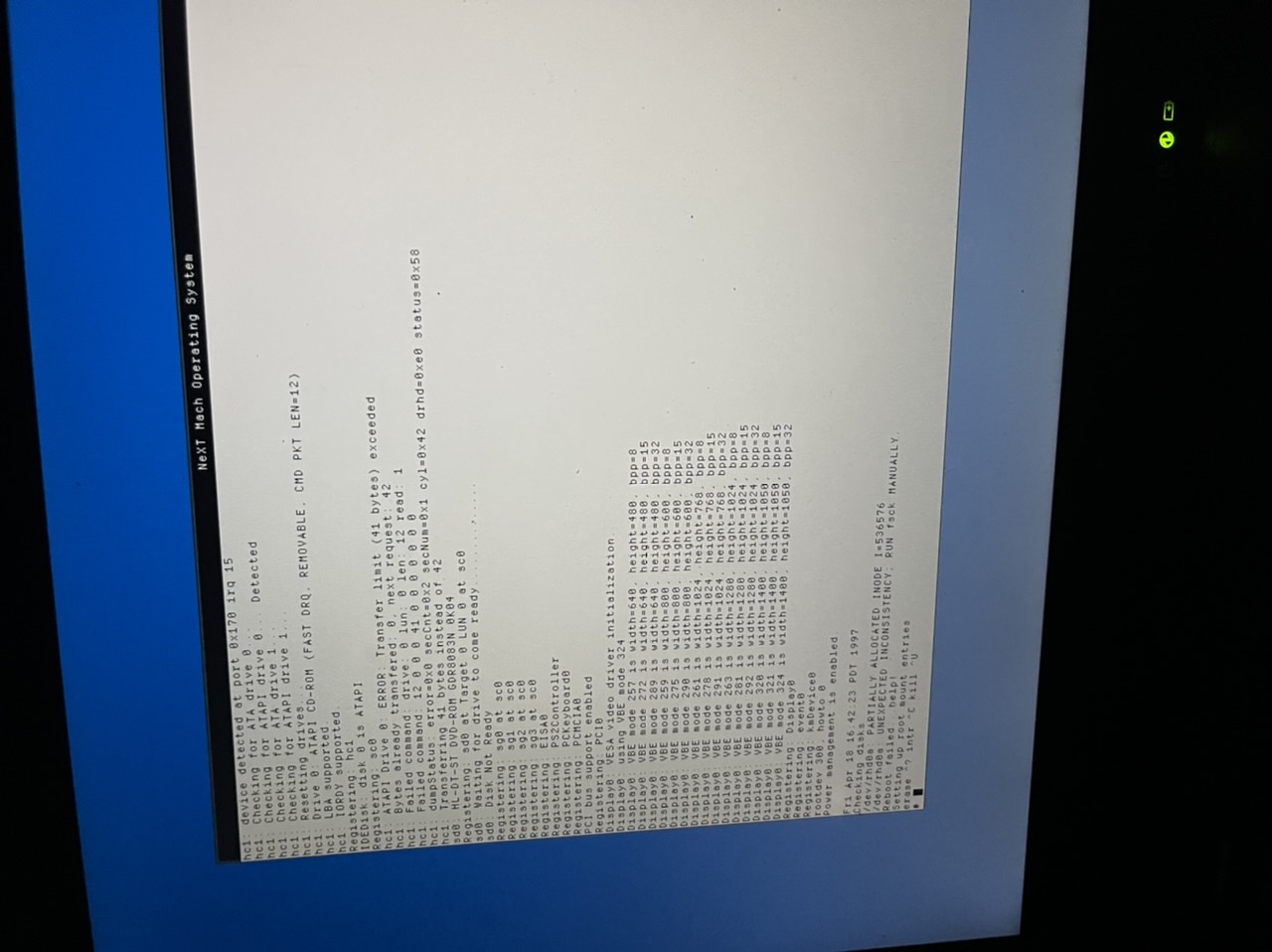
Testing picture upload.
Title: Re: IBM Thinkpad T43 (2005) Install Results. Looks good :)
Post by: pTeK on March 04, 2025, 02:09:00 AM
Post by: pTeK on March 04, 2025, 02:09:00 AM
Quote from: AP on March 04, 2025, 01:30:30 AMHi. Thanks for all that. I did actually get it working.Excellent and welcome to the club :)
Quote from: AP on March 04, 2025, 01:30:30 AMI just reinstalled, using the dual ide driver, (3rd page of drivers).I still need to get my DOS partition up and running, the reason being is so I can use it to transfer files to the OpenSTEP machine as my CD-Drive and Ethernet card is not working at the moment and with a DOS Partition you can boot of a Linux/NetBSD USB stick and copy files to the DOS partition.
I also didn't make a dos partition. One of these things must have been the issue. Everything else I did the same way, master single drive.
Quote from: AP on March 04, 2025, 01:30:30 AMI booted with the boot options you used for your dell. It was picking the wrong drive, or really no drive at all. I manually specified when it asked me too, hd0. It booted into single user mode. I used this to remove the boot option, leaving mem.Yes I had this problem as well and it was frustrating as it would take 10 minutes to boot in to OpenStep :(.
It is now "Checking disks" for some time. It seems quite slow. Each line during the boot went by slowly, like when listing display modes. About a line or two per second. It's been checking disk for 5 minutes so far.
So from my /usr/adm/messages log that you can view in my Dell Inspiron 5150 thread. (https://www.nextcomputers.org/forums/index.php?topic=5241) As you can see after the 10 minutes to boot it detected my hard driver on hc1, What controller is it detecting on yours? hc0 or hc1. As you can see on my 15th post on my Dell Ispiron 5150 thread (https://www.nextcomputers.org/forums/index.php?topic=5241) I changed the driver in config from a Dual EIDE/ATAPI driver to a single EIDE/ATAPI driver, I also had to change the primary to IRQ to the secondary IRQ and port addresses.
Post your /usr/adm/messages for your hardware controller that gets detected and I can help you.
The single EIDE/ATAPI driver is in the same EIDE.config that is already installed :)
Quote from: AP on March 04, 2025, 01:30:30 AMThanks for the info about the patch. Which patch is that? I used the one I got from the adafruit NeXT guide which had the VESA driver in it. What patches did you install on the Thinkpad?Yes, you have installed the correct patch with the VESA driver in it.
Quote from: AP on March 04, 2025, 01:30:30 AMIn terms of drivers, I guess no AC97 driver yet. Probably no Ethernet driver for Intel 82540EB. Yours is a Broadcom Ethernet chipset.No driver for AC97 yet but I think Ethernet and AC97 could be the easier drivers to create?!
Title: Re: IBM Thinkpad T43 (2005) Install Results. Looks good :)
Post by: pTeK on March 04, 2025, 02:13:15 AM
Post by: pTeK on March 04, 2025, 02:13:15 AM
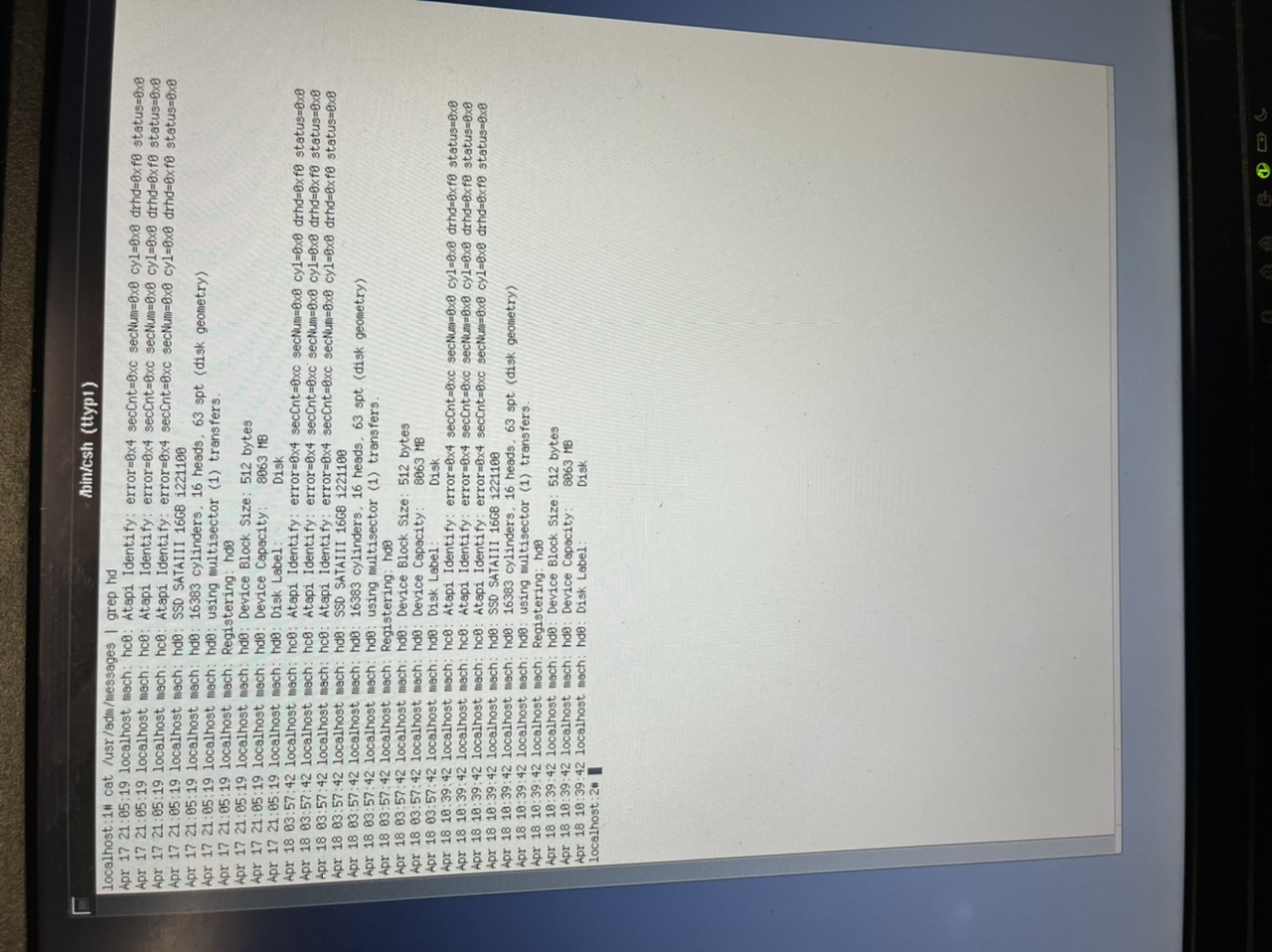
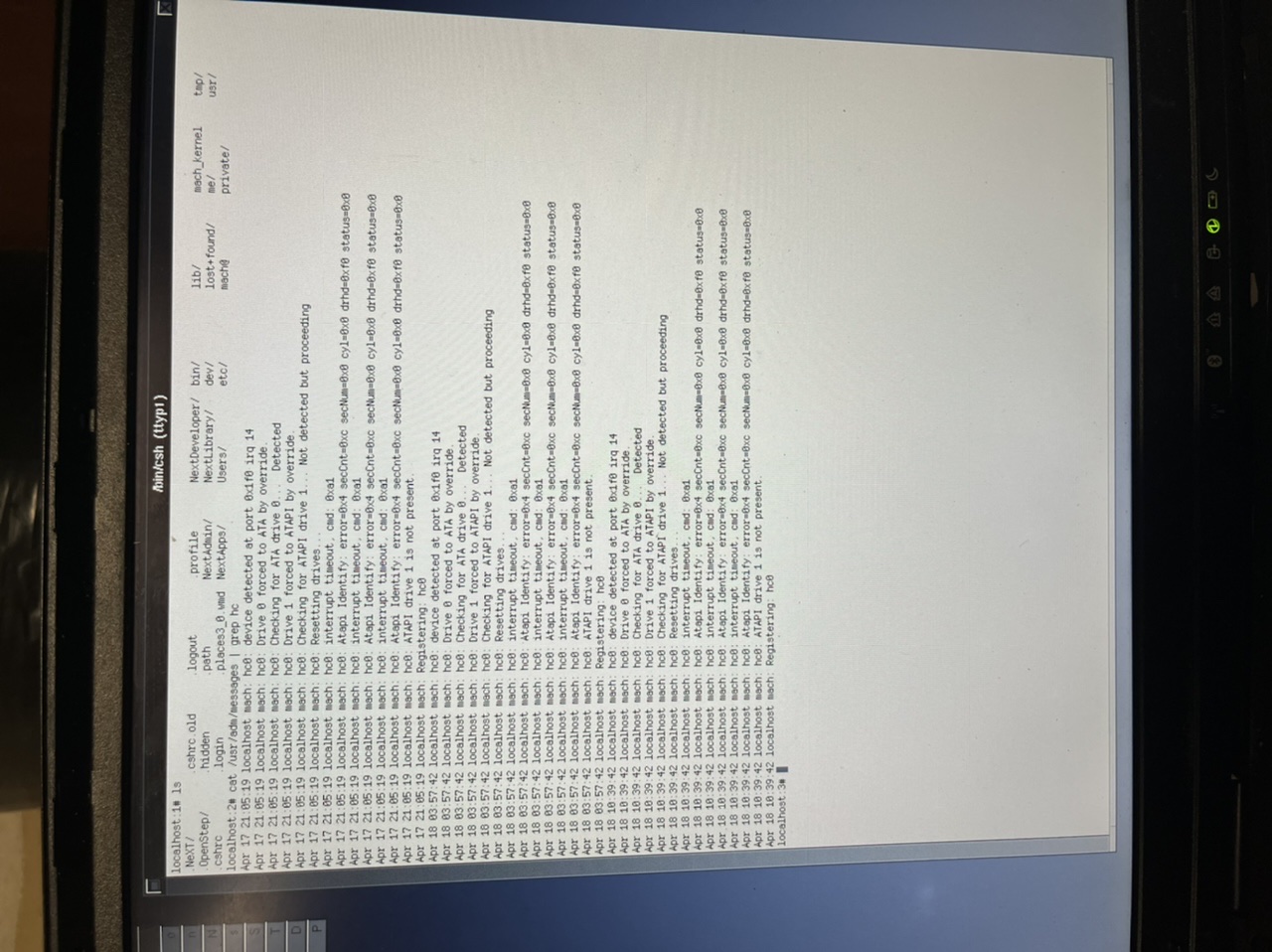
Quote from: AP on March 04, 2025, 02:02:38 AMTesting picture upload.take a picture of cat /usr/adm/messages | grep hc
and
cat /usr/adm/messages | grep hd
Title: Re: IBM Thinkpad T43 (2005) Install Results. Looks good :)
Post by: AP on March 04, 2025, 02:58:02 PM
Post by: AP on March 04, 2025, 02:58:02 PM
I can boot into a terminal interface when I cancel disk checking, and if I specify wrong drive in boot options, and it asks me for a drive, I'll say "hd0" and it will also have issues. But I'll get into a terminal.
I checked the Instance0.table, and the only boot option I have is mem. I did screw something up and can't boot in the VM anymore either.
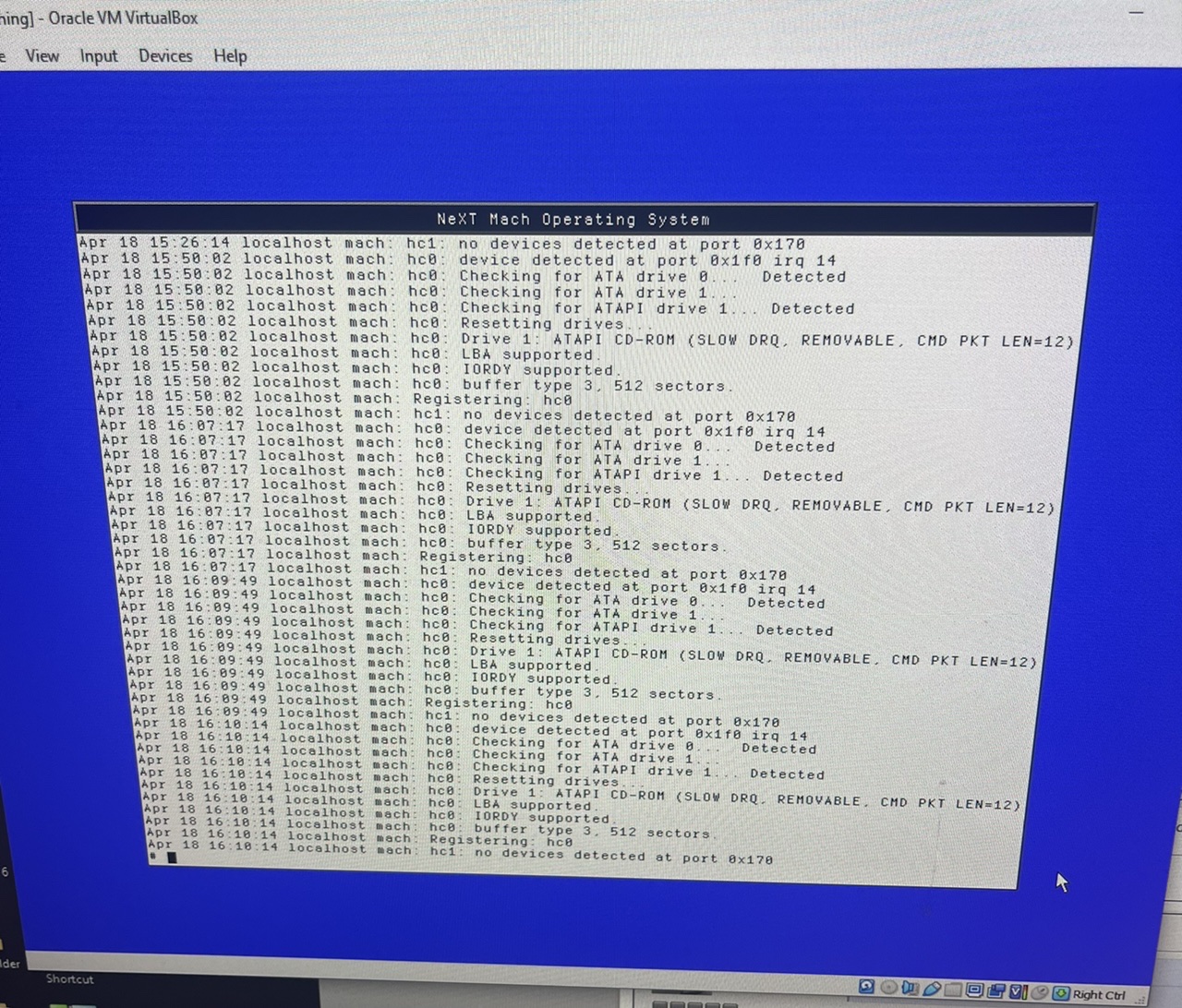
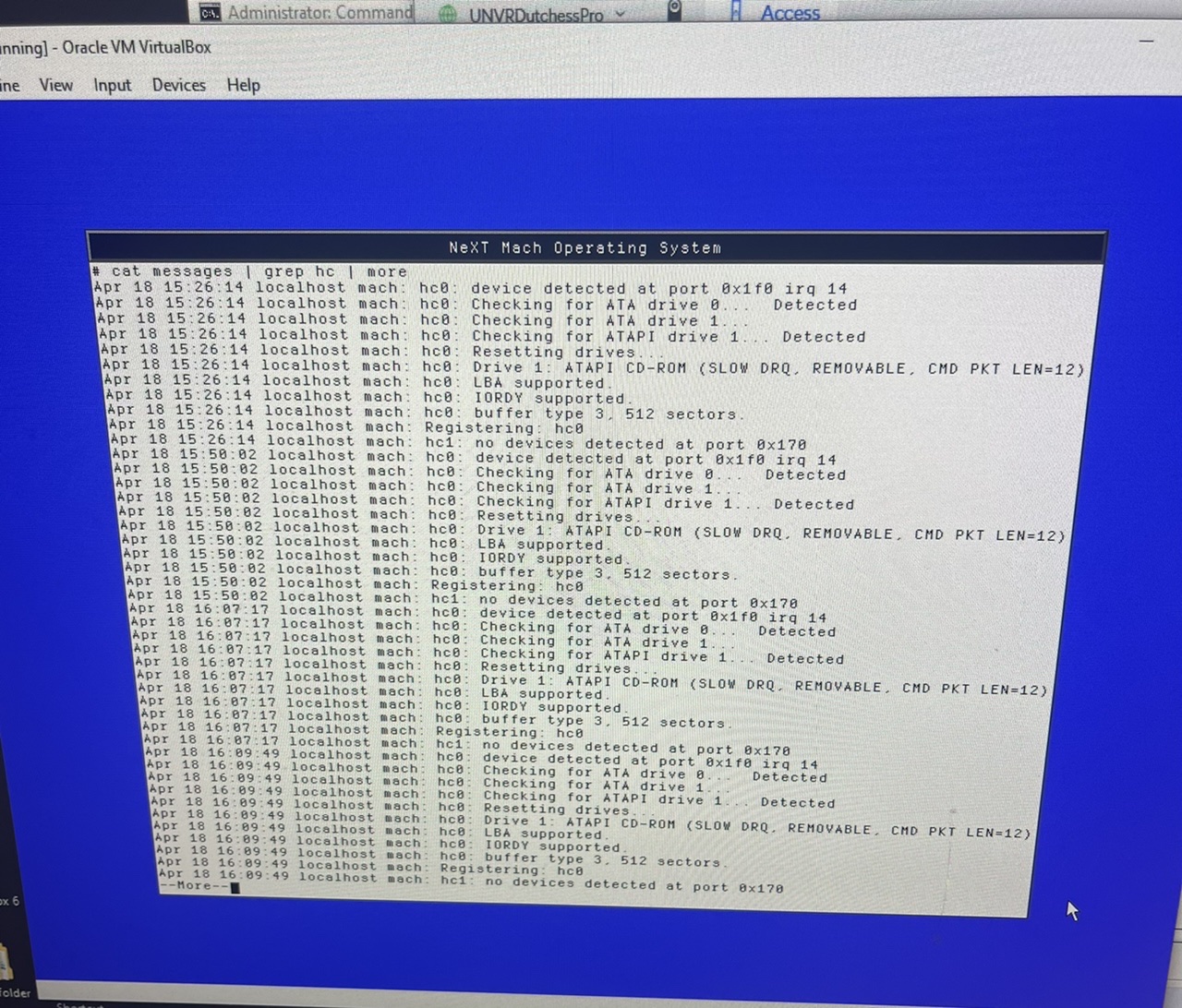
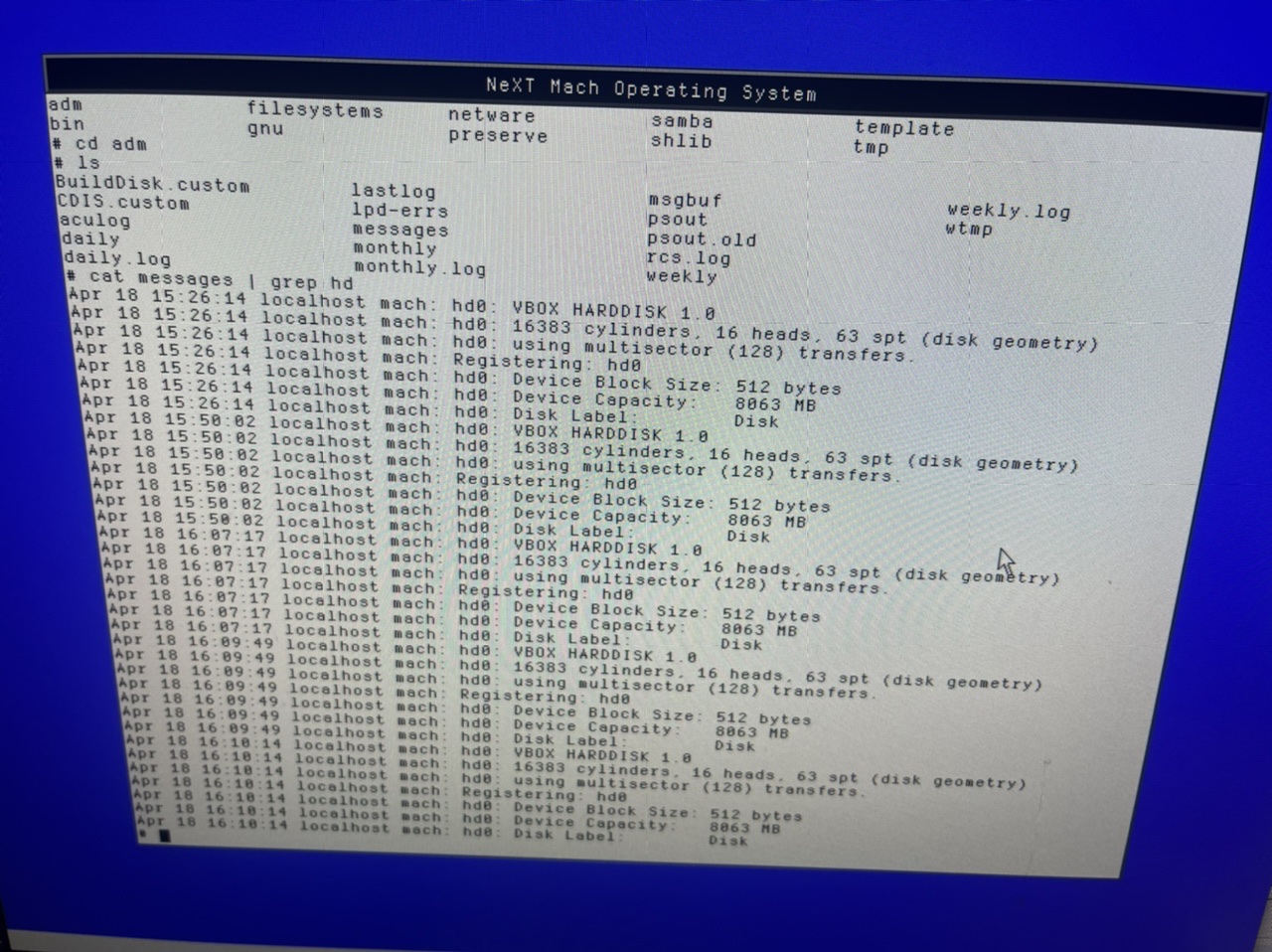
I checked the Instance0.table, and the only boot option I have is mem. I did screw something up and can't boot in the VM anymore either.
Title: Re: IBM Thinkpad T43 (2005) Install Results. Looks good :)
Post by: AP on March 04, 2025, 09:46:38 PM
Post by: AP on March 04, 2025, 09:46:38 PM
I reinstalled, changed the driver to single eide, and changed the irq to 15 and the address to 0x170, with master set to ata.
It couldn't find the device after that and made it unbootable on laptop or virtual machine.
I guess I'll reinstall again and look for further ideas. Couldn't figure out how to recover from that.
Edit: It seems that dell uses the 852PM chipset. Mine is the 855PM chipset. I guess yours is the same southbridge.
What did you have to do to get things going on the T43?
Edit 2: My reading comprehension is bad these days. Busy week and cramming in as much NeXT as possible in my free time. Thanks for all your help by the way. I am now seeing that you had issues with OpenStep install because of fdisk and the ide drive? Or was that resolved.
It couldn't find the device after that and made it unbootable on laptop or virtual machine.
I guess I'll reinstall again and look for further ideas. Couldn't figure out how to recover from that.
Edit: It seems that dell uses the 852PM chipset. Mine is the 855PM chipset. I guess yours is the same southbridge.
What did you have to do to get things going on the T43?
Edit 2: My reading comprehension is bad these days. Busy week and cramming in as much NeXT as possible in my free time. Thanks for all your help by the way. I am now seeing that you had issues with OpenStep install because of fdisk and the ide drive? Or was that resolved.
Title: Re: IBM Thinkpad T43 (2005) Install Results. Looks good :)
Post by: pTeK on March 04, 2025, 11:34:03 PM
Post by: pTeK on March 04, 2025, 11:34:03 PM
Quote from: pTeK on March 04, 2025, 02:13:15 AMtake a picture of cat /usr/adm/messages | grep hcCan you do this but on your laptop and take photos as you will want to get this running on your laptop and you want it to be done correctly.
and
cat /usr/adm/messages | grep hd
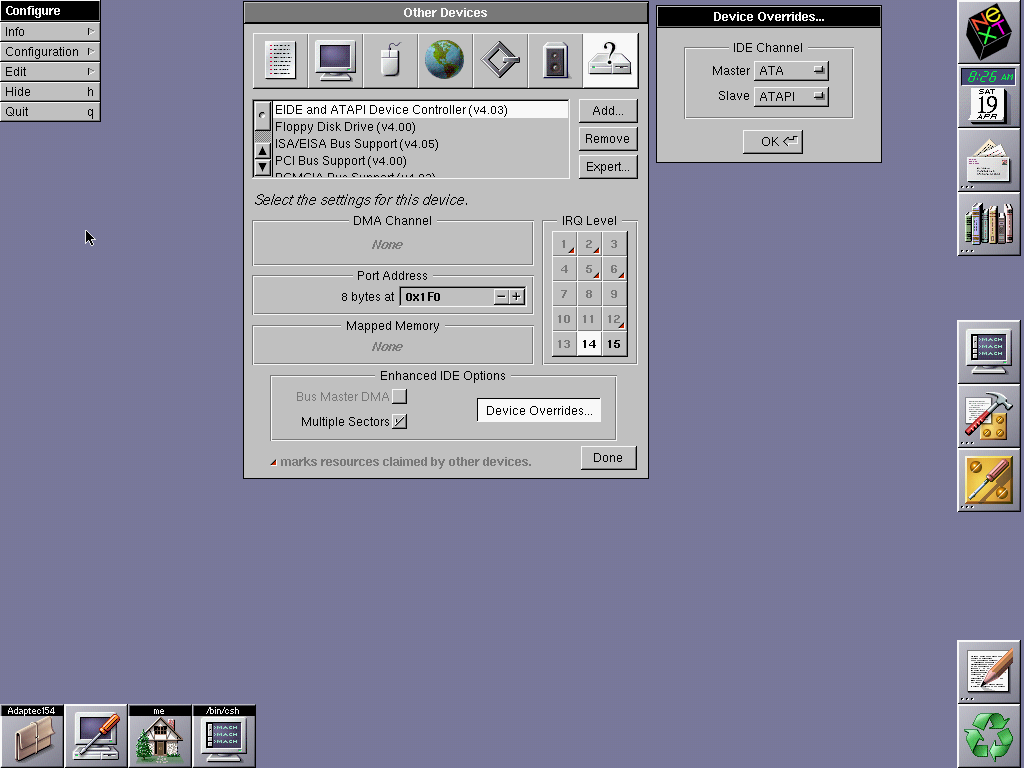
But after looking at your VirtualBox photos (I don't think this will work on your laptop), I would do the following as in the photo but if you try this on your laptop don't expect it to work. Maybe after saving it virtual box goto cd /usr/Devices/system.config and copy Instance0.table to vbox.table so when you boot on VirtualBox you can use config=vbox.
Will need those HD error photos.
Attached is photo of what I would do on your VirtualBox set up but I don't think it will wok on your Laptop. Select EIDE and ATAPI Device Controller (V4.03)
EDIT1: I see from laptop photo you provided above:
hc00 = Need a photo
hc01 = Need a photo
hc10 = ATAPI (CD/DVD Drive)
hc11 = Nothing disconnected.
Title: Re: IBM Thinkpad T43 (2005) Install Results. Looks good :)
Post by: AP on March 04, 2025, 11:36:23 PM
Post by: AP on March 04, 2025, 11:36:23 PM
Also, for file transfer: One of the methods that I have found useful for BeOS and NeXT is to use the VM, get it on the network, and use FTP to a local FTP server.
Edit: Oh yeah. That would make a lot more sense. I'll try that in a second.
Edit: Oh yeah. That would make a lot more sense. I'll try that in a second.
Title: Re: IBM Thinkpad T43 (2005) Install Results. Looks good :)
Post by: pTeK on March 04, 2025, 11:51:59 PM
Post by: pTeK on March 04, 2025, 11:51:59 PM
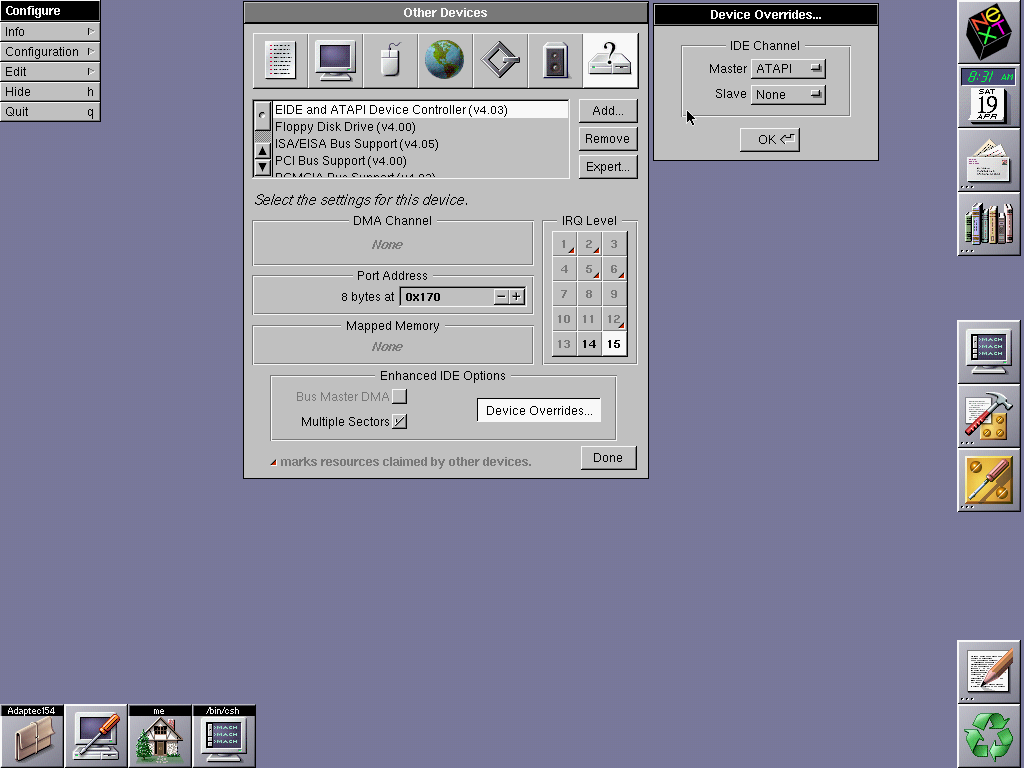
Here is the screenshot for what I would use for hc1 ATAPI controller on your laptop, remember when you remove your current EIDE driver, you can use two separate EIDE and ATAPI Device Controller(V4.03) Just make sure you select correct interrupts and Port address as per photo.
Also remove the Floppy driver as well from your laptop if you don't need it.
Also remove the Floppy driver as well from your laptop if you don't need it.
Title: Re: IBM Thinkpad T43 (2005) Install Results. Looks good :)
Post by: AP on March 05, 2025, 12:09:50 AM
Post by: AP on March 05, 2025, 12:09:50 AM
I guess I don't understand the second screenshot. It didn't like it when i used 0x170. Are you saying I can attempt the same driver for multiple addresses on different irqs?
I used the settings from the first screenshot. I thought I had done that, minus having slave as auto. But maybe not, as it now works. Do you still want those messages? I'd be happy to provide them.
Whew. Not so snappy is it. I guess it boots a little faster than OS/2 though. But I am pleased it's working. On further testing, it is quite slow. But it could be a lot worse.
Edit: USB mouse works. And of course the time I deselect a bunch of stuff during install is the time that works.
Edit: Funny. Battery level works, and it knows when it's charging or not. That doesn't work in BeOS, but BeOS has ethernet, sound, and video drivers. I guess that's because people moved on to Rhapsody and then OS X, so didn't get a lot of third party drivers later on.
Full reinstall with all install options, still works.
Single EIDE controller (v4.03)
IRQ 14
Address 0x1f0 as you said
Specify master as ATA and slave as ATAPI
Patch with VBE vesa driver.
Maybe DMA not existing could be cause of slow speed?
No mem command needed, even with 2GB memory installed. It only sees 512MB though.
Sorry, I am all over the place. Just wanted to add, the fans are running a lot, and it is quite warm. They do slow down sometimes, but not often, so it's not 100% all the time. Working hard? Poorly optimized for the newer hardware?
I used the settings from the first screenshot. I thought I had done that, minus having slave as auto. But maybe not, as it now works. Do you still want those messages? I'd be happy to provide them.
Whew. Not so snappy is it. I guess it boots a little faster than OS/2 though. But I am pleased it's working. On further testing, it is quite slow. But it could be a lot worse.
Edit: USB mouse works. And of course the time I deselect a bunch of stuff during install is the time that works.
Edit: Funny. Battery level works, and it knows when it's charging or not. That doesn't work in BeOS, but BeOS has ethernet, sound, and video drivers. I guess that's because people moved on to Rhapsody and then OS X, so didn't get a lot of third party drivers later on.
Full reinstall with all install options, still works.
Single EIDE controller (v4.03)
IRQ 14
Address 0x1f0 as you said
Specify master as ATA and slave as ATAPI
Patch with VBE vesa driver.
Maybe DMA not existing could be cause of slow speed?
No mem command needed, even with 2GB memory installed. It only sees 512MB though.
Sorry, I am all over the place. Just wanted to add, the fans are running a lot, and it is quite warm. They do slow down sometimes, but not often, so it's not 100% all the time. Working hard? Poorly optimized for the newer hardware?
Title: Re: IBM Thinkpad T43 (2005) Install Results. Looks good :)
Post by: pTeK on March 05, 2025, 04:03:06 AM
Post by: pTeK on March 05, 2025, 04:03:06 AM
Quote from: AP on March 05, 2025, 12:09:50 AMI guess I don't understand the second screenshot. It didn't like it when i used 0x170. Are you saying I can attempt the same driver for multiple addresses on different irqs?
I used the settings from the first screenshot. I thought I had done that, minus having slave as auto. But maybe not, as it now works. Do you still want those messages? I'd be happy to provide them.
This is what your laptop photo says for hc1: I need to see the results of hc0: on your laptop.
Code Select
hc1: device detected at port 0x170 irq 15
hc1: Checking for ATA drive 0...
hc1: Checking for ATAPI drive 0... Detected
hc1: Checking for ATA drive 1...
hc1: Checking for ATAPI drive 1...
hc1: Resetting drives...
On your Virtual Box make these changes so that it is the same as the laptop so you only need the one config. This is why it was not running on your laptop properly.
Change the CD drive to IDE secondary controller, Master.
Have nothing connected to IDE secondary controller, Slave.
Once you show your hc0: results we can see if it is connected to the master or slave controller.
Quote from: AP on March 05, 2025, 12:09:50 AMWhew. Not so snappy is it. I guess it boots a little faster than OS/2 though. But I am pleased it's working. On further testing, it is quite slow. But it could be a lot worse.Yes it is slow as it using the system IRQs, if you had a PIIX3 or PIIX4 driver it would run faster, that is why I patched my ICH4-M PCI string in to the binary.
Quote from: AP on March 05, 2025, 12:09:50 AMEdit: USB mouse works. And of course the time I deselect a bunch of stuff during install is the time that works.I use PS2Mouse for my IBM Thinkpad for active drivers.
Edit: Funny. Battery level works, and it knows when it's charging or not. That doesn't work in BeOS, but BeOS has ethernet, sound, and video drivers. I guess that's because people moved on to Rhapsody and then OS X, so didn't get a lot of third party drivers later on.
Quote from: AP on March 05, 2025, 12:09:50 AMFull reinstall with all install options, still works.This was only for your Virtual box set up, once I get the pics of your laptop setup, we will connect the controllers on Virtual Box the same as your Thinkpad so you will only need the one config file.
Single EIDE controller (v4.03)
IRQ 14
Address 0x1f0 as you said
Specify master as ATA and slave as ATAPI
Patch with VBE vesa driver.
Quote from: AP on March 05, 2025, 12:09:50 AMMaybe DMA not existing could be cause of slow speed?Yes it is slow because we don't have a custom IDE driver so it falls back on to the slowest speed but it works.
No mem command needed, even with 2GB memory installed. It only sees 512MB though.
Sorry, I am all over the place. Just wanted to add, the fans are running a lot, and it is quite warm. They do slow down sometimes, but not often, so it's not 100% all the time. Working hard? Poorly optimized for the newer hardware?
Yes my CPU fan is loud as well, I don't think the laptop CPU fan support was that great back in 2000 or whenever this final OpenStep patch was released.
Don't worry you are on the home straight and not far from the end 8)
Title: Re: IBM Thinkpad T43 (2005) Install Results. Looks good :)
Post by: AP on March 05, 2025, 03:45:35 PM
Post by: AP on March 05, 2025, 03:45:35 PM
Here are those logs.
Those changes intended for the VM did work for the laptop though. I typed out confused questions but now realize you mean make the changes in virtualbox. My cd Drive is not slave?
I'll probably hold on that, until I get this adapter that's on its way for a 2nd hdd. I want to see if it will behave OK in that, and try to add the drive to the BeOS boot menu. Should I be having two EIDE controllers in NeXT, with a master on each and no slave?
Did it make it better when you patched the binary? Is that fairly straightforward? I have the same chipset/southbridge.
I use the same for active drivers. There are no USB storage drivers I imagine?
I currently only have the one confit file, but if there is a better way than I am doing I appreciate any advice.
The fan wasn't full blast all the time, and the computer was warm too, so I don't think the fan controller is the issue. I think that is handled in the BIOS or motherboard on its own somehow. The CPU is getting hot, so if the fan was running for no reason I think it would be cool. I wonder if the VBE VESA driver is using the CPU for the display a lot.
How does your T43 do with temps? I read that they ran hotter and louder than the previous generation, and people would make custom heat sinks for them. I personally worry about such things as I already had a GPU fail for this laptop.
Sorry, I'm on my phone. I can't figure out the quotes right now to make this more legible.
Those changes intended for the VM did work for the laptop though. I typed out confused questions but now realize you mean make the changes in virtualbox. My cd Drive is not slave?
I'll probably hold on that, until I get this adapter that's on its way for a 2nd hdd. I want to see if it will behave OK in that, and try to add the drive to the BeOS boot menu. Should I be having two EIDE controllers in NeXT, with a master on each and no slave?
Did it make it better when you patched the binary? Is that fairly straightforward? I have the same chipset/southbridge.
I use the same for active drivers. There are no USB storage drivers I imagine?
I currently only have the one confit file, but if there is a better way than I am doing I appreciate any advice.
The fan wasn't full blast all the time, and the computer was warm too, so I don't think the fan controller is the issue. I think that is handled in the BIOS or motherboard on its own somehow. The CPU is getting hot, so if the fan was running for no reason I think it would be cool. I wonder if the VBE VESA driver is using the CPU for the display a lot.
How does your T43 do with temps? I read that they ran hotter and louder than the previous generation, and people would make custom heat sinks for them. I personally worry about such things as I already had a GPU fail for this laptop.
Sorry, I'm on my phone. I can't figure out the quotes right now to make this more legible.
Title: Re: IBM Thinkpad T43 (2005) Install Results. Looks good :)
Post by: pTeK on March 05, 2025, 10:25:46 PM
Post by: pTeK on March 05, 2025, 10:25:46 PM
Quick post. Can you go back to the Dual EIDE/ATAPI Controller and take a photo of the hc0 controller on the laptop. Thanks
Title: Re: IBM Thinkpad T43 (2005) Install Results. Looks good :)
Post by: AP on March 05, 2025, 11:44:39 PM
Post by: AP on March 05, 2025, 11:44:39 PM
Haha. Maybe. Will I be able to correct it if it renders it unbootable?
Title: Re: IBM Thinkpad T43 (2005) Install Results. Looks good :)
Post by: pTeK on March 05, 2025, 11:51:41 PM
Post by: pTeK on March 05, 2025, 11:51:41 PM
Quote from: AP on March 05, 2025, 11:44:39 PMHaha. Maybe. Will I be able to correct it if it renders it unbootable?Yes if you set it as Auto for all devices. Just want to see what hc0 is.
Title: Re: IBM Thinkpad T43 (2005) Install Results. Looks good :)
Post by: AP on March 06, 2025, 09:51:31 PM
Post by: AP on March 06, 2025, 09:51:31 PM
Oops. I didn't set auto for all devices.
It booted first time after change. Rainbow circle for 10 minutes after logging in as root. Powered off with button.
Second time booting. It's been at "Checking disks" for 5-7 minutes. I'll give it 10-20 longer.
Edit: my laptop makes an awful beeping when you hot-remove the cd drive. Anyway. Testing that way. Got through the first section of booting so much quicker. Still checking disks forever.
It booted first time after change. Rainbow circle for 10 minutes after logging in as root. Powered off with button.
Second time booting. It's been at "Checking disks" for 5-7 minutes. I'll give it 10-20 longer.
Edit: my laptop makes an awful beeping when you hot-remove the cd drive. Anyway. Testing that way. Got through the first section of booting so much quicker. Still checking disks forever.
Title: Re: IBM Thinkpad T43 (2005) Install Results. Looks good :)
Post by: AP on March 06, 2025, 09:55:49 PM
Post by: AP on March 06, 2025, 09:55:49 PM
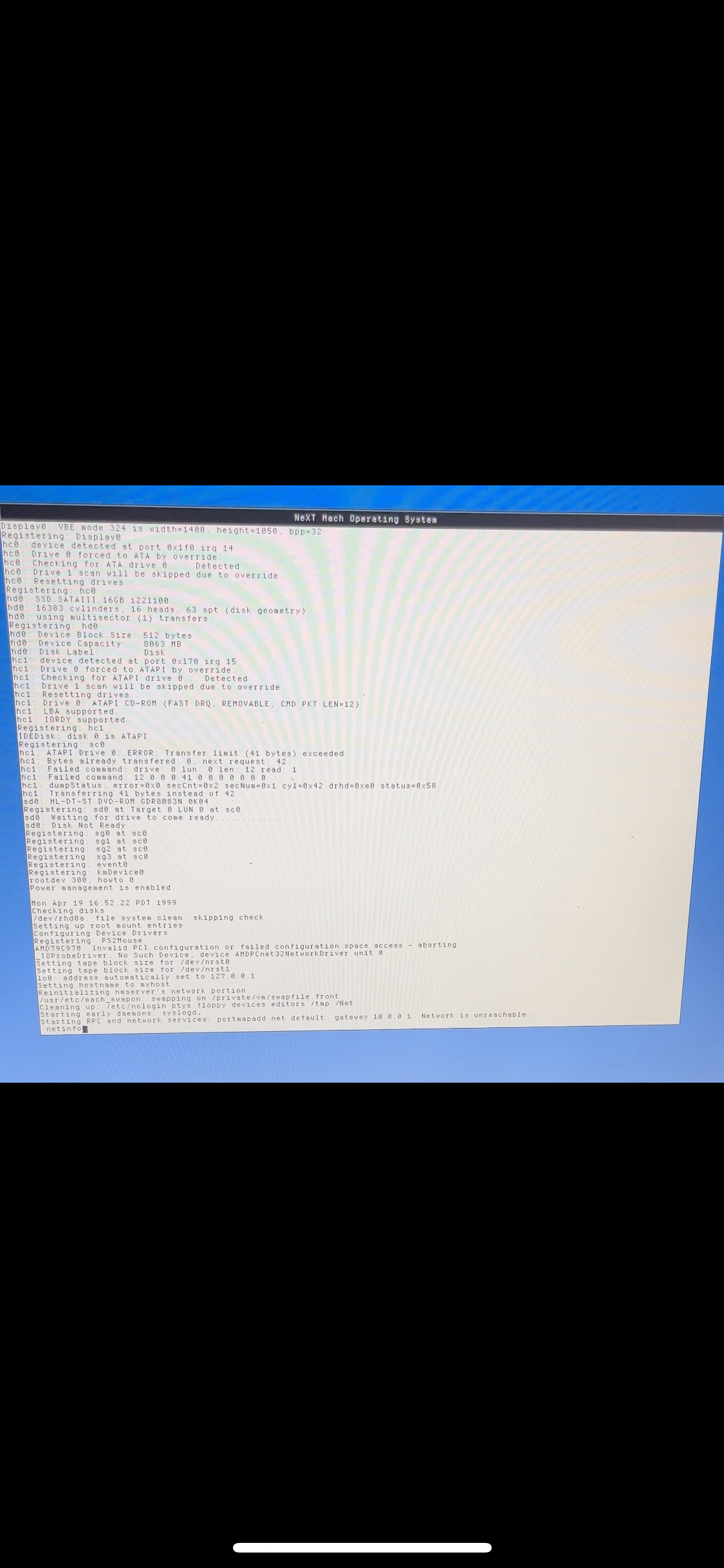
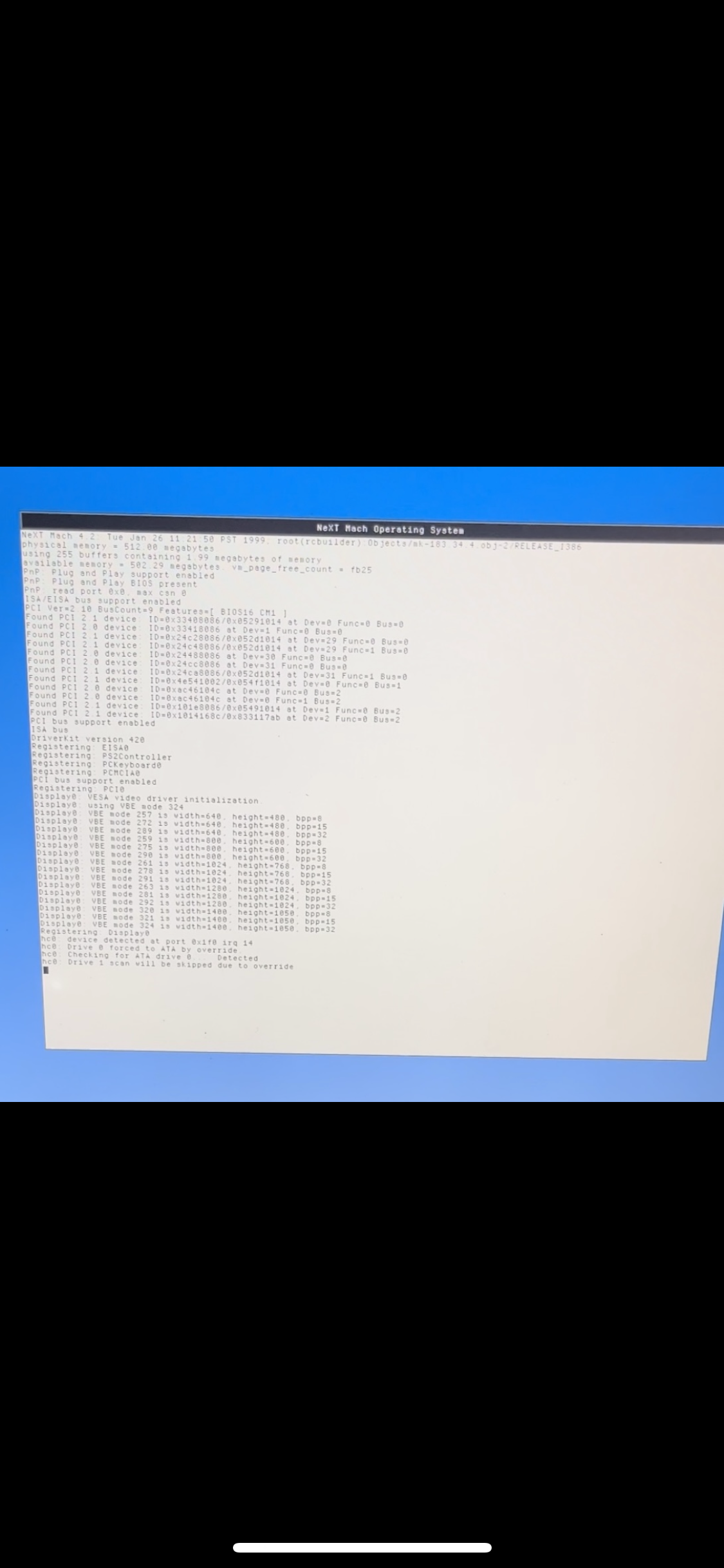
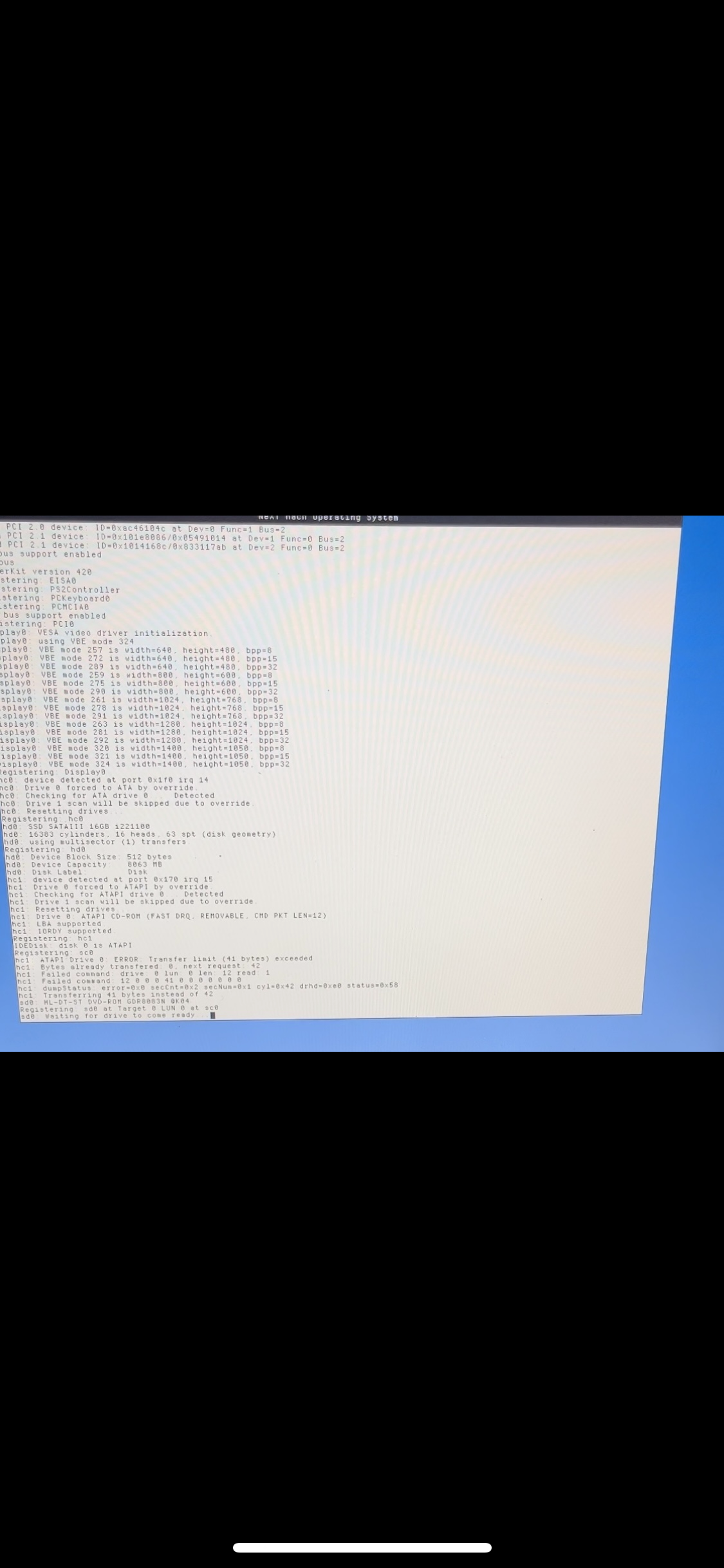
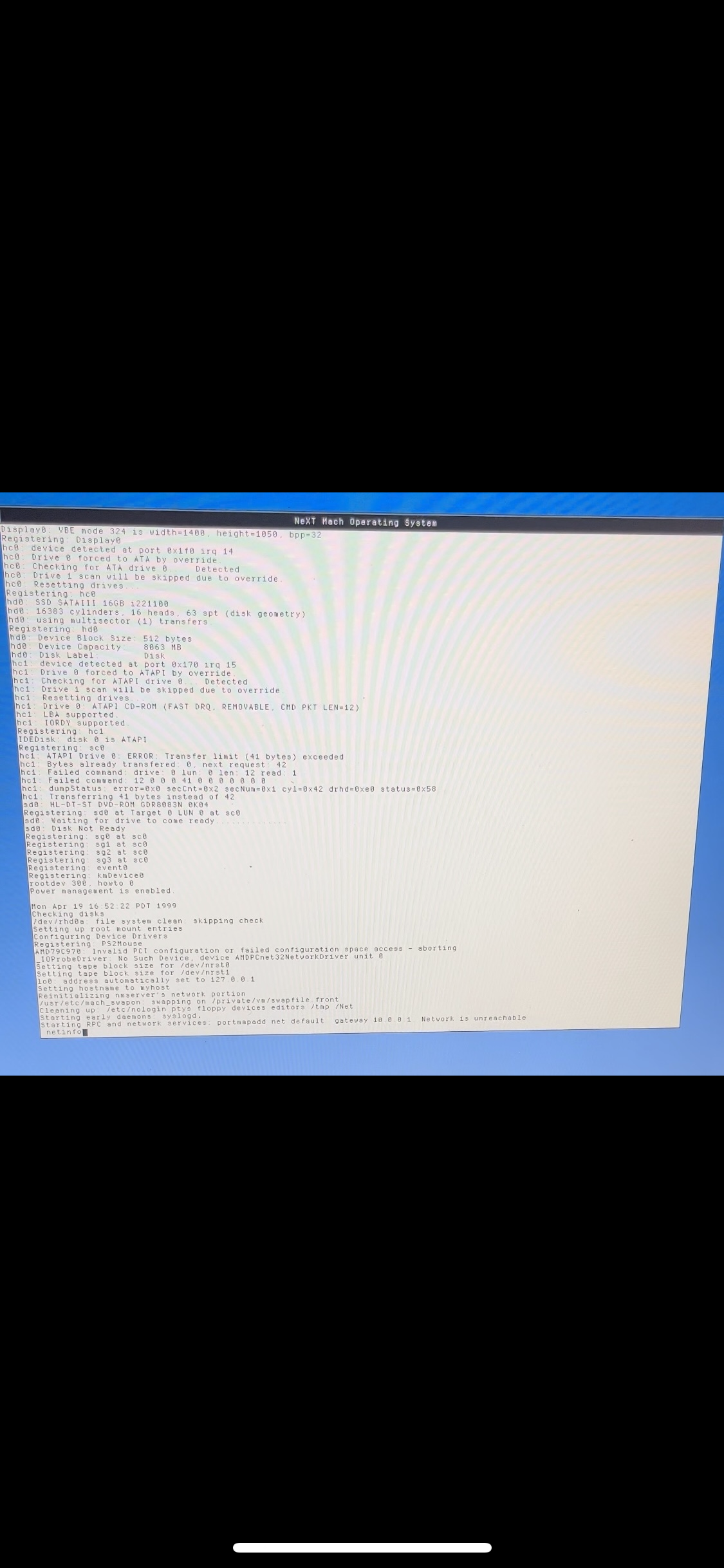
Here is some boot stuff while I wait.
Title: Re: IBM Thinkpad T43 (2005) Install Results. Looks good :)
Post by: AP on March 06, 2025, 10:36:19 PM
Post by: AP on March 06, 2025, 10:36:19 PM
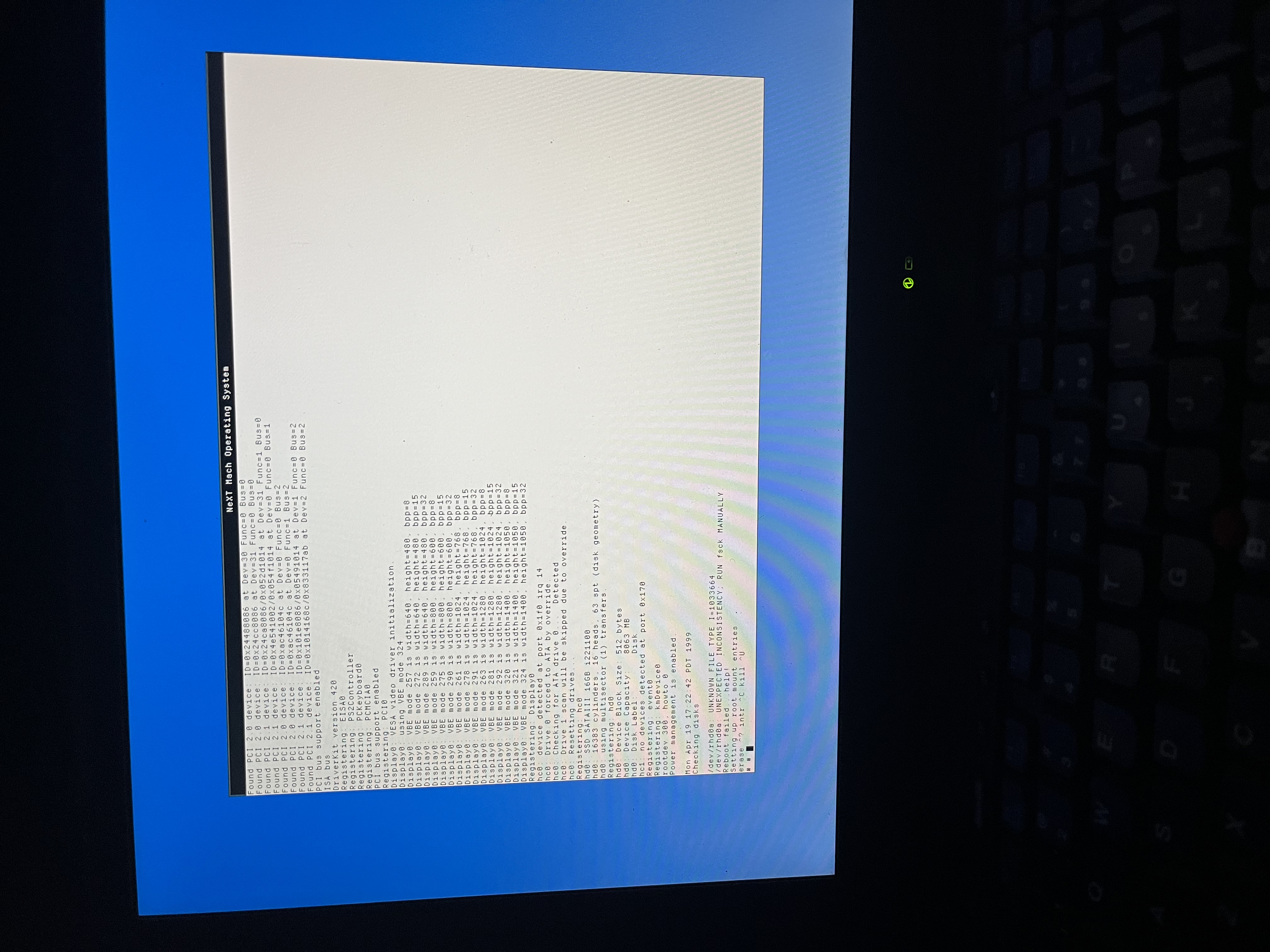
I think one of the last 4 I sent was a dupe. Here is the end of boot process.
Title: Re: IBM Thinkpad T43 (2005) Install Results. Looks good :)
Post by: pTeK on March 06, 2025, 11:51:17 PM
Post by: pTeK on March 06, 2025, 11:51:17 PM
Code Select
hc1: device detected at port 0x170 irq 15
hc1: Checking for ATA drive 0...
hc1: Checking for ATAPI drive 0... Detected
hc1: Checking for ATA drive 1...
hc1: Checking for ATAPI drive 1...
hc1: Resetting drives...
The image I posted in post #23 seems to be correct for your hc1 so Select driver EIDE and ATAPI Device Controller (v4.03) and set it like above. Port 0x170, IRQ 15, Master = ATAPI, Slave = None.
Code Select
hc0: device detected at port 0x1f0 irq 14
hc0: Drive 0 forced to ATA by override.
hc0: Checking for ATA drive 0... Detected
hc0: Drive 1 scan will be skiped due to override.
hc0: Resetting drives...
For your hc0 it seems to be connected to Master, I can't tell that why I wanted both to be set to Auto to make sure 100% so add another EIDE and ATAPI Device Controller (v4.03) and set it to Port 0x1f0, IRQ 14, Master = ATA, Slave = None.
And the most important thing set up your Virtual Box IDE controller the same to hc0 master = HDD and hc1 Master = ATAPI, that way you don't have to worry about different config. Well not true, you can have a custom VirtualBox one with the floppy driver or just use driverLoader d=Floppy once you boot up in VirtualBox.
But yeah those 10 minute boot times from having the Dual EIDE/ATAPI Driver set to AUTO, they suck, I know from experience until I figured out what we are doing here, like it mentions in the manual.
Title: Re: IBM Thinkpad T43 (2005) Install Results. Looks good :)
Post by: pTeK on March 07, 2025, 08:54:40 PM
Post by: pTeK on March 07, 2025, 08:54:40 PM
Quote from: AP on March 04, 2025, 09:46:38 PMWhat did you have to do to get things going on the T43?
Installing NextStep3.3 on the T43 is still not 100% complete but it was easier than the Dell Inspiron 5150 because the Dual EIDE/Atapi driver V 3.35 or V3.37 (The PIIX4 driver) can detect the CD/DVD drive, the problem is the EIDE driver (V3.30) on the NextStep 3.3 CD does not have the ATAPI code so I had to boot on my custom boot CD which has the updated 3.37 driver in single user mode and mount the User and Developer CD and copy all the packages to the HDD to install them. It's still in 640x480 mode for now. Unfortunately the DOS partition has not been formatted and is still bank, I will try to format it with NetBSD (Or even better Window Maker Live) and then copy over some missing drivers/applications to that.
But the struggle with the Dell Inspiron 5150 made the T43 10x easier.
Title: Re: IBM Thinkpad T43 (2005) Install Results. Looks good :)
Post by: AP on March 09, 2025, 12:21:29 AM
Post by: AP on March 09, 2025, 12:21:29 AM
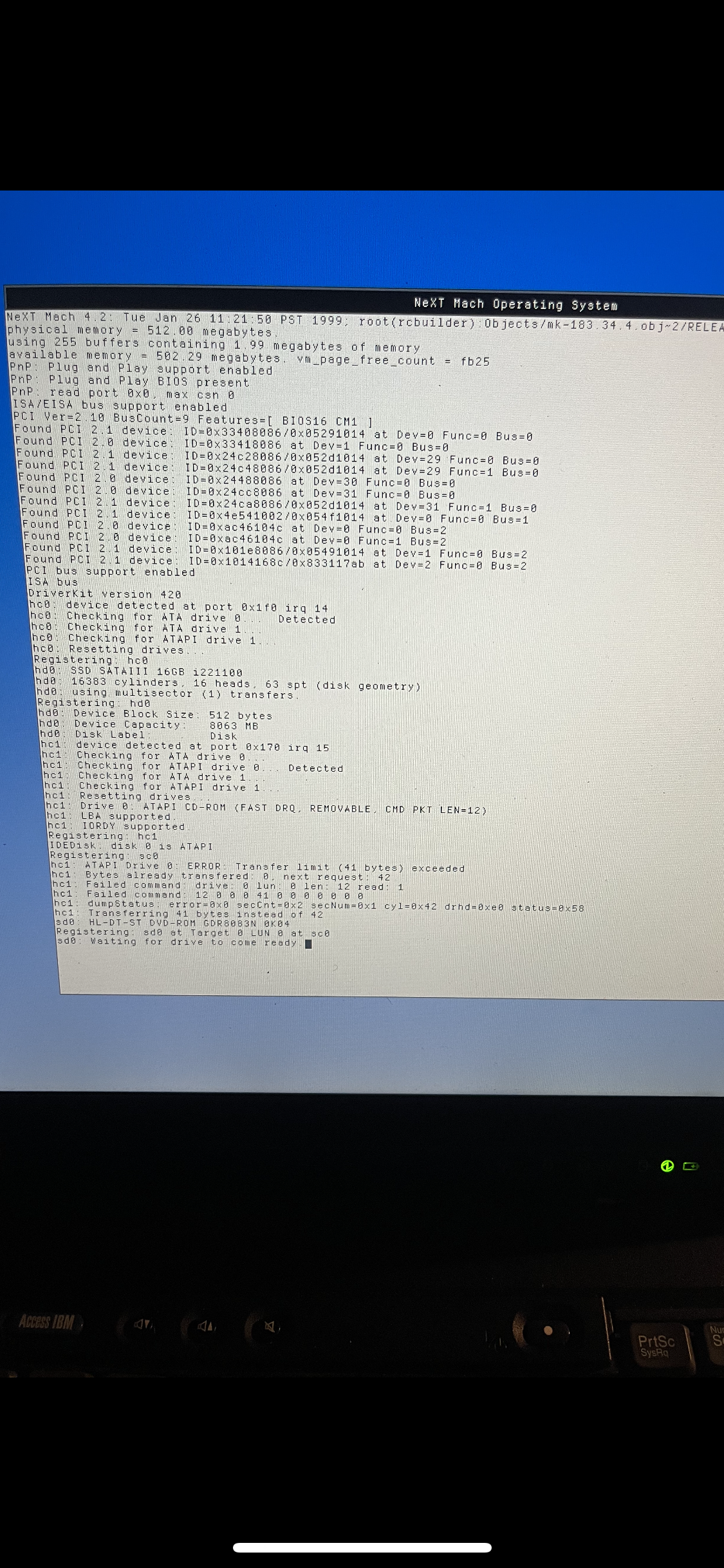
1
Title: Re: IBM Thinkpad T43 (2005) Install Results. Looks good :)
Post by: AP on March 09, 2025, 12:23:20 AM
Post by: AP on March 09, 2025, 12:23:20 AM
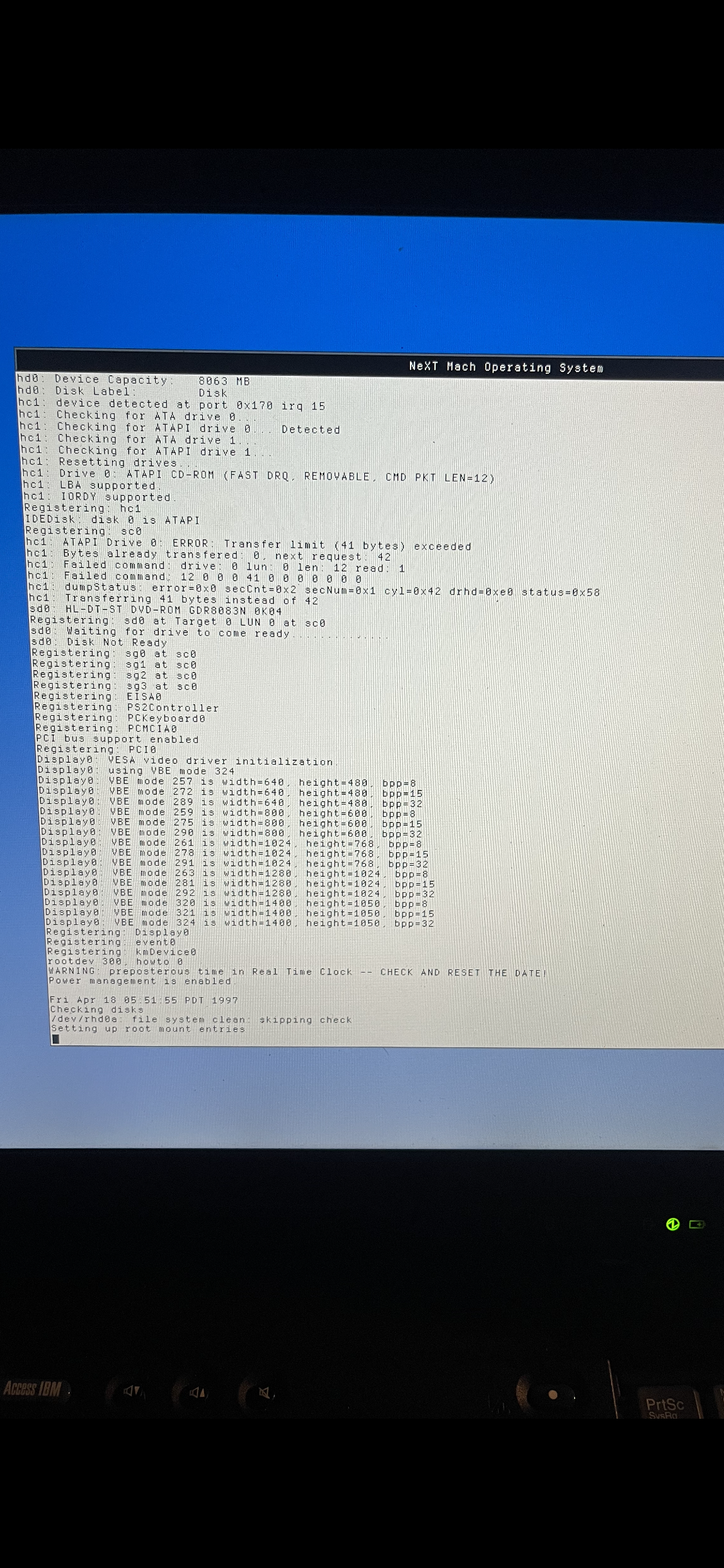
2
Title: Re: IBM Thinkpad T43 (2005) Install Results. Looks good :)
Post by: AP on March 09, 2025, 12:26:03 AM
Post by: AP on March 09, 2025, 12:26:03 AM
3
Reinstalled. Did dual controller driver, those irqs and addresses. Booted fine the first time on laptop, but mouse was frozen. After reboot gets unhappy from disk check. Here is what happens in terms of assigning controllers. I guess the main thing to do now is have correct IDE controller settings, and perhaps patch the device id for chipset the same way you did.
Doing the install again with two separate single controllers. Really haven't figured out how to recover from issues.
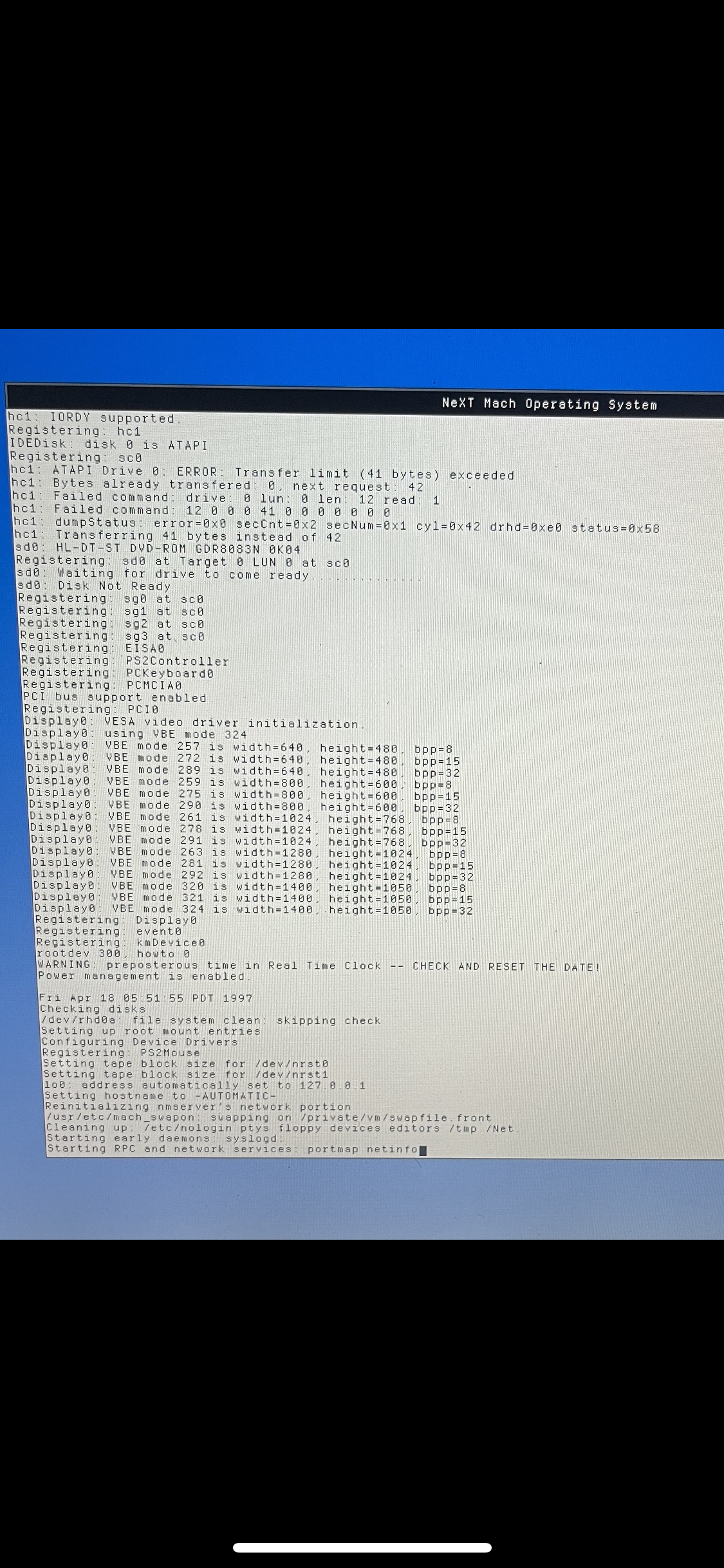
Reinstalled. Did dual controller driver, those irqs and addresses. Booted fine the first time on laptop, but mouse was frozen. After reboot gets unhappy from disk check. Here is what happens in terms of assigning controllers. I guess the main thing to do now is have correct IDE controller settings, and perhaps patch the device id for chipset the same way you did.
Doing the install again with two separate single controllers. Really haven't figured out how to recover from issues.
Title: Re: IBM Thinkpad T43 (2005) Install Results. Looks good :)
Post by: pTeK on March 09, 2025, 04:59:03 AM
Post by: pTeK on March 09, 2025, 04:59:03 AM
Looking at photo one, this is the config I would use. When you boot, use config=Default, make sure Primary/Secondary(Dual) EIDE/ATAPI Device Controller is the only IDE or EIDE one selected and use the following the settings.
Transfer speeds will be slow because it is using the interrupt and not fast like the PIIX3 or PIIX4 driver. IF you want to go that route you need to make sure your driver is backwards compatible with them, the one I have ICH4-M is as it says in the Intel specification manuals.
Once you have the HD drive up and running we can start working on programming our ethernet drivers. :'(
Photo 1 (Post #35) is the main one, with the data.
When you are doing the install the first time you are supposed to use the Primary/Secondary(Dual) EIDE/ATAPI Device Controller. Selecting the different EIDE/ATAPI Device Controller is when you have a SCSI HDD and a ATAPI CD-ROM, or a IDE HDD and a SCSI CD-ROM.
EDIT: Are you still getting those 10 minute + boot times :'( ?
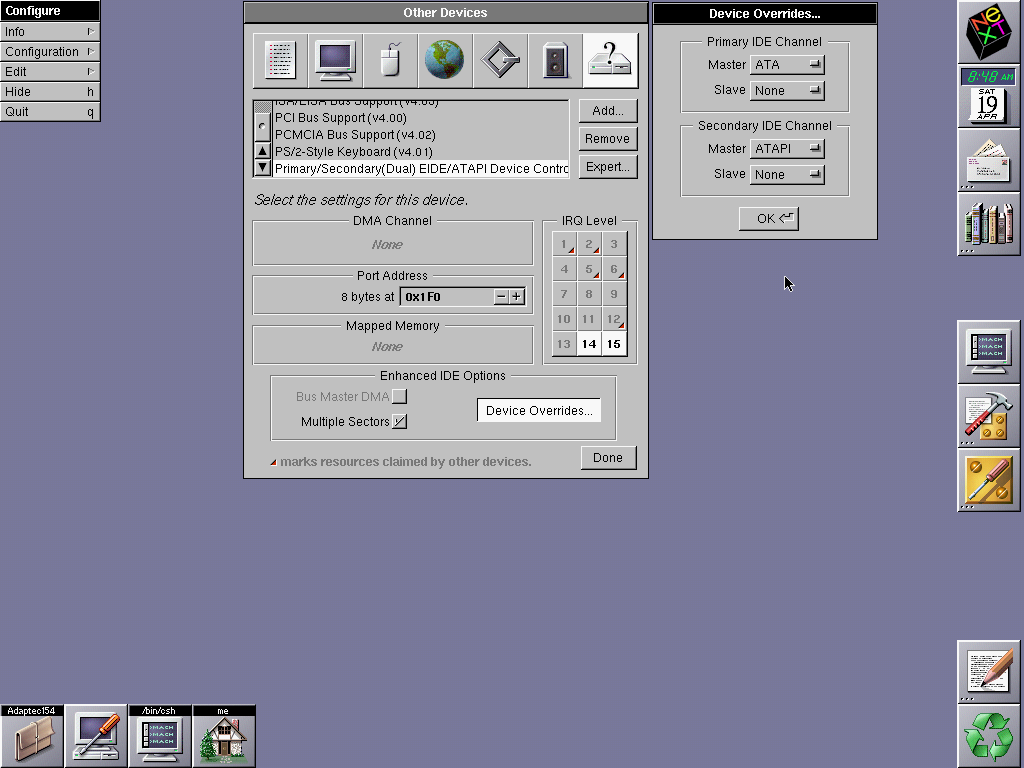
Transfer speeds will be slow because it is using the interrupt and not fast like the PIIX3 or PIIX4 driver. IF you want to go that route you need to make sure your driver is backwards compatible with them, the one I have ICH4-M is as it says in the Intel specification manuals.
Once you have the HD drive up and running we can start working on programming our ethernet drivers. :'(
Photo 1 (Post #35) is the main one, with the data.
When you are doing the install the first time you are supposed to use the Primary/Secondary(Dual) EIDE/ATAPI Device Controller. Selecting the different EIDE/ATAPI Device Controller is when you have a SCSI HDD and a ATAPI CD-ROM, or a IDE HDD and a SCSI CD-ROM.
EDIT: Are you still getting those 10 minute + boot times :'( ?
Title: Re: IBM Thinkpad T43 (2005) Install Results. Looks good :)
Post by: AP on March 09, 2025, 05:23:06 PM
Post by: AP on March 09, 2025, 05:23:06 PM
So do dual controller
IRQ 14 at 0x1f0 Master ATA
IRQ 15 at 0x170 Master ATAPI
I'm guessing from your instruction and the picture in #35, correct me if I'm wrong.
Also, I do have the Ich-4M chipset, what should I do?
The boot times are only 10 minutes when it does the disk checking, that fails. Lately when it actually boots, it's only a couple minutes.
Config=default. Amazing tip. Saved me a reinstall or 12, but any change of the drivers resulted in a unbootable system for laptop. No operating system found, didn't get as far as boot options or startup issues. I think I'll just reinstall and leave it the way it was, until I have it as a second HDD and see from there. There won't be a cd drive in the laptop at the same time as NeXT anyway.
IRQ 14 at 0x1f0 Master ATA
IRQ 15 at 0x170 Master ATAPI
I'm guessing from your instruction and the picture in #35, correct me if I'm wrong.
Also, I do have the Ich-4M chipset, what should I do?
The boot times are only 10 minutes when it does the disk checking, that fails. Lately when it actually boots, it's only a couple minutes.
Config=default. Amazing tip. Saved me a reinstall or 12, but any change of the drivers resulted in a unbootable system for laptop. No operating system found, didn't get as far as boot options or startup issues. I think I'll just reinstall and leave it the way it was, until I have it as a second HDD and see from there. There won't be a cd drive in the laptop at the same time as NeXT anyway.
Title: Re: IBM Thinkpad T43 (2005) Install Results. Looks good :)
Post by: pTeK on March 10, 2025, 12:00:31 AM
Post by: pTeK on March 10, 2025, 12:00:31 AM
Quote from: AP on March 09, 2025, 05:23:06 PMSo do dual controller
IRQ 14 at 0x1f0 Master ATA
IRQ 15 at 0x170 Master ATAPI
I'm guessing from your instruction and the picture in #35, correct me if I'm wrong.
You are correct.
Quote from: AP on March 09, 2025, 05:23:06 PMAlso, I do have the ICH4-M chipset, what should I do?*** WARNING **** Proceed at your own risk, I am not responsible for any damage that could happen
You need to have EIDE.config V4.03 installed. It will have a file called EIDE_PIIX.table in the directory.
You need to back up the following two files: EIDE_reloc, EIDE_PIIX.table.
You will need to know your ICH4-M PCI string.
You will need to replace in EIDE_PIIX.table, the PIIX4 string with the ICH4-M string.
You will need a hex editor (I think I used hexi I mentioned it in another thread)and you will need to search for the PIIX4 PCI string in EIDE_reloc, you need to search for it in reverse (I think) so 86801117. When you search for that it should show up I think 3 or 4 times and you will see the other PIIX strings close by in reverse, you need to replace the PIIX4 string with the ICH4-M string in the same format, so you to write it the same was as the PIIX string, so if it is reversed, reverse the ICH4-M string, if the two words of the PCI ID string are swapped, then swap them.
Quote from: AP on March 09, 2025, 05:23:06 PMThe boot times are only 10 minutes when it does the disk checking, that fails. Lately when it actually boots, it's only a couple minutes.Those 10minute+ boot times used to drive me crazy :'( I'm more pi$$ed off that it make so long to figure out the solution.
Config=default. Amazing tip.
Title: Re: IBM Thinkpad T43 (2005) Install Results. Looks good :)
Post by: AP on March 10, 2025, 04:47:42 PM
Post by: AP on March 10, 2025, 04:47:42 PM
I'll try that out.
I have the drive now in a HDD ultrabay caddy. It does not boot all the way. It says: hc0, ATA drive 0 detected, ATA drive 1 not detected.
It registers the 128GB main drive as hd0, Also the 8GB NeXT drive as hd0? Huh.
I have single controller master and slave as ATA. Should I have dual controller, both masters as ATA and both slaves as none? Last time I tried dual controller it wouldn't boot on laptop.
I took pictures of boot process, but work issues need prompt attention. I think the Ultrabay is treated as slave, as it doesn't see drive without main drive plugged in. I don't know if the laptop has a dual controller, but from the specs of ICH4M it seems like it should. I will also test using the 128GB as Ultrabay, and NeXT as main drive, but want to be able to quickswap BeOS/OS/2 drive with BeOS/windows xp/Slackware drive.
I have the drive now in a HDD ultrabay caddy. It does not boot all the way. It says: hc0, ATA drive 0 detected, ATA drive 1 not detected.
It registers the 128GB main drive as hd0, Also the 8GB NeXT drive as hd0? Huh.
I have single controller master and slave as ATA. Should I have dual controller, both masters as ATA and both slaves as none? Last time I tried dual controller it wouldn't boot on laptop.
I took pictures of boot process, but work issues need prompt attention. I think the Ultrabay is treated as slave, as it doesn't see drive without main drive plugged in. I don't know if the laptop has a dual controller, but from the specs of ICH4M it seems like it should. I will also test using the 128GB as Ultrabay, and NeXT as main drive, but want to be able to quickswap BeOS/OS/2 drive with BeOS/windows xp/Slackware drive.
Title: Re: IBM Thinkpad T43 (2005) Install Results. Looks good :)
Post by: pTeK on March 11, 2025, 12:03:58 AM
Post by: pTeK on March 11, 2025, 12:03:58 AM
Quote from: AP on March 10, 2025, 04:47:42 PMI'll try that out.
I have the drive now in a HDD ultrabay caddy. It does not boot all the way. It says: hc0, ATA drive 0 detected, ATA drive 1 not detected.
It registers the 128GB main drive as hd0, Also the 8GB NeXT drive as hd0? Huh.
I have single controller master and slave as ATA. Should I have dual controller, both masters as ATA and both slaves as none? Last time I tried dual controller it wouldn't boot on laptop.
You need to make your Virtual Box setup identical to your laptop with the PIIX3 IDE controllers in the Virtual Box settings.
Go to your Virtual Box controller settings.
IDE Primary Device 0 (Master This is your ATA or Hard drive IRQ 14, 0x1F0)
IDE Primary Device 1 (Slave This is disconnected)
IDE Secondary Device 0 (Master This is your ATAPI: CD-ROM on laptop or Virtual CD-ROM, IRQ 15, 0x170)
IDE Secondary Device 1 (Slave This is disconnected)
Quote from: AP on March 10, 2025, 04:47:42 PMI took pictures of boot process, but work issues need prompt attention. I think the Ultrabay is treated as slave, as it doesn't see drive without main drive plugged in. I don't know if the laptop has a dual controller, but from the specs of ICH4M it seems like it should. I will also test using the 128GB as Ultrabay, and NeXT as main drive, but want to be able to quickswap BeOS/OS/2 drive with BeOS/windows xp/Slackware drive.
The specs of ICH4M is a dual controller as your results show and is backwards compatible with IRQ 14 and 15 although at a slower speed.
Title: Re: IBM Thinkpad T43 (2005) Install Results. Looks good :)
Post by: AP on March 11, 2025, 12:39:04 AM
Post by: AP on March 11, 2025, 12:39:04 AM
This is with dual controller. Registers the NeXT drive as hd1, primary drive as hd0.
Boots on VM, not on laptop. Boot option rootdev=hd1 and tried hd1a. Both end up like in the picture, seems to try to boot off of it but fsck or read error of some sort?
Edit: I did try that in virtualbox. It did work, but not on the laptop. I think the laptop is treating it as a slave drive in the Ultrabay. That's with dual controller, 2 ATA masters. Actually no, I think the Ultrabay hdd has both drives as master, as BeOS seems to see it as a secondary master. I did attempt to install NeXT with virtualbox having 1 master (Be), 1 slave (CD), and second master (for NeXT). Pick drivers, pick drive, preparing drive, copies files to drive, but booting from that drive does not work.
I should probably have it working normally, then modify from there. Dual controller with 2 masters didn't seem to work though. Is it because it was installed onto "hd0" and putting in in Ultrabay makes it "hd1"?
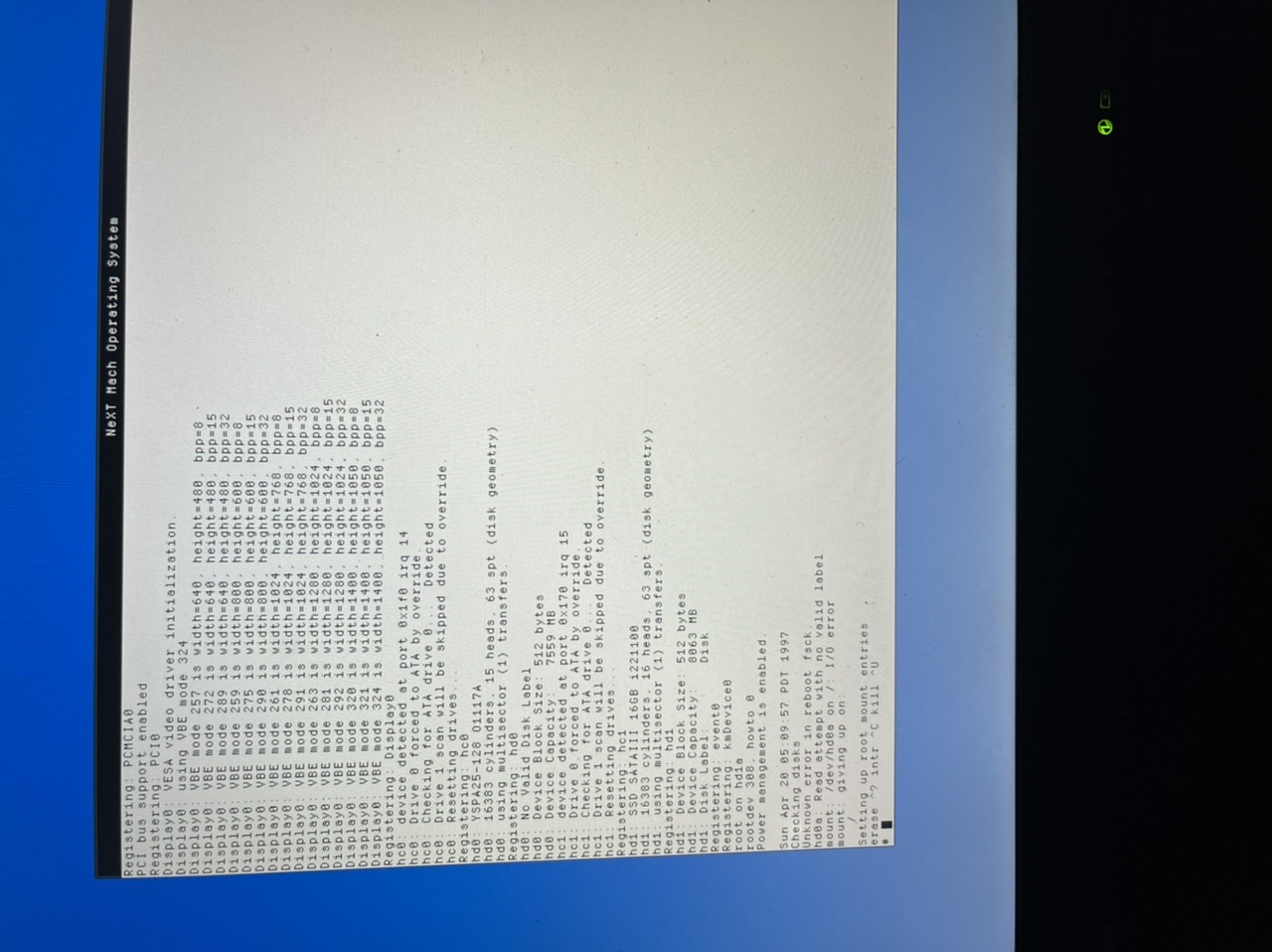
Boots on VM, not on laptop. Boot option rootdev=hd1 and tried hd1a. Both end up like in the picture, seems to try to boot off of it but fsck or read error of some sort?
Edit: I did try that in virtualbox. It did work, but not on the laptop. I think the laptop is treating it as a slave drive in the Ultrabay. That's with dual controller, 2 ATA masters. Actually no, I think the Ultrabay hdd has both drives as master, as BeOS seems to see it as a secondary master. I did attempt to install NeXT with virtualbox having 1 master (Be), 1 slave (CD), and second master (for NeXT). Pick drivers, pick drive, preparing drive, copies files to drive, but booting from that drive does not work.
I should probably have it working normally, then modify from there. Dual controller with 2 masters didn't seem to work though. Is it because it was installed onto "hd0" and putting in in Ultrabay makes it "hd1"?
Title: Re: IBM Thinkpad T43 (2005) Install Results. Looks good :)
Post by: pTeK on March 11, 2025, 05:00:52 AM
Post by: pTeK on March 11, 2025, 05:00:52 AM
Quote from: AP on March 11, 2025, 12:39:04 AMThis is with dual controller. Registers the NeXT drive as hd1, primary drive as hd0.When you mount the Hard disk in Virtual Box, are you mounting the whole disk or the individual partitions? You need to mount the whole disk and not the individual partitions so that when it boots you get the menu off the bootblock, i.e press n for NeXTSTEP.
Boots on VM, not on laptop. Boot option rootdev=hd1 and tried hd1a. Both end up like in the picture, seems to try to boot off of it but fsck or read error of some sort?
Edit: I did try that in virtualbox. It did work, but not on the laptop. I think the laptop is treating it as a slave drive in the Ultrabay. That's with dual controller, 2 ATA masters. Actually no, I think the Ultrabay hdd has both drives as master, as BeOS seems to see it as a secondary master. I did attempt to install NeXT with virtualbox having 1 master (Be), 1 slave (CD), and second master (for NeXT). Pick drivers, pick drive, preparing drive, copies files to drive, but booting from that drive does not work.
I should probably have it working normally, then modify from there. Dual controller with 2 masters didn't seem to work though. Is it because it was installed onto "hd0" and putting in in Ultrabay makes it "hd1"?
Why do you have two hard disks in your Virtual Box set up if you only have one hard drive in your Thinkpad? It will only cause problems unless you know what you are doing. I always set Virtual Box up like my laptop.
That photo you uploaded, I don't know if it is from your Virtual Box or your laptop but it is telling me your rootdev is hd1a.
If NextStep doesn't boot normally and can only boot in single user mode it could be your /etc/fstab the root directory (/) could be pointing at the incorrect hard disk,
IF you rootdev is supposed to be hd1a, and your /etc/fstab points to hd0a, it won't boot (it will bring up a error message) unless you are in single user mode.
So does your Think Pad have two hard drives?
Title: Re: IBM Thinkpad T43 (2005) Install Results. Looks good :)
Post by: AP on March 11, 2025, 09:48:53 AM
Post by: AP on March 11, 2025, 09:48:53 AM
I'll take a look at the fstab. That does make sense, because installing him the virtualbox its hd0 I think, but on the laptop it's hd1.
My laptop has two hard drives. I have two drives for the regular drive bay, that I have in caddies so I can quickly swap them. The NeXT drive is in an Ultrabay adapter, that is its ideal home. If this won't work, I can just test the other drives in the Ultrabay. Not sure how Windows, Slackware, and OS/2 will like it. BeOS, Haiku, FreeDOS shouldn't care. KolibriOS uses LILO so not sure if I'll have to modify. But that's quite off topic.
The whole drive is mounted. I pretty much always get the (press n for NeXT.)
My laptop has two hard drives. I have two drives for the regular drive bay, that I have in caddies so I can quickly swap them. The NeXT drive is in an Ultrabay adapter, that is its ideal home. If this won't work, I can just test the other drives in the Ultrabay. Not sure how Windows, Slackware, and OS/2 will like it. BeOS, Haiku, FreeDOS shouldn't care. KolibriOS uses LILO so not sure if I'll have to modify. But that's quite off topic.
The whole drive is mounted. I pretty much always get the (press n for NeXT.)
Title: Re: IBM Thinkpad T43 (2005) Install Results. Looks good :)
Post by: pTeK on March 11, 2025, 12:35:12 PM
Post by: pTeK on March 11, 2025, 12:35:12 PM
Quote from: AP on March 11, 2025, 09:48:53 AMI'll take a look at the fstab. That does make sense, because installing him the virtualbox its hd0 I think, but on the laptop it's hd1.This ultrabay adapter has just confused things, I thought you just had a simple set up like mine, with a HDD (ATA) which has been partitioned (NeXT, DOS, WinXP, Linux), and a Optical Drive (ATAPI). This set up would have been an easy fix, but now that you have more than one hard drive, I don't know if that affects the IDE controller on the laptop and might change to Controller 0 from Controller 1. This reads like it could involve more work and reads like a complete shit show.
My laptop has two hard drives. I have two drives for the regular drive bay, that I have in caddies so I can quickly swap them. The NeXT drive is in an Ultrabay adapter, that is its ideal home. If this won't work, I can just test the other drives in the Ultrabay. Not sure how Windows, Slackware, and OS/2 will like it. BeOS, Haiku, FreeDOS shouldn't care. KolibriOS uses LILO so not sure if I'll have to modify. But that's quite off topic.
The whole drive is mounted. I pretty much always get the (press n for NeXT.)
Title: Re: IBM Thinkpad T43 (2005) Install Results. Looks good :)
Post by: AP on March 11, 2025, 01:08:35 PM
Post by: AP on March 11, 2025, 01:08:35 PM
Alright. I'll do some troubleshooting and see if I can get things working. Thanks for all the help. I should be fine if I just choose to use the main drive bay for NeXT and use the other bay for the rest, so if I fail with my troubleshooting, I can always fall back to that.
Title: Re: IBM Thinkpad T43 (2005) Install Results. Looks good :)
Post by: pTeK on March 11, 2025, 01:20:39 PM
Post by: pTeK on March 11, 2025, 01:20:39 PM
Quote from: AP on March 11, 2025, 01:08:35 PMAlright. I'll do some troubleshooting and see if I can get things working. Thanks for all the help. I should be fine if I just choose to use the main drive bay for NeXT and use the other bay for the rest, so if I fail with my troubleshooting, I can always fall back to that.What it means is that it could involve a lot more work and scripting which is beyond me. If you can boot in NeXT with using the HDD and the optical drive, I would stick to that.
I will check your logs again. What Volume (name) is your next partition on?! Is it the hd1 SATA something or the hd0 YSPa...
Title: Re: IBM Thinkpad T43 (2005) Install Results. Looks good :)
Post by: AP on March 11, 2025, 01:46:36 PM
Post by: AP on March 11, 2025, 01:46:36 PM
It's the SATA III 16GB.
I think I can get it to work no problem if I keep it in the main drive bay. I think it's expecting to be hd0 but in second bay it's hd1.
I think I can get it to work no problem if I keep it in the main drive bay. I think it's expecting to be hd0 but in second bay it's hd1.
Title: Re: IBM Thinkpad T43 (2005) Install Results. Looks good :)
Post by: AP on March 11, 2025, 02:54:09 PM
Post by: AP on March 11, 2025, 02:54:09 PM
Quote from: pTeK on March 10, 2025, 12:00:31 AMYou need to have EIDE.config V4.03 installed. It will have a file called EIDE_PIIX.table in the directory.
By this, you mean the PIIX EIDE driver, or the Dual ATA/ATAPI EIDE driver (selected during install)
Title: Re: IBM Thinkpad T43 (2005) Install Results. Looks good :)
Post by: pTeK on March 11, 2025, 04:16:22 PM
Post by: pTeK on March 11, 2025, 04:16:22 PM
If you keep swapping the hard drive bay then it won't work as the scripts will be pointing to the other bay. It's an old OS the new ones go by UUID of the gpt partition.
Title: Re: IBM Thinkpad T43 (2005) Install Results. Looks good :)
Post by: AP on March 11, 2025, 04:25:01 PM
Post by: AP on March 11, 2025, 04:25:01 PM
Well in the end, the NeXT drive will always remain in the same bay. The other OS drives will be swapped in the remaining bay. NeXT's depiction of drive numbers should remain unchanged through boots and driveswaps.
I think I will just stick with NeXT in the main bay. Since that was working, that's how I'll leave it.
Which IDE controller driver should I use and modify for ICH4-M? EIDE, Dual EIDE, or PIIX EIDE (all v4.03)
Meaning, I know I edit the PIIX in EIDE.config, but under Configure.app, what should I use as the storage controller driver.
I think I will just stick with NeXT in the main bay. Since that was working, that's how I'll leave it.
Which IDE controller driver should I use and modify for ICH4-M? EIDE, Dual EIDE, or PIIX EIDE (all v4.03)
Meaning, I know I edit the PIIX in EIDE.config, but under Configure.app, what should I use as the storage controller driver.
Title: Re: IBM Thinkpad T43 (2005) Install Results. Looks good :)
Post by: AP on March 11, 2025, 10:52:51 PM
Post by: AP on March 11, 2025, 10:52:51 PM
Maybe not that. The 128GB IDE SSD doesn't work in the Ultrabay. If I can't figure it out with troubleshooting, I might just get a USB floppy drive and CD drive and see if I can't install it that way.
Title: Re: IBM Thinkpad T43 (2005) Install Results. Looks good :)
Post by: pTeK on March 12, 2025, 12:55:11 AM
Post by: pTeK on March 12, 2025, 12:55:11 AM
Quote from: AP on March 11, 2025, 02:54:09 PMBy this, you mean the PIIX EIDE driver, or the Dual ATA/ATAPI EIDE driver (selected during install)
Did you read the EIDE_PIIX.table ? If i told you in a previous post what two files to back up....
Quote from: AP on March 11, 2025, 04:25:01 PMWell in the end, the NeXT drive will always remain in the same bay. The other OS drives will be swapped in the remaining bay. NeXT's depiction of drive numbers should remain unchanged through boots and driveswaps.
I think I will just stick with NeXT in the main bay. Since that was working, that's how I'll leave it.
Which IDE controller driver should I use and modify for ICH4-M? EIDE, Dual EIDE, or PIIX EIDE (all v4.03)
Meaning, I know I edit the PIIX in EIDE.config, but under Configure.app, what should I use as the storage controller driver.
If you can't figure out how to get it booting using the normal EIDE.config/DualEIDE_ATAPI config, and how to set up your VirtualBox setup to be like your Thinkpad laptop. Doing this patch will just make it worse. I give you advice for one config and then you keep changing it, i.e the ATAPI (CD-ROM) for another ATA (HD caddy).
I've seen your posts and I see you've figured it out and got it working but then you keep changing your hardware configuration.
Title: Re: IBM Thinkpad T43 (2005) Install Results. Looks good :)
Post by: AP on March 12, 2025, 03:07:24 PM
Post by: AP on March 12, 2025, 03:07:24 PM
I did see the tables to be backed up in EIDE.config. I just wasn't sure which controller driver to use.
I should have been more clear about my desire to use the NeXT drive in the Ultrabay. I had just received it after waiting for a couple weeks. I didn't know I wouldn't be able to figure it out in the other bay.
I think from my research, that the Ultrabay HDD is a master on a second controller. So this is a dual drive setup with a master on each controller.
Which controller driver should I use.
Photo 1: 5: EIDE/ATAPI
Photo 2: 2: PIIX EIDE/ATAPI
Photo 2: 5: Dual EIDE/ATAPI
The second master (Ultrabay) shows as HD1, and first master as HD0
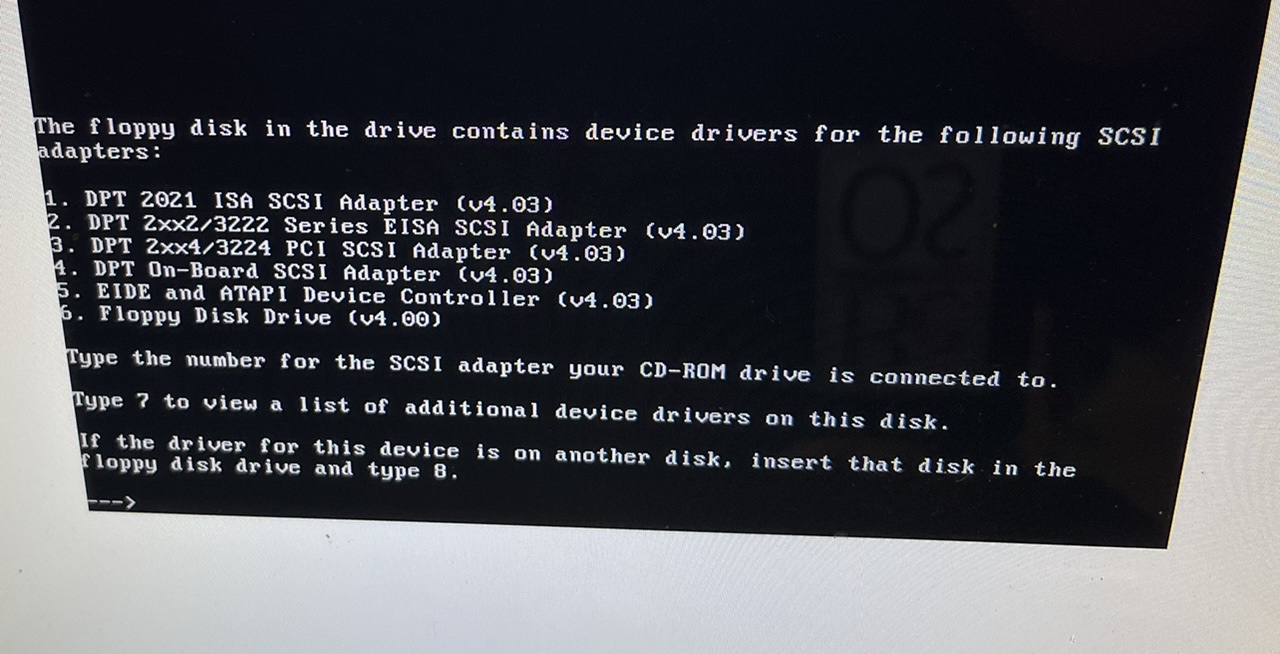
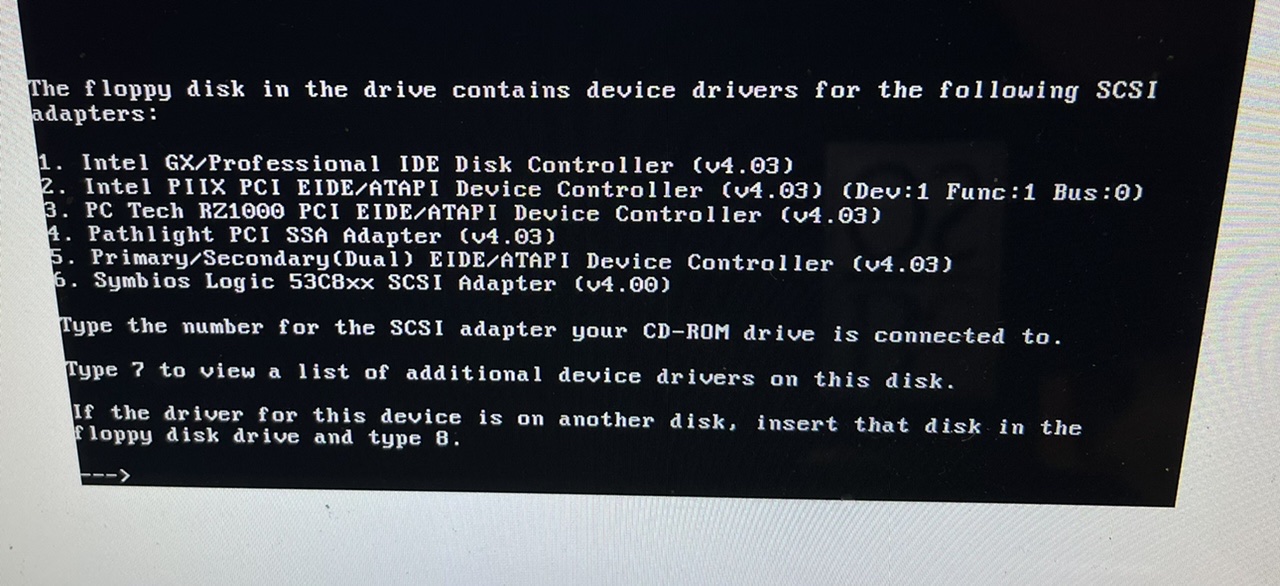
I should have been more clear about my desire to use the NeXT drive in the Ultrabay. I had just received it after waiting for a couple weeks. I didn't know I wouldn't be able to figure it out in the other bay.
I think from my research, that the Ultrabay HDD is a master on a second controller. So this is a dual drive setup with a master on each controller.
Which controller driver should I use.
Photo 1: 5: EIDE/ATAPI
Photo 2: 2: PIIX EIDE/ATAPI
Photo 2: 5: Dual EIDE/ATAPI
The second master (Ultrabay) shows as HD1, and first master as HD0
Title: Re: IBM Thinkpad T43 (2005) Install Results. Looks good :)
Post by: pTeK on March 13, 2025, 12:06:23 AM
Post by: pTeK on March 13, 2025, 12:06:23 AM
Quote from: AP on March 12, 2025, 03:07:24 PMI did see the tables to be backed up in EIDE.config. I just wasn't sure which controller driver to use.How are you going to install it on your Laptop when your Laptop has two hard drives and your NeXT install will be in the CD-ROM controller? Where is OpenStep going to read the packages and data from to install?
I should have been more clear about my desire to use the NeXT drive in the Ultrabay. I had just received it after waiting for a couple weeks. I didn't know I wouldn't be able to figure it out in the other bay.
I think from my research, that the Ultrabay HDD is a master on a second controller. So this is a dual drive setup with a master on each controller.
Which controller driver should I use.
Photo 1: 5: EIDE/ATAPI
Photo 2: 2: PIIX EIDE/ATAPI
Photo 2: 5: Dual EIDE/ATAPI
The second master (Ultrabay) shows as HD1, and first master as HD0
You have to Dual EIDE/ATAPI as per the source code https://github.com/evolver56k/Darwin-0.3/blob/master/drvEIDE-1/EIDE.drvproj/EIDE.lksproj/IdePIIX.m (https://github.com/evolver56k/Darwin-0.3/blob/master/drvEIDE-1/EIDE.drvproj/EIDE.lksproj/IdePIIX.m). I see in the photo it detects your PIIX EIDE/ATAPI, it won't work if you just edited the table file. The source code will explain why.
Title: Re: IBM Thinkpad T43 (2005) Install Results. Looks good :)
Post by: AP on March 13, 2025, 01:35:52 AM
Post by: AP on March 13, 2025, 01:35:52 AM
If I can't get it going with the virtual machine, I'm going to have to use a different computer for installation. I want NeXT to always look for HD1 to boot from. VirtualBox secondary master (hd1) allows the initial install process, but then won't boot. "Int18 boot failure". It doesn't have that issue when I put it into the laptop, but I have the issue where I have no floppy for the drivers, and yes, no CD for install files.
This even happens with new virtual drives. 2 virtual master drives, as hd0 and hd1. I almost wonder if it's best to install as hd0, and don necessary script, fstab, and other editing to set boot drive as hd1.
I'll try different things, but all that I won't complain if my unreasonable desires fail
I should use dual then. You mean I need to do more than edit the table? Or even editing the table, that patching won't work for me?
This even happens with new virtual drives. 2 virtual master drives, as hd0 and hd1. I almost wonder if it's best to install as hd0, and don necessary script, fstab, and other editing to set boot drive as hd1.
I'll try different things, but all that I won't complain if my unreasonable desires fail
I should use dual then. You mean I need to do more than edit the table? Or even editing the table, that patching won't work for me?
Title: Re: IBM Thinkpad T43 (2005) Install Results. Looks good :)
Post by: AP on March 13, 2025, 02:01:11 AM
Post by: AP on March 13, 2025, 02:01:11 AM
Oooh! I think I got it. Using both the failed attempts in VBox, with the Ultrabay drive as second master, it finally loads up. I had to specify rootdev=hd1 -s -v
I don't want to jinx it, but it's not installing and is still hd1, which is what it should be when it gets into the laptop.
I don't want to jinx it, but it's not installing and is still hd1, which is what it should be when it gets into the laptop.
Title: Re: IBM Thinkpad T43 (2005) Install Results. Looks good :)
Post by: pTeK on March 13, 2025, 05:00:46 AM
Post by: pTeK on March 13, 2025, 05:00:46 AM
Quote from: AP on March 13, 2025, 01:35:52 AMIf I can't get it going with the virtual machine, I'm going to have to use a different computer for installation. I want NeXT to always look for HD1 to boot from. VirtualBox secondary master (hd1) allows the initial install process, but then won't boot. "Int18 boot failure". It doesn't have that issue when I put it into the laptop, but I have the issue where I have no floppy for the drivers, and yes, no CD for install files.
This even happens with new virtual drives. 2 virtual master drives, as hd0 and hd1. I almost wonder if it's best to install as hd0, and don necessary script, fstab, and other editing to set boot drive as hd1.
I'll try different things, but all that I won't complain if my unreasonable desires fail
I should use dual then. You mean I need to do more than edit the table? Or even editing the table, that patching won't work for me?
Saying that NeXT is on hd0 or hd1 doesn't mean much to me, you need to display the hc0 and hc1 results as well, just edit the following below for the results instead of uploading a pic (Saves bandwidth as well). hd0 could be be hc0 master, hc0 slave, hc1 master, hc1 slave.. There really are to many options.
And because you seem to keep changing the config every time and not keeping everything consistent. Have you set up your Virtual Box setup the same as your Laptop?
Just do Dual EIDE/ATAPI driver and set to AUTO for all because you keep changing your configurations until it clicks.
Code Select
hc1: device detected at port 0x170 irq 15
hc1: Checking for ATA drive 0...
hc1: Checking for ATAPI drive 0... Detected
hc1: Checking for ATA drive 1...
hc1: Checking for ATAPI drive 1...
hc1: Resetting drives...
Code Select
hc0: device detected at port 0x1f0 irq 14
hc0: Drive 0 forced to ATA by override.
hc0: Checking for ATA drive 0... Detected
hc0: Drive 1 scan will be skiped due to override.
hc0: Resetting drives...
Quote from: AP on March 13, 2025, 02:01:11 AMOooh! I think I got it. Using both the failed attempts in VBox, with the Ultrabay drive as second master, it finally loads up. I had to specify rootdev=hd1 -s -v
I don't want to jinx it, but it's not installing and is still hd1, which is what it should be when it gets into the laptop.
I'm not surprised it keeps failing when you change the configurations all the time, and you don't have your Virtual box set up as the laptop. When you boot with rootdev=hd1 -s -v what is the result of cat /etc/fstab What is rootdev? hd0a?.
Have you actually tried setting your Virtual Box IDE PIIX controller config settings as
hc0 Master = ATA (HD only)
hc0 Slave = None
hc1 Master = AUTO (Could be either ATA/ATAPI or HD/CD-ROM at boot) as some times you swap these two around on your laptop.
hc1 Slave = None.
You should have this up and running by the end of this weekend 8)
Here are some NeXT Answers (https://web.archive.org/web/19970412203319/http://www.next.com/NeXTanswers/HTMLFiles/1001.htmld/1001.html) to read.
NeXT Answer 1933 - EIDE/ATAPI Support in NEXTSTEP 3.3 (https://web.archive.org/web/19970412204003/http://www.next.com/NeXTanswers/HTMLFiles/1933.htmld/1933.html)
NeXT Answer 1487 - Booting from an Alternative Hard Disk Drive (https://web.archive.org/web/19970412213840/http://www.next.com/NeXTanswers/HTMLFiles/1487.htmld/1487.html)
EDIT: Added additional links.
Title: Re: IBM Thinkpad T43 (2005) Install Results. Looks good :)
Post by: AP on March 19, 2025, 01:00:50 PM
Post by: AP on March 19, 2025, 01:00:50 PM
Thanks for those links. I think I can get it going. It's been a rough week and I haven't had a chance to do anything.
When I had it in VBox, I had two master ATA drives, and one slave CD drive. I don't swap the CD drive in the laptop, nor do I intend to. Unfortunately there is no way for me to load drivers from a floppy during the install process, so the entire process will have to be done in VirtualBox and then the drive put into the laptop.
I'll let you know how it goes, but won't be able to do until this weekend.
When I had it in VBox, I had two master ATA drives, and one slave CD drive. I don't swap the CD drive in the laptop, nor do I intend to. Unfortunately there is no way for me to load drivers from a floppy during the install process, so the entire process will have to be done in VirtualBox and then the drive put into the laptop.
I'll let you know how it goes, but won't be able to do until this weekend.
Title: Re: IBM Thinkpad T43 (2005) Install Results. Looks good :)
Post by: pTeK on March 21, 2025, 01:39:54 AM
Post by: pTeK on March 21, 2025, 01:39:54 AM
Quote from: AP on March 19, 2025, 01:00:50 PMWhen I had it in VBox, I had two master ATA drives, and one slave CD drive. I don't swap the CD drive in the laptop, nor do I intend to. Unfortunately there is no way for me to load drivers from a floppy during the install process, so the entire process will have to be done in VirtualBox and then the drive put into the laptop.
This is why I had to use the VirtualBox option as well because there was no way for me to copy files to NeXTSTEP. I still have to try copying the files to a DOS partition, mount it to NeXTSTEP and copy them that way BUT because I have not done that, I can not recommend it. We do our best with the tools we have.
Title: Re: IBM Thinkpad T43 (2005) Install Results. Looks good :)
Post by: AP on March 24, 2025, 04:09:02 PM
Post by: AP on March 24, 2025, 04:09:02 PM
Quote from: pTeK on March 13, 2025, 05:00:46 AMSaying that NeXT is on hd0 or hd1 doesn't mean much to me, you need to display the hc0 and hc1 results as well, just edit the following below for the results instead of uploading a pic (Saves bandwidth as well). hd0 could be be hc0 master, hc0 slave, hc1 master, hc1 slave.. There really are to many options.
And because you seem to keep changing the config every time and not keeping everything consistent. Have you set up your Virtual Box setup the same as your Laptop?
Just do Dual EIDE/ATAPI driver and set to AUTO for all because you keep changing your configurations until it clicks.Code Selecthc1: device detected at port 0x170 irq 15
hc1: Checking for ATA drive 0...
hc1: Checking for ATAPI drive 0... Detected
hc1: Checking for ATA drive 1...
hc1: Checking for ATAPI drive 1...
hc1: Resetting drives...Code Selecthc0: device detected at port 0x1f0 irq 14
hc0: Drive 0 forced to ATA by override.
hc0: Checking for ATA drive 0... Detected
hc0: Drive 1 scan will be skiped due to override.
hc0: Resetting drives...
I'm not surprised it keeps failing when you change the configurations all the time, and you don't have your Virtual box set up as the laptop. When you boot with rootdev=hd1 -s -v what is the result of cat /etc/fstab What is rootdev? hd0a?.
Have you actually tried setting your Virtual Box IDE PIIX controller config settings as
hc0 Master = ATA (HD only)
hc0 Slave = None
hc1 Master = AUTO (Could be either ATA/ATAPI or HD/CD-ROM at boot) as some times you swap these two around on your laptop.
hc1 Slave = None.
You should have this up and running by the end of this weekend 8)
Here are some NeXT Answers (https://web.archive.org/web/19970412203319/http://www.next.com/NeXTanswers/HTMLFiles/1001.htmld/1001.html) to read.
NeXT Answer 1933 - EIDE/ATAPI Support in NEXTSTEP 3.3 (https://web.archive.org/web/19970412204003/http://www.next.com/NeXTanswers/HTMLFiles/1933.htmld/1933.html)
NeXT Answer 1487 - Booting from an Alternative Hard Disk Drive (https://web.archive.org/web/19970412213840/http://www.next.com/NeXTanswers/HTMLFiles/1487.htmld/1487.html)
EDIT: Added additional links.
This was helpful. I got it working.
Install in VirtualBox. Floppy, Master IDE HDD, Slave IDE CD.
Set up as normal. Use the dual eide/atapi driver. (third page of drivers on floppy, 5th option, need to select it twice)
Finish install and patching. Leave dual ide driver as auto auto, auto auto.
Boot in main drive. This has worked before. Do steps according to the quoted article. Back up /etc/fstab. chmod 777 fstab -> vi fstab. Change hd0a to hd1a, and save. Shut down.
Put in second bay adapter. With both drives i the computer, boot. It didn't work the first time, but upon reboot I specified the boot option "rootdev=hd1a". It successfully booted without complaining.
Me choosing to start writing must have jinxed it. It has rainbow spinning circle, sitting at desktop with the desktop icons showing. Seemingly stuck this way for 5 minutes, can't move the cursor.
I feel like those instructions from NeXTanswer should work. It's not that weird to want to install a drive into a second drive bay and want to use it that way. It's the same as if I had a desktop, and wanted to have a second drive.
Edit: After reboot, just checking disks for a long time. Got out of that and can see files still, so maybe can edit fstab if I need to start over.
Title: Re: IBM Thinkpad T43 (2005) Install Results. Looks good :)
Post by: AP on March 24, 2025, 05:40:06 PM
Post by: AP on March 24, 2025, 05:40:06 PM
messages/adm grep hc and hd.
HD0 128GB Be drive
HD1 16GB NeXT drive.
HD0 is on HC0, and HD1 is on HC1.
Can't modify etc/fstab as the file system is mounting read-only if I skip disk checking. Disk checking seems to get stuck, but maybe I should leave for an hour?
Sorry I didn't transcribe that with quote/code blocks to make it more legible. Maybe tomorrow morning I can get to that.
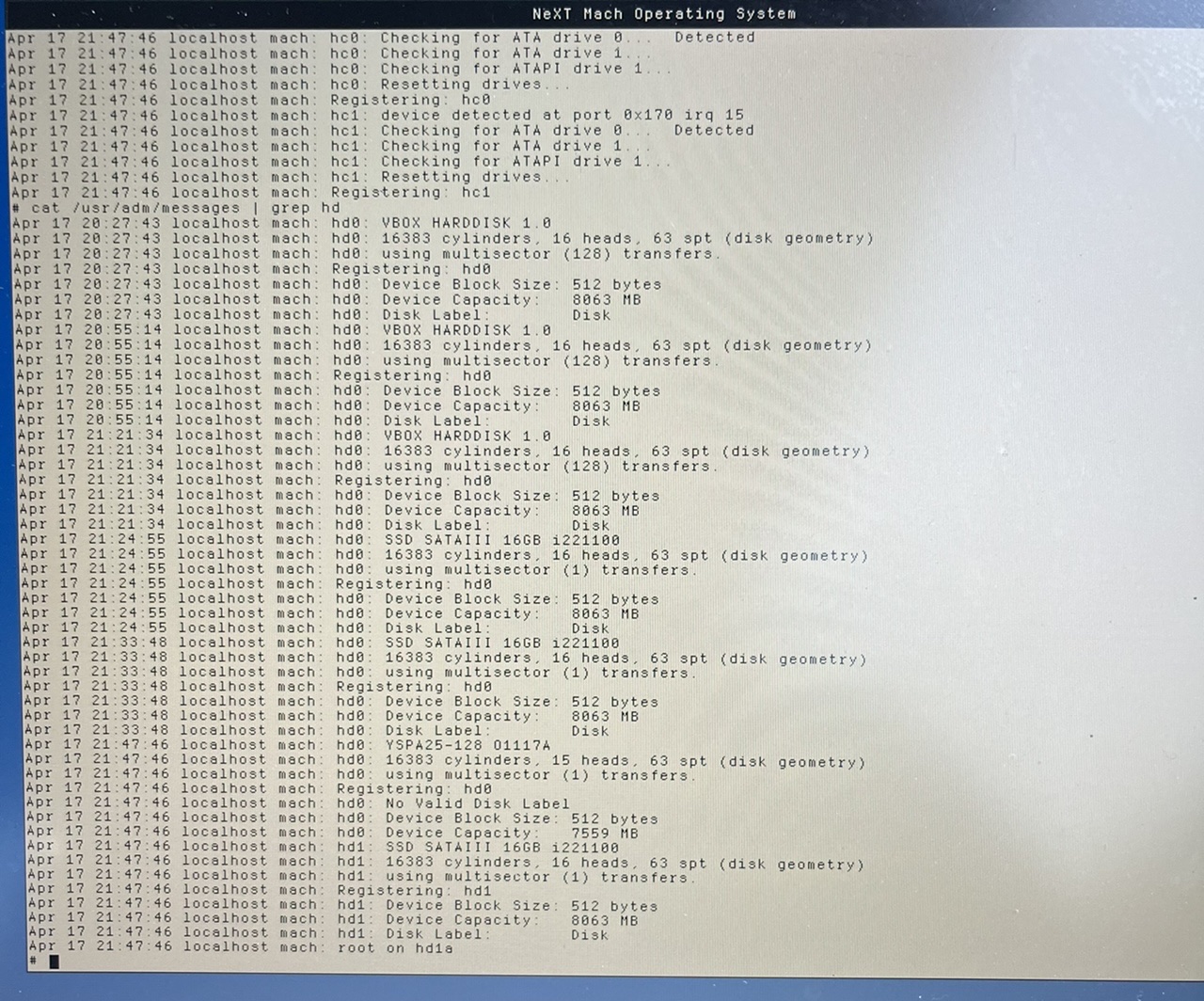
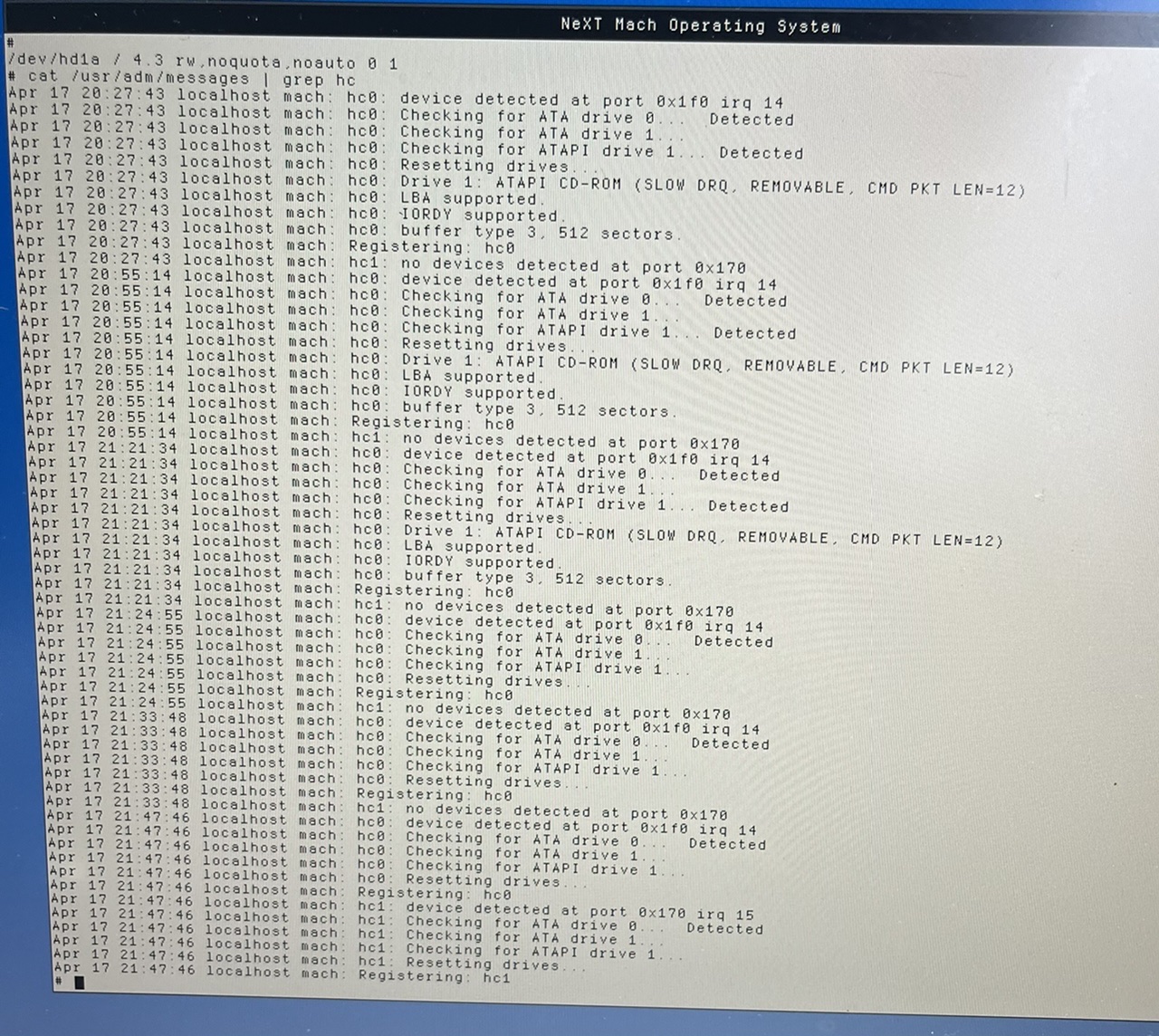
HD0 128GB Be drive
HD1 16GB NeXT drive.
HD0 is on HC0, and HD1 is on HC1.
Can't modify etc/fstab as the file system is mounting read-only if I skip disk checking. Disk checking seems to get stuck, but maybe I should leave for an hour?
Sorry I didn't transcribe that with quote/code blocks to make it more legible. Maybe tomorrow morning I can get to that.
Title: Re: IBM Thinkpad T43 (2005) Install Results. Looks good :)
Post by: pTeK on March 25, 2025, 02:26:22 AM
Post by: pTeK on March 25, 2025, 02:26:22 AM
Quote from: AP on March 24, 2025, 04:09:02 PMThis was helpful. I got it working.
Great News 8)
Quote from: AP on March 24, 2025, 04:09:02 PMInstall in VirtualBox. Floppy, Master IDE HDD, Slave IDE CD.
Set up as normal. Use the dual eide/atapi driver. (third page of drivers on floppy, 5th option, need to select it twice).
Finish install and patching. Leave dual ide driver as auto auto, auto auto.
Boot in main drive. This has worked before. Do steps according to the quoted article. Back up /etc/fstab. chmod 777 fstab -> vi fstab. Change hd0a to hd1a, and save. Shut down.
Great news again, you seem to be very confident and flying through this part 8)
Quote from: AP on March 24, 2025, 04:09:02 PMPut in second bay adapter. With both drives i the computer, boot. It didn't work the first time, but upon reboot I specified the boot option "rootdev=hd1a". It successfully booted without complaining.
Me choosing to start writing must have jinxed it. It has rainbow spinning circle, sitting at desktop with the desktop icons showing. Seemingly stuck this way for 5 minutes, can't move the cursor.
I feel like those instructions from NeXTanswer should work. It's not that weird to want to install a drive into a second drive bay and want to use it that way. It's the same as if I had a desktop, and wanted to have a second drive.
Edit: After reboot, just checking disks for a long time. Got out of that and can see files still, so maybe can edit fstab if I need to start over.
Yes those long waits at the start checking disks is what happens when you have the controllers set to AUTO and there is nothing connected. When it doesn't find anything it keeps probing, This doesn't happen on emulation and runs straight through. This could also be because you still have the Floppy driver installed in /usr/Devices/System.config/Instance0.table. If you have it installed and boot on the Laptop it's going to spend ages trying to probe that imaginary hardware :'(
As for editing the /etc/fstab file did you read this thread? (https://www.nextcomputers.org/forums/index.php?topic=5690)
As for those two pictures you just posted, the controllers of Virtual box and your laptop are mixed in. I can understand why you have a lot of trouble. I have no idea what happens when you plug in the HDD in to the CD/DVD bay and if that alters the IDE controller. Try the following:
Code Select
tail -200 /usr/adm/messages |more
Title: Re: IBM Thinkpad T43 (2005) Install Results. Looks good :)
Post by: AP on March 25, 2025, 11:02:23 AM
Post by: AP on March 25, 2025, 11:02:23 AM
I'll check the following of that log. I believe the virtual controllers are showing up from a different time it the log. That didn't show up during boot.
I can try and change from auto, and remove the floppy driver, if I can get this booted again.
I see now, and will see if I can edit the fstab based on that thread.
I can try and change from auto, and remove the floppy driver, if I can get this booted again.
I see now, and will see if I can edit the fstab based on that thread.
Title: Re: IBM Thinkpad T43 (2005) Install Results. Looks good :)
Post by: pTeK on March 25, 2025, 01:14:54 PM
Post by: pTeK on March 25, 2025, 01:14:54 PM
And we are back to the beginning again, you may have to use the EIDE and ATAPI Device Controller(V4.03). Don't forget you can modify /usr/Devices/System.config/Instance0.table and use the "Kernel Flags" option as I did in my OpenSTEP installation on my Dell Inspiron 5150. (https://www.nextcomputers.org/forums/index.php?topic=5241)
My preferred editor is vi but that doesn't work well in single user mode so you can use pico.
My preferred editor is vi but that doesn't work well in single user mode so you can use pico.
Title: Re: IBM Thinkpad T43 (2005) Install Results. Looks good :)
Post by: AP on March 26, 2025, 02:53:48 PM
Post by: AP on March 26, 2025, 02:53:48 PM
I managed to use pico to change fstab back to the original. Also was able to mount rw with the exchange between you and Stepleton. Now when it boots it says mount: / not found
It can't finish booting. Various steps fail because it's "read-only". This is a lesson on the fact that I can put things back exactly where they were before, and can still remain unbootable. I am not sure why. At this point, I am going to set it up the way I want on a different computer that I can have 2 drives, a CD, and floppy in. NeXT is definitely not forgiving.
EDIT: Well, I think I found a solution. The main drive (BeOS OS/2) wasn't working in the Ultrabay, so I had to put the NeXT drive in there. I found out the issue. There needs to be a jumper on the BeOS drive to make it master. That jumper needs to be taken off to put it in the ultrabay adapter. I bent the jumper pins a little so I could keep the jumper on while having it in the ultrabay, and now it works.
Now that I got that going, if all the operating systems are OK in the ultrabay, I can just keep NeXT in the main bay and not worry about hd0 vs hd1.
It can't finish booting. Various steps fail because it's "read-only". This is a lesson on the fact that I can put things back exactly where they were before, and can still remain unbootable. I am not sure why. At this point, I am going to set it up the way I want on a different computer that I can have 2 drives, a CD, and floppy in. NeXT is definitely not forgiving.
EDIT: Well, I think I found a solution. The main drive (BeOS OS/2) wasn't working in the Ultrabay, so I had to put the NeXT drive in there. I found out the issue. There needs to be a jumper on the BeOS drive to make it master. That jumper needs to be taken off to put it in the ultrabay adapter. I bent the jumper pins a little so I could keep the jumper on while having it in the ultrabay, and now it works.
Now that I got that going, if all the operating systems are OK in the ultrabay, I can just keep NeXT in the main bay and not worry about hd0 vs hd1.
Title: Re: IBM Thinkpad T43 (2005) Install Results. Looks good :)
Post by: pTeK on March 27, 2025, 12:15:05 AM
Post by: pTeK on March 27, 2025, 12:15:05 AM
8) 8) Cool, you are flying through the install and editing the files.
So HD0 is in your main drive and not in the CD-ROM? If so I don't know how you expect to read the MBR on HD0 which then reads and runs NeXT on HD1 unless you have a partition on HD0, which loads and mounts HD1 as mentioned in NeXT Answer 1487 - Booting from an Alternative Hard Disk Drive (https://web.archive.org/web/19970412213840/http://www.next.com/NeXTanswers/HTMLFiles/1487.htmld/1487.html).
I thought that when you used the HDD in the ultra-bay it may swap the boot process around, because quite often the CD-ROM is at a higher boot priority then the HDD.
Reading you post makes sense for you to have the BeOS HDD as the main drive, but you will need to install a boot loader or a partition on that drive so it can run NeXT on the HD1. I haven't done that so I can't give you any advice.
But yes these old operating systems are unforgiving especially with new hardware. Also doesn't help that you have the free support option and not the top $$$ that NeXT might have offered back in the day. 8)
Quote from: AP on March 24, 2025, 05:40:06 PMmessages/adm grep hc and hd.
HD0 128GB Be drive
HD1 16GB NeXT drive.
HD0 is on HC0, and HD1 is on HC1.
So HD0 is in your main drive and not in the CD-ROM? If so I don't know how you expect to read the MBR on HD0 which then reads and runs NeXT on HD1 unless you have a partition on HD0, which loads and mounts HD1 as mentioned in NeXT Answer 1487 - Booting from an Alternative Hard Disk Drive (https://web.archive.org/web/19970412213840/http://www.next.com/NeXTanswers/HTMLFiles/1487.htmld/1487.html).
I thought that when you used the HDD in the ultra-bay it may swap the boot process around, because quite often the CD-ROM is at a higher boot priority then the HDD.
Reading you post makes sense for you to have the BeOS HDD as the main drive, but you will need to install a boot loader or a partition on that drive so it can run NeXT on the HD1. I haven't done that so I can't give you any advice.
But yes these old operating systems are unforgiving especially with new hardware. Also doesn't help that you have the free support option and not the top $$$ that NeXT might have offered back in the day. 8)
Title: Re: IBM Thinkpad T43 (2005) Install Results. Looks good :)
Post by: AP on March 27, 2025, 10:15:52 AM
Post by: AP on March 27, 2025, 10:15:52 AM
Main bay is HD0, Ultrabay is HD1. NeXT has issues with HD1.
I did notice that MBR issue. I was looking into setting up a boot partition for it or something. Maybe I'll use FreeBSD or LILO to figure that out depending. Fix one issue another one comes up.
I did notice that MBR issue. I was looking into setting up a boot partition for it or something. Maybe I'll use FreeBSD or LILO to figure that out depending. Fix one issue another one comes up.
Title: Re: IBM Thinkpad T43 (2005) Install Results. Looks good :)
Post by: pTeK on March 28, 2025, 04:52:55 PM
Post by: pTeK on March 28, 2025, 04:52:55 PM
Quote from: AP on March 24, 2025, 04:09:02 PMMe choosing to start writing must have jinxed it. It has rainbow spinning circle, sitting at desktop with the desktop icons showing. Seemingly stuck this way for 5 minutes, can't move the cursor.
Just had that before. AS per NeXTanswer 1839 - EIDE Driver Overview (https://web.archive.org/web/19970412203930/http://www.next.com/NeXTanswers/HTMLFiles/1839.htmld/1839.html). Only added one, did not add one for the CD-ROM. Now boots in less than one minute.
Quote from: NeXTanswer 1839Use the following installation instructions when installing from a CD-ROM drive connected to the secondary EIDE controller:
- Select Primary/Secondary(Dual) EIDE and ATAPI Device Controllers as the hard disk driver.
Title: Re: IBM Thinkpad T43 (2005) Install Results. Looks good :)
Post by: pTeK on June 22, 2025, 06:04:02 AM
Post by: pTeK on June 22, 2025, 06:04:02 AM
So there seems to be some problem (Error 2010) with the IDE HDD if you don't use the one that is provided with the IBM Think Pad as listed here. https://www.thinkwiki.org/wiki/Problem_with_non-ThinkPad_hard_disks#Drives_that_work_out_of_the_box (https://www.thinkwiki.org/wiki/Problem_with_non-ThinkPad_hard_disks#Drives_that_work_out_of_the_box).
I am using a spare Hitachi HTS541080G9AT00 which apparently has problems compared to the smaller 40GB HDD. IBM wanting to lock customers in for that $$$ :'(
I am using a spare Hitachi HTS541080G9AT00 which apparently has problems compared to the smaller 40GB HDD. IBM wanting to lock customers in for that $$$ :'(