Title: Extending a NeXTSTEP 3.3 partition
Post by: pTeK on January 18, 2025, 02:46:33 AM
Post by: pTeK on January 18, 2025, 02:46:33 AM
Unfortunately when I was installing NeXTSTEP 3.3, even though I have a 40MB IDE HDD the BIOS was locked at 384MB which mean I had DOS for the first 200MB and 183MB for NeXTSTEP.
fdisk was pretty locked at 384MB. fdisk gave me the option to use the whole disk greater than the BIOS but I still want a DOS partition or can I add one via /etc/disktab?
Currently only using IDE driver (V3.31) still need to copy over EIDE V3.35 or EIDE V3.37 some how.
Is their a way to extend that partition from 183MB to 2GB? Would I have to use /etc/disktab? The current IDE driver V3.31 doesn't print the disk label name during the boot up like EIDE V3.37 does.
fdisk was pretty locked at 384MB. fdisk gave me the option to use the whole disk greater than the BIOS but I still want a DOS partition or can I add one via /etc/disktab?
Currently only using IDE driver (V3.31) still need to copy over EIDE V3.35 or EIDE V3.37 some how.
Is their a way to extend that partition from 183MB to 2GB? Would I have to use /etc/disktab? The current IDE driver V3.31 doesn't print the disk label name during the boot up like EIDE V3.37 does.
Title: Re: Extending a NeXTSTEP 3.3 partition
Post by: nuss on January 18, 2025, 09:21:02 AM
Post by: nuss on January 18, 2025, 09:21:02 AM
Hi @pTeK , I can not fully follow, but assume that two HDDs are in play: a 400MB disc with DOS and NeXTstep installed and another 2GB disc?
In such case, I would not try to (clone and?) extend the partition, but do a fresh NeXTstep installation onto the 2GB disc. Then copy over all files from the 400MB disc. Maybe it is required to skip files related to the actual disc layout. Unfortunately I can not remember if this was an issue, when I did such "migrations" to bigger HDDs decades ago.
In such case, I would not try to (clone and?) extend the partition, but do a fresh NeXTstep installation onto the 2GB disc. Then copy over all files from the 400MB disc. Maybe it is required to skip files related to the actual disc layout. Unfortunately I can not remember if this was an issue, when I did such "migrations" to bigger HDDs decades ago.
Title: Re: Extending a NeXTSTEP 3.3 partition
Post by: tjallen on January 18, 2025, 09:49:38 AM
Post by: tjallen on January 18, 2025, 09:49:38 AM
pTeK,
Did you use the -useAllSectors flag? (i.e., /usr/etc/fdisk /dev/hd0h -useAllSectors ) fdisk will allow the creation of a DOS partition before the NEXTSTEP one. As long as the start of the NEXTSTEP partition is within the BIOS limits, the NEXTSTEP partition should be bootable.
Did you use the -useAllSectors flag? (i.e., /usr/etc/fdisk /dev/hd0h -useAllSectors ) fdisk will allow the creation of a DOS partition before the NEXTSTEP one. As long as the start of the NEXTSTEP partition is within the BIOS limits, the NEXTSTEP partition should be bootable.
Title: Re: Extending a NeXTSTEP 3.3 partition
Post by: pTeK on January 18, 2025, 01:17:17 PM
Post by: pTeK on January 18, 2025, 01:17:17 PM
Quote from: nuss on January 18, 2025, 09:21:02 AMHi @pTeK , I can not fully follow, but assume that two HDDs are in play: a 400MB disc with DOS and NeXTstep installed and another 2GB disc?
It's on the one Fujitsu 40GB IDE HDD.
Quote from: tjallen on January 18, 2025, 09:49:38 AMDid you use the -useAllSectors flag? (i.e., /usr/etc/fdisk /dev/hd0h -useAllSectors ) fdisk will allow the creation of a DOS partition before the NEXTSTEP one. As long as the start of the NEXTSTEP partition is within the BIOS limits, the NEXTSTEP partition should be bootable.
How are you supposed to do this during the install process, you can't break out of the script?!
Title: Re: Extending a NeXTSTEP 3.3 partition
Post by: tjallen on January 18, 2025, 03:21:44 PM
Post by: tjallen on January 18, 2025, 03:21:44 PM
Quote from: pTeK on January 18, 2025, 01:17:17 PMHow are you supposed to do this during the install process, you can't break out of the script?!
I don't know of a way unless you were to clone the install CD and replace fdisk by a script with that flag or replace the lines in rc.cdrom
DISK=${ROOT}/usr/etc/disk and FDISK=${ROOT}/usr/etc/fdisk.
(One useful thing I've done is to duplicate the install CDs to magneto optical disks, which don't have bitrot, as far as I can tell, are much more robust than CD media, and can be written to afterwards. On these one could rename fdisk and replace it by a script.)
To get maximum room and partitioning for multiple OSs, I usually install to a spare disk first, then I prepare a new disk with all partitions and with NEXTSTEP filesystems and then copy everything over using gnutar, which you have to install separately from one of the archives. rsync would also work great. I mount the prepared disk (usually either /dev/hd1a or /dev/sd0a) at /Disk and use
Code Select
# gnutar -c --ignore-failed-read -l --exclude /private/vm/swapfile.front \
--exclude /Disk/ -f - / | ( cd /Disk/; gnutar xsvpf - )
After I copy over all the NEXTSTEP files, then a tricky part is making the larger disk the boot disk and installing the other OSs. Windows will replace the NEXTSTEP booter in the MBR, so I then install Linux and use lilo to replace the booter, enabling the booting all OSs.
Title: Re: Extending a NeXTSTEP 3.3 partition
Post by: pTeK on January 18, 2025, 04:01:07 PM
Post by: pTeK on January 18, 2025, 04:01:07 PM
Quote from: tjallen on January 18, 2025, 03:21:44 PMI don't know of a way unless you were to clone the install CD and replace fdisk by a script with that flag or replace the lines in rc.cdromManually going through the /etc/rc.cdrom is a pain in the @$$.
DISK=${ROOT}/usr/etc/disk and FDISK=${ROOT}/usr/etc/fdisk.
Quote from: tjallen on January 18, 2025, 03:21:44 PM(One useful thing I've done is to duplicate the install CDs to magneto optical disks, which don't have bitrot, as far as I can tell, are much more robust than CD media, and can be written to afterwards. On these one could rename fdisk and replace it by a script.)
To get maximum room and partitioning for multiple OSs, I usually install to a spare disk first, then I prepare a new disk with all partitions and with NEXTSTEP filesystems and then copy everything over using gnutar, which you have to install separately from one of the archives. rsync would also work great. I mount the prepared disk (usually either /dev/hd1a or /dev/sd0a) at /Disk and use
Code Select# gnutar -c --ignore-failed-read -l --exclude /private/vm/swapfile.front \
--exclude /Disk/ -f - / | ( cd /Disk/; gnutar xsvpf - )
After I copy over all the NEXTSTEP files, then a tricky part is making the larger disk the boot disk and installing the other OSs. Windows will replace the NEXTSTEP booter in the MBR, so I then install Linux and use lilo to replace the booter, enabling the booting all OSs.
Unfortunately I'm using a laptop and can't connect a secondary HD in to do your technique.
Does Windows just write over the first 512bytes on the HD or does it write over more than that? How do you still remember your HD partition drive sector starts and stops or are they still kept in the first 512bytes?
Is this Windows XP or Windows 95?
Thanks.
Title: Re: Extending a NeXTSTEP 3.3 partition
Post by: tjallen on January 18, 2025, 06:46:42 PM
Post by: tjallen on January 18, 2025, 06:46:42 PM
Quote from: pTeK on January 18, 2025, 04:01:07 PMManually going through the /etc/rc.cdrom is a pain in the @$$.
Unfortunately I'm using a laptop and can't connect a secondary HD in to do your technique.
Does Windows just write over the first 512bytes on the HD or does it write over more than that? How do you still remember your HD partition drive sector starts and stops or are they still kept in the first 512bytes?
Is this Windows XP or Windows 95?
Thanks.
Can you take the hard drive out of the laptop? If so, you could use a desktop, connect the laptop hard drive to it and then do the procedure. You might need a 2.5" to standard IDE adapter.
You'll have to use config=Default at the boot: prompt under NEXTSTEP. That gives a 640x480 grayscale screen if I recall correctly, so it's kind of cramped, but then you run Configure.app and select your laptop hardware. I've also done it in single-user mode and edited the Instance0.table files directly, but that's a real pain and error-prone. This is how I propagate NEXTSTEP now, since I have several tricked-out NEXTSTEP computers and I just clone the drives as I posted earlier and then put the drives in their new hosts. It's been decades since I last did a clean install.
I'm not sure where the partition information is kept, but I think that it's in the MBR, which I think is 512 bytes. Windows doesn't re-write the partition start and stop addresses, fortunately, but I used to get those addresses from cfdisk under Linux and write them down in the log book for each computer. My partition layout on an 80 GB disk is usually something like:
Partition 1: Primary 250 MB Linux /boot partition
Partition 2: Primary 8 GB NEXTSTEP
Partition 3: Primary 30-40 GB for Windows
Partition 4: Extended for Linux, or Primary and use LVM.
I use lilo to put the booter in the MBR and run it twice to also put a copy in partition 1. That way if something happens, I can make that partition active with any fdisk and recover. Usually I use NEXTSTEP to make the first two partitions and then cfdisk under Linux to add the rest. Then I install Linux and Windows. Windows will recognize its partition and not damage the others... usually, but it will overwrite the MBR. If Windows overwrites the booter but the first partition with Linux /boot is made active (and you have used lilo to put a booter there), then making the first partition active fixes Windows' overwriting the MBR. This is also a fine solution. Linux, of course, is well-behaved. If you'd like, I can boot one of my multi-OS machines and tell you the starts and stops of each partition. They're all similar, but not identical.
Which version of Windows I use depends on the processor. On the 486, I use Windows 95, on a Pentium MMX and faster, I use Windows 2000. The few Windows programs I need to run (Mostly Watch Timer Pro and Fontographer, but also flash memory programmers) all work fine on Windows 95 and 2000.
Title: Re: Extending a NeXTSTEP 3.3 partition
Post by: pTeK on January 20, 2025, 11:49:14 AM
Post by: pTeK on January 20, 2025, 11:49:14 AM
Quote from: tjallen on January 18, 2025, 06:46:42 PMCan you take the hard drive out of the laptop? If so, you could use a desktop, connect the laptop hard drive to it and then do the procedure. You might need a 2.5" to standard IDE adapter.
Don't have a desktop, only have laptops here. I once tried using DD to write a 512MB Virtual Box flat image to the Dell Inspiron 5150 HDD but it seemed to have errors, I think the HDD new it was 60GB and the 512MB image was incorrect as there was always lots of errors, didn't get around trying to create a new partition and dumping the files to it to see if it would get rid of the errors a project for another day.
Title: Re: Extending a NeXTSTEP 3.3 partition
Post by: pTeK on May 22, 2025, 04:32:06 AM
Post by: pTeK on May 22, 2025, 04:32:06 AM
Quote from: tjallen on January 18, 2025, 06:46:42 PMYou'll have to use config=Default at the boot: prompt under NEXTSTEP. That gives a 640x480 grayscale screen if I recall correctly, so it's kind of cramped, but then you run Configure.app and select your laptop hardware. I've also done it in single-user mode and edited the Instance0.table files directly, but that's a real pain and error-prone.
Editing files in single-user mode is not fun :'( The amount of times I have to reload pico because I mad a error and did not save during the editing.
Quote from: tjallen on January 18, 2025, 06:46:42 PMI'm not sure where the partition information is kept, but I think that it's in the MBR, which I think is 512 bytes. Windows doesn't re-write the partition start and stop addresses, fortunately, but I used to get those addresses from cfdisk under Linux and write them down in the log book for each computer. My partition layout on an 80 GB disk is usually something like:
Partition 1: Primary 250 MB Linux /boot partition
Partition 2: Primary 8 GB NEXTSTEP
Partition 3: Primary 30-40 GB for Windows
Partition 4: Extended for Linux, or Primary and use LVM.I use lilo to put the booter in the MBR and run it twice to also put a copy in partition 1. That way if something happens, I can make that partition active with any fdisk and recover. Usually I use NEXTSTEP to make the first two partitions and then cfdisk under Linux to add the rest. Then I install Linux and Windows. Windows will recognize its partition and not damage the others... usually, but it will overwrite the MBR. If Windows overwrites the booter but the first partition with Linux /boot is made active (and you have used lilo to put a booter there), then making the first partition active fixes Windows' overwriting the MBR. This is also a fine solution. Linux, of course, is well-behaved. If you'd like, I can boot one of my multi-OS machines and tell you the starts and stops of each partition. They're all similar, but not identical.
Ok Thanks for that, Might do the same but use NetBSD instead of Linux/Lilo. Is it possible that you could post your /etc/disktab with your 4 * 2GB NeXTSTEP partitions which start after the /boot partition?
Thanks.
Thanks.
Title: Re: Extending a NeXTSTEP 3.3 partition
Post by: tjallen on May 26, 2025, 08:50:14 PM
Post by: tjallen on May 26, 2025, 08:50:14 PM
Yes, using pico in single-user mode is far from fun. I've been using vi instead, but that's also painful since it doesn't work correctly all the time.
As for my disktab, since I'm using EIDE disks I don't have a disktab entry for them. When I make an 8GB NEXTSTEP partition on an EIDE disk, even without a disktab, and I initialize it, I end up with four equal-sized partitions, about 2GB each. More specifically, I use the NEXTSTEP fdisk to make a primary Linux partition for the /boot directory of about 200-300 MB and then use the rest of the disk to make a primary NEXTSTEP partition, which will be nearly, but not exactly 8GB since the EIDE driver can only see the first 8 GB of the EIDE disk. Then I use Linux's fdisk to make a third primary partition for Windows and a fourth extended partition, subdivided into smaller logical partitions for Linux, or lately, a fourth primary partition and then I use LVM under Linux for the various Linux partitions. I install NEXTSTEP first, then Windows--which replaces the MBR boot sector so that to temporarily boot NEXTSTEP I would have to make the NEXTSTEP partition active--but then I install Linux, create a lilo.conf to boot all three OSs, and run lilo to replace the Windows MBR boot sector with the Linux one. (And, as I wrote, I make a backup booter on the first primary partition for insurance.)
I've been trying to use SCSI disks, with a disktab, to end up with 14GB (or 16GB if that's possible) for NEXTSTEP and the rest Slackware & Win2000 but, as you've read, I'm having trouble because after partitioning and then initializing the NEXTSTEP partition on the SCSI disks, their partition tables are wiped out and I don't know why. Perhaps I have flaky hardware? I haven't figured it out yet.
As for my disktab, since I'm using EIDE disks I don't have a disktab entry for them. When I make an 8GB NEXTSTEP partition on an EIDE disk, even without a disktab, and I initialize it, I end up with four equal-sized partitions, about 2GB each. More specifically, I use the NEXTSTEP fdisk to make a primary Linux partition for the /boot directory of about 200-300 MB and then use the rest of the disk to make a primary NEXTSTEP partition, which will be nearly, but not exactly 8GB since the EIDE driver can only see the first 8 GB of the EIDE disk. Then I use Linux's fdisk to make a third primary partition for Windows and a fourth extended partition, subdivided into smaller logical partitions for Linux, or lately, a fourth primary partition and then I use LVM under Linux for the various Linux partitions. I install NEXTSTEP first, then Windows--which replaces the MBR boot sector so that to temporarily boot NEXTSTEP I would have to make the NEXTSTEP partition active--but then I install Linux, create a lilo.conf to boot all three OSs, and run lilo to replace the Windows MBR boot sector with the Linux one. (And, as I wrote, I make a backup booter on the first primary partition for insurance.)
I've been trying to use SCSI disks, with a disktab, to end up with 14GB (or 16GB if that's possible) for NEXTSTEP and the rest Slackware & Win2000 but, as you've read, I'm having trouble because after partitioning and then initializing the NEXTSTEP partition on the SCSI disks, their partition tables are wiped out and I don't know why. Perhaps I have flaky hardware? I haven't figured it out yet.
Title: Re: Extending a NeXTSTEP 3.3 partition
Post by: user341 on May 26, 2025, 11:29:12 PM
Post by: user341 on May 26, 2025, 11:29:12 PM
2gig is the general limit. That said, I know with the latest update to OS4.2 it was possible to have a 4GB partition if you set the block size to 1024 instead of 512. I believe I shared one of my disktabs to do this elsewhere. I wish someone would do this and create a blank 4GB drive for us under previous.
I *think* you can similarly do so with NS3.3 too, but since this is based on old memories, Im not as certain.
I *think* you can similarly do so with NS3.3 too, but since this is based on old memories, Im not as certain.
Title: Re: Extending a NeXTSTEP 3.3 partition
Post by: Apple2guy on May 28, 2025, 10:10:45 PM
Post by: Apple2guy on May 28, 2025, 10:10:45 PM
A fully patched OS 4.2 can boot off of a 4gb partition on a sci drive with 512 sectors.
Title: Re: Extending a NeXTSTEP 3.3 partition
Post by: wa2flq on May 29, 2025, 11:31:12 PM
Post by: wa2flq on May 29, 2025, 11:31:12 PM
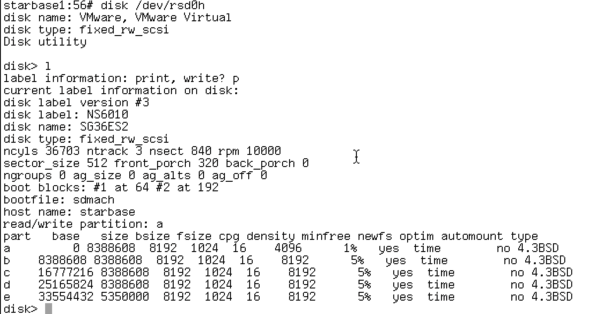
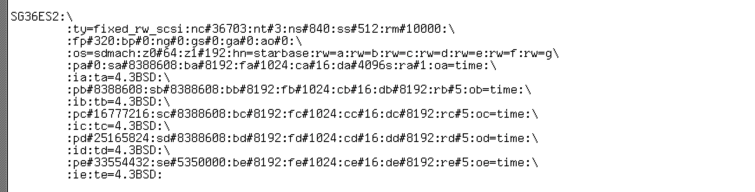
Quote from: tjallen on May 26, 2025, 08:50:14 PM.....A SCSI disk will support multiple partitions on a 16GB disk (or larger) per SCSI unit (drive).
I've been trying to use SCSI disks, with a disktab, to end up with 14GB (or 16GB if that's possible) for NEXTSTEP and the rest Slackware & Win2000 but, as you've read, I'm having trouble because after partitioning and then initializing the NEXTSTEP partition on the SCSI disks, their partition tables are wiped out and I don't know why. Perhaps I have flaky hardware? I haven't figured it out yet.
Title: Re: Extending a NeXTSTEP 3.3 partition
Post by: tjallen on June 01, 2025, 01:38:01 PM
Post by: tjallen on June 01, 2025, 01:38:01 PM
Thanks, wa2flq. Yes, I've been able to make seven, or even eight, slices on SCSI disks larger than 30 GB, but when I do, the partition table has been wiped out. I can re-make it and then install Windows and Linux as well, but it's a mystery to me why initializing the disk wipes the partition table.
Title: Re: Extending a NeXTSTEP 3.3 partition
Post by: wa2flq on June 01, 2025, 07:30:42 PM
Post by: wa2flq on June 01, 2025, 07:30:42 PM
I don't recall running into this problem. But its has been a while since I built an Intel Physical or Virtual system.
I don't believe "disk" modifies anything outside the partition itself. So it should not normally touch the area where the partition table is located. Given it the wrong drive size parameters or wrong device may be one way. What is your FP and BP (front and back porch) settings?
I don't believe "disk" modifies anything outside the partition itself. So it should not normally touch the area where the partition table is located. Given it the wrong drive size parameters or wrong device may be one way. What is your FP and BP (front and back porch) settings?
Title: Re: Extending a NeXTSTEP 3.3 partition
Post by: rjnf on June 10, 2025, 03:11:32 PM
Post by: rjnf on June 10, 2025, 03:11:32 PM
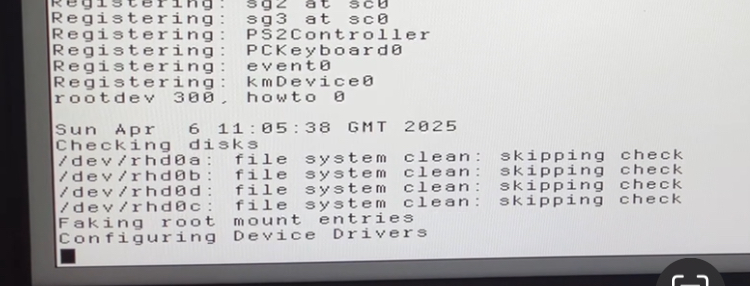
This is my layout
Title: Re: Extending a NeXTSTEP 3.3 partition
Post by: pTeK on June 20, 2025, 09:28:34 PM
Post by: pTeK on June 20, 2025, 09:28:34 PM
Quote from: wa2flq on June 01, 2025, 07:30:42 PMI don't recall running into this problem. But its has been a while since I built an Intel Physical or Virtual system.Front Porch = 320, back porch = 0. That is the results from disk(8).
I don't believe "disk" modifies anything outside the partition itself. So it should not normally touch the area where the partition table is located. Given it the wrong drive size parameters or wrong device may be one way. What is your FP and BP (front and back porch) settings?
Also for fdisk(8) on systems with hard drives bigger than 8GB does any one else get:
Code Select
NeXT fdisk v1.02a
Segmentation fault
Is that the error you are supposed to get with fdisk?
EDIT: I think I know why I'm getting this error on my DELL 5150. I copied the disk image over from VirtualBox and because I set it up with SCSI because the bus logic controller is faster than the EIDE driver it has problems. When I use disk(8) and look at the label it shows up as fixed_rw_scsi also the C/H/S do not match the 8GB+ values of 16383C/16H/63S and HDD speed of 5400RPM. The values are showing up as 32757C/4H/S32 with RPM 3600.
Short cuts really do bite you in the @$$. I don't have this problem on the IBM Thinkpad because the driver detects the CD-ROM. I can't do that with the DELL 5150 as the DVD-ROM is not detected which is why I write the virtual image directly to the HDD.
Title: Re: Extending a NeXTSTEP 3.3 partition
Post by: Apple2guy on June 21, 2025, 09:56:12 AM
Post by: Apple2guy on June 21, 2025, 09:56:12 AM
Quote from: pTeK on June 20, 2025, 09:28:34 PMFront Porch = 320, back porch = 0. That is the results from disk(8).
Also for fdisk(8) on systems with hard drives bigger than 8GB does any one else get:Code SelectNeXT fdisk v1.02a
Segmentation fault
Is that the error you are supposed to get with fdisk?
EDIT: I think I know why I'm getting this error on my DELL 5150. I copied the disk image over from VirtualBox and because I set it up with SCSI because the bus logic controller is faster than the EIDE driver it has problems. When I use disk(8) and look at the label it shows up as fixed_rw_scsi also the C/H/S do not match the 8GB+ values of 16383C/16H/63S and HDD speed of 5400RPM. The values are showing up as 32757C/4H/S32 with RPM 3600.
Short cuts really do bite you in the @$$. I don't have this problem on the IBM Thinkpad because the driver detects the CD-ROM. I can't do that with the DELL 5150 as the DVD-ROM is not detected which is why I write the virtual image directly to the HDD.
I get that error on my C2Quad It was a dd image of a different 36 gb scsi drive that failed, a Futijitsu. Now I have a 36 gb Compaq Branded drive I DD'd the backup image I made onto it.
Title: Re: Extending a NeXTSTEP 3.3 partition
Post by: pTeK on June 22, 2025, 06:07:06 AM
Post by: pTeK on June 22, 2025, 06:07:06 AM
I was wondering why my NS 3.3 couldn't use disk(8) to format the HDD and then realised it was over the 2GB partition limit, so loaded into single user mode with OpenStep 4.2 and formatted the partition that way and finished off the install with NS 3.3 :/. Need to compile the Darwin 0.1 disk(8) command with NS 3.3.
Title: Re: Extending a NeXTSTEP 3.3 partition
Post by: wa2flq on June 22, 2025, 11:16:03 PM
Post by: wa2flq on June 22, 2025, 11:16:03 PM
Quote from: pTeK on June 20, 2025, 09:28:34 PMFront Porch = 320, back porch = 0. That is the results from disk(8).
Also for fdisk(8) on systems with hard drives bigger than 8GB does any one else get:Code SelectNeXT fdisk v1.02a
Segmentation fault
Is that the error you are supposed to get with fdisk?
EDIT: I think I know why I'm getting this error on my DELL 5150. I copied the disk image over from VirtualBox and because I set it up with SCSI because the bus logic controller is faster than the EIDE driver it has problems. When I use disk(8) and look at the label it shows up as fixed_rw_scsi also the C/H/S do not match the 8GB+ values of 16383C/16H/63S and HDD speed of 5400RPM. The values are showing up as 32757C/4H/S32 with RPM 3600.
Short cuts really do bite you in the @$$. I don't have this problem on the IBM Thinkpad because the driver detects the CD-ROM. I can't do that with the DELL 5150 as the DVD-ROM is not detected which is why I write the virtual image directly to the HDD.
The original posting by pTeK referred to EIDE/IDE drives. To be clear, I think using large EIDE/IDE disks beyond 8GB to be problematic/or impossible with NeXTSTEP/OPENSTEP.
Apologies in advance if I have misread this thread.
The mismatching of utility and BIOS reporting on EIDE/IDE drives would not surprise me. Nextstep 3.3 and higher should query the drive itself for geometry. Check for drive patches in NeXTSTEP/OPENSTEP.
There is a good review in https://cdn.preterhuman.net/texts/computing/nextstep-openstep/FAQ-OpenStepOnEmulators.pdf While primarily concerned with virtual machines, the discussion on Hard Disk Partition Sizes is still relevant for physical machines. I've seen the IDE + C/H/S BIOS territory referred to as Hell. I don't disagree.
Do you get the same error when you specify the entire raw disk as part of the command?
fdisk /dev/rsd0h SCSI if you have it.
fdisk /dev/rhd0h EIDE/IDE
As an aside, see my note about using GRUB to manage multi-boots with a mix of IDE and SCSI disks.
https://www.nextcomputers.org/forums/index.php?topic=1906
Title: Re: Extending a NeXTSTEP 3.3 partition
Post by: pTeK on June 24, 2025, 05:29:32 AM
Post by: pTeK on June 24, 2025, 05:29:32 AM
Quote from: wa2flq on June 22, 2025, 11:16:03 PMDo you get the same error when you specify the entire raw disk as part of the command?
fdisk /dev/rsd0h SCSI if you have it.
fdisk /dev/rhd0h EIDE/IDE
Yes the error comes up when using:
Code Select
fdisk /dev/rhd0h
There is no error when I use that command on the IBM ThinkPad T43 which has the correct C/H/S stored on the disk label and is listed as a IDE HDD drive instead of a SCSI. Need to find a disk label editor for the Dell Inspiron 5150.