Title: AppKit API question
Post by: daniel.dlds on March 18, 2025, 08:43:18 AM
Post by: daniel.dlds on March 18, 2025, 08:43:18 AM
Hi,
I am developing a text editor using the NeXT API's (Foundation and AppKit).
The text widget is a TextField that is Streched in the application window where the user will enter
text.
I can set the text in my buffer on to the text field even with carriage returns programmatically.
Now I need to be able to allow the user to enter text into the field and when he presses the Enter key, move the caret to the line below. How I am doing it is to have a delegate on the text field and implement the textDidEnd:endChar:
When this method is called I check for the last character entered and if its a carriage return, append it to my buffer that is backing the text field.
But the default behaviour of the text field remains, which is to select all the text content of the field. I want to prevent that. I read in the docs that the text object besides calling that method on the delegate, sends a message to the textfield to do the selection.
How should I prevent that ?
Thanks for any help,
Regards
I am developing a text editor using the NeXT API's (Foundation and AppKit).
The text widget is a TextField that is Streched in the application window where the user will enter
text.
I can set the text in my buffer on to the text field even with carriage returns programmatically.
Now I need to be able to allow the user to enter text into the field and when he presses the Enter key, move the caret to the line below. How I am doing it is to have a delegate on the text field and implement the textDidEnd:endChar:
When this method is called I check for the last character entered and if its a carriage return, append it to my buffer that is backing the text field.
But the default behaviour of the text field remains, which is to select all the text content of the field. I want to prevent that. I read in the docs that the text object besides calling that method on the delegate, sends a message to the textfield to do the selection.
How should I prevent that ?
Thanks for any help,
Regards
Title: Re: AppKit API question
Post by: pTeK on March 18, 2025, 12:25:51 PM
Post by: pTeK on March 18, 2025, 12:25:51 PM
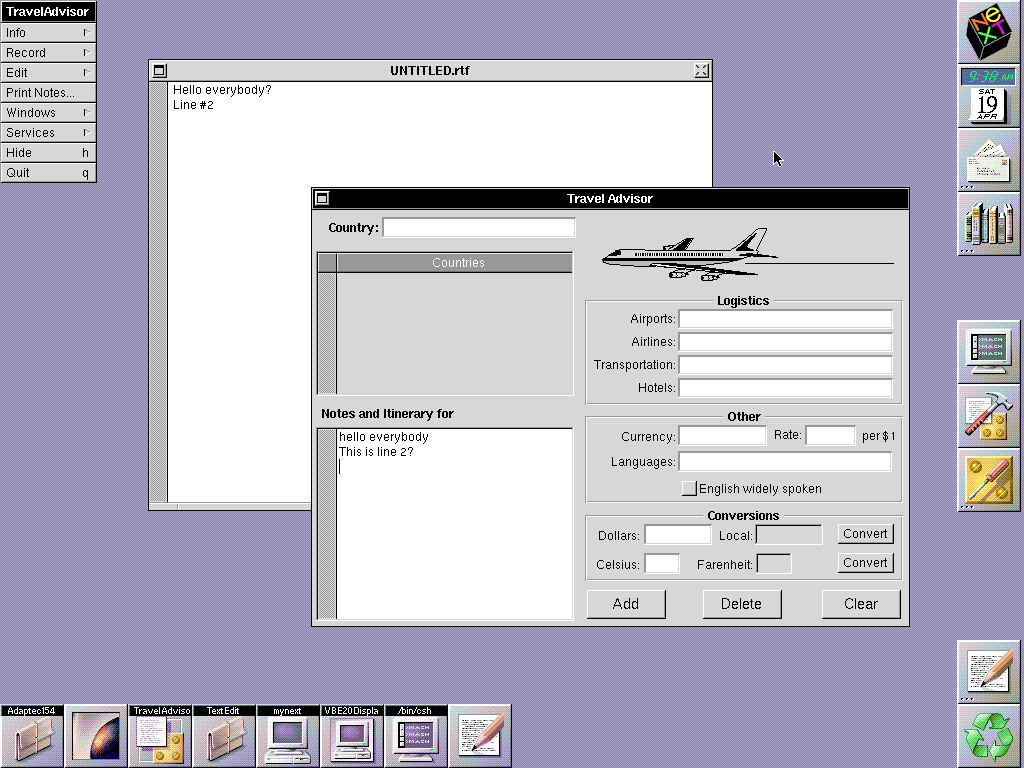
I know this is not the answer you are looking for but with OpenStep Developer they have example source code for TextEdit and Travel Advisor. Would there be similar code to what you are looking for in there?
Title: Re: AppKit API question
Post by: daniel.dlds on March 20, 2025, 04:09:50 AM
Post by: daniel.dlds on March 20, 2025, 04:09:50 AM
I am on NeXTStep 3.3, and I didnt't know that OpenStep had that.
I will search the OS for sources of TexTEdit, and if I can't find it, I will try to install openstep and look at the sources in there.
Thanks,
Regards
I will search the OS for sources of TexTEdit, and if I can't find it, I will try to install openstep and look at the sources in there.
Thanks,
Regards
Title: Re: AppKit API question
Post by: pTeK on March 20, 2025, 01:09:38 PM
Post by: pTeK on March 20, 2025, 01:09:38 PM
I know you would have preferred a more direct answer, but I hope that if you go through the source code it might give a temporary solution.
Also http://www.rhapsodyos.org/software/textedit/textedit_1.html might have source to the version for Rhapsody, Yes I know it is two OS versions down the lane but maybe it might give you a hint at what you are looking for.
Cool avatar pic by the way.
EDIT: You do not need to install OpenStep if you just want to look at the source. It will be on the OpenStep developer CD. Have you tried look at some examples for GNUStep to see if it is similar to work?
Also http://www.rhapsodyos.org/software/textedit/textedit_1.html might have source to the version for Rhapsody, Yes I know it is two OS versions down the lane but maybe it might give you a hint at what you are looking for.
Cool avatar pic by the way.
EDIT: You do not need to install OpenStep if you just want to look at the source. It will be on the OpenStep developer CD. Have you tried look at some examples for GNUStep to see if it is similar to work?
Title: Re: AppKit API question
Post by: daniel.dlds on April 02, 2025, 07:47:47 AM
Post by: daniel.dlds on April 02, 2025, 07:47:47 AM
Without looking at the source (yet), I decided to replace the TextField component, with a Text component, because from what I read, TextField is mainly for a single line text entry, not so mucha as a textarea (as is called in other graphical toolkits). So far so good, but the component does not display (yet)
Title: Re: AppKit API question
Post by: user217 on April 02, 2025, 01:50:42 PM
Post by: user217 on April 02, 2025, 01:50:42 PM
Quote from: pTeK on March 20, 2025, 01:09:38 PMHave you tried look at some examples for GNUStep to see if it is similar to work?
Well, here's the info panel from the default text editor under NEXTSPACE...
GSDE and NEXTSPACE both ship NeXT TextEdit. :) I thought this was amazing, until I discovered that you can't save changes to the default fonts! (Thirty-year-old bug? GNUstep port fail? I have no idea!)
Title: Re: AppKit API question
Post by: jeffberg on July 08, 2025, 12:38:32 AM
Post by: jeffberg on July 08, 2025, 12:38:32 AM
@daniel.dlds sorry, I realize this is a bit old now. But in case you hadn't solved the issue yet, I think you are using the incorrect class for this specific use case. Basically use NSTextView. NSTextView is for multiline documents. You shouldn't need to manually manage carriage returns and stuff. NSTextField is meant for basic text entry boxes, not full text documents. NSText is an abstract superclass you can't use directly.
Take a look at the Text programming guide for more info. There is one in the NeXT Developer documentation on your disk, but if it's hard to find, the official Apple one is ancient and it's basically the same. https://developer.apple.com/library/archive/documentation/TextFonts/Conceptual/CocoaTextArchitecture/Introduction/Introduction.html#//apple_ref/doc/uid/TP40009459
One important thing to note is that NSTextView on its own cannot scroll. It needs to be embedded in an NSScrollView. This is done automatically for you if you use interface builder. But if you are creating your text view in code, it's quite fiddly to get right. Apple also has an ancient document that explains this and its fully compatible with OpenStep. https://developer.apple.com/library/archive/documentation/Cocoa/Conceptual/TextUILayer/Tasks/TextInScrollView.html#//apple_ref/doc/uid/20000938-CJBBIAAF
Hope this helps!
Take a look at the Text programming guide for more info. There is one in the NeXT Developer documentation on your disk, but if it's hard to find, the official Apple one is ancient and it's basically the same. https://developer.apple.com/library/archive/documentation/TextFonts/Conceptual/CocoaTextArchitecture/Introduction/Introduction.html#//apple_ref/doc/uid/TP40009459
One important thing to note is that NSTextView on its own cannot scroll. It needs to be embedded in an NSScrollView. This is done automatically for you if you use interface builder. But if you are creating your text view in code, it's quite fiddly to get right. Apple also has an ancient document that explains this and its fully compatible with OpenStep. https://developer.apple.com/library/archive/documentation/Cocoa/Conceptual/TextUILayer/Tasks/TextInScrollView.html#//apple_ref/doc/uid/20000938-CJBBIAAF
Hope this helps!