Title: How do i tell (without teardown) if i'm on an 030, 040/25, or 040/33 Cube?
Post by: luVWagn on July 08, 2025, 03:09:33 PM
Post by: luVWagn on July 08, 2025, 03:09:33 PM
So, is there a system-info view or a command from shell that will tell (without teardown) if i'm on an 030, 040/25, or 040/33 Cube?
Title: Re: How do i tell (without teardown) if i'm on an 030, 040/25, or 040/33 Cube?
Post by: cuby on July 08, 2025, 05:18:14 PM
Post by: cuby on July 08, 2025, 05:18:14 PM
/usr/bin/machine should print the CPU type (m68030 or m68040), /usr/bin/hostinfo also prints the CPU speed. I can't see right now how to figure out if you're running on a Cube vs. a NeXTstation but would assume this is encoded in the "System type" and "board revision" output of the hostinfo tool.
See the uname tool for NeXTstep (http://www.stellarcore.net/downloads/uname.nextstep) for some more information.
See the uname tool for NeXTstep (http://www.stellarcore.net/downloads/uname.nextstep) for some more information.
Title: Re: How do i tell (without teardown) if i'm on an 030, 040/25, or 040/33 Cube?
Post by: nuss on July 09, 2025, 08:06:30 AM
Post by: nuss on July 09, 2025, 08:06:30 AM
Also working without teardown:
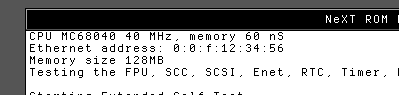
The first information you see on the screen when booting up the machine is about the CPU and memory. Screenshot is taken from Previous (68040 Turbo Color + 40MHz Nitro):
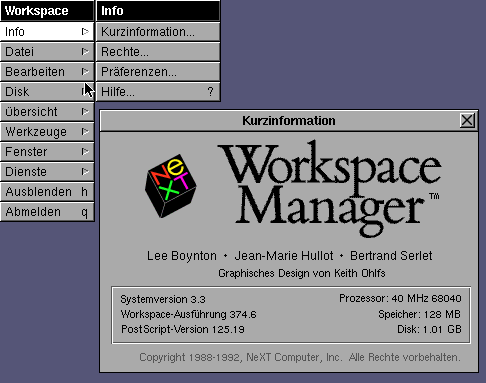
In Workspace Manager you can go to Info and click the first item. The Info panel holds CPU information, too:
For both method I am not sure if this holds valid for older firmware or OS, like NeXTstep older than 3.0.
The first information you see on the screen when booting up the machine is about the CPU and memory. Screenshot is taken from Previous (68040 Turbo Color + 40MHz Nitro):
In Workspace Manager you can go to Info and click the first item. The Info panel holds CPU information, too:
For both method I am not sure if this holds valid for older firmware or OS, like NeXTstep older than 3.0.
Title: Re: How do i tell (without teardown) if i'm on an 030, 040/25, or 040/33 Cube?
Post by: krazycat on July 09, 2025, 11:59:53 AM
Post by: krazycat on July 09, 2025, 11:59:53 AM
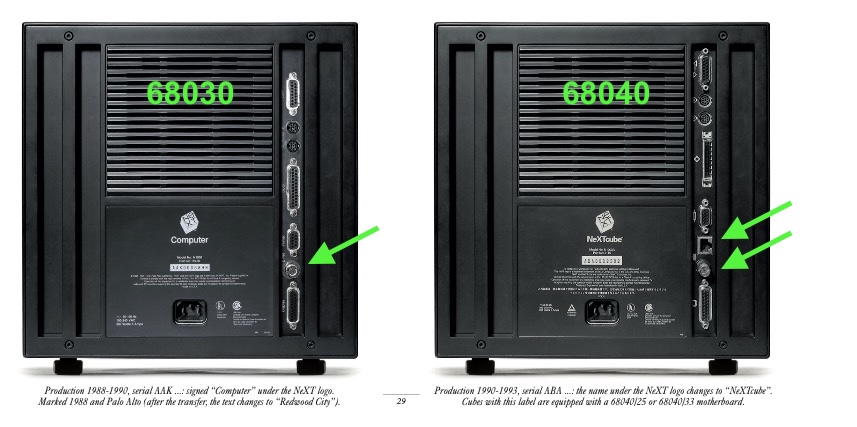
To determine whether you have a 68030 or 68040 processor, simply look at the back of the cube: the 68030 motherboard has only one Ethernet port, the 68040 motherboard has two (RJ and coaxial).
To find out if it's a 68040/25 or 68040/33, follow cuby and nuss's instructions :-)
To find out if it's a 68040/25 or 68040/33, follow cuby and nuss's instructions :-)