Title: ZuluSCSI Wide on WhiteBox
Post by: Apple2guy on August 28, 2025, 08:53:26 PM
Post by: Apple2guy on August 28, 2025, 08:53:26 PM
CPU: Core i5 3570 @ 3.4 Ghz
Ram: 16 GB DDR3 1600
GPU: NVIDIA GeForce 7950 GT 512 MB (VESA driver)
Scsi: Adaptec 2940UW Pro
Motherboard: P8B75-V
Sound: Soundblaster 16 PCI
Ethernet: SMC 9332 10/100
OS: Openstep 4.2
Zuluscsi Wide store link (https://shop.rabbitholecomputing.com/products/zuluscsi-wide)
ZuluSCSI Wide manual (https://github.com/ZuluSCSI/ZuluSCSI-firmware/wiki/ZuluSCSI-Wide-Manual)
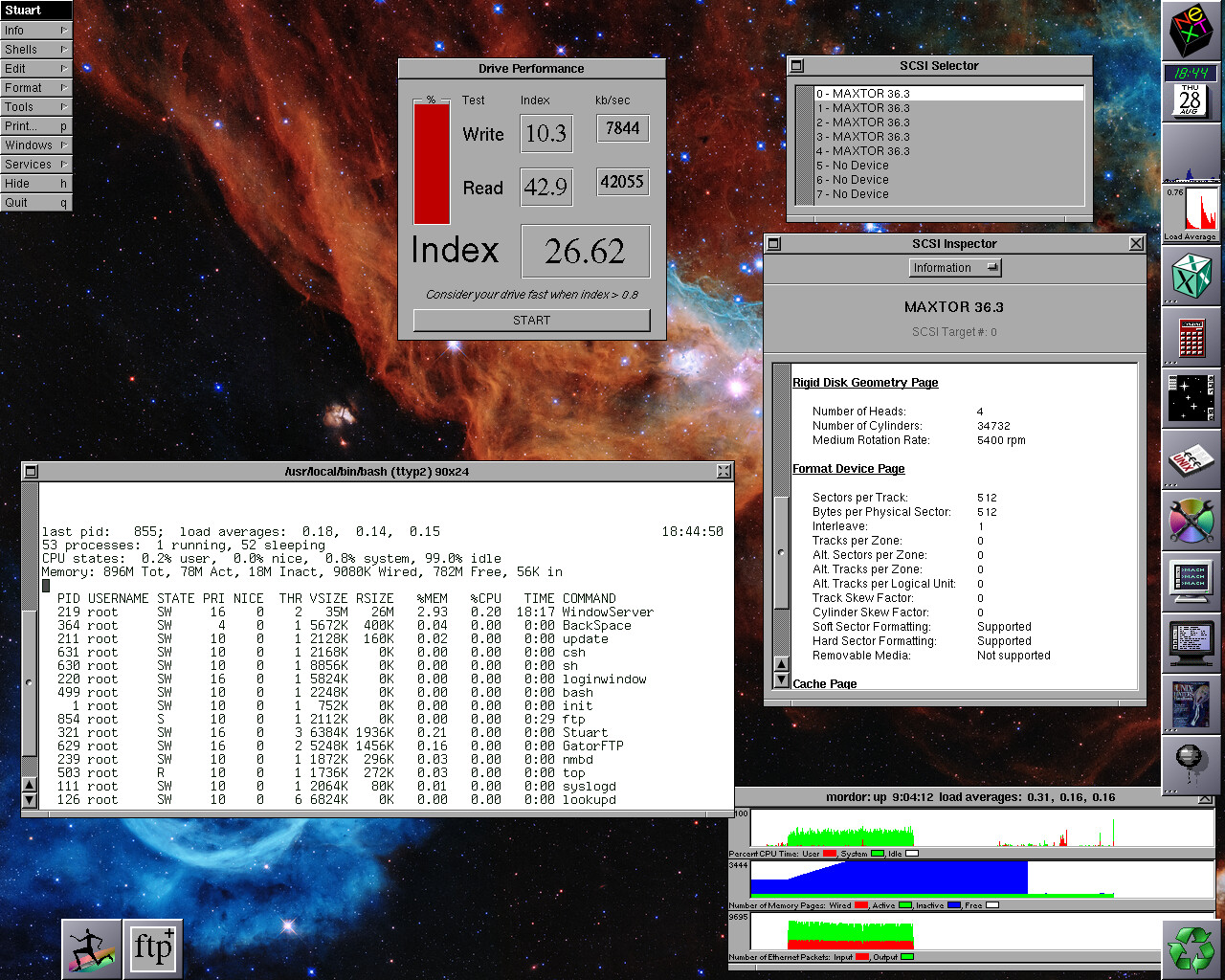
Included is my zuluscsi.ini file I had to use custom CHS settings so Openstep would format the emulated drives successfully.
You MUST have your image files on the SD card be unfragmented. I used Mac to copy and every time macOS fragmented the files. :o With a fragmented image it is glacially slow. I formatted the sd card mbr/exfat from linux and copied the files onto the sd card and then used filefrag to check if the copied files were fragmented.
The disktab entry I use.
Zuluscsi.ini
Ram: 16 GB DDR3 1600
GPU: NVIDIA GeForce 7950 GT 512 MB (VESA driver)
Scsi: Adaptec 2940UW Pro
Motherboard: P8B75-V
Sound: Soundblaster 16 PCI
Ethernet: SMC 9332 10/100
OS: Openstep 4.2
Zuluscsi Wide store link (https://shop.rabbitholecomputing.com/products/zuluscsi-wide)
ZuluSCSI Wide manual (https://github.com/ZuluSCSI/ZuluSCSI-firmware/wiki/ZuluSCSI-Wide-Manual)
Included is my zuluscsi.ini file I had to use custom CHS settings so Openstep would format the emulated drives successfully.
You MUST have your image files on the SD card be unfragmented. I used Mac to copy and every time macOS fragmented the files. :o With a fragmented image it is glacially slow. I formatted the sd card mbr/exfat from linux and copied the files onto the sd card and then used filefrag to check if the copied files were fragmented.
The disktab entry I use.
Code Select
ZULU|MAXTOR 36.3|MAXTOR 36.3-512:\
	:ty=fixed_rw_scsi:nc#34372:nt#4:ns#512:ss#512:rm#15000:\
	:fp#320:bp#0:ng#0:gs#0:ga#0:ao#0:\
	:os=mach_kernel:z0#64:z1:192:hn=mordor:ro=a:\
	:pa#63:sa#8388608:ba#8192:fa#1024:ca#4:da#4096:ra#10:oa=time:\
	:ia:ta=4.3BSD:aa:\
	:pb#8388671:sb#8388608:bb#8192:fb#1024:cb#4:db#4096:rb#10:ob=time:\
	:ib:tb=4.3BSD:ab:\
	:pc#16777279:sc#8388608:bc#8192:fc#1024:cc#4:dc#4096:rc#10:oc=time:\
	:ic:tc=4.3BSD:ac:\
	:pd#25165887:sd#8388608:bd#8192:fd#1024:cd#4:dd#4096:rd#10:od=time:\
	:id:td=4.3BSD:ad:\
	:pe#33554495:se#8388608:be#8192:fe#1024:ce#4:de#4096:re#10:oe=time:\
	:ie:te=4.3BSD:ae:\
	:pf#41943103:sf#8388608:bf#8192:ff#1024:cf#4:df#4096:rf#10:of=time:\
	:if:tf=4.3BSD:af:\
	:pg#50331711:sg#8388608:bg#8192:fg#1024:cg#4:dg#4096:rg#10:og=time:\
	:ig:tg=4.3BSD:ag:
Zuluscsi.ini
Code Select
# See http://zuluscsi.com/manual for more information about setting up your ZuluSCSI
[SCSI]
# Settings that apply to all SCSI IDs

# Select a system preset to apply default settings
# Known systems: "Mac", "MacPlus", "MPC3000", "MegaSTE", "X68000"
#System="Mac"

#Debug = 0   # Same effect as DIPSW2, enables verbose log messages
#DebugLogMask = 255 # A bit mask for SCSI IDs 0-7, filters only matching SCSI ID debug messages
#DebugIgnoreBusyFree = 0 # Set to 1 to ignore the BUS_FREE and BUS_BUSY logging
#SelectionDelay = 255   # Millisecond delay after selection, 255 = automatic, 0 = no delay
Dir = "/"   # Optionally look for image files in subdirectory
#Dir2 = "/images"  # Multiple directories can be specified Dir1...Dir9
#InvertStatusLED = 0 #  0: LED on when device is active, 1: Inverted LED activity
#DisableStatusLED = 1 # 0: Use status LED, 1: Disable status LED
#EnableToolbox = 1 # Enable Toolbox API. Disabled by default for compatibility reasons.

# NOTE: PhyMode is only relevant for ZuluSCSI V1.1 at this time.
#PhyMode = 0   # 0: Best available  1: PIO  2: DMA_TIMER  3: GREENPAK_PIO   4: GREENPAK_DMA
# The PhyMode parameter has no effect on ZuluSCSI RP2040-based platforms, as there is only one PHY mode.

# Settings that can be needed for compatibility with some hosts
#Quirks = 0   # 0: Standard, 1: Apple, 2: OMTI, 4: Xebec, 8: VMS, 16: X68000, 32: EWSD
#EnableUnitAttention = 0 # Post UNIT_ATTENTION status on power-on or SD card hotplug
EnableSCSI2 = 1 # Enable faster speeds of SCSI2
#EnableSelLatch = 0 # For Philips P2000C and other devices that release SEL signal before BSY
#EnableParity = 1 # Enable parity checks on platforms that support it (RP2040)
#MapLunsToIDs = 0 # For Philips P2000C simulate multiple LUNs
#InitPreDelay = 0  # How many milliseconds to delay before the SCSI interface is initialized
#InitPostDelay = 0 # How many milliseconds to delay after the SCSI interface is initialized

# Will reclock the board if the board supports both reclocking and the chosen speed
# SpeedGrade = Default # TurboMax - max speed, A, B, C, etc
# MaxSyncSpeed = 20 # Set to 5, 10, or 20 to enable synchronous SCSI mode, 0 to disable

# Wide bus support
# MaxBusWidth = 0 # 0: 8-bit, 1: 16-bit. Defaults to maximum supported.

# ROM settings
#DisableROMDrive = 1 # Disable the ROM drive if it has been loaded to flash
#ROMDriveSCSIID = 7 # Override ROM drive's SCSI ID

#Initiator settings
#InitiatorID = 7 # SCSI ID, 0-7, when the device is in initiator mode, default is 7
#InitiatorMaxRetry = 5 #  number of retries on failed reads 0-255, default is 5
#InitiatorImageHandling = 0 # 0: skip existing images, 1: create new image with incrementing suffix, 2: overwrite existing image
#InitiatorUseRead10 = 0 # 0: Always use READ6 command, 1: Always use READ10 command, not set: Autodetect READ10 support
#InitiatorBusWidth = 0 # 0: Always 8-bit, 1: Always 16-bit, not set: Select best supported

#InitiatorMSC = 0 # Force USB MSC mode for initiator. By default enabled only if SD card is not inserted.
#InitiatorMSCReadOnly = 0 # Prevent writing to the drive through USB MSC
#InitiatorMSCDisablePrefetch = 0 # Disable read prefetching in USB MSC mode
#InitiatorMSCStatusInterval = 5000 # Periodically report access status to log
#InitiatorMSCInitDelay = 300 # In milliseconds, gives time for USB serial to configure itself

# On RP2040 based boards and v1.2 the audio disabled by default
# On Blasters audio is enabled by default
#EnableCDAudio = 0 # 1: Enable CD audio

#MaxVolume = 100 # Set the percentage of the volume from 1 to 100 (default)

# Settings that can be specified either per-device or for all devices.

# Select a device preset to apply default settings
# Known systems: "ST32430N"
#Device = "ATLAS10K3"
#Vendor = "MAXTOR"
#Product = "36.3"
#Version = "1.0"
#Serial = "0123456789ABCDEF"
#Type = 0     # 0: Fixed, 1: Removable, 2: Optical, 3: Floppy, 4: Mag-optical,
              # 5: Tape,  6: Network,   7: Zip100
#VendorExtensions = 0 # Bit flags for specific extensions per device type
#  CDROM - 1: Plextor's d8h vendor command
#TypeModifier = 0  # Affects only INQUIRY response
#SectorsPerTrack = 63
#HeadsPerCylinder = 255
#RightAlignStrings = 0 # Right-align SCSI vendor / product strings
#PrefetchBytes = 8192 # Maximum number of bytes to prefetch after a read request, 0 to disable
#ReinsertCDOnInquiry = 1 # Reinsert any ejected CD-ROM image on Inquiry command
#ReinsertAfterEject = 1 # Reinsert next CD image after eject, if multiple images configured.
#EjectButton = 0 # Enable eject by button 1 or 2, or set 0 to disable

# The default values of 20 and 50 give a visible and audible (with optional buzzer) eject notification
#EjectBlinkTimes = 20 # the number of times to blink the LED
#EjectBlinkPeriod = 50 # the period in milliseconds for each blink

#CDAVolume = 63 # Change CD Audio default volume. Maximum 255.
#DisableMacSanityCheck = 0 # Disable sanity warnings for Mac disk drives. Default is 0 - enable checks
#BlockSize = 0 # Set the drive's blocksize, defaults to 2048 for CDs and 512 for all other drives

# Mount SD card as a mass storage device before entering SCSI emulator
# EnableUSBMassStorage = 1 # setting this to one will mount the SD card if the USB cord is plugged in
# USBMassStorageWaitPeriod = 1000 # Number of milliseconds the device will wait for the host to mount SD card
#   May need to be increased if connected through a USB hub
# USBMassStoragePresentImages = 0 # 0: disabled (default) 1: enabled - FW v2025.02.05 or later required)
# - USBMassStoragePresentImages is BETA grade, and only available on RP2040/RP2350-based ZuluSCSI boards

# SCSI DaynaPORT settings
#WiFiSSID = "Wifi SSID string"
#WiFiPassword = "WiFi Password"
#WiFiMACAddress = "01:23:45:67:89"
[SCSI0]
Device = "ATLAS10K3"
Vendor = "MAXTOR"
Product = "36.3"
Type = 0
SectorsPerTrack = 512
HeadsPerCylinder = 4

[SCSI1]
Device = "ATLAS10K3"
Vendor = "MAXTOR"
Product = "36.3"
Type = 0
SectorsPerTrack = 512
HeadsPerCylinder = 4

[SCSI2]
Device = "ATLAS10K3"
Vendor = "MAXTOR"
Product = "36.3"
Type = 0
SectorsPerTrack = 512
HeadsPerCylinder = 4

[SCSI3]
Device = "ATLAS10K3"
Vendor = "MAXTOR"
Product = "36.3"
Type = 0
SectorsPerTrack = 512
HeadsPerCylinder = 4

[SCSI4]
Device = "ATLAS10K3"
Vendor = "MAXTOR"
Product = "36.3"
Type = 0
SectorsPerTrack = 512
HeadsPerCylinder = 4

# Settings can be overridden for individual devices.
#[SCSI2]
#Product = "Disk with ID2"

#[SCSI5]
#Product = "CD-ROM Drive"
#Type = 2

# If IMG0..IMG9 are specified, they are cycled after each eject command.
#IMG0 = FirstCD.iso
#IMG1 = SecondCD.bin


# Raw sector range from SD card can be passed through
# Format is RAW:first_sector:last_sector where sector numbers can be decimal or hex.
# If end sector is beyond end of SD card, it will be adjusted automatically.
# [SCSI4]
# IMG0 = RAW:0x00000000:0xFFFFFFFF # Whole SD card
Title: Re: ZuluSCSI Wide on WhiteBox
Post by: Apple2guy on August 29, 2025, 10:01:58 AM
Post by: Apple2guy on August 29, 2025, 10:01:58 AM
Also the planet will thank me, Zuluscsi Wide and SD card uses a lot less wattage than 5x 36 gb 10Krpm SCSI drives.
Title: Re: ZuluSCSI Wide on WhiteBox
Post by: pTeK on September 01, 2025, 02:57:41 AM
Post by: pTeK on September 01, 2025, 02:57:41 AM
Quote from: Apple2guy on August 28, 2025, 08:53:26 PMCPU: Core i5 3570 @ 3.4 Ghz
Ram: 16 GB DDR3 1600
GPU: NVIDIA GeForce 7950 GT 512 MB (VESA driver)
Scsi: Adaptec 2940UW Pro
Motherboard: P8B75-V
Sound: Soundblaster 16 PCI
Ethernet: SMC 9332 10/100
OS: Openstep 4.2
What is your VESA resolution 1600x1200 or 1920x1080?
Title: Re: ZuluSCSI Wide on WhiteBox
Post by: Apple2guy on September 01, 2025, 10:28:01 AM
Post by: Apple2guy on September 01, 2025, 10:28:01 AM
Currently it's 1600x1200 using the gpu built into the cpu. I put a 4xpcie to nvme in place of the gpu for linux. With that Nvidia card and the monitor I'm using it would only do up to 1080x1024.
Title: Re: ZuluSCSI Wide on WhiteBox
Post by: kokomuck on September 02, 2025, 01:04:33 AM
Post by: kokomuck on September 02, 2025, 01:04:33 AM
Quote from: Apple2guy on September 01, 2025, 10:28:01 AMCurrently it's 1600x1200 using the gpu built into the cpu. I put a 4xpcie to nvme in place of the gpu for linux. With that Nvidia card and the monitor I'm using it would only do up to 1080x1024.
Sorry, I don't understand. With the setup mentioned in the initial post, do you get a resolution of 1600 x 1200? Or with which setup do you get this (or any higher) resolution?
Thanks for the clarification!
All the best,
Kokomuck