Title: intruder alert...
Post by: emond on March 02, 2007, 11:15:15 AM
Post by: emond on March 02, 2007, 11:15:15 AM
Hi all,
I am a Newbie in NeXT World...
For several days, I have had a complete NeXTcube.
When, I start in "single mode", I am not "root" but "Intruder alert".
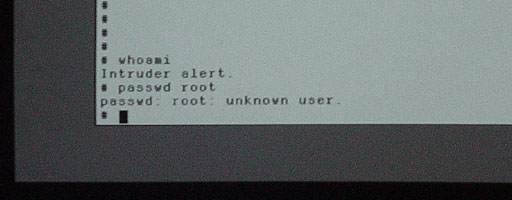
Who can how remove this protection?
Or explanation about this ?
best regards
I am a Newbie in NeXT World...
For several days, I have had a complete NeXTcube.
When, I start in "single mode", I am not "root" but "Intruder alert".
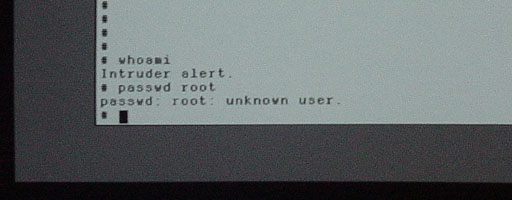
Who can how remove this protection?
Or explanation about this ?
best regards
Title: intruder alert...
Post by: idylukewild on March 02, 2007, 05:53:01 PM
Post by: idylukewild on March 02, 2007, 05:53:01 PM
I found the following on http://groups.google.com/group/comp.sys.hp.hpux/browse_thread/thread/3066ee240014dc5d/46b00af63436f39b?lnk=st&q=%22intruder+alert%22&rnum=5#46b00af63436f39b
QuoteThe 'whoami' program uses the current uid (or is it euid; I can't
remember) and tries to lookup its
matching username in the password file
( via getpwuid(uid) or something similar ). When the call
fails i.e. when there is no entry with that uid, its does
not know what the username is and so puts 'Intruder alert'
instead.
As for 'who am i' that just looks at the file /etc/utmp which is
filled in by the 'login' program.
Having given you the background info you can deduce the rest...
Oh... alright ...
Whats happened is the password file is ok when the user is
logging in, but between that time and the 'whoami', the
password file entry for that user gets corrupted or removed.
by a another root user say.
To find out which entry or if it has been removed do this :-
csh> whoami
Intruder alert.
csh> rm -f junk
csh> touch junk
csh> ls -l junk
-rw-r----- 1 1234 sys 0 Nov 16 11:09 junk
csh> grep 1234 /etc/passwd
> PS - Could it be because some user have the same password?
No.
Hope it helps.
PS. One last point, amend text as appropriate if you are
using NIS passwd server.
--
Terry Yip. BNR Europe Ltd, London, England.
[email protected]
The opinions expressed here are not mine, even if I said they were.
The opinions expressed here are not BNRs, even if I said they were.
The opinions expressed here are not anybodies, even if I said they were.
Title: intruder alert...
Post by: emond on March 02, 2007, 08:42:44 PM
Post by: emond on March 02, 2007, 08:42:44 PM
I think that it is more complicated...
Because, I do not have a file /etc/passwd
Because, I do not have a file /etc/passwd
Title: intruder alert...
Post by: idylukewild on March 03, 2007, 07:47:37 PM
Post by: idylukewild on March 03, 2007, 07:47:37 PM
Hmmm. Maybe this will help. Never happended to me. Perhaps someone else has the answer. Looks like a good reason to have a cloned drive on hand in case something gets corrupted.
From http://groups.google.com/group/comp.sys.next.software/browse_thread/thread/af1e8c75775cc02/ceee84d552e6f8b1?lnk=gst&q=intruder&rnum=5#ceee84d552e6f8b1
Later on in the thread it is suggested that the OS install disc be used to 'upgrade' the OS and thereby overwrite the corrupted file. Another reason to have an OS install CD.
From http://groups.google.com/group/comp.sys.next.software/browse_thread/thread/af1e8c75775cc02/ceee84d552e6f8b1?lnk=gst&q=intruder&rnum=5#ceee84d552e6f8b1
QuoteLuis Cabrera
Jan 31 2000, 3:00 am
DAH! I just had a black out and my Turbo color slab is now sick it give me
the following error while it boots:
ghostface syslogd: going down on signal 15
autonfsmount[119]: exiting
erase ^? intr ^C kill^U
#
If I type whoami it give me back "Intruder Alert"
If I type shutdown NOW it says " that must be tomorrow Can't you wait untill
then?"
I used fsck on it and I rebooted in single user mode and fscked it there as
well but to no avail.
I'd appreciate it if anyone could help me out here
QuoteBill Seng
Feb 2 2000, 3:00 am
If I recall correctly this indicates a problem accessing root's home directory
and/or .cshrc (and other root user files?), which is why you get the "Intruder
Alert" message.
Try booting into single user mode (type bsd -s at the NeXT> boot prompt) and see
if you can get into the root directory and/or root's .cshrc.
I wish I could give you more than that. It happened to me a while ago when I was
adding/removing disks on my system, which rendered certain files for the root
user unavailable. Unfortunately, I don't know which ones....Of course, adding
the disks in the right order and making root's user files accessible fixed it
nicely.
- Bill Seng
Later on in the thread it is suggested that the OS install disc be used to 'upgrade' the OS and thereby overwrite the corrupted file. Another reason to have an OS install CD.