Title: OPENSTEP at 2560x1600
Post by: blakespot on April 29, 2007, 11:25:39 AM
Post by: blakespot on April 29, 2007, 11:25:39 AM
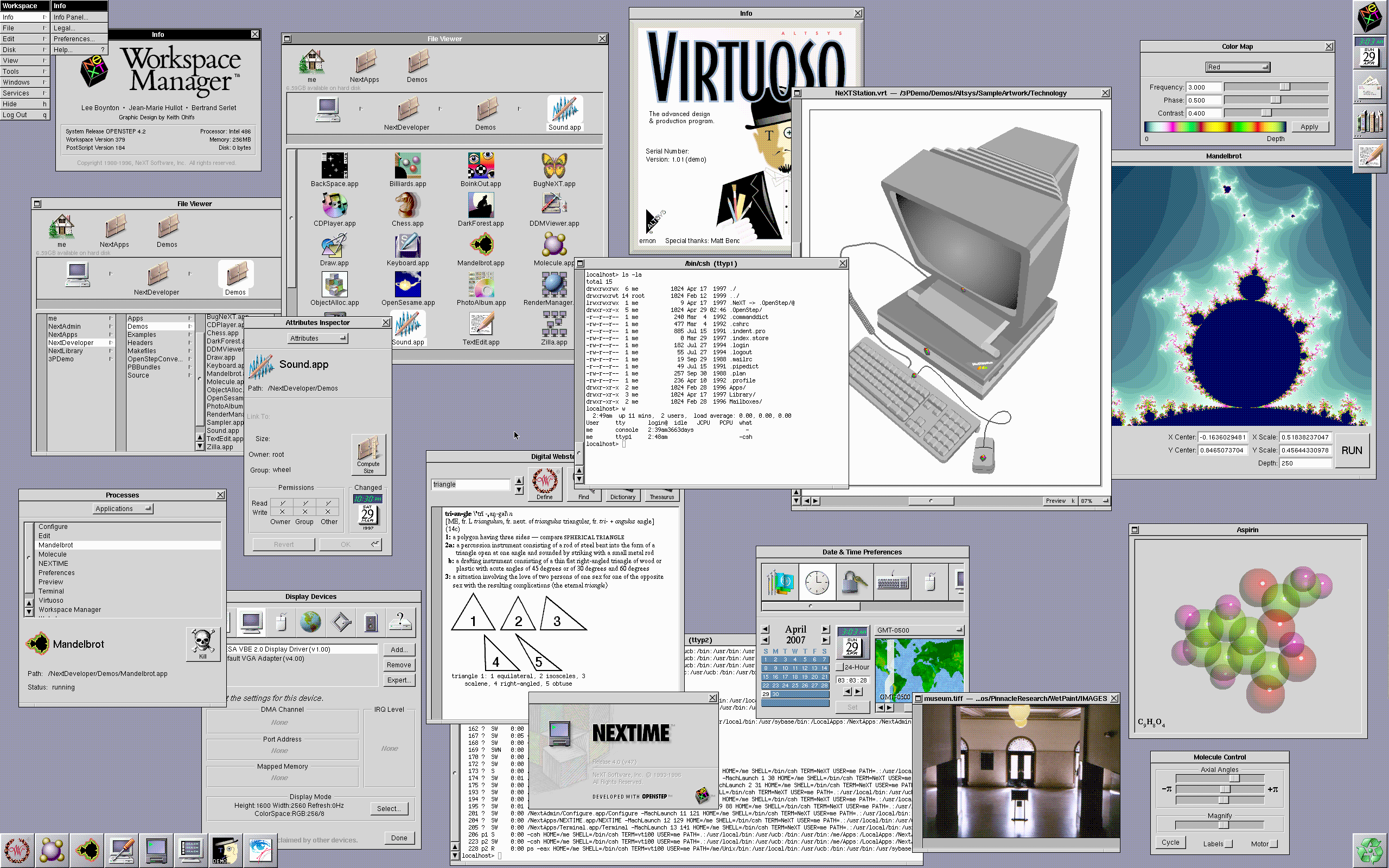
OPENSTEP 4.2 under Parallels on my Mac Pro. I didn't know it could run at this high a resolution. (VESA 2.0)
 (http://pix.blakespot.com/view/computers/screenshots/OPENSTEP_on_MP/openstep_2560x1600_1.png.html?g2_imageViewsIndex=3)
( click shot for full res )
blakespot
(http://pix.blakespot.com/view/computers/screenshots/OPENSTEP_on_MP/openstep_2560x1600_1.png.html?g2_imageViewsIndex=3)
( click shot for full res )
blakespot
Title: OPENSTEP at 2560x1600
Post by: Nightengale on April 29, 2007, 06:36:06 PM
Post by: Nightengale on April 29, 2007, 06:36:06 PM
That's a lot of real estate :D
Title: OPENSTEP at 2560x1600
Post by: blakespot on April 29, 2007, 08:50:15 PM
Post by: blakespot on April 29, 2007, 08:50:15 PM
Quote from: "Nightengale"That's a lot of real estate :DVirtualization = good, eh?
b
lak e
sp ot
Title: OPENSTEP at 2560x1600
Post by: dlundh on April 30, 2007, 12:18:50 AM
Post by: dlundh on April 30, 2007, 12:18:50 AM
Looks very nice indeed! Makes me wish I had the intel version to run in a VM as well. :)
Title: Drivers?
Post by: ErikTheHack on May 05, 2007, 04:18:48 PM
Post by: ErikTheHack on May 05, 2007, 04:18:48 PM
Just so it's documented in one place (if it already is I couldn't find it) -- would you mind sharing which OPENSTEP drivers you had to use to get up and running?
I know you need the VESA driver provided with Patch 4 for video but did you get networking working? Sound?
Also, I'm having some problems getting Patch 4 to install -- the installer starts but as soon as it's going to start with the "checking files" part the installer app just closes. No errors, no nothing! Did you have any issues getting the patch installed?
Thanks!
Eric
I know you need the VESA driver provided with Patch 4 for video but did you get networking working? Sound?
Also, I'm having some problems getting Patch 4 to install -- the installer starts but as soon as it's going to start with the "checking files" part the installer app just closes. No errors, no nothing! Did you have any issues getting the patch installed?
Thanks!
Eric
Title: Re: OPENSTEP at 2560x1600
Post by: da9000 on May 06, 2007, 06:48:05 PM
Post by: da9000 on May 06, 2007, 06:48:05 PM
Quote from: "blakespot"OPENSTEP 4.2 under Parallels on my Mac Pro. I didn't know it could run at this high a resolution. (VESA 2.0)
Nice!!!
Title: OPENSTEP at 2560x1600
Post by: Nightengale on May 08, 2007, 08:25:43 PM
Post by: Nightengale on May 08, 2007, 08:25:43 PM
Quote from: "blakespot"Quote from: "Nightengale"That's a lot of real estate :DVirtualization = good, eh?
b
lak e
sp ot
Certainly seems to be, what a brain bender....I never go into the virtualization sceners yet but it looks tempting.
Title: Re: OPENSTEP at 2560x1600
Post by: ericj on May 08, 2007, 09:07:32 PM
Post by: ericj on May 08, 2007, 09:07:32 PM
Quote from: "blakespot"OPENSTEP 4.2 under Parallels on my Mac Pro. I didn't know it could run at this high a resolution. (VESA 2.0)
( click shot for full res )
blakespot
Now that makes me want a Mac Pro even more. :(
Title: OPENSTEP at 2560x1600
Post by: Nitro on July 23, 2008, 07:51:16 AM
Post by: Nitro on July 23, 2008, 07:51:16 AM
Here's a link to the image over at Flickr.
http://www.flickr.com/photos/blakespot/2419063647/in/set-72157604578580203/
http://www.flickr.com/photos/blakespot/2419063647/in/set-72157604578580203/
Title: OPENSTEP at 2560x1600
Post by: helf on July 23, 2008, 07:20:47 PM
Post by: helf on July 23, 2008, 07:20:47 PM
wow, now that is nice :D
Title: OPENSTEP at 2560x1600
Post by: nightriders on January 09, 2009, 05:00:53 PM
Post by: nightriders on January 09, 2009, 05:00:53 PM
Ah, please... could you document how you got this done? That's awesome.
Title: higher screen resolutions with VMwareFB
Post by: virtualbob on December 08, 2009, 12:30:25 AM
Post by: virtualbob on December 08, 2009, 12:30:25 AM
Nice that Parallels can use the VESA driver and get higher those higher resolutions. Using the VMwareFB driver in VMware Fusion 2 seems to be limited to a max of 1024x768, though with a bit of experimenting found that switching the Mac display to "thousands" before booting NextStep (and may possibly work on OpenStep too) allowed higher screen resolutions up to 1280x1024.
Just thought I'd mention that as a workaround for getting a higher screen res. even though it's not 24 bit true color.
Just thought I'd mention that as a workaround for getting a higher screen res. even though it's not 24 bit true color.