Title: Any success with networking with VMWare ???
Post by: macguybrazil on May 09, 2007, 12:06:42 PM
Post by: macguybrazil on May 09, 2007, 12:06:42 PM
Hi for all,
anyone here did have success with the networking of NS 3.3 with VMWare server 1.03? I used some tips provide by the forum like:
0- login with root account
1 -disable / remove netinfo preferences
2- go to hostmanager.app and set a local and follow other procedures
3- create a resolv.conf file inside of /etc
but after the reboot and with the networking process have been loaded nothing happen besides of a crash. i have to login again in single mode and edit my hostconfig file to -NO- to have a normal access . I copy all my network info from VMNetwork editor (DHCP info). In VMWare network i set my access for use NAT.
Any help?
anyone here did have success with the networking of NS 3.3 with VMWare server 1.03? I used some tips provide by the forum like:
0- login with root account
1 -disable / remove netinfo preferences
2- go to hostmanager.app and set a local and follow other procedures
3- create a resolv.conf file inside of /etc
but after the reboot and with the networking process have been loaded nothing happen besides of a crash. i have to login again in single mode and edit my hostconfig file to -NO- to have a normal access . I copy all my network info from VMNetwork editor (DHCP info). In VMWare network i set my access for use NAT.
Any help?
Title: Any success with networking with VMWare ???
Post by: nextchef on May 09, 2007, 09:40:09 PM
Post by: nextchef on May 09, 2007, 09:40:09 PM
I have OS4.2 networking working in VMware workstation 5.5, at least mostly. I can ping any ip in the world, but can not get DNS resolution working. I have a proper resolv.conf in /etc, have followed the cablemodem seup pdf exactly, and manually verified the values in the config files, but no luck yet. I followed the same procedure in my NeXT and sparc installs, and both those worked fine. I think I will create another vm and try NS3.3 to see if that is any different.
Chef
Chef
Title: Any success with networking with VMWare ???
Post by: nextchef on May 11, 2007, 03:27:34 PM
Post by: nextchef on May 11, 2007, 03:27:34 PM
Finally got it working. Killed all the netinfo stuff, and set it up for the third time, and now it works. I think netinfomanager was crashing, or not saving things properly before, so I explicitly saved every step along the way.
Chef
Chef
Title: Any success with networking with VMWare ???
Post by: macguybrazil on May 12, 2007, 01:00:32 PM
Post by: macguybrazil on May 12, 2007, 01:00:32 PM
Chef, what configuration do you use into vmware for networking? Nat, brigde,etc? do you use DSL or cable modem? Could provide some information?
thanks
:)
thanks
:)
Title: Any success with networking with VMWare ???
Post by: nextchef on May 13, 2007, 10:28:03 AM
Post by: nextchef on May 13, 2007, 10:28:03 AM
Quote from: "macguybrazil"Chef, what configuration do you use into vmware for networking? Nat, brigde,etc? do you use DSL or cable modem? Could provide some information?
I used the NAT setup for the network. You need to go into the VMware network settings and find out what ip address range is being used, so you can pick one to use in NS/OS.
Chef
Title: Any success with networking with VMWare ???
Post by: aragon on May 14, 2007, 04:55:27 AM
Post by: aragon on May 14, 2007, 04:55:27 AM
I am running on VMWare Workstation. I started out with a 4.5.3 install, but I could not get either the AMD nor the VMXnet drivers running.
A new reinstall of a more recent VMWare WS (5.5) solved my problems. Now VMXnet is up and running, I am currently operation in host network mode for my tests.
Hope this helps...
A new reinstall of a more recent VMWare WS (5.5) solved my problems. Now VMXnet is up and running, I am currently operation in host network mode for my tests.
Hope this helps...
Title: Any success with networking with VMWare ???
Post by: macguybrazil on May 14, 2007, 04:48:45 PM
Post by: macguybrazil on May 14, 2007, 04:48:45 PM
Success !!!!
Remove all netinfo stuff again
set hostmanager as local with informations from VMWare (manager virtual networks) -> network DCHP. copy all information !
resolv.conf make inside of /etc
VMware set to use NAT
reboot
Now surfing in web using Omniweb 2.7b
8)
Remove all netinfo stuff again
set hostmanager as local with informations from VMWare (manager virtual networks) -> network DCHP. copy all information !
resolv.conf make inside of /etc
VMware set to use NAT
reboot
Now surfing in web using Omniweb 2.7b
8)
Title: Any success with networking with VMWare ???
Post by: aragon on May 15, 2007, 02:44:32 PM
Post by: aragon on May 15, 2007, 02:44:32 PM
Hmmm, I still have some problems.
All of a sudden my network connection seems to cause a kernel panic.
Did you experience any problems like this? I'm still looking for a solution to this.
BTW: I'm having fun browsing the web with OmniWeb, too. I have to admit that the retro look on those sites looks very cool to me! Reminds me of the good (?) old Netscape days :wink:
All of a sudden my network connection seems to cause a kernel panic.
Did you experience any problems like this? I'm still looking for a solution to this.
BTW: I'm having fun browsing the web with OmniWeb, too. I have to admit that the retro look on those sites looks very cool to me! Reminds me of the good (?) old Netscape days :wink:
Title: Any success with networking with VMWare ???
Post by: nextchef on May 15, 2007, 03:06:01 PM
Post by: nextchef on May 15, 2007, 03:06:01 PM
Quote from: "aragon"Hmmm, I still have some problems.
All of a sudden my network connection seems to cause a kernel panic.
Did you experience any problems like this? I'm still looking for a solution to this.
BTW: I'm having fun browsing the web with OmniWeb, too. I have to admit that the retro look on those sites looks very cool to me! Reminds me of the good (?) old Netscape days :wink:
No problems as of yet with the network, but I have not done any heavy browsing on it yet. I do get some GUI drawing errors from time to time where a dialog box will have its elements scrambled or upside down/reversed. The vid driver also does not behave well with my desktop size and color depth on my desktop at work, so I have to change my resolution, start the vm, and then change it back to get proper colors. A known issue with the Atomic display driver.
Chef
Title: Any success with networking with VMWare ???
Post by: macguybrazil on May 15, 2007, 04:21:40 PM
Post by: macguybrazil on May 15, 2007, 04:21:40 PM
Aragon,
so far so good with the network access to internet.
i have some kernel panics using omniweb 2.7b3 too.
:(
so far so good with the network access to internet.
i have some kernel panics using omniweb 2.7b3 too.
:(
Title: Any success with networking with VMWare ???
Post by: aragon on May 21, 2007, 07:38:40 AM
Post by: aragon on May 21, 2007, 07:38:40 AM
Hey,
I decided to drop the author of the vmxnet drivers for Nextstep a mail about this problem. He answered within 1 hour (wow!) and sent me an updated version. Perhaps it helped that we both are located in Germany ;-)
He is running this driver only in Openstep 4.2, but he heard from someone else about the kernel panics in NS 3.x. He did a few updates on the driver internals. I still have to do some more meaningful tests, but my first impression is that maybe this driver works ok!
I will let you know of the results. I will ask Jens to release the new driver version if the tests are ok.
I decided to drop the author of the vmxnet drivers for Nextstep a mail about this problem. He answered within 1 hour (wow!) and sent me an updated version. Perhaps it helped that we both are located in Germany ;-)
He is running this driver only in Openstep 4.2, but he heard from someone else about the kernel panics in NS 3.x. He did a few updates on the driver internals. I still have to do some more meaningful tests, but my first impression is that maybe this driver works ok!
I will let you know of the results. I will ask Jens to release the new driver version if the tests are ok.
Title: Any success with networking with VMWare ???
Post by: macguybrazil on May 21, 2007, 07:58:04 AM
Post by: macguybrazil on May 21, 2007, 07:58:04 AM
OK Aragon. I will be waiting. Thanks
:)
:)
Title: Any success with networking with VMWare ???
Post by: aragon on May 21, 2007, 08:41:35 AM
Post by: aragon on May 21, 2007, 08:41:35 AM
Damn, this guy really *is* fast.
See the next post for the download location ;-)
[[Direct link removed by request]]
Seems he would like to have some more testers ;-)
Please let him know if the driver works well for you.
See the next post for the download location ;-)
[[Direct link removed by request]]
Seems he would like to have some more testers ;-)
Please let him know if the driver works well for you.
Title: Any success with networking with VMWare ???
Post by: Morgon on May 21, 2007, 05:51:53 PM
Post by: Morgon on May 21, 2007, 05:51:53 PM
Quote from: "aragon"Damn, this guy really *is* fast. Here's the link to the new driver version:
http://mitglied.lycos.de/Morgon_de/downloads/VMXNet-1.3.I.bs.tar.gz
I had this new version of the driver around for about 1 month. As I already said in my mail I did the update as we had some long term problems with the old driver version in our company where OpenStep is running under VMWare 24/7 as Netinfo and fax server. After some days to weeks running the network perfomance broke in and we had to reboot OpenStep to get it running well again.
Due to that two months ago I completely rewrote the internal memory handling of the driver to be more efficient and more stable against overflows of the network buffers.
I had planned to release that new version (1.3) after some months of testing in our company to ensure there are new bugs in it making it unstable (as was the case with a thing I tried in version 1.2 :-) ).
Your mail made me skip that longer testing so you could try if it helps with the problems in NS 3.x as I have the NS 3.3 CDs around but no time to try that on my own. Tho chances are small that I can fix anything else if there are still some serious bugs like kernel panics with the new version, as at this time I have no more ideas what else to change to make it more stable ;-)
Greetings,
Morgon
PS: Instead of using the direct link posted above it would be nice if you get the new driver from the download section using the main site http://mitglied.lycos.de/Morgon_de as the page is hosted at Lycos for free and they don't like it if too much data is downloaded without the pages beeing shown (since they can't place any ads on the downloads :-) ). Thank you.
Title: Any success with networking with VMWare ???
Post by: macguybrazil on May 29, 2007, 03:51:33 PM
Post by: macguybrazil on May 29, 2007, 03:51:33 PM
Success again!
Now i have both, under my VMWare server/Win XP Pro, nextstep 3.3 and openstep 4.2 surfing in web. The new challenge is to do nextmail work with an ordinary email account (gmail for example).
:D
PS: thanks Morgon for the new network drive! their are working very well under next and open environment
Now i have both, under my VMWare server/Win XP Pro, nextstep 3.3 and openstep 4.2 surfing in web. The new challenge is to do nextmail work with an ordinary email account (gmail for example).
:D
PS: thanks Morgon for the new network drive! their are working very well under next and open environment
Title: Any success with networking with VMWare ???
Post by: krfkeith on June 01, 2007, 10:25:46 AM
Post by: krfkeith on June 01, 2007, 10:25:46 AM
If anyone actually knows how to network VMware Workstation in Windows with OPENSTEP could they please explain how to to me? I'm completely clueless! I'm writing a guide for installing OPENSTEP in VMware right now and I just need to finish up this one problem: networking. Once that's done my guide will be complete and everyone will be able to bask in the wonder of OPENSTEP in the free and wonderful VMware player!!!!
(sorry I get a little too excited sometimes!)
(sorry I get a little too excited sometimes!)
Title: Any success with networking with VMWare ???
Post by: macguybrazil on June 01, 2007, 02:25:28 PM
Post by: macguybrazil on June 01, 2007, 02:25:28 PM
Krfkeith, hi.
Just look here:
http://www.nextcomputers.org/forums/viewtopic.php?t=787
copy your network information from your vmware virtual network. in my case is found it in DHCP-> VMNet ->properties
the router information is in NAT -> gateway ip
I´m using NAT option to connect in vmware server.
:)
Just look here:
http://www.nextcomputers.org/forums/viewtopic.php?t=787
copy your network information from your vmware virtual network. in my case is found it in DHCP-> VMNet ->properties
the router information is in NAT -> gateway ip
I´m using NAT option to connect in vmware server.
:)
Title: Optionally....
Post by: PGHammer on February 02, 2008, 03:20:46 AM
Post by: PGHammer on February 02, 2008, 03:20:46 AM
Quote from: "macguybrazil"Krfkeith, hi.
Just look here:
http://www.nextcomputers.org/forums/viewtopic.php?t=787
copy your network information from your vmware virtual network. in my case is found it in DHCP-> VMNet ->properties
the router information is in NAT -> gateway ip
I´m using NAT option to connect in vmware server.
:)
Optionally, you can add the DHCP daemon (ported to NS 3.3) and follow the instructions included with it. I have it working just fine in VMWare 6 under (don't laugh) Vista Ultimate as a host. For Web browsing, I'm using OmniWeb 3.0 beta 6.
Why VMWare (and why 6 under Windows in particular)?
With VMWare 6, I actually have a very NeXT-like 1280x1024 @ 32-bit, very nice color desktop. (Naturally I had to adjust the VMMouse driver to match the desktop.)
Title: DHCP works under Fusion
Post by: rice0067 on February 02, 2008, 10:33:33 PM
Post by: rice0067 on February 02, 2008, 10:33:33 PM
I can second that the DHCP package works for NS under VMware fusion for mac os X..
Title: Any success with networking with VMWare ???
Post by: slynce on March 26, 2009, 01:59:14 AM
Post by: slynce on March 26, 2009, 01:59:14 AM
Hi everybody,
I'm a novice in setting NextStep 3.3 in VMware WS (just two weeks since I built the appliance and still learning the basics "how-to"). At this stage I've got color screen, stable mouse, some apps installed -Omniweb and Nexus and now I'd like to set a working network (NAT connection with host) to browsee internet. I followed all the instructions from "TjLs-Cable-Modem..pdf" and read all the posts here, but still can't have the network working and have some issuses I can't understand and solve myself, so here are my questions:
1. When setting my network in Netinfo manager and have to enter domain name which data I enter? What do Netinfo manager mean by domain name - some internet address or the name of my adsl connection (I use adsl provided by Bulgarian National Company, via telephone cable to a wireless router at home and connect my computer to this router, so which data should I enter in InfoManager under "Value" string and where I can see it/read it on my computer)?
2. How to create resolve.config? I read that it can be done in edit.app where I have to use some key combination to remove .rtf extension, but can't make this key combination and can't remove .rtf extension. Can anyone hint me on how to create edit file without extension or some other way to create resolv.config (there must be some easy way to do so)
3. After one of my tries to set the network I succeded in a network from which could ping my router, but that was all and Omniweb couldn't browse the internet - so my question here is - after setting the network should I change some other settings to use the web browser to surf the Internet?
I would appreciate any suggestions, help and hints (pls screenshots if possible)!
Thanks in advance!
I'm a novice in setting NextStep 3.3 in VMware WS (just two weeks since I built the appliance and still learning the basics "how-to"). At this stage I've got color screen, stable mouse, some apps installed -Omniweb and Nexus and now I'd like to set a working network (NAT connection with host) to browsee internet. I followed all the instructions from "TjLs-Cable-Modem..pdf" and read all the posts here, but still can't have the network working and have some issuses I can't understand and solve myself, so here are my questions:
1. When setting my network in Netinfo manager and have to enter domain name which data I enter? What do Netinfo manager mean by domain name - some internet address or the name of my adsl connection (I use adsl provided by Bulgarian National Company, via telephone cable to a wireless router at home and connect my computer to this router, so which data should I enter in InfoManager under "Value" string and where I can see it/read it on my computer)?
2. How to create resolve.config? I read that it can be done in edit.app where I have to use some key combination to remove .rtf extension, but can't make this key combination and can't remove .rtf extension. Can anyone hint me on how to create edit file without extension or some other way to create resolv.config (there must be some easy way to do so)
3. After one of my tries to set the network I succeded in a network from which could ping my router, but that was all and Omniweb couldn't browse the internet - so my question here is - after setting the network should I change some other settings to use the web browser to surf the Internet?
I would appreciate any suggestions, help and hints (pls screenshots if possible)!
Thanks in advance!
Title: Any success with networking with VMWare ???
Post by: Empathy on March 26, 2009, 07:16:06 AM
Post by: Empathy on March 26, 2009, 07:16:06 AM
It doesn't matter what you use for domain name. You can use any name you like, like mynetwork.com.
For creating text files you could try to learn to use the vi editor, it takes like 15 minutes to become a decent vi user, it's harder then most other editors, but I think it's worth the effort, it comes in handy :).
For creating text files you could try to learn to use the vi editor, it takes like 15 minutes to become a decent vi user, it's harder then most other editors, but I think it's worth the effort, it comes in handy :).
Title: Any success with networking with VMWare ???
Post by: slynce on March 26, 2009, 08:35:27 AM
Post by: slynce on March 26, 2009, 08:35:27 AM
Hi everybody!
I would like to report that I've just solved the problem with removing .rtf extension of the text file. The "TjLs...pdf" manual guides that control key+shift+R combination makes the tric and I just found out that in the modern qwerty keyboards "Alt" serves as a "control" key, so the correct combination for removing .trf extension from resolve text file is "Alt"+"Shift"+"R"
I would like to report that I've just solved the problem with removing .rtf extension of the text file. The "TjLs...pdf" manual guides that control key+shift+R combination makes the tric and I just found out that in the modern qwerty keyboards "Alt" serves as a "control" key, so the correct combination for removing .trf extension from resolve text file is "Alt"+"Shift"+"R"
Title: Any success with networking with VMWare ???
Post by: slynce on March 27, 2009, 10:53:07 AM
Post by: slynce on March 27, 2009, 10:53:07 AM
Quote from: "Empathy"It doesn't matter what you use for domain name. You can use any name you like, like mynetwork.com.
Emphaty, doest it have to be a real domain name?
I just checked the network I set up with nslookup and the result was
"can't find server name for the address"
The strange thing is the only IP I can ping is the one I put into the Host manager configuration; can't ping any web sites or other http's
The thing I cannot understand is where exactly to fill all the data from my vmware NAT configuration, when I fill in Host Manager in the NextStep 3.3.
Anyone can help? I will provide pics of my exact settings [/img]
Title: Any success with networking with VMWare ???
Post by: slynce on March 28, 2009, 02:15:16 AM
Post by: slynce on March 28, 2009, 02:15:16 AM
Quote from: "nextchef"Finally got it working. Killed all the netinfo stuff, and set it up for the third time, and now it works. I think netinfomanager was crashing, or not saving things properly before, so I explicitly saved every step along the way.Chef, I've got the same problem here, hope you can help!
Chef
I installed NextStep 3.3 on a VMware 6.5 /workstation 6/ as "codepoetry" described it, resolved all patching and mouse-resolution issues using vmware drivers given by atomic and downloaded and installed some web-browsing software from this forum archives, so now as a result I've got well working NextStep 3.3 virtual machine. As I started connecting it to the Internet ( at home I use wireless router with Bulgarian Telephone Company's ADSL connection) I followed all the advice "TjLs...pdf" document gives, together with creating "resolv.conf" and registering my network details in Netinfo Manager/machines
The result is as you describe it above - I can ping the IP address I gave in HostManager.app, but when checking the network and connection of the virtual machine it says "can't find server name" for the IP address I gave. It also cannot ping any web site in the Internet.
I can see you wrote in your post (I quote above) that you killed all the NetInfo stuff and it did the trick, so please tell what exactly you meant by that? You killed 1.) the localhost data in NetInfo.app/machines
2.) you killed the broadcasthost data
3.) the newly-entered-after-following-the-steps-of-the-manual your host data
4.) or you killed all three together ?
I would be very grateful if you find some spare time to describe me this in details (cause -you know - I've got this virtual machine up and about for a week so far and still can't try nexus or spider woman browsers -it's like laying by the fully naked Miss Planet with your hands nadcuffed ;)
Title: Any success with networking with VMWare ???
Post by: slynce on March 29, 2009, 04:22:12 AM
Post by: slynce on March 29, 2009, 04:22:12 AM
I just solved the connection problem (after a week struggle with VMware settings) and now am surfing the Internet happily with my OmniWeb 2 web browser, so this post was writtent and sent out of a VMware NextStep 3.3 machine.
I'd like to describe the changes I did to the settings in the NextStep HostManager configuration and some other little issues I experienced, so that everyone who has just installed NextStep 3.3 in VMware to be able to configure their Internet connection and browse the Internet ;)
What I did to connect my NextStep virtual machine via NAT connection is the following:
1. Following the advice from "TjLs...pdf" manual on how to connect the NextStep 3.3 machine to the Internet I created a file "resolv.conf " in /etc (directory). Creating it is easy - you just use edit.app, when "Untitled.rtf" window of the new text document appears you hit "Alt-Shift-R" key configuration to remove .rtf extension and after writing the info in it you save it "/etc/resolv.conf"
The information has to be written in it is JUST:
nameserver 192.168.X.2
(where the IP address is the one VMware gives to your NAT and it is permanent and X is the speciffic number VMware assignes to you when you first install VMware software on your host computer and it differs)
After writing this one line in the document Save it writing "/etc/resolv.conf" as a path and name for the file
2. In Host Manager I filled the following configuration :
Internet address - 192.168.X.210 (I read in the VMware help - "DHCP conventions for assigning IP address" that the IP range between 192.168.X.128 - 192.168.X.253 is DHCP assigned, which means the ones VMware gives to the guest OS - NextStep 3.3 in our case. tha last number "210" I picked in blind - it turned out a lucky guess)
Broadcats Address - 192.168.X.255
Netmask - 255.255.255.0
Router - 192.168.X.2 (It turned out - after a week of trying, that the router IP in VMware configuration is the one Vmware workstation gives to your NAT as a Gateway IP and it doesn't change, it's permanent)
The name you chose as your Hostname doesn't matter. In my case I believe that it MUST be something inspirational, so I chose "bernerslee" ;)
As you are done with the Host Manager, don't hurry to reboot!
Go to NetInfo Manager.app and do the following:
1. Delete from /machines "localhost" directory with it's information
2. If you had created a directory with "your_new_host" information, following "TjLs...padf" manual advice - delete it too!!! It IS essential because in some way it messes with the VMware NAT configuration (Ican't expalin why, but I realised that this manual wasn't written to help you to set NAT connection in a VMware OS but to configure a connection between a real NextStep machine and your router, so part of it is not needed in our case)
So that's it! After rebooting the NextStep OS you've got the Internet!
The first thing I noticed, though was that when trying to reach my mail accounts my OmniWeb 2 failed to do so and wrote that was not able to resolve https'
Anyone know anything about it? ( I hope it's just this browsers issue and changing the browser will do the trick.)
Any hints here welcome!
I'd like to describe the changes I did to the settings in the NextStep HostManager configuration and some other little issues I experienced, so that everyone who has just installed NextStep 3.3 in VMware to be able to configure their Internet connection and browse the Internet ;)
What I did to connect my NextStep virtual machine via NAT connection is the following:
1. Following the advice from "TjLs...pdf" manual on how to connect the NextStep 3.3 machine to the Internet I created a file "resolv.conf " in /etc (directory). Creating it is easy - you just use edit.app, when "Untitled.rtf" window of the new text document appears you hit "Alt-Shift-R" key configuration to remove .rtf extension and after writing the info in it you save it "/etc/resolv.conf"
The information has to be written in it is JUST:
nameserver 192.168.X.2
(where the IP address is the one VMware gives to your NAT and it is permanent and X is the speciffic number VMware assignes to you when you first install VMware software on your host computer and it differs)
After writing this one line in the document Save it writing "/etc/resolv.conf" as a path and name for the file
2. In Host Manager I filled the following configuration :
Internet address - 192.168.X.210 (I read in the VMware help - "DHCP conventions for assigning IP address" that the IP range between 192.168.X.128 - 192.168.X.253 is DHCP assigned, which means the ones VMware gives to the guest OS - NextStep 3.3 in our case. tha last number "210" I picked in blind - it turned out a lucky guess)
Broadcats Address - 192.168.X.255
Netmask - 255.255.255.0
Router - 192.168.X.2 (It turned out - after a week of trying, that the router IP in VMware configuration is the one Vmware workstation gives to your NAT as a Gateway IP and it doesn't change, it's permanent)
The name you chose as your Hostname doesn't matter. In my case I believe that it MUST be something inspirational, so I chose "bernerslee" ;)
As you are done with the Host Manager, don't hurry to reboot!
Go to NetInfo Manager.app and do the following:
1. Delete from /machines "localhost" directory with it's information
2. If you had created a directory with "your_new_host" information, following "TjLs...padf" manual advice - delete it too!!! It IS essential because in some way it messes with the VMware NAT configuration (Ican't expalin why, but I realised that this manual wasn't written to help you to set NAT connection in a VMware OS but to configure a connection between a real NextStep machine and your router, so part of it is not needed in our case)
So that's it! After rebooting the NextStep OS you've got the Internet!
The first thing I noticed, though was that when trying to reach my mail accounts my OmniWeb 2 failed to do so and wrote that was not able to resolve https'
Anyone know anything about it? ( I hope it's just this browsers issue and changing the browser will do the trick.)
Any hints here welcome!
Title: Any success with networking with VMWare ???
Post by: andreas_g on October 28, 2009, 01:21:13 PM
Post by: andreas_g on October 28, 2009, 01:21:13 PM
Title: Any success with networking with VMWare ???
Post by: Thomas on August 20, 2010, 02:50:57 PM
Post by: Thomas on August 20, 2010, 02:50:57 PM
Quote from: "slynce"...
The first thing I noticed, though was that when trying to reach my mail accounts my OmniWeb 2 failed to do so and wrote that was not able to resolve https'
Though https is around since 1994 the https standard used today was finalized in 2000, so it is not very likely that OmniWeb can resolve the code in it's current form.
Title: Any success with networking with VMWare ???
Post by: Thomas on August 21, 2010, 04:51:19 AM
Post by: Thomas on August 21, 2010, 04:51:19 AM
Quote from: "slynce"...
nameserver 192.168.X.2
(where the IP address is the one VMware gives to your NAT and it is permanent and X is the speciffic number VMware assignes to you when you first install VMware software on your host computer and it differs)
After writing this one line in the document Save it writing "/etc/resolv.conf" as a path and name for the file
2. In Host Manager I filled the following configuration :
Internet address - 192.168.X.210 (I read in the VMware help - "DHCP conventions for assigning IP address" that the IP range between 192.168.X.128 - 192.168.X.253 is DHCP assigned, which means the ones VMware gives to the guest OS - NextStep 3.3 in our case. tha last number "210" I picked in blind - it turned out a lucky guess)
Broadcats Address - 192.168.X.255
Netmask - 255.255.255.0
Router - 192.168.X.2 (It turned out - after a week of trying, that the router IP in VMware configuration is the one Vmware workstation gives to your NAT as a Gateway IP and it doesn't change, it's permanent)
The name you chose as your Hostname doesn't matter. In my case I believe that it MUST be something inspirational, so I chose "bernerslee" ;)
...
Until here it was very helpful!
Quote from: "slynce"... As you are done with the Host Manager, don't hurry to reboot!I also followed this advice and while I got internet access in the process - deleting those entries seriously messed up my system: the NetInfoManager and the UserManager would no longer function and those are the only Apps I have tested before I rolled my VM back to a Snapshot before the change. I assume there were more functions affected.
Go to NetInfo Manager.app and do the following:
1. Delete from /machines "localhost" directory with it's information
2. If you had created a directory with "your_new_host" information, following "TjLs...padf" manual advice - delete it too!!!
So I can not recommend to follow the above advice to delete the "localhost" directory in the HostManager!
In my second attempt I followed "TjLs-Cable-Modem-Howto-for-NeXTStep" strictly to the very end - with success.
I also got the internet to work this way in my VMware NeXTSTEP installation.
And the UserManager and the other system tools still work as the are supposed to.
But the real interesting question now is how to access my local network drive and folders on the host machine so I can easily transfer files from and to this NeXTSTEP installation.
Also access to my network printer (HP LaserJet 5000DN with JetDirect network card) would be nice - though I'm not sure if there are any drivers for it in NeXTSTEP.
Title: Any success with networking with VMWare ???
Post by: aragon on August 21, 2010, 09:46:33 AM
Post by: aragon on August 21, 2010, 09:46:33 AM
@Thomas: I usually transfer files between my NS3.3 vmware client and the XP host system via ftp.
Network printing should be possible, if your printer supports Postscript this should not be a problem, IMHO.
Network printing should be possible, if your printer supports Postscript this should not be a problem, IMHO.
Title: Any success with networking with VMWare ???
Post by: Thomas on August 21, 2010, 07:01:55 PM
Post by: Thomas on August 21, 2010, 07:01:55 PM
Do you use a virtual ftp site on your host computer or a real one on the web?
Ideal would be a way to create CD ISO images from within the NeXTSTEP VM - is there something like that?
My HP LaserJet 5000 supports Postscript. I just need to find the right driver in NeXTSTEP.
This is how far I have my VMware installation of NeXTSTEP 3.3:
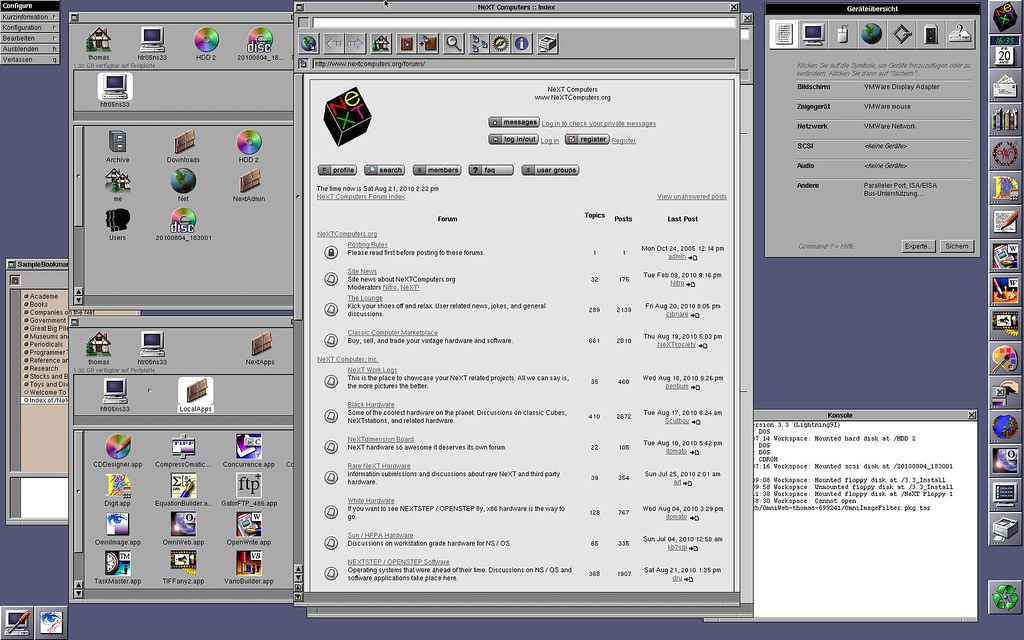
(the display resolution is WUXGA - 1920 x 1200)
An up-to-date web browser would be great though ...
Ideal would be a way to create CD ISO images from within the NeXTSTEP VM - is there something like that?
My HP LaserJet 5000 supports Postscript. I just need to find the right driver in NeXTSTEP.
This is how far I have my VMware installation of NeXTSTEP 3.3:
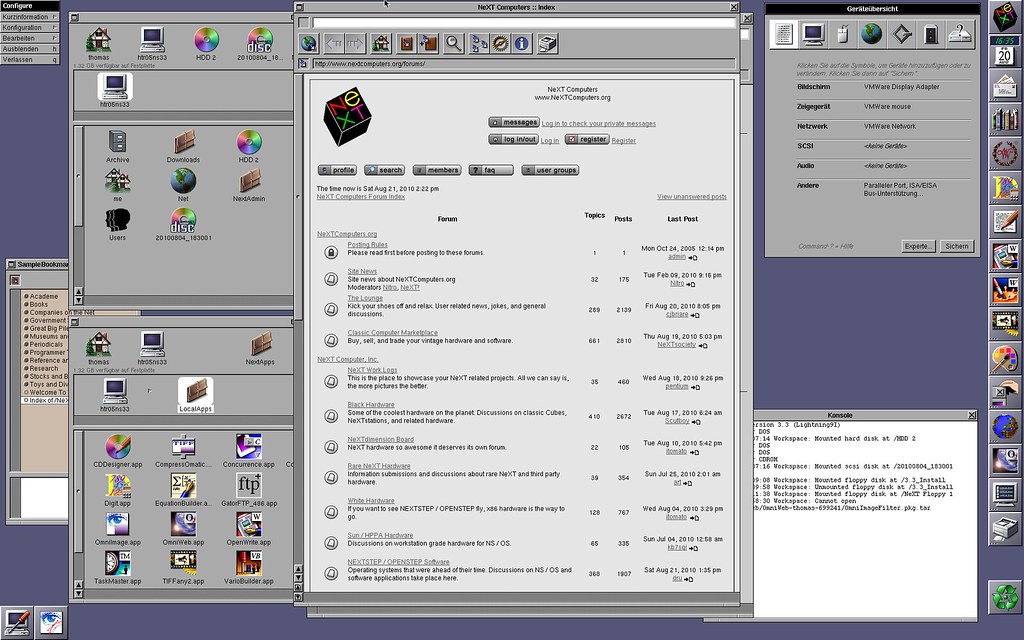
(the display resolution is WUXGA - 1920 x 1200)
An up-to-date web browser would be great though ...
Title: Any success with networking with VMWare ???
Post by: aragon on August 22, 2010, 04:58:28 AM
Post by: aragon on August 22, 2010, 04:58:28 AM
I just use the standard M$ ftp service with anonymous login.
You could also use a program like UltraISO on the host side (assuming Windows) to build a ISO to mount in vmware.
As for creating ISO filesystems on NeXT, I would check out mkisofs (http://www.nextcomputers.org/NeXTfiles/Software/NEXTSTEP/Apps/CDRom/mkisofs.1.12b5.NIHS.b.tar.gz).
You could also use a program like UltraISO on the host side (assuming Windows) to build a ISO to mount in vmware.
As for creating ISO filesystems on NeXT, I would check out mkisofs (http://www.nextcomputers.org/NeXTfiles/Software/NEXTSTEP/Apps/CDRom/mkisofs.1.12b5.NIHS.b.tar.gz).
Title: Any success with networking with VMWare ???
Post by: Thomas on August 22, 2010, 10:24:10 AM
Post by: Thomas on August 22, 2010, 10:24:10 AM
I'm already using UltraISO as an easy way to move files into the NeXT VM. However that works only in one direction. But it would be nice if there would be a way that I could modify those ISO files = write on the virtual CDs from within NeXTSTEP.
What is the M$ ftp service and where do I find it?
What is the M$ ftp service and where do I find it?
Title: Any success with networking with VMWare ???
Post by: aragon on August 23, 2010, 03:01:11 AM
Post by: aragon on August 23, 2010, 03:01:11 AM
If your host system is any flavor of Windows, it's quite likely the the Internet Information Server (IIS) already is installed on your system and serving files via ftp from the c:\inetpub\ftproot directory.
You should be able to change the settings to your liking in the system configuration. Go to start\control panel and select the 'switch to classic view' option in the upper left corner. From the classic control panel window, select 'administrative tools,' then 'internet information services.'
You should be able to change the settings to your liking in the system configuration. Go to start\control panel and select the 'switch to classic view' option in the upper left corner. From the classic control panel window, select 'administrative tools,' then 'internet information services.'
Title: Any success with networking with VMWare ???
Post by: Thomas on August 23, 2010, 10:09:13 PM
Post by: Thomas on August 23, 2010, 10:09:13 PM
I have Windows 7 Ultimate but IIS is deactivated by default. So far I activated IIS, FTP and while on it also NFS.
But configuring the FTP seems to be rather complex. I don't want to open my system to the outside by opening ports and allowing holes in the firewall.
So how do I set it up in detail so that only the Virtual Machine and local user have access?
But configuring the FTP seems to be rather complex. I don't want to open my system to the outside by opening ports and allowing holes in the firewall.
So how do I set it up in detail so that only the Virtual Machine and local user have access?