Title: Connect a NeXTdimension Cube to a Flat Panel Monitor
Post by: Nitro on January 28, 2006, 12:37:52 PM
Post by: Nitro on January 28, 2006, 12:37:52 PM
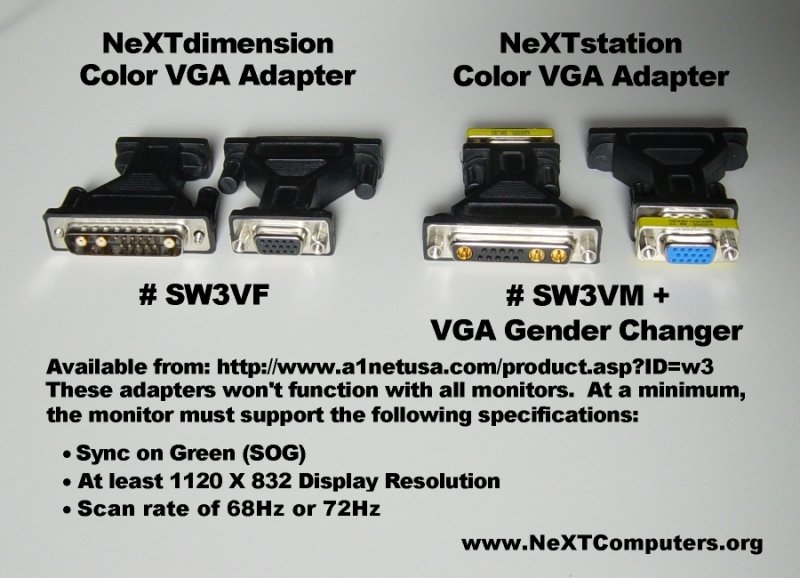
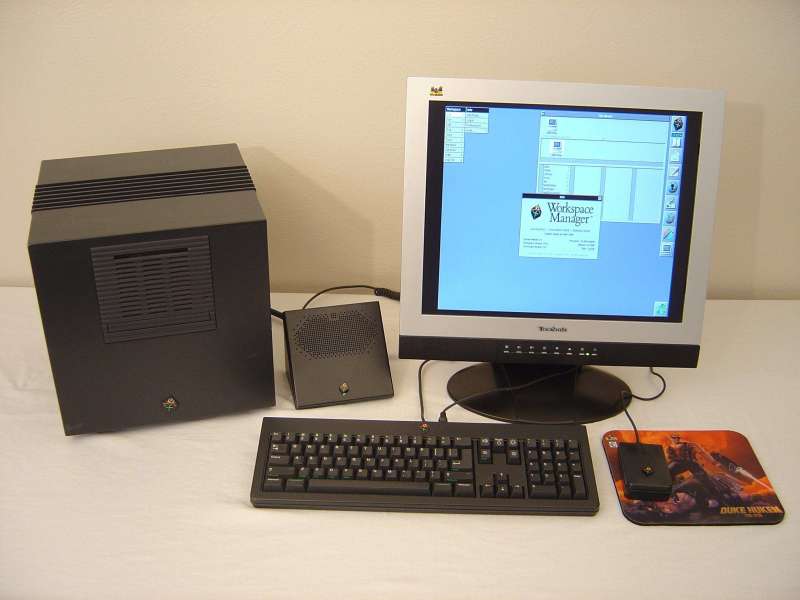
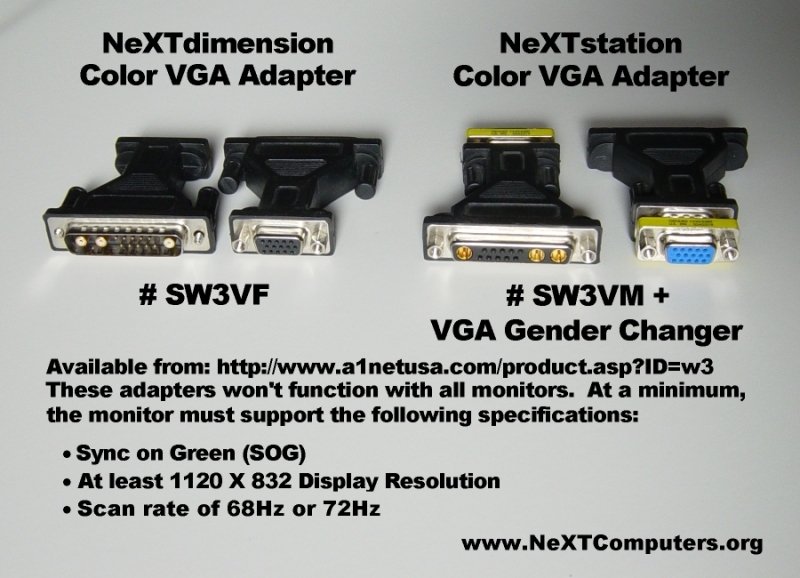
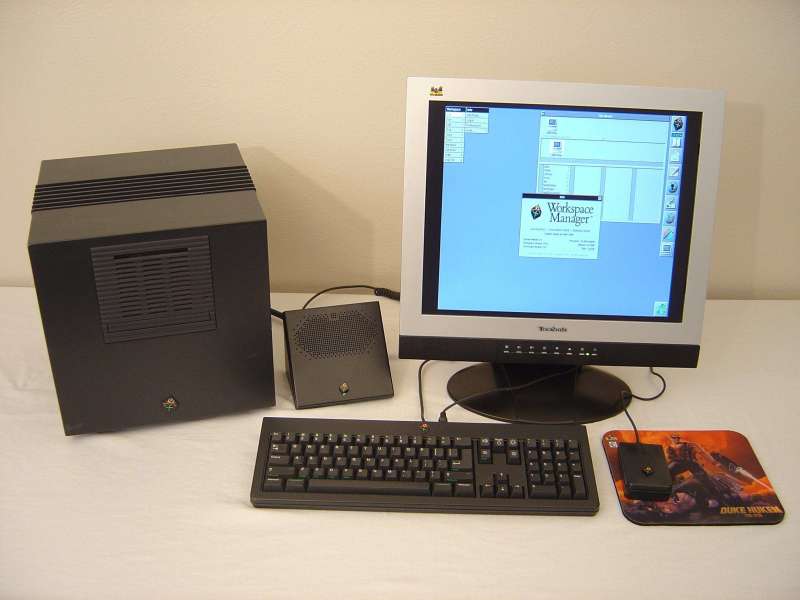
I posted this in the old OPENSTEP forums a while ago when I was searching for an adapter to connect a NeXTdimension Cube to a flat panel monitor. Many people around the Internet and others in the forums had found VGA adapters that worked with black hardware, but I wanted to find something that was inexpensive and available locally. Most of the adapters I had seen were $35.00 USD or more, so I did a little searching and found these adapters. At the time they were selling for $8.00 USD, but they're now available for $6.99 USD from http://www.a1netusa.com/product.asp?ID=w3 . I've tried these on both a NeXTdimension board (#SW3VF) and a NeXTstation turbo color (#SW3VM + VGA gender changer) and they work well. However, they don't work with all monitors. Minimum requirements are support for sync on green (SOG), minimum display resolution of 1120 x 832 or higher, and scan rates of 68Hz or 72Hz depending on your black hardware. Here's a few shots of the adapters and a working system. The monitor is an older 19" Viewsonic VX900.
 (http://www.nextcomputers.org/webpics/nitro/TDC.jpg)
Another option available is to use a monitor that works out of the box with black hardware, such as some SGI monitors. It's also possible to use NeXT monitors with a PC or Mac. These guys can help with that. http://www.si87.com/MonitorSolutions/next/ .
 (http://www.nextcomputers.org/webpics/nitro/TDC.jpg)
Another option available is to use a monitor that works out of the box with black hardware, such as some SGI monitors. It's also possible to use NeXT monitors with a PC or Mac. These guys can help with that. http://www.si87.com/MonitorSolutions/next/ .
Title: Connect a NeXTdimension Cube to a Flat Panel Monitor
Post by: Slab on January 28, 2006, 03:02:39 PM
Post by: Slab on January 28, 2006, 03:02:39 PM
I'm gonna have to give one of those adapters a try. :)
Title: Connect a NeXTdimension Cube to a Flat Panel Monitor
Post by: cmstar on January 28, 2006, 06:04:23 PM
Post by: cmstar on January 28, 2006, 06:04:23 PM
Nitro, thank you so much. I was just looking for this kind of information.
I have a 21" NeXT monitor, but I'm really cramped for space. Looking to sell the NeXT monitor and put my color slab on a flat panel. This is just what I need.
Also, for those looking into this. DON'T hate me, I only state this for those that might find it useful. Freepay is giving away free flatpanel lcd monitors. It's an incentive program. However they offer a Samsung Syncmaster 19" 940b monitor which does sync on green and the other required options for NeXT (according to the spec sheet). You can sign up for a free one here:
http://flatscreens.freepay.com/?r=8675309
Also, does anyone know of any adapter/converter or specs/plans for one to use with a MONO slab?
I have 10 of the MONOs...with no keyboards mice or monitors...they're just collecting dust. I suppose I should sell those too.
I have a 21" NeXT monitor, but I'm really cramped for space. Looking to sell the NeXT monitor and put my color slab on a flat panel. This is just what I need.
Also, for those looking into this. DON'T hate me, I only state this for those that might find it useful. Freepay is giving away free flatpanel lcd monitors. It's an incentive program. However they offer a Samsung Syncmaster 19" 940b monitor which does sync on green and the other required options for NeXT (according to the spec sheet). You can sign up for a free one here:
http://flatscreens.freepay.com/?r=8675309
Also, does anyone know of any adapter/converter or specs/plans for one to use with a MONO slab?
I have 10 of the MONOs...with no keyboards mice or monitors...they're just collecting dust. I suppose I should sell those too.
Title: Connect a NeXTdimension Cube to a Flat Panel Monitor
Post by: Nitro on January 30, 2006, 11:45:36 AM
Post by: Nitro on January 30, 2006, 11:45:36 AM
Quote from: "cmstar"Also, does anyone know of any adapter/converter or specs/plans for one to use with a MONO slab?
I have 10 of the MONOs...with no keyboards mice or monitors...they're just collecting dust. I suppose I should sell those too.
I don't know very much about video input/output in general, so maybe someone who is more knowledgeable can chime in here. I believe a signal converter would be necessary to connect a mono slab or non-Dimension Cube to a VGA monitor. Also, the video signal would have to be tapped off of a pass-through connector since the mono video port is shared with the keyboard input. I'd sure like to find a working solution though, as I imagine even grayscale would look slick on a flat panel.
Title: Connect a NeXTdimension Cube to a Flat Panel Monitor
Post by: cmstar on January 31, 2006, 10:59:50 AM
Post by: cmstar on January 31, 2006, 10:59:50 AM
I spent about an hour last night looking for pinouts on NeXT and VGA.
Here is the interesting part. The mono's have seperat horizontal and vertical sync (not sync on green like the colors). This looks very much like VGA.
The main difference is that there is only 1 data line, instead of 3 (one for each color, RGB).
I also found the necessary means to power up the machine from the monitor connector.
If (and this is a big if) I get motivated, and can scrap up the right connectors from my box-o-junk. I may work on building an adapter.
I'm wondering if I wired the single data line from the mono to all three data lines on the vga side if it would produce 'technicolor' *lol*
Here is the interesting part. The mono's have seperat horizontal and vertical sync (not sync on green like the colors). This looks very much like VGA.
The main difference is that there is only 1 data line, instead of 3 (one for each color, RGB).
I also found the necessary means to power up the machine from the monitor connector.
If (and this is a big if) I get motivated, and can scrap up the right connectors from my box-o-junk. I may work on building an adapter.
I'm wondering if I wired the single data line from the mono to all three data lines on the vga side if it would produce 'technicolor' *lol*
Title: Connect a NeXTdimension Cube to a Flat Panel Monitor
Post by: gborgns on January 31, 2006, 09:37:43 PM
Post by: gborgns on January 31, 2006, 09:37:43 PM
I tried the mono cube driving an VGA LCD already. It works, but there was some ghosting. I originally did the mod to allow me to use the 040 cube cpu board test floppy, which doesn't work with the dimension board/monitor combination, to test a couple of 040 boards I acquired.
I used a spare Non-ADB sound box to perform the mod.
I punched a hole in the back of the box for the DB-15 VGA connector and used a mating connector I found from an old cassette deck for the PCB white connector.
If you open the sound box, you will find a white connector on the PCB that has the required video signals coming from the 19 pin interconnect cable.
I directly connected the HS, VS, and ground lines to thier respective 15 pin VGA connections. For the video, I connected the single video signal to the three VGA RGB inputs through 75 ohm resistors, one for each line.
The ghosting does not occur if only one of the R, G, or B inputs is connected. But of course the display will be in that color and not Black and White. The ghosting could be just a matching/drive issue, but I didn't look into it any further, since it works fine as a test box.
I used a spare Non-ADB sound box to perform the mod.
I punched a hole in the back of the box for the DB-15 VGA connector and used a mating connector I found from an old cassette deck for the PCB white connector.
If you open the sound box, you will find a white connector on the PCB that has the required video signals coming from the 19 pin interconnect cable.
I directly connected the HS, VS, and ground lines to thier respective 15 pin VGA connections. For the video, I connected the single video signal to the three VGA RGB inputs through 75 ohm resistors, one for each line.
The ghosting does not occur if only one of the R, G, or B inputs is connected. But of course the display will be in that color and not Black and White. The ghosting could be just a matching/drive issue, but I didn't look into it any further, since it works fine as a test box.
Title: Connect a NeXTdimension Cube to a Flat Panel Monitor
Post by: Nitro on February 02, 2006, 02:59:25 PM
Post by: Nitro on February 02, 2006, 02:59:25 PM
Thanks gborgns, that a great solution. I'll hunt down some DB-19 solder connectors and see if I can make it work.
Title: Connect a NeXTdimension Cube to a Flat Panel Monitor
Post by: gborgns on February 02, 2006, 04:03:49 PM
Post by: gborgns on February 02, 2006, 04:03:49 PM
Nitro,
DB-19 connectors are made of un-obtainuim. At least that is what I concluded. I search high and low. Plenty of DB-15's and DB-25's but no DB-19's.
It came down to either modify a sound box, make a connector (from a DB-25), find a broken mono monitor to canabilize, or butcher a NeXT monitor cable.
The sound box mod was the easiest.
DB-19 connectors are made of un-obtainuim. At least that is what I concluded. I search high and low. Plenty of DB-15's and DB-25's but no DB-19's.
It came down to either modify a sound box, make a connector (from a DB-25), find a broken mono monitor to canabilize, or butcher a NeXT monitor cable.
The sound box mod was the easiest.
Title: Connect a NeXTdimension Cube to a Flat Panel Monitor
Post by: urbanape on February 03, 2006, 08:13:43 AM
Post by: urbanape on February 03, 2006, 08:13:43 AM
From your pictures, it appears that this adapter is used beyond the sound box, is that correct? Meaning, using an LCD screen doesn't preclude the use of the sound box? Can you upload a few pics of the cables all hooked up?
Title: Connect a NeXTdimension Cube to a Flat Panel Monitor
Post by: blackcube on February 03, 2006, 09:35:25 AM
Post by: blackcube on February 03, 2006, 09:35:25 AM
Quote from: "gborgns"Nitro,
DB-19 connectors are made of un-obtainuim. At least that is what I concluded. I search high and low. Plenty of DB-15's and DB-25's but no DB-19's.
It came down to either modify a sound box, make a connector (from a DB-25), find a broken mono monitor to canabilize, or butcher a NeXT monitor cable.
The sound box mod was the easiest.
http://www.sfcable.com/store/24-221.html
They have DB-19's@$0.50 each. I'm going over to a local surplus electronics store in the morning. I'll check their stock as well. They used to stock DB-19's as well as DB-23's for the Amiga (made of gold plated un-obtainium!)
Title: Connect a NeXTdimension Cube to a Flat Panel Monitor
Post by: blackcube on February 03, 2006, 09:43:47 AM
Post by: blackcube on February 03, 2006, 09:43:47 AM
Quote from: "gborgns"Nitro,
DB-19 connectors are made of un-obtainuim. At least that is what I concluded. I search high and low. Plenty of DB-15's and DB-25's but no DB-19's.
It came down to either modify a sound box, make a connector (from a DB-25), find a broken mono monitor to canabilize, or butcher a NeXT monitor cable.
The sound box mod was the easiest.
http://www.sfcable.com/store/24-221.html
http://www.connectworld.net/cgi-bin/ccc/05MPartDB19.html
http://www.cablesandconnectors.com/PIX/pan103.jpg

They all have DB19's in stock. I'm going over to a local surplus electronics store in the morning. I'll check their stock as well. They used to stock DB-19's as well as DB-23's for the Amiga (made of gold plated un-obtainium!)
Title: Connect a NeXTdimension Cube to a Flat Panel Monitor
Post by: Nitro on February 03, 2006, 04:03:17 PM
Post by: Nitro on February 03, 2006, 04:03:17 PM
Quote from: "urbanape"From your pictures, it appears that this adapter is used beyond the sound box, is that correct? Meaning, using an LCD screen doesn't preclude the use of the sound box? Can you upload a few pics of the cables all hooked up?
Hi urbanape,
The NeXTdimension VGA adapter plugs directly into the 13W3-style connector on the NeXTdimension color board. There are two ways to wire the keyboard to a Cube equipped with color. The keyboard either plugs into the sound box (as shown), or it plugs into the grayscale monitor and you can use two monitors (one grayscale and one color). I'll try to take some pictures of the installed adapter and wiring this weekend.
Blackcube:
Thanks for the links.
Title: Connect a NeXTdimension Cube to a Flat Panel Monitor
Post by: gborgns on February 04, 2006, 01:11:41 AM
Post by: gborgns on February 04, 2006, 01:11:41 AM
Blackcube,
Wow! Thanks for the sources. None of my local suppliers had a DB-19. They all looked at me funny when I asked.
Sure beats butchering a cable.
Let me know if you run into or solve the ghosting problem.
Wow! Thanks for the sources. None of my local suppliers had a DB-19. They all looked at me funny when I asked.
Sure beats butchering a cable.
Let me know if you run into or solve the ghosting problem.
Title: Connect a NeXTdimension Cube to a Flat Panel Monitor
Post by: urbanape on February 04, 2006, 10:49:46 AM
Post by: urbanape on February 04, 2006, 10:49:46 AM
so, in the case of my color nextstation turbo, I've got a Y-cable coming out of the back of the slab, with one end going to my 21" display, and the other going to the soundbox.
Looking at the first picture, I'm just not seeing where the adapter comes into play:
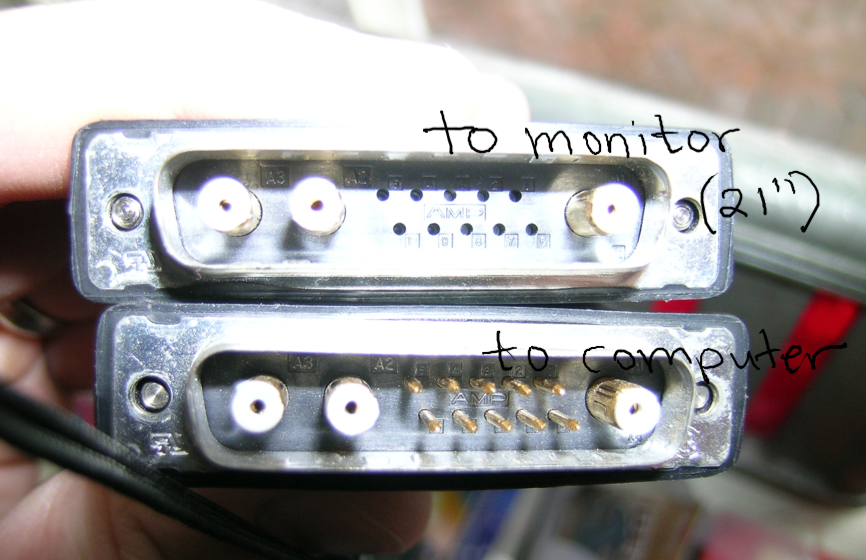
Edit by Admin: Linked to local image
Looking at the first picture, I'm just not seeing where the adapter comes into play:
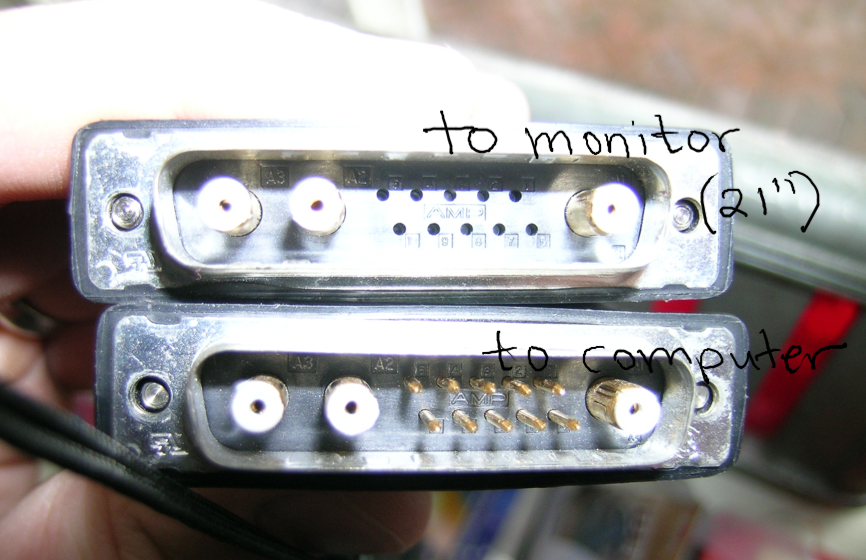
Edit by Admin: Linked to local image
Title: Connect a NeXTdimension Cube to a Flat Panel Monitor
Post by: Nitro on February 04, 2006, 01:54:28 PM
Post by: Nitro on February 04, 2006, 01:54:28 PM
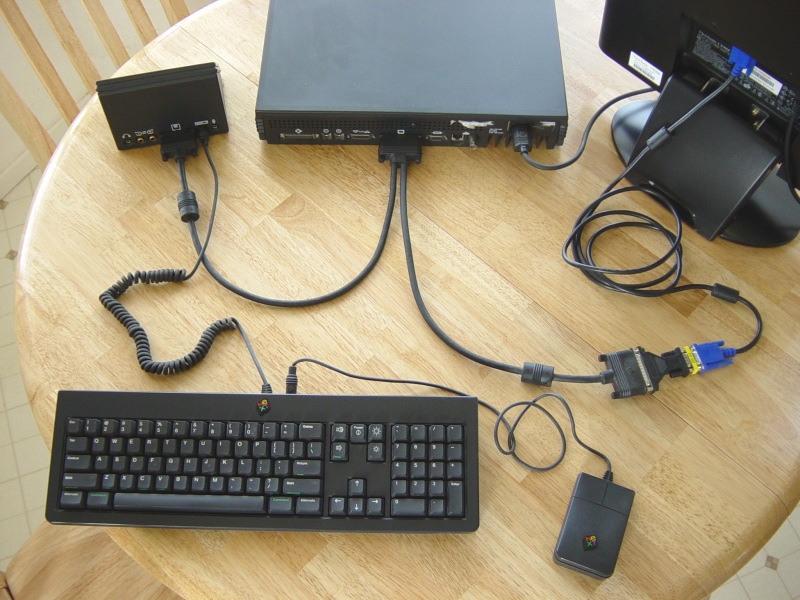
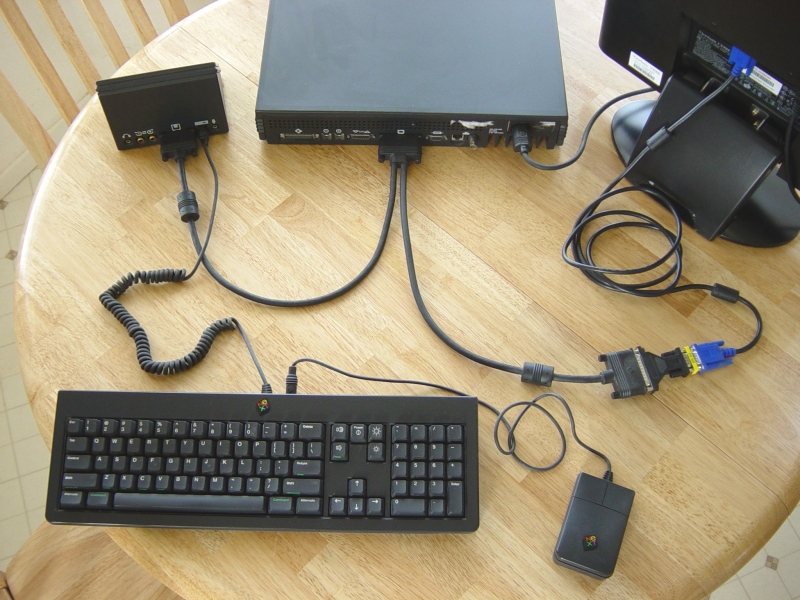
Here's a picture of the cable connections for a turbo colorstation. The NeXTstation Color VGA adapter can be seen in the lower right between the NeXT Y-cable and the blue VGA monitor connector.
Title: Connect a NeXTdimension Cube to a Flat Panel Monitor
Post by: urbanape on February 04, 2006, 03:36:45 PM
Post by: urbanape on February 04, 2006, 03:36:45 PM
So, in that case, the Y-cable I have will work with the adapter? The adapter only connects the three composite pins and adapts them to VGA?
Title: Connect a NeXTdimension Cube to a Flat Panel Monitor
Post by: Nitro on February 04, 2006, 06:15:55 PM
Post by: Nitro on February 04, 2006, 06:15:55 PM
Quote from: "urbanape"So, in that case, the Y-cable I have will work with the adapter? The adapter only connects the three composite pins and adapts them to VGA?
Yes and Yes. :)
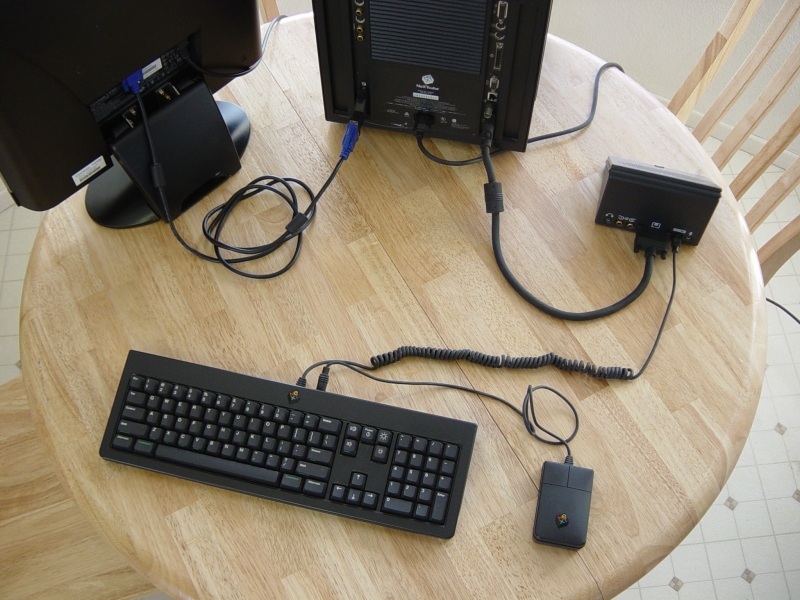
Here's a picture of the cable connections for a NeXTdimension Cube. The NeXTdimension Color VGA adapter plugs directly into the Dimension color board as shown.
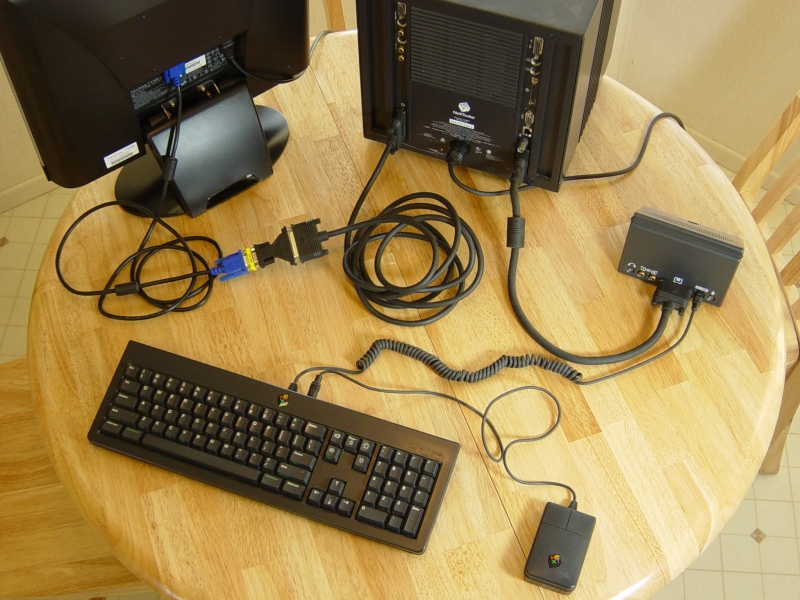
If you already own a NeXTdimension video cable and you don't want the adapter hanging off the back of your Dimension board, you can simply use your existing Dimension video cable and the NeXTstation Color VGA adapter as shown.
Title: Connect a NeXTdimension Cube to a Flat Panel Monitor
Post by: urbanape on February 05, 2006, 08:13:53 AM
Post by: urbanape on February 05, 2006, 08:13:53 AM
Thanks for the pics, Nitro! :)
Title: Connect a NeXTdimension Cube to a Flat Panel Monitor
Post by: Nitro on February 06, 2006, 02:52:52 PM
Post by: Nitro on February 06, 2006, 02:52:52 PM
No problem. Hope it helps. :)
Title: Connect a NeXTdimension Cube to a Flat Panel Monitor
Post by: cyclox on February 16, 2006, 03:04:36 PM
Post by: cyclox on February 16, 2006, 03:04:36 PM
Thanks for posting this! I've been trying to resurrect my NeXTstation Turbo and it's been a little difficult to do so without a monitor connected. My LCD should be able to handle the sync-on-green signal, so once I get the adapter I'll be ready to go.
Title: Connect a NeXTdimension Cube to a Flat Panel Monitor
Post by: Nitro on February 17, 2006, 07:26:37 AM
Post by: Nitro on February 17, 2006, 07:26:37 AM
Quote from: "cyclox"Thanks for posting this! I've been trying to resurrect my NeXTstation Turbo and it's been a little difficult to do so without a monitor connected. My LCD should be able to handle the sync-on-green signal, so once I get the adapter I'll be ready to go.
The adapters work well, and best of all they're cheap. :) We'd love to see a picture of your system when you get it running.
Title: Connect a NeXTdimension Cube to a Flat Panel Monitor
Post by: cyclox on February 17, 2006, 09:46:44 AM
Post by: cyclox on February 17, 2006, 09:46:44 AM
Will definitely post a photo once it's up and running. Once that's done, it'll be time to get that NeXT Laser Printer printing again... it's suffering from the age-old takeup roller problem.
Title: LCD Panel
Post by: cyclox on February 26, 2006, 11:30:23 AM
Post by: cyclox on February 26, 2006, 11:30:23 AM
Nitro (or anyone else who's got an LCD panel hooked up to a NeXT system): what model LCD panel are you using with your NeXT systems? Any suggestions? I have access to some cheap, decent CRT monitors, but they're big and bulky...
EDIT: Should have read that first post more carefully...19" Viewsonic VX900!
EDIT: Should have read that first post more carefully...19" Viewsonic VX900!
Title: Connect a NeXTdimension Cube to a Flat Panel Monitor
Post by: blackcube on February 26, 2006, 11:39:26 AM
Post by: blackcube on February 26, 2006, 11:39:26 AM
Quote from: "cyclox"Will definitely post a photo once it's up and running. Once that's done, it'll be time to get that NeXT Laser Printer printing again... it's suffering from the age-old takeup roller problem.
http://www.blackcube.org/downloads/next_400dpi_laser_printer_tricks.pdf
http://www.blackcube.org/downloads/NeXT_Laser_Printer_Service.pdf
Title: Connect a NeXTdimension Cube to a Flat Panel Monitor
Post by: brams on July 05, 2006, 02:15:25 PM
Post by: brams on July 05, 2006, 02:15:25 PM
I need an SW3VM but they want 75 bucks to ship it according to the site in the link:
http://www.a1netusa.com/product.asp?ID=w3
Does anybody know of another source of adaptor that is known to work (confirmed working)
Thanks
brams
http://www.a1netusa.com/product.asp?ID=w3
Does anybody know of another source of adaptor that is known to work (confirmed working)
Thanks
brams
Title: Connect a NeXTdimension Cube to a Flat Panel Monitor
Post by: Andreas on July 08, 2006, 06:47:43 AM
Post by: Andreas on July 08, 2006, 06:47:43 AM
Quote from: "brams"
Does anybody know of another source of adaptor that is known to work (confirmed working)
Brams, i have purchased the last few cables from reichelt.de before they clearout that type, its instead the adapter a ~2m cable (and its testet :-)), drop me a line if you are interestet...
Title: Connect a NeXTdimension Cube to a Flat Panel Monitor
Post by: brams on July 08, 2006, 07:06:16 AM
Post by: brams on July 08, 2006, 07:06:16 AM
Hi Andreas
Many thanks, can you tell me, will it plug into a slab Y cable, eg, is it male or female at the 13w3 end. Which SVGA monitor have you tested it with does the monitor support Sync on Green?
If this OK, I'll probably take one of you, thanks!
brams
Many thanks, can you tell me, will it plug into a slab Y cable, eg, is it male or female at the 13w3 end. Which SVGA monitor have you tested it with does the monitor support Sync on Green?
If this OK, I'll probably take one of you, thanks!
brams
Title: Connect a NeXTdimension Cube to a Flat Panel Monitor
Post by: Andreas on July 08, 2006, 07:48:38 AM
Post by: Andreas on July 08, 2006, 07:48:38 AM
Quote from: "brams"Hi Andreas
Many thanks, can you tell me, will it plug into a slab Y cable, eg, is it male or female at the 13w3 end. Which SVGA monitor have you tested it with does the monitor support Sync on Green?
If this OK, I'll probably take one of you, thanks!
brams
Brams, yes, i'm using it with slabs and different monitors. Its the seldom one with the female 13W3 to plug in into the Y-cable from the slab. The VGA side is male, it fits directly into the monitor or, if your monitor have a fixed wire, you need a gender changer, wich i can also supply. (the same combination like the second picture for SW3VM, the yellow thing)
If that cable doesn't work, you monitor isn't fit for the NeXTs.
I had testet it with an 17" CRT, but can't remember the type and now i'm using it with a Sony TFT SDM-S94

Title: Connect a NeXTdimension Cube to a Flat Panel Monitor
Post by: brams on July 11, 2006, 10:53:49 AM
Post by: brams on July 11, 2006, 10:53:49 AM
I'm having great difficulty getting my Viewsonic VP171b to work on my slab, and after testing various things I have reason to suspect that the cause my be the different scan rates of using ADB vs non-ADB.
The thread is here
http://www.nextcomputers.org/forums/viewtopic.php?p=1277#1277
Andreas can you tell me are you using ADB KB & SB on your slab?
Thanks
brams
The thread is here
http://www.nextcomputers.org/forums/viewtopic.php?p=1277#1277
Andreas can you tell me are you using ADB KB & SB on your slab?
Thanks
brams
Title: Connect a NeXTdimension Cube to a Flat Panel Monitor
Post by: Andreas on July 11, 2006, 11:14:01 AM
Post by: Andreas on July 11, 2006, 11:14:01 AM
Quote from: "brams"I'm having great difficulty getting my Viewsonic VP171b to work on my slab, and after testing various things I have reason to suspect that the cause my be the different scan rates of using ADB vs non-ADB.
The scans rates differ minimal, all in the range that a simple Multiscan have to show.
Quote
Andreas can you tell me are you using ADB KB & SB on your slab?
Both, a have selled a few slabs in history, ADB and non-ADB-Types and alle of them are used with these cable and my monitors. But i have to say, some monitors work fine with NeXTs others won't work, even if they can SOG. (i have a Phillips 17" with SOG, don't work)
(BTW, the cable is shipped, drop me a line if received)
Title: Connect a NeXTdimension Cube to a Flat Panel Monitor
Post by: da9000 on April 02, 2007, 04:53:19 PM
Post by: da9000 on April 02, 2007, 04:53:19 PM
Hey guys,
I'm curious where one can get one of these "split" cables that are seen in Nitro's photos of his NeXTStation, which split the signals that go to the SoundBox and the monitor (LCD in his case).
Thanks
I'm curious where one can get one of these "split" cables that are seen in Nitro's photos of his NeXTStation, which split the signals that go to the SoundBox and the monitor (LCD in his case).
Thanks
Title: Connect a NeXTdimension Cube to a Flat Panel Monitor
Post by: blackcube on April 02, 2007, 07:00:01 PM
Post by: blackcube on April 02, 2007, 07:00:01 PM
Quote from: "da9000"Hey guys,
I'm curious where one can get one of these "split" cables that are seen in Nitro's photos of his NeXTStation, which split the signals that go to the SoundBox and the monitor (LCD in his case).
Thanks
Those are standard "Y" cables for a NeXTStation Color or Color Turbo. Ebay, Rob at Blackhole or maybe someone on this list who might have a spare probably be your only sources.
James
Title: Connect a NeXTdimension Cube to a Flat Panel Monitor
Post by: da9000 on April 02, 2007, 07:21:52 PM
Post by: da9000 on April 02, 2007, 07:21:52 PM
Ah, great! Thanks James. I've just gotten a station to play with and I guess I'll be needing one of these... The search is on!
Title: Connect a NeXTdimension Cube to a Flat Panel Monitor
Post by: Harbourmaster on November 08, 2007, 08:48:00 PM
Post by: Harbourmaster on November 08, 2007, 08:48:00 PM
The link to a1net in the original post appears to be broken now.
Here is an alternate source for this part current price is $8.46 each
Sun 13W3-M to HD15-F (VGA) Video Port Adapter
http://www.monoprice.com/products/product.asp?c_id=104&cp_id=10401&cs_id=1040110&p_id=71&seq=1&format=2
Here is an alternate source for this part current price is $8.46 each
Sun 13W3-M to HD15-F (VGA) Video Port Adapter
http://www.monoprice.com/products/product.asp?c_id=104&cp_id=10401&cs_id=1040110&p_id=71&seq=1&format=2
Title: Connect a NeXTdimension Cube to a Flat Panel Monitor
Post by: krfkeith on November 09, 2007, 11:05:58 PM
Post by: krfkeith on November 09, 2007, 11:05:58 PM
I can follow up that that one works very well, i have it
Title: Connect a NeXTdimension Cube to a Flat Panel Monitor
Post by: Nitro on November 12, 2007, 05:56:52 PM
Post by: Nitro on November 12, 2007, 05:56:52 PM
Quote from: "Harbourmaster"The link to a1net in the original post appears to be broken now.
Here is an alternate source for this part current price is $8.46 each
Sun 13W3-M to HD15-F (VGA) Video Port Adapter
http://www.monoprice.com/products/product.asp?c_id=104&cp_id=10401&cs_id=1040110&p_id=71&seq=1&format=2
Thanks for the link. I'll update the original post since that adapter isn't available anymore.
Title: Connect a NeXTdimension Cube to a Flat Panel Monitor
Post by: it68000 on November 19, 2007, 10:13:18 AM
Post by: it68000 on November 19, 2007, 10:13:18 AM
QuoteSun 13W3-M to HD15-F (VGA) Video Port Adapter
http://www.monoprice.com/products/product.asp?c_id=104&cp_id=10401&cs_id=1040110&p_id=71&seq=1&format=2
For european users what seems to be the same adapter is available here from time to time:
http://stores.ebay.it/K1Connectivity-Store
I've gotten mine from them.
Title: Viewsonic VP950b
Post by: cubist on March 04, 2008, 10:39:31 PM
Post by: cubist on March 04, 2008, 10:39:31 PM
Another datapoint: A viewsonic VP950b LCD syncs up to a NextDimension but the results aren't entirely satisfactory. Vertically stretched and the horizontal position cannot be centered without narrowing the scan even more. Ticking over the entire manual horizontal size range never produced a really nice font appearance. Better than no monitor but only barely. Will play some more with it...
Title: LCD versus CRT from Viewsonic
Post by: cubist on March 12, 2008, 11:00:00 PM
Post by: cubist on March 12, 2008, 11:00:00 PM
I sent off a quick note to Viewsonic with the idea of getting recommendations for improving the situation with NeXT video formats and LCD monitors. It's not promising but it was an honest response from the company:
QuoteViewSonic LCD desktop displays are non-continuous frequencySo I'd like to know if anyone using non-Viewsonic monitors is getting an image the is properly framed on the screen and doesn't have blurring artifacts from internal resampling for standard VESA screen resolutions.
displays --- they only operate at certain scanning frequencies. Most
of ViewSonic CRT displays are continuous frequency. All ViewSonic LCD
desktop displays are designed to work with source devices that output
video timing formats that are defined in the Video Electronics
Standards Association (VESA) Display Monitor Timing (DMT) Standard.
1120 x 832 at 68Hz and 72Hz are not VESA DMT Standard timing formats.
Therefore, ViewSonic cannot guarantee that our LCD desktop displays
will work with the NeXt Computer. It may be possible to use a CRT
display. Most CRT displays are capable of displaying many
non-standard video timing formats as long as the horizontal and
vertical scanning frequencies are within the range limits for the
display and there is sufficient horizontal and vertical blanking
time.
Title: Connect a NeXTdimension Cube to a Flat Panel Monitor
Post by: helf on March 13, 2008, 12:11:17 PM
Post by: helf on March 13, 2008, 12:11:17 PM
wow, I'm surprised you actually even got a response. That alone is pretty impressive :P
Title: Agreed
Post by: cubist on March 13, 2008, 06:00:00 PM
Post by: cubist on March 13, 2008, 06:00:00 PM
Quote from: "helf"wow, I'm surprised you actually even got a response. That alone is pretty impressive :P
So was I. I wrote back and thanked them for making the effort. They get points with me for that (just try it with, say, Belkin sometime).
Title: Video Timings
Post by: cubist on March 14, 2008, 05:37:38 PM
Post by: cubist on March 14, 2008, 05:37:38 PM
Quote from: "cubist"So was I. I wrote back and thanked them for making the effort. They get points with me for that (just try it with, say, Belkin sometime).
Even better: they wrote back with an offer to at least evaluate potential monitor candidates. They need front and backporch timings, sync timings, etc. and I no longer have access to the gear that can do this. (Well, I have one scope that can get close but it will be imprecise.) So I'm challenging the community for timings for the three color hardware machines: colorstation, turbo colorstation, and ND. Anyone want to step up?
Title: Connect a NeXTdimension Cube to a Flat Panel Monitor
Post by: krfkeith on March 15, 2008, 09:43:52 AM
Post by: krfkeith on March 15, 2008, 09:43:52 AM
OOH! Me!!!! I have a turbo color station!
Title: Offering?
Post by: cubist on March 15, 2008, 11:29:17 AM
Post by: cubist on March 15, 2008, 11:29:17 AM
Quote from: "krfkeith"OOH! Me!!!! I have a turbo color station!
You're offering to provide timings for the TCS?
Title: Connect a NeXTdimension Cube to a Flat Panel Monitor
Post by: helf on March 15, 2008, 03:13:43 PM
Post by: helf on March 15, 2008, 03:13:43 PM
I would if I had the equipment.
krfkeith, he needs 'timings', not just someone that has a turbo color.
krfkeith, he needs 'timings', not just someone that has a turbo color.
Title: Re: Video Timings
Post by: stevebez on March 15, 2008, 08:08:15 PM
Post by: stevebez on March 15, 2008, 08:08:15 PM
Quote from: "cubist"Quote from: "cubist"So was I. I wrote back and thanked them for making the effort. They get points with me for that (just try it with, say, Belkin sometime).
Even better: they wrote back with an offer to at least evaluate potential monitor candidates. They need front and backporch timings, sync timings, etc. and I no longer have access to the gear that can do this. (Well, I have one scope that can get close but it will be imprecise.) So I'm challenging the community for timings for the three color hardware machines: colorstation, turbo colorstation, and ND. Anyone want to step up?
IIRC, Viewsonic H.Q. is in Walnut, California. Maybe someone in SoCal could lend them a "test mule".
Title: Connect a NeXTdimension Cube to a Flat Panel Monitor
Post by: jheis on March 19, 2008, 11:07:15 PM
Post by: jheis on March 19, 2008, 11:07:15 PM
To add to the list of monitors that work with NeXT HW, I just picked up a Samsung SyncMaster 2032nw. ($229 at Costco). Seems to work right out of the box.
The NeXT image does not fill the whole screen, however. There is about a 1/2" of black at the bottom of the screen and about an inch & 1/4 on the right side.
Now I just need to get a functioning keyboard....
James
The NeXT image does not fill the whole screen, however. There is about a 1/2" of black at the bottom of the screen and about an inch & 1/4 on the right side.
Now I just need to get a functioning keyboard....
James