I was going to ask this a while ago but I kept on forgetting about it.
Anyways, Many months back I came upon a NeXTStep 3.3 install cd in a second hand store. It had no manuals, floppies (heck, even the case was not from NeXT) but for 99 cents why complain? :)
Anyways, I found it again while cleaning and since I never checked to see if it worked I popped it into my linux box and waited for the disc to mount.
When it does mount it says the drive is empty (no icons) yet three hundred some-odd megs of space are marked as used and there are no bytes free.
I then thought it must be a filesystem thing and since every copy of NS I have seen comes with a floppy I assumed that I needed a boot floppy (you can't cd boot off the disc?). Now that I have given up on rawrite (refuses anything I give it and says "Path or file not found") i'm stumped. Can someone fill me in? I have downloaded all the floppy images just so you know.
Yes, you need a boot floppy for x86. HPPA and SPARC can boot from CD as can Turbo NeXT, but x86 needs the floppies. To make them, under Linux:
dd if=floppy-image-file-name of=/dev/fd0
These instructions, of course, work with some slight tweaking on NeXTSTEP/FreeBSD/Solaris/IRIX/whatever-Unix-you-have. As I pretty much always use some sort of Unix, I'm not sure what the right rawrite incantation is.
Sorry, I can't create floppy images on my system.
I still need to figure out what ubuntu does not like to do anything with floppies. I have a bajillion Windows computers though.
Ok, what happens when you try to create a floppy? If the error is 'permission denied', try 'sudo dd if=floppy-image of=/dev/fd0'.
It's allowing me to use the drive. The floppy dirve itself is dead and I have not had time to find a replacement.
Anyways, I tried those modified boot cd's mentioned in an earlier thread and they seem to work fine. Now I need to figure out why the setup skips the hard drive. It sees it but then complains about no volume label being found after which it tries the cd drive, fails (because it's read-only) and then shuts down the system because no hard drive could be found.
I still want the boot floppies....unless we could merge both boot cd's and cram the rest of the slack space with drivers.
Quote from: "pentium"Anyways, I found it again while cleaning and since I never checked to see if it worked I popped it into my linux box and waited for the disc to mount.
When it does mount it says the drive is empty (no icons) yet three hundred some-odd megs of space are marked as used and there are no bytes free.
You can get it to mount on linux, but you have to specify an alternate filesystem type in the mount command. Use fstype ufs and ufstype= nextstep, nextstep-cd, or openstep.
Chef
I don't need to mount it on linux now that I have the boot cd's.
Okay, I got my rig all setup and all the compatible hardware has been installed.
I set the hard drive to "normal" and not "LBA" and then set it as master with the CD drive being slave (and both on the primary IDE bus).
I then loaded the proper (or should be) intel IDE driver and proceeded to install.
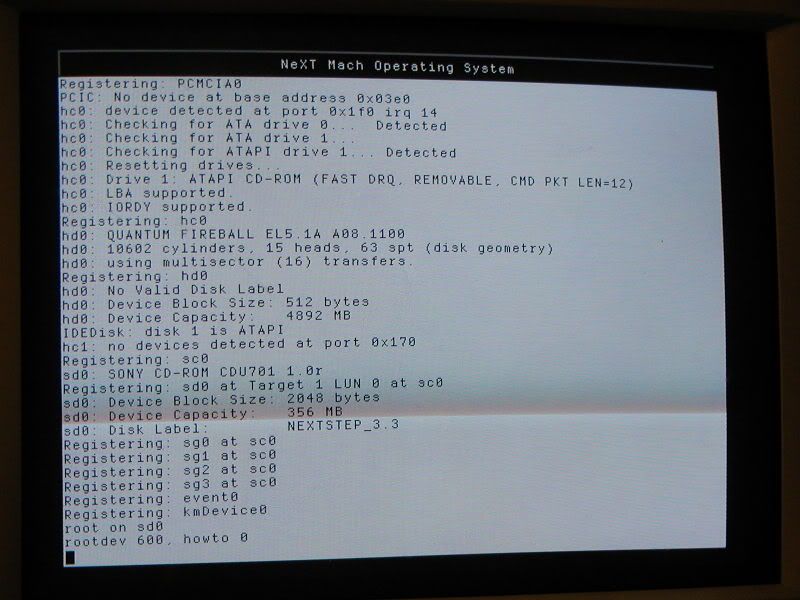
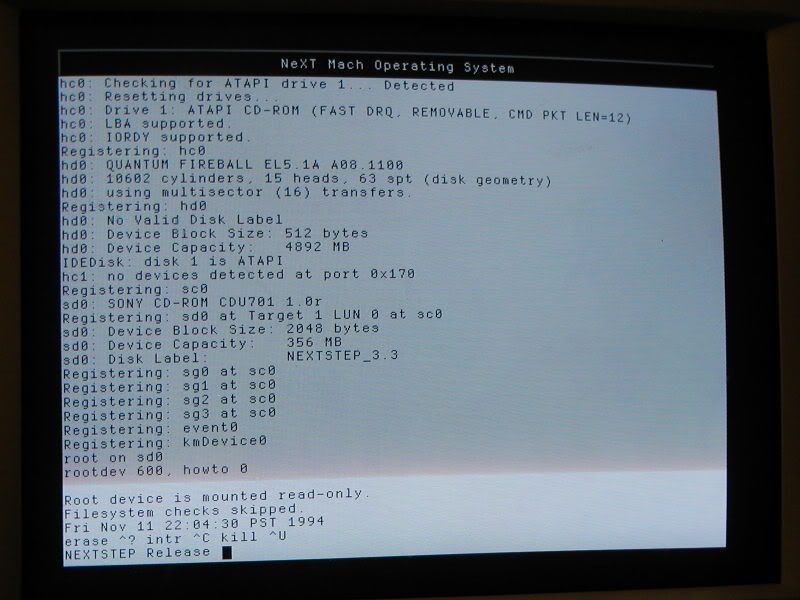
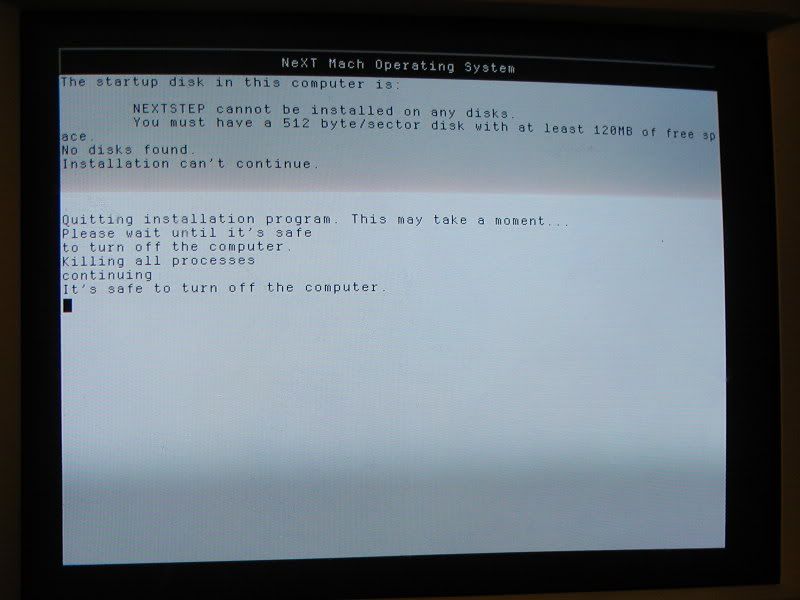
Since it all flew by so fast, I have taken "snapshots" of the rest.
*Clicky* (
http://i11.photobucket.com/albums/a166/ballsandy/00003.jpg)
*Clicky* (
http://i11.photobucket.com/albums/a166/ballsandy/00004.jpg)
*Clicky* (
http://i11.photobucket.com/albums/a166/ballsandy/00005.jpg)
One thing to note is that the drive being used used to have ubuntu and the GRUB boot loader installed. Even though I have since de-partitioned the drive part of GRUB is still resident on the drive.
Am I positive that I don't need to manually partition?
okay, using a dos boot floppy I ran fdisk /MBR to clear what remained of GRUB so that's completely gone now. I have also cleared up driver problems (I think)
I still can't install though. It won't accept any hard drive as something it can install on I even tried a 2 gig scsi drive and it still rejected it.
specs of the computer you are trying to install on?
Most importantly for the SCSI, what is the HBA?
QuoteMost importantly for the SCSI, what is the HBA?
HBA?
The scsi card is not necessary for running the system, I just installed the card so I could plug scsi devices in at a later date.
As for system specs, I checked all the hardware and it is NS 3.3 compatible.
Mobo: ASUS P/I-P55T2P4
CPU: Pentium 1 @ 233 mhz
Ram: 128 mb
Note: a 512k cache module was installed on the board
Hard drive: IDE Quantum fireball that's 4.9 gigs in size
CD: IDE sony CD rom drive (forget speed but it's at least 8X)
Scsi: Adaptec AHA-2940AU
Video: Diamond Viper Pro PCI (Weitek onboard)
Sound: Sound blaster 16 (CT1740)
Network: 3Com Etherlink III (3C509B-TPO)
Mouse: Logitech Bus mouse (save my serial ports!)
The Intel chipset on the board seems to be supported so I have tried with both the chipset IDE driver and the default IDE driver (non-intel).
I know the drive is bigger than is allowed when it comes to partitions (2 gigs per partition) but I was planning on putting two partitions on the drive.
easy enough...
So rawrite your 3 floppies, and get your CD ready... it should be pretty simple, just look at my install guide on Qemu in the virtualization area.. it's basically the same thing.
David Shaw's NEXTSTEP Install Page has some detailed instructions that might help.
http://www.shawcomputing.net/resources/next/software/install/ns_install.html
yay for weak cache memory thats on the cpu bus instead of internal! :) Those cache cards really don't improve performance much at all... kinda sucks :)
QuoteThose cache cards really don't improve performance much at all... kinda sucks
So it's not really going to improve the overall system? It just bumps the cache from 256k to 512k.
Like I said, rawrite is being fussy.
The only thing I can get out of it is "no such file or directory"
That is why I am using those boot cd's that itomato thought up. (
http://www.nextcomputers.org/forums/viewtopic.php?t=520)
Give me a few to look over those guides.
UGH!
I tried again with both that 4 gig IDE drive and an old apple 160mb scsi drive and the setup STILL insists that it can't find a suitable drive.
What's going on?
EDIT:
I tried again after pulling the cache module and got the same result (no surprise but rules it out as the problem).
BuMP.
what scsi card do you have?
Do you have access to a small-ish IDE disk?
if you are using IDE are you using the DUAL port controller on the beta disks?
To answer your first question I am using an Adaptec AHA-2940AU PCI card. They are supported.
Do I have access to a smaller IDE disk? Not right now. my smaller IDE drives are less than 120 megs.
I tried the dual port contoller as well as the driver for my chipset and the other non-bets IDE drivers and all of them give the same result when setup tries to find a drive.
well clearly something isn't right...
I recently tried it on an amd 3500+ with 2 gigabytes of ram (nextstep can only use 512), and around where it switches to VGA it reboots..
Perhaps your machine is too 'new'... ? Or like a lot of early pentiums had some really flakey/odd PCI issues.
Try a PII/PIII.. It runs great on a PIII that I found in the office. You should be able to pick one up cheap/free.
sorry but I don't have any other free systems.
Recently my parents have been complaining about all my systems and I have been stripping and tossing systems.
On the other hand it seems other people have had similar problems.
I was reading this and got success until my butterfingers got the upper hand and I got stuck in a coding hole.
http://groups.google.com/group/comp.sys.next.sysadmin/browse_thread/thread/1886b8953cd195d2/f8d37c2af8be8ffe?lnk=st&q=NeXTSTEP+3.3+4GB&rnum=5&hl=en#f8d37c2af8be8ffeI also have a box of spare drives somewhere but it weighs a ton. I thlink it has an 800 meg drive in it.
EDIT: 800 meg drive didn't work either. :cry:
Could the bios be partly responsible. What should be set in the bios in order for NS to be used?
BIOS - "other" worked for me
I'll disregard that last post and assume someone tried to make a funny. :lol:
Well I tried another pentium and then a PII and in both cases I still got the same problem.
Just to clarify, is the NeXTStep cd suppost to have a block size of 2048 bytes?
It seems odd for something that prefers 512 bytes. Is it also normal for the root device to mount read-only?
Look here. (
http://i11.photobucket.com/albums/a166/ballsandy/00004.jpg)
Not at all. Must be a cultural issue? On January 13 '06 I posted this:
http://www.nextcomputers.org/forums/viewtopic.php?t=51I literally HAD to change my BIOS Hard Drive type from WIN98 to "OTHER" else it would NOT work.
One thing I noted from that link was that my cd drive keeps stealing sd0 from the hard drive weather it be a scsi or an IDE drive set to master.
I only have three different hard drive types.
-Large
-Normal
-LBA
I have been trying to install with the drive set to Normal.
I also just noticed that the bios keeps resetting the clock to nov 17 2089 at 2:08 in the morning. :?
I reset the date and time and the next time I tried to install it told me that I had a preposterous date. :shock:
Could we also have a Y2K problem?
Yes!
Yes!
Yes!
Yes!
Yes!
I tried loading the scsi driver first and then I loaded a different EIDE driver.
It it's usual and then It detected the 163 mb scsi drive drive! :D
I'll swap it out now for the 2 gig scsi drive I have and all should be dandy!
I'll report back.
Well I wasn't able to figure out a way to use an IDE drive but it happily accepted my 2 gig scsi drive. It's installing right now and from here on it looks like smooth sailing.
Nevermind.
After a reboot it started looking for the floppies containing the drivers. I gave it the CD but it ignored it and demanded floppies.
Looks like I needed to make floppies after all.
Since linux is out of the question (and I refuse to go there, understand?) can somebody please tell me how to use rawrite?
No matter what path I specify It just comes back telling me that it does not exist.
I'm running xp and all the images are in C:/floppy.
*sigh*
I finally manage to create the driver floppies and setup is telling me that the needed drivers are not on any of the disks!
EDIT: It looks like it was the program I was using. I wasn't using rawrite, I used Diskimage.
Last post tonight. I promise.
I tried several different floppies, several different drives and several different programs but each time I am left with disks filled with garbage.
The NeXTStep Operating system is starting to look like my NeXT Step to the gates of hell.
is fundamentally incompatable, or you are missing something...
Did you install Nextstep via an emulator to make sure you are getting the steps correctly?
Quote from: "pentium"I was going to ask this a while ago but I kept on forgetting about it.
Anyways, Many months back I came upon a NeXTStep 3.3 install cd in a second hand store. It had no manuals, floppies (heck, even the case was not from NeXT) but for 99 cents why complain? :)
Anyways, I found it again while cleaning and since I never checked to see if it worked I popped it into my linux box and waited for the disc to mount.
When it does mount it says the drive is empty (no icons) yet three hundred some-odd megs of space are marked as used and there are no bytes free.
I then thought it must be a filesystem thing and since every copy of NS I have seen comes with a floppy I assumed that I needed a boot floppy (you can't cd boot off the disc?). Now that I have given up on rawrite (refuses anything I give it and says "Path or file not found") i'm stumped. Can someone fill me in? I have downloaded all the floppy images just so you know.
I think I'd take that CD back :shock:
But it only cost 99 cents and I finally got NS installed and have mastered the art of rawrite. Now I just need to reload the drivers I initially used to finish off the setup and I'm finished. Come to think of it, I have never tested the floppy drive in my white box to see if it is even good. It could be that.
QuoteDid you install Nextstep via an emulator to make sure you are getting the steps correctly?
No. I never used an emulator because I expected no problems.
lol, not expecting problems! :)
It sure is picky, isn't it. I hear it was a bear in 94 as well.. but I didn't have the 486, or the $500 for the student version back then. It's a shame Adobe licensing pushed the prices so high.. $129 is such a deal now for osx....
So it sounds like you finally got it somewhat installed?
Yep.
Now I am stuck at the initial disk boot right after yo install NS.
It begins and then it prompts me to insert the floppy containing the drivers I had loaded before I had started the install. The problem is that I used those openstep boot cd's and didn't make floppies and because it would only check the floppy drive I had to make the floppies that I had ignored to make in the first place.
After mastering rawrite (I kept getting errors because I was incorrectly typing the name in) I made floppies of the main driver floppy, the core driver floppy and the additional drivers floppy. The next problem was that when I inserted the floppy and told it to search for the drivers it would fire up the floppy drive, make some noise like it was doing something and then come back telling me that there were no drivers found on the floppy. It did this with all three floppies.
I checked both the White box's floppy drive and the one on the system from which I was making the disks from and they were fine. I tried different floppies but it just can't find those drivers. If I try to continue without loading the drivers the system panics.
I'm going to try the install again but this time start the setup from the floppies and not the cd's.
EDIT: I gave up on a floppy install. I kept specifying the right drivers bud it couldn't find the cd drive. On the other hand I have proven that the driver floppies are being properly made so it's the install that's driving me nuts.
Quote from: "pentium"The problem is that I used those openstep boot cd's...
-and-
...I made floppies of the main driver floppy, the core driver floppy and the additional drivers floppy. The next problem was that when I inserted the floppy and told it to search for the drivers it would fire up the floppy drive, make some noise like it was doing something and then come back telling me that there were no drivers found on the floppy.
Are you talking about
these floppies:
NEXTSTEP 3.3 Drivers (
http://download.info.apple.com/Apple_Support_Area/Apple_Software_Updates/MultiCountry/Enterprise/nextstep/floppyimages/3.3_Driver_Disk.floppyimage)
NEXTSTEP 3.3 Core Drivers (
http://download.info.apple.com/Apple_Support_Area/Apple_Software_Updates/MultiCountry/Enterprise/nextstep/floppyimages/3.3_Core_Drivers.floppyimage)
NEXTSTEP 3.3 Additional Drivers (
http://download.info.apple.com/Apple_Support_Area/Apple_Software_Updates/MultiCountry/Enterprise/nextstep/floppyimages/3.3_Addl_Drivers.floppyimage)
NEXTSTEP 3.3 Beta Drivers (
http://download.info.apple.com/Apple_Support_Area/Apple_Software_Updates/MultiCountry/Enterprise/nextstep/floppyimages/3.3_Beta_Drivers.floppyimage)[/list]of which there are actually four floppies, not three.
I would guess the important question is if you are installing NEXTSTEP 3.3, and made NEXTSTEP 3.3 floppies, why are you expecting the OPENSTEP drivers to be found on them?
My guess (and it is only a guess as I have never used this OPENSTEP boot CD) is that the creator of it put all the possible
OPENSTEP drivers on it. And that it was those OPENSTEP drivers that allowed you to get as far as you did the last time.
We could test this by seeing if the NEXTSTEP drivers work with the installation...
QuoteI gave up on a floppy install. I kept specifying the right drivers bud it couldn't find the cd drive. On the other hand I have proven that the driver floppies are being properly made so it's the install that's driving me nuts.
Which would support the contention that the drivers on those floppies don't support your hardware (or that you do not have the CD-ROM drive on the primary ATA controller for your system, if it is on it's own controller on the logic board, the installation software may be expecting to see it on the primary controller in a slave configuration).
So since your installation seems to want OPENSTEP drivers to work, and you are going to need them in the form of floppies, I would suggest putting those rawrite skills to work and make a few more floppy disks...
OPENSTEP 4.0 Drivers 1 (
http://download.info.apple.com/Apple_Support_Area/Apple_Software_Updates/MultiCountry/Enterprise/openstep/floppyimages/4.0_Drivers_1.floppyimage)
OPENSTEP 4.0 Drivers 2 (
http://download.info.apple.com/Apple_Support_Area/Apple_Software_Updates/MultiCountry/Enterprise/openstep/floppyimages/4.0_Drivers_2.floppyimage)
OPENSTEP 4.1 Additional Drivers (
http://download.info.apple.com/Apple_Support_Area/Apple_Software_Updates/MultiCountry/Enterprise/openstep/floppyimages/4.1_Addl_Drivers.floppyimage)
OPENSTEP 4.2 Drivers (
http://download.info.apple.com/Apple_Support_Area/Apple_Software_Updates/MultiCountry/Enterprise/openstep/floppyimages/4.2_Driver_Disk.floppyimage)
OPENSTEP 4.2 Beta Drivers 1 (
http://download.info.apple.com/Apple_Support_Area/Apple_Software_Updates/MultiCountry/Enterprise/openstep/floppyimages/4.2_Beta_Drivers_1.floppyimage)
OPENSTEP 4.2 Beta Drivers 2 (
http://download.info.apple.com/Apple_Support_Area/Apple_Software_Updates/MultiCountry/Enterprise/openstep/floppyimages/4.2_Beta_Drivers_2.floppyimage)[/list]Odds are that the driver you need is on one of those disks.
QuoteNo. I never used an emulator because I expected no problems.
The reason for doing an install in emulation is so that you know how things
should go when things are working out correctly. When trying this for the first time on questionable hardware using a CD boot hack designed for a different OS, you would have a hard time telling if the issues you are having are with standard installation, the hardware or the boot CD.
Knowing your way through a normal simple installation would at least give you a frame of reference... without it, your mostly feeling around in the dark. :shock:
I'll try those drivers out in the morning.
If this fails I will be at my whits end.
Quote from: "pentium"Like I said, rawrite is being fussy.
The only thing I can get out of it is "no such file or directory"
Haven't read the rest of the thread, but there's a Windoze version of Rawrite. Maybe try that?
Edit:
And the only way I recommend checking to see if a floppy image was written correctly, is to first md5sum the image file (after download), and then after using Rawrite or another tool (dd) to write the image, use the same (or other) tool to read it back and md5sum the newly read-back image and check to make sure the two MD5 sums match. Then and only then will you be sure the image was written 100% correctly. Small note: even if the MD5 sums don't match a written image/disk
could still work, if the non-matching parts are in unused file system blocks/sectors or in unused files.
As for the error message, it refers to the path of the source image or the floppy device. If using a modern Linux (using udev, or the ancient devfs), you might not have the floppy device under /dev/fd0, which would cause this error to be displayed.
I second RacerX's recommendation to use the OpenSTEP floppies as it only makes logical sense since the boot CDs contained those drivers and those are the ones used during the installation (and if the installer had any brains, yes it's an anti-NeXT rant, it would have copied those files already, but it didn't happen in the past, and won't ever happen - officially that is).
Quote from: "da9000"(and if the installer had any brains, yes it's an anti-NeXT rant, it would have copied those files already, but it didn't happen in the past, and won't ever happen - officially that is).
It should be noted that once the drivers are loaded off the floppies and into memory and the system boots into Mach to run the installer, the floppies are no longer part of the process. It is this fact that lets owners of IBM ThinkPads to swap out the internal floppy drive for the CD-ROM drive to complete the installation. The only thing that gets written to the hard drive about the floppies is the list of drivers used to boot Mach in the first place, the files themselves couldn't have been written to the drive as the drive wasn't formated yet. The first time the system boots from the hard drive it needs to copy the drivers originally used from the floppies to the hard drive.
Apple changed the process with Rhapsody, which in turn forced owners of ThinkPads to acquire an external floppy drive in order to install Rhapsody (I continued to use OPENSTEP on my ThinkPad for an additional 6 months after getting Rhapsody because I didn't originally have an external floppy drive).
@RacerX:
granted what you say is how it works, but the whole "wow" factor of being able to swap floppy drives for CDROM drives, etc, isn't enough to forgive the lack of either a RAM drive to hold such drivers (ok RAM was precious back then, but still, NeXTSTEP required the machine to have plenty, so it wasn't like trying to get a Linux kernel "live install" setup in under 4MB, which is really hard coz the Linux kernel has like some 32,847,328,974 drivers in that .Z/.bz file), or at the very least ask again for the floppies after the basic install is done, but before the first reboot! (since at this time everything proper is loaded, otherwise the install wouldn't have happened - it's a "known good config" state, but then again, I'm not sure about the hot-re-plugability of the CDROM on those laptops).
Anyways, I probably don't know enough of the reasons why, so feel free to fill me in :)
Quote from: "da9000"isn't enough to forgive the lack of either a RAM drive to hold such drivers (ok RAM was precious back then, but still, NeXTSTEP required the machine to have plenty, so it wasn't like trying to get a Linux kernel "live install" setup in under 4MB...
Anyways, I probably don't know enough of the reasons why, so feel free to fill me in :)
Well, back in 1993, 8 MB was
quite a lot of RAM, but really you answered the question yourself... what would have been the point in contriving something like having a RAM disk in the installation? At what point are you wasting time on a piece of software that should only be used (ideally) once?
It only really became an issue when people are trying to shoehorn an older OS onto hardware that didn't exist when it was written.
:roll:
And to think, back in the early 90s people thought that NeXT was spending too much time making things easy for end users... little did they know that 14 years later someone would complain because it doesn't meet 21st century standards of ease of use. :shock:
Yeah, as far as the RAM issue goes, I understand. But as for the "why not keep the known-good-state-drivers and shove'em on the boot partition before we reboot" issue, I see it purely from a technical point of view, and in that sense it's not a 21st century expectation. It was technically feasible back then, so it should have been implemented then (nothing harder than the 1st part of the installation) rather than possibly having a non-bootable installation and at the same time forcing the user to re-insert the same floppies again, so that the same drivers can be loaded again, just to be able to boot as before, so that the installation can continue. Fighting redundancy isn't a new concept.
This same technical view is what drove/drives (part of) my (deep seeded) hatred (and disgust) for Windows. Imagine when I discovered Linux circa 1995 and realized that I didn't have to reboot the computer after loading a device driver, just because the Linux blokes had realized that it was technically feasible (on the same crappy x86 hardware that ran DOS and Windows) and had thus gone ahead and implemented so, while the Micro$ofties hadn't either realized or done it (yet claimed superiority in every respect, which is what begets my wrath).
So basically: if it can be done better (technically, and without extreme effort and at the given time-frame), but it's not (due to lazyness or stupidity), then a rant is begotten :)
Don't get me wrong, I love NeXTSTEP and the people who made it possible, but the white installer scripts are crappy.
Well I manage to install half the drivers before things go nuts again.
It began loading drivers and at which time a message came up telling me it had a problem linking with the PCI bus driver. Something about an undefined character. A few moments later the list of needed drivers refresh and the only drivers I am having trouble loading now are:
-EISA bus
-PCI bus
-Floppy Driver (I added that driver at the cd boot, drive works anyways)
-EIDE/ATAPI driver
Just my luck that three of these drivers are needed in order to boot. I bet you that error is also part of the problem.
Quote from: "da9000"So basically: if it can be done better (technically, and without extreme effort and at the given time-frame), but it's not (due to lazyness or stupidity), then a rant is begotten :)
If it was so technically feasible then, then it is just as technically feasible today... so fix it. It is exactly what you are talking about that would solve the
boot/installation CD issue. But when you find that you can't do it (without extreme effort and in the given time-frame), then maybe you'll realize why the phrase
armchair quarterback isn't a term of endearment.
:roll:
Though one does have to wonder why anyone so critical of technical aspects of computing would have been anywhere near DOS/Windows in the 1990s... I didn't have my first real life experience with Windows until the end of 1997. Before that it was Macs (1988), NeXT (1990), SGI (1993), Sun (1994) and Linux (1994). The only people I knew of that used DOS/Windows were secretaries and home users, but surely no one of a professional nature (or someone with a
wrath to
begotten :shock: ).
Secretaries and home user - priceless :D . I have to admit there was quite a bit of gui and mac bashing by the cli junkies during those timeframes as well. I also admit copying dos 3.3 floppys from work because the ibm clone i got through mail order only had command.com on the 40 mb seagate :roll:
Well, usually one need only ask the question of what could be done using the systems of that era to figure out why no one wanting to do serious work considered using a PC. I've pointed out what could be done using 1994 software on an old Mac before (a good example can be found here (
http://www.shawcomputing.net/racerx/trek_stuff/constellation/1017_damage.mov)). From what I recall, the main reason for CLI people disliking GUI systems was the fact that it removed the barrier to entry for using computers. Most of the DOS users who disliked Macs and later Windows did so because a GUI negated the training they had gone through to make their computers useful.
What is funny is that many who were late to the web often lament the days of
hand-coding web pages for the same reason, but originally the web was supposed to be a WYSIWYG experience. When Tim Berners-Lee made his research available, most people were more concerned with porting the page rendering part rather than the page generating part of his work to other platforms. This gave rise to another false barrier to entry which had to be overcome.
I agree with
da9000, if it can be done better it should be done that way... I just doubt that his priorities as to what should have been done better, when and by whom are in anyway similar to mine. :D
Nope, from what I know of, IBM PC's were marketed by IBM to get into that market you mention-certainly nothing mission-critical or real time for sure. The same market that Apple iMacs were originally for-no?
The main reason that I remember floating around for CLI vs GUI was "real" computer users typed things in, "GUI is for babies" or something to that effect was the rants I remember reading.
I went from Apple to PC simply because of the magically amazing amount of hardware and software available. Apple IIC hard drive was 20 mb and just too expensive. I couldn't download programs that were too big because I ran out of room on the floppy that had the telcom program on it, only one disk drive tho... IBM clones had all of these wonderful cards to plug in to choose from. It was a cheap decision for home use but you're quite right, the barrier to entry was there for as you stated but pricing quickly became a priority for me. The training point is a good one, that's too ironic.
I don't understand the web point you made but then again I don't understand a lot of things :)
We are going off topic.
Anyone have any ideas?
Quote from: "pentium"We are going off topic.
Anyone have any ideas?
Yeah.. for yours & my sanity get a new floppy disk drive & some new floppies!!!!!
And don't mix OpenSTEP with NeXTSTEP CD's... KISS....
I still say you should use qemu and do a dry run....
*sigh*
Well it looks like the topic is just going to derail from here on so I give up.
Quote from: "pentium"*sigh*
Well it looks like the topic is just going to derail from here on so I give up.
Without proper disks, it isn't going to work. ever.
Even in 1994 if you didn't have working floppy disks / drives you'd be up the creek.
Well in that case the next time I have free time I'll try to boot off the NS floppies and start over without the cd's.
One question, is a scsi cd drive needed during the floppy boot? The last time I tried I was having trouble getting the setup to detect the IDE cd drive I'm assuming it's a driver-related issue.
Quote from: "pentium"Well in that case the next time I have free time I'll try to boot off the NS floppies and start over without the cd's.
One question, is a scsi cd drive needed during the floppy boot? The last time I tried I was having trouble getting the setup to detect the IDE cd drive I'm assuming it's a driver-related issue.
SCSI isn't required. thats why I said do it in the emulator so you get a 'dry run'. The BETA disk has a bug in that the IDE/EIDE controllers don't show up on the first pass. Select the #2 driver (it's mostly out of the way to screw up detection) then you can press 7 and get the rest of the drivers.....
Trust me, do it in the emulator to get a feel of it. It's quicker than the real thing.
Honestly.
Problem is that my only system capable of running such an emulator is not up to it not to mention it will really get me nowhere (you still have to load the setup like normal and even after you have installed it you have to do it AGAIN).
I have tried every IDE driver on the NS 3.3 disks and none of them want to detect my cd drive. I tried with a regular scsi cd drive but it too was undetected by the install. I tried loading the drivers in different orders and I even tried loading all of them but the setup still can't see the cd drive!
It's really starting to get on my nerves now. If it refuses to work the cd WILL become a mug coaster and that is a threat.
I had an idea last night...
If you boot the floppies on your system, you'll get your disk geometry..
Such as your Quantum Fireball ELS is 10602 cylinders, 15 heads, 63 spt
You could try this:
creating a raw disk image with Qemu, installing a bare system (the drivers you have at least mount up the CD). Gziping that raw disk image, adding something like an OpenBSD boot floppy & the compressed disk image onto a bootable CD.
So you boot the CD, then mount the CD and then do something like this:
gzip -dc qemu-raw.disk.gz>/dev/wd0c
which will overlay your real disk with the virtual disk.
Another thing I would suggest after looking at the pictures again is just booting up with something like OpenBSD and instead of installing blanking your disk. Use either the bootable CD found on their site, or the boot floppy, and just select shell then do something like this:
dd if=/dev/zero of=/dev/wd0c bs=512
let it go for a few minutes or all the way it doesnt matter but this will destroy all data / partitions / mbr's and all that jazz from the disk. Then if you can boot with the config that you had going when you took the pictures NeXTSTEP ought to see the disk as blank, you can then do the 'advanced' route and create your 2 gig partition. Remember NeXTSTEP's biggest disk support is 2 gigabytes. (its a 32bit signed thing. Lot's of BSD4.3 derrived OS's have this limit).
I'd probably try the disk blanking first as it'll be quicker, then doing the qemu image switcharoo.....
!*ALERT*! BRAIN OVERLOAD!
I did not understand one thing you said.
You also forgot (read back) that I removed the IDE quantum drive and in it's place installed a 2 gig Seagate SCSI drive. That was the only way I could manage to get the system to register the hard drive before the system registered the cd drive and thus have setup detect the hard drive.
We can forget about the hard drive now.
We just need to figure out why the cd drive is invisible when we try to boot up and install using the NS 3.3 floppies.
-We tried a scsi cd drive and it wasn't detected (and the correct scsi driver was used)
-We tried both the master and slave positions in the primary IDE bus with no success.
Something is not right. I'm going to fiddle with the system a little more and see what's up. It also might have something to do with the bios.
Here's something.
I wanted to refresh myself on what exactly was the problem and I missed two things.
Before I get the problem about no cd drive being found I get this a few lines up
Adaptec2940: Can't Get configspace; ABORTING
Adaptec2940: Can't Get configspace; ABORTING
hc0: No devices detected at port 0x1f0
I then looked over the error.
No SCSI controller or CD-ROM drive found
Use sd%d, hd%d, fd%d, en%d, tr%d
Root Device?
...and from there it prompts for input.
There was one part I missed it seems. Not only is the CD drive not being found but neither is the SCSI card being detected. I know I am loading the right driver so what's the difference between the NS one and the OS one?
its basically a new step of the api as they lifted it above nextstep so it would run on windows, and solaris...
I haven't heard any success about loading os drivers on ns.
could you go back to an all ide setup? it sounds like a clean wipe of that disk would help as it was seeing both on the boot pics.... (the dd thing)
Now this config space error is critical ... it sounds like you've got an early pci bios.. it was flakey as hell when it debuted...
see if you have settings for PnP and toggle that about.. you may also want to disable all peripherals you can to "free config space"... see if your bios has a failsafe setting..
sorry the later 486/ early pentiums were a rough ride.. by the PII PCI had stabalized to being usefull.
I was also thinking if you have a new ide disk and a bios that will let you have a manual drive type you ought to be able to fake it out as long as the spt is the same....
can you boot in some manner that see's a HD at least?
So far the only way I have had the setup properly detect a hard drive was when I used the OS boot cd's, loaded the scsi driver and then the IDE driver.
However we now know that you run into driver problems later on.
I'll throw an 800 meg IDE drive in tomorrow, set it as master and slave the cd drive on the primary IDE bus. I'll pull the scsi card as well as the sound and network cards and reset the bios and reconfigure it.
When it comes to configuring the hard drive in the bios I will set it to "normal" and not LBA or Large. I'll then try to get the setup to work properly. If it works, the scsi, sound and net cards are reinstalled.
I would of had a PII system floating around but I have had to trim down on my spare boards recently and I had to dump a few. Also, please ignore the photos on the first page. Those were taken back when I had a different configuration and totally diffreent problems. I'll make up some new shots as soon as I can.
I'll tell you what as well.. I'm about to move offices and I'm sure there are tonnes of extra IDE disks about.. The field techs dump them about...
If you post a picture of your install CD showing it as an original, I'll mail you an IDE disk with NS installed, and a bootable CD with a compressed image of NS.
You've fought way too hard to have gotten nowhere..
That's an interesting way to.
Rats, I can't do it today and since school starts up tomorrow I won't be able to try again until next weekend.
Okay.
I did everything I said I would do a few posts abck but instead of the 800 meg drive I will use a 1.2 gig drive I pulled from a performa 5200.
Photos will also have to wait. The batteries in my camera are charging.
First off, It still can't see the cd drive.
It can see the IDE hard drive but not the cd drive so i'm thinking it might have something to do with how new the drive is so installing an even older cd drive might work.
I'll post photos as soon as the batteries charge and I will haul out my stack of old cd drives and try one of the older 4X or 8X drives.
I got it!
I tried another cd drive and switched from the "IDE driver" to the "EIDE/ATAPI Device controller" and at first I had a problem with the cd drive but it proved I was on the right track (it saw the drive but the drive was having trouble reading the disc). I switched back to the Sony cd drive I used before and used the EIDE/ATAPI driver again and bingo! It properly saw the hard drive and saw the cd drive no problem.
Finally, after weeks of hair pulling I have NS 3.3 installed. :D
Now to solve the final problem.
Why is it that NS is ignoring my video settings and staying at b/w and a very low resolution? I told it to be at RGB 1024x768 70hz 555/16. I know my card is capable of color at that resolution.
EDIT: I was using the wrong driver. I forgot to load this (
http://download.info.apple.com/Apple_Support_Area/Apple_Software_Updates/MultiCountry/Enterprise/nextstep/drivers/released/WeitekPower9100.pkg.compressed) driver. (DUH!) Now how do I uncompress it?
Quote from: "pentium"I got it!
I tried another cd drive and switched from the "IDE driver" to the "EIDE/ATAPI Device controller" and at first I had a problem with the cd drive but it proved I was on the right track (it saw the drive but the drive was having trouble reading the disc). I switched back to the Sony cd drive I used before and used the EIDE/ATAPI driver again and bingo! It properly saw the hard drive and saw the cd drive no problem.
Finally, after weeks of hair pulling I have NS 3.3 installed. :D
Now to solve the final problem.
Why is it that NS is ignoring my video settings and staying at b/w and a very low resolution? I told it to be at RGB 1024x768 70hz 555/16. I know my card is capable of color at that resolution.
EDIT: I was using the wrong driver. I forgot to load this (http://download.info.apple.com/Apple_Support_Area/Apple_Software_Updates/MultiCountry/Enterprise/nextstep/drivers/released/WeitekPower9100.pkg.compressed) driver. (DUH!) Now how do I uncompress it?
Far out! Glad you finally got it going! NS is a picky beast to say the least!
the command you want from the terminal is 'uncompress'. The NS shell should do it as well. Really.
If neither of them work try this:
cat WeitekPower9100.pkg.compressed | gzip -dc|tar -xvf -
See if that produces anything....
Oh and welcome to the world of NS! you'll want the CICS User patches & whatnot.
If you mean the third NS 3.3 patch I have already applied it.
The uncompress command requires the .z extension. I can uncompress the package if I rename .compress to .z but the package installer gives me "Can't open package" and refuses to carry on.
cat WeitekPower9100.pkg.compressed | gzip -dc|tar -xvf -that's assuming that the compressed package is in / and not in a subdirectory of /, right?
I can't try right now. I'm going to bed but I will do it in the morning (i'm stoked)
QuoteNS is a picky beast to say the least!
Well if you exclude my earlier issues with installing NS with OS drivers this was pretty easy to install so long as you knew what IDE driver to use.
When the day comes I get a cube of my own I hope that the setup is easier. -_-'
Quote from: "pentium"If you mean the third NS 3.3 patch I have already applied it.
The uncompress command requires the .z extension. I can uncompress the package if I rename .compress to .z but the package installer gives me "Can't open package" and refuses to carry on.
cat WeitekPower9100.pkg.compressed | gzip -dc|tar -xvf -
that's assuming that the compressed package is in / and not in a subdirectory of /, right?
I can't try right now. I'm going to bed but I will do it in the morning (i'm stoked)
QuoteNS is a picky beast to say the least!
Well if you exclude my earlier issues with installing NS with OS drivers this was pretty easy to install so long as you knew what IDE driver to use.
When the day comes I get a cube of my own I hope that the setup is easier. -_-'
The gzip .... should work wherever the file is.. su to root as you are probably 'me'. You got the patch? cool, I guess the other things is a copy of the browser (if you have a NIC!?), and a copy of doom.
I've built a quad binary of apache.. I guess I could do the same for some IRC client, but I think that's about the extent of it's usefullness...
Anyways it's 3am, and I've spent far too long on an install package for windows (
http://sourceforge.net/project/showfiles.php?group_id=204974&package_id=245145 )... Something to help along some more Unix n00bz...
Oh and once again it's great you finally got it going! I wasn't about to give up on ya!
QuoteI guess the other things is a copy of the browser (if you have a NIC!?), and a copy of doom.
Not to worry. I have a network card installed and it's driver loaded.
Well I didn't even need to use that command.
This time around i copied the driver to disk from my mac to a mac formatted floppy. When I put the floppy in the box it saw it as a compressed file and uncompressed it by itself. The rest of the driver install went fine but when I restarted I got hit with a nasty case of the PINSTRIPE OF DEATH!
I must have installed a bad vram chip. Removing the bad chip should fix this.
There we go.
The driver is in, NS is configured and almost everything is set.
Finally. I'm done! :D